Page 201 of 506
▫Electronic Serial Number/Sirius
Identification Number (ESN/SID) ......... 266
▫ Selecting uconnect� studios
(Satellite) Mode ..................... 267
▫ Satellite Antenna ..................... 267
▫ Reception Quality .................... 267
▫ Operating Instructions — uconnect� studios
(Satellite) Mode ..................... 268
▫ Operating Instructions — uconnect� phone
(If Equipped) ....................... 271
▫ Operating Instructions — Video
Entertainment System (VES)™
(If Equipped) ....................... 271 �
Remote Sound System Controls —
If Equipped .......................... 271
▫ Right-Hand Switch Functions ............ 272
▫ Left-Hand Switch Functions For Radio
Operation .......................... 272
▫ Left-Hand Switch Functions For Media
(i.e., CD) Operation ................... 272
� CD/DVD Maintenance ................. 273
� Climate Controls ...................... 274
▫ Manual Air Conditioning And Heating
System ............................ 274
▫ Automatic Temperature Control (ATC) —
If Equipped ........................ 277
▫ Operating Tips ...................... 283
UNDERSTANDING YOUR INSTRUMENT PANEL 199
4
Page 202 of 506
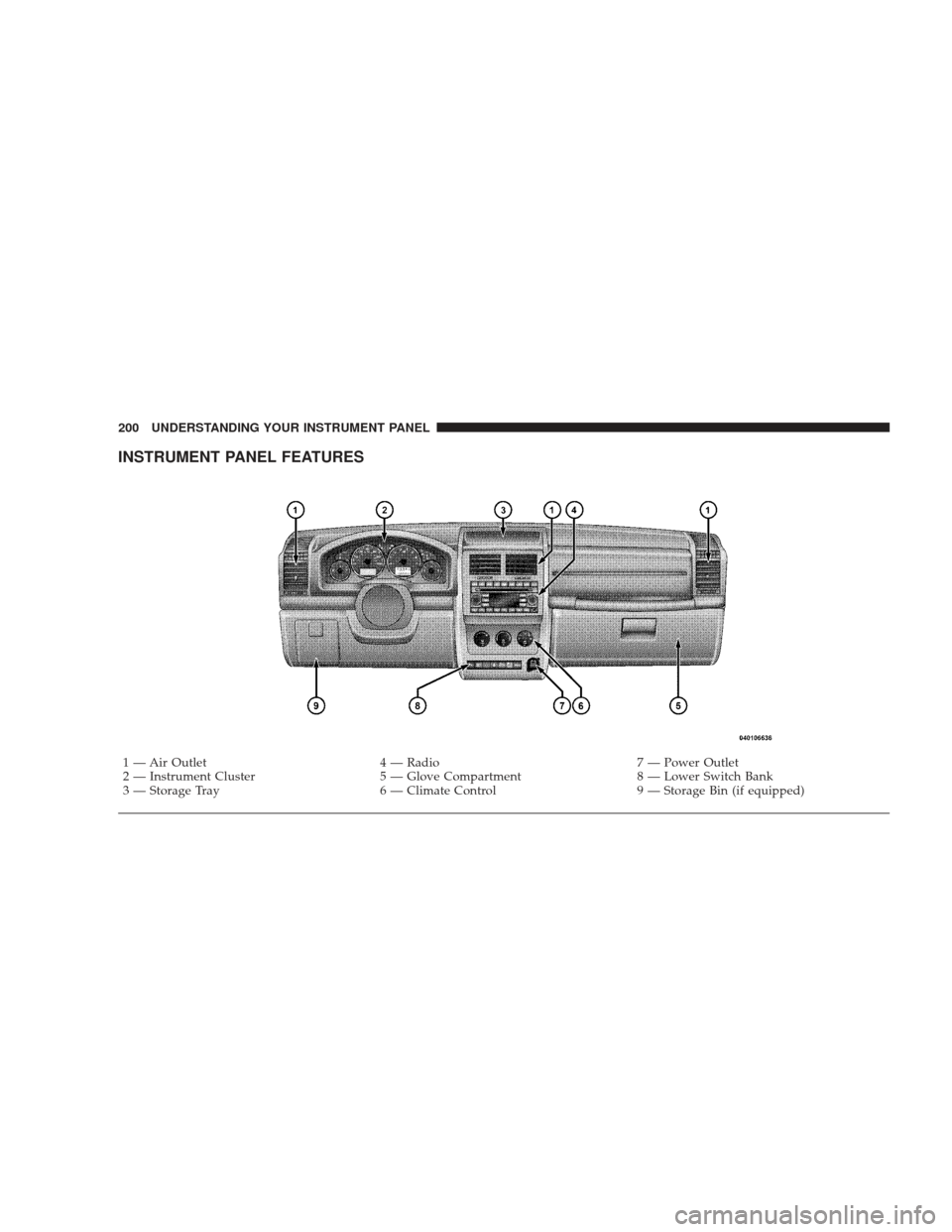
INSTRUMENT PANEL FEATURES
1 — Air Outlet4 — Radio7 — Power Outlet
2 — Instrument Cluster 5 — Glove Compartment8 — Lower Switch Bank
3 — Storage Tray 6 — Climate Control9 — Storage Bin (if equipped)
200 UNDERSTANDING YOUR INSTRUMENT PANEL
Page 226 of 506
Remote Key Unlock
WhenDriver Door 1st Press is selected, only the driver’s
door will unlock on the first press of the Remote Keyless
Entry (RKE) transmitter UNLOCK button. When Driver
Door 1st Press is selected, you must press the RKE
transmitter UNLOCK button twice to unlock the passen-
ger’s doors. When All Doors 1st Press is selected, all of
the doors will unlock on the first press of the RKE
transmitter UNLOCK button. To make your selection,
press and release the FUNCTION SELECT button until
“Driver Door 1st Press” or “All Doors 1st Press” appears.
Recall Memory with Remote Key Unlock — If
Equipped
When on is selected, you can use your RKE transmitter to
recall one of two pre-programmed memory profiles. Each
memory profile contains desired position settings for the
driver seat, side mirror, adjustable pedals (if equipped),
power tilt and telescopic steering column (if equipped),
and a set of desired radio station presets. When OFF is selected, only the memory switch on the driver’s door
panel will recall memory profiles. To make your selec-
tion, press and release the FUNCTION SELECT button
until “ON” or “OFF” appears. Refer to “Driver Memory
Seat” in Section 3 of this manual for more information.
Sound Horn with Remote Key Lock
When on is selected, a short horn sound will occur when
the RKE transmitter LOCK button is pressed. This feature
may be selected with or without the Flash Lights with
Remote Key Lock feature. To make your selection, press
and release the FUNCTION SELECT button until “On”
or “Off” appears.
Rain Sensing Intermittent Wipers — If Equipped
When on is selected, the system will automatically acti-
vate the windshield wipers if it senses moisture on the
windshield. To make your selection, press and release the
FUNCTION SELECT button until “On” or “Off” appears.
When Off is selected, the system reverts to the standard
intermittent wiper operation.
224 UNDERSTANDING YOUR INSTRUMENT PANEL
Page 228 of 506
Delay Turning Headlights Off
When this feature is selected, the driver can choose to
have the headlights remain on for 0, 30, 60, or 90 seconds
when exiting the vehicle. To make your selection, press
and release the FUNCTION SELECT button until “0,”
“30,” “60,” or “90” appears.
Turn Headlights On with Remote Key Unlock
When this feature is selected, the headlights will activate
and remain on for up to 90 seconds when the doors are
unlocked with the RKE transmitter. To make your selec-
tion, press and release the FUNCTION SELECT button
until “Off,” “30 sec.,” “60 sec.,” or “90 sec.” appears.
Delay Power Off to Accessories Until Exit
When this feature is selected, the power window
switches, radio, hands–free system (if equipped), DVD
video system (if equipped), power sunroof (if equipped),
and power outlets will remain active for up to 60 minutes
after the ignition switch is turned to the LOCK position.Opening a vehicle door will cancel this feature. To make
your selection, press and release the FUNCTION SE-
LECT button until “Off,” “45 sec.,” “5 min.,” or “10 min.”
appears.
Illumination Approach
When this feature is selected, the headlights will activate
and remain on for up to 90 seconds when the doors are
unlocked with the RKE transmitter. To make your selec-
tion, press and hold the RESET button until “Off,”
“30 sec,” “60 sec,” or “90 sec” appears.
Park Assist System — If Equipped
When on is selected, the system will scan for objects
behind the vehicle when the transmission is in the
REVERSE and the vehicle speed is less than 11 mph
(18 km/h). Refer to “Rear Park Assist System” in Sec-
tion 3 of this manual for system function and operating
information. To make your selection, press and release
the FUNCTION SELECT button until “On” or “Off”
appears.
226 UNDERSTANDING YOUR INSTRUMENT PANEL
Page 229 of 506
Hill Start Assist (HSA) — If Equipped
When on is selected, the HSA system is active. Refer to
“HSA (Hill Start Assist)” under “Electronic Brake Control
System” in Section 5 of this manual for system function
and operating information. To make your selection, press
and release the FUNCTION SELECT button until “On”
or “Off” appears.
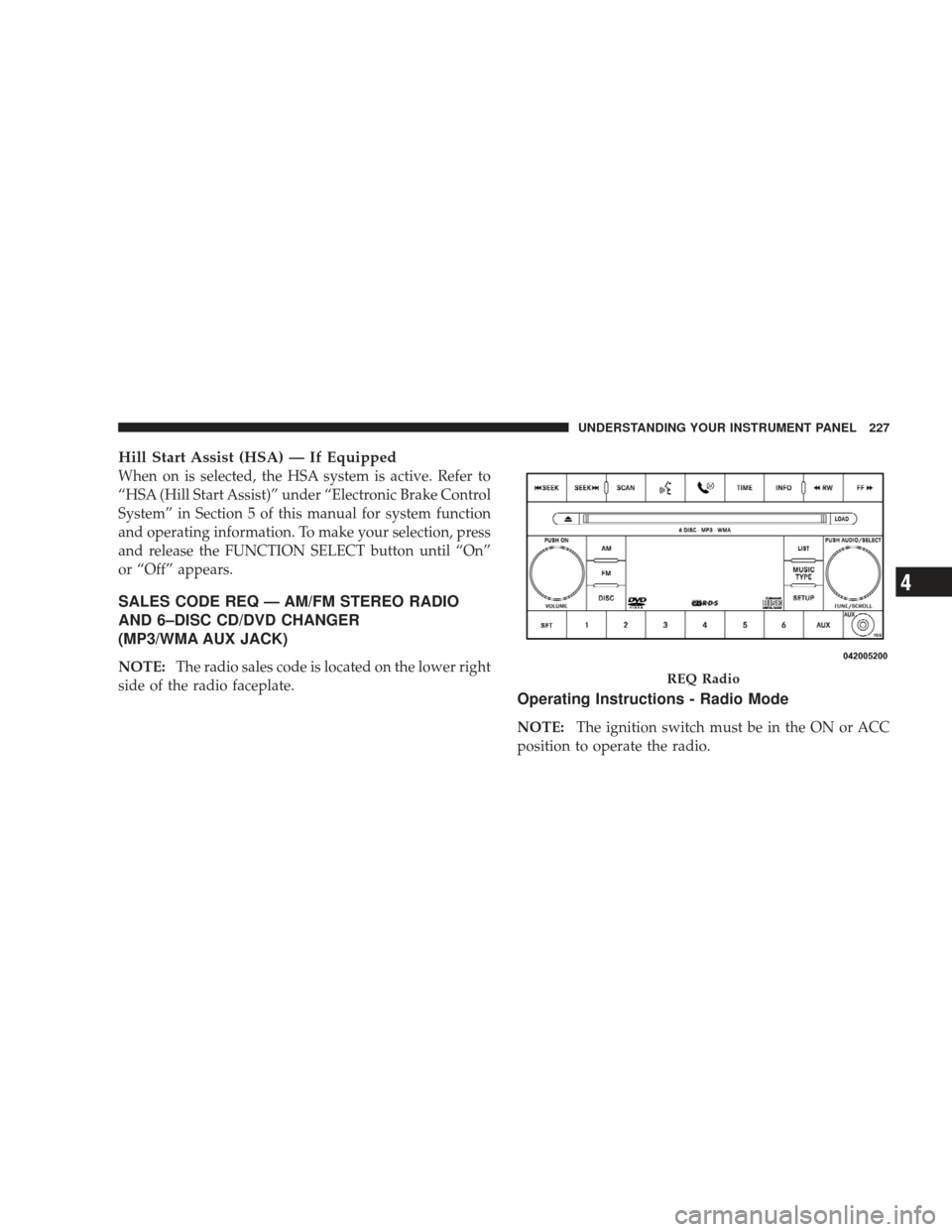
SALES CODE REQ — AM/FM STEREO RADIO
AND 6–DISC CD/DVD CHANGER
(MP3/WMA AUX JACK)
NOTE:The radio sales code is located on the lower right
side of the radio faceplate.
Operating Instructions - Radio Mode
NOTE: The ignition switch must be in the ON or ACC
position to operate the radio.
REQ Radio
UNDERSTANDING YOUR INSTRUMENT PANEL 227
4
Page 230 of 506
Power Switch/Volume Control (Rotary)
Push the ON/VOLUME control knob to turn on the
radio. Press the ON/VOLUME control knob a second
time to turn off the radio.
Electronic Volume Control
The electronic volume control turns continuously (360
degrees) in either direction without stopping. Turning the
ON/VOLUME control knob to the right increases the
volume and to the left decreases it.
When the audio system is turned ON, the sound will be
set at the same volume level as last played.
SEEK Buttons
Press and release the SEEK buttons to search for the next
listenable station in AM/FM mode. Press the right switch
to seek up and the left switch to seek down. The radio
will remain tuned to the new station until you make
another selection. Holding either button will bypass
stations without stopping until you release it.
SCAN Button
Pressing the SCAN button causes the tuner to search for
the next listenable station in AM, FM or Satellite (if
equipped) frequencies, pausing for five seconds at each
listenable station before continuing to the next. To stop
the search, press the SCAN button a second time.
Voice Recognition Button uconnect�phone — If
Equipped
Press this button to operate the uconnect� phone feature
(if equipped). Refer to “uconnect� phone” in Section 3.
If your vehicle is not equipped with or this feature is not
available on your vehicle, a “Not Equipped With
uconnect” message will display on the radio screen.
Phone Button uconnect� phone — If Equipped
Press this button to operate the uconnect� phone feature
(if equipped). Refer to “uconnect� phone” in Section 3.
228 UNDERSTANDING YOUR INSTRUMENT PANEL
Page 231 of 506
If your vehicle is not equipped with or this feature is not
available on your vehicle, a “Not Equipped With
uconnect” message will display on the radio screen.
TIME Button
Press the TIME button to alternate locations of the time
and frequency display.
Clock Setting Procedure
1. Press and hold the TIME button until the hours blink.
2. Adjust the hours by turning the right side TUNE/
SCROLL control knob.
3. After adjusting the hours, press the right side TUNE/
SCROLL control knob to set the minutes. The minutes
will begin to blink.
4. Adjust the minutes using the right side TUNE/
SCROLL control knob. Press the TUNE/SCROLL control
knob to save the time change.5. To exit, press any button/knob or wait five seconds.
The clock can also be set by pressing the SETUP button
and selecting the “SET HOME CLOCK” entry. Once in
this display follow the above procedure, starting at
step 2.
INFO Button
Press the INFO button for an RDS station (one with call
letters displayed). The radio will return a Radio Text
message broadcast from an FM station (FM mode only).
RW/FF
Pressing the RW (Rewind) or FF (Fast Forward) buttons
causes the tuner to search for the next frequency in the
direction of the arrows. This feature operates in AM, FM
or Satellite (if equipped) frequencies.
TUNE Control
Turn the rotary TUNE/SCROLL control knob clockwise
to increase or counterclockwise to decrease the frequency.
UNDERSTANDING YOUR INSTRUMENT PANEL 229
4
Page 232 of 506
Setting the Tone, Balance, and Fade
Push the rotary TUNE/SCROLL control knob and BASS
will display. Turn the TUNE/SCROLL control knob to
the right or left to increase or decrease the bass tones.
Push the rotary TUNE/SCROLL control knob a second
time and MID will display. Turn the TUNE/SCROLL
control knob to the right or left to increase or decrease the
mid-range tones.
Push the rotary TUNE/SCROLL control knob a third
time and TREBLE will display. Turn the TUNE/SCROLL
control knob to the right or left to increase or decrease the
treble tones.
Push the rotary TUNE/SCROLL control knob a fourth
time and BALANCE will display. Turn the TUNE/
SCROLL control knob to the right or left to adjust the
sound level from the right or left side speakers.Push the rotary TUNE/SCROLL control knob a fifth time
and FADE will display. Turn the TUNE/SCROLL control
knob to the left or right to adjust the sound level between
the front and rear speakers.
Push the rotary TUNE/SCROLL control knob again to
exit setting tone, balance, and fade.
MUSIC TYPE Button
Pressing this button once will turn on the Music Type
mode for five seconds. Pressing the MUSIC TYPE button
or turning the TUNE/SCROLL control knob within five
seconds will allow the program format type to be se-
lected. Many radio stations do not currently broadcast
Music Type information.
230 UNDERSTANDING YOUR INSTRUMENT PANEL