2009 JAGUAR XF manual radio set
[x] Cancel search: manual radio setPage 69 of 391

69
Steering wheel
AUDIO CONTROL
1.Rotate (up or down) to increase or
decrease volume.
2. Rotate (up or down) a nd release, to scroll
up or down through preset radio stations
or CD tracks.
Rotate and hold (for two seconds) to select
the next or previous radio station on the
waveband, or to select the next or previous
loaded CD (on multi-disc CD players).
3. Press repeatedly to scroll through the
audio source options, comprising: FM1,
FM2, AM, CD, DAB radi o, Auxiliary input,
Portable Audio Interface and TV options.
Press and hold (for two seconds) to select
Phonebook view (when a phone is
connected to the system).
4. Press to mute the audio unit.
Press to dial, answer or end a phone call.
VOICE CONTROL
JaguarVoice control pr ovides a safe and
convenient way of operating certain vehicle
systems, without the need to operate the
controls manually.
Voice commands are av ailable for the phone,
navigation and touch-scre en display systems,
and a notepad facility is provided, to allow
voice notes to be recorded. Help and tutorial
functions provide advi ce on operating the
system. Information on JaguarVoice operation
of the telephone and navigation systems is
detailed later in this handbook.
See TELEPHONE VOICE CONTROL (page 323).
See USING VOICE CONTROL (page 373).
The system is controlle d using the voice button
on the steering wheel (arrowed). Voice
commands are picked up by a dedicated
microphone and audible fee dback will be heard
through the audio system speakers.12
43E91129
E95902
Page 268 of 391
Audio introduction
268
RADIO RECEPTION
Some interference is to be expected from time
to time during a journey. Occasionally, it may
be necessary to retune the audio unit, to offset
the effects of moving from one transmitter area
to another.
While Radio Data System (RDS) automatic
retuning helps to reduce the effects of signal
changes, some manual retuning may still be
required (especially for lo cal stations) in areas
of weak reception.
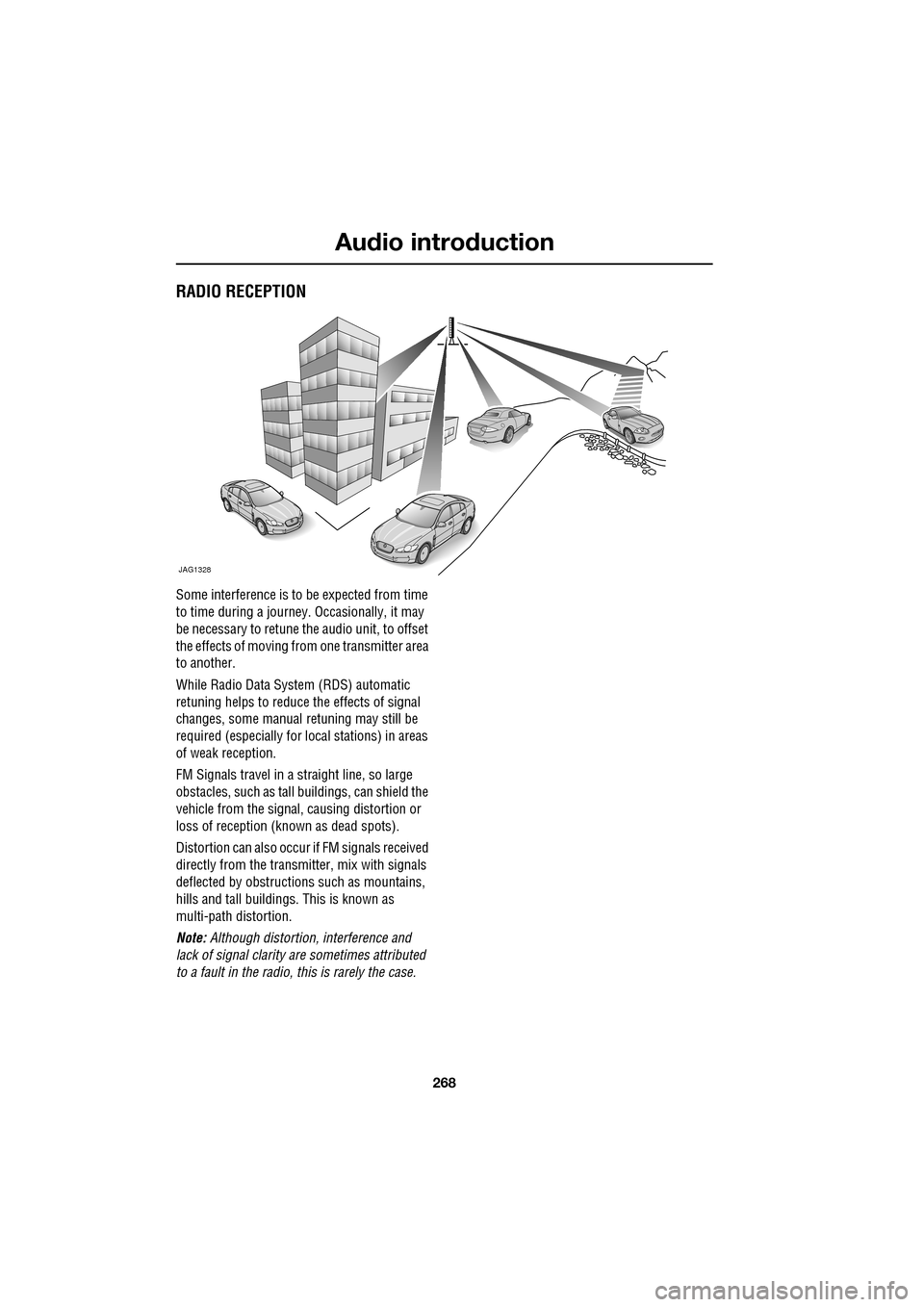
FM Signals travel in a straight line, so large
obstacles, such as tall buildings, can shield the
vehicle from the signal, causing distortion or
loss of reception (known as dead spots).
Distortion can also occur if FM signals received
directly from the transmitter, mix with signals
deflected by obstructions such as mountains,
hills and tall buildin gs. This is known as
multi-path distortion.
Note: Although distortion, interference and
lack of signal clarity are sometimes attributed
to a fault in the radio, this is rarely the case.
JAG1328
Page 274 of 391
Audio unit operation
274
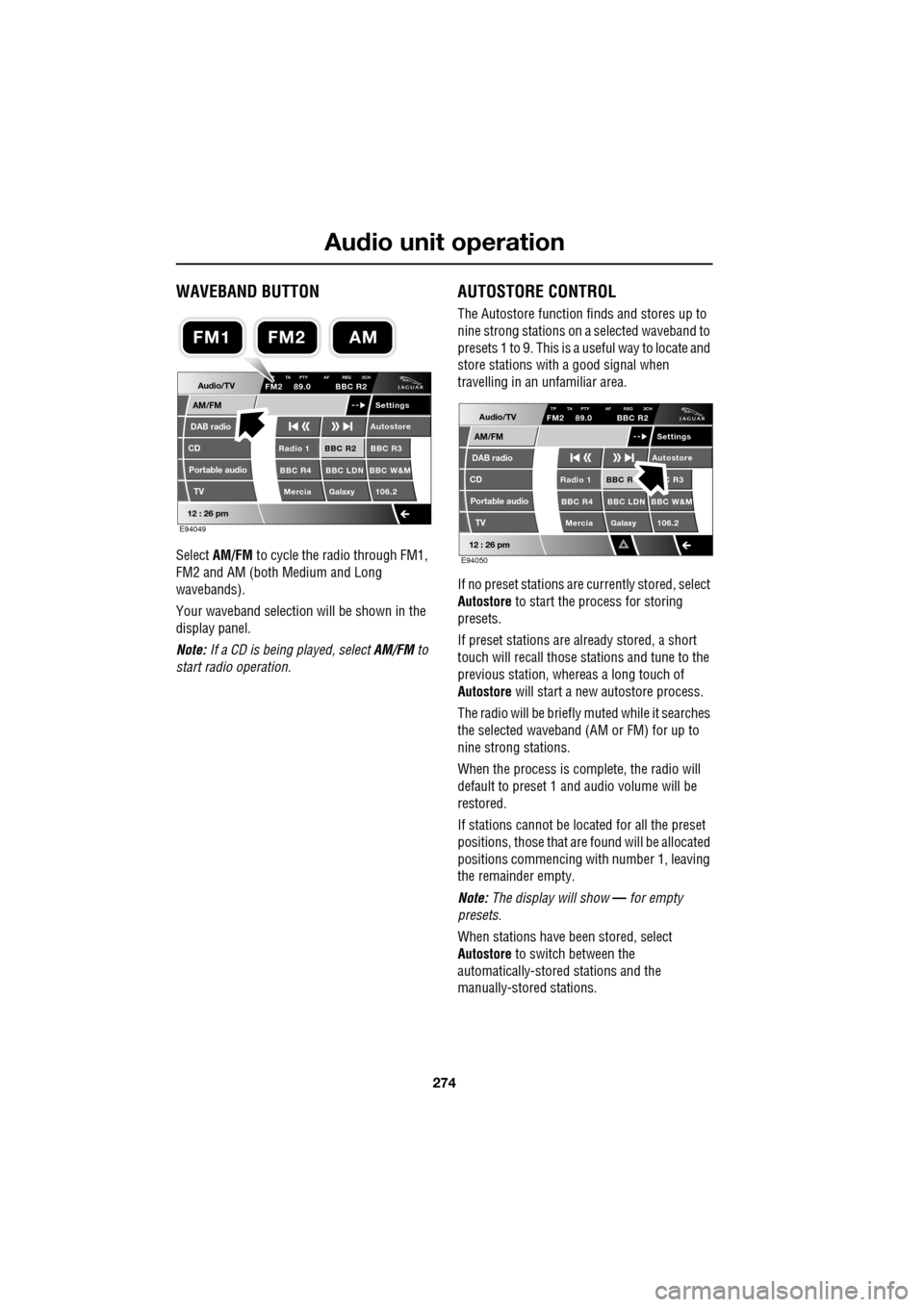
WAVEBAND BUTTON
Select AM/FM to cycle the radio through FM1,
FM2 and AM (both Medium and Long
wavebands).
Your waveband selection will be shown in the
display panel.
Note: If a CD is being played, select AM/FM to
start radio operation.
AUTOSTORE CONTROL
The Autostore function fi nds and stores up to
nine strong stations on a selected waveband to
presets 1 to 9. This is a useful way to locate and
store stations with a good signal when
travelling in an unfamiliar area.
If no preset stations are currently stored, select
Autostore to start the process for storing
presets.
If preset stations are already stored, a short
touch will recall those stations and tune to the
previous station, whereas a long touch of
Autostore will start a new autostore process.
The radio will be briefly muted while it searches
the selected waveband (AM or FM) for up to
nine strong stations.
When the process is co mplete, the radio will
default to preset 1 and audio volume will be
restored.
If stations cannot be located for all the preset
positions, those that are found will be allocated
positions commencing with number 1, leaving
the remainder empty.
Note: The display will show — for empty
presets.
When stations have been stored, select
Autostore to switch between the
automatically-stored stations and the
manually-stored stations.
Audio/TV
DAB radio
CD
AM/FM
12 : 26 pm
BBC R2 BBC R3
BBC R4 BBC LDN BBC W&M Mercia Galaxy 106.2Radio 1
Settings
Autostore
P TA PTY AF REG 3CHFM2 89.0 BBC R2
Portable audio TV
E94049
FM2AMFM1
Audio/TV
DAB radio
CD
AM/FM
12 : 26 pm
BBC R C R3
BBC R4 BBC LDN BBC W&M Mercia Galaxy 106.2Radio 1
Settings
Autostore
TP TA PTY AF REG 3CHFM2 89.0 BBC R2
Portable audio TV
E94050
Page 275 of 391
275
Audio unit operation
STATION PRESET BUTTONS
Tuning stations
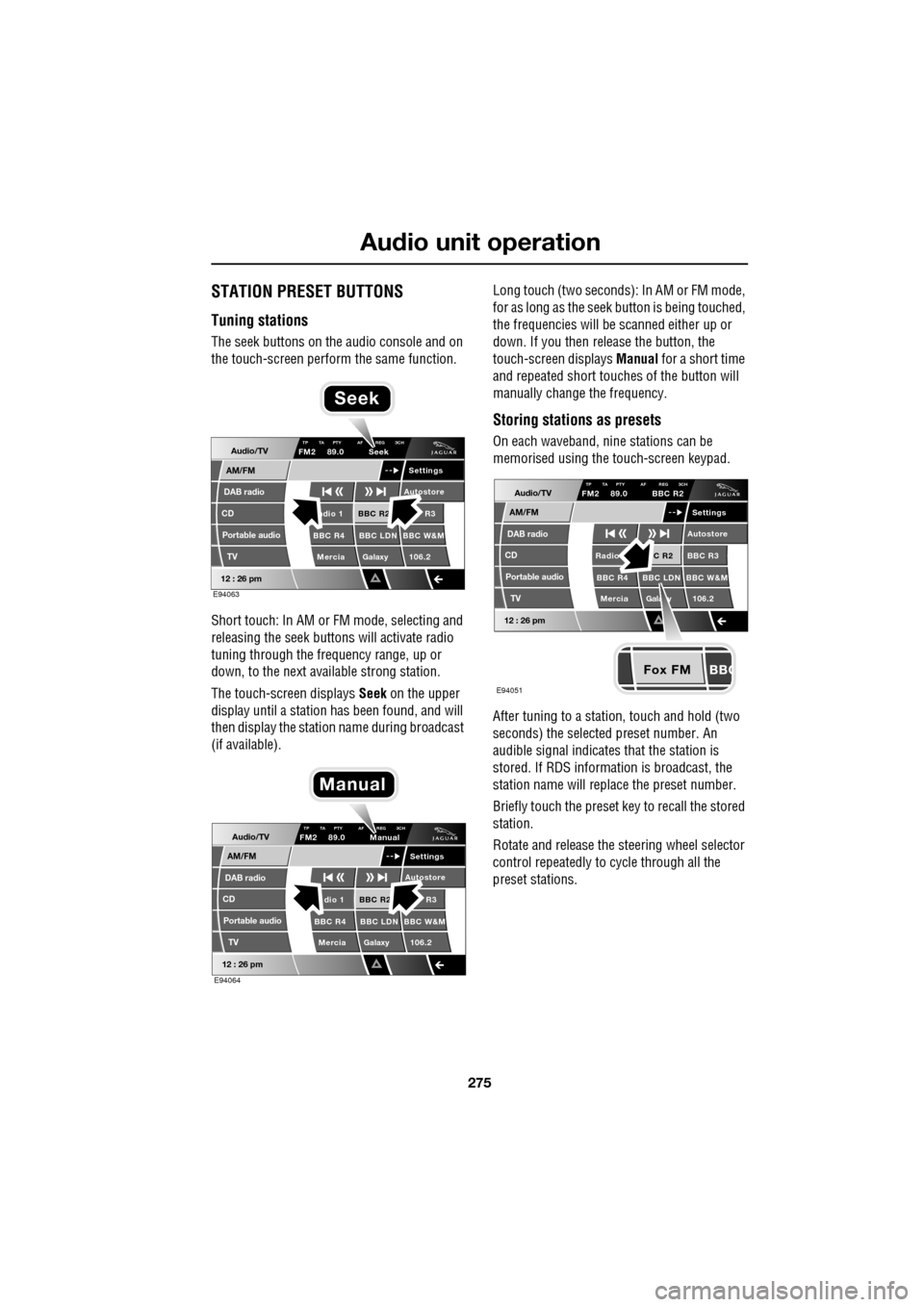
The seek buttons on the audio console and on
the touch-screen perform the same function.
Short touch: In AM or FM mode, selecting and
releasing the seek buttons will activate radio
tuning through the frequency range, up or
down, to the next available strong station.
The touch-screen displays Seek on the upper
display until a station has been found, and will
then display the station name during broadcast
(if available). Long touch (two seconds): In AM or FM mode,
for as long as the seek
button is being touched,
the frequencies will be scanned either up or
down. If you then release the button, the
touch-screen displays Manual for a short time
and repeated short touc hes of the button will
manually change the frequency.
Storing stations as presets
On each waveband, ni ne stations can be
memorised using the touch-screen keypad.
After tuning to a stati on, touch and hold (two
seconds) the selected preset number. An
audible signal indicates that the station is
stored. If RDS informat ion is broadcast, the
station name will replace the preset number.
Briefly touch the preset key to recall the stored
station.
Rotate and release the steering wheel selector
control repeatedly to cycle through all the
preset stations.Audio/TV
DAB radio
CD
AM/FM
12 : 26 pm
BBC R2 R3
BBC R4 BBC LDN BBC W&M Mercia Galaxy 106.2adio 1
Settings
Autostore
TP TA PTY AF REG 3CHFM2 89.0 Seek
Portable audio TV
E94063
Seek
Audio/TV
DAB radio
CD
AM/FM
12 : 26 pm
BBC R2 R3
BBC R4 BBC LDN BBC W&M Mercia Galaxy 106.2dio 1
Settings
Autostore
TP TA PTY AF REG 3CHFM2 89.0 Manual
Portable audio TV
E94064
Manual
Fox FM
Audio/TV
DAB radio
CD
AM/FM
12 : 26 pm
C R2 BBC R3
BBC R4 BBC LDN BBC W&M
Mercia Gala y 106.2Radio
Settings
Autostore
TP TA PTY AF REG 3CHFM2 89.0 BBC R2
Portable audio TV
E94051
Page 310 of 391

Telephone
310
6.When the vehicle's Bluetooth system is
discovered, your mob ile phone will list
Jaguar as a discovered Bluetooth device.
Select this device from the list.
7. You will now be requested to enter a
Bluetooth PIN. When pairing and docking
from your mobile phone, this number is
always 1313.
Once your phone is paired to the vehicle's
Bluetooth system, it can connect automatically.
If the phone does not automatically connect,
you will have to conne ct manually with the
Jaguar Bluetooth System, via the mobile
phone. Please consul t the mobile phone's
handbook for further information.
Note: Some mobile phones require you to
authorise the connection each time you start
the system. To change this, you must set
Jaguar as ‘authorised’ in the mobile phone’s
known device list. This will enable connections
from the vehicle to the mobile phone to take
place automatically without confirmation each
time. Please consul t the mobile phone’s
handbook for further information.
Pairing and docking using the
touch-screen
1. Switch on your mobile phone’s Bluetooth
connection, using the phone’s menu. Make
sure that your mobile phone is in Bluetooth
discoverable mode, sometimes referred to
as find me mode (s ee your phone’s
operating instructions for more
information).
2. Switch the ignition system on, ensure that
the touch-screen is active. 3.
From the home menu select Comms. If
your car is not fitted with JaguarVoice,
Phone will appear in the position occupied
by Comms .
4. Select Settings .
5. Select Search new . The system will search
for all Bluetooth phones that are in range.
If a phone is already docked, it will be
automatically undocked when a Search is
initiated.
Home
Audio/TV
Climate
Comms
Navigation
VehicleExternal
Left Right
20 17CC
15C
.5 .5
DAB radio DAB1
BBC 5Live Xtra
BBC National DAB
TA FM DAB i Subch. PL II
Valet12 : 26 pm
E96908
Digit Dial
Names
Last 10
Settings
7
1
4
*8
2
5
0 9
6
Options
C
E96912
Comms
Page 372 of 391

Navigation system
372
SURVEILLANCE SETTING
If you frequently travel through an area that is
subject to slow or stat ionary traffic, it is
possible to set a surveillance area which can be
viewed at any time.
Up to three areas can be set for this
surveillance.
RDS-TMC radio data for the selected
surveillance area must be available and TMC
must be enabled in order to show TMC events
in this area
From the Navigation Setup menu select
RDS-TMC .
Select Surveillance Setting . Select
Add.
Choose any of the met hods above to select a
surveillance area.
If you select Map you can position the area
accurately by zooming in using the binoculars
icon (arrowed).
JOL4661ENG
Quick POI
Navigation Setup
Selection
Calibration
Restore User
Settings
Defaults Quick POI
12 : 26 pm
RDS-TMC
Language
Selection
JOL4662ENG
RDS-TMC
Traffic on
Show TMC
Auto avoid
All Traffic
United Kingdom
Country
Station
Manual
Change
Auto
Surveillance
Events
Voice
Guidance
12 : 26 pm
Information Setting
traffic
Route
JOL4663ENG
Stored Locations
Surveillance Point 2
Surveillance Point 3
Surveillance Point 1 Delete
Add
Delete
12 : 26 pm
Add Surveillance Point?
POI
Postcode
Map
Coordinates
Address
HomeGBR
12 3 4 5
PreviousMemory
12 : 26 pm
Search
Motorway
Entry/Exit
Area
JOL4664ENG
A 3 4
Info
N
1/8 ml
TMC
12 : 26 pm
B4100 Banbury Rd
JOL4665ENG
Page 384 of 391

Index
384
Essential towing checks . . . . . . . . . . . . . 185
Event data recording . . . . . . . . . . . . . . . . . 11
Exterior mirrors . . . . . . . . . . . . . . . . . . . . . 95adjusting and folding . . . . . . . . . . . . . . 95
mirror dip when reversing. . . . . . . . . . . 96
F
Fascia - controls overview . . . . . . . . . . . . . 12
Fastening the seat belts . . . . . . . . . . . . . . . 51releasing the seat belts . . . . . . . . . . . . . 51
Ferry disarming the tilt alarm sensor . . . . . . . 22
Fire extinguisher . . . . . . . . . . . . . . . . . . . 250
First aid kit . . . . . . . . . . . . . . . . . . . . . . . . 250
Forward alert function . . . . . . . . . . . . . . . 164
Fuel
octane rating . . . . . . . . . . . . . . . . . . . . 175
petrol fuel guard . . . . . . . . . . . . . . . . . 180
refuelling . . . . . . . . . . . . . . . . . . . . . . . 179
Fuel cut-off . . . . . . . . . . . . . . . . . . . . . . . 177 resetting the fuel cut-off . . . . . . . . . . . 178
Fuel filler flap . . . . . . . . . . . . . . . . . . . . . . 178
Fuel guard . . . . . . . . . . . . . . . . . . . . . . . . 180
Fuel quality . . . . . . . . . . . . . . . . . . . . . . . 174 alternative fuels for pe trol engines . . . 175
diesel engined vehicles . . . . . . . . . . . . 176
petrol engined vehicles . . . . . . . . . . . . 174
unleaded fuel. . . . . . . . . . . . . . . . . . . . 175
Fuse box locations . . . . . . . . . . . . . . . . . . 242 engine compartment fuse box. . . . . . . 242
fuse and relay positions . . . . . . . . . . . 244
luggage compartment fuse box. . . . . . 243
passenger compartment fuse box . . . . 243
Fuse specification chart . . . . . . . . . . . . . . 245
G
Garage door transceiver . . . . . . . . . . . . . 128 before programming . . . . . . . . . . . . . . 128
entry gate programming . . . . . . . . . . . 130
information and assistance . . . . . . . . . 130
programming . . . . . . . . . . . . . . . . . . . 129
reprogramming a single garage door opener
button . . . . . . . . . . . . . . . . . . . . . . . 130
rolling code device equipment
programming . . . . . . . . . . . . . . . . . 130
to erase all programming . . . . . . . . . . 129 General information on
radio frequencies . . 16
Global opening and closing. . . . . . . . . . . . . 35 cancelling global opening/closing . . . . . 36
window global closing (not Japan). . . . . 36
window global opening . . . . . . . . . . . . . 35
Glove box . . . . . . . . . . . . . . . . . . . . . . . . . 125
H
Hazard warning flashers . . . . . . . . . . . 77, 250
Head restraints . . . . . . . . . . . . . . . . . . . . . . 44
head restraint removal . . . . . . . . . . . . . . 45
manual head restraints . . . . . . . . . . . . . . 45
tilt adjustment . . . . . . . . . . . . . . . . . . . . 44
whiplash protection . . . . . . . . . . . . . . . . 44
Headlamp adjustment . . . . . . . . . . . . . . . . . 78
Headlamp levelling . . . . . . . . . . . . . . . . . . . 79
halogen headlamps . . . . . . . . . . . . . . . . 79
xenon headlamps . . . . . . . . . . . . . . . . . . 79
Headlamp removal . . . . . . . . . . . . . . . . . . . 81
Headlamp washers . . . . . . . . . . . . . . . . . . . 90
Heated seats . . . . . . . . . . . . . . . . . . . . . . . . 47
Heated steering wheel. . . . . . . . . . . . . . . . . 68
Hints on driving with ABS . . . . . . . . . . . . . 144 ABS braking techniques . . . . . . . . . . . . 145
ABS warning indicator . . . . . . . . . . . . . 144
brake vacuum assist (V6 petrol models
only) . . . . . . . . . . . . . . . . . . . . . . . . 146
Electronic Brakeforce Distribution (EBD) . .
145
Emergency Brake Assist (EBA) . . . . . . . 146
Horn . . . . . . . . . . . . . . . . . . . . . . . . . . . . . . 68
I
Information displays general information . . . . . . . . . . . . . . . 105
Information messages . . . . . . . . . . . . . . . 106
Inspecting safety syst em components . . . 252
Instrument lighting dimmer . . . . . . . . . . . 123
Instrument panel overview . . . . . . . . . . . . . 99 instrument panel . . . . . . . . . . . . . . . . . . 99
Interior lamps . . . . . . . . . . . . . . . . . . . . . . . 80
rear interior lighting . . . . . . . . . . . . . . . . 80
Interior mirror . . . . . . . . . . . . . . . . . . . . . . . 94 auto dimming . . . . . . . . . . . . . . . . . . . . . 94
manual dimming . . . . . . . . . . . . . . . . . . 94
Isofix child restraints . . . . . . . . . . . . . . . . . 62