2009 JAGUAR XF Message centre
[x] Cancel search: Message centrePage 327 of 391
327
Telephone
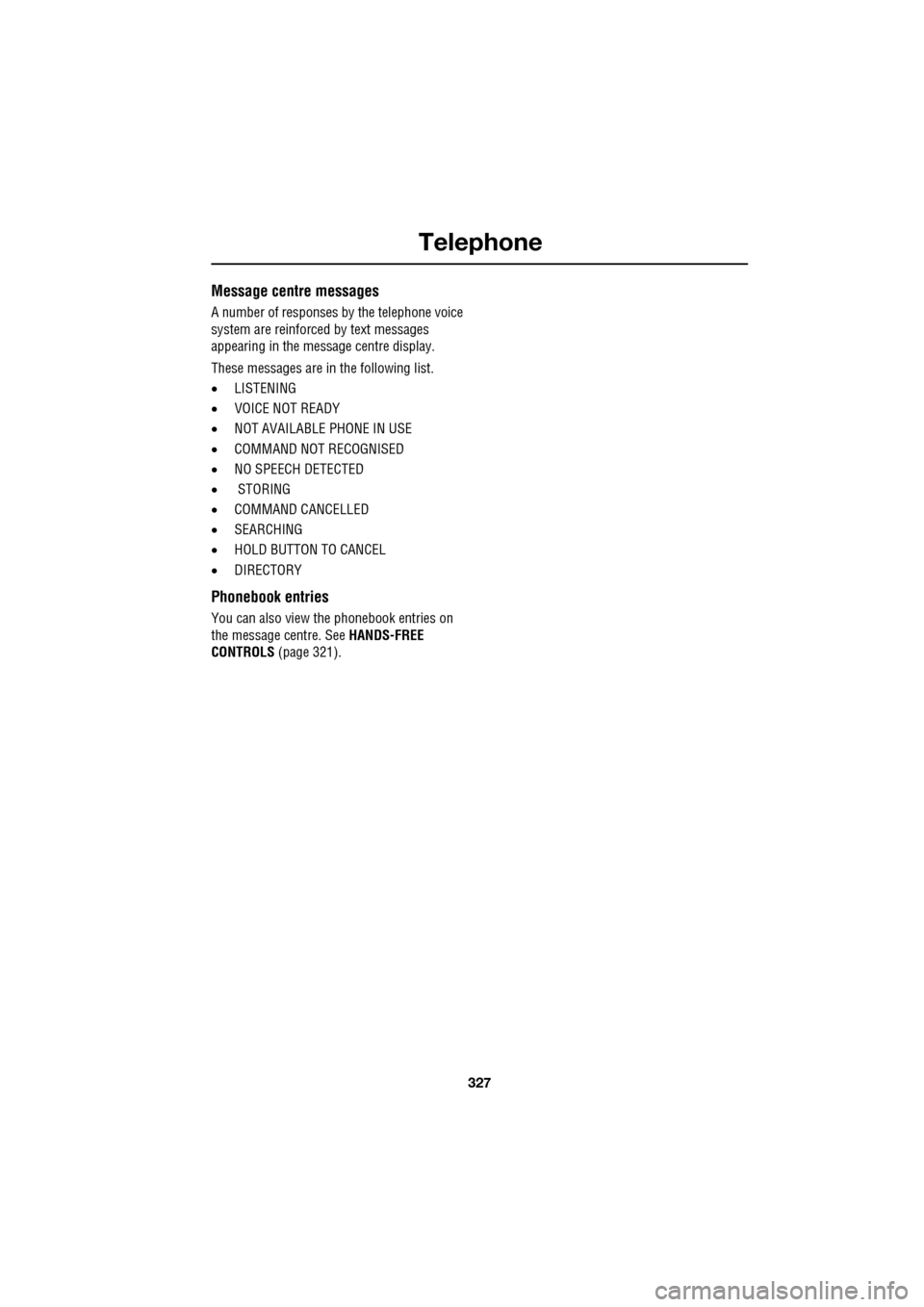
Message centre messages
A number of responses by the telephone voice
system are reinforced by text messages
appearing in the mess age centre display.
These messages are in the following list.
• LISTENING
• VOICE NOT READY
• NOT AVAILABLE PHONE IN USE
• COMMAND NOT RECOGNISED
• NO SPEECH DETECTED
• STORING
• COMMAND CANCELLED
• SEARCHING
• HOLD BUTTON TO CANCEL
• DIRECTORY
Phonebook entries
You can also view the phonebook entries on
the message centre. See HANDS-FREE
CONTROLS (page 321).
Page 339 of 391

339
Navigation system
Saving user preferences to memory
Use the scroll arrows (1) to see the options.
Most of these selections are either on or off,
light blue band is not selected, dark blue band
is selected.
Touch the line of your choice then OK (2).
TURN-BY-TURN NAVIGATION
(Message centre guidance)
Turn-by-turn navigation guidance (displayed in
the message centre) can be turned on or off as
follows:
From the main navi gation menu, select
Navigation Setup , then select User Settings .
Scroll through the user settings list until the
Message centre guidance band is displayed.
Touch the band to select/d eselect the feature.
If the band is dark blue, then Message centre
guidance is acti ve. If the band is light blue,
Message centre guidance is turned off.
LANGUAGE SELECTION
From the initial navigation screen, select
Language and select your language.
If necessary, use the scroll arrows to the left of
the list to search up or down.
N
LUTON
Menu
Navigation Setup
Low Fuel Warning
User Settings
Display Petrol Station
Text Size on the MAP
y traffic restriction
Auto voice guidance
Medium
OK
Default
Selection
Calibration
Restore
User
Settings
Defaults Quick POI
12 : 26 pm 12 : 26 pm
12 : 26 pm
21
Stored
Destination
Auto Voice
Entry
Guidance Off
Locations
Navigation SetupRoute Options
RDS-TMC
Language
Selection
JOL4507ENG
German
French
Italian
English
Caution
Language Agree
English
Language
US English
12 : 26 pm
12 : 26 pm
JOL4501ENG
Distraction may cause accidents.
Never enter data whilst driving.
Always concentrate on driving
and obey traffic regulations.
See Owners Handbook.
Page 365 of 391

365
Navigation system
CANCELLING POI ICON DISPLAY
If the display of POI icons is no longer required,
they can be turned off as follows:
•Touch the map screen to display the
additional buttons.
• Touch POI Off to cancel the display of POI
icons on the map.
JAGUAR DEALERSHIP LOCATIONS
Details of Jaguar Dealerships are held on the
Navigation System DVD as a points of interest
(POI) category. Certain Dealers may be located
in areas that are not fully mapped on the DVD.
If a route is set to one of these Dealers,
guidance may only be pos sible to the nearest
town centre; a warni ng message will be
displayed.
If Jaguar Dealerships (or certain other
categories, such as airports) are selected, they
will be displayed across all search areas.
ENTRY BY TOWN
If a town name is entered first, the points of
interest listed will be restricted to that town.
• From the Input POI Name screen, touch
Town .
• Enter the town name required.
• Touch List to display the list of possible
towns.
• Select the town required.
The Input POI screen is displayed again.
• Enter the POI name required.
ENTRY BY CATEGORY
If a POI category is selected first, the points of
interest listed will be restricted to that category.
Others continued
MuseumTheatre
Town Centre
University/College
Restaurant
All RestaurantsChinese
Fast Food FrenchItalian
Japanese
Other Restaurants
Page 366 of 391

Navigation system
366
OTHER SELECTION METHODS
Town centres
The POI database holds town centre locations.
To select a town centre, proceed as follows:
•From the Input POI Na me screen, enter the
town name required in the Name text area
(do not select the Town button).
• Touch List to display the list of matches.
• For the town centre, select the entry
showing the town name only.
Note: In some cases, more than one town
centre location may be listed.
CATEGORIES AND SUB-CATEGORIES
The POI database is divided into a number of
categories. Each main category is further
divided into a number of sub-categories.
The first entry in the list of Restaurant
sub-categories, is ALL. This selects all of the
Restaurant sub-categories.
To narrow the search, touch the Town button.
This will display the alpha keyboard, to allow
the desired town na me to be entered.
Search area
When searching the database, only points of
interest in the current search area are included,
except for the sub-categories marked All
search areas in the POI category list.
List button
The List button becomes active, when the
characters entered reduce the possible entries
to a small enough number (the list is displayed
automatically when the number of entries
reduces to four or less).
You can also select List (when active) without
entering a POI name. All the relevant points of
interest will be displayed, e.g. in a selected
town or category.
All button
The All button returns to searching all
categories after sele cting one category.
POI ENTRY MESSAGES
While searching for point s of interest, you may
encounter one of the following messages:
1. There are no POIs in this Category.
2. No POIs Found in this Town.
QUICK POI SELECTION
A total of five POIs can be stored.
Quick POI Selection
DefaultOK
AllPark Petrol
Golf ShopHotel
Car
Q-POI Selection
Community
Hotel
Leisure
Others
12 : 26 pm
12 : 26 pm
More
FORD
FORD T
LUTON
M 4 0
12 : 26 pm
4
N
Set
Destination
Menu
POI
mi
JOL4508ENG
Page 373 of 391

373
Navigation system
Choose to save as any one of the three choices.
The map will display the saved area.
USING VOICE CONTROL
JaguarVoice allows many of the navigation
features to be activa ted by voice commands.
The system is controlled by the switch on the
left-hand side of th e steering wheel.
Briefly press the switch on the steering wheel
(arrowed) and after the tone, speak one of the
system commands.
In response to your command, the system will
repeat your instruction and Listening will
appear in the message centre. The system will
either carry out your command or ask for more
information. If the system asks for more
information, wait until the tone has sounded
before replying. To cancel a voice control session, press and
hold the switch on the steering wheel.
The voice control system understands
pre-defined commands, which need to be
spoken word for word. A list of all navigation
voice commands is given
in the following table.
Nametags
Information on nametags is given earlier in this
handbook. See VOICE CONTROL (page 69).
Message centre messages
A number of responses by the navigation voice
system are reinforced by text messages
appearing in the message centre display.
Info
N
1/8 ml
M69,A5A5
mi
TMC
Surveillance Point2
Surveillance Point3 Surveillance
Cancel
Surveillance Point1
12 : 26 pmJOL4666ENG
A 3 4
mi
NTMC
B4100 Banbury Road
Surveillance Point 1
1/4 ml
12 : 26 pmJOL4667ENGE95902
Page 377 of 391
377
Navigation system
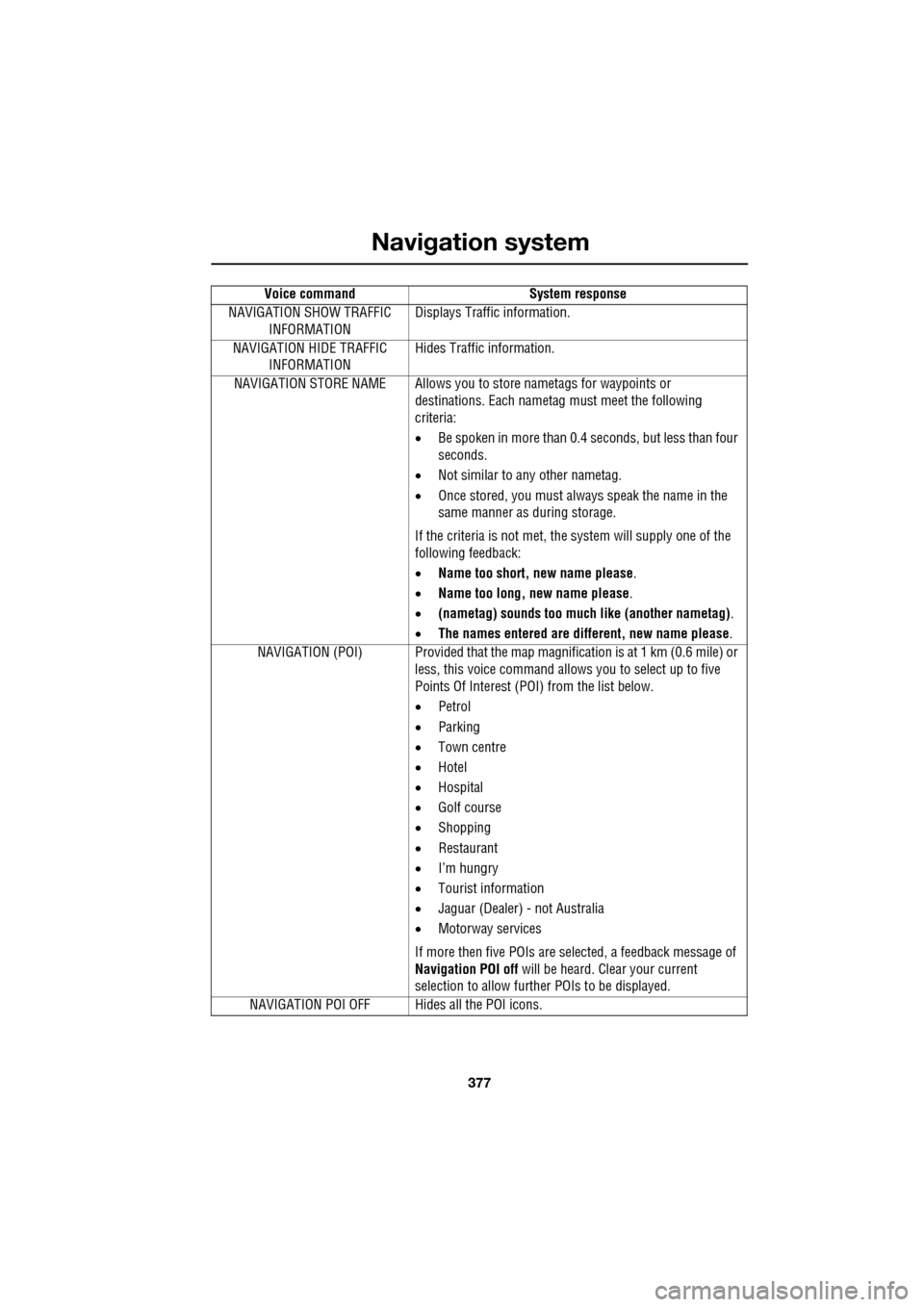
NAVIGATION SHOW TRAFFIC INFORMATION Displays Traffic information.
NAVIGATION HIDE TRAFFIC INFORMATION Hides Traffic information.
NAVIGATION STORE NAME Allows you to store nametags for waypoints or
destinations. Each nametag must meet the following
criteria:
• Be spoken in more than 0.4 seconds, but less than four
seconds.
• Not similar to any other nametag.
• Once stored, you must always speak the name in the
same manner as during storage.
If the criteria is not met, the system will supply one of the
following feedback:
• Name too short, new name please .
• Name too long, new name please .
• (nametag) sounds too much like (another nametag) .
• The names entered are different, new name please.
NAVIGATION (POI) Provided that the map ma gnification is at 1 km (0.6 mile) or
less, this voice command allows you to select up to five
Points Of Interest (POI) from the list below.
• Petrol
• Parking
• Town centre
• Hotel
• Hospital
• Golf course
• Shopping
• Restaurant
• I’m hungry
• Tourist information
• Jaguar (Dealer) - not Australia
• Motorway services
If more then five POIs are selected, a feedback message of
Navigation POI off will be heard. Clear your current
selection to allow furthe r POIs to be displayed.
NAVIGATION POI OFF Hid es all the POI icons.
Voice command
System response
Page 381 of 391

Index
381
A
ABS driving hints . . . . . . . . . . . . . . . . . . 144
ACC . . . . . . . . . . . . . . . . . . . . . . . . . . . . . 159
Accessories . . . . . . . . . . . . . . . . . . . . . . . . 14
Adaptive cruise control . . . . . . . . . . . . . . 159
Adaptive cruise control (ACC)principle of operation . . . . . . . . . . . . . 159
Adaptive dynamics . . . . . . . . . . . . . . . . . 172
Adjusting the headlamps . . . . . . . . . . . . . . 78
Adjusting the steering wheel . . . . . . . . . . . 67 entry and exit mode . . . . . . . . . . . . . . . 67
Advanced emergency brake assist . . . . . 165
AFS . . . . . . . . . . . . . . . . . . . . . . . . . . . . . . 79
Air vents . . . . . . . . . . . . . . . . . . . . . . . . . 115 rear vents . . . . . . . . . . . . . . . . . . . . . . 115
Airbag labels . . . . . . . . . . . . . . . . . . . . . . . 58
Airbag service information . . . . . . . . . . . . 58
Airbag warning lamp . . . . . . . . . . . . . . . . . 57
Alarm trigger information . . . . . . . . . . . . . . . . 39
Alarm sensor override . . . . . . . . . . . . . . . . 22
Approach lamps . . . . . . . . . . . . . . . . . . . . 81
Arming . . . . . . . . . . . . . . . . . . . . . . . . . . . 19
Arming the alarm . . . . . . . . . . . . . . . . . . . 37
alarm indicator . . . . . . . . . . . . . . . . . . . 38
battery-backed sounder . . . . . . . . . . . . 38
full alarm. . . . . . . . . . . . . . . . . . . . . . . . 37
perimeter alarm . . . . . . . . . . . . . . . . . . 37
ASL . . . . . . . . . . . . . . . . . . . . . . . . . . . . . 167
Audible warnings and indicators . . . . . . . 104
Audio portable interface . . . . . . . . . . . . . . . . 131
Audio control. . . . . . . . . . . . . . . . . . . 69, 272
sound settings . . . . . . . . . . . . . . . . . . 272
Audio controls . . . . . . . . . . . . . . . . . . . . . 282 steering wheel controls. . . . . . . . . . . . 282
Audio unit overview. . . . . . . . . . . . . . . . . 269 audio controls . . . . . . . . . . . . . . . . . . . 269
sound system overview . . . . . . . . . . . 270
Autolamps . . . . . . . . . . . . . . . . . . . . . . . . . 76 exit delay. . . . . . . . . . . . . . . . . . . . . . . . 77
windscreen wiper detection . . . . . . . . . 76
Automatic climate control . . . . . . . . . . . . 116 controls . . . . . . . . . . . . . . . . . . . . . . . 116
touch-screen operation . . . . . . . . . . . . 119 Automatic speed limiter . . . . . . . . . . . . . . 167
Automatic speed limiter (ASL)
principle of operation . . . . . . . . . . . . . . 167
Automatic transmission . . . . . . . . . . . . . . 137
automatic mode . . . . . . . . . . . . . . . . . . 139
JaguarDrive selector . . . . . . . . . . . . . . 137
limp-home mode . . . . . . . . . . . . . . . . . 143
manual mode . . . . . . . . . . . . . . . . . . . . 141
message centre display . . . . . . . . . . . . 143
sport mode . . . . . . . . . . . . . . . . . . . . . 140
starting. . . . . . . . . . . . . . . . . . . . . . . . . 139
Autostore control . . . . . . . . . . . . . . . . . . . 274
Auxiliary connections . . . . . . . . . . . . . . . . 299 connecting a USB device . . . . . . . . . . . 300
connecting an auxiliary device . . . . . . . 301
connecting an iPod . . . . . . . . . . . . . . . 300
connecting more than one device . . . . 301
portable audio overview . . . . . . . . . . . . 299
Auxiliary input devices . . . . . . . . . . . . . . . 302 displaying track information. . . . . . . . . 303
playing a portable device . . . . . . . . . . . 302
portable device settings . . . . . . . . . . . . 306
searching a portable device . . . . . . . . . 304
Auxiliary power sockets . . . . . . . . . . . . . . 125
B
Battery charging faults . . . . . . . . . . . . . . . . . . . 213
Battery care . . . . . . . . . . . . . . . . . . . . . . . 212 Battery Monitoring System (BMS) . . . . 213
Battery charging . . . . . . . . . . . . . . . . . . . . 215
Battery warning symbols . . . . . . . . . . . . . 212
Blind spot monitor . . . . . . . . . . . . . . . . . . . 97 sensor blockage . . . . . . . . . . . . . . . . . . . 98
system fault . . . . . . . . . . . . . . . . . . . . . . 98
Block heaters . . . . . . . . . . . . . . . . . . . . . . 134
Bonnet lock . . . . . . . . . . . . . . . . . . . . . . . 195
Booster cables . . . . . . . . . . . . . . . . . . . . . 214
Booster cushions . . . . . . . . . . . . . . . . . . . . 61
Brake fluid check . . . . . . . . . . . . . . . . . . . 206
checking the fluid level. . . . . . . . . . . . . 206
topping up the fluid . . . . . . . . . . . . . . . 207
Brakes
brake pads . . . . . . . . . . . . . . . . . . . . . . 144
pad wear warning. . . . . . . . . . . . . . . . . 144
principle of operation . . . . . . . . . . . . . . 144
Page 389 of 391

Index
389
Tyre care . . . . . . . . . . . . . . . . . . . . . . . . . 217age degradation . . . . . . . . . . . . . . . . . 221
directional tyres . . . . . . . . . . . . . . . . . 222
flat spots . . . . . . . . . . . . . . . . . . . . . . . 220
pressure compensation for ambient temperature changes . . . . . . . . . . . 219
punctured tyres. . . . . . . . . . . . . . . . . . 221
replacement tyres . . . . . . . . . . . . . . . . 222
tyre checks . . . . . . . . . . . . . . . . . . . . . 221
tyre pressures . . . . . . . . . . . . . . . . . . . 217
tyre pressures during long term vehicle storage . . . . . . . . . . . . . . . . . . . . . . 220
tyre wear . . . . . . . . . . . . . . . . . . . . . . . 220
Tyre glossary. . . . . . . . . . . . . . . . . . . . . . 238
Tyre pressure monitoring system . . . . . . 234
replacement sensor . . . . . . . . . . . . . . 236
temporary use spare wheel . . . . . . . . . 236
TPM System information messages . . 237
TPM system operation . . . . . . . . . . . . 235
tyre changing . . . . . . . . . . . . . . . . . . . 236
Tyre repair kit . . . . . . . . . . . . . . . . . . . . . 229
checking the tyre pressure after a repair. . . 233
Jaguar tyre repair kit . . . . . . . . . . . . . . 231
Jaguar tyre repair kit safety information . . . 230
using the Jaguar tyre repair kit . . . . . . 232
U
Undocking the Jaguar Smart Key . . . . . . . 21
Unlocking . . . . . . . . . . . . . . . . . . . . . . . . . 18
Using ACC . . . . . . . . . . . . . . . . . . . . . . . . 159 ACC malfunction . . . . . . . . . . . . . . . . . 163
automatic low speed switch off . . . . . 162
automatic switch off . . . . . . . . . . . . . . 162
changing the follow mode set gap . . . 161
changing the speed. . . . . . . . . . . . . . . 160
detection beam issues . . . . . . . . . . . . 163
entering the follow mode set gap . . . . 160
hints on driving with ACC . . . . . . . . . . 162
overriding the speed and follow mode 161
resuming the speed and follow mode . 162
setting the speed . . . . . . . . . . . . . . . . 160
Using booster cables. . . . . . . . . . . . . . . . 214 disconnecting the cables . . . . . . . . . . 214 Using cruise control . . . . . . . . . . . . . . . . . 156
automatic switch off. . . . . . . . . . . . . . . 157
changing the speed . . . . . . . . . . . . . . . 157
message centre information displays. . 158
resuming the speed . . . . . . . . . . . . . . . 157
setting vehicle speed . . . . . . . . . . . . . . 156
Using seat belts during pr egnancy . . . . . . . 51
Using snow chains . . . . . . . . . . . . . . . . . . 223
Using the ASL. . . . . . . . . . . . . . . . . . . . . . 167
ASL unavailable . . . . . . . . . . . . . . . . . . 168
exceeding the set speed . . . . . . . . . . . . 168
resuming ASL . . . . . . . . . . . . . . . . . . . 168
setting a speed limit . . . . . . . . . . . . . . . 167
suspending ASL . . . . . . . . . . . . . . . . . . 168
Using the parking aid . . . . . . . . . . . . . . . . 148
cleaning the sensors . . . . . . . . . . . . . . 151
front and rear parking aid. . . . . . . . . . . 150
rear fitted accessories . . . . . . . . . . . . . 151
rear parking aid . . . . . . . . . . . . . . . . . . 149
system fault . . . . . . . . . . . . . . . . . . . . . 151
touch-screen . . . . . . . . . . . . . . . . . . . . 148
Using the remote control . . . . . . . . . . . . . . 17 approach lighting . . . . . . . . . . . . . . . . . . 17
care of the Jaguar Smart Key . . . . . . . . . 18
docking the Jaguar Smart Key . . . . . . . . 20
emergency key blade . . . . . . . . . . . . . . . 25
irregular operation . . . . . . . . . . . . . . . . . 18
Jaguar Smart Key. . . . . . . . . . . . . . . . . . 17
Jaguar Smart Key system transmitters . 32
locking and arming the vehicle. . . . . . . . 19
luggage compartment . . . . . . . . . . . . . . 17
panic button . . . . . . . . . . . . . . . . . . . . . . 17
undocking the Jaguar Smart Key . . . . . . 21
unlocking and disarming the vehicle . . . 18