2009 JAGUAR XF Message centre
[x] Cancel search: Message centrePage 206 of 391

Maintenance
206
BRAKE FLUID CHECK
If the quantity of fluid in the brake
reservoir drops below the
recommended level, a red warning
indicator in the instrume nt pack will illuminate
and the message BRAKE FLUID LOW will be
displayed in the message centre.
Note: If the warning indicator illuminates or the
message is displayed, while the vehicle is being
driven, stop the vehicle as soon as safety
permits by gently applying the brakes. Check
and top-up the fluid level if necessary.
Checking the fluid level
With the vehicle on level ground, check the
fluid level at least every week (more frequently
in high mileage or arduous operating
conditions).
The brake fluid reservoi r is located beneath a
cover on the raised platform to the rear of the
main underbonnet area. See ENGINE
COMPARTMENT OVERVIEW (page 196).
1. Release the catch.
2. Lift the cover forwards, then pull
rearwards, to release the hinges.
3. Clean the filler cap with a clean, dry cloth
before removing, to prevent dirt or
moisture from entering the reservoir.
WARNING
Seek qualified assistance immediately
if brake pedal travel is unusually long,
unusually short or if there is any
significant loss of br ake fluid. Driving under
such conditions could result in extended
stopping distances or co mplete brake failure.
WARNINGS
Brake fluid is highly toxic - keep
containers sealed a nd out of reach of
children. If accidental consumption is
suspected, seek medical attention
immediately.
If the fluid comes into contact with
the skin or eyes, rinse immediately
with plenty of water.
Brake fluid is highl y inflammable. Do
not allow brake fluid to come into
contact with naked flames or other
sources of ignition (e.g. a hot engine) - a fire
may result.
Do not drive the vehicle with the fluid
level below the MIN mark.
E95164
1
2
Page 213 of 391

213
Vehicle battery
Your vehicle is fitted with a low maintenance
battery, which is located under the floor of the
luggage compartment.
In hot climates more frequent checks of the
battery electrolyte level and condition are
required. If necessary, the battery cells can be
topped up using di stilled water.
When the ignition is switched on, but without
the engine running, BATTERY NOT CHARGING
is displayed in the mess age centre. The battery
will only charge when the engine is running.
Note: Do not connect any 12 volt equipment
(e.g. a 12 volt inspection lamp), directly to the
battery terminals. Use the accessory socket
located in the cubby box, for connecting Jaguar
approved accessories.
Battery Monitoring System (BMS)
Your vehicle is equipped with a Battery
Monitoring System (BMS) which manages the
battery charging system and, if excessive
battery discharge is o ccurring when the engine
isn't running, shuts down non-essential
electrical systems to protect battery power.
In the event that too many electrical systems
are operational when the engine is not running,
and the battery charge is insufficient, the audio
and entertainment systems (if active) and
climate control system will be switched off.
This will be confirmed by a low battery warning
message displayed on the touch-screen. If this
occurs, switch on and run the engine for at
least five minutes, preferably with all auxiliary
electrical systems switched off (e.g. lights,
wipers, climate control, seat heaters etc.).
Note: The audio system can be operated
during this five minute period when the engine
is running.
If the engine is switched off before the five
minute period ends and the audio system is
switched on, the warning message will
re-appear on the touch-sc reen and the audio,
entertainment and climate control systems will
switch off again. For this reason, it is important
that the engine is left running for the full five
minute period.
Charging faults
If there is a fault in the battery charging system,
CHARGING FAULT is displayed with red
backlighting in the mess age centre. If this
occurs, switch off all non-essential electrical
systems and seek qualified assistance at the
earliest opportunity.
CAUTION
Do not allow battery electrolyte to come
into contact with fabrics or painted
surfaces. If battery electrolyte comes into
contact with any surfac e, the surface should
be washed down immedi ately with copious
amounts of clean water. Battery electrolyte is
both corrosive and toxic, and can damage a
wide range of materials if left.
Page 234 of 391

Wheels and tyres
234
7.Switch the compressor to on ( I) and inflate
the tyre to the correct pressure.
8. To check the tyre pressure, turn off the
compressor then read the pressure from
the gauge.
9. When the compressor is off, if the tyre
pressure is too high, release the required
amount of pressure using the pressure
relief valve.
10. Once the tyre is inflated to the correct
pressure, switch off the compressor and
remove the power plug from the auxiliary
socket.
•The use of the tyre re pair kit sealant may
lead to error prompts and incorrect
readings of the Tyre Pressure
Monitoring System. Therefore, use the
tyre repair kit pressure gauge to check
and adjust the damaged tyre's inflation
pressure.
11. Unscrew the inflation hose connector from
the tyre valve, replace the tyre valve cap
and the inflation hose connector protective
cap.
12. Ensure that the tyre repair kit is placed
securely in the vehicle.
13. Drive to the nearest tyre repair centre or
Dealer/Authorised Repairer, for a
replacement tyre to be fitted. Ensure that
you make the repair centre aware that the
tyre repair kit has been used before the tyre
is removed.
14. Both the tyre inflation hose, and the sealant
container should be replaced once a new
tyre has been fitted. Only sealant containers which are
completely empty should be
disposed of with normal household
waste. Sealant containe rs which contain some
sealant, and the tyre in flation hose, should be
disposed of by a tyre specialist or your
Dealer/Authorised Repairer, in compliance with
local waste dispos al regulations.
TYRE PRESSURE MONITORING
SYSTEM
Note: Non-approved accessories may interfere
with the system. If this occurs, TYRE
PRESSURE SYSTEM FAULT is displayed in the
message centre.
WARNINGS
The Tyre Pressure Monitoring (TPM)
system is NOT a substitute for
manually checking ty re pressures.
The TPM system only provides a low pressure
warning and does not re-i nflate your tyres.
Tyre pressures should be checked regularly
using an accurate pressure gauge when cold.
Failure to properly maintain your pressures
could increase the risk of tyre failure, with
consequential loss of vehicle control and
personal injury.
The TPM system can NOT register
damage to a tyre. Regularly check the
condition of your tyre s, especially if
the vehicle is driven off-road.
CAUTION
When inflating tyre s, care should be
taken to avoid bend ing or damaging the
TPM system valves. Always ensure correct
alignment of the inflation head to the valve
stem.
Page 235 of 391

235
Wheels and tyres
Note: Different types of tyre may affect the
performance of the TPM system. Always
replace tyres in accordance with
recommendations. See TYRE
SPECIFICATIONS - ARDUOUS TERRAIN
(page 239).
Your vehicle may be equipped with a TPM
System which monitors pressure in each tyre
(temporary use spare wheels are not fitted with
sensors and are conseque ntly not monitored).
Wheels fitted with a TPM system can be easily
visually identified by the external metal lock nut
and valve ( 1). All Jaguar n on-TPM system
wheels have a rubber valve fitted (2).
TPM system operation
The TPM system monitors pressure of the
tyres via sensors located in each wheel and a
receiver located within the vehicle.
Communication between se nsor and receiver
is via Radio Frequency (RF) signals.
The tyre pressure warning
comprises a yellow warning telltale
within the instrument panel, and
the associated messages within the message
centre. If the telltale light illu
minates, you should stop
and check your tyres as soon as possible and
inflate them to the recommended pressure as
stated on the tyre pressure placard. If low
pressure warnings occur frequently, the cause
must be determined and rectified.
When driving through variable climatic
conditions the TPM syst em warnings may be
intermittent.
Your vehicle will also indicate a TPM System
malfunction by initially flashing and
subsequent continuous illumination of the
warning telltale. A text message will
accompany the system malfunction and will
display TYRE PRESSURE SYSTEM FAULT . The
TPM system fault sequence will be activated at
every ignition cycle until the fault is rectified.
When a malfunction occurs, the system may
not be able to de tect or signal low tyre pressure
as intended.
TPM system malfuncti ons may occur for a
variety of reasons which may include other
radio frequency systems that could cause
interference or the installation of incompatible
replacement tyres on the vehicle.
1
2
E91713
AutokmInst Ful/100km
E95244
Page 255 of 391

255
Vehicle recovery
4.Using a flat-bladed screwdriver, turn the
locking device 90° counter-clockwise.
5. Apply the foot brake.
6. Use the strap to pull the EPR lever
upwards, until it latches in the vertical
position.
When EPR is activated, the JaguarDrive
selector will remain in P , but the selector
indicator and the gear display in the message
centre will both flash N (if ignition is on), to
indicate that EPR is active.
When vehicle transportation has been
completed, EPR should be cancelled, to allow
Park to be re-engaged.
Cancelling EPR
1. Using a flat-bladed sc rewdriver, release
the latch (arrowed).
2. Return the EPR lever to its horizontal
position.
3. Turn the locking device 90° clockwise to
secure.
4. Replace the trim pane l and close the cubby
box and twin cup holder lids.E96408
4
5
62
1
E96409
3
Page 318 of 391
Telephone
318
NAMES
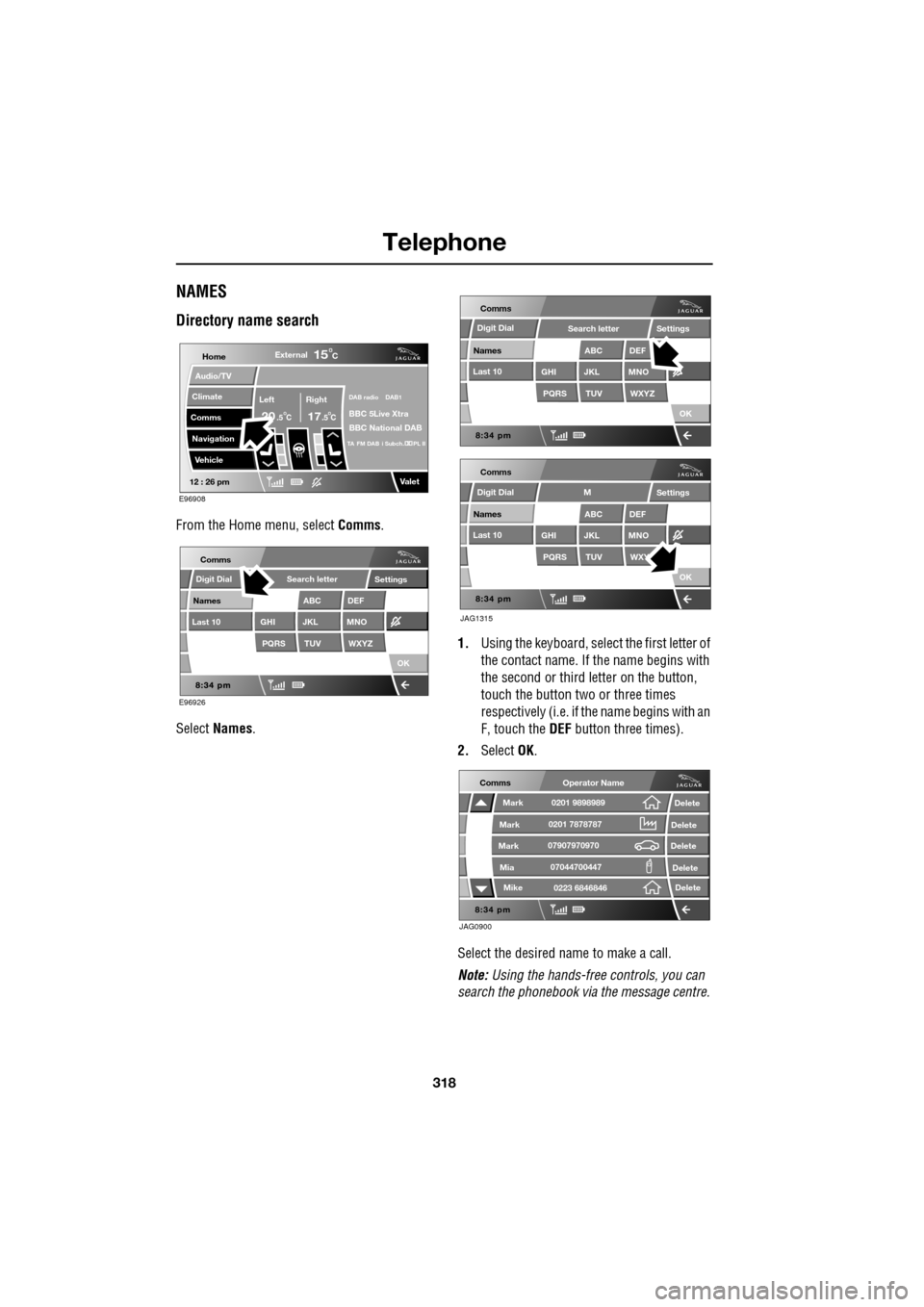
Directory name search
From the Home menu, select Comms.
Select Names . 1.
Using the keyboard, select the first letter of
the contact name. If th e name begins with
the second or third letter on the button,
touch the button two or three times
respectively (i.e. if th e name begins with an
F, touch the DEF button three times).
2. Select OK.
Select the desired name to make a call.
Note: Using the hands-free controls, you can
search the phonebook via the message centre.
Home
Audio/TV
Climate
Comms
Navigation
VehicleExternal
Left Right
20 17CC
15C
.5 .5
DAB radio DAB1
BBC 5Live Xtra
BBC National DAB
TA FM DAB i Subch. PL II
Valet12 : 26 pm
E96908
E96926
Comms
Digit Dial
Names
Last 10
Settings
PQRS
GHITUV
ABC
JKL
WXYZ
DEF
MNO
Search letter
OK
Comms
Comms
Names
Last 10
Settings
PQRS
GHITUV
ABC
JKL
WXYZ
DEF
MNO
Search letter
OK
Names
Last 10
Settings
PQRS
GHITUV
ABC
JKL
WXY
DEF
MNO
M
OK
JAG1315
Digit Dial
Digit Dial
JAG0900
Comms
Delete
Delete
Delete
Delete
Delete
Mark
Mark
Mark
Mike
Mia0201 9898989
0201 7878787
0223 6846846
07907970970
07044700447
Operator Name
Page 321 of 391
321
Telephone
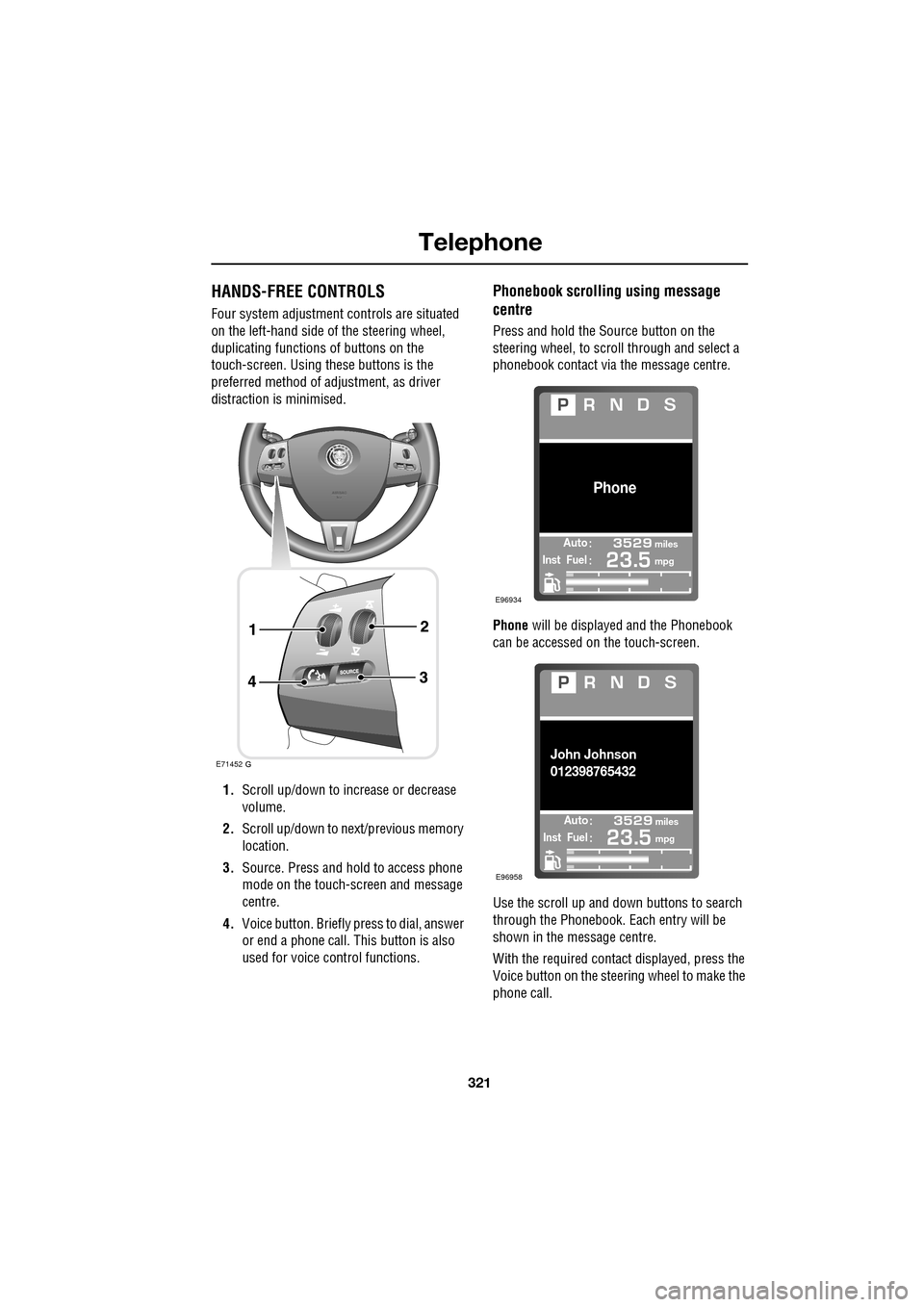
HANDS-FREE CONTROLS
Four system adjustment controls are situated
on the left-hand side of the steering wheel,
duplicating functions of buttons on the
touch-screen. Using these buttons is the
preferred method of adjustment, as driver
distraction is minimised.
1. Scroll up/down to increase or decrease
volume.
2. Scroll up/down to ne xt/previous memory
location.
3. Source. Press and hold to access phone
mode on the touch-screen and message
centre.
4. Voice button. Briefly press to dial, answer
or end a phone call. This button is also
used for voice control functions.
Phonebook scrolling using message
centre
Press and hold the Source button on the
steering wheel, to scroll through and select a
phonebook contact via the message centre.
Phone will be displayed and the Phonebook
can be accessed on the touch-screen.
Use the scroll up and down buttons to search
through the Phonebook. Each entry will be
shown in the message centre.
With the required contact displayed, press the
Voice button on the steering wheel to make the
phone call.
E71452
Automiles
Inst Fuelmpg
Phone
E96934
Automiles
Inst Fuelmpg
John Johnson
012398765432
E96958
Page 323 of 391
323
Telephone
TELEPHONE VOICE CONTROL
Voice control allows many of the telephone
features to be activa ted by voice commands.
The system is controlled by the
switch on the left -hand side of the
steering wheel.
Note: The voice control dire ctory is separate
from your phone SIM card address or
phonebook. See VOICE CONTROL (page 69).
The voice control sy stem understands
predefined commands which need to be
spoken word for word. A list of all telephone
voice commands is below.
• PHONE HELP
• PHONE DIAL NUMBER
• PHONE REDIAL
• PHONE STORE NAME
• PHONE DIAL NAME
• PHONE ACCEPT CALLS
• PHONE REJECT CALLS
• PHONE DIAL LAST ANSWERED CALL
• PHONE DIAL LAST MISSED CALL
• PHONE DIAL VOICEMAIL
• PHONE PLAY DIRECTORY
• PHONE DELETE DIRECTORY
• PHONE DIAL HANDSET NAME
Most of the above commands are self
explanatory, those whic h are not, are explained
more fully in the following section.
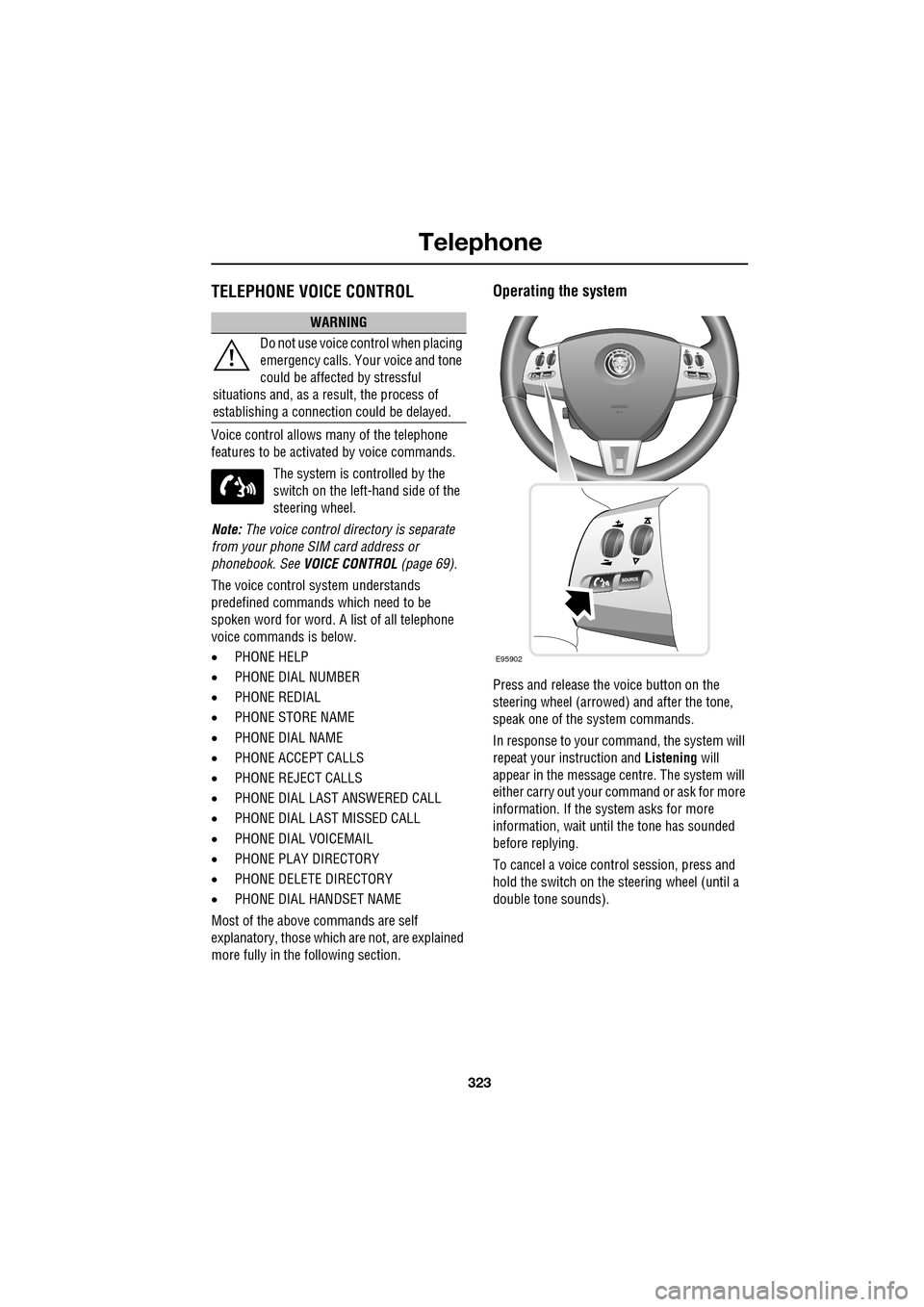
Operating the system
Press and release the voice button on the
steering wheel (arrowed) and after the tone,
speak one of the system commands.
In response to your command, the system will
repeat your instruction and Listening will
appear in the message centre. The system will
either carry out your command or ask for more
information. If the system asks for more
information, wait until the tone has sounded
before replying.
To cancel a voice control session, press and
hold the switch on the steering wheel (until a
double tone sounds).
WARNING
Do not use voice control when placing
emergency calls. Your voice and tone
could be affected by stressful
situations and, as a result, the process of
establishing a connecti on could be delayed.
E95902