2009 JAGUAR XF Start
[x] Cancel search: StartPage 71 of 391

71
Steering wheel
Cancelling voice control
To cancel a voice command, press and hold the
Voice button on the steering wheel until a
double tone is heard.
Note: If a phone call is received during a voice
session, voice control is cancelled.
Voice system tutorial
To listen to a tutorial on how to use
JaguarVoice, press and release the voice
button and, after the tone, say VOICE
TUTORIAL .
The tutorial is divided into four lessons and has
a total duration of approximately four minutes.
The tutorial can only be undertaken with the
vehicle stationary and parked.
The tutorial can also be accessed via the
touch-screen.
1. Select Comms from the Home menu.
2. From the Comms menu, select Voice.
3. From the Voice menu, select Operating
guide and then select Tutorial. To cancel the tutorial, press and release the
Voice button and say
CANCEL. To skip to the
previous or next lesson of the tutorial, press
and release the Voice button and say
PREVIOUS or NEXT .
Command help
For a list of the most commonly used voice
commands, press and release the Voice button
and, after the tone, say the appropriate
command from the following list:
• VOICE HELP
• NAVIGATION HELP
• PHONE HELP
• DISPLAY HELP
• NOTEPAD HELP
Voice
12 : 26 pm
Add phone nametags
Comm Operating guide
Settings
E96025
Voice
12 : 26 pm
To give a voice command briefly press
the voice button and speak normally
after the tone
Tutorial will help you start to use your
voice control system
Tutorial
Page 81 of 391

81
Lighting
Note: For lamps controlled by proximity
sensors, the wearing of gloves may interfere
with operation. If you are wearing gloves, it
may be necessary to touch the proximity
switch to operate the lamps.
Ambience lighting
Ambience lighting. Automatically illuminates
when the headlamps are on. Ambience lighting
creates a blue glow ar ound the centre console
and front door armrests.
Luggage compartment lamp
Automatically illuminates when the luggage
compartment is opened.
APPROACH LAMPS
This feature is activated by pressing
the headlamp icon button on the
Jaguar Smart Key. See USING THE
REMOTE CONTROL (page 17). The headlamps
will remain on for 25 seconds or until the
button is pressed again, or until the engine
START/STOP button is pressed.
REMOVING A HEADLAMP
1. Open the bonnet. See OPENING AND
CLOSING THE BONNET (page 195).
2. Remove the two bolts from the top of the
headlamp unit.
3. Remove the retaining bolt located in the
wheel arch.
Note: To improve access to the wheel arch,
turn the steering wheel to full lock, in the
direction of the affected headlamp.
4. Pull the headlamp away slightly from the
body of the vehicle.CAUTION
It is recommended that the following
procedure should only be attempted by
a qualified technician. If in doubt, consult your
Dealer/Authorised Repairer.
Do not place the removed lamp unit face
down on hard or abrasive surfaces.
Doing so may scratch the surface of the lens.
3
2
2
E94719
2
4
Page 91 of 391

91
Wipers and washers
CHANGING THE WIPER BLADES
Service position
The windscreen wiper service position allows
the wipers to be parked in a more accessible
position. This makes it easier to change wiper
blades.
Setting the service position
1.With the ignition switched off, pull the
wiper stalk towards the steering wheel to
the single wipe position. Hold the stalk in
this position.
2. Make sure the brake pedal is not applied
and, while still holding the wiper stalk in
the single wipe positi on, press the ignition
START/STOP button to switch on the
ignition.
The wipers will move to the vertical (service)
position. Release the wiper stalk.
To return the wiper blades to the operating
position, turn the ignition off.
CAUTIONS
When checking or changing the wiper
blades, they can be set to the service
position or parked normally.
E94746
JAG1625
1
2
Page 102 of 391

Instruments
102
Anti-lock Braking System (ABS)/
Electronic Parking Brake (EPB) - Amber
Illuminates if a fault has been
detected in the ABS (accompanied
by a warning message in the
message centre).
The brake system will c ontinue to function
normally, but without ABS braking.
The warning indicator will also illuminate if a
fault has been detected in the EPB system
(accompanied by a warning message in the
message centre).
If the warning indicato r illuminates or stays
illuminated after the bulb check cycle, seek
qualified assistance as soon as possible.
Adaptive Front Lighting - Amber
Illuminates when there is a system
fault. Seek qualified assistance as
soon as possible.
Engine malfunction - Amber
Illuminates when the ignition
system is on and remains
illuminated until the engine is
started.
If the indicator illuminates when the engine is
running, there is an engine malfunction.
Specialised diagnostic equipment is required
to repair such faults. Seek qualified assistance
as soon as possible. The vehicle may acti
vate limp-home mode,
with the possibility of reduced engine
performance. Driv e with caution.
Dynamic Stability Control (DSC) - Amber
The indicator will flash twice every
second when DSC is operating.
The message DSC NOT AVAILABLE
will be displayed and the indicator will
illuminate continuously, if a fault is detected.
When Trac DSC is selected, the message TRAC
DSC is displayed for f our seconds and the
warning indicator remains illuminated.
When DSC is switched off, a chime will sound,
the message DSC OFF is displayed in the
message centre and the warning indicator
remains illuminated.
Rear fog lamps - Amber
Illuminates when the rear fog lamps
are switched on.
Adaptive Cruise Control - Amber
Illuminates when adaptive cruise
control is active, to indicate that the
vehicle is in follow mode.
Forward alert - Amber
Illuminates when the forward alert
function is active.
Airbag - Amber
Flashes if the airbag system
develops a fault, then illuminates
permanently until the fault has been
diagnosed and cleared.
Seek qualified assistance as soon as possible.
WARNING
If the ABS and brake warning
indicators are illuminated at the same
time, do not drive the vehicle until the
fault is rectified. Seek qualified assistance
immediately.
Page 104 of 391

Instruments
104
AUDIBLE WARNINGS AND INDICATORS
Various sounds are produced for warning and notification purposes as follows:Hazard or Condition Chime or tone/remedy
External lamps remain on when
the driver’s door is opened. A chime will sound until the lamps are switched off or driver’s
door is closed (unless the lighting control is in
AUTO position).
Hazard warning indicators on. A ti cking will sound until the hazard indicators are switched off.
Direction indicators on. A tick ing will sound until the indicators are switched off.
Memory 1 (or 2) settings saved. A short tone as the memory selection is saved.
Airbag system failure. A tone sequence is repeated five times. Seek qualified assistance as soon as possible.
Seat belt reminder. A chime will sound until an unfastened se at belt is fastened. The
warning will cease if occupied fr ont seat belts are buckled, the
ignition is turned off or more than approximately three minutes
has elapsed since the start of the chime.
Electric parking brake (EPB). If the EPB is a pplied while the vehicle is moving a continuous
chime will sound; release the EPB. If there is a fault with the
system which would prevent the a pplication of the EPB, a brief
sequence of chimes is initiated.
Adaptive Cruise Control (ACC)
driver intervene. Multiple chime. Apply the brakes.
ACC low speed automatic
switch off. A chime will sound to indicate that the ACC system is no longer
operating.
Forward Alert Multiple chime. Apply the brakes.
Speed is over 15 km/h (9 mph)
above the set limit speed. A short warning chime. Reduce speed.
Gear selector is not in Park with
ignition off. A chime will sound.
Select Park.
Entry delay warning (European
markets only). Intermittent slow, low pitc
hed chime. Disarm vehicle.
The Jaguar Smart Key cannot be
detected. A chime will sound. The remote ha
ndset should be inserted into
the starter control unit.
The Jaguar Smart Key is to be
removed from the starter
control unit. A chime will sound for 60 seconds if
the Jaguar Smart Key is in
the starter control unit and the driver’s door is opened. The
remote handset should be remove d from the starter control unit.
DSC OFF A chime will sound.
Page 108 of 391

Information displays
108
Average fuel consumption (A, B and
Auto)
The average fuel consumption, stated as litres
per 100 kilometres (except Japan, kilometres
per litre), miles per litre or miles per gallon (UK
only), based on the accumulated distance
travelled and the accumulated fuel used.
Range
This shows the predicte d distance, miles or
kilometres, that the vehi cle should travel on the
remaining fuel, assuming average fuel
economy and fuel consum ption stay constant.
Electronic dipstick (diesel and V8 petrol
engines only)
This shows the current engine oil level and any
associated warnings. SeeENGINE OIL CHECK -
V8 Petrol engines (page 199).
ML-km (also Miles-litre)
The display of metric or imperial units is
selected via the touch-screen.
Display language
The display language is selected via the
touch-screen.
Reset
Resetting of the trip memo ries is carried out via
the touch-screen.
Service interval indicator
The service interval message will only be
displayed when the vehicle has less than
3400 km (2000 miles) before the service is
due.
When the ignition is switched on, and the
vehicle has started it s service countdown,
SERVICE REQ'D XXXX km (XXXX MLS) is
displayed in the message centre. At the same
time the display will glow Amber.
After approximat ely five seconds, the display
reverts to show the preset requirements.
When the service distance has been reached,
SERVICE REQUIRED is displayed in the
message centre and the display will glow Red.
After approximat ely five seconds, the display
reverts to show the preset requirements.
The distance countdown re duces in increments
of 50 km or 50 miles, depending on which
display units have been selected.
The distance countdown is controlled by the
engine management system and is
automatically adjusted to allow for driving style
and conditions. This ga uges when the service
becomes necessary.
Note: After the completion of each service, the
Dealer/Authorised Repairer will reset the
distance display to commence the countdown
to the next service.
CAUTION
If no service interv al indicator is
displayed during the vehicle service
cycle, make sure that your vehicle is serviced
in accordance with the intervals, as stated in
the Service Portfolio.
Page 109 of 391
109
Information displays
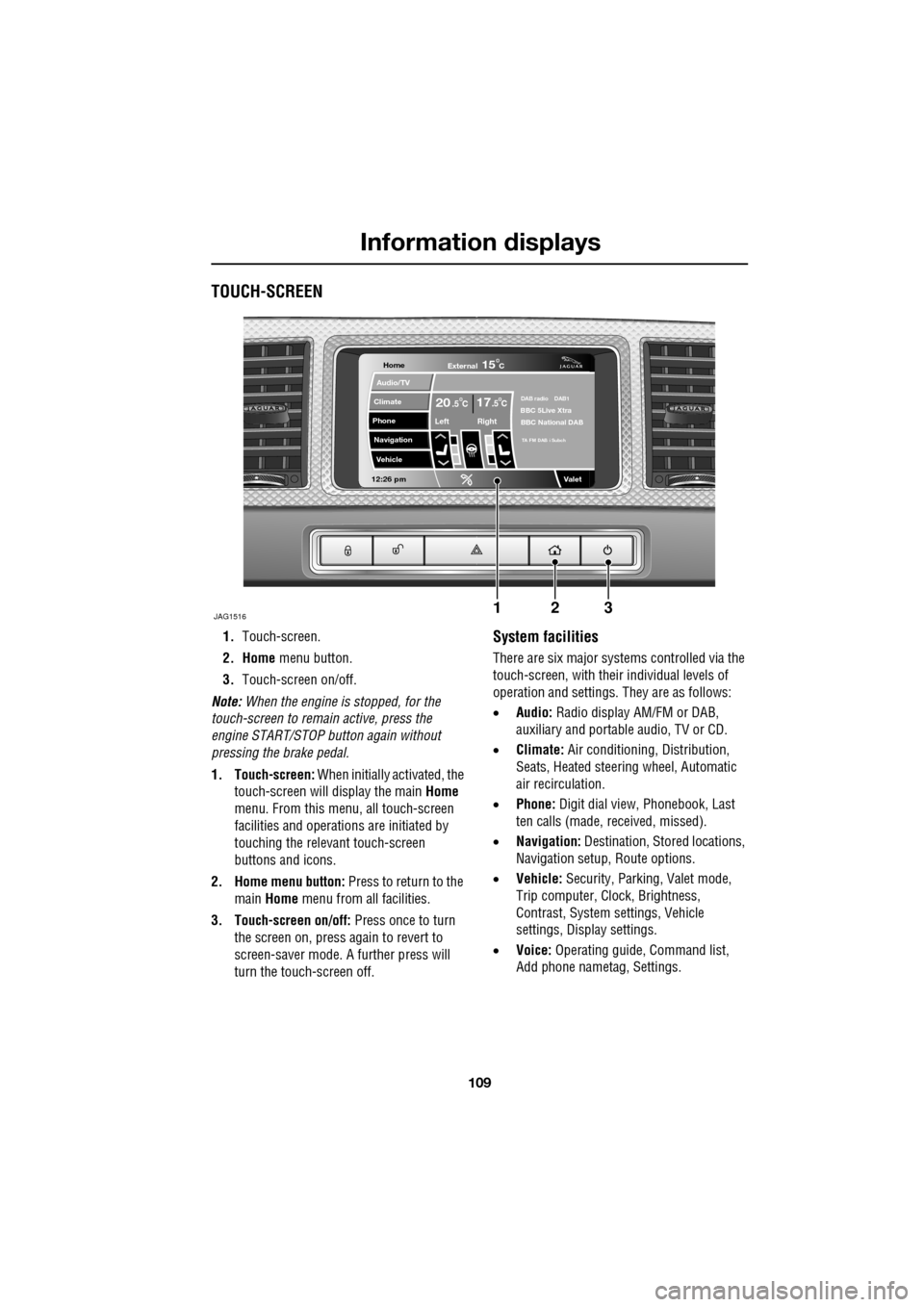
TOUCH-SCREEN
1.Touch-screen.
2. Home menu button.
3. Touch-screen on/off.
Note: When the engine is stopped, for the
touch-screen to remain active, press the
engine START/STOP button again without
pressing the brake pedal.
1. Touch-screen: When initially activated, the
touch-screen will display the main Home
menu. From this menu, all touch-screen
facilities and operati ons are initiated by
touching the relevant touch-screen
buttons and icons.
2. Home menu button: Press to return to the main Home menu from all facilities.
3. Touch-screen on/off: Press once to turn
the screen on, press again to revert to
screen-saver mode. A further press will
turn the touch-screen off.System facilities
There are six major systems controlled via the
touch-screen, with their individual levels of
operation and settings. They are as follows:
• Audio: Radio display AM/FM or DAB,
auxiliary and portable audio, TV or CD.
• Climate: Air conditioning, Distribution,
Seats, Heated steering wheel, Automatic
air recirculation.
• Phone: Digit dial view, Phonebook, Last
ten calls (made, received, missed).
• Navigation: Destination, St ored locations,
Navigation setup, Route options.
• Vehicle: Security, Parking, Valet mode,
Trip computer, Clock, Brightness,
Contrast, System settings, Vehicle
settings, Displa y settings.
• Voice: Operating guide, Command list,
Add phone nametag, Settings.
Home
Audio/TV
Climate
Phone
Navigation
Vehicle
Valet12:26 pm
JAG1516
External15C
Left Right
20 17CC.5 .5DAB radio DAB1BBC 5Live Xtra
BBC National DAB
TA FM DAB i Subch
123
Page 110 of 391

Information displays
110
Touch-screen use
When the engine START/STOP button is
pressed, the touch-screen is activated by the
on/off switch on the centre console.
The buttons on the centre console, below the
touch-screen display, are referred to as hard
buttons and should be pressed firmly. The
touch-screen buttons are soft buttons and only
require short, light pressu re to function. Do not
use excessive pressure.
When operating touch-sc reen buttons, always
extend the tip of one finger, and withhold the
thumb and remaining finge rs from the screen.
Touching the screen with more than one finger
at a time may cause false inputs.
Throughout the handbook, the expression
Select an item (or similar wording) means
touch the on-screen button to select or alter
the required item.
The handbook shows the on-screen menus,
explains how to oper ate the controls and
illustrates how to select or alter settings and
requirements. After becoming familiar with the
controls, follow the on-screen menus and
prompts, to operate th e system as required.
Touch-screen display icons
Touch-screen display icons are as follows
(they may not all be displayed at the same
time):WARNING
In the interest of road safety, only
operate, adjust or view the system
when it is safe to do so.
CAUTION
Always run the engine during prolonged
use of the touch-screen. Failure to do so
may discharge the vehicle battery, preventing
the engine from starting.
Return to the previous screen
displayed.
Warning triangle button indicating
an information or warning
message in the message centre.
Touch the button to temporarily remove the
warning message from the message centre
display. See WARNING AND INFORMATION
MESSAGES (page 106).
Telephone: send button.
Telephone: end call.
Page up or increase setting to
required value.
Page down or decrease setting to
required value.
Direct access to the valet mode
setting screen.
Telephone signal strength
indicator (if supported by
Bluetooth phone).
Telephone battery level indicator
(if supported by Bluetooth phone).
No phone connected.
Valet