2009 JAGUAR XF Wiper
[x] Cancel search: WiperPage 188 of 391

Vehicle care
188
Do not use household soaps or detergents. The
use of Jaguar Vehicle Shampoo is
recommended.
Note: The vehicle's brightwork should be
cleaned using a sponge and generous
quantities of cold or lukewarm water only.
Rinse thoroughly and dry with a chamois
leather or synthetic substitute.
Using an automatic wash
Note: Regular use of automatic car washes
tends to dull the lustre of the paintwork.
1. Drive up to the entry of the car wash and
onto the conveyor.
2. Select N (Neutral) using the JaguarDrive
selector.
3. Press and release the engine START/STOP
button to stop the engine. The JaguarDrive
selector should remain raised and the
selector and message centre should
indicate that N is selected. 4.
The vehicle should rema in in this condition
while it is conveyed through the car wash.
5. At the end of the wash cycle, when directed
to start the engine by the car wash
instructions, press the brake pedal and
press and release the engine START/STOP
button to start the engine.
6. Select D (Drive) using the JaguarDrive
selector and drive away.
Do not start the engine or change the
JaguarDrive selector position during the car
wash.
After leaving the car wash, switch on the
windscreen wiper immediately to remove water
and prevent a build up of wax.
Underbonnet cleaning
CAUTIONS
Commercially operated automatic car
washes, jet washes and power-operated
mops, are not recommen ded. The detergents
used can contain certain chemicals which
may, over time, be detrimental to some
exterior parts of the vehicle. Prolonged usage
of automatic car wash es and power-operated
mops will also cause fine scratches in the paint
surface.
Ensure that Auto wipe is not selected
when entering a car wash, or damage to
the wiper blades and arms can occur if they
operate during the wash cycle.
Ensure that when using an automatic
drive through car wash, N (Neutral) is
selected and that the ignition is left in
convenience mode for the duration of the
wash.
CAUTIONS
Do not use a high pr essure washer or
steam cleaner in the engine
compartment. Damage to components could
occur.
Ensure that the brake fluid reservoir is
kept dry at all times. Only use a clean,
dry cloth to clean the brake fluid cap and
reservoir.
Page 189 of 391
189
Vehicle care
Glass surfaces
Clean the rear window with a soft cloth to avoid
damaging the heating element. Do not scrape
the glass or use any abrasive cleaning fluid.
Mirror glass is particularly susceptible to
damage. Wash with soapy water. Do not use
abrasive cleaning compounds or metal
scrapers to remove ice.
The following products will ensure glass
surfaces and windscreen wipers are kept in
good condition:
• Jaguar Screen Clean Paste - Apply only to
the windscreen exterior to ensure effective
operation of the windscreen wiper.
• Jaguar Glass Cleaner - Interior and exterior
of all other glass surfaces.
• Jaguar Screen Wash - Washer reservoir
additive.
• Jaguar Winter Care Kit comprising de-icer,
ice scraper, anti-mist wipe cloth and aerial
cleaner - for use in adverse weather
conditions.
Cleaning the rear screen
To avoid damaging the heating elements when
cleaning the inside of th e rear screen, use only
a soft damp cloth/chamois leather. Do not use
solvents or sharp objects to clean the glass.
Removing grease and tar
Remove grease or tar with Jaguar Tar Remover
or methylated spirit (a lcohol). White spirit is
also effective, but mu st not be applied to
rubber, particularly the windscreen wiper
blades.
Bird droppings
Do not allow bird droppings or tree sap to
harden. Remove from paintwork immediately
with a lukewarm soap and water solution.
Polishing
For maximum protection against road dust,
salts, industrial fall-out etc., it is recommended
that the vehicle is polished regularly using
Jaguar polish and a polishing cloth.
CLEANING THE INTERIOR
CAUTION
Ensure that after using methylated or
white spirit, the area is washed
immediately with soapy water, to remove all
traces of spirit.
CAUTION
Chrome polish, or other abrasive
cleaners, must not be used on the
vehicle's brightwork. The vehicle's brightwork
should be cleaned using a sponge and
generous quantities of cold or lukewarm water
only. Rinse thoroughly a nd dry with a chamois
leather or synthetic substitute.
WARNING
Ensure that you read all of the
information and instructions for use
provided with cleaning products.
Some products contain substances that are
harmful and can cause he alth problems if used
incorrectly.
CAUTIONS
Some products, if used incorrectly can
cause damage to the in terior surfaces of
the vehicle.
To prevent airbag damage, the steering
wheel centre pad and other areas
containing airbags s hould only be cleaned
sparingly with a damp cl oth, warm water and a
non-detergent soap. Do not allow these areas
to be flooded with chemical solvents, liquids,
furniture cream or polishes.
Page 192 of 391
Maintenance
192
GENERAL INFORMATION
Regular systematic maintenance is the key to
ensuring the continued reliability and efficiency
of your vehicle.
Maintenance is the owner's responsibility and
you must ensure that owner maintenance
operations, oil services, inspections and brake
fluid and coolant changes are carried out when
required and according to the manufacturer's
recommendations.
The routine maintenance requirements for your
vehicle are shown in th e Service Portfolio book.
Most of this necessar y workshop maintenance
requires specialised knowledge and
equipment, and should preferably be entrusted
to a Dealer/Authorised Repairer.
Service Portfolio
The Service Portfolio book includes a Service
Record section, which enables a record to be
kept of all the servicing and inspections that are
carried out on the vehicle. This section of the
book also has an area for brake fluid changes
to be recorded.
Ensure your service provider signs and stamps
the book after each se rvice and inspection.
Owner maintenance
In addition to the routine services and
inspections, a number of simple checks must
be carried out more frequently. These checks
can be carried out by th e owner and advice is
given on the pages that follow.
Daily checks
• Operation of lamps, horn, direction
indicators, wipers, washers and warning
indicators.
• Operation of seat belts and brakes.
• Look for fluid deposits underneath the
vehicle that might indicate a leak.
Condensation drips from the air
conditioning is normal.
CAUTION
Severe damage to the electrical system
and electronic components can occur, if
any attempt is made to diagnose faults in the
electrical system using conventional
diagnostic equipment (e .g. the use of test
lamps or low impedanc e voltmeters). The
fitting of any electric al accessory should only
be entrusted to a Deal er/Authorised Repairer.CAUTION
Any significant or sudden drop in fluid
levels, or uneven tyre wear, should be
reported to a qualifie d technician without
delay.
Page 209 of 391
209
Maintenance
WASHER FLUID CHECK
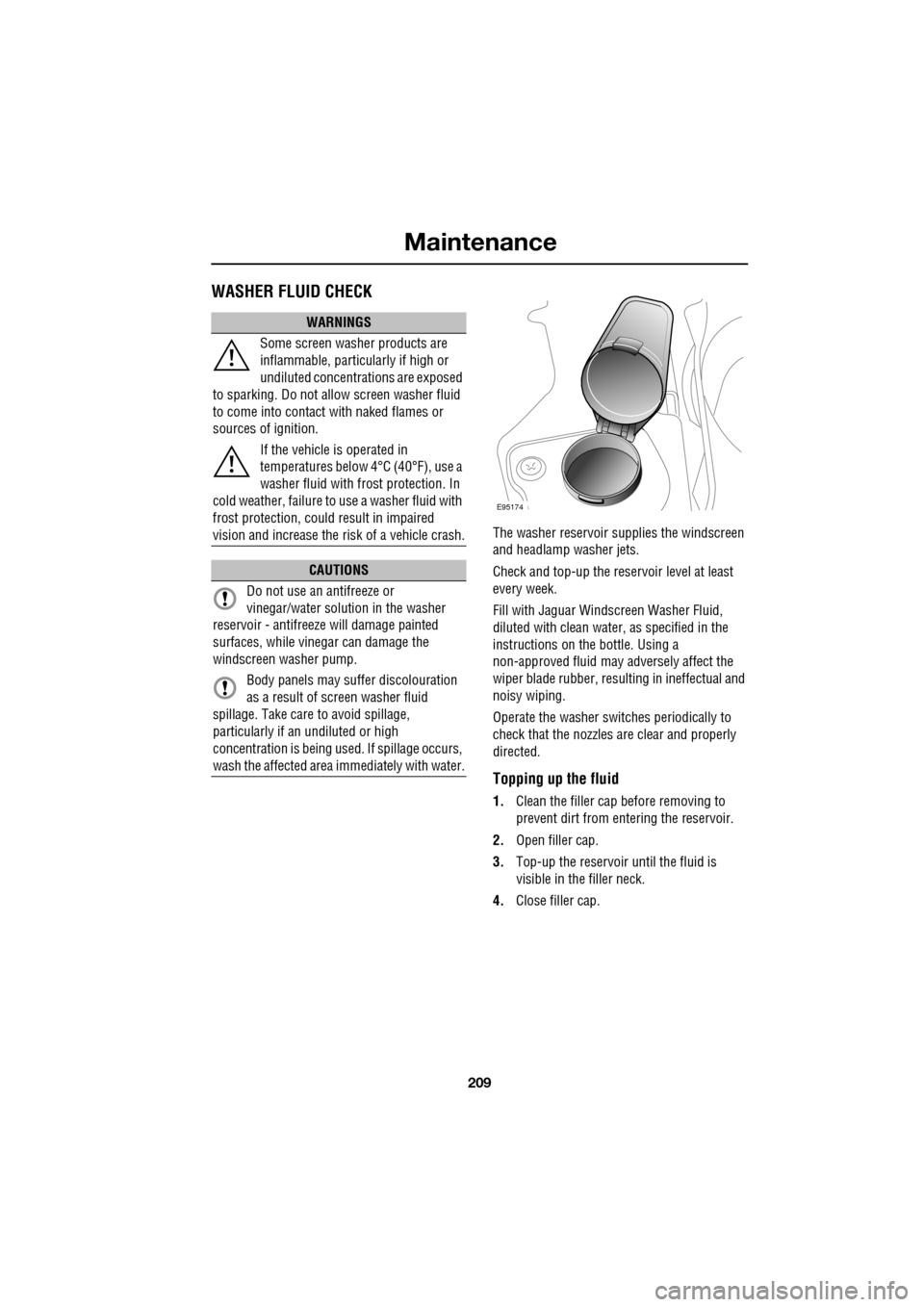
The washer reservoir supplies the windscreen
and headlamp washer jets.
Check and top-up the reservoir level at least
every week.
Fill with Jaguar Windscreen Washer Fluid,
diluted with clean water, as specified in the
instructions on the bottle. Using a
non-approved fluid may adversely affect the
wiper blade rubber, resulting in ineffectual and
noisy wiping.
Operate the washer switches periodically to
check that the nozzles are clear and properly
directed.
Topping up the fluid
1. Clean the filler cap before removing to
prevent dirt from entering the reservoir.
2. Open filler cap.
3. Top-up the reservoir until the fluid is
visible in the filler neck.
4. Close filler cap.
WARNINGS
Some screen washer products are
inflammable, particularly if high or
undiluted concentrations are exposed
to sparking. Do not allow screen washer fluid
to come into contact with naked flames or
sources of ignition.
If the vehicle is operated in
temperatures below 4°C (40°F), use a
washer fluid with frost protection. In
cold weather, failure to use a washer fluid with
frost protection, could result in impaired
vision and increase the risk of a vehicle crash.
CAUTIONS
Do not use an antifreeze or
vinegar/water solution in the washer
reservoir - antifreeze will damage painted
surfaces, while vinegar can damage the
windscreen washer pump.
Body panels may suffer discolouration
as a result of screen washer fluid
spillage. Take care to avoid spillage,
particularly if an undiluted or high
concentration is being us ed. If spillage occurs,
wash the affected area immediately with water.
E95174
Page 213 of 391

213
Vehicle battery
Your vehicle is fitted with a low maintenance
battery, which is located under the floor of the
luggage compartment.
In hot climates more frequent checks of the
battery electrolyte level and condition are
required. If necessary, the battery cells can be
topped up using di stilled water.
When the ignition is switched on, but without
the engine running, BATTERY NOT CHARGING
is displayed in the mess age centre. The battery
will only charge when the engine is running.
Note: Do not connect any 12 volt equipment
(e.g. a 12 volt inspection lamp), directly to the
battery terminals. Use the accessory socket
located in the cubby box, for connecting Jaguar
approved accessories.
Battery Monitoring System (BMS)
Your vehicle is equipped with a Battery
Monitoring System (BMS) which manages the
battery charging system and, if excessive
battery discharge is o ccurring when the engine
isn't running, shuts down non-essential
electrical systems to protect battery power.
In the event that too many electrical systems
are operational when the engine is not running,
and the battery charge is insufficient, the audio
and entertainment systems (if active) and
climate control system will be switched off.
This will be confirmed by a low battery warning
message displayed on the touch-screen. If this
occurs, switch on and run the engine for at
least five minutes, preferably with all auxiliary
electrical systems switched off (e.g. lights,
wipers, climate control, seat heaters etc.).
Note: The audio system can be operated
during this five minute period when the engine
is running.
If the engine is switched off before the five
minute period ends and the audio system is
switched on, the warning message will
re-appear on the touch-sc reen and the audio,
entertainment and climate control systems will
switch off again. For this reason, it is important
that the engine is left running for the full five
minute period.
Charging faults
If there is a fault in the battery charging system,
CHARGING FAULT is displayed with red
backlighting in the mess age centre. If this
occurs, switch off all non-essential electrical
systems and seek qualified assistance at the
earliest opportunity.
CAUTION
Do not allow battery electrolyte to come
into contact with fabrics or painted
surfaces. If battery electrolyte comes into
contact with any surfac e, the surface should
be washed down immedi ately with copious
amounts of clean water. Battery electrolyte is
both corrosive and toxic, and can damage a
wide range of materials if left.
Page 245 of 391

245
Fuses
FUSE SPECIFICATION CHART
Engine compartment fuse box
Fuse No Rating (amps) Fuse
Colour Circuit
F1 - - Not used.
F2 - - Not used.
F3 20A Blue Emissions system (petrol only).
F4 20A Blue Emissions system (petrol only).
F5 40A Green Anti-lock brake pump.
F6 30A Pink Power wash pump.
F7 - - Not used.
F8 - - Not used.
F9 50A Red Engine management.
F10 - - Not used.
F11 - - Not used.
F12 50A Red Secondary air in jection (petrol only).
F13 30A Pink Wipers.
F14 30A Pink Starter solenoid.
F15 40A Green Screen heater.
F16 40A Green Screen heater.
F17 80A Black Radiator fan. (V6 petrol only)
F18 60A Yellow Glow plugs (diesel only).
F19 - - Not used.
F20 15A Blue Horn.
F21 25A Clear Anti-lock brakes.
F22 15A Blue Cigar lighter.
F23 - - Not used.
F24 5A Tan Adaptive cruise control.
F25 10A Red Anti-lock brakes.
F26 10A Red Engine manage ment. JaguarDrive selector. Transmission
control module.
F27 5A Tan Diesel - Engine management.
F27 5A Tan Petrol - Secondary air injection.
Page 381 of 391

Index
381
A
ABS driving hints . . . . . . . . . . . . . . . . . . 144
ACC . . . . . . . . . . . . . . . . . . . . . . . . . . . . . 159
Accessories . . . . . . . . . . . . . . . . . . . . . . . . 14
Adaptive cruise control . . . . . . . . . . . . . . 159
Adaptive cruise control (ACC)principle of operation . . . . . . . . . . . . . 159
Adaptive dynamics . . . . . . . . . . . . . . . . . 172
Adjusting the headlamps . . . . . . . . . . . . . . 78
Adjusting the steering wheel . . . . . . . . . . . 67 entry and exit mode . . . . . . . . . . . . . . . 67
Advanced emergency brake assist . . . . . 165
AFS . . . . . . . . . . . . . . . . . . . . . . . . . . . . . . 79
Air vents . . . . . . . . . . . . . . . . . . . . . . . . . 115 rear vents . . . . . . . . . . . . . . . . . . . . . . 115
Airbag labels . . . . . . . . . . . . . . . . . . . . . . . 58
Airbag service information . . . . . . . . . . . . 58
Airbag warning lamp . . . . . . . . . . . . . . . . . 57
Alarm trigger information . . . . . . . . . . . . . . . . 39
Alarm sensor override . . . . . . . . . . . . . . . . 22
Approach lamps . . . . . . . . . . . . . . . . . . . . 81
Arming . . . . . . . . . . . . . . . . . . . . . . . . . . . 19
Arming the alarm . . . . . . . . . . . . . . . . . . . 37
alarm indicator . . . . . . . . . . . . . . . . . . . 38
battery-backed sounder . . . . . . . . . . . . 38
full alarm. . . . . . . . . . . . . . . . . . . . . . . . 37
perimeter alarm . . . . . . . . . . . . . . . . . . 37
ASL . . . . . . . . . . . . . . . . . . . . . . . . . . . . . 167
Audible warnings and indicators . . . . . . . 104
Audio portable interface . . . . . . . . . . . . . . . . 131
Audio control. . . . . . . . . . . . . . . . . . . 69, 272
sound settings . . . . . . . . . . . . . . . . . . 272
Audio controls . . . . . . . . . . . . . . . . . . . . . 282 steering wheel controls. . . . . . . . . . . . 282
Audio unit overview. . . . . . . . . . . . . . . . . 269 audio controls . . . . . . . . . . . . . . . . . . . 269
sound system overview . . . . . . . . . . . 270
Autolamps . . . . . . . . . . . . . . . . . . . . . . . . . 76 exit delay. . . . . . . . . . . . . . . . . . . . . . . . 77
windscreen wiper detection . . . . . . . . . 76
Automatic climate control . . . . . . . . . . . . 116 controls . . . . . . . . . . . . . . . . . . . . . . . 116
touch-screen operation . . . . . . . . . . . . 119 Automatic speed limiter . . . . . . . . . . . . . . 167
Automatic speed limiter (ASL)
principle of operation . . . . . . . . . . . . . . 167
Automatic transmission . . . . . . . . . . . . . . 137
automatic mode . . . . . . . . . . . . . . . . . . 139
JaguarDrive selector . . . . . . . . . . . . . . 137
limp-home mode . . . . . . . . . . . . . . . . . 143
manual mode . . . . . . . . . . . . . . . . . . . . 141
message centre display . . . . . . . . . . . . 143
sport mode . . . . . . . . . . . . . . . . . . . . . 140
starting. . . . . . . . . . . . . . . . . . . . . . . . . 139
Autostore control . . . . . . . . . . . . . . . . . . . 274
Auxiliary connections . . . . . . . . . . . . . . . . 299 connecting a USB device . . . . . . . . . . . 300
connecting an auxiliary device . . . . . . . 301
connecting an iPod . . . . . . . . . . . . . . . 300
connecting more than one device . . . . 301
portable audio overview . . . . . . . . . . . . 299
Auxiliary input devices . . . . . . . . . . . . . . . 302 displaying track information. . . . . . . . . 303
playing a portable device . . . . . . . . . . . 302
portable device settings . . . . . . . . . . . . 306
searching a portable device . . . . . . . . . 304
Auxiliary power sockets . . . . . . . . . . . . . . 125
B
Battery charging faults . . . . . . . . . . . . . . . . . . . 213
Battery care . . . . . . . . . . . . . . . . . . . . . . . 212 Battery Monitoring System (BMS) . . . . 213
Battery charging . . . . . . . . . . . . . . . . . . . . 215
Battery warning symbols . . . . . . . . . . . . . 212
Blind spot monitor . . . . . . . . . . . . . . . . . . . 97 sensor blockage . . . . . . . . . . . . . . . . . . . 98
system fault . . . . . . . . . . . . . . . . . . . . . . 98
Block heaters . . . . . . . . . . . . . . . . . . . . . . 134
Bonnet lock . . . . . . . . . . . . . . . . . . . . . . . 195
Booster cables . . . . . . . . . . . . . . . . . . . . . 214
Booster cushions . . . . . . . . . . . . . . . . . . . . 61
Brake fluid check . . . . . . . . . . . . . . . . . . . 206
checking the fluid level. . . . . . . . . . . . . 206
topping up the fluid . . . . . . . . . . . . . . . 207
Brakes
brake pads . . . . . . . . . . . . . . . . . . . . . . 144
pad wear warning. . . . . . . . . . . . . . . . . 144
principle of operation . . . . . . . . . . . . . . 144
Page 382 of 391

Index
382
Bulb changing . . . . . . . . . . . . . . . . . . . . . . 83direction indicator bulb (front) . . . . . . . 84
headlamp unit bulbs . . . . . . . . . . . . . . . 83
high level brake lamp . . . . . . . . . . . . . . 86
number plate lamp bulb . . . . . . . . . . . . 86
rear lamp bulbs . . . . . . . . . . . . . . . . . . . 85
side lamp bulb . . . . . . . . . . . . . . . . . . . 85
side repeater lamp . . . . . . . . . . . . . . . . 85
Bulb specification chart . . . . . . . . . . . . . . . 87
C
Cancel guidance . . . . . . . . . . . . . . . . . . . 350
Car wash . . . . . . . . . . . . . . . . . . . . . . . . . 187
Cautions . . . . . . . . . . . . . . . . . . . . . . . . . . . 9
Changing a bulb . . . . . . . . . . . . . . . . . . . . 83 general information . . . . . . . . . . . . . . . . 83
Changing a fuse. . . . . . . . . . . . . . . . . . . . 241 checking or renewing a blown fuse . . . 241
Changing a road wheel . . . . . . . . . . . . . . 225
locking wheel nuts . . . . . . . . . . . . . . . 226
spare wheel location . . . . . . . . . . . . . . 226
temporary use spare wheel . . . . . . . . . 225
tightening the wheel nuts . . . . . . . . . . 229
wheel changing procedure . . . . . . . . . 228
wheel changing safety. . . . . . . . . . . . . 227
Changing the remote cont rol battery . . . . . 24
Changing the vehicle battery . . . . . . . . . . 215
battery disposal. . . . . . . . . . . . . . . . . . 215
Changing the wiper blades . . . . . . . . . . . . 91 changing the wiper blades . . . . . . . . . . 92
service position . . . . . . . . . . . . . . . . . . . 91
Channel automatic tuning . . . . . . . . . . . . 284
Channel options. . . . . . . . . . . . . . . . . . . . 284 DAB search . . . . . . . . . . . . . . . . . . . . . 286
finding a channel. . . . . . . . . . . . . . . . . 285
finding a subchannel . . . . . . . . . . . . . . 285
finding an ensemble . . . . . . . . . . . . . . 286
Charging the vehicle battery . . . . . . . . . . 215
Checking the wiper blades . . . . . . . . . . . . . 90
Child safety locks . . . . . . . . . . . . . . . . . . . 65
Child seat anchor points . . . . . . . . . . . . . . 62 installing an ISOFIX child seat. . . . . . . . 63
ISOFIX anchor points . . . . . . . . . . . . . . 62
tether anchorage points . . . . . . . . . . . . 64
Child seat positioning . . . . . . . . . . . . . . . . 60 Child seats . . . . . . . . . . . . . . . . . . . . . . . . . 59
child restraint check list . . . . . . . . . . . . . 60
Cleaning the alloy wheels . . . . . . . . . . . . . 187
Cleaning the exterior . . . . . . . . . . . . . . . . . 187
bird droppings . . . . . . . . . . . . . . . . . . . 189
cleaning the rear screen . . . . . . . . . . . . 189
glass surfaces . . . . . . . . . . . . . . . . . . . 189
polishing . . . . . . . . . . . . . . . . . . . . . . . 189
removing grease and tar. . . . . . . . . . . . 189
underbonnet cleaning . . . . . . . . . . . . . . 188
using an automatic wash . . . . . . . . . . . 188
washing the vehicle paintwork . . . . . . . 187
Cleaning the interior . . . . . . . . . . . . . . . . . 189 airbag module covers . . . . . . . . . . . . . . 191
carpet and mats . . . . . . . . . . . . . . . . . . 191
cloth and fabric . . . . . . . . . . . . . . . . . . 190
instrument pack, clock, and audio equipment . . . . . . . . . . . . . . . . . . . . 190
leather . . . . . . . . . . . . . . . . . . . . . . . . . 190
removing stains . . . . . . . . . . . . . . . . . . 190
seat belts . . . . . . . . . . . . . . . . . . . . . . . 191
Climate seats . . . . . . . . . . . . . . . . . . . . . . . 48 backrest ventilation only. . . . . . . . . . . . . 48
cooled ventilation . . . . . . . . . . . . . . . . . . 48
heated ventilation . . . . . . . . . . . . . . . . . . 48
Clock. . . . . . . . . . . . . . . . . . . . . . . . . . . . . 124 setting the clock as the screensaver . . . 124
Compact disc display options . . . . . . . . . . 296
Compact disc pause . . . . . . . . . . . . . . . . . 295
Compact disc player CD compatibility . . . . . . . . . . . . . . . . . . 292
loading CDs . . . . . . . . . . . . . . . . . . . . . 292
Compact disc selection . . . . . . . . . . . . . . . 294
Compass view. . . . . . . . . . . . . . . . . . . . . . 360
Condensation - lamps . . . . . . . . . . . . . . . . . 76
Controls overview . . . . . . . . . . . . . . . . . . . . 12
Coolant check . . . . . . . . . . . . . . . . . . . . . . 204
Cornering lamps . . . . . . . . . . . . . . . . . . . . . 79
Cruise control . . . . . . . . . . . . . . . . . . . 74, 156
principle of operation . . . . . . . . . . . . . . 156
Cup holders . . . . . . . . . . . . . . . . . . . . . . . 126 twin cup holder . . . . . . . . . . . . . . . . . . 127