2009 JAGUAR XF Adaptive cruise control
[x] Cancel search: Adaptive cruise controlPage 160 of 391
Adaptive cruise control (ACC)
160
Setting the speed
Accelerate as normal until the required speed is
reached.
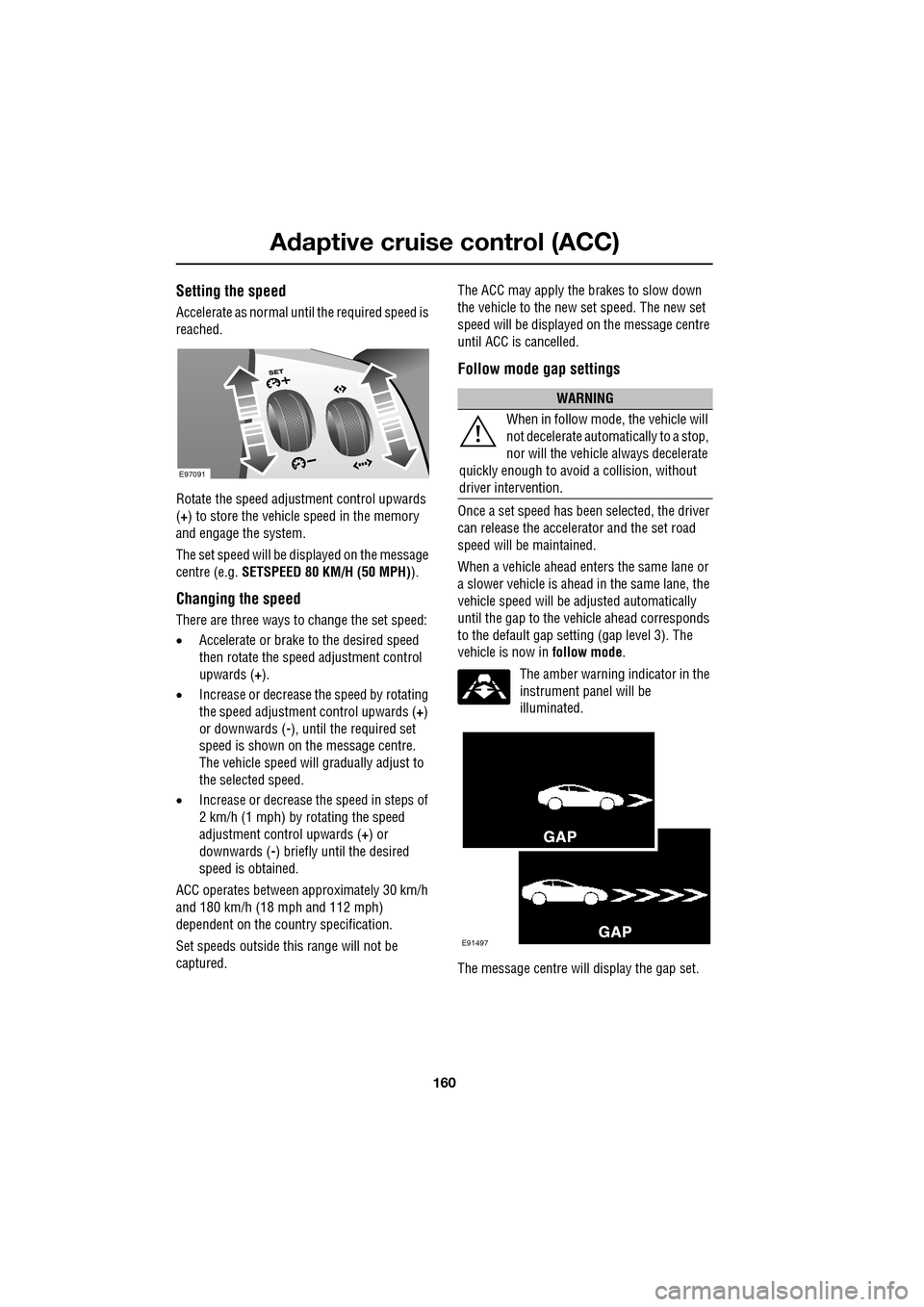
Rotate the speed adjustment control upwards
(+) to store the vehicle speed in the memory
and engage the system.
The set speed will be displayed on the message
centre (e.g. SETSPEED 80 KM/H (50 MPH) ).
Changing the speed
There are three ways to change the set speed:
•Accelerate or brake to the desired speed
then rotate the speed adjustment control
upwards ( +).
• Increase or decrease the speed by rotating
the speed adjustment control upwards ( +)
or downwards ( -), until the required set
speed is shown on the message centre.
The vehicle speed will gradually adjust to
the selected speed.
• Increase or decrease the speed in steps of
2 km/h (1 mph) by rotating the speed
adjustment control upwards (+) or
downwards ( -) briefly until the desired
speed is obtained.
ACC operates between approximately 30 km/h
and 180 km/h (18 mph and 112 mph)
dependent on the c ountry specification.
Set speeds outside th is range will not be
captured. The ACC may apply the brakes to slow down
the vehicle to the new set speed. The new set
speed will be displayed on the message centre
until ACC is cancelled.
Follow mode gap settings
Once a set speed has been selected, the driver
can release the accelerator and the set road
speed will be maintained.
When a vehicle ahead enters the same lane or
a slower vehicle is ahead in the same lane, the
vehicle speed will be adjusted automatically
until the gap to the vehicle ahead corresponds
to the default gap setting (gap level 3). The
vehicle is now in
follow mode.
The amber warning indicator in the
instrument panel will be
illuminated.
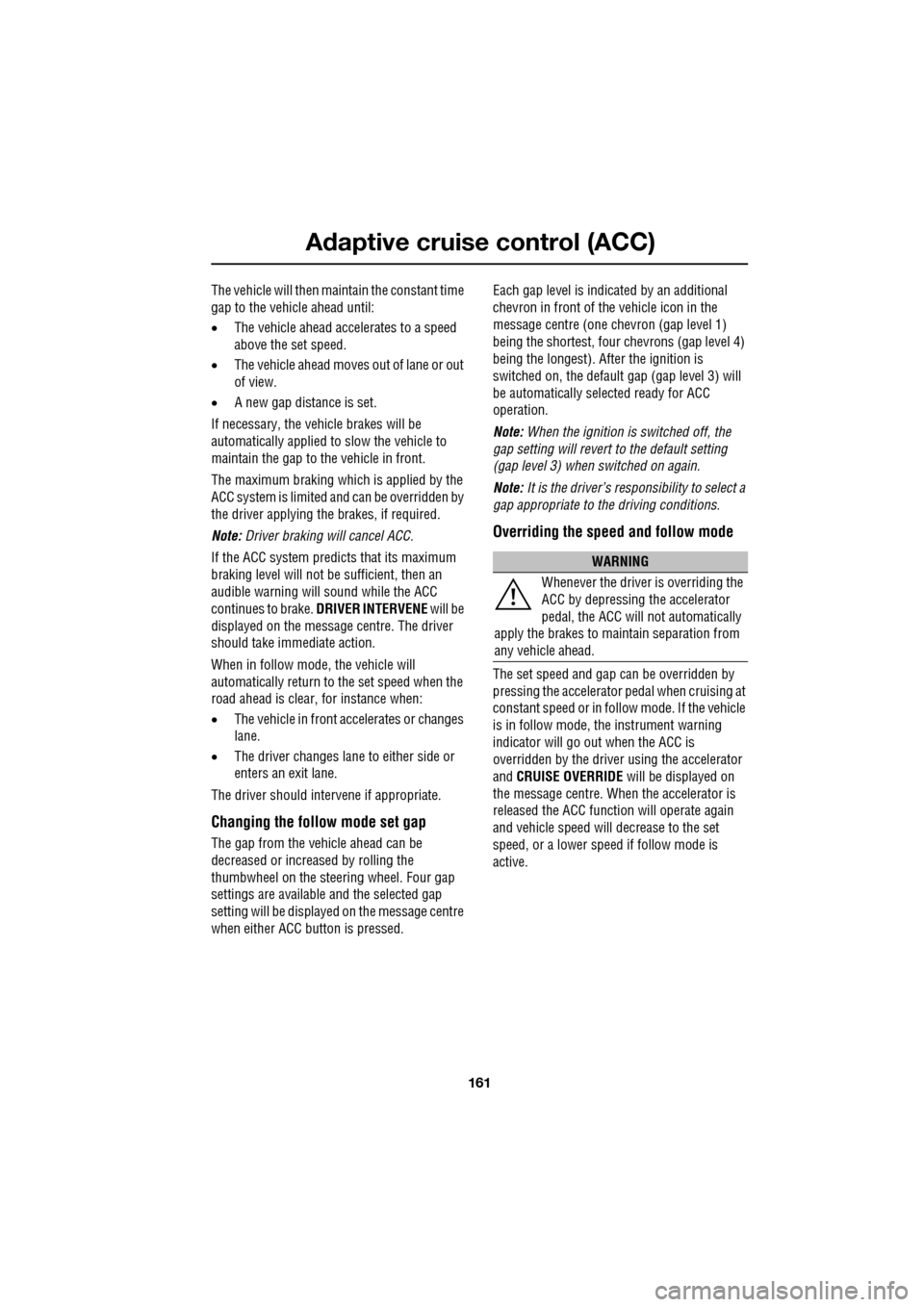
The message centre will display the gap set.
E97091
WARNING
When in follow mode, the vehicle will
not decelerate automatically to a stop,
nor will the vehicle always decelerate
quickly enough to avoid a collision, without
driver intervention.
E91497
Page 161 of 391
161
Adaptive cruise control (ACC)
The vehicle will then maintain the constant time
gap to the vehicle ahead until:
•The vehicle ahead accelerates to a speed
above the set speed.
• The vehicle ahead moves out of lane or out
of view.
• A new gap distance is set.
If necessary, the vehicle brakes will be
automatically applied to slow the vehicle to
maintain the gap to the vehicle in front.
The maximum braking which is applied by the
ACC system is limited and can be overridden by
the driver applying the brakes, if required.
Note: Driver braking will cancel ACC.
If the ACC system predicts that its maximum
braking level will not be sufficient, then an
audible warning will sound while the ACC
continues to brake. DRIVER INTERVENE will be
displayed on the message centre. The driver
should take immediate action.
When in follow mode, the vehicle will
automatically return to the set speed when the
road ahead is clear, for instance when:
• The vehicle in front accelerates or changes
lane.
• The driver changes lane to either side or
enters an exit lane.
The driver should intervene if appropriate.
Changing the follow mode set gap
The gap from the vehicle ahead can be
decreased or increased by rolling the
thumbwheel on the stee ring wheel. Four gap
settings are available and the selected gap
setting will be displaye d on the message centre
when either ACC button is pressed. Each gap level is indicated by an
additional
chevron in front of th e vehicle icon in the
message centre (one chevron (gap level 1)
being the shortest, four chevrons (gap level 4)
being the longest). A fter the ignition is
switched on, the default gap (gap level 3) will
be automatically selected ready for ACC
operation.
Note: When the ignition is switched off, the
gap setting will revert to the default setting
(gap level 3) when switched on again.
Note: It is the driver’s responsibility to select a
gap appropriate to the driving conditions.
Overriding the speed and follow mode
The set speed and gap ca n be overridden by
pressing the accelerator pedal when cruising at
constant speed or in follow mode. If the vehicle
is in follow mode, the instrument warning
indicator will go out when the ACC is
overridden by the driver using the accelerator
and CRUISE OVERRIDE will be displayed on
the message centre. When the accelerator is
released the ACC functi on will operate again
and vehicle speed will decrease to the set
speed, or a lower spee d if follow mode is
active.
WARNING
Whenever the driver is overriding the
ACC by depressing the accelerator
pedal, the ACC will not automatically
apply the brakes to ma intain separation from
any vehicle ahead.
Page 162 of 391
Adaptive cruise control (ACC)
162
Automatic low speed switch off
If the speed of the vehicle decreases below
30 km/h (18 mph), the ACC system will be
automatically switched off and the instrument
warning indicator will go out.
If the brakes were being applied by the ACC
system, they will be slowly released.
This will be accompanied by an audible
warning, and DRIVER INTERVENE will be
displayed on the message centre. The driver
must take control.
Automatic switch off
ACC will disengage, but not clear the memory
when;
• the CANCEL button ( 3) is pressed
• the brake pedal is pressed
• Neutral ( N), Park ( P) or Reverse ( R) gear
positions are selected
• Dynamic Stability Control activates.
ACC will disengage, and clear the memory
when;
• the ignition system is switched off
• maximum vehicle speed is reached
• a fault occurs in the ACC system.
Resuming the speed and follow mode
By pressing the RESUME button (4) after ACC
has been cancelled, for example, after braking,
the ACC will become active again provided that
the set speed memory has not been erased.
The original set speed will be resumed (unless
a vehicle ahead causes the follow mode to
become active) and the set speed will be
displayed in the message centre for four
seconds.
Hints on driving with ACC
The system acts by regulating the speed of the
vehicle using engine c ontrol and the brakes.
Gear changes may occur in response to
deceleration or acceleration whilst in ACC.
ACC is not a collision avoidance system.
However, during some situations the system
may provide the driver with an indication that
intervention is required.
An audible alarm will sound, accompanied by
the message DRIVER INTERVENE if the ACC
detects:
• A failure has occurred whilst the system is
active
• That using maximum ACC braking only is
not sufficient.
Note: ACC operates when the gear selector
lever is in position S or D.
Note: When engaged, the accelerator pedal
rests in the raised position. Fully release the
pedal to allow normal ACC operation.
Note: When braking is applied by the ACC, the
vehicle brake lamps will be switched on
although the brake pedal will not move.
CAUTION
RESUME should only be used if the
driver is aware of the set speed and
intends to return to it.
Page 163 of 391

163
Adaptive cruise control (ACC)
Detection beam issues
Detection issues can occur:
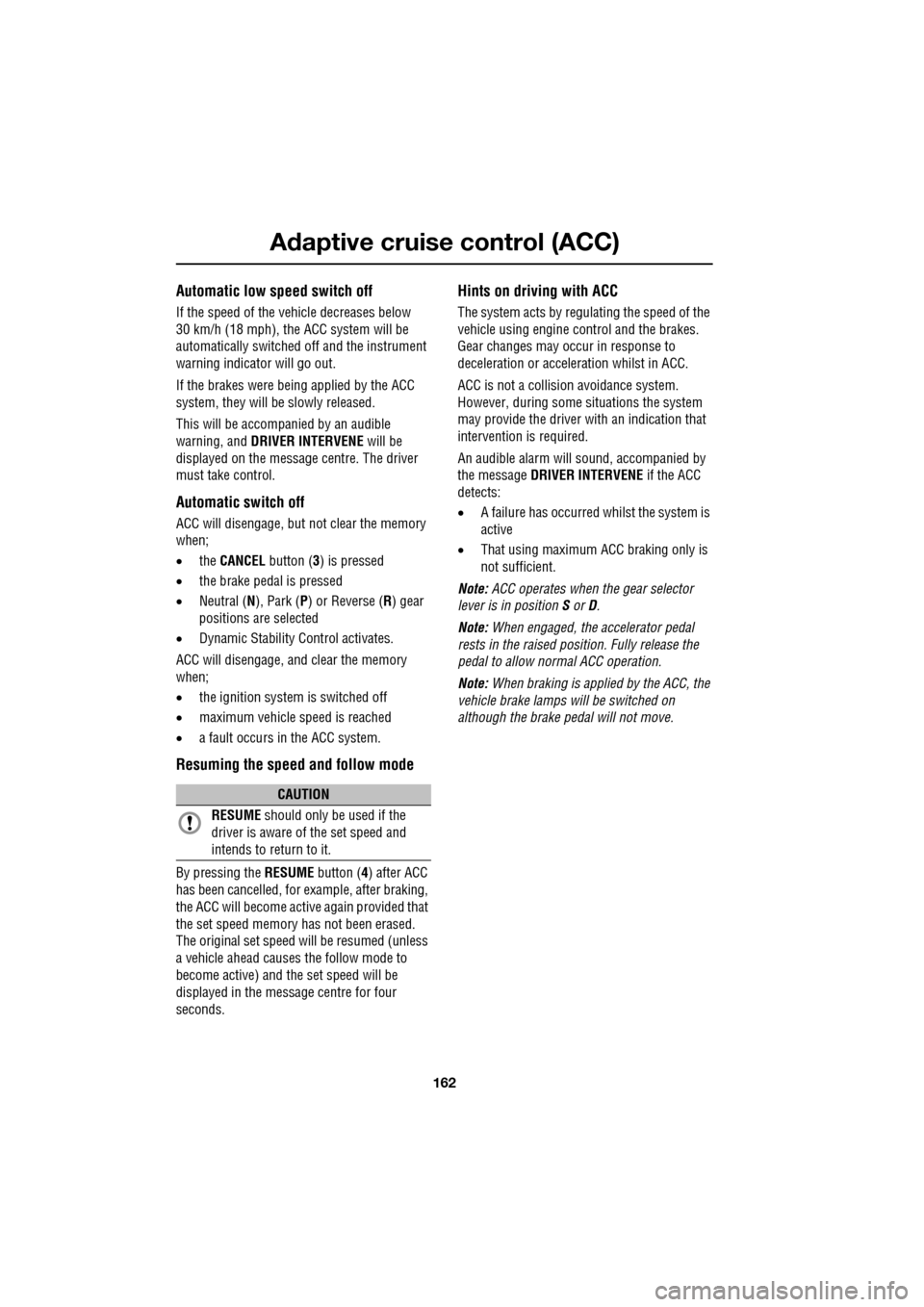
1.When driving on a different line to the
vehicle in front.
2. When a vehicle edges into your lane. The
vehicle will only be detected once it has
moved fully into your lane.
3. There may be issues with the detection of
vehicles in front when going into and
coming out of a bend.
In these cases ACC may brake late or
unexpectedly. The driver should stay alert and
intervene if necessary.
ACC malfunction
If a malfunction occurs during operation of the
system in cruise or follow modes, the ACC
system will switch off a nd cannot be used until
the fault is cleared. The message DRIVER
INTERVENE appears briefly and is then
replaced by the message CRUISE NOT
AVAILABLE . If malfunction of the ACC or any
related system occurs at any other time, the
message CRUISE NOT AVAILABLE will be
displayed. It will not be possible to activate the
ACC system in any mode.
Accumulations of dirt, snow or ice on the
sensor or cover may inhibit ACC operation.
Fitting of a vehicle front protector or metallised
badges may also affect ACC operation.
The ACC system relies on its radar to detect
objects and constantly scans ahead. If the
radar detects no objects ahead in ACC or follow
mode , then the ACC will be deactivated, the
audible alarm sounds and the message
DRIVER INTERVENE displays briefly. The
message ACC SENSOR BLOCKED will then be
displayed.
The same messages may also be displayed
while driving on open roads with few objects
for the radar to detect.
Clearing the obstruction allows the system to
return to normal operation. If the obstruction is
present when ACC is inac tive, e.g. on initial
starting or with the ACC system switched off,
the message ACC SENSOR BLOCKED will be
displayed.
Tyres other than those recommended may
have different sizes. This can affect the correct
operation of the ACC.1
2
3
E91498
Page 164 of 391

Adaptive cruise control (ACC)
164
Adverse weather conditions
During adverse weather conditions such as
heavy rain or snowfall, the sensitivity of radar
blockage detection is incr eased, so that it can
correctly detect any reduced performance
caused by a blocked sensor.
During these conditions, the warning message
ACC SENSOR BLOCKED may be displayed
more frequently, especially in areas where
there are few roadside objects for the radar to
detect.
FORWARD ALERT FUNCTION
Limited detection and warning of objects
ahead, is provided during ACC operation by the
ACC FORWARD ALERT warning. The enhanced
forward alert feature additionally provides
warnings when ACC is not engaged; if an object
is detected close ahead, then the warning tone
and message will be issued. The brakes will not
be applied. The forward alert system does not initiate any
action. The driver must
take appropriate action
when the FORWARD ALERT message is
displayed. However, the system monitors
driver actions (e.g. braking, steering or
indicating) and may not initiate the warning
display if the appropriate action has been taken
early enough.
The Forward alert function may be switched on
or off using the forward alert switch, located
where shown.
When the indicator in the
instrument panel is on, Forward
alert is active.
The sensitivity of the warning may be changed:
• Press the gap decrease button when ACC
is disengaged to displa y and then decrease
the sensitivity of the alert.
• Press the gap increase button to display
and then increase the sensitivity of the
alert.
FORWARD ALERT is
displayed in the
message centre.
WARNING
Do not use in poor visibility,
specifically fog, heavy rain, spray or
snow.
Do not use on icy or slippery roads.
JAG1303
Page 165 of 391

165
Adaptive cruise control (ACC)
ADVANCED EMERGENCY BRAKE
ASSIST
On vehicles fitted with Advanced Emergency
Brake Assist, brake response is improved
during emergency braking when a moving
vehicle is detected close ahead.
Advanced Emergency Brake Assist activates If
the risk of collision increases after the
FORWARD ALERT warning is displayed.
See FORWARD ALERT FUNCTION (page 164).
The brakes are automatica lly applied gently in
preparation for rapid braking (which may be
noticeable). If the brake pedal is then pressed
quickly, then braking is implemented fully,
even if the pressure on the pedal is light.
See HINTS ON DRIVING WITH ABS
(page 144).
Advanced Emergency Brake Assist is available
at speeds above approximately 7 km/h (5 mph)
and will function even if Forward Alert and
Adaptive Cruise Control are switched off. A
fault with the system will be indicated by the
warning FORWARD ALER T UNAVAILABLE
appearing in the mess age centre. Advanced
Emergency Brake Assist will not be available
until the fault is rectified.
WARNING
Advanced Emergency Brake Assist, is
an additional safety system and is not
intended to relieve the driver of the
responsibility for exer cising due care and
attention when driving.
CAUTION
The system may not react to slow
moving vehicles and will not react to
stationary vehicles or vehicles not
travelling in the same direction as your vehicle.
Advanced Emergency Brake Assist can
only improve braking performance if the
driver applies the brakes.
Warnings may not appear if the distance
to the vehicle ahead is very small or if
steering wheel and pedal movements
are large (e.g. to avoid a collision).
Advanced Emergency Brake Assist
utilises the same radar sensor as
Adaptive Cruise Control and Forward
Alert - the same limita tions of performance
apply.
See PRINCIPLE OF OPERATION (page 159).
See USING ACC (page 159).
See FORWARD ALERT FUNCTION
(page 164).
Page 166 of 391

Adaptive cruise control (ACC)
166
MESSAGE CENTRE INFORMATION MESSAGES
MessageMeaning
CRUISE OVERRIDE Driver is pressing the accelerator pedal overriding cruise control function. Message will disappear when accelerator pedal is released
and cruise control speed is resumed.
CRUISE CANCELLED Driver has cancelle d cruise control or is braking.
CRUISE NOT AVAILABLE Cruise control or Adaptive
Cruise Control malfunction.
DRIVER INTERVENE Action by the driver to apply the brakes is required.
SETSPEED XXX KM/H Speed set fo r Adaptive Cruise Control.
GAP Set the distance (time gap).
RADAR SENSOR BLOCKED Clean the front of the vehicle in the area of the sensor unit (the sensor
is mounted centrally behind the
bumper cover above the cooling
aperture).
This message may also appear under the following conditions:
If stone chip protect ion has been applied.
On rural roads with few roadside objects.
In heavy rain.
FORWARD ALERT OFF Forward alert feature has been switched off.
WARNING: A warning will not be given for objects detected in
the vehicle’s path of travel.
FORWARD ALERT Forward Alert feature has been switched on or the setting changed. A
warning will be given for objects detected in the vehicle path of travel.
A longer gap indicates that the system will warn when detected objects
are further away than the previous setting.
Action by the driver to ap ply the brakes is required.
FORWARD ALERT UNAVAILABLE Advanced emergency brake assist
and Forward Alert functions are
unavailable.
Page 245 of 391

245
Fuses
FUSE SPECIFICATION CHART
Engine compartment fuse box
Fuse No Rating (amps) Fuse
Colour Circuit
F1 - - Not used.
F2 - - Not used.
F3 20A Blue Emissions system (petrol only).
F4 20A Blue Emissions system (petrol only).
F5 40A Green Anti-lock brake pump.
F6 30A Pink Power wash pump.
F7 - - Not used.
F8 - - Not used.
F9 50A Red Engine management.
F10 - - Not used.
F11 - - Not used.
F12 50A Red Secondary air in jection (petrol only).
F13 30A Pink Wipers.
F14 30A Pink Starter solenoid.
F15 40A Green Screen heater.
F16 40A Green Screen heater.
F17 80A Black Radiator fan. (V6 petrol only)
F18 60A Yellow Glow plugs (diesel only).
F19 - - Not used.
F20 15A Blue Horn.
F21 25A Clear Anti-lock brakes.
F22 15A Blue Cigar lighter.
F23 - - Not used.
F24 5A Tan Adaptive cruise control.
F25 10A Red Anti-lock brakes.
F26 10A Red Engine manage ment. JaguarDrive selector. Transmission
control module.
F27 5A Tan Diesel - Engine management.
F27 5A Tan Petrol - Secondary air injection.