Page 98 of 273
1
FEATURES OF YOUR HYUNDAI
87
HJM2067
STEERING WHEEL TILT LEVER!
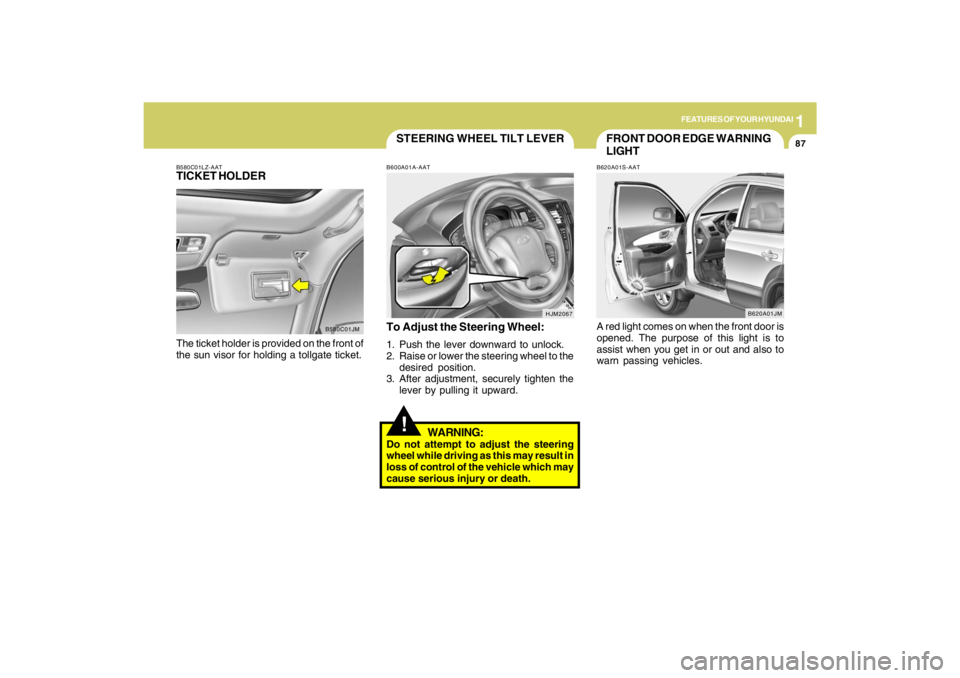
To Adjust the Steering Wheel:1. Push the lever downward to unlock.
2. Raise or lower the steering wheel to the
desired position.
3. After adjustment, securely tighten the
lever by pulling it upward.
WARNING:
Do not attempt to adjust the steering
wheel while driving as this may result in
loss of control of the vehicle which may
cause serious injury or death.B600A01A-AAT
B580C01LZ-AATTICKET HOLDERThe ticket holder is provided on the front of
the sun visor for holding a tollgate ticket.
B580C01JM
FRONT DOOR EDGE WARNING
LIGHTB620A01S-AATA red light comes on when the front door is
opened. The purpose of this light is to
assist when you get in or out and also to
warn passing vehicles.
B620A01JM
Page 100 of 273
1
FEATURES OF YOUR HYUNDAI
89
!
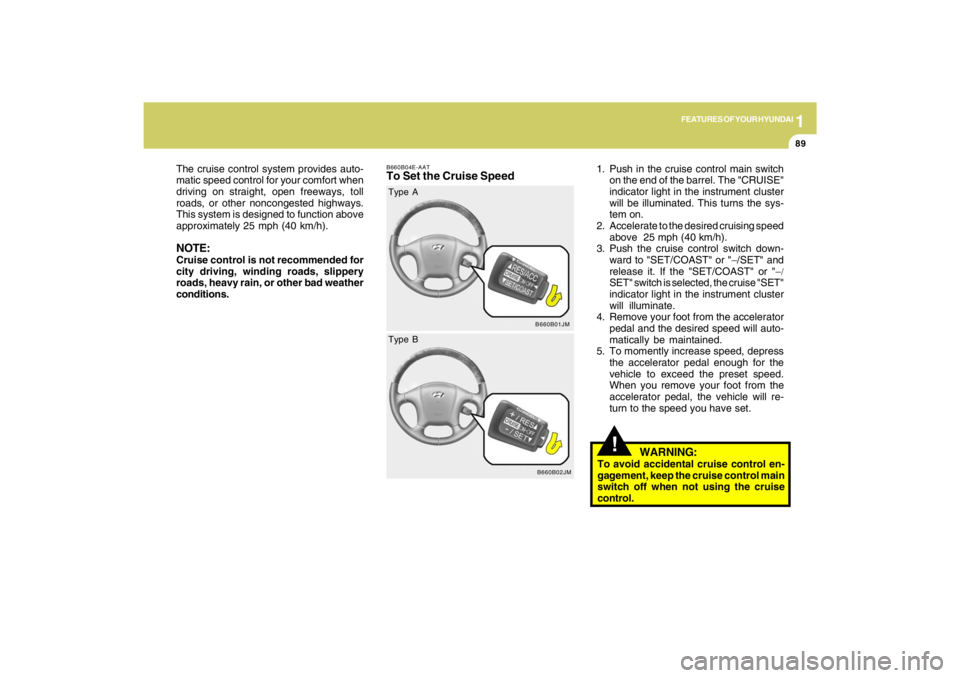
B660B04E-AATTo Set the Cruise Speed
1. Push in the cruise control main switch
on the end of the barrel. The "CRUISE"
indicator light in the instrument cluster
will be illuminated. This turns the sys-
tem on.
2. Accelerate to the desired cruising speed
above 25 mph (40 km/h).
3. Push the cruise control switch down-
ward to "SET/COAST" or "−/SET" and
release it. If the "SET/COAST" or "−/
SET" switch is selected, the cruise "SET"
indicator light in the instrument cluster
will illuminate.
4. Remove your foot from the accelerator
pedal and the desired speed will auto-
matically be maintained.
5. To momently increase speed, depress
the accelerator pedal enough for the
vehicle to exceed the preset speed.
When you remove your foot from the
accelerator pedal, the vehicle will re-
turn to the speed you have set. The cruise control system provides auto-
matic speed control for your comfort when
driving on straight, open freeways, toll
roads, or other noncongested highways.
This system is designed to function above
approximately 25 mph (40 km/h).
NOTE:Cruise control is not recommended for
city driving, winding roads, slippery
roads, heavy rain, or other bad weather
conditions.
B660B01JM
Type A
B660B02JM
Type B
WARNING:
To avoid accidental cruise control en-
gagement, keep the cruise control main
switch off when not using the cruise
control.
Page 102 of 273
1
FEATURES OF YOUR HYUNDAI
91
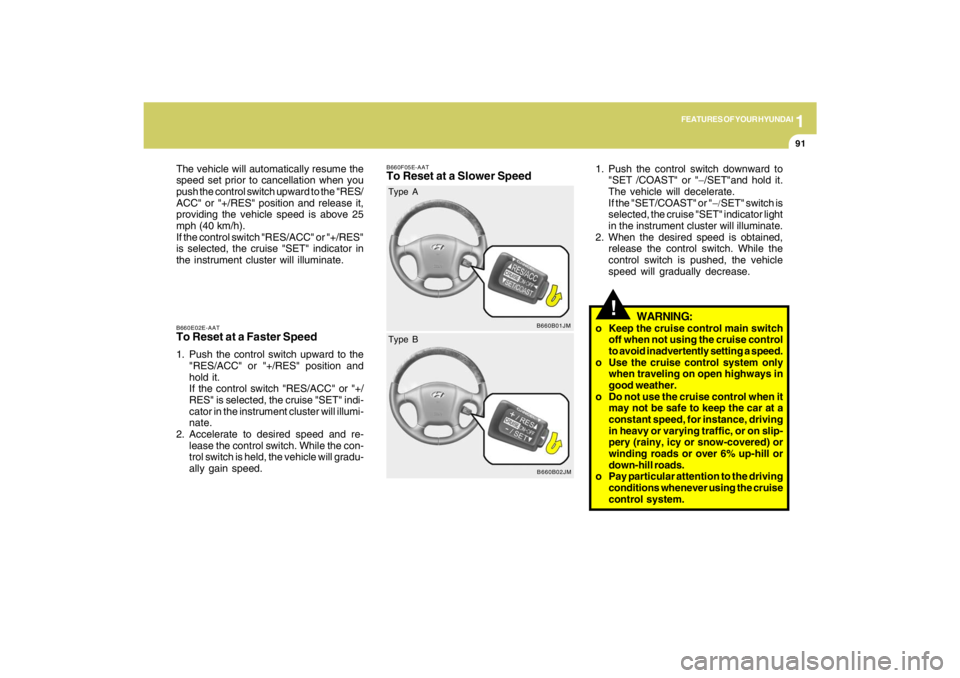
B660E02E-AATTo Reset at a Faster Speed1. Push the control switch upward to the
"RES/ACC" or "+/RES" position and
hold it.
If the control switch "RES/ACC" or "+/
RES" is selected, the cruise "SET" indi-
cator in the instrument cluster will illumi-
nate.
2. Accelerate to desired speed and re-
lease the control switch. While the con-
trol switch is held, the vehicle will gradu-
ally gain speed. The vehicle will automatically resume the
speed set prior to cancellation when you
push the control switch upward to the "RES/
ACC" or "+/RES" position and release it,
providing the vehicle speed is above 25
mph (40 km/h).
If the control switch "RES/ACC" or "+/RES"
is selected, the cruise "SET" indicator in
the instrument cluster will illuminate.
B660F05E-AATTo Reset at a Slower Speed
1. Push the control switch downward to
"SET /COAST" or "−/SET"and hold it.
The vehicle will decelerate.
If the "SET/COAST" or "−/SET" switch is
selected, the cruise "SET" indicator light
in the instrument cluster will illuminate.
2. When the desired speed is obtained,
release the control switch. While the
control switch is pushed, the vehicle
speed will gradually decrease.
!
WARNING:
o Keep the cruise control main switch
off when not using the cruise control
to avoid inadvertently setting a speed.
o Use the cruise control system only
when traveling on open highways in
good weather.
o Do not use the cruise control when it
may not be safe to keep the car at a
constant speed, for instance, driving
in heavy or varying traffic, or on slip-
pery (rainy, icy or snow-covered) or
winding roads or over 6% up-hill or
down-hill roads.
o Pay particular attention to the driving
conditions whenever using the cruise
control system.
B660B01JM
Type A
B660B02JM
Type B
Page 105 of 273
1FEATURES OF YOUR HYUNDAI94
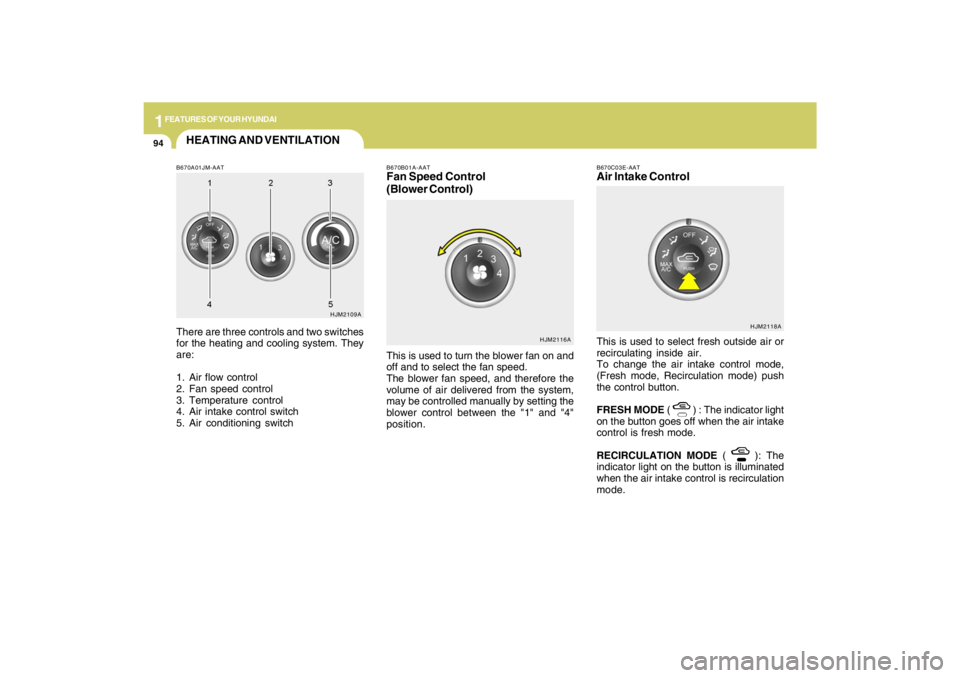
B670A01JM-AATThere are three controls and two switches
for the heating and cooling system. They
are:
1. Air flow control
2. Fan speed control
3. Temperature control
4. Air intake control switch
5. Air conditioning switch
HJM2109A
HJM2116A B670B01A-AAT
Fan Speed Control
(Blower Control)This is used to turn the blower fan on and
off and to select the fan speed.
The blower fan speed, and therefore the
volume of air delivered from the system,
may be controlled manually by setting the
blower control between the "1" and "4"
position.
HEATING AND VENTILATION
B670C03E-AATAir Intake ControlThis is used to select fresh outside air or
recirculating inside air.
To change the air intake control mode,
(Fresh mode, Recirculation mode) push
the control button.
FRESH MODE (
) : The indicator light
on the button goes off when the air intake
control is fresh mode.
RECIRCULATION MODE (
): The
indicator light on the button is illuminated
when the air intake control is recirculation
mode.HJM2118A
Page 111 of 273
1FEATURES OF YOUR HYUNDAI
100
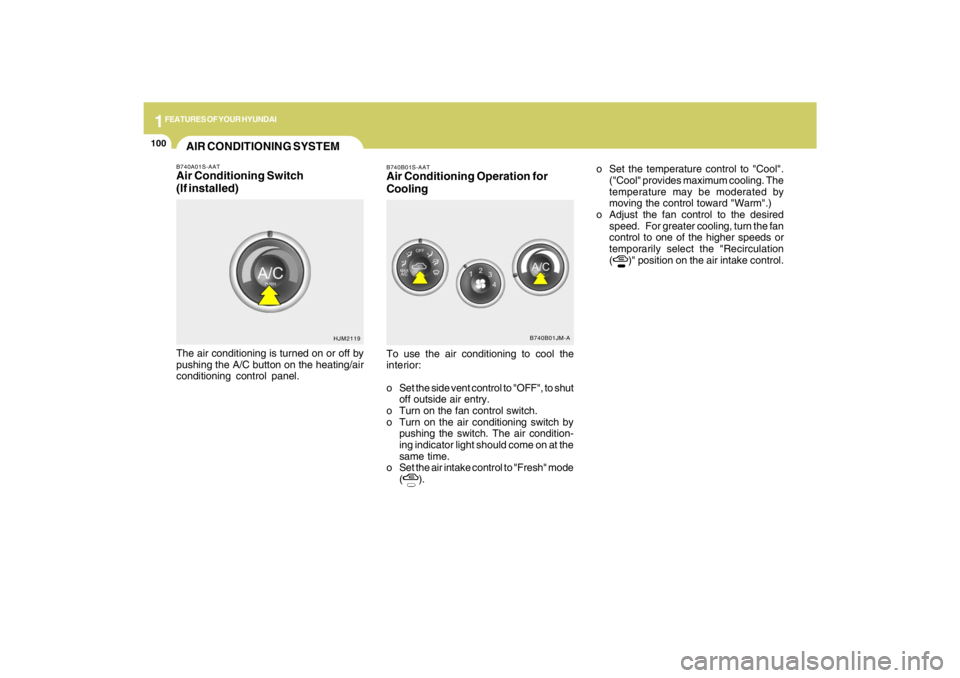
B740B01S-AATAir Conditioning Operation for
CoolingTo use the air conditioning to cool the
interior:
o Set the side vent control to "OFF", to shut
off outside air entry.
o Turn on the fan control switch.
o Turn on the air conditioning switch by
pushing the switch. The air condition-
ing indicator light should come on at the
same time.
o Set the air intake control to "Fresh" mode
(
).o Set the temperature control to "Cool".
("Cool" provides maximum cooling. The
temperature may be moderated by
moving the control toward "Warm".)
o Adjust the fan control to the desired
speed. For greater cooling, turn the fan
control to one of the higher speeds or
temporarily select the "Recirculation
(
)" position on the air intake control.
B740B01JM-A
AIR CONDITIONING SYSTEMB740A01S-AATAir Conditioning Switch
(If installed)The air conditioning is turned on or off by
pushing the A/C button on the heating/air
conditioning control panel.
HJM2119
Page 113 of 273

1FEATURES OF YOUR HYUNDAI
102
B740D01A-AATOperation Tipso If the interior of the car is hot when you
first get in, open the windows for a few
minutes to expel the hot air.
o When you are using the air conditioning
system, keep all windows closed to
keep hot air out.
o When moving slowly, as in heavy traffic,
shift to a lower gear. This increases
engine speed, which in turn increases
the speed of the air conditioning com-
pressor.
o On steep grades, turn the air condition-
ing off to avoid the possibility of the
engine over-heating.
o During winter months or in periods when
the air conditioning is not used regu-
larly, run the air conditioning once ev-
ery month for a few minutes. This will
help circulate the lubricants and keep
your system in peak operating condi-
tion.
B740C01S-AATDehumidified HeatingFor dehumidified heating:
o Turn on the fan control switch.
o Turn on the air conditioning switch. The
air conditioning indicator light should
come on at the same time.
o Set the air intake control to the "Fresh"
mode (
).
o Set the air flow control to the "Face" (
).
o Adjust the fan control to the desired
speed.
o For more rapid action, set the fan at one
of the higher speeds.
o Adjust the temperature control to pro-
vide the desired amount of warmth.
Page 115 of 273
1FEATURES OF YOUR HYUNDAI
104
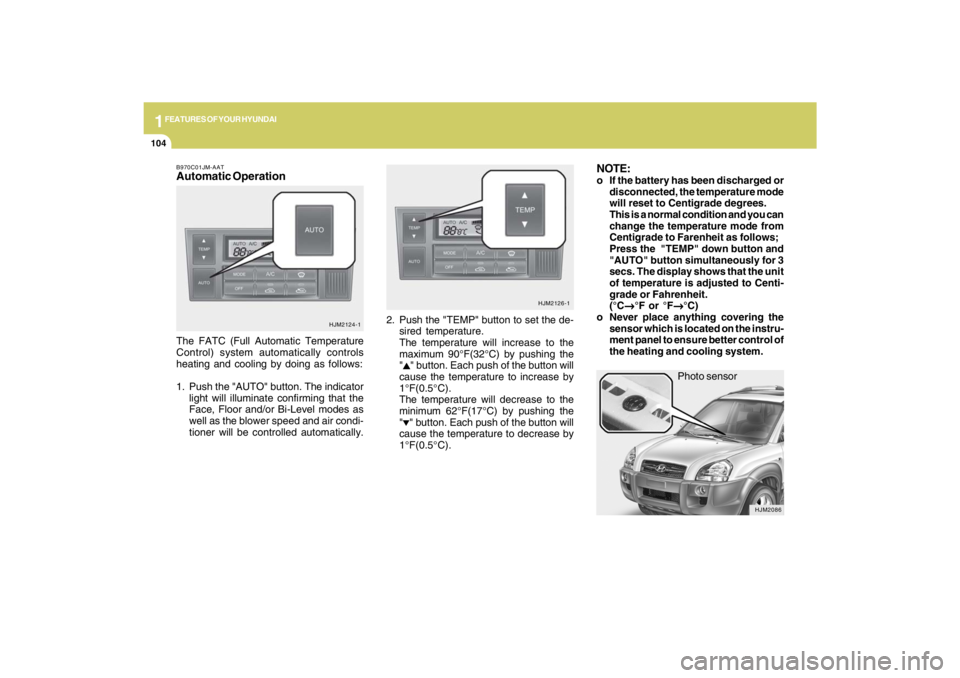
Photo sensor
HJM2086
NOTE:o If the battery has been discharged or
disconnected, the temperature mode
will reset to Centigrade degrees.
This is a normal condition and you can
change the temperature mode from
Centigrade to Farenheit as follows;
Press the "TEMP" down button and
"AUTO" button simultaneously for 3
secs. The display shows that the unit
of temperature is adjusted to Centi-
grade or Fahrenheit.
(°C
→ →→ →
→°F or °F
→ →→ →
→°C)
o Never place anything covering the
sensor which is located on the instru-
ment panel to ensure better control of
the heating and cooling system.
B970C01JM-AATAutomatic OperationThe FATC (Full Automatic Temperature
Control) system automatically controls
heating and cooling by doing as follows:
1. Push the "AUTO" button. The indicator
light will illuminate confirming that the
Face, Floor and/or Bi-Level modes as
well as the blower speed and air condi-
tioner will be controlled automatically.2. Push the "TEMP" button to set the de-
sired temperature.
The temperature will increase to the
maximum 90°F(32°C) by pushing the
"
" button. Each push of the button will
cause the temperature to increase by
1°F(0.5°C).
The temperature will decrease to the
minimum 62°F(17°C) by pushing the
"" button. Each push of the button will
cause the temperature to decrease by
1°F(0.5°C).
HJM2124-1HJM2126-1
Page 116 of 273
1
FEATURES OF YOUR HYUNDAI
105105105105105
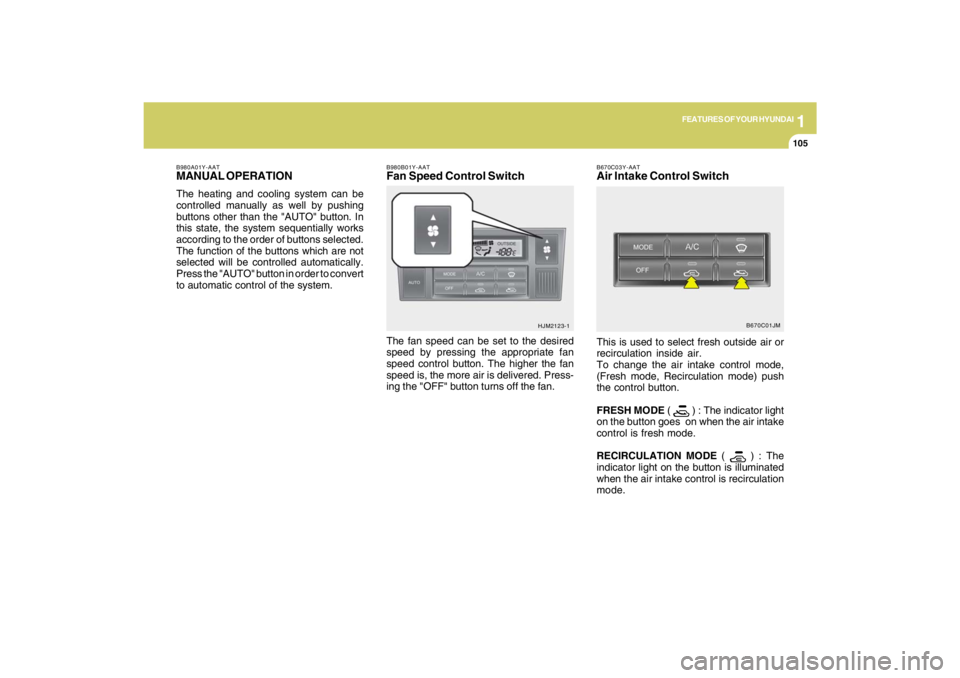
B980B01Y-AATFan Speed Control SwitchThe fan speed can be set to the desired
speed by pressing the appropriate fan
speed control button. The higher the fan
speed is, the more air is delivered. Press-
ing the "OFF" button turns off the fan.
HJM2123-1 B980A01Y-AAT
MANUAL OPERATIONThe heating and cooling system can be
controlled manually as well by pushing
buttons other than the "AUTO" button. In
this state, the system sequentially works
according to the order of buttons selected.
The function of the buttons which are not
selected will be controlled automatically.
Press the "AUTO" button in order to convert
to automatic control of the system.
B670C03Y-AATAir Intake Control SwitchThis is used to select fresh outside air or
recirculation inside air.
To change the air intake control mode,
(Fresh mode, Recirculation mode) push
the control button.
FRESH MODE (
) : The indicator light
on the button goes on when the air intake
control is fresh mode.
RECIRCULATION MODE (
) : The
indicator light on the button is illuminated
when the air intake control is recirculation
mode.B670C01JM