FEATURES OF YOUR HYUNDAI 1- 43
2. Trip odometer
o This mode indicates the drive dis-
tance travelled since the last drive time reset.
o Pressing the trip switch for more
than 1 second, when the drive dis-tance is being displayed, clears the drive distance to zero.
o Refer to the explanation of the trip computer (see page 1-46, Drive Dis-tance).
B TYPE (WITHOUT TRIP COMPUTER) Function of digital odometer/trip odometer
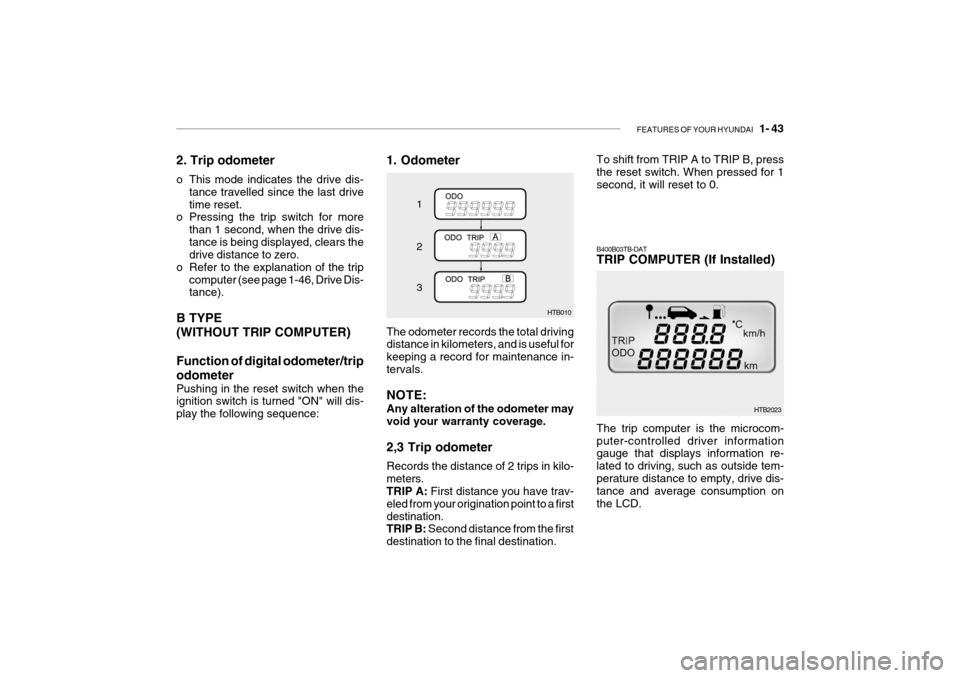
Pushing in the reset switch when the ignition switch is turned "ON" will dis- play the following sequence: 1. Odometer
HTB010
1 2 3
The odometer records the total driving distance in kilometers, and is useful for keeping a record for maintenance in-tervals. NOTE: Any alteration of the odometer may void your warranty coverage. 2,3 Trip odometer Records the distance of 2 trips in kilo- meters. TRIP A: First distance you have trav-
eled from your origination point to a first destination. TRIP B: Second distance from the first
destination to the final destination. To shift from TRIP A to TRIP B, pressthe reset switch. When pressed for 1 second, it will reset to 0.
The trip computer is the microcom- puter-controlled driver information gauge that displays information re- lated to driving, such as outside tem-perature distance to empty, drive dis- tance and average consumption on the LCD.
B400B03TB-DAT TRIP COMPUTER (If Installed)
HTB2023