Page 109 of 427
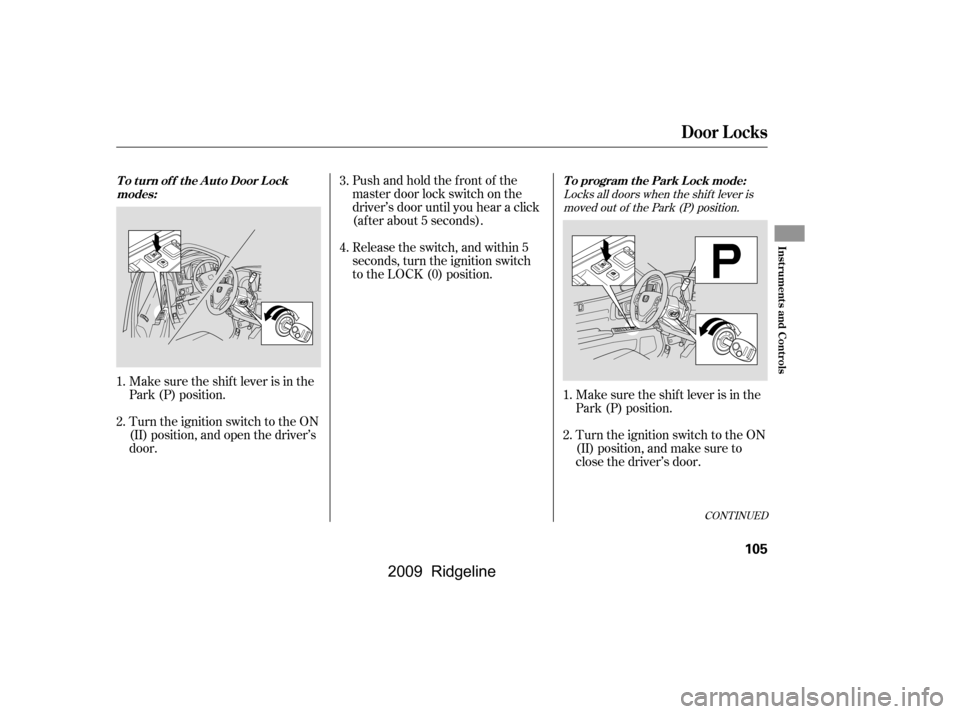
Locks all doors when the shif t lever ismoved out of the Park (P) position.
Pushandholdthefrontof the
master door lock switch on the
driver’s door until you hear a click
(af ter about 5 seconds).
Release the switch, and within 5
seconds, turn the ignition switch
to the LOCK (0) position.
Make sure the shif t lever is in the
Park (P) position.
Turn the ignition switch to the ON
(II) position, and open the driver’s
door. Make sure the shif t lever is in the
Park (P) position.
Turn the ignition switch to the ON
(II) position, and make sure to
close the driver’s door.
1.
2.
1.
2. 3.
4.
CONT INUED
Door L ocks
T o t urn of f t he A ut o Door L ock
modes: To program the Park Lock mode:
Inst rument s and Cont rols
105
�\f���—�\f���—�\f���y�
���������\f�\f�y���
�(���������\f�y�\f�
�
�\f�y
2009 Ridgeline
Page 110 of 427
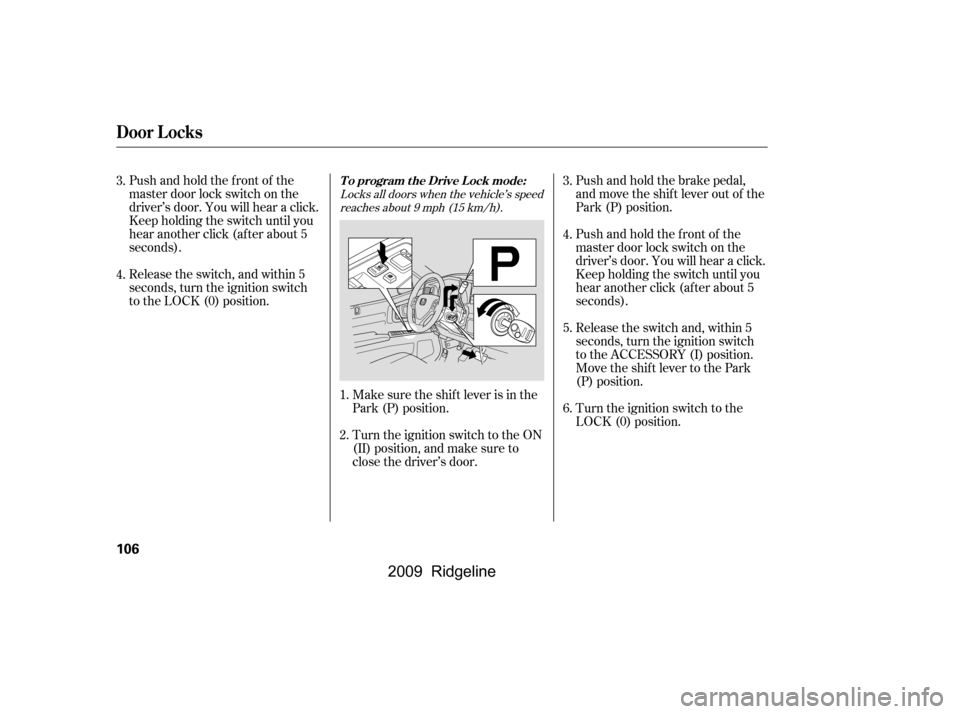
Push and hold the brake pedal,
and move the shif t lever out of the
Park (P) position.
Release the switch and, within 5
seconds, turn the ignition switch
to the ACCESSORY (I) position.
Move the shift lever to the Park
(P) position.
Pushandholdthefrontof the
master door lock switch on the
driver’s door. You will hear a click.
Keep holding the switch until you
hear another click (after about 5
seconds).
Release the switch, and within 5
seconds, turn the ignition switch
to the LOCK (0) position.
Pushandholdthefrontof the
master door lock switch on the
driver’s door. You will hear a click.
Keep holding the switch until you
hear another click (after about 5
seconds).
Turn the ignition switch to the
LOCK (0) position.
Make sure the shif t lever is in the
Park (P) position.
Turn the ignition switch to the ON
(II) position, and make sure to
close the driver’s door.
1.
2. 3.
5.
4.
6.
3.
4.
Locks all doors when the vehicle’s speed
reaches about 9 mph (15 km/h).
T o program t he Drive L ock mode:
Door L ocks
106
�\f���—�\f���—�\f���y�
���������\f���y���
�(���������\f�y�\f�
�
�
�y
2009 Ridgeline
Page 111 of 427
CONT INUED
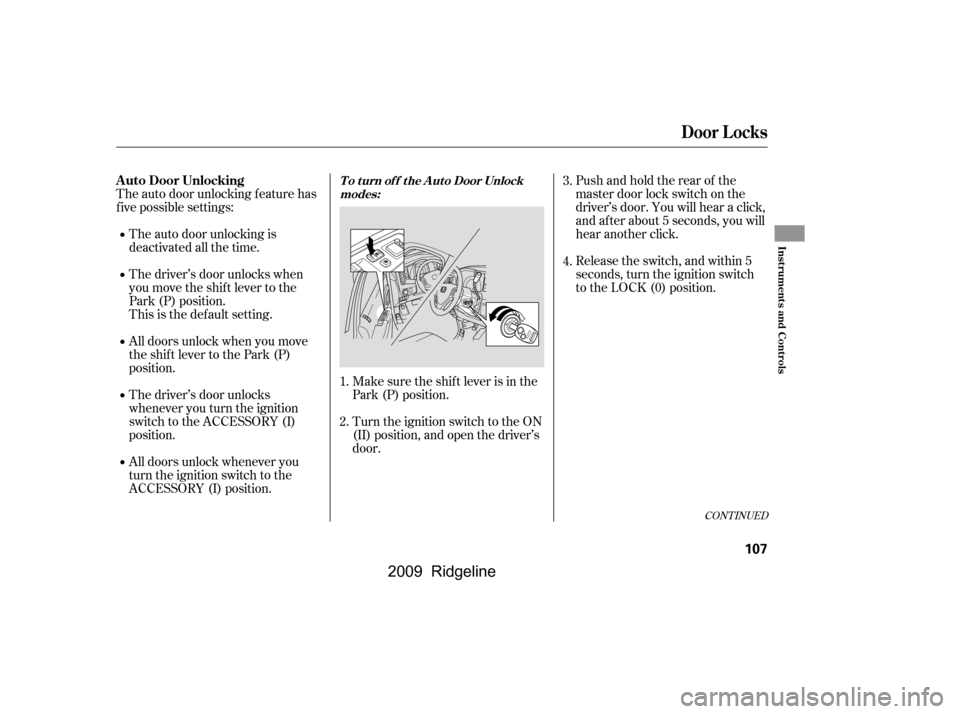
Pushandholdtherearof the
master door lock switch on the
driver’s door. You will hear a click,
and after about 5 seconds, you will
hear another click.
The auto door unlocking f eature has
f ive possible settings:
The driver’s door unlocks when
you move the shif t lever to the
Park (P) position.
The auto door unlocking is
deactivated all the time. Release the switch, and within 5
seconds, turn the ignition switch
to the LOCK (0) position.
All doors unlock whenever you
turn the ignition switch to the
ACCESSORY (I) position.
The driver’s door unlocks
whenever you turn the ignition
switch to the ACCESSORY (I)
position.
All doors unlock when you move
the shif t lever to the Park (P)
position.
This is the def ault setting. Make sure the shif t lever is in the
Park (P) position.
Turn the ignition switch to the ON
(II) position, and open the driver’s
door.
1.
2. 3.
4.T o t urn of f t he A ut o Door Unlock
modes:
Door L ocks
A uto Door Unlocking
Inst rument s and Cont rols
107
�\f���—�\f���—�\f���y�
���������
���y���
�(���������\f�y�\f�
�
���y
2009 Ridgeline
Page 112 of 427
�µ
�µ
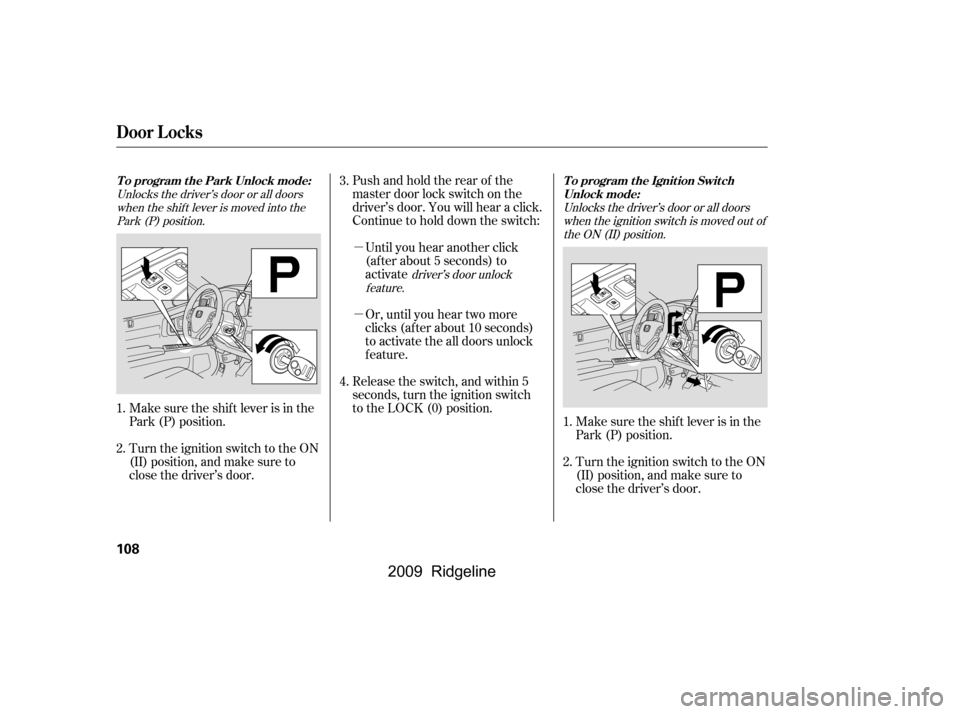
Pushandholdtherearof the
master door lock switch on the
driver’s door. You will hear a click.
Continue to hold down the switch:Or, until you hear two more
clicks (af ter about 10 seconds)
to activate the all doors unlock
feature.
Release the switch, and within 5
seconds, turn the ignition switch
to the LOCK (0) position. Until you hear another click
(af ter about 5 seconds) to
activate
Make sure the shif t lever is in the
Park (P) position.
Turn the ignition switch to the ON
(II) position, and make sure to
close the driver’s door. Make sure the shif t lever is in the
Park (P) position.
Turn the ignition switch to the ON
(II) position, and make sure to
close the driver’s door.
1.
2.
4.
3.
1.
2.
Unlocks the driver’s door or all doorswhen the shif t lever is moved into thePark (P) position.
driver’s door unlock
feature. Unlocks the driver’s door or all doors
when the ignition switch is moved out ofthe ON (II) position.
Door L ocks
To program the Park Unlock mode: To program the Ignition Switch
Unlock mode:
108
�\f���—�\f���—�\f���y�
�����������\f�y���
�(���������\f�y�\f�
�
���y
2009 Ridgeline
Page 113 of 427
�µ
�µOr, until you hear two moreclicks (af ter about 10 seconds)
to activate the all doors unlock
feature.
Until you hear another click
(af ter about 5 seconds) to
activate the driver’s door unlock
feature.
Pushandholdtherearof the
master door lock switch on the
driver’s door. You will hear a click.
Continue to hold the switch:
Release the switch and, within 5
seconds, turn the ignition switch
to the ACCESSORY (I) position.
Move the shift lever to the Park
(P) position.
Turn the ignition switch to the
LOCK (0) position.If your vehicle’s battery is removed
or goes dead, the auto door lock/
unlock setting is reset to the
deactivated mode.
Push and hold the brake pedal,
then move the shift lever out of
the Park (P) position.
5.
4. 6.
3.
Door L ocks
Inst rument s and Cont rols
109
�\f���—�\f���—�\f���y�
�������������y���
�(���������\f�y�\f�
�
���y
2009 Ridgeline
Page 114 of 427
�µ
�µ �µ
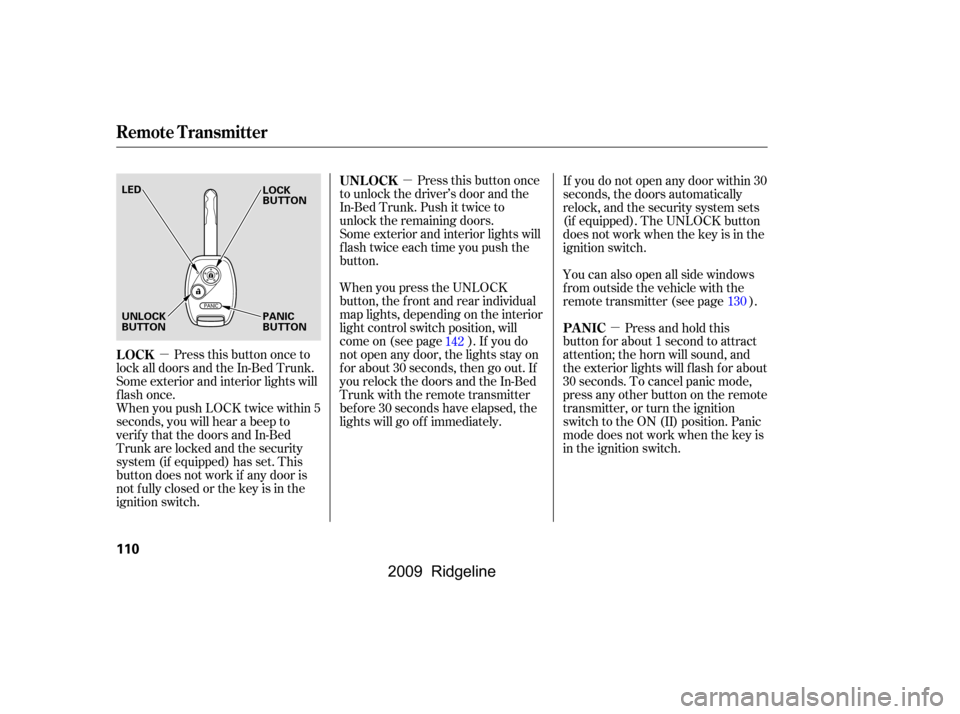
Press this button once
to unlock the driver’s door and the
In-Bed Trunk. Push it twice to
unlock the remaining doors.
Some exterior and interior lights will
f lash twice each time you push the
button.
When you press the UNLOCK
button, the f ront and rear individual
map lights, depending on the interior
light control switch position, will
come on (see page ). If you do
not open any door, the lights stay on
f or about 30 seconds, then go out. If
you relock the doors and the In-Bed
Trunk with the remote transmitter
bef ore 30 seconds have elapsed, the
lights will go of f immediately.
Press this button once to
lock all doors and the In-Bed Trunk.
Some exterior and interior lights will
flash once.
When you push LOCK twice within 5
seconds, you will hear a beep to
verify that the doors and In-Bed
Trunk are locked and the security
system (if equipped) has set. This
button does not work if any door is
not f ully closed or the key is in the
ignition switch. Press and hold this
button for about 1 second to attract
attention; the horn will sound, and
the exterior lights will f lash f or about
30 seconds. To cancel panic mode,
press any other button on the remote
transmitter, or turn the ignition
switch to the ON (II) position. Panic
mode does not work when the key is
in the ignition switch.
If you do not open any door within 30
seconds, the doors automatically
relock, and the security system sets
(if equipped). The UNLOCK button
does not work when the key is in the
ignition switch.
You can also open all side windows
f rom outside the vehicle with the
remote transmitter (see page ).
142 130
UNL OCK
LOCK PA NIC
Remote Transmitter
110
LED
UNLOCK
BUTTON
PANIC
BUTTON
LOCK
BUTTON
�\f���—�\f���—�\f���y�
�������������y���
�(���������\f�y�\f�
�
���y
2009 Ridgeline
Page 149 of 427

The heating and air conditioning
system in your vehicle provides a
comf ortable driving environment in
all weather conditions.
The standard audio system has
many f eatures. This section
describes those f eatures and how to
use them.
Your vehicle has an anti-theft audio
system that requires a code number
to enable it.
The security system helps to dis-
courage vandalism and thef t of your
vehicle.
Theclimatecontrolsystemandthe
audio system have a voice control
feature. Refer to the navigation
system manual f or more inf ormation...............
Vents, Heating and A/C .146
...............
Climate Control System .152
..........
Playing the AM/FM Radio .159
............
AM/FM Radio Reception .165
.
Playing the XM
Satellite Radio .167
...................................
Playing CDs .173
.......................................
CD Player .175
CD Changer (Models without navigation ..................................
system) .181
CD Changer (Models with navigation ..................................
system) .189
....................
Protecting Your CDs .198
CD Player/Changer Error ...................................
Messages .201
................
Remote Audio Controls .202
......................
Auxiliary Input Jack .203
.................
Radio Thef t Protection .204
..........................
Setting the Clock .205
............................
Security System .206
...............................
Cruise Control .207
.........................................
Compass .210
HomeLink
Universal ................................
Transceiver .213
.......
Bluetooth
HandsFreeLink.217 ...
Rearview Camera and Monitor .246
On RTS, RTL models, and Canadian
EX-L models
On models with navigation system
Features
Features
145
�\f���—�\f���—�\f���y���\f��\f������
�y���
�(���������\f�y�\f�
���\f�y
2009 Ridgeline
Page 165 of 427

�µ
�µ�µ �µ�µ
�µ
You can use any of f ive methods to
f ind radio stations on the selected
band: tune, seek, scan, the preset
bars, and auto select.
Use the TUNE bar to tune
the radio to a desired f requency.
Press the side of the bar to tune
to a higher f requency, and press the side to tune to a lower
f requency.
The scan f unction samples
all stations with strong signals on the
selected band. To activate it, press
the SCAN button, then release it.
You will see SCAN in the display.
The system will scan f or a station with a strong signal. When it f inds
one, it will stop and play that station
f or about 10 seconds.
If you do nothing, the system will
scan f or the next strong station and
play it f or 10 seconds. When it plays
a station that you want to listen to,
press the SCAN button again.
Repeat steps 1 through 3 to store a
total of six stations on AM and
twelve stations on FM.
Pick a preset number (1 6), and
hold it until you hear a beep.
Usethetune,seek,orscan
function to tune the radio to a
desired station.
The ignition switch must be in the
ACCESSORY (I) or ON (II) position.
Turn the system on by pushing the
PWR button or the AM/FM button.
Adjust the volume by turning the
volume knob.
Pushing the AUDIO button will also
turn on the system (see page ).
The band and f requency that the
radio was last tuned to are displayed.
To change bands, press the AM/FM
button. On the FM band, ST will be
displayed if the station is
broadcasting in stereo. Stereo
reproduction in AM is not available.
On the AM band, AM noise
reduction turns on automatically.
Each side of the bars (1
6) can store one f requency on AM
and two f requencies on FM. Select the desired band, AM or
FM. FM1 and FM2 let you store
six stations each.
The SEEK f unction
searches up and down from the
current f requency to f ind a station
with a strong signal. To activate it,
press the or side of the
SEEK/SKIP bar, then release it. 1.
2.
3.
4.
163
On models with navigation system
T o Play the A M/FM Radio
T o Select a Station
TUNE
SCAN Preset
SEEK
Playing the AM/FM Radio
Features
161
�\f���—�\f���—�\f���y���\f��\f������\f�y���
�(���������\f�y�\f�
�����y
2009 Ridgeline