Page 285 of 427

CONT INUED
If you think you can saf ely drive a
short distance to a service station,
proceed slowly to the station, then
inflate the tire to the recommended
pressure.
If the tire is f lat, or if the tire
pressure is too low to continue
driving, replace the tire with the
compact spare tire (see page ).
Driving on a signif icantly under-
inf lated tire causes the tire to
overheat and can lead to tire failure.
Under-inf lation also reduces f uel
efficiency and tire tread life, and may
af f ect the vehicle’s handling and
stopping ability.
Becausetirepressurevariesby
temperature and other conditions,
the low tire pressure/TPMS
indicator may come on unexpectedly.
When the low tire pressure/TPMS
indicator is on, one or more of your
tires is signif icantly underinf lated.
Youshouldstopandcheckyourtires
as soon as possible, and inflate them
to the proper pressure as indicated
on the vehicle’s tire inf ormation
placard.
It is possible that the pressures
shown on the multi-inf ormation
display and the pressures you
manually measure are slightly
dif f erent.
If the dif f erence is signif icant or you
cannot make the low tire pressure/
TPMS indicator and message on the
multi-inf ormation display go out af ter
inf lating the tires to the specif ied
values, have your dealer check the
system as soon as possible.
Each tire has its own pressure
sensor. If the air pressure of a tire
becomes signif icantly low, the
sensor in that tire immediately sends
a signal that causes the low tire
pressure/TPMS indicator in the
instrument panel to come on. If this
happens, you will see which tire is
losing pressure on the multi-
inf ormation display along with a
‘‘CHECK TIRE PRESSURE’’
message.
Your vehicle is equipped with a tire
pressure monitoring system (TPMS)
that turns on every time you start the
engine and monitors the pressure in
your tires while driving.
361On models with navigation systemLow Tire Pressure/
TPMS Indicator
Tire Pressure Monitoring System (TPMS)
Driving
281
�\f���—�\f���—�\f���y���\f�����������y���
�(���������\f�y�\f�������y
2009 Ridgeline
Page 287 of 427
CONT INUED
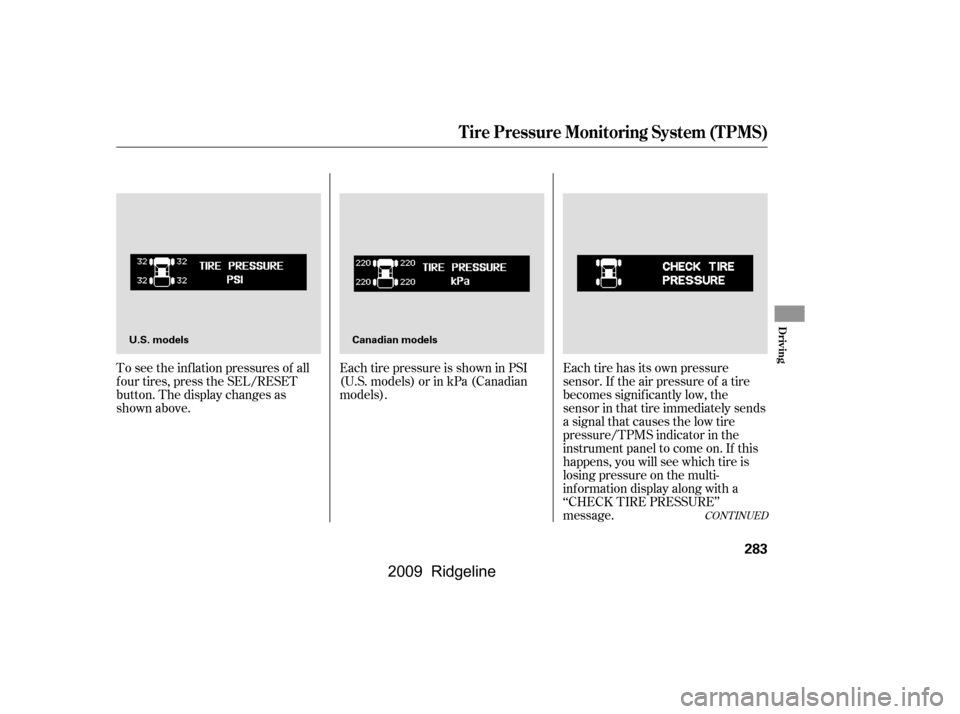
To see the inf lation pressures of all
f our tires, press the SEL/RESET
button. The display changes as
shown above.Each tire pressure is shown in PSI
(U.S. models) or in kPa (Canadian
models).
Each tire has its own pressure
sensor. If the air pressure of a tire
becomes signif icantly low, the
sensor in that tire immediately sends
a signal that causes the low tire
pressure/TPMS indicator in the
instrument panel to come on. If this
happens, you will see which tire is
losing pressure on the multi-
inf ormation display along with a
‘‘CHECK TIRE PRESSURE’’
message.
Tire Pressure Monitoring System (TPMS)
Driving
283
U.S. models
Canadian models
�\f���—�\f���—�\f���y���\f�����������y���
�(���������\f�y�\f�������y
2009 Ridgeline
Page 292 of 427

Your vehicle is equipped with disc
brakes at all f our wheels. A power
assist helps reduce the ef f ort needed
on the brake pedal. The emergency
brake assist system increases the
stopping f orce when you depress the
brake pedal hard in an emergency
situation. The anti-lock brake system
(ABS) helps you retain steering
control when braking very hard.
Resting your f oot on the pedal keeps
the brakes applied lightly, builds up
heat, and reduces their ef f ectiveness
and reduces brake pad life. In
addition, f uel economy can be
reduced. It also keeps your brake
lights on all the time, conf using
drivers behind you.Constant application of the brakes
when going down a long hill builds
up heat and reduces their ef f ective-
ness. Use the engine to assist the
brakes by taking your f oot of f the
accelerator and downshif ting to a
lower gear.
Check the brakes after driving
through deep water. Apply the
brakes moderately to see if they f eel
normal. If not, apply them gently and
f requently until they do. Be extra
cautious and alert in your driving.
The hydraulic system that operates
the brakes has two separate circuits.
Each circuit works diagonally across
the vehicle (the lef t-f ront brake is
connected with the right-rear brake,
etc.). If one circuit should develop a
problem, you will still have braking
at two wheels.
If the brake pads need replacing, you
will hear a distinctive, metallic
screeching sound when you apply
the brake pedal. If you do not have
the brake pads replaced, they will
screech all the time. It is normal f or
the brakes to occasionally squeal or
squeak when you apply them.
Braking System Design
Brake Pad Wear Indicators
Braking System
288
�\f���—�\f���—�\f���y���\f���������
�y���
�(���������\f�y�\f�������y
2009 Ridgeline
Page 304 of 427
�´
Trailer lights and equipment must
comply with f ederal, state, province,
and local regulations. Check trailer
light requirements f or the areas
where you plan to tow, and use only
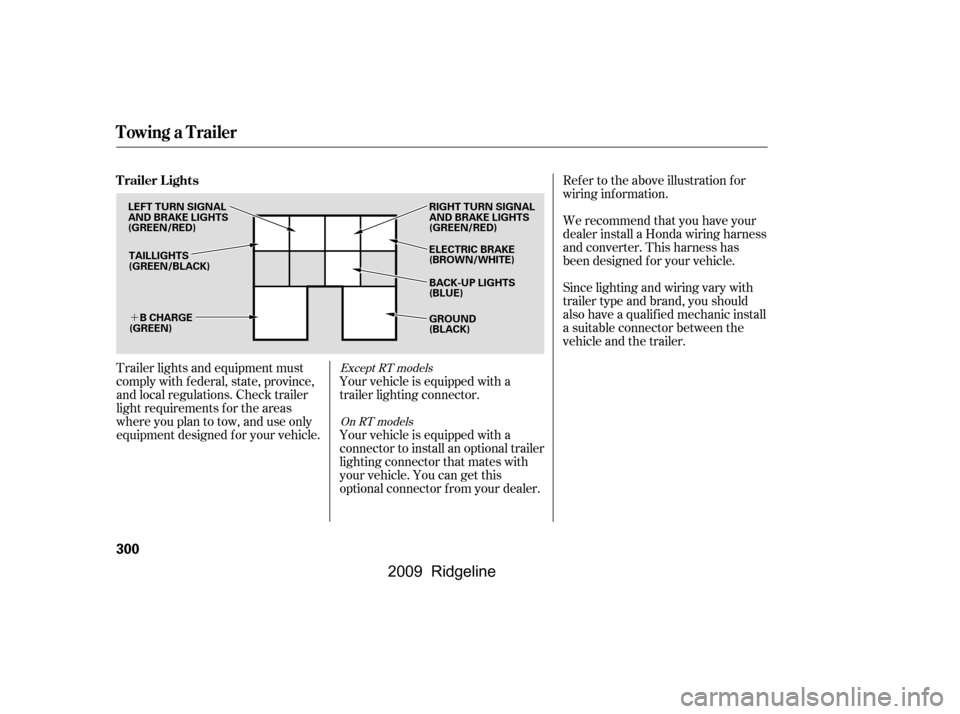
equipment designed f or your vehicle.Ref er to the above illustration f or
wiring information.
We recommend that you have your
dealer install a Honda wiring harness
and converter. This harness has
been designed f or your vehicle.
Your vehicle is equipped with a
trailer lighting connector.
Your vehicle is equipped with a
connector to install an optional trailer
lighting connector that mates with
your vehicle. You can get this
optional connector f rom your dealer. Since lighting and wiring vary with
trailer type and brand, you should
also have a qualif ied mechanic install
a suitable connector between the
vehicle and the trailer.Except RT models
On RT models
Trailer Lights
Towing a Trailer
300
TAILLIGHTS
(GREEN/BLACK) ELECTRIC BRAKE
(BROWN/WHITE)
RIGHT TURN SIGNAL
AND BRAKE LIGHTS
(GREEN/RED)
GROUND
(BLACK)
B CHARGE
(GREEN)
LEFT TURN SIGNAL
AND BRAKE LIGHTS
(GREEN/RED)
BACK-UP LIGHTS
(BLUE)
�\f���—�\f���—�\f���y���\f�������\f���y���
�(���������\f�y�\f���\f���y
2009 Ridgeline
Page 306 of 427
�´
Ref er to the above illustrations f or
wiring information.The trailer jumper harness is used to
install the controller f or the electric
trailer brakes. For more inf ormation,
see
on page . Insert the trailer brake f use into the
secondary under-hood f use box (see
page ).
298 381
Except RT models
Except RT models
T railer Connect or Socket s
T railer Jumper Harness
Trailer Brakes T railer Brake Fuse
Towing a Trailer
302
7-PIN TRAILER SOCKET
SMALL
LIGHT
(GREEN)
B
CHARGE
(BLACK)
BACK LIGHT
(YELLOW)
GROUND
(WHITE) GROUND
(BLACK)
ELECTRIC BRAKE
(BROWN/WHITE)
LEFT
TURN/
STOP
(RED) RIGHT
TURN/
STOP
(BROWN)
ELECTRIC
BRAKE
(BLUE) BRAKE
(20A)
(BLUE)
BRAKE LIGHTS
(SKY BLUE)
�\f���—�\f���—�\f���y���\f���������\f�y���
�(���������\f�y�\f���\f���y
2009 Ridgeline
Page 321 of 427
CONT INUED
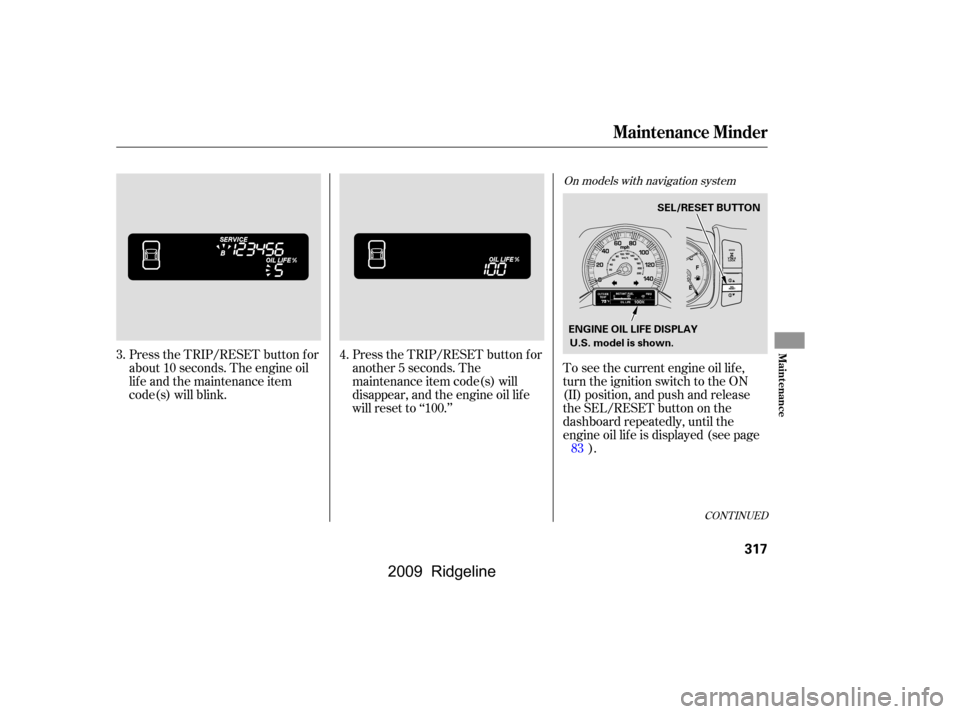
Press the TRIP/RESET button f or
about 10 seconds. The engine oil
lif e and the maintenance item
code(s) will blink.Press the TRIP/RESET button f or
another 5 seconds. The
maintenance item code(s) will
disappear, and the engine oil lif e
will reset to ‘‘100.’’To see the current engine oil lif e,
turn the ignition switch to the ON
(II) position, and push and release
the SEL/RESET button on the
dashboard repeatedly, until the
engine oil lif e is displayed (see page
).
3.
4.
83
On models with navigation system
Maintenance Minder
Maint enance
317
U.S. model is shown.SEL/RESET BUTTON
ENGINE OIL LIFE DISPLAY
�\f���—�\f���—�\f���y���\f���������\f�y���
�(���������\f�y�\f�������y
2009 Ridgeline
Page 325 of 427
�Û�Ý
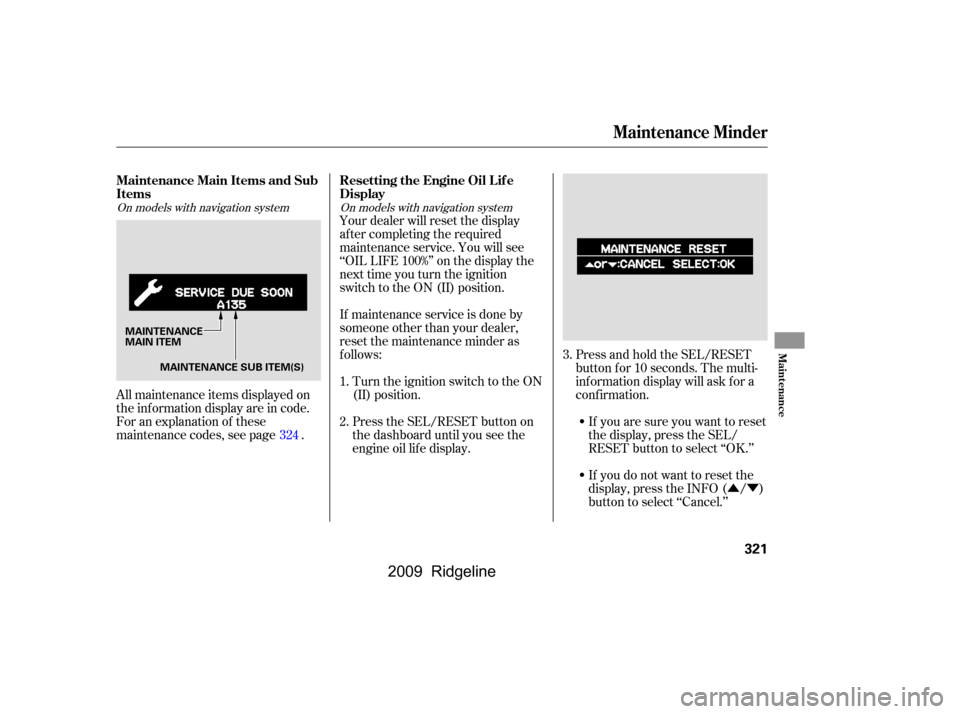
All maintenance items displayed on
the inf ormation display are in code.
For an explanation of these
maintenance codes, see page . Your dealer will reset the display
af ter completing the required
maintenance service. You will see
‘‘OIL LIFE 100%’’ on the display the
next time you turn the ignition
switch to the ON (II) position.
If maintenance service is done by
someone other than your dealer,
reset the maintenance minder as
f ollows:
Turn the ignition switch to the ON
(II) position.
Press the SEL/RESET button on
the dashboard until you see the
engine oil lif e display. Press and hold the SEL/RESET
button f or 10 seconds. The multi-
inf ormation display will ask f or a
conf irmation.
If you are sure you want to reset
the display, press the SEL/
RESET button to select ‘‘OK.’’
If you do not want to reset the
display, press the INFO ( / )
button to select ‘‘Cancel.’’
1.
2.
3.
324
On models with navigation system On models with navigation system
Maintenance Main Items and Sub
Items Resetting the Engine Oil Lif e
Display
Maintenance Minder
Maint enance
321
MAINTENANCE
MAIN ITEM
MAINTENANCE SUB ITEM(S)
�\f���—�\f���—�\f���y���\f�������\f�\f�y���
�(���������\f�y�\f�������y
2009 Ridgeline
Page 334 of 427
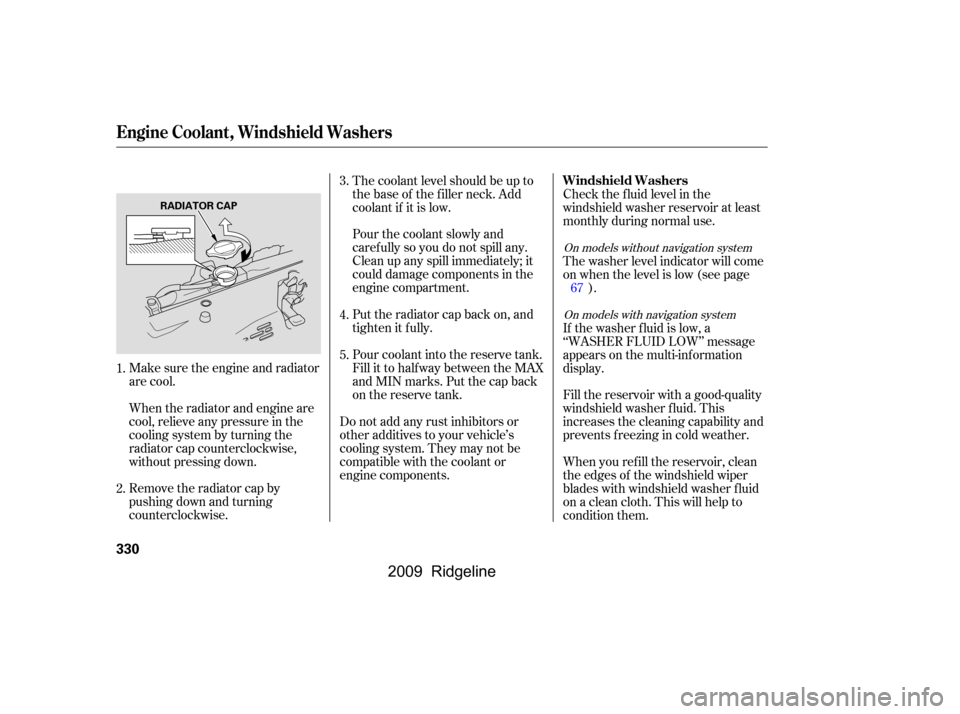
Make sure the engine and radiator
are cool.
When the radiator and engine are
cool, relieve any pressure in the
cooling system by turning the
radiator cap counterclockwise,
without pressing down.
Remove the radiator cap by
pushing down and turning
counterclockwise.The coolant level should be up to
the base of the f iller neck. Add
coolant if it is low.
Pourthecoolantslowlyand
caref ully so you do not spill any.
Clean up any spill immediately; it
could damage components in the
engine compartment.
Put the radiator cap back on, and
tighten it fully.
Pour coolant into the reserve tank.
Fill it to half way between the MAX
and MIN marks. Put the cap back
on the reserve tank.
Do not add any rust inhibitors or
other additives to your vehicle’s
cooling system. They may not be
compatible with the coolant or
engine components. Check the f luid level in the
windshield washer reservoir at least
monthly during normal use.
Fill the reservoir with a good-quality
windshield washer f luid. This
increases the cleaning capability and
prevents f reezing in cold weather.
The washer level indicator will come
on when the level is low (see page
).
If the washer f luid is low, a
‘‘WASHER FLUID LOW’’ message
appears on the multi-inf ormation
display.
When you ref ill the reservoir, clean
the edges of the windshield wiper
blades with windshield washer f luid
on a clean cloth. This will help to
condition them.
3.
4.
5.
1.
2. 67
On models without navigation system
On models with navigation system
Windshield Washers
Engine Coolant, Windshield Washers
330
RADIATOR CAP
�\f���—�\f���—�\f���y���\f�������
���y���
�(���������\f�y�\f�������y
2009 Ridgeline