Page 247 of 578
CONT INUED
You can see the album, artist, and
track name in the display. If a disc is
recorded in MP3 or WMA, you can
see the f older and f ile name, and the
album, artist, and track tag.
With the f older name, you will see
the FOLDER indicator in the display.
The TRACK indicator is shown with
the file or track name.
The display shows up to about 16
characters of selected text data (the
f older name, f ile name, etc.). Each time you press the TITLE
button, the display shows you the
text data on a disc, if the disc was
recorded with text data.
When you press and release the
TITLE button while a disc without
text data is playing, you will see ‘‘NO
INFO’’ on the display.If the text data has more than 16
characters, you will see the first 16
characters and the indicator in
the display. Press and hold the
TITLE button until the next 16
characters are shown. You can see
up to about 32 characters of the text
data.
If youpressandholdtheTITLE
button again, the display shows the
f irst 16 characters again.
If any letter is not available, it is
replaced with ‘‘ . ’’ (dot) in the display.
When the disc has no text data, you
will see ‘‘NO INFO’’ on the display.
You will also see some text data
under these conditions:
When a new f older, f ile, or track is
selected. When you turn on the audio system
next time, the system keeps your
selection with the TITLE button. When playing a CD-DA with text
data, the album and track name are
showninthedisplay.Withadiscin
MP3 or WMA, the display shows the
f older and f ile name.
When you insert a disc, and the
system begins to play. When you change the audio mode
to play a disc with text data or in
MP3 or WMA.
T ext Data Display Function
Playing Discs (EX and EX-L models)
Features
243
�����—�����—�
���y�
���������
���y���
�(�/���������y���������y
2009 Pilot
Page 253 of 578
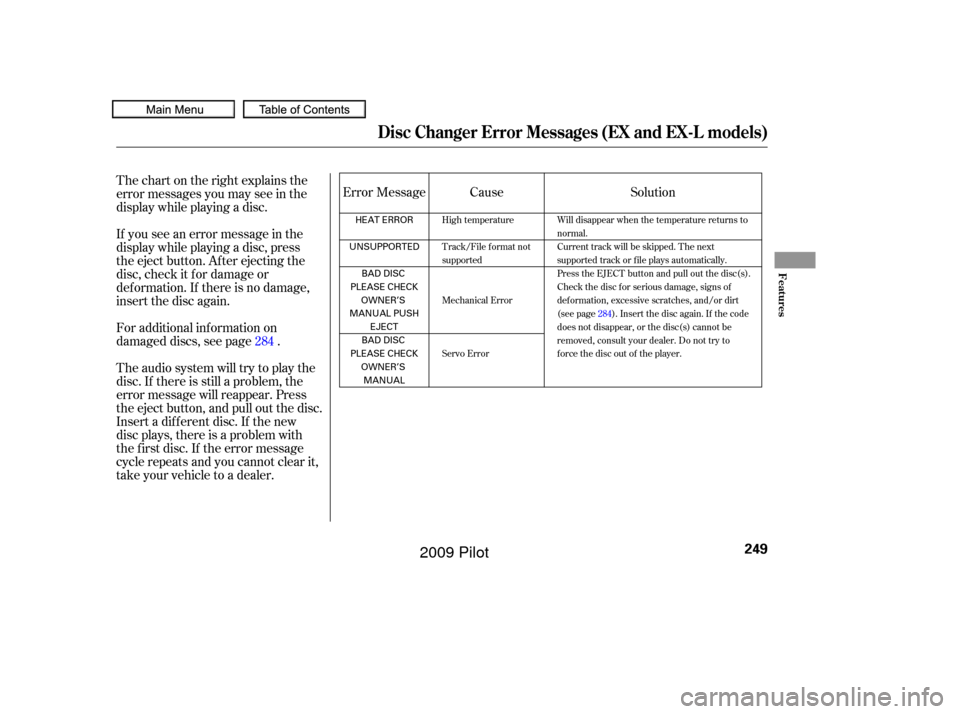
Thechartontherightexplainsthe
error messages you may see in the
display while playing a disc.
If you see an error message in the
display while playing a disc, press
the eject button. After ejecting the
disc, check it for damage or
deformation. If there is no damage,
insert the disc again.
For additional information on
damaged discs, see page .
Theaudiosystemwilltrytoplaythe
disc. If there is still a problem, the
error message will reappear. Press
the eject button, and pull out the disc.
Insert a dif f erent disc. If the new
disc plays, there is a problem with
the f irst disc. If the error message
cycle repeats and you cannot clear it,
take your vehicle to a dealer.Cause
Solution
Error Message
284
High temperature
Track/File format not
supported
Mechanical Error
Servo Error Will disappear when the temperature returns to
normal.
Current track will be skipped. The next
supported track or file plays automatically.
Press the EJECT button and pull out the disc(s).
Check the disc for serious damage, signs of
deformation, excessive scratches, and/or dirt
(see page
284). Insert the disc again. If the code
does not disappear, or the disc(s) cannot be
removed, consult your dealer. Do not try to
force the disc out of the player.
Disc Changer Error Messages (EX and EX-L models)
Features
249
HEAT ERROR
UNSUPPORTED BAD DISC
PLEASE CHECK OWNER’S
MANUAL PUSH EJECT
BAD DISC
PLEASE CHECK OWNER’SMANUAL
�����—�����—�
���y�
����
����
���y���
�(�/���������y���������y
2009 Pilot
Page 254 of 578
The selector can be pushed lef t,
right, up, down, and in. Use the
selector to scroll through lists, to
select menus, and to highlight menu
items. When you make a selection,
push the center of the selector
(ENTER)togotothatselection. The knob turns lef t and right. Use it
to make selections or adjustments to
a list or menu on the screen.
Most audio system f unctions can still
be controlled by standard buttons,
dials, and knobs, but some f unctions
can only be accessed using the
interf ace dial. The interf ace dial has
two parts, a knob and a selector. The audio system can also be
operated by voice control. See the
Navi section in your quick start
guide f or an overview of this system,
and the navigation system manual
f or complete details.
On models with navigation system
Interf ace Dial
Voice Control System
Audio System (Models with navigation system)
250
SELECTOR
KNOB ENTER
�����—�����—�
���y�
������
������y���
�(�/���������y���������y
2009 Pilot
Page 255 of 578
Playing the FM/A M Radio (Models with navigation system)
Features
251
INTERFACE DIALAUDIO DISPLAY
PRESET BUTTONS
With rear entertainment system
Without rear entertainment system
INTERFACE DIAL
FM
BUTTON
AM
BUTTON
SCAN
BUTTON
AUDIO DISPLAY
PRESET BUTTONS
TUNE KNOB
AUDIO
BUTTON POWER/
VOLUME KNOB
AUDIO
BUTTON AM
BUTTON
FM
BUTTON
SCAN
BUTTON
TUNE KNOB POWER/
VOLUME KNOB
A.SEL (AUTO
SELECT) BUTTON
�����—�����—�
���y�
������
��
���y���
�(�/���������y���������y
2009 Pilot
Page 256 of 578
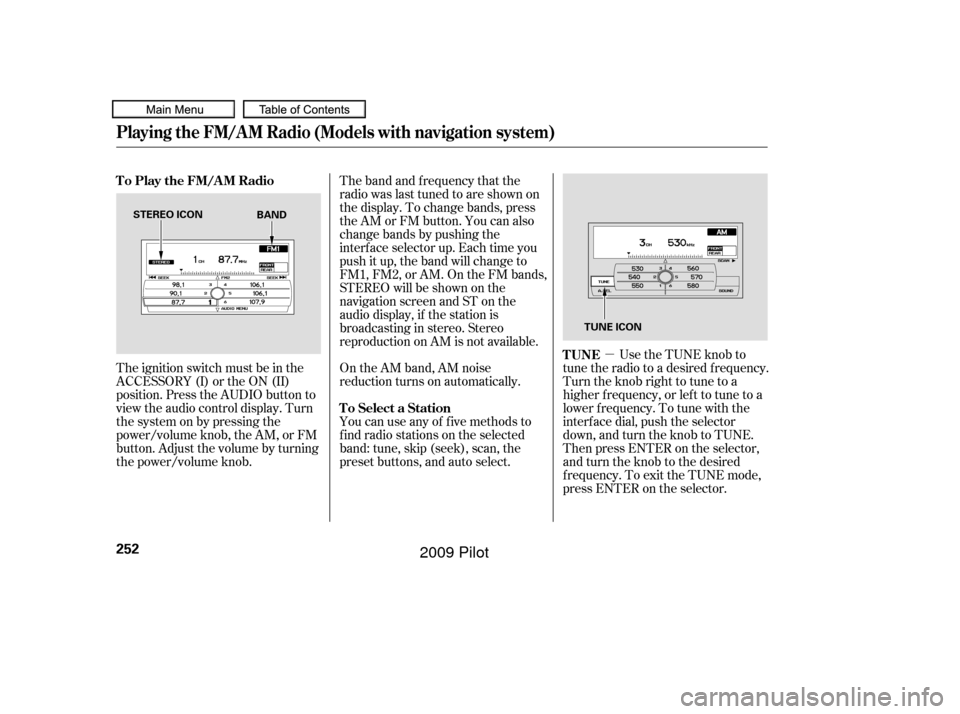
�µUse the TUNE knob to
tune the radio to a desired f requency.
Turn the knob right to tune to a
higher f requency, or lef t to tune to a
lower f requency. To tune with the
interf ace dial, push the selector
down, and turn the knob to TUNE.
Then press ENTER on the selector,
andturntheknobtothedesired
f requency. To exit the TUNE mode,
press ENTER on the selector.
The ignition switch must be in the
ACCESSORY (I) or the ON (II)
position. Press the AUDIO button to
view the audio control display. Turn
the system on by pressing the
power/volume knob, the AM, or FM
button. Adjust the volume by turning
the power/volume knob. The band and f requency that the
radio was last tuned to are shown on
the display. To change bands, press
the AM or FM button. You can also
change bands by pushing the
interf ace selector up. Each time you
push it up, the band will change to
FM1, FM2, or AM. On the FM bands,
STEREO will be shown on the
navigation screen and ST on the
audio display, if the station is
broadcasting in stereo. Stereo
reproduction on AM is not available.
On the AM band, AM noise
reduction turns on automatically.
You can use any of f ive methods to
f ind radio stations on the selected
band: tune, skip (seek), scan, the
preset buttons, and auto select.
TUNE
To Play the FM/AM Radio
To Select a Station
Playing the FM/A M Radio (Models with navigation system)
252
STEREO ICON TUNE ICON
BAND
�����—�����—�
���y�
������
������y���
�(�/���������y���������y
2009 Pilot
Page 259 of 578
CONT INUED
On the FM band, you can select a
favorite station and display the
program service name according to
the inf ormation provided by the
radio data system (RDS).
Theprogramservicenamedisplay
f unction shows the name of the
station you are listening to. With the
audio system on and the FM band
selected, you can turn this f unction
on or of f .
For inf ormation on FM/AM radio
f requencies and reception, see page
. To switch the function between on
and off, press and release the TITLE
button. With the system on, you will
see the ‘‘PS NAME ON’’ message on
the center display. If the station you
are listening to is an RDS station, the
displayed f requency switches to the
station name.
306
Playing the FM/A M Radio (Models with navigation system)
Radio Data System (RDS)
Program Service (PS) Name DisplayFeatures
255
�����—�����—�
���y�
������
������y���
�(�/���������y���������y
2009 Pilot
Page 260 of 578
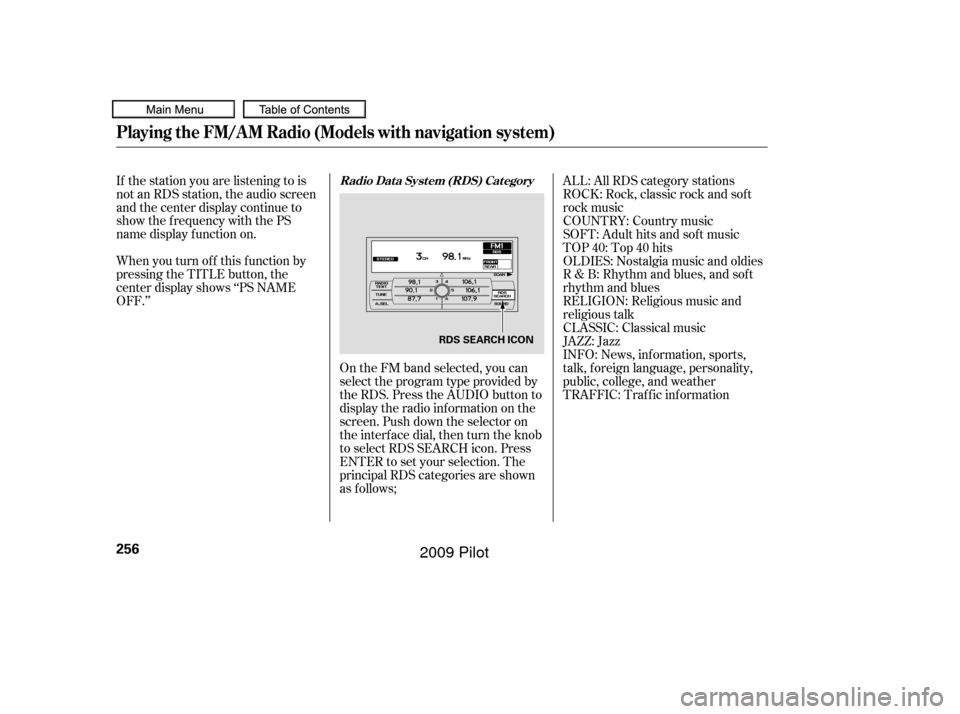
On the FM band selected, you can
select the program type provided by
the RDS. Press the AUDIO button to
display the radio inf ormation on the
screen. Push down the selector on
the interf ace dial, then turn the knob
to select RDS SEARCH icon. Press
ENTER to set your selection. The
principal RDS categories are shown
as f ollows;
If the station you are listening to is
not an RDS station, the audio screen
and the center display continue to
show the f requency with the PS
name display f unction on.
When you turn of f this f unction by
pressing the TITLE button, the
center display shows ‘‘PS NAME
OFF.’’
TRAFFIC: Traffic information INFO: News, inf ormation, sports,
talk, f oreign language, personality,
public, college, and weather JAZZ: Jazz CLASSIC: Classical music RELIGION: Religious music and
religious talk R & B: Rhythm and blues, and sof t
rhythm and blues OLDIES: Nostalgia music and oldies TOP 40: Top 40 hits
SOFT: Adult hits and sof t music
COUNTRY: Country music ROCK: Rock, classic rock and sof t
rock music ALL: All RDS category stations
Playing the FM/A M Radio (Models with navigation system)
Radio Data System (RDS) Category
256
RDS SEARCH ICON
�����—�����—�
���y�
������
������y���
�(�/���������y�������
�y
2009 Pilot
Page 262 of 578
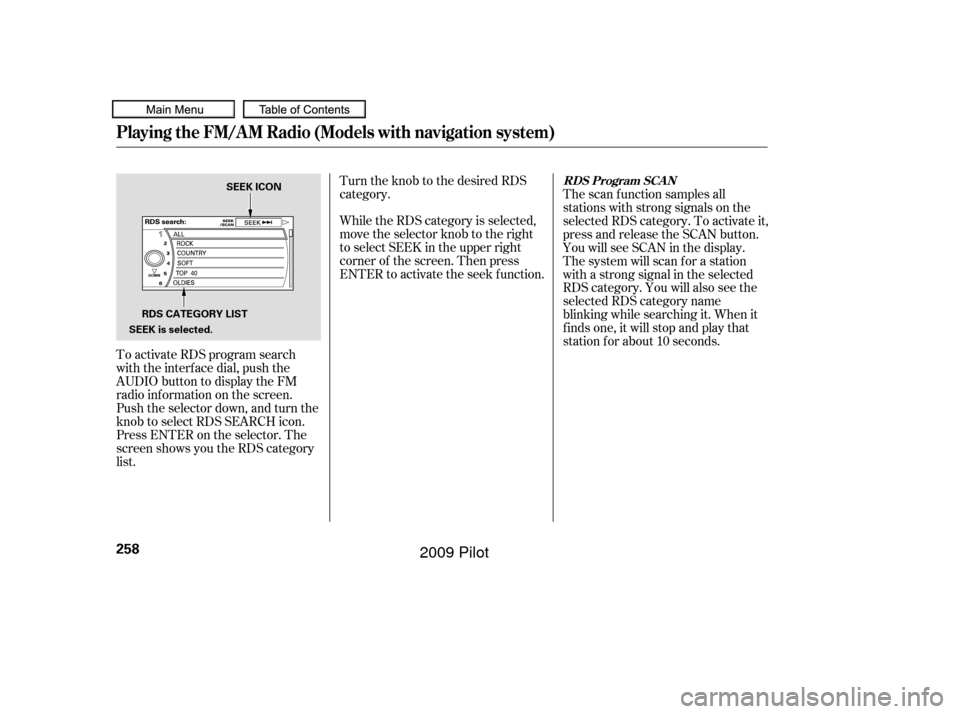
To activate RDS program search
with the interf ace dial, push the
AUDIO button to display the FM
radio inf ormation on the screen.
Push the selector down, and turn the
knob to select RDS SEARCH icon.
Press ENTER on the selector. The
screen shows you the RDS category
list.Turn the knob to the desired RDS
category.
While the RDS category is selected,
move the selector knob to the right
to select SEEK in the upper right
corner of the screen. Then press
ENTER to activate the seek f unction.
The scan f unction samples all
stations with strong signals on the
selected RDS category. To activate it,
press and release the SCAN button.
You will see SCAN in the display.
The system will scan f or a station
with a strong signal in the selected
RDS category. You will also see the
selected RDS category name
blinking while searching it. When it
f inds one, it will stop and play that
station f or about 10 seconds.
Playing the FM/A M Radio (Models with navigation system)
RDS Program SCAN
258
RDS CATEGORY LIST
SEEK is selected. SEEK ICON
�����—�����—�
���y�
�������������y���
�(�/���������y���������y
2009 Pilot