Page 228 of 578
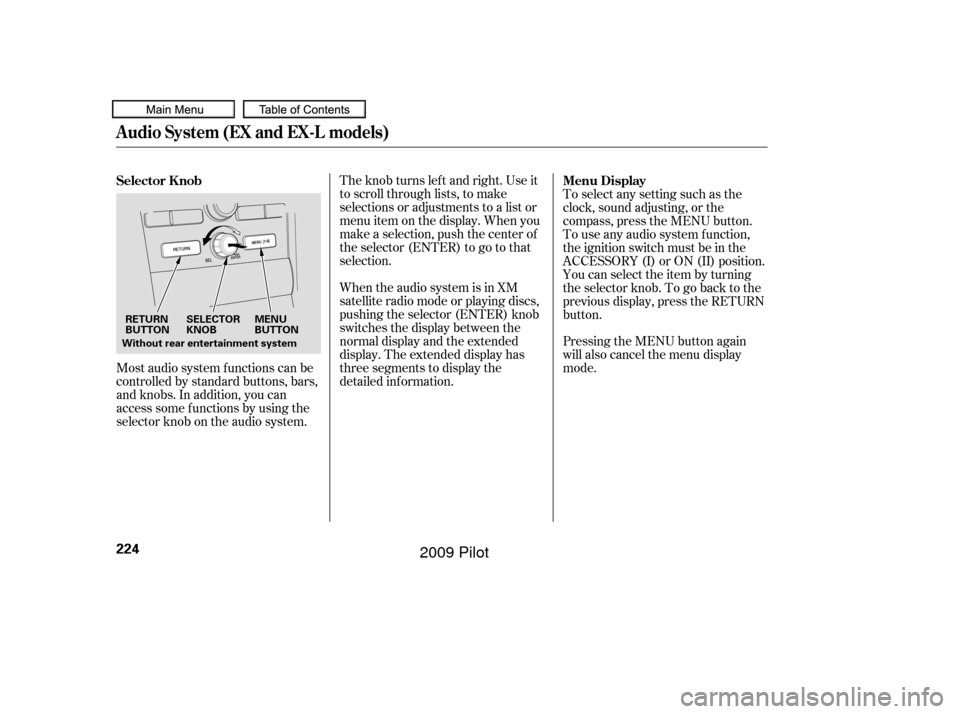
Most audio system f unctions can be
controlled by standard buttons, bars,
and knobs. In addition, you can
access some f unctions by using the
selector knob on the audio system.The knob turns lef t and right. Use it
to scroll through lists, to make
selections or adjustments to a list or
menu item on the display. When you
make a selection, push the center of
the selector (ENTER) to go to that
selection.
When the audio system is in XM
satellite radio mode or playing discs,
pushing the selector (ENTER) knob
switches the display between the
normal display and the extended
display. The extended display has
three segments to display the
detailed inf ormation.
Pressing the MENU button again
will also cancel the menu display
mode. To select any setting such as the
clock, sound adjusting, or the
compass, press the MENU button.
To use any audio system f unction,
the ignition switch must be in the
ACCESSORY (I) or ON (II) position.
You can select the item by turning
the selector knob. To go back to the
previous display, press the RETURN
button.
Selector K nob
Menu Display
Audio System (EX and EX-L models)
224
SELECTOR
KNOBMENU
BUTTON
RETURN
BUTTON
Without rear entertainment system
�����—�����—�
���y�
�������������y���
�(�/���������y���������y
2009 Pilot
Page 232 of 578
To switch the function between on
and off, press and release the TITLE
button. With the system on, you will
see the ‘‘PS NAME ON’’ message on
the display. If the station you are
listening to is an RDS station, the
displayed f requency switches to the
station name.
On the FM band, you can select a
favorite station and display the
program service name according to
the inf ormation provided by the
radio data system (RDS).
Theprogramservicenamedisplay
f unction shows the name of the
station you are listening to. With the
audio system on and the FM band
selected, you can turn this f unction
on or of f .
,pressthe
A. SEL (auto select) button. This
restores the presets you originally
set.
For inf ormation on FM/AM radio
f requencies and reception, see page .
306To turn of f auto selectRadio Data System (RDS)
Program Service (PS) Name Display
Playing the FM/AM Radio (EX and EX-L models)
228
�����—�����—�
���y�
���������
���y���
�(�/���������y���������y
2009 Pilot
Page 236 of 578
�µManuf actured under license f rom
Dolby Laboratories. ‘‘Dolby’’,
‘‘ProLogic’’, and the double-D symbol
are trademarks of Dolby
Laboratories. The SVC mode controls the volume
based on vehicle speed. The f aster
you go, the louder the audio volume
becomes. As you slow down, the
audio volume decreases.
The SVC has f our modes: SVC OFF,
SVC LOW, SVC MID, and SVC
HIGH. Turn the selector knob to
adjust the setting to your liking. If
you f eel the sound is too loud,
choose low. If you f eel the sound is
too quiet, choose high.
This f unction is set to MID as the
def ault setting when the vehicle
leaves the factory.
Dolby
PL (ProLogic) II signal processing
creates multi-channel surround
sound f rom 2 channel stereo audio
sources. Dolby ProLogic II can only
be activated when listening to DISC
(CD-DA, MP3/WMA), XM Radio,
andAUX.WhenProLogicIIisactive,
‘‘PL II’’ is shown in the audio display.
If equipped
Playing the FM/AM Radio (EX and EX-L models)
Speed-sensit ive Volume
Compensat ion (SVC)
Dolby PL (ProL ogic) II
232
�����—�����—�
���y�
�������������y���
�(�/���������y���������y
2009 Pilot
Page 237 of 578
You can use the instrument panel
brightness control knob to adjust the
illumination of the audio system (see
page ). The audio system
illuminates when the parking lights
are on, even if the radio is turned of f .129
Playing the FM/AM Radio (EX and EX-L models)
A udio System L ighting
Features
233
�����—�����—�
���y�
�������������y���
�(�/���������y���������y
2009 Pilot
Page 241 of 578
�µ�µ
�µ
�µ
CONT INUED
Youcanstoreupto12
preset channels using the six preset
buttons. Each button stores one
channel f rom the XM1 band and one
channel f rom the XM2 band.
To store a channel: Press the XM button. Either XM1
or XM2 will show in the display.
Use the selector knob,
CATEGORY bar, or SCAN button
to tune to a desired channel.
Pick the preset button you want
f or that channel. Press and hold
the button until you hear a beep. In category mode, only channels
within that category can be
selected. In channel mode, all
channels can be selected. Repeat steps 2 and 3 to store the
f irst six channels.
Press the XM button again. The
other XM band will show. Store
the next six channels using steps 2
and 3.
Once a channel is stored, simply
press and release the proper preset
button to tune to it.
Thepresetsmaybelostif your
vehicle’s battery goes dead, is
disconnected, or the radio f use is
removed. XM is loading the
audio or program inf ormation.
The channel
currently selected is no longer
broadcasting.
The encryption
code is being updated. Wait until the
encryption code is f ully updated.
Channels 0 and 1 should still work
normally.
3. 4.
5.
2. 1.
Playing the XMSatellite Radio (EX-L and U.S. EX models)
Preset XM Satellite Radio Display
Messages
‘‘L OA DING’’
‘‘OFF A IR’’
‘‘UPDA T ING’’
Features
237
�����—�����—�
���y�
���������
���y���
�(�/���������y���������y
2009 Pilot
Page 243 of 578
Driving on the north side of an
east/west mountain road.
Driving on the north side of a
large commercial truck on an
east/west road.
Driving in tunnels.
Driving on a road beside a vertical
wall, steep clif f , or hill to the south
of you.
Driving on the lower level of a
multi-tiered road.
Driving on a single lane road
alongside dense trees taller than
50 ft. (15 m) to the south of you.
Large items carried on a roof rack.
There may be other geographic
situations that could affect XM
Satellite Radio reception. If your XM Radio service has expired
or you purchased your vehicle f rom
a previous owner, you can listen to a
sampling of the broadcasts available
on XM Satellite Radio. With the
ignition switch in the ACCESSORY
(I) or the ON (II) position, push the
power/volume knob to turn on the
audio system, and press the
button. A variety of music
types and styles will play.
If you decide to purchase XM
Satellite Radio service, contact XM
Radio at , or at
1-800-852-9696. In Canada, contact , or call 1-877-438-
9677. You will need to give them
your radio I.D. number and your
credit card number. To get your
radio I.D. number, press the button, then turn the
selector knob until ‘‘CH 000’’ appears
in the display. Your I.D. will appear
in the display. After you’ve registered with XM
Radio, keep your audio system in the
XM Satellite Radio mode while you
wait f or activation. This should take
about 30 minutes.
While waiting f or activation, make
sure your vehicle remains in an open
area with good reception. Once your
audio system is activated,
‘‘CATEGORY’’ or ‘‘CH’’ will appear in
the display, and you’ll be able to
listen to XM Radio broadcasts. XM
Radio will continue to send an
activation signal to your vehicle f or
at least 12 hours from the activation
request. If the service has not been
activated after 36 hours, contact XM
Radio.
As required by the FCC:
Changes or modif ications not expresslyapproved by the party responsible f orcompliance could void the user’sauthority to operate the equipment. www.xmradio.com
www.xmradio.ca
Receiving Satellite Radio Service
Playing the XMSatellite Radio (EX-L and U.S. EX models)
Features
239
�����—�����—�
���y�
�������������y���
�(�/���������y���������y
2009 Pilot
Page 245 of 578
�µ
�µ
�µ
�µ
This audio system can also play
CD-Rs and CD-RWs compressed in
MP3 or WMA f ormats. When
playing a disc in MP3, you will see
‘‘MP3’’ in the display. In WMA
f ormat, ‘‘WMA’’ will appear in the
display. The disc, f older and track
numbers are displayed. You can
select up to 255 f olders or tracks.
To load or play discs, the ignition
switch must be in the ACCESSORY
(I) or ON (II) position.
You operate the disc changer with
the same controls used f or the radio.
To select the disc changer, press the
CD/AUX or CD button. You will see
‘‘CD’’ in the display. The disc and
track numbers, and the elapsed time
areshowninthedisplay.Youcan
also select the displayed inf ormation
with the TITLE button (see page
). The system will continuously
play a disc until you change modes. The specif ications f or
compatible MP3 f iles are:
Sampling f requency:
32/44.1/48 kHz (MPEG1), 16/
22.05/24 kHz (MPEG2)
Bit rate:
32/40/48/56/64/80/96/112/128/
160/192/224/256/320 kbps
(MPEG1), 8/16/24/32/40/48/56/
64/80/96/112/128/160 kbps
(MPEG2)
Compatible with variable bit rate
and multi-session.
Maximum layers
(including ROOT): 8 layers
If you have a disc that is a
combination of CD-DA tracks and
MP3/WMA f iles, you can choose the
f ormat to listen by pressing and
holding CD/AUX or CD button until
you hear a beep.
Video CDs and DVD discs do not
work in this unit.
243
CONT INUED
To Play a Disc
Playing Discs (EX and EX-L models)
Features
241
Do not use discs with adhesive labels.
The label can curl up and cause the
disc to jam in the unit.
�����—�����—�
���y�
�������������y���
�(�/���������y���������y
2009 Pilot
Page 246 of 578
�µ
�µ
�µ
�µYour vehicle’s in-dash disc changer
holdsuptosixdiscs.
You cannot load and play 3-inch
(8-cm) discs in this unit.
When the disc load indicator turns
green and ‘‘LOAD’’ appears in the
display again, insert the next disc
in the slot. Do not try to insert a
disc until ‘‘LOAD’’ appears. You
could damage the audio unit.
Repeat this until all six positions
are loaded. If you are not loading
all six positions, the system begins
playing the last disc loaded.
You can also load a disc into an
empty position while a disc is playing
by pressing the appropriate preset
button. The system stops playing the
current disc and starts the loading
sequence. It then plays the disc just
loaded.
The specif ications f or compatible
WMA f iles are:
Compatible with variable bit rate
and multi-session
Maximum layers
(including ROOT): 8 layers
NOTE:
If a f ile on an MP3 or WMA disc is
protected by digital rights
management (DRM), the audio unit
displays UNSUPPORTED, and then
skips to the next f ile. Sampling f requency:
22.05/32/44.1/48 kHz
Bitrate:
48/64/80/96/128/160/192 kbps
To load more than one disc, press
the LOAD button until you hear a
beep and see ‘‘LOAD’’ in the
display. To load only one disc,
press and release the LOAD
button.
The disc number f or an empty
position begins blinking.
Insert the disc into the disc slot
when the green disc load indicator
comes on. Insert it only about
half way; the drive will pull it in the
rest of the way. You will see
‘‘BUSY’’ in the display while the
disc load indicator turns red and
blinks as the disc is loaded.
1.
2.
3.
4.
5.
L oading Discs
Playing Discs (EX and EX-L models)
242
�����—�����—�
���y�
�������������y���
�(�/���������y���������y
2009 Pilot