Page 359 of 578

�·
The HomeLink
Universal
Transceiver built into your vehicle
canbeprogrammedtooperateupto
three remote controlled devices
around your home, such as garage
doors, lighting, or home security
systems. Units manuf actured between April 1,
1982 and January 1, 1993 may be
equipped with saf ety stop and
reverse f eatures. If your unit does
not have an external entrapment
protection system, an easy test to
conf irm the f unction and
perf ormance of the saf ety stop and
reverse f eature is to lay a 2 4
under the closing door. The door
should stop and reverse upon
contacting the piece of wood.
As an additional safety feature,
garage door openers manuf actured
af ter January 1, 1993 are required to
have external entrapment protection
systems, such as an electronic eye,
which detect an object obstructing
the door.
Bef ore programming your
HomeLink to operate a garage door
opener, conf irm that the opener has
an external entrapment protection
system, such as an ‘‘electronic eye,’’
or other saf ety and reverse stop
f eatures.
If your garage door was
manuf actured bef ore April 1, 1982,
you may not be able to program
HomeLink to operate it. These units
do not have safety features that
cause the motor to stop and reverse
it if an obstacle is detected during
closing, increasing the risk of injury.
Do not use HomeLink with any
garage door opener that lacks saf ety
stop and reverse f eatures.
CONT INUED
Except LX modelsGeneral Saf ety Inf ormation
HomeL inkUniversal Transceiver
Features
355
�����—�����—�
���y�
����
��������y���
�(�/���������y���������y
2009 Pilot
Page 362 of 578
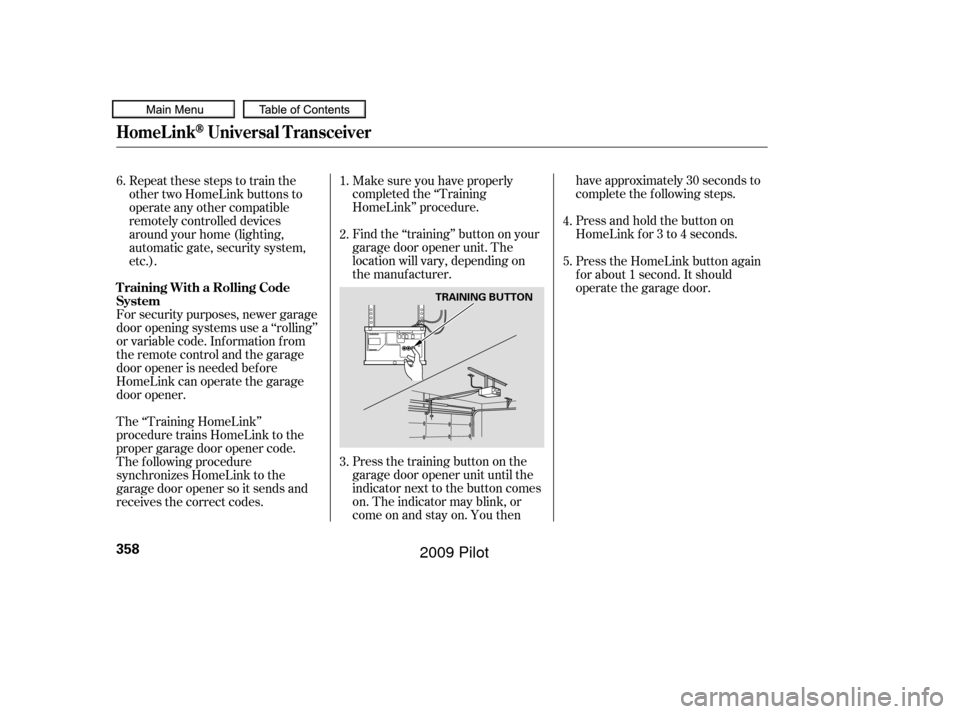
Press the training button on the
garage door opener unit until the
indicator next to the button comes
on. The indicator may blink, or
comeonandstayon.Youthenhave approximately 30 seconds to
complete the f ollowing steps.
Press and hold the button on
HomeLink f or 3 to 4 seconds.
Make sure you have properly
completed the ‘‘Training
HomeLink’’ procedure.
Find the ‘‘training’’ button on your
garage door opener unit. The
location will vary, depending on
the manufacturer.
The ‘‘Training HomeLink’’
procedure trains HomeLink to the
proper garage door opener code.
The f ollowing procedure
synchronizes HomeLink to the
garage door opener so it sends and
receives the correct codes. For security purposes, newer garage
door opening systems use a ‘‘rolling’’
or variable code. Information from
the remote control and the garage
door opener is needed bef ore
HomeLink can operate the garage
door opener. Repeat these steps to train the
other two HomeLink buttons to
operate any other compatible
remotely controlled devices
around your home (lighting,
automatic gate, security system,
etc.).
Press the HomeLink button again
f or about 1 second. It should
operate the garage door.
2.
4.
5.
1.
3.
6.
HomeL inkUniversal Transceiver
T raining With a Rolling Code
System
358
TRAINING BUTTON
�����—�����—�
���y�
����
����
���y���
�(�/���������y���������y
2009 Pilot
Page 365 of 578

To operate the HFL, use the HFL
Talk and Back buttons on the left
side of the steering wheel.
The HFL buttons are used as
f ollows:
HFLTalk:Thisbuttonisusedbefore
you give a command, to answer
incoming calls, and to conf irm
system inf ormation.
The HFL microphone is on the
ceiling, between the f ront map lights
and the console buttons. On models
with navigation system, the
microphone is shared with the
navigation system.
When the HFL is in use, the sound
comes through the vehicle’s f ront
audio system speakers. If the audio
system is in use while operating
either of the HFL buttons or making
a call, the HFL over-rides the audio
system. To change the volume level,
use the audio system volume knob,
or the steering wheel volume
controls.
Your vehicle’s HFL system has the
cellular phonebook import f unction.
This allows you to import your
cellular phonebook to the HFL.
Using the navigation system, you can
makeacalldirectlyandstorea
desired number in the HFL f rom the
list shown on the navigation display.
For more inf ormation on how to
import the phonebook or to make a
call, see page .
You can also store the desired
number to the HFL directly f rom
your mobile phone using the receive
contact f unction in the HFL.
372
CONT INUED
BluetoothHandsFreeL ink
HFL Buttons
Microphone
Audio System
Features
361
HFL TALK BUTTON
HFL BACK BUTTON
�����—�����—�
���y�
����
��������y���
�(�/���������y���������y
2009 Pilot
Page 399 of 578
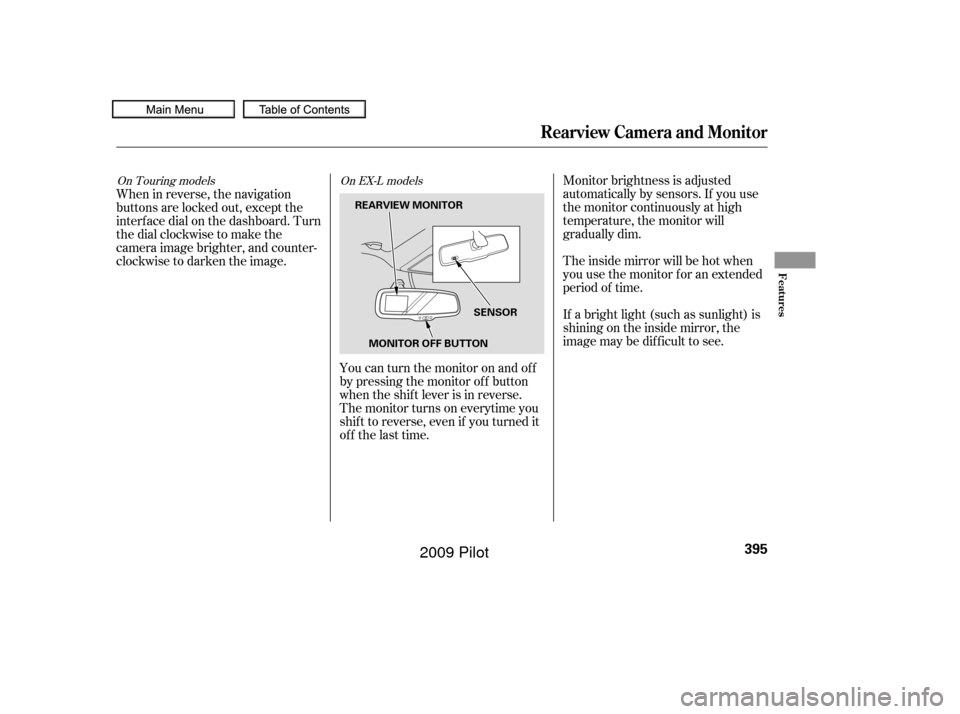
Monitor brightness is adjusted
automatically by sensors. If you use
the monitor continuously at high
temperature, the monitor will
gradually dim.
The inside mirror will be hot when
you use the monitor f or an extended
period of time.
If a bright light (such as sunlight) is
shining on the inside mirror, the
image may be dif f icult to see.
You can turn the monitor on and of f
by pressing the monitor of f button
when the shif t lever is in reverse.
The monitor turns on everytime you
shif t to reverse, even if you turned it
of f the last time.
When in reverse, the navigation
buttons are locked out, except the
interf ace dial on the dashboard. Turn
the dial clockwise to make the
camera image brighter, and counter-
clockwise to darken the image.On Touring models
On EX-L models
Rearview Camera and Monitor
Features
395
SENSOR
MONITOR OFF BUTTON
REARVIEW MONITOR
�����—�����—�
���y�
�������������y���
�(�/���������y���������y
2009 Pilot
Page 405 of 578
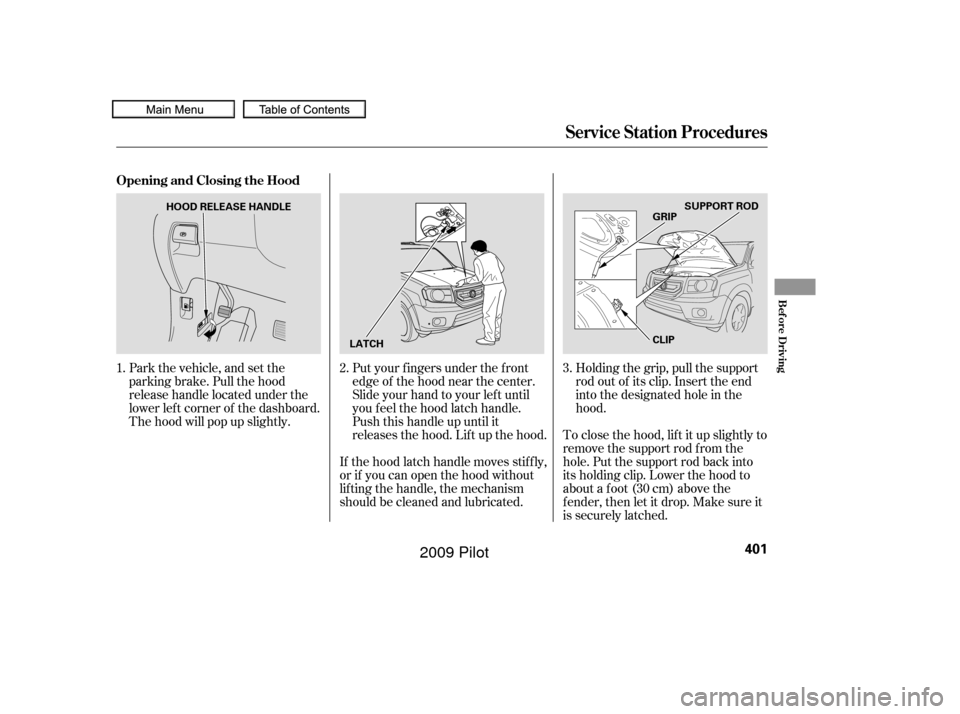
Park the vehicle, and set the
parking brake. Pull the hood
release handle located under the
lower lef t corner of the dashboard.
The hood will pop up slightly.Put your f ingers under the f ront
edge of the hood near the center.
Slide your hand to your lef t until
you f eel the hood latch handle.
Push this handle up until it
releases the hood. Lif t up the hood.
If the hood latch handle moves stif f ly,
or if you can open the hood without
lif ting the handle, the mechanism
should be cleaned and lubricated. Holding the grip, pull the support
rod out of its clip. Insert the end
into the designated hole in the
hood.
To close the hood, lif t it up slightly to
remove the support rod f rom the
hole. Put the support rod back into
its holding clip. Lower the hood to
about a f oot (30 cm) above the
f ender, then let it drop. Make sure it
is securely latched.
1.
2.3.
Service Station Procedures
Opening and Closing the Hood
Bef ore Driving
401
HOOD RELEASE HANDLE
LATCH CLIPSUPPORT ROD
GRIP
�����—�����—�
���y�
������
��
���y���
�(�/���������y���������y
2009 Pilot
Page 407 of 578
�µ
�µ �µ
�µ
Fuel economy is not a f ixed number.
It varies based on driving conditions,
driving habits and vehicle condition.
Theref ore, it is not possible f or one
set of estimates to predict f uel
economy precisely f or all drivers in
all environments.
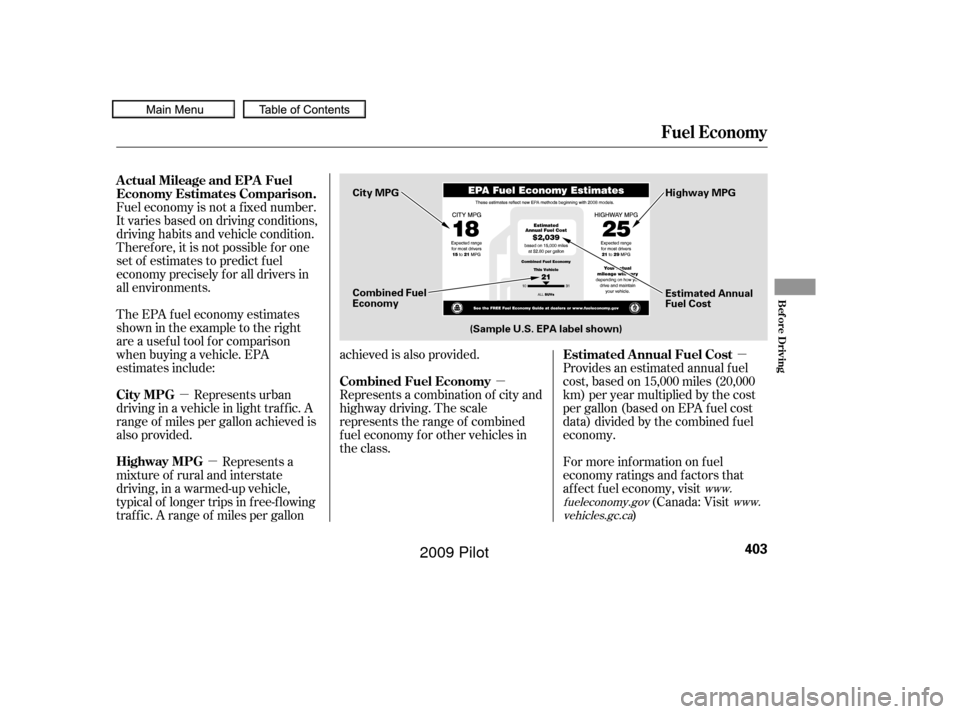
Provides an estimated annual f uel
cost, based on 15,000 miles (20,000
km) per year multiplied by the cost
pergallon(basedonEPAfuelcost
data) divided by the combined f uel
economy.
For more inf ormation on f uel
economy ratings and factors that
af f ect f uel economy, visit(Canada: Visit
)
Represents urban
driving in a vehicle in light traf f ic. A
range of miles per gallon achieved is
also provided. The EPA f uel economy estimates
shownintheexampletotheright
are a usef ul tool f or comparison
when buying a vehicle. EPA
estimates include:
Represents a combination of city and
highway driving. The scale
represents the range of combined
f uel economy f or other vehicles in
the class.
Represents a
mixture of rural and interstate
driving, in a warmed-up vehicle,
typical of longer trips in f ree-f lowing
traf f ic. A range of miles per gallon achieved is also provided.
www.
fueleconomy.gov www.
vehicles.gc.ca
Actual Mileage and EPA Fuel
Economy Estimates Comparison.
Estimated Annual Fuel Cost
City MPG Combined Fuel Economy
Highway MPG
Fuel Economy
Bef ore Driving
403
Combined Fuel
Economy (Sample U.S. EPA label shown) Estimated Annual
Fuel Cost
City MPG
Highway MPG
�����—�����—�
���y�
������
������y���
�(�/���������y���������y
2009 Pilot
Page 410 of 578
Bef ore installing any accessory:Make sure the accessory does not
obscure any lights, or interf ere
with proper vehicle operation or
perf ormance.
Be sure electronic accessories do
not overload electrical circuits
(see page ) or interf ere with
proper operation of your vehicle.
Do not install accessories on the
side pillars or across the rear
windows. Accessories installed in
theseareasmayinterferewith
proper operation of the side
curtain airbags.
When properly installed, cellular
phones, alarms, two-way radios, and
low-powered audio systems should
not interf ere with your vehicle’s
computer controlled systems, such
as your airbags, anti-lock brakes, and
tire pressure monitoring system.
If possible, have your dealer
inspect the f inal installation. Bef ore installing any electronic
accessory, have the installer
contact your dealer for assistance.
If possible, have your dealer
inspect the f inal installation.
Modif ying your vehicle, or installing
some non-Honda accessories, can
make it unsaf e. Bef ore you make any
modif ications or add any accessories,
be sure to read the f ollowing
inf ormation.
Your dealer has Honda accessories
that allow you to personalize your
vehicle. These accessories have
been designed and approved f or your
vehicle, and are covered by warranty.
Although non-Honda accessories
may f it on your vehicle, they may not
meet f actory specif ications, and
could adversely af f ect your vehicle’s
handling and stability.
529
A ccessories
A ccessories and Modif ications
406
Improper accessories or
modifications can affect your
vehicle’s handling, stability, and
performance, and cause a
crash in which you can be hurt
or killed.
Follow all instructions in this
owner’s manual regarding
accessories and modifications.
�����—�����—�
���y�
�������������y���
�(�/���������y�����
�
�y
2009 Pilot
Page 416 of 578
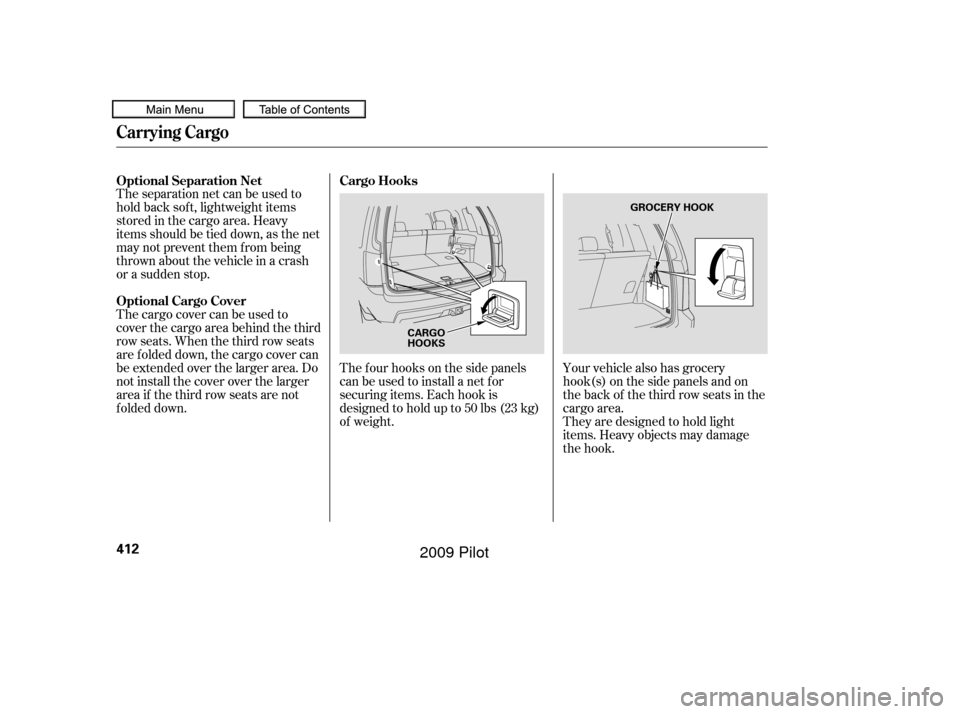
The f our hooks on the side panels
canbeusedtoinstallanetfor
securing items. Each hook is
designed to hold up to 50 lbs (23 kg)
of weight.
Theseparationnetcanbeusedto
hold back sof t, lightweight items
stored in the cargo area. Heavy
items should be tied down, as the net
may not prevent them f rom being
thrown about the vehicle in a crash
or a sudden stop.
The cargo cover can be used to
cover the cargo area behind the third
row seats. When the third row seats
are folded down, the cargo cover can
be extended over the larger area. Do
not install the cover over the larger
area if the third row seats are not
f olded down.
Your vehicle also has grocery
hook(s) on the side panels and on
the back of the third row seats in the
cargo area.
They are designed to hold light
items. Heavy objects may damage
the hook.
Cargo Hooks
Optional Separation Net
Optional Cargo Cover
Carrying Cargo
412
CARGO
HOOKS GROCERY HOOK
�����—�����—�
���y�
�������������y���
�(�/���������y�����
���y
2009 Pilot