Page 130 of 532
Each time you press the INFO
button, the display changes to ‘‘ON,’’
to ‘‘OFF,’’ then to ‘‘EXIT.’’
Select ‘‘ON’’ or ‘‘OFF’’ by pressing
the INFO button, and enter your
selection by pressing the SEL/
RESET button.
When you press the UNLOCK
button on the remote transmitter to
unlock the doors and the tailgate, the
exterior lights blink twice to verif y
that the doors and the tailgate are
unlocked and the security system is
turned off.
When you push the LOCK button on
the remote transmitter, some
exterior lights f lash, and a beeper
sounds when you push the LOCK
button again within 5 seconds to
verify that the doors and the tailgate
arelockedandthesecuritysystem
has set (see page ). You can
customize the exterior lights not to
f lash and the beeper not to sound.
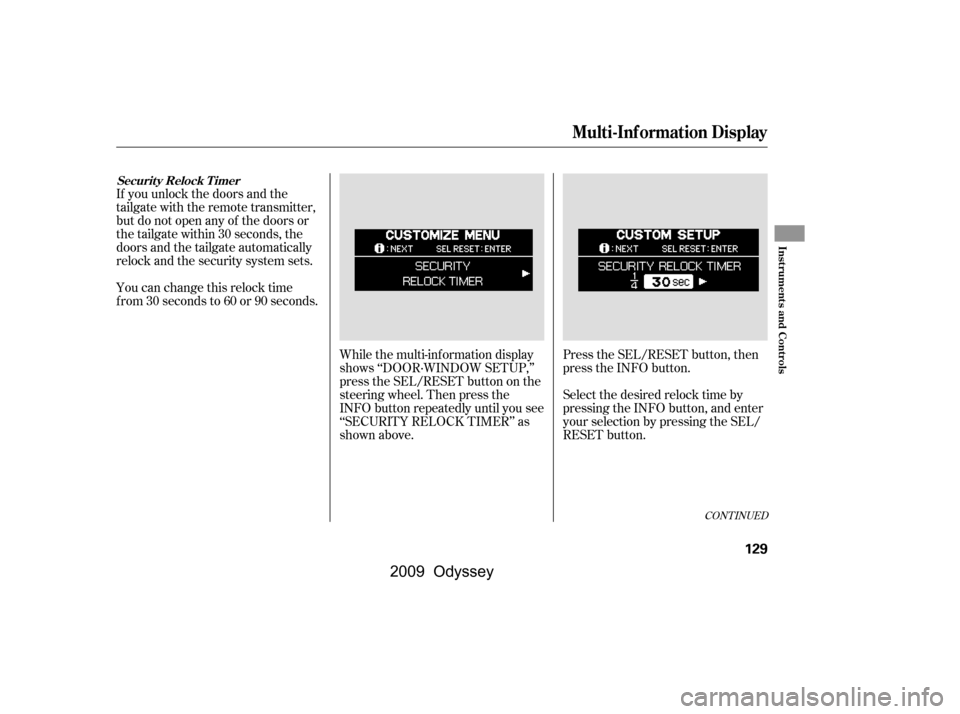
While the multi-information display
shows ‘‘DOOR·WINDOW SETUP,’’
press the SEL/RESET button on the
steering wheel. Then press the
INFO button repeatedly until you see
‘‘KEYLESS LOCK
ACKNOWLEDGEMENT’’ as shown
above.Press the SEL/RESET button. The
display changes as shown above.
318
CONT INUED
K eyless L ock A cknowledgement
Multi-Inf ormation Display
Inst rument s and Cont rols
127
�\f���—�\f���—���
�y�
�
����
��\f���y���
�(���������\f�y�\f�
�����y
2009 Odyssey
Page 132 of 532
If you unlock the doors and the
tailgate with the remote transmitter,
but do not open any of the doors or
thetailgatewithin30seconds,the
doors and the tailgate automatically
relock and the security system sets.
You can change this relock time
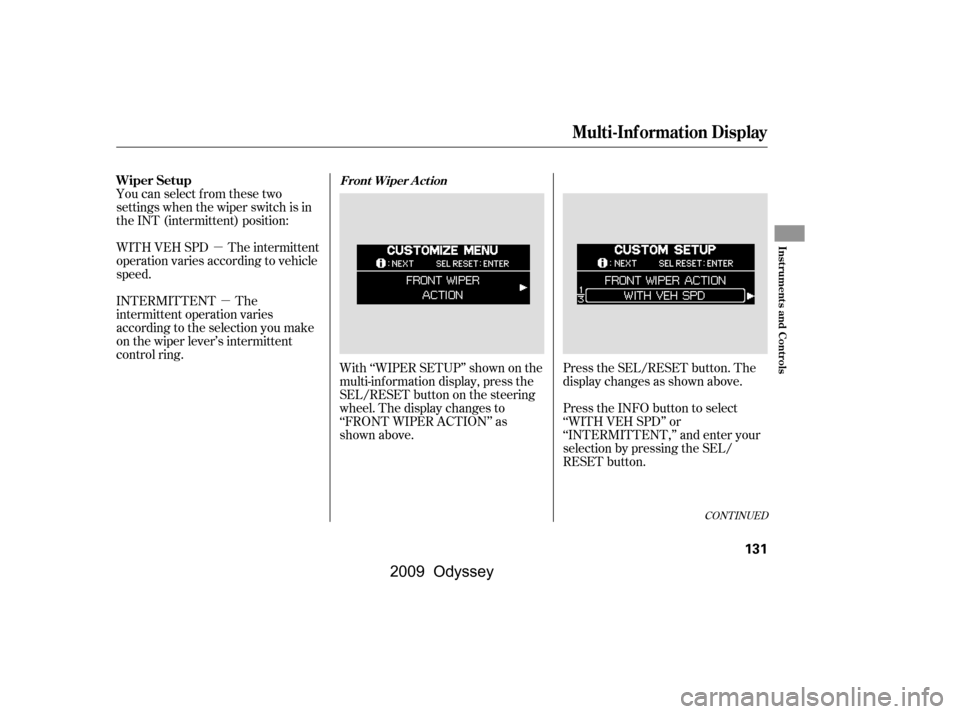
f rom 30 seconds to 60 or 90 seconds.While the multi-information display
shows ‘‘DOOR·WINDOW SETUP,’’
press the SEL/RESET button on the
steering wheel. Then press the
INFO button repeatedly until you see
‘‘SECURITY RELOCK TIMER’’ as
shown above.Press the SEL/RESET button, then
press the INFO button.
Select the desired relock time by
pressing the INFO button, and enter
your selection by pressing the SEL/
RESET button.
CONT INUED
Securit y Relock T imer
Multi-Inf ormation Display
Inst rument s and Cont rols
129
�\f���—�\f���—���
�y�
�
����
��
���y���
�(���������\f�y�\f�
�����y
2009 Odyssey
Page 134 of 532
�µ�µ
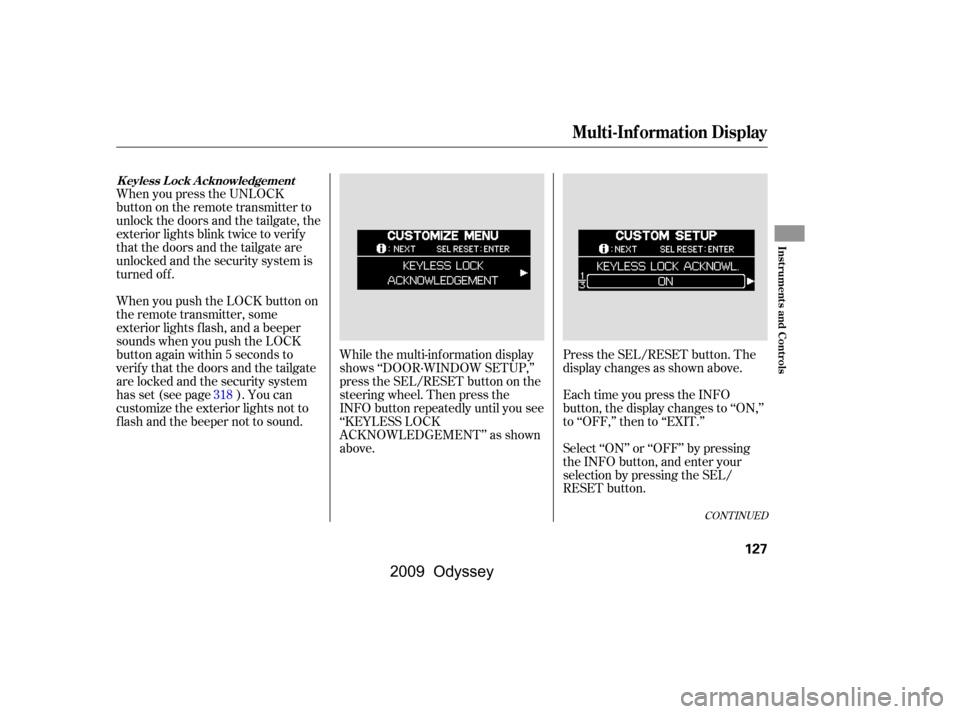
With ‘‘WIPER SETUP’’ shown on the
multi-inf ormation display, press the
SEL/RESET button on the steering
wheel. The display changes to
‘‘FRONT WIPER ACTION’’ as
shown above.
You can select from these two
settings when the wiper switch is in
the INT (intermittent) position:
WITH VEH SPD The intermittent
operation varies according to vehicle
speed.
INTERMITTENT The
intermittent operation varies
according to the selection you make
on the wiper lever’s intermittent
control ring.
Press the SEL/RESET button. The
display changes as shown above.
Press the INFO button to select
‘‘WITH VEH SPD’’ or
‘‘INTERMITTENT,’’ and enter your
selection by pressing the SEL/
RESET button.
CONT INUED
Wiper SetupFront Wiper A ct ion
Multi-Inf ormation Display
Inst rument s and Cont rols
131
�\f���—�\f���—���
�y�
�
����
������y���
�(���������\f�y�\f�
�����y
2009 Odyssey
Page 285 of 532
�´
�µ �Û�Ý
�´
�µ
If you are listening to the radio, use
the CH button to change stations.
Each time you press the top ( ) of
the button, the system goes to the
next preset station on the band you
are listening to. Press the bottom
( ) to go back to the previous
station.
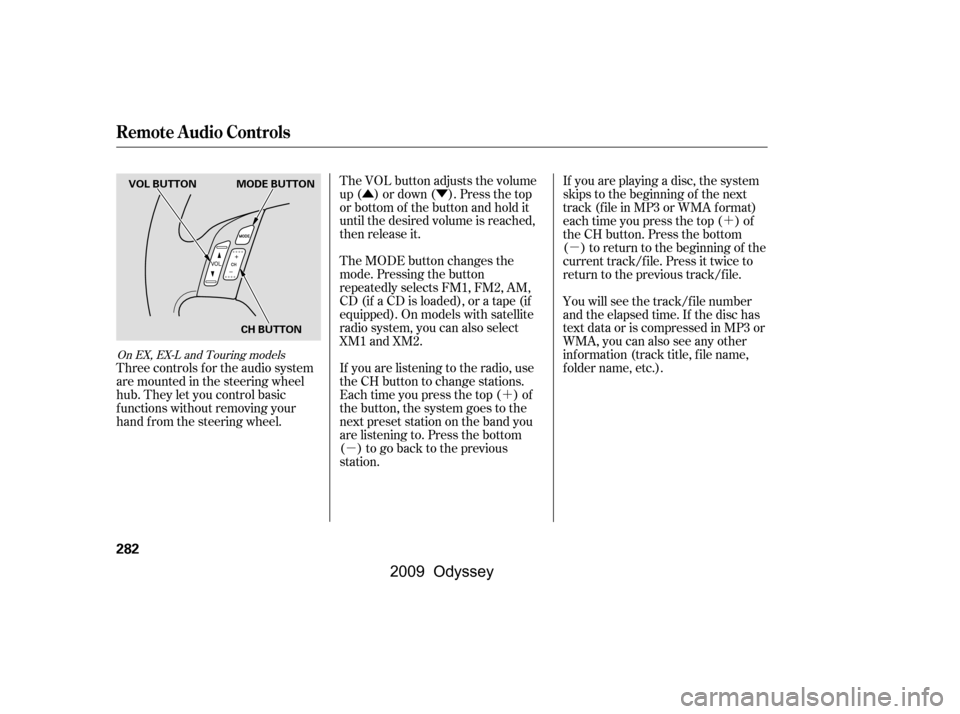
The VOL button adjusts the volume
up ( ) or down ( ). Press the top
or bottom of the button and hold it
until the desired volume is reached,
then release it.
The MODE button changes the
mode. Pressing the button
repeatedly selects FM1, FM2, AM,
CD (if a CD is loaded), or a tape (if
equipped). On models with satellite
radio system, you can also select
XM1 and XM2. If you are playing a disc, the system
skips to the beginning of the next
track (f ile in MP3 or WMA f ormat)
each time you press the top ( ) of
the CH button. Press the bottom
( ) to return to the beginning of the
current track/f ile. Press it twice to
return to the previous track/f ile.
You will see the track/f ile number
and the elapsed time. If the disc has
text data or is compressed in MP3 or
WMA, you can also see any other
inf ormation (track title, f ile name,
f older name, etc.).
Three controls f or the audio system
are mounted in the steering wheel
hub. They let you control basic
f unctions without removing your
hand f rom the steering wheel.
On EX, EX-L and Touring models
Remote Audio Controls
282
MODE BUTTON
VOL BUTTON
CH BUTTON
�\f���—�\f���—���
�y�
�
�������
���y���
�(���������\f�y�\f�������y
2009 Odyssey
Page 330 of 532
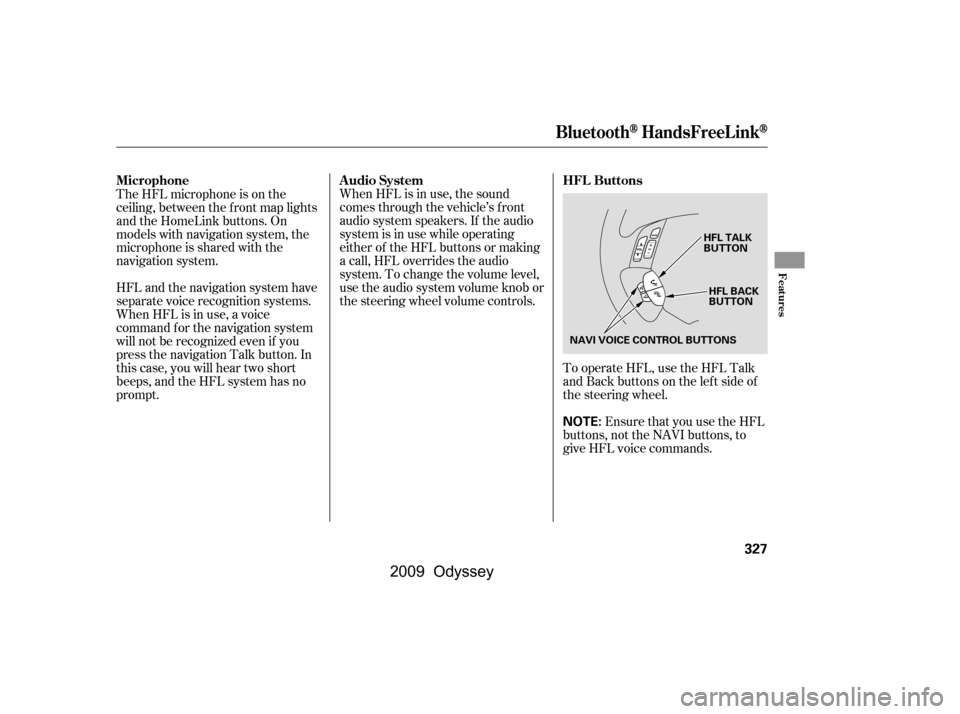
Ensure that you use the HFL
buttons, not the NAVI buttons, to
give HFL voice commands.
To operate HFL, use the HFL Talk
and Back buttons on the left side of
the steering wheel.
When HFL is in use, the sound
comes through the vehicle’s f ront
audio system speakers. If the audio
system is in use while operating
either of the HFL buttons or making
a call, HFL overrides the audio
system. To change the volume level,
use the audio system volume knob or
the steering wheel volume controls.
The HFL microphone is on the
ceiling, between the f ront map lights
and the HomeLink buttons. On
models with navigation system, the
microphone is shared with the
navigation system.
HFL and the navigation system have
separate voice recognition systems.
When HFL is in use, a voice
command f or the navigation system
will not be recognized even if you
press the navigation Talk button. In
this case, you will hear two short
beeps, and the HFL system has no
prompt.
BluetoothHandsFreeL ink
HFL Buttons
Audio System
Microphone
Features
327
NOTE:
HFL BACK
BUTTON
HFL TALK
BUTTON
NAVI VOICE CONTROL BUTTONS
�\f���—�\f���—���
�y�
�
���������
�y���
�(���������\f�y�\f�������y
2009 Odyssey
Page 343 of 532

You can make calls using any phone
number, or by using a name in the
HFL phonebook. You can also redial
the last number called. During a call,
HFLallowsyoutotalkupto30
minutes af ter you remove the key
f rom the ignition switch. Continuing
a call without running the engine
may discharge and weaken the
vehicle’s battery.Press and release the Talk button.
Af ter the beep, say ‘‘Call’’ or ‘‘Dial.’’
HFL responds ‘‘Calling’’ or
‘‘Dialing.’’
Once connected, you will hear the
person you called through the
audio speakers. To change the
volume, use the audio system
volume knob or the steering wheel
volume controls.
To end the call, press the Back
button.
With your phone on and the
ignition switch in the
ACCESSORY (I) or ON (II)
position, press and release the
Talk button. After the beep, say
‘‘Call’’ or ‘‘Dial.’’
HFL responds ‘‘What name or
number would you like to call/
dial? Press the Talk button and say
a name, a number, or say list to
hear the phonebook entries.’’
Press and release the Talk button.
Af ter the beep, say the number
you want to call. For example, say
‘‘123 456 7891.’’
HFL responds ‘‘123 456 7891.
Press the Talk button and
continue to add numbers, or say
Call or Dial to place a call.’’ 4.
2.
1. 3.
To make a call using a phone number,
do this:
BluetoothHandsFreeL ink
Making a Call
340
�\f���—�\f���—���
�y�
����\f�\f��\f�\f�y���
�(���������\f�y�\f�������y
2009 Odyssey
Page 345 of 532

To redial the last number called by thephone, do this:
To make a call using a name in the HFL phonebook, do this:
Press and release the Talk button.
Af ter the beep, say ‘‘Redial.’’
HFL responds ‘‘Redialing.’’
Once connected, you will hear the
person you called through the audio
speakers. To change the volume, use
the audio system volume knob or the
steering wheel volume controls.
Press and release the Talk button.
After the beep, say the name you
want to call. For example, say
‘‘John.’’
HFL responds ‘‘Would you like to
call John? Press the Talk button
and say Yes or No.’’
Press and release the Talk button.
Af ter the beep, say ‘‘Yes.’’
HFL responds ‘‘Calling’’ or
‘‘Dialing.’’
Once connected, you will hear the
person you called through the
audio speakers. To change the
volume, use the audio system
volume knob or the steering wheel
volume controls.
To end the call, press the Back
button.
Press and release the Talk button.
Af ter the beep, say ‘‘Call.’’ HFL
responds ‘‘Dialing the number
received from the navigation
system. To end the call, please
press the Bluetooth
HandsFreeLink Back button on
the steering wheel.’’
HFL responds ‘‘What name or
number would you like to call/
dial? Press the Talk button and say
a name, a number, or say list to
hear the phonebook entries.’’
With your phone on and the
ignition switch in the
ACCESSORY (I) or ON (II)
position, press and release the
Talk button. After the beep, say
‘‘Call’’ or ‘‘Dial.’’
1. 2.
3.
4.
8.
BluetoothHandsFreeL ink
342
�\f���—�\f���—���
�y�
����\f�\f����
�y���
�(���������\f�y�\f�������y
2009 Odyssey
Page 351 of 532

�»�¼�»�¼
Press and release the Talk button.
Af ter the beep, say ‘‘Yes.’’
HFL responds ‘‘The name has
been deleted.’’
Press and release the Talk button.
Af ter the beep, say ‘‘Phonebook.’’
HFL responds ‘‘Phonebook
options are store, edit, delete,
receive contact, and list. Press the
Talk button and say a command.’’
Press and release the Talk button.
Af ter the beep, say ‘‘Phonebook.’’
HFL responds ‘‘Phonebook
options are store, edit, delete,
receive contact, and list. Press the
Talk button and say a command.’’
Press and release the Talk button.
Af ter the beep, say ‘‘List.’’
HFL responds by listing the names
in the phonebook in the order which
they were stored. Af ter all names are
listed, HFL responds ‘‘The entire list
has been read.’’ Press and release the Talk button.
Af ter the beep, say ‘‘List.’’
HFL responds by listing the
names in the phonebook. When it
saysthenameyouwanttocall,for
example, Eric , press and
release the Talk button. After the
beep, say ‘‘Call.’’ HFL responds
‘‘Would you like to call Eric ?
Press the Talk button and say Yes
or No.’’Once connected, you will hear the
person you called through the audio
speakers. To change the volume, use
the audio system volume knob or the
steering wheel volume controls.
Press and release the Talk button.
Af ter the beep, say ‘‘Yes.’’ HFL
responds ‘‘Calling.’’
1.
4.
2. 1.
2.
3.
To list all names in the phonebook, do
this: To call a name f rom the phonebook list,
do this:
BluetoothHandsFreeL ink
348
�\f���—�\f���—���
�y�
����\f�
������y���
�(���������\f�y�\f�������y
2009 Odyssey