Page 139 of 352
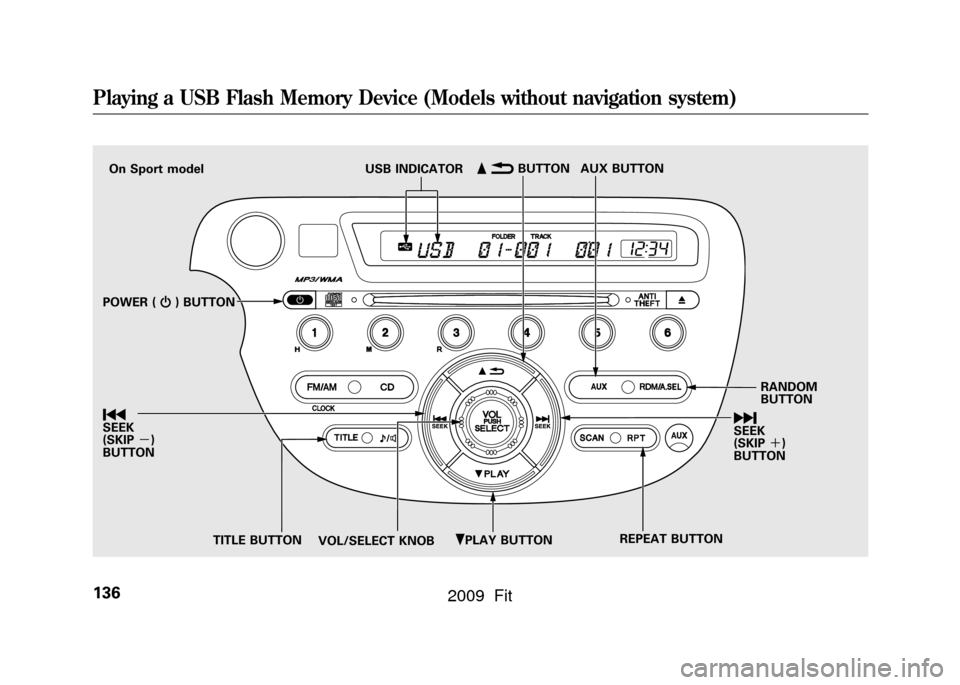
ꂺPLAY BUTTON
USB INDICATOR
RANDOM
BUTTON
\b
SEEK
(SKIP +)
BUTTON
TITLE BUTTON AUX BUTTON
ꂹꂾ
BUTTON
VOL/SELECT KNOB REPEAT BUTTON
ꀾ
SEEK
(SKIP
-)
BUTTON POWER ( ꂻ) BUTTON
On Sport model
Playing a USB Flash Memory Device (Models without navigation system)136
2009 Fit
Page 196 of 352

On Sport modelThe security system helps to protect
your vehicle and valuables from
theft. The horn sounds and a
combination of headlights, parking/
side marker lights and taillights
flashes if someone attempts to break
into your vehicle or remove the audio
unit. This alarm continues for 2
minutes, then the system resets. To
reset an activated system before the
2 minutes have elapsed, unlock the
driver's door with the key or the
remote transmitter.
The security system automatically
sets 15 seconds after you lock the
doors, hood, and the tailgate. For the
system to activate, you must lock the
doors and the tailgate from the
outside with the key, driver's lock
tab, door lock master switch, or
remote transmitter. The security
system indicator on the instrument
panel starts blinking immediately to
show you the system is setting itself.
Once the security system is set,
opening any door, the tailgate, or the
hood without using the key or the
remote transmitter, will cause it to
alarm. It also alarms if the radio is
removed from the dashboard or the
wiring is cut.
The alarm will also be activated if a
passenger inside the locked vehicle
turns the ignition switch on.The security system will not set if the
hood, tailgate, or any door is not fully
closed. If the system will not set,
check the door and tailgate open
indicator on the instrument panel
(see page
62)to see if the doors and
tailgate are fully closed. Since it is
not part of the monitor display,
manually check the hood.
NOTE: To see if the system is set
after you exit the vehicle, press the
LOCK button on the remote
transmitter within 5 seconds. If the
system is set, the horn will beep
once.
Do not attempt to alter this system or
add other devices to it.
SECURITY SYSTEM INDICATOR
Security System
193
Features
2009 Fit
Page 197 of 352

On Sport model and Canadian LX modelCruise control allows you to maintain
a set speed above 25 mph (40 km/h)
without keeping your foot on the
accelerator pedal. It should be used
for cruising on straight, open
highways. It is not recommended for
city driving, winding roads, slippery
roads, heavy rain, or bad weather.
Improper use of the cruise
control can lead to a crash.
Use the cruise control only
when traveling on open
highways in good weather.Using the Cruise Control
1. Press the CRUISE button on the
steering wheel. The CRUISE
MAIN indicator on the instrument
panel comes on.
NOTE: The main switch can be left
on, even when the system is not in
use.
2. Accelerate to the desired cruising speed above 25 mph (40 km/h). 3. Press the SET/DECEL button on
the steering wheel. The CRUISE
CONTROL indicator on the
instrument panel comes on to
show the system is now activated.
Cruise control may not hold the set
speed when you are going up and
down hills. If your speed increases
going down a hill, use the brakes to
slow down. This will cancel cruise
control. To resume the set speed,
press the RES/ACCEL button. The
indicator on the instrument panel will
come back on.
When climbing a steep hill, the
automatic transmission may
downshift to hold the set speed.CRUISE BUTTON
SET/DECEL BUTTON CANCEL
BUTTON
RES/ACCEL
BUTTON
Cruise Control194
2009 Fit
Page 217 of 352
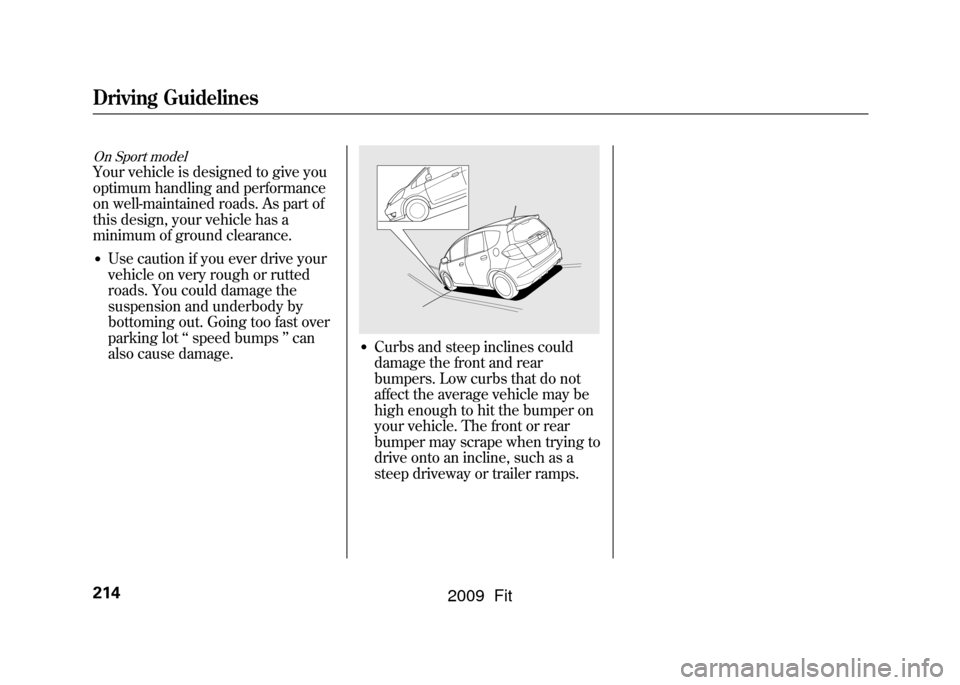
On Sport modelYour vehicle is designed to give you
optimum handling and performance
on well-maintained roads. As part of
this design, your vehicle has a
minimum of ground clearance.●Use caution if you ever drive your
vehicle on very rough or rutted
roads. You could damage the
suspension and underbody by
bottoming out. Going too fast over
parking lot‘‘speed bumps ’’can
also cause damage.
●Curbs and steep inclines could
damage the front and rear
bumpers. Low curbs that do not
affect the average vehicle may be
high enough to hit the bumper on
your vehicle. The front or rear
bumper may scrape when trying to
drive onto an incline, such as a
steep driveway or trailer ramps.
Driving Guidelines214
2009 Fit
Page 222 of 352
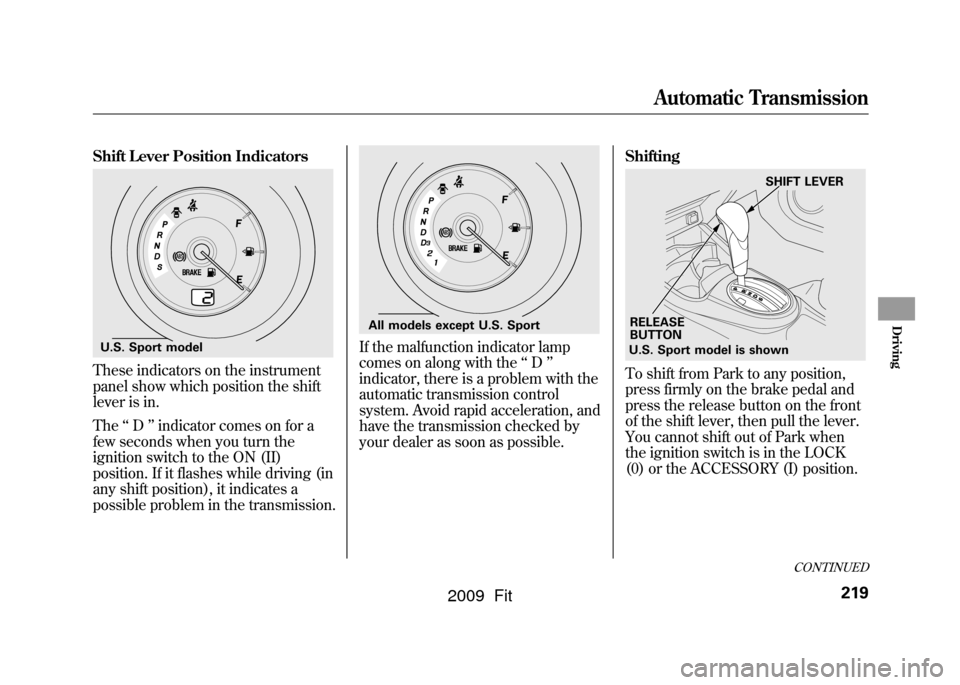
Shift Lever Position IndicatorsThese indicators on the instrument
panel show which position the shift
lever is in.
The‘‘D ’’indicator comes on for a
few seconds when you turn the
ignition switch to the ON (II)
position. If it flashes while driving (in
any shift position), it indicates a
possible problem in the transmission.
If the malfunction indicator lamp
comes on along with the ‘‘D ’’
indicator, there is a problem with the
automatic transmission control
system. Avoid rapid acceleration, and
have the transmission checked by
your dealer as soon as possible. Shifting
To shift from Park to any position,
press firmly on the brake pedal and
press the release button on the front
of the shift lever, then pull the lever.
You cannot shift out of Park when
the ignition switch is in the LOCK
(0) or the ACCESSORY (I) position.
U.S. Sport model
All models except U.S. Sport
U.S. Sport model is shown
RELEASE
BUTTON SHIFT LEVER
CONTINUED
Automatic Transmission
219
Driving
2009 Fit
Page 223 of 352

All models except U.S. SportTo shift from:Do this:
PtoR Press the brake pedal, and
press the shift lever release
button.
RtoP
NtoR
D
3to 2
2to1 Press the shift lever release
button.
1to2
2toD3
D3to D
DtoN
DtoD
3
NtoD RtoN Move the shift lever.
U.S. Sport modelTo shift from:
Do this:
PtoR Press the brake pedal, and
press the shift lever release
button.
RtoP
NtoR DtoS Press the shift lever release
button.
StoD
DtoN
NtoD RtoN Move the shift lever.
Park (P)
-This position
mechanically locks the transmission.
Use Park whenever you are turning
off or starting the engine. To shift out
of Park, you must press on the brake
pedal and have your foot off the
accelerator pedal. Press the release
button on the front of the shift lever
to move it.
If you have done all of the above and
still cannot move the lever out of
Park, see Shift Lock Release on
page223.
To avoid transmission damage, come
to a complete stop before shifting
into Park. You must also press the
release button to shift into Park. The
shift lever must be in Park before
you can remove the key from the
ignition switch.
Automatic Transmission220
2009 Fit
Page 224 of 352

Reverse (R)-Press the brake
pedal and press the release button on
the front of the shift lever to shift
from Park to reverse. To shift from
reverse to neutral, come to a
complete stop, and then shift. Press
the release button before shifting
into reverse from neutral.
Neutral (N) -Use neutral if you
need to restart a stalled engine, or if
it is necessary to stop briefly with the
engine idling. Shift to the Park
position if you need to leave your
vehicle for any reason. Press on the
brake pedal when you are moving
the shift lever from neutral to
another gear. Drive (D)
-Use this position for
your normal driving. The
transmission automatically selects a
suitable gear (1 through 5) for your
speed and acceleration. You may
notice the transmission shifting up at
higher engine speeds when the
engine is cold. This helps the engine
warm up faster.
All models except U.S. SportDrive (D
3) - This position is similar
to D, except only the first three gears
are selected. Use D
3to provide
engine braking when going down a
steep hill. D
3can also keep the
transmission from cycling between
third and fourth gears in stop-and-go
driving.
All models except U.S. SportSecond (2) -To shift to second,
press the release button on the front
of the shift lever. This position locks
the transmission in second gear. It
does not downshift to first gear when
you come to a stop.
Use second gear:●For more power when climbing.●To increase engine braking when
going down steep hills.●For starting out on a slippery
surface or in deep snow.●To help reduce wheel spin.
CONTINUED
Automatic Transmission
221
Driving
2009 Fit
Page 225 of 352

All models except U.S. SportFirst (1)-To shift from second to
first, press the release button on the
front of the shift lever. This position
locks the transmission in first gear.
By upshifting and downshifting
through 1, 2, D
3, and D, you can
operate the transmission much like a
manual transmission without a clutch
pedal.
U.S. Sport modelS position (S) -To shift into the S
position, press the release button on
the front of the shift lever, and move
the lever to S. This position is similar
to D, except only gears from first to
fourth are selected. The S position
keeps the transmission from cycling
between fourth and fifth gears in
stop-and-go driving.
With the shift lever in D or S, you
can also use the paddle shifters to
shift the transmission up or down.
With the paddle shifters, you can
operate the transmission much like a
manual transmission without a clutch
pedal. For more information on
driving with the paddle shifters, see
page 224. Engine Speed Limiter
If you exceed the maximum speed
for the gear you are in, the engine
speed will enter into the
tachometer's red zone. If this occurs,
you may feel the engine cut in and
out. This is caused by a limiter in the
engine's computer controls. The
engine will run normally when you
reduce the rpm below the red zone.
Automatic Transmission222
2009 Fit