Page 265 of 345
Headlight Aiming
The headlights were properly aimed
when your vehicle was new. If you
regularly carry heavy items in the
cargo area or pull a trailer,
readjustment may be required.
Adjustments should be done by your
dealer or another qualified
technician.Replacing a Headlight Bulb
Your vehicle has halogen headlight
bulbs. Handle it by its steel base and
protect the glass from contact with
your skin or hard objects. If you
touch the glass, clean it with
denatured alcohol and a clean cloth.
Halogen headlight bulbs get very hot
when lit. Oil, perspiration, or a scratch
on the glass can cause the bulb to
overheat and shatter.
1. Open the hood.
If you need to change the
headlight bulb on the driver's side,
remove the front end of the air
intake duct by pulling it out.
AIR INTAKE DUCT
CONTINUED
Lights
261
Maintenance
2009 Element
Page 267 of 345
4. Insert the new bulb into the hole,and turn it one-quarter turn
clockwise to lock it in place.
5. Push the electrical connector back onto the bulb. Make sure it is on
all the way.
6. Test the lights to make sure the new bulb is working. Replacing a Front Parking/Turn
Signal Light Bulb
1. Open the hood.
2. Remove the socket from the
headlight assembly by turning it
one-quarter turn counterclockwise.
3. Remove the bulb from the socket by pushing the bulb in and turning
it counterclockwise until it
unlocks. 4. Install the new bulb in the socket
by pushing the bulb in and turning
it clockwise until it locks.
5. Test the lights to make sure the new bulb is working.
CONTINUED
Lights
263
Maintenance
2009 Element
Page 269 of 345
9. Put the inner fender cover in place.Install the holding clip.
Lock the clip in place by pushing
on the center.
Install the wheel arch protector
and tighten the screws securely. Replacing a Front Side Marker
Light Bulb
1. Open the hood.
To change the driver's side,
remove the front end of the air
intake duct by pulling it out (see
page261).
2. Remove the socket from the light assembly by turning it one-quarter
turn counterclockwise. 3. Pull the bulb straight out of its
socket. Push the new bulb straight
into the socket until it bottoms.
4. Reinstall the socket into the light assembly by turning it clockwise
until it locks.
5. Test the lights to make sure the new bulb is working.
6. Install the front end of the air intake duct.
CONTINUED
Lights
265
Maintenance
2009 Element
Page 271 of 345
Replacing a Rear License Plate
Bulb1. Remove the license light assemblyby pushing the left edge of the
lens toward the right and pulling
the assembly out.
2. Pull the bulb straight out of its socket. Push the new bulb in until
it bottoms in the socket.
3. Turn on the parking lights andcheck that the new bulb is
working.
4. Put the lens back on the socket until it locks.
5. Slide the right side of the light assembly into the hole. Push on
the left side to latch the assembly
into place. Replacing a High-mount Brake
Light Bulb
1. Open the hatch. Remove the light
assembly cover by pushing in on
the tabs on both sides and pulling
the cover down.
2. Remove the socket from the light assembly by turning it one-quarter
turn counterclockwise.
LENS
SOCKET BULB
LENS
TABS
COVER
CONTINUED
Lights
267
Maintenance
2009 Element
Page 273 of 345

If you remove the driver's floor mat,
make sure to re-anchor it when you
put it back in your vehicle.
If you use non-Honda floor mats,
make sure they fit properly and that
they can be used with the floor mat
anchors. Do not put additional floor
mats on top of the anchored mats.Dust and Pollen Filter
This filter removes the dust and
pollen that is brought in from the
outside through the heating and
cooling system.
Have your dealer replace the filter
when this service is indicated by a
maintenance message on the
information display. It should be
replaced every 15,000 miles
(24,000 km) if you drive primarily in
urban areas that have high
concentrations of soot in the air, or if
the flow from the heating and cooling
system becomes less than usual.Wiper Blades
Check the condition of the wiper
blades at least every 6 months.
Replace them if you find signs of
cracking in the rubber, areas that are
getting hard, or if they leave streaks
and unwiped areas when used.
1. Front:
Raise the wiper arm off the
windshield.
Do not open the hood when the wiper
arms are raised, or you will damage the
hood and the arms.
Rear:
Raise the wiper arm off the hatch
glass and hold it.
CONTINUED
Floor Mats, Dust and Pollen Filter, Wiper Blades
269
Maintenance
2009 Element
Page 275 of 345

Wheels
Clean the wheels as you would the
rest of the exterior. Wash them with
the same solution, and rinse them
thoroughly.If equippedAluminum alloy wheels have a
protective clear-coat that keeps the
aluminum from corroding and
tarnishing. Cleaning the wheels with
harsh chemicals (including some
commercial wheel cleaners) or a stiff
brush can damage the clear-coat. To
clean the wheels, use a mild
detergent and a soft brush or sponge.Tires
To safely operate your vehicle, your
tires must be the proper type and
size, in good condition with adequate
tread, and correctly inflated.
The following pages give more
detailed information on how to take
care of your tires and what to do
when they need to be replaced.
Using tires that are excessively
worn or improperly inflated can
cause a crash in which you can
be seriously hurt or killed.
Follow all instructions in this
owner's manual regarding tire
inflation and maintenance.Inflation Guidelines
Keeping the tires properly inflated
provides the best combination of
handling, tread life, and riding
comfort.
●Underinflated tires wear unevenly,
adversely affect handling and fuel
economy, and are more likely to
fail from being overheated.●Overinflated tires can make your
vehicle ride more harshly, are
more prone to damage from road
hazards, and wear unevenly.
The tire pressure monitoring system
(TPMS) will warn you when a tire
pressure is low. See page227for
more information on the TPMS.
CONTINUED
Wheels, Tires
271
Maintenance
2009 Element
Page 277 of 345

The compact spare tire pressure is:
60 psi (420 kPa, 4.2 kgf/cm
2)
For convenience, the recommended
tire sizes and cold tire pressures are
on a label on the driver's doorjamb.
For additional technical information
about your tires, see page311.
Tire Inspection
Every time you check inflation, you
should also examine the tires for
damage, foreign objects, and wear.
You should look for:
●Bumps or bulges in the tread or
side of the tire. Replace the tire if
you find either of these conditions.●Cuts, splits, or cracks in the side of
the tire. Replace the tire if you can
see fabric or cord.●Excessive tread wear.
Your tires have wear indicators
molded into the tread. When the
tread wears down, you will see a
1/2 inch (12.7 mm) wide band across
the tread. This shows there is less
than 1/16 inch (1.6 mm) of tread left
on the tire.
A tire this worn gives very little
traction on wet roads. You should
replace the tire if you can see three
or more tread wear indicators. Tire Service Life
The service life of your tires is
dependent on many factors,
including, but not limited to, driving
habits, road conditions, vehicle
loading, inflation pressure,
maintenance history, speed, and
environmental conditions (even
when the tires are not in use).
In addition to your regular
inspections and inflation pressure
maintenance, it is recommended that
you have annual inspections
performed once the tires reach five
years old. It is also recommended
that all tires, including the spare, be
removed from service after 10 years
from the date of manufacture,
regardless of their condition or state
of wear.
The last four digits of the TIN (tire
identification number) are found on
the sidewall of the tire and indicate
the date of manufacture (See
Tire
Labeling on page313).
INDICATOR LOCATION MARKS
TREAD WEAR INDICATORS
CONTINUED
Tires
273
Maintenance
2009 Element
Page 278 of 345
Tire Maintenance
In addition to proper inflation, correct
wheel alignment helps to decrease
tire wear. If you find a tire is worn
unevenly, have your dealer check the
wheel alignment.
Have your dealer check the tires if
you feel a consistent vibration while
driving. A tire should always be
rebalanced if it is removed from the
wheel. When you have new tires
installed, make sure they are
balanced. This increases riding
comfort and tire life. For best results,
have the installer perform a dynamic
balance.On vehicles with aluminum wheels,
improper wheel weights can damage
your vehicle's aluminum wheels. Use
only Honda wheel weights for
balancing.Tire Rotation
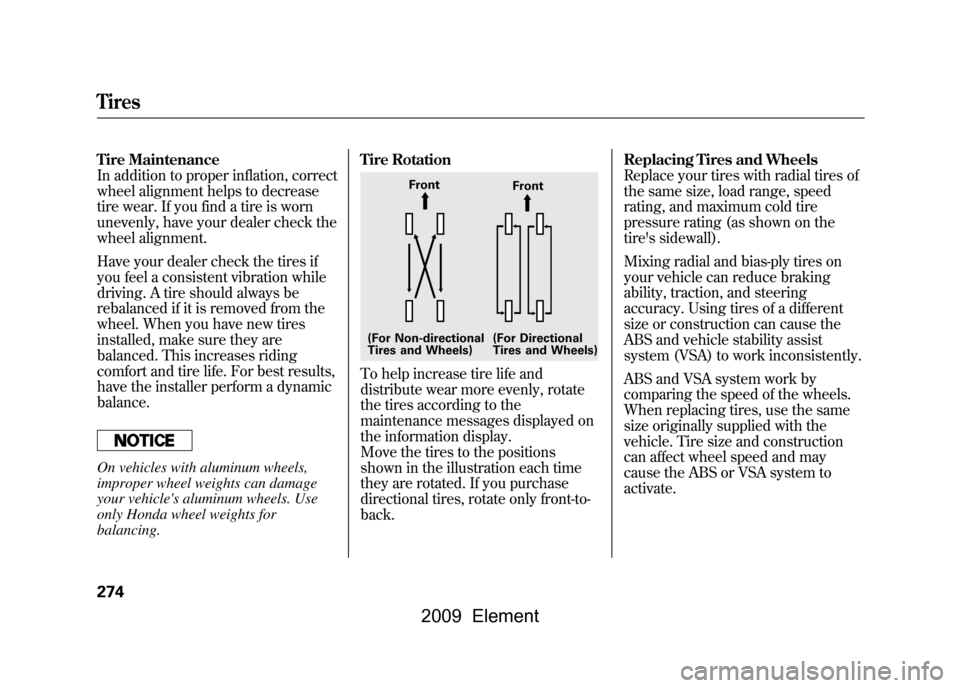
To help increase tire life and
distribute wear more evenly, rotate
the tires according to the
maintenance messages displayed on
the information display.
Move the tires to the positions
shown in the illustration each time
they are rotated. If you purchase
directional tires, rotate only front-to-
back.
Replacing Tires and Wheels
Replace your tires with radial tires of
the same size, load range, speed
rating, and maximum cold tire
pressure rating (as shown on the
tire's sidewall).
Mixing radial and bias-ply tires on
your vehicle can reduce braking
ability, traction, and steering
accuracy. Using tires of a different
size or construction can cause the
ABS and vehicle stability assist
system (VSA) to work inconsistently.
ABS and VSA system work by
comparing the speed of the wheels.
When replacing tires, use the same
size originally supplied with the
vehicle. Tire size and construction
can affect wheel speed and may
cause the ABS or VSA system to
activate.
Front
Front
(For Non-directional
Tires and Wheels) (For Directional
Tires and Wheels)
Tires274
2009 Element


