2009 GMC SIERRA 1500 battery
[x] Cancel search: batteryPage 320 of 602

d(Camera):Press this button to change camera
angles on DVDs that have this feature while a DVD is
playing. The format and content of this function vary for
each disc.
1 through 0 (Numeric Keypad):The numeric keypad
provides the capability of direct chapter or track
number selection.
\(Clear):Press this button within three seconds after
entering a numeric selection, to clear all numerical inputs.
}10 (Double Digit Entries):Press this button to
select chapter or track numbers greater than nine.
Press this button before entering the number.
Battery Replacement
To change the remote control batteries, do the following:
1. Slide the rear cover back on the remote control.
2. Replace the two batteries in the compartment. Make
sure they are installed correctly using the diagram
on the inside of the remote control.
3. Replace the battery cover.If the remote control is to be stored for a long period of
time, remove the batteries and keep them in a cool,
dry place.
Problem Recommended Action
No power. The ignition might not be
turned ON/RUN or in
ACC/ACCESSORY.
The picture does not ll the
screen. There are black
borders on the top and
bottom or on both sides or
it looks stretched out.Check the display mode
settings in the setup menu
by pressing the display
menu button on the remote
control.
In auxiliary mode, the
picture moves or scrolls.Check the auxiliary input
connections at both
devices.
The remote control does
not work.Check to make sure there
is no obstruction between
the remote control and the
transmitter window.
Check the batteries to
make sure they are not
dead or installed
incorrectly.
3-136
Page 326 of 602

XM™ Satellite Radio Service
XM Satellite Radio Service gives digital radio reception
from coast-to-coast in the 48 contiguous United States,
and in Canada. Just as with FM, tall buildings or hills can
interfere with satellite radio signals, causing the sound to
fade in and out. In addition, traveling or standing under
heavy foliage, bridges, garages, or tunnels may cause
loss of the XM signal for a period of time.
Cellular Phone Usage
Cellular phone usage may cause interference with the
vehicle’s radio. This interference may occur when making
or receiving phone calls, charging the phone’s battery, or
simply having the phone on. This interference causes an
increased level of static while listening to the radio. If
static is received while listening to the radio, unplug the
cellular phone and turn it off.
Fixed Mast Antenna
The xed mast antenna can withstand most car washes
without being damaged as long as it is securely attached
to the base. If the mast becomes slightly bent, straighten
it out by hand. If the mast is badly bent, replace it.
Occasionally check to make sure the antenna is
tightened to its base. If tightening is required, tighten by
hand until fully seated plus one quarter turn.
XM™ Satellite Radio Antenna
System
The XM Satellite Radio antenna is located on the roof of
the vehicle. Keep the antenna clear of obstructions for
clear radio reception.
If the vehicle has a sunroof, the performance of the XM
system may be affected if the sunroof is open.
3-142
Page 357 of 602

{CAUTION:
Snow can trap engine exhaust under the vehicle.
This may cause exhaust gases to get inside.
Engine exhaust contains carbon monoxide (CO)
which cannot be seen or smelled. It can cause
unconsciousness and even death.
If the vehicle is stuck in the snow:
Clear away snow from around the base of
your vehicle, especially any that is blocking
the exhaust pipe.
Check again from time to time to be sure
snow does not collect there.
Open a window about two inches (5 cm) on
the side of the vehicle that is away from the
wind to bring in fresh air.
Fully open the air outlets on or under the
instrument panel.
Adjust the Climate Control system to a setting
that circulates the air inside the vehicle and
set the fan speed to the highest setting.
See Climate Control System in the Index.
CAUTION: (Continued)
CAUTION: (Continued)
For more information about carbon monoxide,
seeEngine Exhaust on page 2-55.
Snow can trap exhaust gases under your vehicle.
This can cause deadly CO (carbon monoxide) gas
to get inside. CO could overcome you and kill you.
You cannot see it or smell it, so you might not know
it is in your vehicle. Clear away snow from around
the base of your vehicle, especially any that is
blocking the exhaust.
Run the engine for short periods only as needed to keep
warm, but be careful.
To save fuel, run the engine for only short periods as
needed to warm the vehicle and then shut the engine off
and close the window most of the way to save heat.
Repeat this until help arrives but only when you feel really
uncomfortable from the cold. Moving about to keep warm
also helps.
If it takes some time for help to arrive, now and then
when you run the engine, push the accelerator pedal
slightly so the engine runs faster than the idle speed. This
keeps the battery charged to restart the vehicle and to
signal for help with the headlamps. Do this as little as
possible to save fuel.
4-31
Page 408 of 602

Heavy-DutyTrailer Wiring Harness
Package
For vehicles equipped with heavy duty trailering, the
harness is connected to a bracket on the hitch platform.
The seven-wire harness contains the following trailer
circuits:
Yellow: Left Stop/Turn Signal
Dark Green: Right Stop/Turn Signal
Brown: Taillamps
White: Ground
Light Green: Back-up Lamps
Red: Battery Feed*
Dark Blue: Trailer Brake**The fuses for these two circuits are installed in the
underhood electrical center, but the wires are not
connected. They should be connected by your
dealer/retailer or a qualied service center. The fuse
and wire for the ITBC is factory installed and connected
if the vehicle is equipped with an ITBC. The fuse for
the battery feed is not required if the vehicle has
an auxiliary battery. If the vehicle does not have an
auxiliary battery, have your dealer/retailer or authorized
service center install the required fuse.
If charging a remote (non-vehicle) battery, press the
tow/haul mode button located at the end of the shift lever.
This will boost the vehicle system voltage and properly
charge the battery. If the trailer is too light for tow/haul
mode, turn on the headlamps as a second way to boost
the vehicle system and charge the battery.
4-82
Page 409 of 602
Camper/Fifth-Wheel Trailer Wiring Package
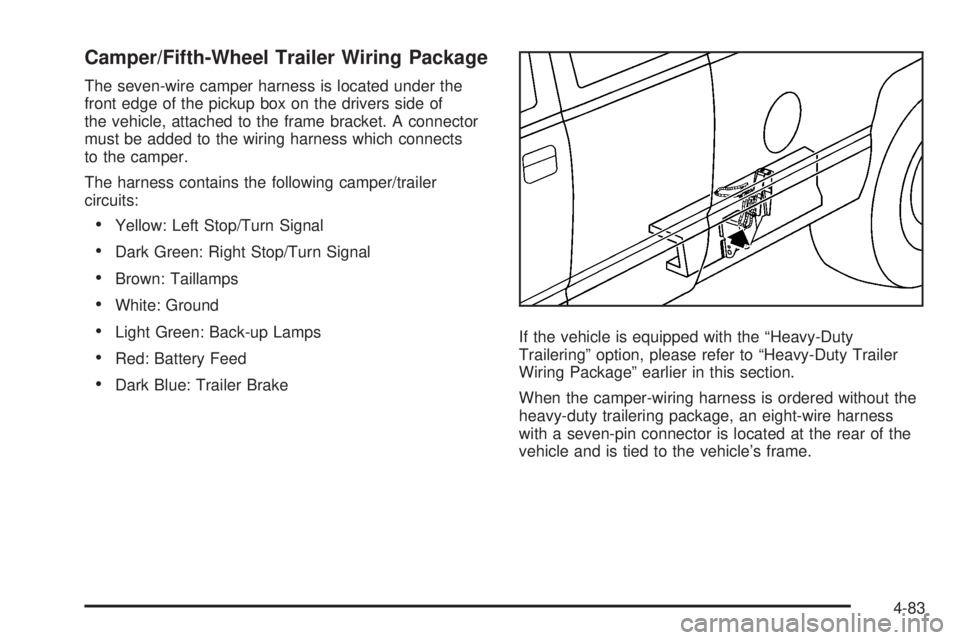
The seven-wire camper harness is located under the
front edge of the pickup box on the drivers side of
the vehicle, attached to the frame bracket. A connector
must be added to the wiring harness which connects
to the camper.
The harness contains the following camper/trailer
circuits:
Yellow: Left Stop/Turn Signal
Dark Green: Right Stop/Turn Signal
Brown: Taillamps
White: Ground
Light Green: Back-up Lamps
Red: Battery Feed
Dark Blue: Trailer BrakeIf the vehicle is equipped with the “Heavy-Duty
Trailering” option, please refer to “Heavy-Duty Trailer
Wiring Package” earlier in this section.
When the camper-wiring harness is ordered without the
heavy-duty trailering package, an eight-wire harness
with a seven-pin connector is located at the rear of the
vehicle and is tied to the vehicle’s frame.
4-83
Page 410 of 602
Electric Brake Control Wiring
Provisions
These wiring provisions are included with the vehicle as
part of the trailer wiring package. These provisions are for
an electric brake controller. The instrument panel
contains blunt cut wires behind the steering column for
the trailer brake controller. The harness contains the
following wires:
Dark Blue: Brake Signal to Trailer Connector
Red/Black: Battery
Light Blue/White: Brake Switch
White: Ground
It should be installed by your dealer/retailer or a qualied
service center.
If the vehicle is equipped with an ITBC, the blunt cuts
exist, but are not connected further in the harness. If an
aftermarket trailer brake controller is installed, the ITBC
must be disconnected. Do not power both ITBC and
aftermarket controllers to control the trailer brakes at the
same time.
Auxiliary Battery
The auxiliary battery provision can be used to supply
electrical power to additional equipment that may be
added, such as a slide-in camper. If the vehicle has this
provision, this relay will be located on the drivers side of
the vehicle, next to the underhood electrical center.Be sure to follow the proper installation instructions that
are included with any electrical equipment that is
installed.
Notice:Leaving electrical equipment on for
extended periods will drain the battery. Always turn
off electrical equipment when not in use and do not
use equipment that exceeds the maximum amperage
rating for the auxiliary battery provision.
Trailer Recommendations
Subtract the hitch loads from the Cargo Weight Rating
(CWR). CWR is the maximum weight of the load
the vehicle can carry. It does not include the weight of
the people inside, but you can gure about 150 lbs.
(68 kg) for each passenger. The total cargo load must
not be more than the vehicles CWR.
Weigh the vehicle with the trailer attached, so the
GVWR or GAWR are not exceeded. If using a
weight-distributing hitch, weigh the vehicle without the
spring bars in place.
The best performance is obtained by correctly spreading
out the weight of the load and choosing the correct
hitch and trailer brakes.
For more information seeTowing a Trailer on page 4-53.
4-84
Page 411 of 602

Service............................................................5-4
Accessories and Modications..........................5-4
California Proposition 65 Warning.....................5-5
California Perchlorate Materials Requirements.....5-5
Doing Your Own Service Work.........................5-5
Adding Equipment to the Outside of the
Vehicle......................................................5-6
Fuel................................................................5-6
Gasoline Octane............................................5-7
Gasoline Specications....................................5-7
California Fuel...............................................5-7
Additives.......................................................5-8
Fuel E85 (85% Ethanol)..................................5-9
Fuels in Foreign Countries.............................5-10
Filling the Tank............................................5-11
Filling a Portable Fuel Container.....................5-13
Checking Things Under
the Hood....................................................5-14
Hood Release..............................................5-14
Engine Compartment Overview.......................5-16
Engine Oil...................................................5-17
Engine Oil Life System..................................5-20
Engine Air Cleaner/Filter................................5-22Automatic Transmission Fluid
(4-Speed Transmission)..............................5-24
Automatic Transmission Fluid
(6-Speed Transmission)..............................5-27
Cooling System............................................5-30
Engine Coolant.............................................5-32
Engine Overheating.......................................5-36
Overheated Engine Protection
Operating Mode........................................5-38
Engine Fan Noise.........................................5-39
Power Steering Fluid.....................................5-39
Windshield Washer Fluid................................5-40
Brakes........................................................5-41
Battery........................................................5-45
Jump Starting...............................................5-46
Rear Axle.......................................................5-51
Four-Wheel Drive............................................5-53
Front Axle......................................................5-56
Noise Control System.....................................5-57
Tampering with Noise Control System
Prohibited.................................................5-57
Headlamp Aiming...........................................5-58
Section 5 Service and Appearance Care
5-1
Page 427 of 602

A.Engine Air Cleaner/Filter on page 5-22.
B. Coolant Surge Tank and Pressure Cap.
SeeCooling System on page 5-30.
C. Positive (+) Terminal. SeeJump Starting on
page 5-46.
D.Battery on page 5-45.
E. Engine Oil Fill Cap. See “When to Add Engine Oil”
underEngine Oil on page 5-17.
F. Automatic Transmission Dipstick. See “Checking
the Fluid Level” underAutomatic Transmission Fluid
(4-Speed Transmission) on page 5-24orAutomatic
Transmission Fluid (6-Speed Transmission) on
page 5-27.
G. Remote Negative (−) Terminal (Out of View).
SeeJump Starting on page 5-46.
H. Engine Oil Dipstick (Out of View). See “Checking
Engine Oil” underEngine Oil on page 5-17.
I. Engine Cooling Fan. SeeCooling System on
page 5-30.
J. Power Steering Fluid Reservoir. SeePower Steering
Fluid on page 5-39.
K. Brake Master Cylinder Reservoir. See “Brake Fluid”
underBrakes on page 5-41.
L.Underhood Fuse Block on page 5-127.
M. Windshield Washer Fluid Reservoir. See “Adding
Washer Fluid” underWindshield Washer Fluid
on page 5-40.Engine Oil
For diesel engine vehicles, see “Engine Oil” in the
DURAMAX®Diesel manual.
Checking Engine Oil
It is a good idea to check the engine oil level at each
fuel ll. In order to get an accurate reading, the oil must
be warm and the vehicle must be on level ground.
The engine oil dipstick handle is a yellow loop.
SeeEngine Compartment Overview on page 5-16
for the location of the engine oil dipstick.
1. Turn off the engine and give the oil several minutes
to drain back into the oil pan. If this is not done,
the oil dipstick might not show the actual level.
2. Pull out the dipstick and clean it with a paper towel
or cloth, then push it back in all the way. Remove it
again, keeping the tip down, and check the level.
5-17