2009 GMC CANYON ignition
[x] Cancel search: ignitionPage 158 of 414

Malfunction Indicator Lamp
Check Engine Light
A computer system called OBD II (On-Board
Diagnostics-Second Generation) monitors operation
of the fuel, ignition, and emission control systems.
It ensures that emissions are at acceptable levels for
the life of the vehicle, helping to produce a cleaner
environment.
This light should come on
when the ignition is on, but
the engine is not running,
as a check to show it
working.
If it does not, have the vehicle serviced by your
dealer/retailer.
If the check engine light comes on and stays on, while
the engine is running, this indicates that there is an
OBD II problem and service is required.
Malfunctions often are indicated by the system before
any problem is apparent. Being aware of the light
can prevent more serious damage to the vehicle.This system assists the service technician in correctly
diagnosing any malfunction.
Notice:If the vehicle is continually driven with this
light on, after a while, the emission controls might
not work as well, the vehicle’s fuel economy might
not be as good, and the engine might not run as
smoothly. This could lead to costly repairs that might
not be covered by the vehicle warranty.
Notice:Modications made to the engine,
transmission, exhaust, intake, or fuel system of the
vehicle or the replacement of the original tires with
other than those of the same Tire Performance
Criteria (TPC) can affect the vehicle’s emission
controls and can cause this light to come on.
Modications to these systems could lead to
costly repairs not covered by the vehicle warranty.
This could also result in a failure to pass a required
Emission Inspection/Maintenance test. See
Accessories and Modifications on page 5-3.
This light comes on during a malfunction in one of
two ways:
Light Flashing:A misre condition has been detected.
A misre increases vehicle emissions and could
damage the emission control system on the vehicle.
Diagnosis and service might be required.
3-30
Page 162 of 414
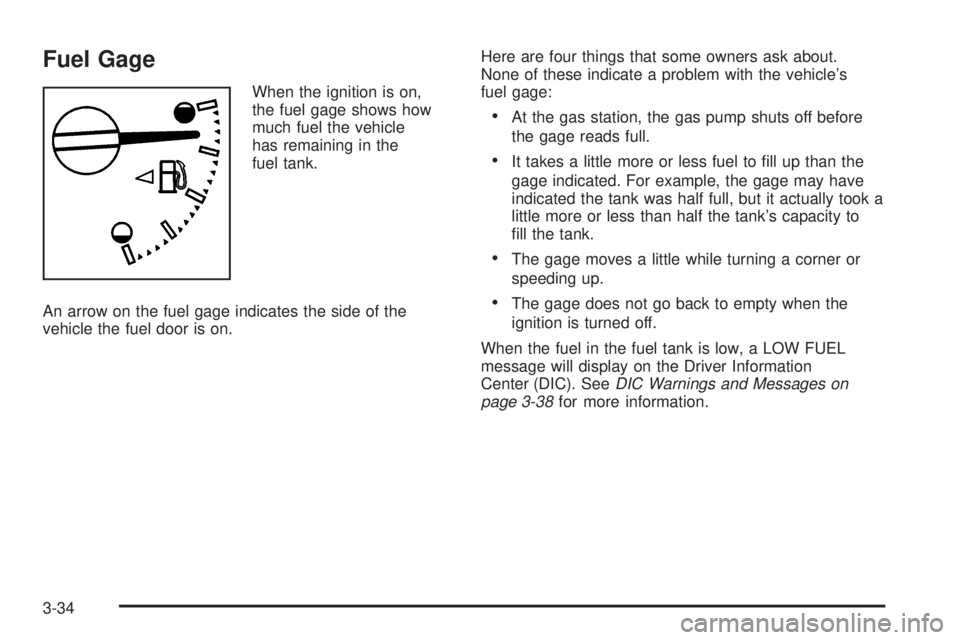
Fuel Gage
When the ignition is on,
the fuel gage shows how
much fuel the vehicle
has remaining in the
fuel tank.
An arrow on the fuel gage indicates the side of the
vehicle the fuel door is on.Here are four things that some owners ask about.
None of these indicate a problem with the vehicle’s
fuel gage:
At the gas station, the gas pump shuts off before
the gage reads full.
It takes a little more or less fuel to ll up than the
gage indicated. For example, the gage may have
indicated the tank was half full, but it actually took a
little more or less than half the tank’s capacity to
ll the tank.
The gage moves a little while turning a corner or
speeding up.
The gage does not go back to empty when the
ignition is turned off.
When the fuel in the fuel tank is low, a LOW FUEL
message will display on the Driver Information
Center (DIC). SeeDIC Warnings and Messages on
page 3-38for more information.
3-34
Page 163 of 414
Driver Information Center (DIC)
The Driver Information Center (DIC) displays information
such as the trip odometer, personalization features,
and warning messages. The DIC display is located on
the instrument panel cluster.
DIC Operation and Displays
The Driver Information Center (DIC) comes on when the
ignition is on.
If a problem is detected, a warning message appears
on the display. Pressing and releasing the trip odometer
reset stem on the DIC acknowledges some current
warnings or service messages. Some messages only
clear after the required action has been taken.
The DIC has different modes which can be accessed by
pressing the trip odometer reset stem on the DIC.
These modes are explained in the following section.
The DIC trip odometer reset stem is located on
the instrument panel cluster next to the DIC display.
To scroll through the available functions, press and
release the reset stem.
Trip Information
Odometer
The odometer is automatically displayed on the DIC
when you start the vehicle. The odometer shows
the total distance the vehicle has been driven in either
miles for the United States or kilometers for Canada.
Trip Odometer
Press and release the reset stem until TRIP appears on
the DIC display. The trip odometer shows the current
distance traveled since the last reset of the trip odometer
in either miles for the United States or kilometers for
Canada.
To reset the trip odometer, press and hold the reset
stem until the display returns to zero.
Engine Oil Life System
With the engine off, turn the key to ON/RUN and
then press the reset stem until OIL LIFE RESET
appears — alternating between OIL LIFE and
RESET — on the DIC display. The CHANGE OIL
message alerts you to change the oil on a schedule
consistent with your driving conditions. Always reset the
OIL LIFE message after an oil change. To reset the
message, seeEngine Oil Life System on page 5-18.
3-35
Page 164 of 414
In addition to the engine oil life system monitoring the
oil life, additional maintenance is recommended in
the Maintenance Schedule in this manual. SeeEngine
Oil on page 5-15andScheduled Maintenance on
page 6-4for more information.
Language
This feature allows you to choose the language in which
the DIC display shows information.
To set your choice for this feature:
1. With the engine off, turn the key to ON/RUN, but do
not start the engine.
2. Close all doors so the DOORS message does not
display in the DIC.
3. Momentarily press and release the reset stem until
the current language is displayed: English (default),
Spanish, or French.
4. To select a different language, press and hold the
reset stem until the next language appears.
5. Repeat Step 4 until the desired language is
displayed. Once the desired language is shown on
the DIC display, the language is set.
6. To exit the language selection, momentarily press
and release the reset stem. All DIC messages will
now display in the language selected.
Automatic Door Locks
This feature allows you to program the door locks to a
preferred setting.
To set your choice for this feature:
1. With the engine off, turn the key to LOCK/OFF.
Do not remove the key from the ignition.
2. Press and hold the power door lock button until the
DIC display shows the current door lock mode.
3. To view the next available mode, press and hold
the reset stem until the mode appears. Release
the reset stem and press and hold again to view the
next mode.
4. Once the desired mode is shown on the DIC display,
briey press the reset stem to set your choice.
The DIC display then clears.
The following are the available modes:
Lock 1 (default):On vehicles with an automatic
transmission, this mode locks all of the doors when the
vehicle is shifted out of P (Park) and unlocks all of
the doors when the vehicle is shifted into P (Park).
On vehicles with a manual transmission, this mode locks
all of the doors when the vehicle speed is greater
than 15 mph (24 km/h) and unlocks all of the doors
when the key is removed from the ignition.
3-36
Page 165 of 414
Lock 2:On vehicles with an automatic transmission,
this mode locks all of the doors when the vehicle
is shifted out of P (Park) and unlocks the driver’s door
when the vehicle is shifted into P (Park).
On vehicles with a manual transmission, this mode locks
all of the doors when the vehicle speed is greater than
15 mph (24 km/h) and unlocks the driver’s door when the
key is removed from the ignition.
Lock 3:On vehicles with an automatic transmission, this
mode locks all of the doors when the vehicle is shifted out
of P (Park). The doors will not automatically unlock.
On vehicles with a manual transmission, this mode locks
all of the doors when the vehicle speed is greater than
15 mph (24 km/h). The doors will not automatically
unlock.
Remote Keyless Entry (RKE) Feedback
This feature allows you to program the Remote
Keyless Entry (RKE) feedback to a preferred setting.
To set your choice for this feature:
1. With the engine off, turn the key to LOCK/OFF.
Do not remove the key from the ignition.
2. Press and hold the lock and unlock buttons on the
RKE transmitter at the same time. Hold both
buttons until the DIC display shows the current
RKE feedback mode.3. To view the next available mode, press and hold
the reset stem until the mode appears. Release
the reset stem and press and hold again to view the
next mode.
4. Once the desired mode is shown on the DIC
display, briey press the reset stem to set your
choice. The DIC display then clears.
The following are the available modes:
RFA 1 (default):This mode ashes the parking lamps
when you press the lock or unlock buttons on the
RKE transmitter.
RFA 2:This mode ashes the parking lamps and
sounds the horn when you press the lock button on the
RKE transmitter. This mode also ashes the parking
lamps when you press the unlock button on the
RKE transmitter.
RFA 3:This mode ashes the parking lamps and
sounds the horn when you press the lock or unlock
buttons on the RKE transmitter.
RFA 4:This mode disables RKE feedback. There will
be no feedback when you press the lock or unlock
buttons on the RKE transmitter.
3-37
Page 167 of 414

DOORS
This message displays when one or more of the doors
is ajar. Check all the doors on your vehicle to make
sure they are closed. The message clears from
the display after all of the doors are closed.
ENG (Engine) HOT
This message displays when the engine coolant
temperature is hot. Check the engine coolant
temperature gage. SeeEngine Coolant Temperature
Gage on page 3-29. Have your vehicle serviced by your
dealer/retailer as soon as possible if you suspect the
engine is overheating. SeeEngine Overheating on
page 5-32for more information.
FLUID
This message displays if the brake uid is low. Check
the brake uid as soon as possible and have your
vehicle serviced by your dealer/retailer. SeeBrakes on
page 5-36for more information. Press and release
the reset stem to acknowledge the message and clear it
from the display.
FUEL CAP
This message displays if the vehicle’s fuel cap is either
off or loose. Pull over as soon as possible and check
to see if the fuel cap is secure. You may also see
the check engine light on the instrument panel cluster.
If the check engine light does come on when the
fuel cap was loose, it may take a few driving trips before
the light turns off. SeeMalfunction Indicator Lamp on
page 3-30for more information if the light still remains
on. Press and release the reset stem to acknowledge
the message and clear it from the display.
LOW FUEL
This message displays if the level of fuel in the vehicle
is low. Also check the fuel gage. SeeFuel Gage on
page 3-34for more information. Rell the fuel tank as
soon as possible.
LOW TIRE
This message displays if a low tire pressure is detected in
any of the vehicle’s tires. Press and release the reset
stem to acknowledge the message and clear it from the
display. The message appears at each ignition cycle until
the tires are inated to the correct ination pressure.
SeeTires on page 5-54andInflation - Tire Pressure on
page 5-61for more information on tires and the correct
ination pressures.
3-39
Page 168 of 414

OIL
This message displays when the oil pressure is low.
SeeOil Pressure Light on page 3-32andEngine Oil
on page 5-15for more information.
PARK BRK (Brake)
This message displays when the parking brake is set.
SeeParking Brake on page 2-31andBrake System
Warning Light on page 3-27for more information.
The message clears from the display after the parking
brake is released or by pressing and releasing the
reset stem.
REDUCED POWER
This message displays when the vehicle’s engine power
is reduced. Reduced engine power can affect the
vehicle’s ability to accelerate. If this message is on, but
there is no reduction in performance, proceed to
your destination. The performance may be reduced the
next time the vehicle is driven. The vehicle may be
driven at a reduced speed while this message is on, but
acceleration and speed may be reduced. Anytime this
message stays on, the vehicle should be taken to
your dealer/retailer for service as soon as possible.
Press and release the reset stem to acknowledge the
message and clear it from the display.
SERV (Service) 4WD (Four-Wheel Drive)
This message displays when there is a problem with the
transfer case control system. Check the transfer
case on your vehicle and have it serviced by your
dealer/retailer. SeeFour-Wheel Drive on page 2-26for
more information about the transfer case. Press and
release the reset stem to acknowledge the message and
clear it from the display.
SERV (Service) TPM
(Tire Pressure Monitor)
This message displays if a part on the Tire Pressure
Monitor System (TPMS) is not working properly. The tire
pressure light also ashes and then remains on during
the same ignition cycle. SeeTire Pressure Light on
page 3-29. Several conditions may cause this message
to appear. SeeTire Pressure Monitor Operation on
page 5-65for more information. If the warning comes on
and stays on, there may be a problem with the TPMS.
See your dealer/retailer.
SERV (Service) VEH (Vehicle)
This message displays if your vehicle needs service.
Have your vehicle serviced by your dealer/retailer
as soon as possible.
3-40
Page 171 of 414
The vehicle has Retained Accessory Power (RAP).
With RAP, the audio system can be played even after
the ignition is turned off. SeeRetained Accessory
Power (RAP) on page 2-19for more information.
Setting the Clock
AM-FM Radio
Press and hold HR until the correct hour displays.
Press and hold MIN until the correct minute displays.
There is an initial two-second delay before the clock
goes into time-set mode. To display the time with the
ignition off, press RCL, HR, or MIN.
Radio with CD (MP3/WMA)
Press and hold the HR button until the correct hour
displays. Press and hold the MIN button until the correct
minute displays. The time can be set with the ignition
on or off.
To synchronize the time with an FM station broadcasting
Radio Data System (RDS) information, press and
hold the HR and MIN buttons at the same time until
RDS TIME displays. To accept this time, press and hold
the HR and MIN buttons, at the same time, for another
two seconds. If the time is not available from the station,
NO UPDAT (update) displays.
RDS time is broadcast once a minute. After tuning to an
RDS broadcast station, it could take a few minutes
for the time to update.
3-43