2009 FIAT PANDA ICE
[x] Cancel search: ICEPage 2 of 226

Dear Customer
,
Thank you for choosing Fiat and congratulations on your choice of a Fiat Panda.
We have written this handbook to help you get to know all your new Fiat Panda’s features and use it in the best pos-
sible way. You should read it right through before taking the road for the first time. You will find information, tips
and important warnings regarding the driving of your car to help you derive the maximum from your Fiat Panda’s
technological features.
You are recommended to carefully read the warnings and indications, marked with the respective symbols, at the end
of the page:
personal safety;
car safety;
environmental protection.
The enclosed Warranty Booklet lists the services that Fiat offers to its Customers:
❒
the Warranty Certificate with terms and conditions for maintaining its validity;
❒
the range of additional services available to Fiat Customers.
Enjoy the reading and happy motoring!
This Owner Handbook describes all Fiat Panda versions.
As a consequence, you should only consider the information which is related
to the engine and bodywork version of the car you have purchased.
001-030 PANDA EN 7-10-2009 13:39 Pagina 1
Page 6 of 226
5KNOW YOUR
VEHICLESAFETY
CORRECT USE
OF THE CAR
WARNING LIGHTS
AND MESSAGES
IN
AN EMERGENCY
CAR
MAINTENANCE
TECHNICAL
SPECIFICATIONS
INDEX
F0Z0003m
fig. 3
THE FIAT CODE SYSTEMTo further protect your car from theft, it has been fitted
with an engine immobilising system. It is automatically acti-
vated when the ignition key is removed.
An electronic device, in fact, is fitted in each ignition key grip.
The device transmits a radio-frequency signal when the en-
gine is started through a special aerial built into the igni-
tion switch. The modulated signal, which changes each time
the engine is started, is the “password”, by means of which
the control unit recognises the key and enables to start
the engine.
OPERATION
Each time the car is started by turning the ignition key to
MAR, the Fiat CODE system control unit sends an ac-
knowledgement code to the engine management control
unit to deactivate the inhibitor.
The acknowledgement code is sent only if the Fiat CODE
system control unit has recognised the code transmitted
from the key.
Each time the ignition key is turned to STOP, the Fiat
CODE system deactivates the functions of the engine man-
agement control unit.
If the code has not been recognised correctly, the instru-
ment panel warning light
Y
turns on.
In this case, turn the key to STOP and then back to MAR;
if the lock continues, possibly try with the other keys pro-
vided with the car. If you still cannot start the engine, per-
form the emergency start procedure (see chapter “In an
emergency”) and then contact the Fiat Dealership.
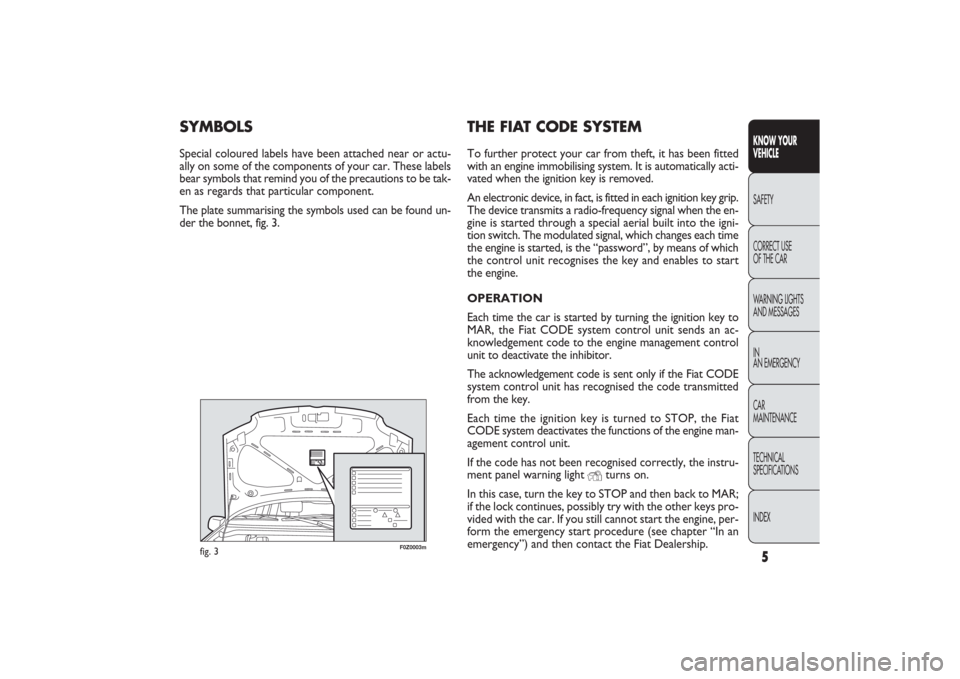
SYMBOLSSpecial coloured labels have been attached near or actu-
ally on some of the components of your car. These labels
bear symbols that remind you of the precautions to be tak-
en as regards that particular component.
The plate summarising the symbols used can be found un-
der the bonnet, fig. 3.
001-030 PANDA EN 7-10-2009 13:39 Pagina 5
Page 7 of 226
6
KNOW YOUR
VEHICLE
SAFETY
CORRECT USE
OF THE CAR
WARNING LIGHTS
AND MESSAGES
IN
AN EMERGENCY
CAR
MAINTENANCE
TECHNICAL
SPECIFICATIONS
INDEX
F0Z0679m
fig. 4
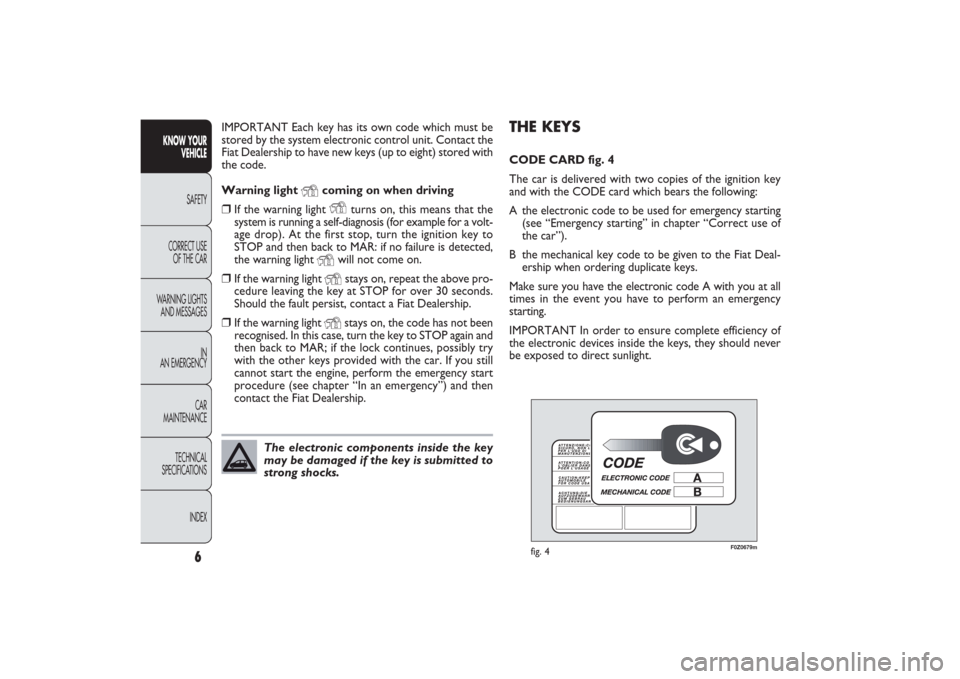
THE KEYSCODE CARD fig. 4
The car is delivered with two copies of the ignition key
and with the CODE card which bears the following:
A the electronic code to be used for emergency starting
(see “Emergency starting” in chapter “Correct use of
the car”).
B the mechanical key code to be given to the Fiat Deal-
ership when ordering duplicate keys.
Make sure you have the electronic code A with you at all
times in the event you have to perform an emergency
starting.
IMPORTANT In order to ensure complete efficiency of
the electronic devices inside the keys, they should never
be exposed to direct sunlight. IMPORTANT Each key has its own code which must be
stored by the system electronic control unit. Contact the
Fiat Dealership to have new keys (up to eight) stored with
the code.
Warning light
Y
coming on when driving
❒
If the warning light
Y
turns on, this means that the
system is running a self-diagnosis (for example for a volt-
age drop). At the first stop, turn the ignition key to
STOP and then back to MAR: if no failure is detected,
the warning light
Y
will not come on.
❒
If the warning light
Y
stays on, repeat the above pro-
cedure leaving the key at STOP for over 30 seconds.
Should the fault persist, contact a Fiat Dealership.
❒
If the warning light
Y
stays on, the code has not been
recognised. In this case, turn the key to STOP again and
then back to MAR; if the lock continues, possibly try
with the other keys provided with the car. If you still
cannot start the engine, perform the emergency start
procedure (see chapter “In an emergency”) and then
contact the Fiat Dealership.
The electronic components inside the key
may be damaged if the key is submitted to
strong shocks.
001-030 PANDA EN 7-10-2009 13:39 Pagina 6
Page 10 of 226
9KNOW YOUR
VEHICLESAFETY
CORRECT USE
OF THE CAR
WARNING LIGHTS
AND MESSAGES
IN
AN EMERGENCY
CAR
MAINTENANCE
TECHNICAL
SPECIFICATIONS
INDEX
F0Z0683m
fig. 8
F0Z0684m
fig. 9
REPLACING THE BATTERY
OF THE KEY WITH REMOTE CONTROL
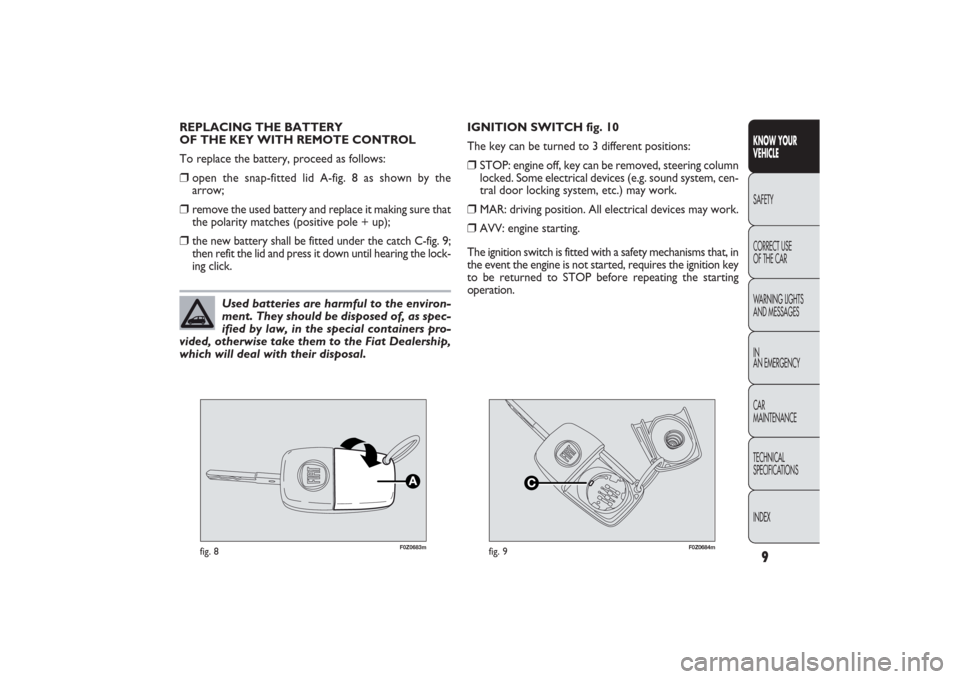
To replace the battery, proceed as follows:❒
open the snap-fitted lid A-fig. 8 as shown by the
arrow;
❒
remove the used battery and replace it making sure that
the polarity matches (positive pole + up);
❒
the new battery shall be fitted under the catch C-fig. 9;
then refit the lid and press it down until hearing the lock-
ing click.IGNITION SWITCH fig. 10
The key can be turned to 3 different positions:
❒
STOP: engine off, key can be removed, steering column
locked. Some electrical devices (e.g. sound system, cen-
tral door locking system, etc.) may work.
❒
MAR: driving position. All electrical devices may work.
❒
AVV: engine starting.
The ignition switch is fitted with a safety mechanisms that, in
the event the engine is not started, requires the ignition key
to be returned to STOP before repeating the starting
operation.
Used batteries are harmful to the environ-
ment. They should be disposed of, as spec-
ified by law, in the special containers pro-
vided, otherwise take them to the Fiat Dealership,
which will deal with their disposal.
001-030 PANDA EN 7-10-2009 13:39 Pagina 9
Page 11 of 226

F0Z0026m
fig. 10
STEERING COLUMN LOCK fig. 10
Engagement
When the key is at STOP, remove the key and turn the
steering wheel until it locks.
Disengagement
Move the steering wheel slightly as you turn the ignition
key to MAR.
10
KNOW YOUR
VEHICLE
SAFETY
CORRECT USE
OF THE CAR
WARNING LIGHTS
AND MESSAGES
IN
AN EMERGENCY
CAR
MAINTENANCE
TECHNICAL
SPECIFICATIONS
INDEX
If the ignition device is tampered with
(e.g.: attempted theft), have it checked
over by a Fiat Dealership as soon as possible.
WARNING
When getting out of the car, always re-
move the key to prevent any occupants
from accidentally activating the controls. Re-
member to engage the handbrake. If the car is
parked on uphill slope, engage the first gear; if the
car is facing downhill, engage the reverse gear.
Never leave an unattended children in the car.
WARNING
Never remove the key while the car is
moving. The steering wheel would auto-
matically lock as soon as you try to turn it. This
also applies when the car is being towed.
WARNING
It is absolutely forbidden to carry out
whatever after-market operations involv-
ing steering system or steering column modifica-
tions (e.g.: installation of anti-theft device). This
could badly affect performance and safety,
invalidate the warranty and also result in the
non-compliance of the car with approval
requirements.
WARNING
001-030 PANDA EN 7-10-2009 13:39 Pagina 10
Page 23 of 226

22
KNOW YOUR
VEHICLE
SAFETY
CORRECT USE
OF THE CAR
WARNING LIGHTS
AND MESSAGES
IN
AN EMERGENCY
CAR
MAINTENANCE
TECHNICAL
SPECIFICATIONS
INDEX
Day
Year
MODE
button
pressed
briefly Month
DeutschPortuguês
English
Español
Français
Italiano
Nederlands
Polski
Example:
EXIT MENUTRIP B DATA
SET TIME
SET DATE
SEE RADIO
AUTOCLOSE
MEASUREMENT UNIT
LANGUAGE BUZZER VOLUME SERVICE
BUTTON VOLUMESPEED BEEP
fig. 28Example:
+
−
+
–
– +
– +
–
– +
+++
–––
++ – –+ +
–
MODE
button
pressed
briefly
On the standard screen, briefly press the button MODE
to start browsing. Press + or − to browse within the
menu.
NOTE Only the short menu may be accessed for rea-
sons of safety while the vehicle is moving (“Speed Beep”
setting). The standard menu is only available when the
car is stationary. On cars equipped with Connect Nav+,
many functions are displayed on the navigator display.
F0Z1235i
001-030 PANDA EN 7-10-2009 13:40 Pagina 22
Page 28 of 226

27KNOW YOUR
VEHICLESAFETY
CORRECT USE
OF THE CAR
WARNING LIGHTS
AND MESSAGES
IN
AN EMERGENCY
CAR
MAINTENANCE
TECHNICAL
SPECIFICATIONS
INDEX
Note The “Scheduled servicing plan” ensures car servic-
ing every 20,000 km (or 12,000 miles). This is automati-
cally displayed when the ignition key is in the MAR posi-
tion, from 2,000 km (or the equivalent in miles) before the
service and reappears every 200 km (or the equivalent
in miles). Below 200 km servicing indications are more fre-
quent. The displaying will be in kilometres or miles de-
pending on the measurement unit settings. When the next
scheduled servicing is approaching (“coupon”), the mes-
sage “Service” will appear on the display followed by
the number of kilometres or miles left when the key is
turned to MAR. Contact a Fiat Dealership to carry out any
service operation provided by the “Scheduled servicing
plan” and to reset the display.
Exit Menu
This is the last function that closes the cycle of settings
listed in the menu screen.
Briefly press the button MODE to go back to the standard
screen without storing the settings.
Press the button
–to return to the first menu option
(Speed Lim.). Adjust the button volume (Button Vol.)
This function is used to set the volume (8 levels) of the
beep accompanying the activation of the buttons MODE,
+ and –.
To set the desired volume, proceed as follows:
– briefly press the button MODE: the previously set
volume “level” will flash on the display;
– press the button + or – for setting;
– briefly press the button MODE to go back to the menu
screen or press the button for a prolonged time to go back
to the standard screen without storing the settings.
Scheduled Servicing (Service)
By this function you can display information about the
mileage intervals for car servicing.
To consult this display, proceed as follows:
– briefly press the button MODE: the display shows ser-
vice requirements in km or mi according to the previous
setting (see paragraph “Measurement units”);
– briefly press the button MODE to go back to the menu
screen or press the button for a prolonged time to go back
to the standard screen.
001-030 PANDA EN 7-10-2009 13:40 Pagina 27
Page 36 of 226

35KNOW YOUR
VEHICLESAFETY
CORRECT USE
OF THE CAR
WARNING LIGHTS
AND MESSAGES
IN
AN EMERGENCY
CAR
MAINTENANCE
TECHNICAL
SPECIFICATIONS
INDEX
F0Z0036m
fig. 37
F0Z0744m
fig. 38
REAR VIEW MIRRORSINTERIOR MIRROR fig. 37
The mirror is fitted with a safety device that causes
its release in the event of a violent impact with the
passenger.
The mirror can be adjusted to two different positions
(normal or antiglare) by means of the lever A.BABY SURVEILLANCE MIRROR fig. 38
(for versions/markets where provided)
The surveillance mirror gives the driver and passenger an
overview of rear seats, to keep under control all passen-
gers (children) on the rear seats.
The mirror must be fasted to the windscreen using the rel-
evant sucker. Warning: to preserve visibility, the surveil-
lance mirror can only be positioned according to fig. 38,
over a parallel line to the roof trim, at about 11 cm. Do not
place the mirror on printed areas, as it could easily detach.
This is not a toy and should be kept far from children’s
reach.
031-064 PANDA EN 7-10-2009 13:43 Pagina 35