Page 167 of 498
4. When the vehicle is shifted into REVERSE, an image of
the rear of the vehicle will appear with a caution note to
�check entire surroundings�displayed across the top of
the screen. After five seconds this note will disappear.
5. When the vehicle is shifted out of REVERSE, the rear
camera mode is exited and the audio screen appears
again.
OVERHEAD CONSOLE
The overhead console has the following features:
•Courtesy Lights
•Garage Door Opener — If Equipped
Courtesy/Reading Lights
There are two reading lights and one courtesy light
located near the front of the console.All lights illuminate as courtesy lights when a door is
opened, when the dimmer control is rotated to the
courtesy light position (fully upward position), or when
the UNLOCK button is pressed on the Remote Keyless
Overhead Console
UNDERSTANDING THE FEATURES OF YOUR VEHICLE 165
3
Page 168 of 498

Entry (RKE) transmitter, if equipped. The two round
lamps are also operated individually as reading lights by
pressing the center of each lens.
NOTE:The courtesy/reading lights will remain on until
the switch is pressed a second time, so be sure they have
been turned off before leaving the vehicle. If the interior
lights are left on after the vehicle is turned OFF, they will
turn off after 15 minutes.
OVERHEAD CONSOLE WITH ELECTRONIC
VEHICLE INFORMATION CENTER (EVIC) — IF
EQUIPPED
The overhead console contains dome/reading lights, and
an Electronic Vehicle Information Center (EVIC).
Dome/Reading Lights
Located in the overhead console are two dome/reading
lights.
The dome/reading lights illuminate when a door is
opened or when the interior lights are turned on by
rotating the dimmer control located on the headlight
switch.
The reading lights are activated by pressing the center of
each lens.
NOTE:The dome/reading lights will remain on until
the switch is pressed a second time, so be sure they have
been turned off before leaving the vehicle.
166 UNDERSTANDING THE FEATURES OF YOUR VEHICLE
Page 173 of 498

•“AUTO DOOR LOCK > ON” – When ON is selected,
all doors will lock automatically when the vehicle
reaches a speed of 15 mph (24 km/h). To make your
selection, press and release the RESET button until
“ON” or “OFF” appears.
•“AUTO UNLOCK ON EXIT > ON” – When ON is
selected, all doors will unlock when the vehicle is
stopped and the transmission is in the PARK or
NEUTRAL position and the driver’s door is opened.
To make your selection, press and release the RESET
button until “ON” or “OFF” appears.
•“RKE UNLOCK DRV DR 1st” – WhenDRV DR 1stis
selected, only the driver’s door will unlock on the first
press of the RKE UNLOCK button. When Driver Door
1st Press is selected, you must press the Remote
Keyless Entry UNLOCK button twice to unlock the
passenger’s doors. To make your selection, press and
release the RESET button until “DRV DR 1st ” appears.
•“RKE UNLOCK ALL DR 1ST” – When AllALL DR
1STis selected, all of the doors will unlock on the first
press of the RKE UNLOCK button. To make your
selection, press and release the RESET button until
“All DR 1st” appears.
•MEM. RECALL WITH RKE > ON – When ON is
selected, pressing the UNLOCK button on the RKE
will recall the memory settings for the seat, mirror and
radio. To make your selection, press and release the
RESET button until “ON�or “OFF” appears.
•“SOUND HORN W/LOCK > ON” – When ON is
selected, a short horn sound will occur when the
Remote Keyless Entry LOCK button is pressed. This
feature may be selected with or without the flash lights
on lock/unlock feature. To make your selection, press
and release the RESET button until “ON” or “OFF”
appears.
UNDERSTANDING THE FEATURES OF YOUR VEHICLE 171
3
Page 174 of 498

•“FLASH LAMPS W/LOCK >ON” – When ON is
selected, the front and rear turn signals will flash when
the doors are locked or unlocked with the RKE Trans-
mitter. This feature may be selected with or without
the sound horn on lock feature selected. To make your
selection, press and release the RESET button until
“ON” or “OFF” appears.
•“HEADLAMP OFF DELAY > 0 SEC” – When this
feature is selected, the driver can choose to have the
headlamps remain on for 0, 30, 60, or 90 seconds when
exiting the vehicle. To make your selection, press and
release the RESET button until “0,” “30,” “60,” or “90”
appears.
NOTE:The headlamp switch must be in the “A” auto
mode before this feature will work.
•HEADLAMPS W/WIPERS > ON – When ON is
selected, the headlamps will automatically turn on
when the wiper switch is activated.
•EASY EXIT SEAT > ON – When ON is selected, and
the key is removed from the ignition, the driver’s seat
will automatically move rearward to allow easy exit.
•TILT MIRRORS IN “R” > ON – When ON is selected,
and the transmission is put in REVERSE, the outside
mirrors will tilt downward.
•“KEY OFF POWER DELAY> OFF” – When this feature
is selected, the power window switches, radio, hands–
free system (if equipped), and power outlets will
remain active for up to 10 minutes after the ignition
switch is turned off. Opening a vehicle door will
cancel this feature. To make your selection, press and
release the RESET button until “Off,” “45 sec.,”
“5 min.,” “10 min.” appears.
•“ILLUMINATED APRCH > OFF” – When this feature
is selected, the headlights will activate and remain on
for up to 90 seconds when the doors are unlocked with
172 UNDERSTANDING THE FEATURES OF YOUR VEHICLE
Page 177 of 498
1.Turn the ignition switch to the ON/RUN position.
2.Press the MENU buttonuntil “Personal
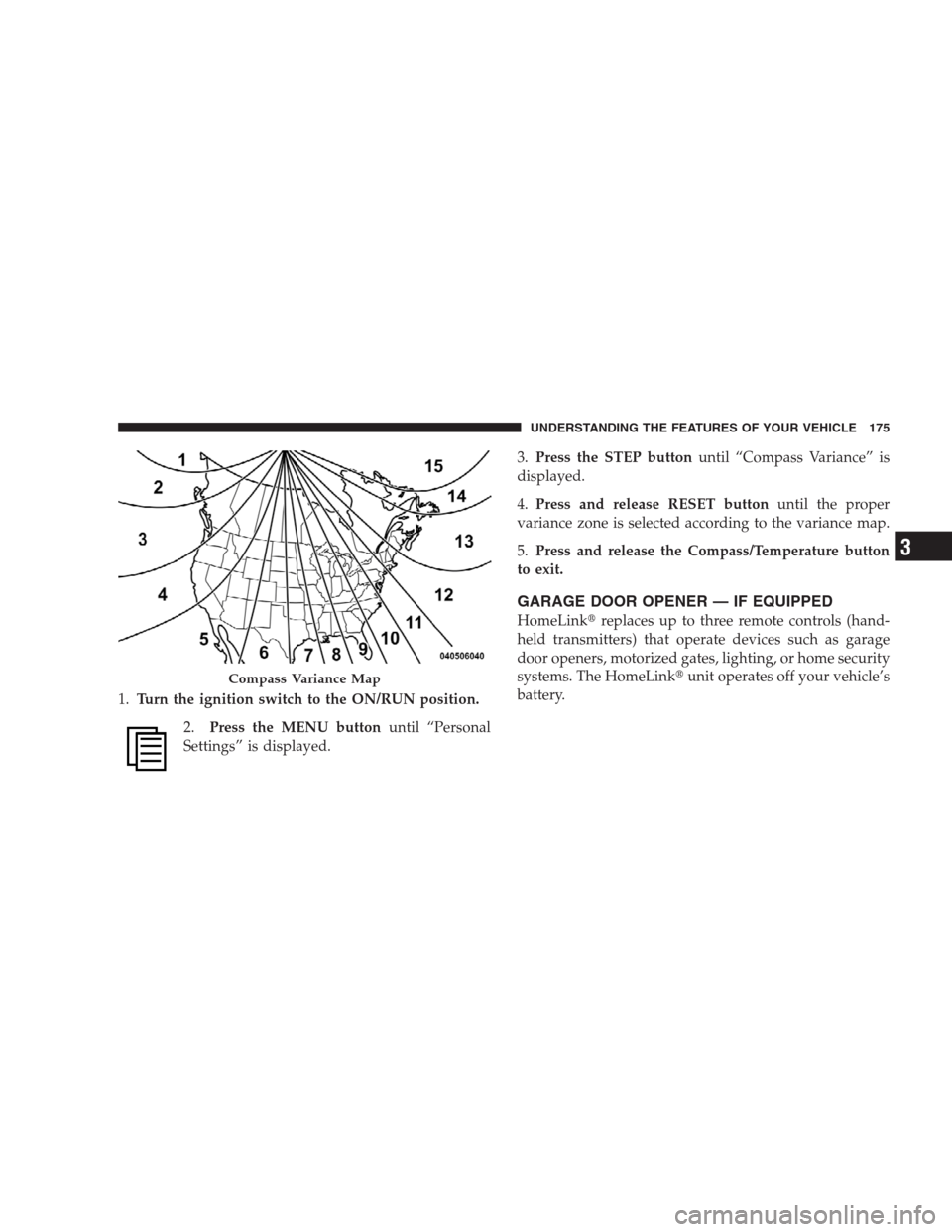
Settings” is displayed.3.Press the STEP buttonuntil “Compass Variance” is
displayed.
4.Press and release RESET buttonuntil the proper
variance zone is selected according to the variance map.
5.Press and release the Compass/Temperature button
to exit.
GARAGE DOOR OPENER — IF EQUIPPED
HomeLink�replaces up to three remote controls (hand-
held transmitters) that operate devices such as garage
door openers, motorized gates, lighting, or home security
systems. The HomeLink�unit operates off your vehicle’s
battery.
Compass Variance Map
UNDERSTANDING THE FEATURES OF YOUR VEHICLE 175
3
Page 182 of 498

has successfully accepted the frequency signal. The
EVIC display will change from “CHANNEL # TRAIN-
ING” to “CHANNEL # TRAINED.”
If you unplugged the device for training, plug it back in
at this time.
Then proceed with Step 4 under “Programming
HomeLink�” earlier in this section.
Using HomeLink�
To operate, simply press and release the programmed
HomeLink�button. Activation will now occur for the
trained device (i.e., garage door opener, gate operator,
security system, entry door lock, home/office lighting,
etc.) The hand-held transmitter of the device may also be
used at any time.
Reprogramming A Single HomeLink�Button
To reprogram a channel that has been previously trained,
follow these steps:
1. Turn the ignition switch to the ON/RUN position.
2. Press and hold the desired HomeLink�button for
20 seconds until the EVIC display states “CHANNEL #
TRAINING.”Do not release the button.
3.Without releasing the button,proceed with Program-
ming HomeLink�Step 2 and follow all remaining steps.
Security
It is advised to erase all channels before you sell or turn
in your vehicle.
To do this, press and hold the two outside buttons for
20 seconds until the EVIC message states “CHANNELS
CLEARED.” Note that all channels will be erased. Indi-
vidual channels cannot be erased.
180 UNDERSTANDING THE FEATURES OF YOUR VEHICLE
Page 186 of 498

together to minimize the buffeting. If the buffeting occurs
with the sunroof open, adjust the sunroof opening to
minimize the buffeting or open any window.
Sunroof Maintenance
Use only a nonabrasive cleaner and a soft cloth to clean
the glass panel.
ELECTRICAL POWER OUTLETS
This vehicle has three 12-Volt auxiliary power outlets that
can provide up to 20 Amps of current for accessories
designed for use with the standard power outlet adapt-
ers. The outlet located in the lower portion of the
instrument panel has a snap on plastic cap so that it can
be covered when not in use. As a safety precaution, the
outlet in the instrument panel only operates with the
ignition switch ON. When the optional Cigar Lighter
heating element is used, it heats when pushed in and
pops out automatically when ready for use.To preservethe heating element, do not hold the lighter in the
heating position.
There are two additional 12-Volt (20 total Amps for both
outlets) power outlets, one located in the storage bin of
the center console and another located in the right rear
cargo area. These outlets can be configured by the
customer to operate only when the ignition is ON
(switched battery fed) or with the ignition ON or OFF
(battery fed) to allow for cellular telephone charging and
operation while the ignition is OFF.
NOTE:All accessories connected to these outlets should
be removed or turned off when the vehicle is not in use
to protect the battery against discharge (unless the cus-
tomer has configured the fuse block to switched battery
feed).
184 UNDERSTANDING THE FEATURES OF YOUR VEHICLE
Page 187 of 498

WARNING!
To avoid serious injury or death:
•Do not use a three-prong adapter.
•Do not insert any objects into the receptacles.
•Do not touch with wet hands.
•Close the lid when not in use and while driving
the vehicle.
•If this outlet is mishandled, it may cause an
electric shock and failure.
CAUTION!
•Many accessories that can be plugged in draw
power from the vehicle’s battery, even when not in
use (i.e., cellular phones, etc.). Eventually, if
plugged in long enough, the vehicle’s battery will
discharge sufficiently to degrade battery life
and/or prevent engine starting.
•Accessories that draw higher power (i.e., coolers,
vacuum cleaners, lights, etc.) will discharge the
battery even more quickly. Only use these inter-
mittently and with greater caution.
•After the use of high power draw accessories or
long periods of the vehicle not being started (with
accessories still plugged in), the vehicle must be
driven a sufficient length of time to allow the
generator to recharge the vehicle’s battery.
UNDERSTANDING THE FEATURES OF YOUR VEHICLE 185
3