Page 82 of 498

�Rear Park Assist — If Equipped........... 158
▫Rear Park Assist Sensors............... 158
▫Rear Park Assist Warning Display........ 159
▫Enable/Disable The Rear Park Assist...... 162
▫Service The Rear Park Assist............ 162
▫Cleaning The Rear Park Assist........... 163
�Rear Backup Camera — If Equipped........ 163
▫Turning The Rear Camera On Or Off — With
Navigation Radio.................... 164
▫Turning The Rear Camera On Or Off —
Without Navigation Radio.............. 164
�Overhead Console..................... 165
▫Courtesy/Reading Lights.............. 165�Overhead Console With Electronic Vehicle
Information Center (EVIC) — If Equipped..... 166
▫Dome/Reading Lights................. 166
▫Electronic Vehicle Information Center (EVIC)
— If Equipped...................... 167
▫Compass/Temperature Button........... 173
�Garage Door Opener — If Equipped........ 175
▫Programming HomeLink�.............. 177
▫Gate Operator/Canadian Programming.... 179
▫Using HomeLink�................... 180
▫Reprogramming A Single
HomeLink�Button................... 180
▫Security........................... 180
▫Troubleshooting Tips.................. 181
80 UNDERSTANDING THE FEATURES OF YOUR VEHICLE
Page 177 of 498
1.Turn the ignition switch to the ON/RUN position.
2.Press the MENU buttonuntil “Personal
Settings” is displayed.3.Press the STEP buttonuntil “Compass Variance” is
displayed.
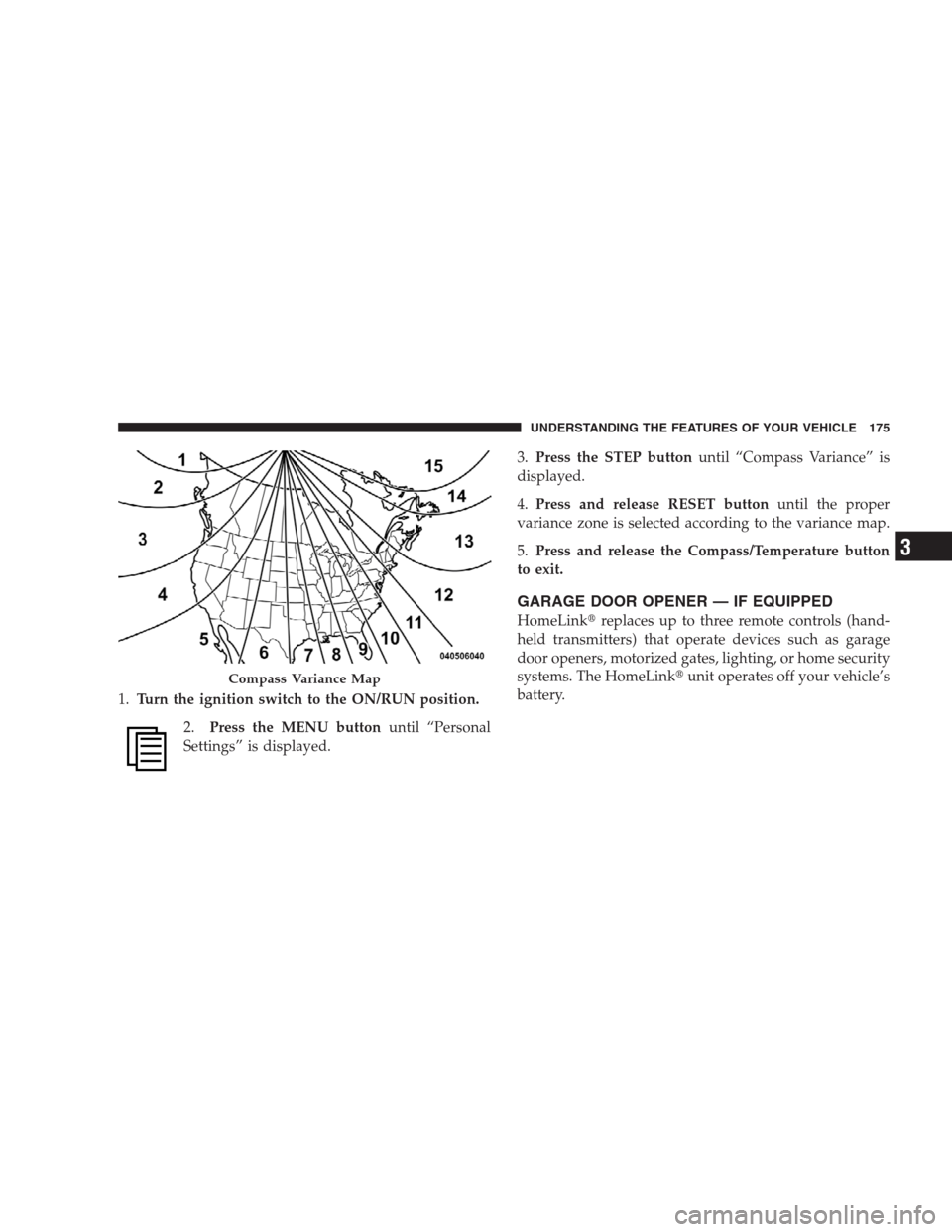
4.Press and release RESET buttonuntil the proper
variance zone is selected according to the variance map.
5.Press and release the Compass/Temperature button
to exit.
GARAGE DOOR OPENER — IF EQUIPPED
HomeLink�replaces up to three remote controls (hand-
held transmitters) that operate devices such as garage
door openers, motorized gates, lighting, or home security
systems. The HomeLink�unit operates off your vehicle’s
battery.
Compass Variance Map
UNDERSTANDING THE FEATURES OF YOUR VEHICLE 175
3
Page 178 of 498

The HomeLink�buttons are located in the overhead
console, and contain one, two, or three dots/lines desig-
nating the different HomeLink�channels.
NOTE:HomeLink�is disabled when the Vehicle Secu-
rity Alarm is active.WARNING!
•Your motorized door or gate will open and close
while you are training the Universal Transceiver.
Do not train the transceiver if people or pets are in
the path of the door or gate. Only use this trans-
ceiver with a garage door opener that has a “stop
and reverse” feature as required by federal safety
standards. This includes most garage door opener
models manufactured after 1982. Do not use a
garage door opener without these safety features.
Call toll-free 1–800–355–3515 or, on the Internet at
www.HomeLink.com for safety information or as-
sistance.
•Vehicle exhaust contains carbon monoxide, a dan-
gerous gas. Do not run your vehicle in the garage
while training the transceiver. Exhaust gas can
cause serious injury or death.
HomeLink�Buttons
176 UNDERSTANDING THE FEATURES OF YOUR VEHICLE
Page 182 of 498

has successfully accepted the frequency signal. The
EVIC display will change from “CHANNEL # TRAIN-
ING” to “CHANNEL # TRAINED.”
If you unplugged the device for training, plug it back in
at this time.
Then proceed with Step 4 under “Programming
HomeLink�” earlier in this section.
Using HomeLink�
To operate, simply press and release the programmed
HomeLink�button. Activation will now occur for the
trained device (i.e., garage door opener, gate operator,
security system, entry door lock, home/office lighting,
etc.) The hand-held transmitter of the device may also be
used at any time.
Reprogramming A Single HomeLink�Button
To reprogram a channel that has been previously trained,
follow these steps:
1. Turn the ignition switch to the ON/RUN position.
2. Press and hold the desired HomeLink�button for
20 seconds until the EVIC display states “CHANNEL #
TRAINING.”Do not release the button.
3.Without releasing the button,proceed with Program-
ming HomeLink�Step 2 and follow all remaining steps.
Security
It is advised to erase all channels before you sell or turn
in your vehicle.
To do this, press and hold the two outside buttons for
20 seconds until the EVIC message states “CHANNELS
CLEARED.” Note that all channels will be erased. Indi-
vidual channels cannot be erased.
180 UNDERSTANDING THE FEATURES OF YOUR VEHICLE
Page 183 of 498

The HomeLink�Universal Transceiver is disabled when
the Vehicle Security Alarm is active.
Troubleshooting Tips
If you are having trouble programming HomeLink�, here
are some of the most common solutions:
•Replace the battery in the original transmitter.
•Press the learn button on the garage door opener to
complete the training for rolling code.
•Did you unplug the device for training, and remember
to plug it back in?
If you are having any problems or require assistance,
please call toll-free 1–800–355–3515 or, on the Internet at
www.HomeLink.com for information or assistance.
General Information
This device complies with FCC rules Part 15 and Industry
Canada RSS-210. Operation is subject to the following
two conditions:
1. This device may not cause harmful interference
2. This device must accept any interference that may be
received including interference that may cause undesired
operation
NOTE:The transmitter has been tested and it complies
with FCC and IC rules. Changes or modifications not
expressly approved by the party responsible for compli-
ance could void the user ’s authority to operate the
device.
The term “IC:” before the certification/registration num-
ber only signifies that Industry Canada technical specifi-
cations were met.
UNDERSTANDING THE FEATURES OF YOUR VEHICLE 181
3
Page 185 of 498

movement and the sunroof will remain in a partial open
condition until the switch is pushed forward again. To
close fully, hold the switch in the forward position until
the glass movement has stopped.
The sunshade can be opened manually. It will also open
as the sunroof opens. The sunshade cannot be closed if
the sunroof is open.
WARNING!
•Never leave children alone in a vehicle. Leaving
unattended children in a vehicle is dangerous for a
number of reasons. A child or others could be
seriously or fatally injured. Don’t leave the key in
the ignition. A child could operate power win-
dows, other controls, or move the vehicle.
(Continued)
WARNING! (Continued)
•In an accident, there is a greater risk of being
thrown from a vehicle with an open sunroof. You
could also be seriously injured or killed. Always
fasten your seat belt properly and make sure all
passengers are properly secured too.
•Do not allow small children to operate the sun-
roof. Never allow fingers or other body parts, or
any object to project through the sunroof opening.
Injury may result.
Wind Buffeting
Wind buffeting can be described as the perception of
pressure on the ears or a helicopter-type sound in the
ears. Your vehicle may exhibit wind buffeting with the
windows down, or the sunroof (if equipped) in certain
open or partially open positions. This is a normal occur-
rence and can be minimized. If the buffeting occurs with
the rear windows open, open the front and rear windows
UNDERSTANDING THE FEATURES OF YOUR VEHICLE 183
3
Page 197 of 498
CAUTION!
Use care when washing the inside of the rear window
to prevent damage to heating elements. Use a soft
cloth and a mild washing solution, wiping parallel to
the heating elements. Also, keep all objects a safe
distance from the window to prevent damaging the
heating elements.
FACTORY INSTALLED ROOF LUGGAGE RACK
A factory installed luggage rack is located on the vehicles
roof.
The load carried on the roof when equipped with a
luggage rack must not exceed 150 lbs (68 kg), and should
be uniformly distributed over the cargo area.
The side rails between the stantions should be used to tie
down cargo. Check the straps frequently to be sure that
the load remains securely attached.
Roof Luggage Rack
UNDERSTANDING THE FEATURES OF YOUR VEHICLE 195
3
Page 198 of 498

NOTE:Crossbars are offered by Mopar�accessories.
External racks do not increase the total load carrying
capacity of the vehicle. Be sure that the total occupant
and luggage load inside the vehicle, plus the load on the
luggage rack, do not exceed the maximum vehicle load
capacity.
CAUTION!
To avoid damage to the roof rack and vehicle, do not
exceed the maximum roof rack load capacity. Always
distribute heavy loads as evenly as possible and
secure the load appropriately.
Long loads which extend over the windshield, such
as wood panels or surfboards, should be secured to
both the front and rear of the vehicle.
Place a blanket or other protection between the
surface of the roof and the load.
(Continued)
CAUTION! (Continued)
Travel at reduced speeds and turn corners carefully
when carrying large or heavy loads on the roof rack.
Wind forces, due to natural causes or nearby truck
traffic, can add sudden upward loads. This is espe-
cially true on large flat loads and may result in
damage to the cargo or your vehicle.
WARNING!
Cargo must be securely tied down before driving
your vehicle. Improperly secured loads can fly off the
vehicle, particularly at high speeds, resulting in per-
sonal injury or property damage. Follow the roof rack
cautions when carrying cargo on your roof rack.
196 UNDERSTANDING THE FEATURES OF YOUR VEHICLE