Page 56 of 449
WARNING!
Deployed airbags and seat belt pretensioners cannot
protect you in another collision. Have the airbags,
and both front seat belt retractor assemblies (w/
pretensioners), replaced by an authorized dealer as
soon as possible.
Maintaining Your Airbag System
WARNING!
²Modifications to any part of the airbag system
could cause it to fail when you need it. You could
be injured if the airbag system is not there to
protect you. Do not modify the components or
wiring, including adding any kind of badges or
stickers to the steering wheel hub trim cover or the
upper right side of the instrument panel. Do not
modify the front bumper, vehicle body structure,
or add aftermarket side steps or running boards.
²You need proper knee impact protection in a
collision. Do not mount or locate any aftermarket
equipment on or behind the knee bolsters.
(Continued)
54 THINGS TO KNOW BEFORE STARTING YOUR VEHICLE
Page 86 of 449
The UConnecttsystem is fully integrated with the vehi-
cle's audio system. The volume of the UConnecttsystem
can be adjusted either from the radio volume control
knob or from the steering wheel radio control (right
switch), if so equipped.
The radio display will be used for visual prompts from
the UConnecttsystem such as9CELL9or caller ID on
certain radios.
Operation
Voice commands can be used to operate the UConnectt
system and to navigate through the UConnecttmenu
structure. Voice commands are required after most
UConnecttsystem prompts. You will be prompted for a
specific command and then guided through the available
options.
²Prior to giving a voice command, one must wait for
the beep, which follows the9Ready9prompt or another
prompt.
²For certain operations, compound commands can be
used. For example, instead of saying9Setup9and then
9Phone Pairing,9the following compound command
can be said:9Setup Phone Pairing.9
²For each feature explanation in this section, only the
combined form of the voice command is given. You
can also break the commands into parts and say each
part of the command when you are asked for it. For
example, you can use the combined form voice com-
mand9Phonebook New Entry,9or you can break the
combined form command into two voice commands:
9Phonebook9and9New Entry.9Please remember, the
UConnecttsystem works best when you talk in a
normal conversational tone, as if speaking to someone
sitting a few feet/meters away from you.
Voice Command Tree
Refer to ªVoice Treeº in this section.
84 UNDERSTANDING THE FEATURES OF YOUR VEHICLE
Page 125 of 449
LIGHTS
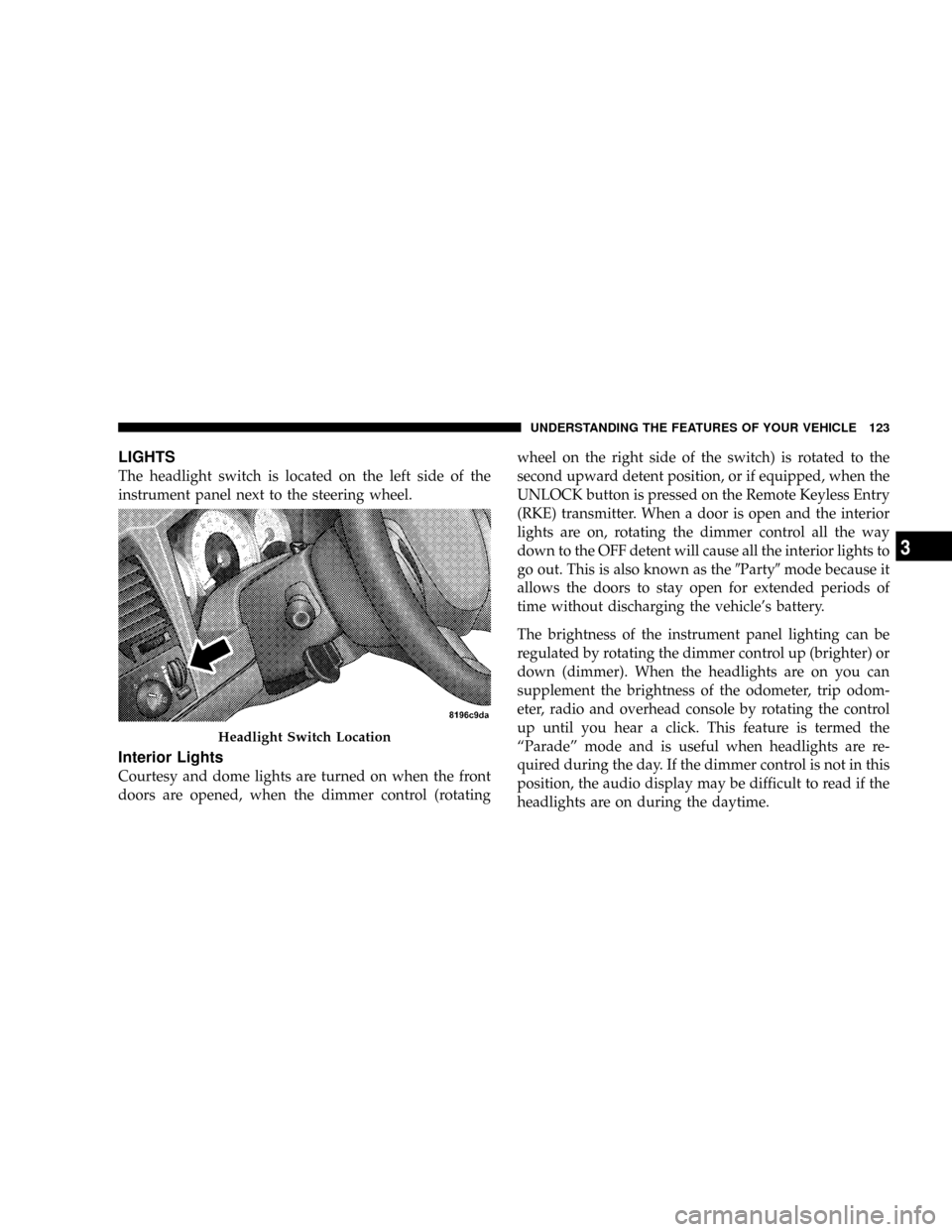
The headlight switch is located on the left side of the
instrument panel next to the steering wheel.
Interior Lights
Courtesy and dome lights are turned on when the front
doors are opened, when the dimmer control (rotatingwheel on the right side of the switch) is rotated to the
second upward detent position, or if equipped, when the
UNLOCK button is pressed on the Remote Keyless Entry
(RKE) transmitter. When a door is open and the interior
lights are on, rotating the dimmer control all the way
down to the OFF detent will cause all the interior lights to
go out. This is also known as the9Party9mode because it
allows the doors to stay open for extended periods of
time without discharging the vehicle's battery.
The brightness of the instrument panel lighting can be
regulated by rotating the dimmer control up (brighter) or
down (dimmer). When the headlights are on you can
supplement the brightness of the odometer, trip odom-
eter, radio and overhead console by rotating the control
up until you hear a click. This feature is termed the
ªParadeº mode and is useful when headlights are re-
quired during the day. If the dimmer control is not in this
position, the audio display may be difficult to read if the
headlights are on during the daytime.
Headlight Switch Location
UNDERSTANDING THE FEATURES OF YOUR VEHICLE 123
3
Page 130 of 449
The arrow on either side of the instrument cluster flashes
to indicate the direction of the turn, and proper operation
of the front and rear turn signal lights. If an indicator fails
to light when the multifunction lever is moved, it would
suggest that the switch or indicator lamp is defective.
If a defective bulb or wiring circuit is detected for the
turn signal system, the arrow indicators will flash at a
faster rate.
NOTE:If a turn signal has been left on for at least a mile
duration, a continuous chime will sound.
Turn Signal Auto-Mode
Tap the multifunction lever once and the turn signal (left
or right) will flash three times, and automatically turn off.
Flash-To-Pass
You can signal another vehicle with your headlights by
partially pulling the multifunction lever toward the steer-
ing wheel. This will turn on the high beam headlights
until the multifunction lever is released.
High Beam/Low Beam Select Switch
Pull the multifunction lever fully toward the steering
wheel to switch the headlights from high or low beam.
128 UNDERSTANDING THE FEATURES OF YOUR VEHICLE
Page 133 of 449
Windshield Washers
To use the washer, push in on the washer knob on the end
of the multifunction lever and hold while spray is
desired. If the washer knob is depressed while in the
delay range, the wiper will operate for several seconds
after the washer knob is released. It will then resume the
intermittent interval previously selected. If the washer
knob is pushed, for a period greater than one second
while in the off position, the wiper will wipe approxi-
mately three wipes after the wash knob is released.
To prevent freeze-up of your windshield washer system
in cold weather, select a solution or mixture that meets or
exceeds the temperature range of your climate. This
rating information can be found on most washer fluid
containers.
TILT STEERING COLUMN
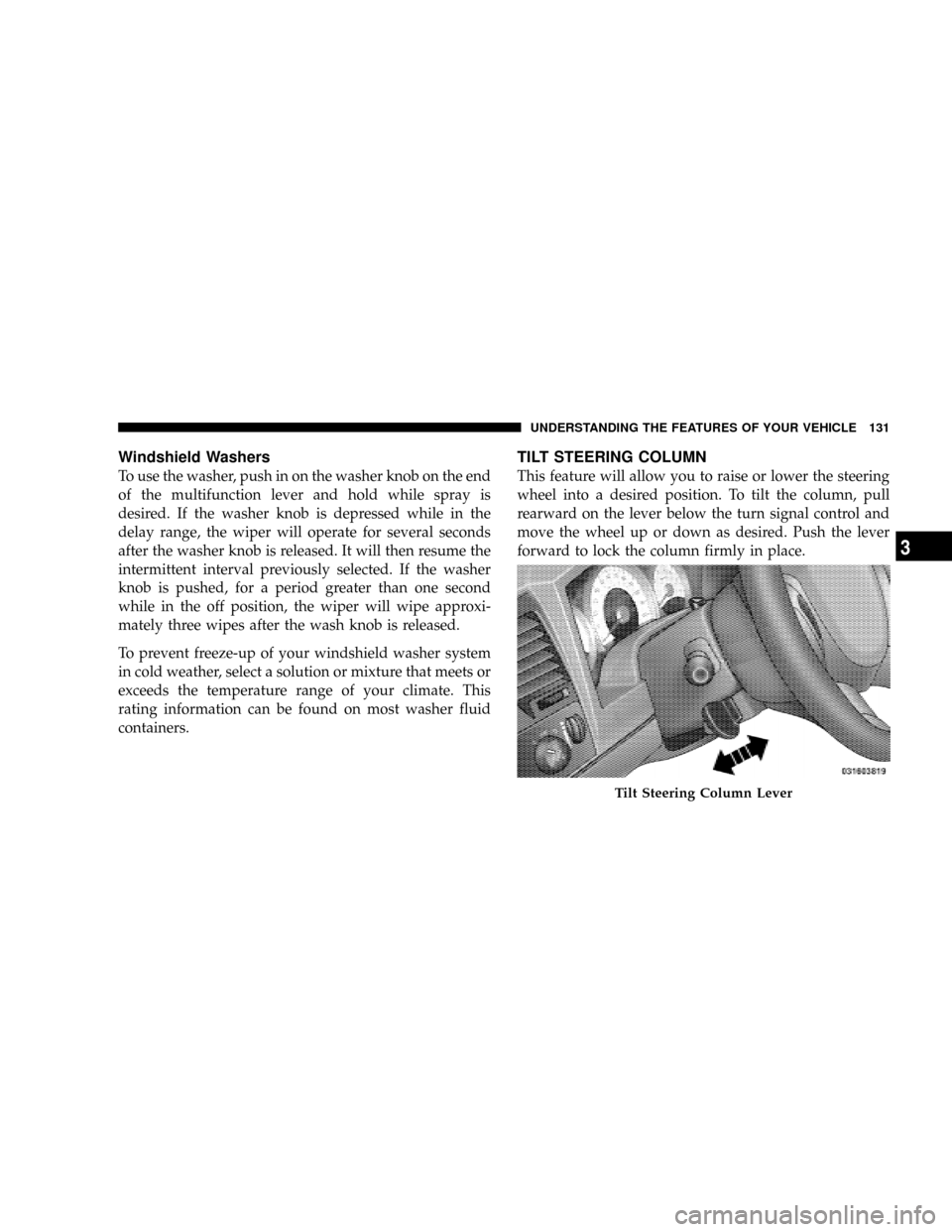
This feature will allow you to raise or lower the steering
wheel into a desired position. To tilt the column, pull
rearward on the lever below the turn signal control and
move the wheel up or down as desired. Push the lever
forward to lock the column firmly in place.
Tilt Steering Column Lever
UNDERSTANDING THE FEATURES OF YOUR VEHICLE 131
3
Page 134 of 449
WARNING!
Tilting the steering column while the vehicle is
moving is dangerous. Without a stable steering col-
umn, you could lose control of the vehicle and have
an accident. Adjust the column only while the ve-
hicle is stopped. Be sure it is locked before driving.
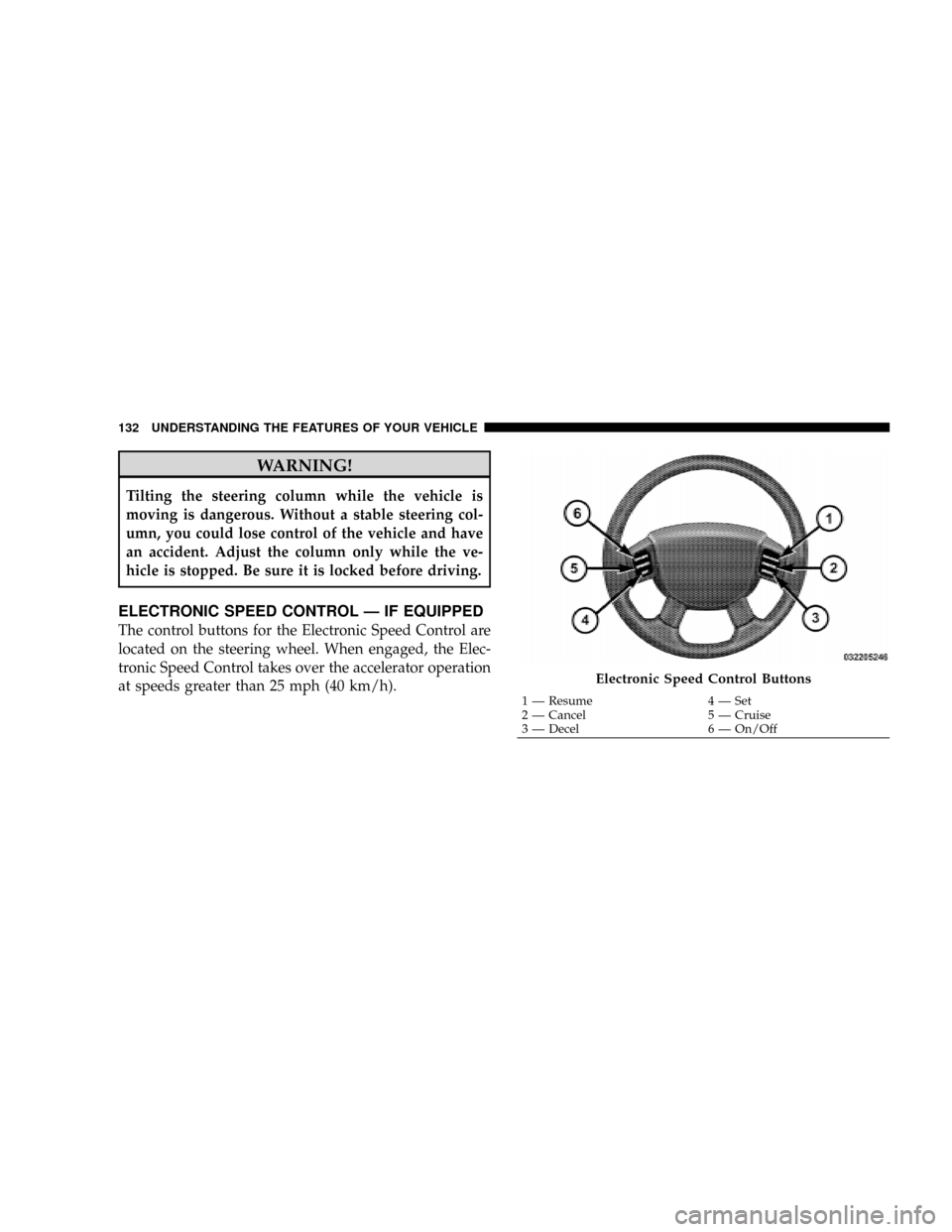
ELECTRONIC SPEED CONTROL Ð IF EQUIPPED
The control buttons for the Electronic Speed Control are
located on the steering wheel. When engaged, the Elec-
tronic Speed Control takes over the accelerator operation
at speeds greater than 25 mph (40 km/h).
Electronic Speed Control Buttons
1 Ð Resume 4 Ð Set
2 Ð Cancel 5 Ð Cruise
3 Ð Decel 6 Ð On/Off 132 UNDERSTANDING THE FEATURES OF YOUR VEHICLE
Page 228 of 449
Operating Instructions Ð Hands-Free Phone (If
Equipped)
Refer to ªHands-Free Communication (UConnectt)º in
Section 3.
Operating Instructions Ð Video Entertainment
System (VES)Ÿ (If Equipped)
Refer to separate ªVideo Entertainment System (VES)Ÿ
Guide.º
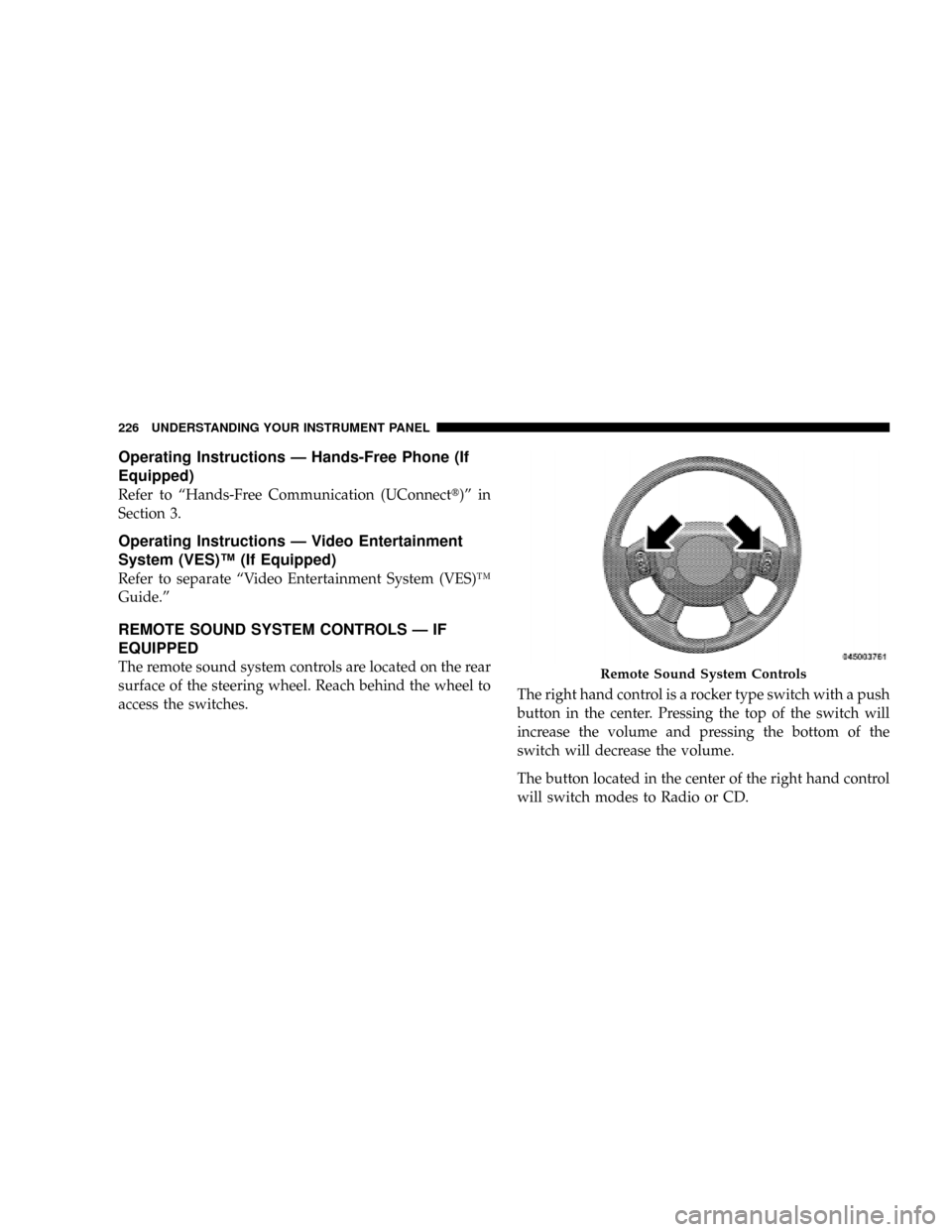
REMOTE SOUND SYSTEM CONTROLS Ð IF
EQUIPPED
The remote sound system controls are located on the rear
surface of the steering wheel. Reach behind the wheel to
access the switches.The right hand control is a rocker type switch with a push
button in the center. Pressing the top of the switch will
increase the volume and pressing the bottom of the
switch will decrease the volume.
The button located in the center of the right hand control
will switch modes to Radio or CD.Remote Sound System Controls
226 UNDERSTANDING YOUR INSTRUMENT PANEL
Page 238 of 449
NNV233/243 GII Transfer Case Operating
Information/Precautions................ 251
NShifting Procedure - NV233/243 Transfer
Case.............................. 255
NNV 244 Generation II Transfer Case
Operating Information / Precautions....... 257
NShifting Procedure - NV 244 Generation II
Transfer Case....................... 261
mLimited-Slip Rear Axle Differential Ð If
Equipped............................ 262
mDriving On Slippery Surfaces............. 263
mDriving Through Water.................. 264
NFlowing/Rising Water................. 264
NShallow Standing Water................ 264
mPower Steering........................ 266NPower Steering Fluid Check............. 266
mParking Brake........................ 267
mBrake System......................... 269
NRear-Wheel Anti-Lock Brake System (ABS) ±
If Equipped......................... 269
NFour-Wheel Anti-Lock Brake System (ABS) . . 270
mTire Safety Information.................. 272
NTire Markings....................... 272
NTire Identification Number (TIN).......... 275
NTire Loading And Tire Pressure........... 276
mTires Ð General Information.............. 280
NTire Pressure........................ 280
NTire Inflation Pressures................. 281
236 STARTING AND OPERATING