Page 150 of 381

INSTRUMENT CLUSTER DESCRIPTION
1. Fuel Gauge
The pointer shows the level of fuel in the fuel tank when
the ignition switch is in the ON position.
2. Trip Odometer Button
Press this button to change the display from odometer to
either of two trip odometer settings. The letter “A” or “B”
will appear when in the trip odometer mode. Push in and
hold the button for two seconds to reset the trip odometer
to 0 mi (km). The odometer must be in TRIP mode to
reset it.
3. Speedometer
Indicates vehicle speed.
4. Electronic Speed Control Indicator Light
This light will turn on when the electronic
speed control is on.5. Tachometer
The red segments indicate the maximum permissible
engine revolutions per minute (RPM x 1000) for each gear
range. Ease up on the accelerator before reaching the red
area.
6. Charging System Warning Light
This light shows the status of the electrical charg-
ing system. The light should turn on when the
ignition switch is first turned ON and remain on briefly
as a bulb check. If the light stays on or turns on while
driving, turn off some of the vehicle’s non-essential
electrical devices (i.e., radio) or slightly increase engine
speed (if at idle). If the light remains on, it means that the
charging system is experiencing a problem. See your
local authorized dealer to obtain service immediately.
150 UNDERSTANDING YOUR INSTRUMENT PANEL
Page 160 of 381
![DODGE CHALLENGER SRT 2009 3.G Owners Manual •Surround Sound Modes (If Equipped with Driver-
Selectable Surround [DSS])
•Performance Features
The system allows the driver to select information by
pressing the following buttons mounted on the](/manual-img/12/5534/w960_5534-159.png "DODGE CHALLENGER SRT 2009 3.G Owners Manual •Surround Sound Modes (If Equipped with Driver-
Selectable Surround [DSS])
•Performance Features
The system allows the driver to select information by
pressing the following buttons mounted on the")
•Surround Sound Modes (If Equipped with Driver-
Selectable Surround [DSS])
•Performance Features
The system allows the driver to select information by
pressing the following buttons mounted on the steering
wheel.
MENU Button
Press and release the MENU button and the
mode displayed will change between Trip
Functions, Performance Pages, Navigation (If
Equipped), System Warnings, System Status,
Personal Settings, Telephone (If Equipped), and Sur-
round Sound (If Equipped).
FUNCTION SELECT Button
Press the FUNCTION SELECT button to accept
a selection. The FUNCTION SELECT buttonalso functions as a remote sound system control. Refer to
“Remote Sound System Controls” in this section.
SCROLL Button
Press the SCROLL button to scroll through Trip
Functions, Performance Pages, Navigation (If
Equipped), System Status Messages, and Per-
sonal Settings (Customer Programmable Fea-
tures). The SCROLL button also functions as a remote
sound system control. Refer to “Remote Sound System
Controls” in this section.
AUDIO MODE Button
Press the AUDIO MODE button to select the
Compass/Temp/Audio screen. Along with
compass reading and outside temperature, this
screen will display radio and media mode
information depending on which radio is in the vehicle.
Refer to “Remote Sound System Controls” in this section.
160 UNDERSTANDING YOUR INSTRUMENT PANEL
Page 174 of 381

Turn Headlights On with Remote Key Unlock
When this feature is selected, the headlights will activate
and remain on for up to 90 seconds when the doors are
unlocked with the RKE transmitter. To make your selec-
tion, press and release the FUNCTION SELECT button
until “OFF,” “30 sec.,” “60 sec.,” or “90 sec.” appears.
Delay Power Off to Accessories Until Exit
When this feature is selected, the power window
switches, radio, hands-free system (if equipped), power
sunroof (if equipped), and ignition-powered power out-
lets will remain active for up to 60 minutes after the
ignition switch is turned OFF. Opening a vehicle door
will cancel this feature. To make your selection, press and
release the FUNCTION SELECT button until “Off,” “45
sec.,” “5 min.,” “10 min.,” “30 min.,” or “60 min.”
appears.
Turn-by-Turn Navigation — If Equipped
When ON is selected, the Turn-by-Turn directions will
appear in the display as the vehicle approaches a desig-
nated turn within a programmed route. To make your
selection, press and release the FUNCTION SELECT
button until “ON” or “OFF” appears.
Display Units of Measure In
The EVIC, odometer, and navigation system (if
equipped) can be changed between English and Metric
units of measure. To make your selection, press and
release the FUNCTION SELECT button until “US” or
“METRIC” appears.
174 UNDERSTANDING YOUR INSTRUMENT PANEL
Page 175 of 381

RADIO GENERAL INFORMATION
Radio Broadcast Signals
Your new radio will provide excellent reception under
most operating conditions. Like any system, however, car
radios have performance limitations, due to mobile op-
eration and natural phenomena, which might lead you to
believe your sound system is malfunctioning. To help
you understand and save you concern about these “ap-
parent” malfunctions, you must understand a point or
two about the transmission and reception of radio sig-
nals.
Two Types of Signals
There are two basic types of radio signals: AM or
Amplitude Modulation, in which the transmitted sound
causes the amplitude, or height, of the radio waves to
vary; and FM or Frequency Modulation, in which the
frequency of the wave is varied to carry the sound.
Electrical Disturbances
Radio waves may pick up electrical disturbances during
transmission. They mainly affect the wave amplitude,
and thus remain a part of the AM reception. They
interfere very little with the frequency variations that
carry the FM signal.
AM Reception
AM sound is based on wave amplitude, so AM reception
can be disrupted by such things as lightning, power lines
and neon signs.
FM Reception
Because FM transmission is based on frequency varia-
tions, interference that consists of amplitude variations
can be filtered out, leaving the reception relatively clear,
which is the major feature of FM radio.
UNDERSTANDING YOUR INSTRUMENT PANEL 175
4
Page 176 of 381
NOTE:The radio, steering wheel radio controls, and
6-disc CD/DVD changer (if equipped) will remain active
for up to 60 minutes after the ignition switch is turned
OFF. Opening either door will cancel this feature. The
time is programmable. Refer to “Delay Power Off to
Accessories Until Exit,” under “Personal Settings (Cus-
tomer Programmable Features),” under “Electronic Ve-
hicle Information Center (EVIC)” in Section 4.
SALES CODE REQ — AM/FM STEREO RADIO
AND 6–DISC CD/DVD CHANGER (MP3/WMA AUX
JACK)
NOTE:The radio sales code is located on the lower right
side of your radio faceplate.RET Radio
176 UNDERSTANDING YOUR INSTRUMENT PANEL
Page 177 of 381

Operating Instructions - Radio Mode
NOTE:The ignition switch must be in the ON or ACC
position to operate the radio.
Power Switch/Volume Control (Rotary)
Push the ON/VOLUME control knob to turn on the
radio. Press the ON/VOLUME control knob a second
time to turn off the radio.
Electronic Volume Control
The electronic volume control turns continuously (360
degrees) in either direction without stopping. Turning the
ON/VOLUME control knob to the right increases the
volume and to the left decreases it.
When the audio system is turned ON, the sound will be
set at the same volume level as last played.
SEEK Buttons
Press and release the SEEK buttons to search for the next
listenable station in AM/FM mode. Press the right switchto seek up and the left switch to seek down. The radio
will remain tuned to the new station until you make
another selection. Holding either button will bypass
stations without stopping until you release it.
SCAN Button
Pressing the SCAN button causes the tuner to search for
the next listenable station, in AM, FM or Satellite (if
equipped) frequencies, pausing for five seconds at each
listenable station before continuing to the next. To stop
the search, press the SCAN button a second time.
Voice Recognition Button (UConnect�Hands-Free
Phone) — If Equipped
Press this button to operate the Hands-Free Phone
(UConnect�) feature (if equipped). Refer to “Hands-Free
Communication (UConnect�)” in Section 3.
If your vehicle is not equipped with or this feature is not
available on your vehicle, a “Not Equipped With
UConnect” message will display on the radio screen.
UNDERSTANDING YOUR INSTRUMENT PANEL 177
4
Page 178 of 381

Phone Button (UConnect�Hands-Free Phone) — If
Equipped
Press this button to operate the Hands-Free Phone
(UConnect�) feature (if equipped). Refer to “Hands-Free
Communication (UConnect�)” in Section 3.
If your vehicle is not equipped with or this feature is not
available on your vehicle, a “Not Equipped With
UConnect” message will display on the radio screen.
TIME Button
Press the TIME button and the time of day will display. In
AM or FM mode, pressing the TIME button will switch
between the time and frequency displays.
Clock Setting Procedure
1. Press and hold the TIME button until the hours blink.
2. Adjust the hours by turning the right side TUNE/
SCROLL control knob.3. After adjusting the hours, press the right side TUNE/
SCROLL control knob to set the minutes. The minutes
will begin to blink.
4. Adjust the minutes using the right side TUNE/
SCROLL control knob. Press the TUNE/SCROLL control
knob to save the time change.
5. To exit, press any button/knob or wait five seconds.
The clock can also be set by pressing the SETUP button
and selecting the “SET HOME CLOCK” entry. Once in
this display follow the above procedure, starting at step
2.
INFO Button
Press the INFO button for an RDS station (one with call
letters displayed). The radio will return a Radio Text
message broadcast from an FM station (FM mode only).
178 UNDERSTANDING YOUR INSTRUMENT PANEL
Page 180 of 381
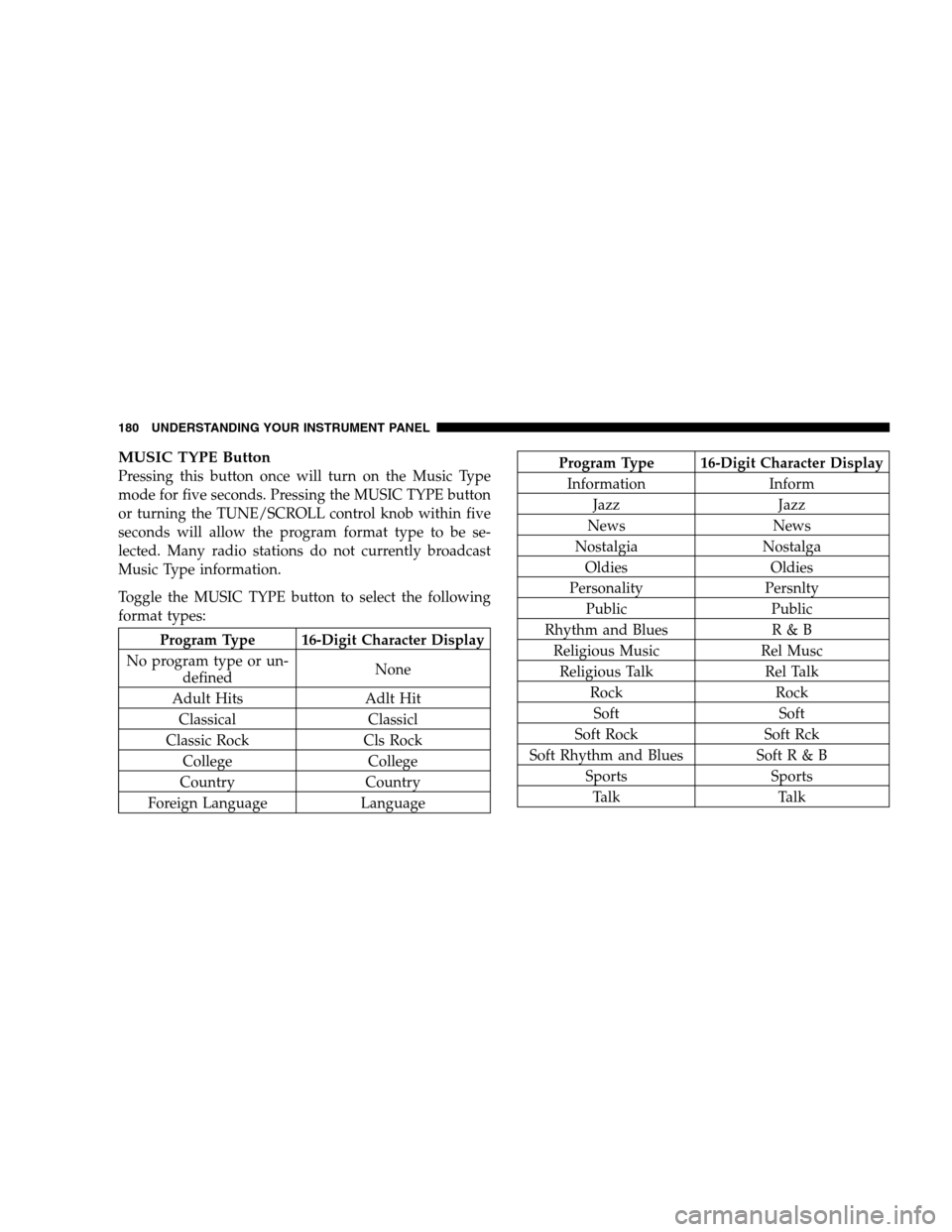
MUSIC TYPE Button
Pressing this button once will turn on the Music Type
mode for five seconds. Pressing the MUSIC TYPE button
or turning the TUNE/SCROLL control knob within five
seconds will allow the program format type to be se-
lected. Many radio stations do not currently broadcast
Music Type information.
Toggle the MUSIC TYPE button to select the following
format types:
Program Type 16-Digit Character Display
No program type or un-
definedNone
Adult Hits Adlt Hit
Classical Classicl
Classic Rock Cls Rock
College College
Country Country
Foreign Language Language
Program Type 16-Digit Character Display
Information Inform
Jazz Jazz
News News
Nostalgia Nostalga
Oldies Oldies
Personality Persnlty
Public Public
Rhythm and Blues R & B
Religious Music Rel Musc
Religious Talk Rel Talk
Rock Rock
Soft Soft
Soft Rock Soft Rck
Soft Rhythm and Blues Soft R & B
Sports Sports
Talk Talk
180 UNDERSTANDING YOUR INSTRUMENT PANEL