Page 162 of 469

14. Oil Pressure Warning Light
This light indicates low engine oil pressure. The
light should turn on momentarily when the engine
is started. If the light turns on while driving, stop the
vehicle and shut off the engine as soon as possible. A
chime will sound for four minutes when this light turns
on.
Do not operate the vehicle until the cause is corrected.
This light does not indicate how much oil is in the engine.
The engine oil level must be checked under the hood.
15. High Beam Indicator
This indicator will turn on when the high beam
headlights are on. Push the multifunction lever
away from the steering wheel to switch the headlights to
high beam.16. Seat Belt Reminder Light
This light will turn on for five to eight seconds as
a bulb check when the ignition switch is first
turned ON. A chime will sound if the driver’s seat
belt is unbuckled during the bulb check. The Seat Belt
Warning Light will flash or remain on continuously if the
driver’s seat belt remains unbuckled after the bulb check
or when driving.
17. Shift Lever Indicator — Automatic Transmission
Only
The Shift Lever Indicator is self-contained within the
instrument cluster. It displays the gear position of the
automatic transmission.
18. Front Fog Light Indicator — If Equipped
This indicator will illuminate when the front fog
lights are on.
160 UNDERSTANDING YOUR INSTRUMENT PANEL
Page 181 of 469
Lock Doors Automatically at 15 mph (24 km/h)
When ON is selected, both doors will lock automatically
when the vehicle reaches a speed of 15 mph (24 km/h).
To make your selection, press and release the FUNC-
TION SELECT button until “ON” or “OFF” appears.
Unlock Doors Automatically on Exit
When ON is selected, both doors will unlock when the
vehicle is stopped and the transmission is in the PARK or
NEUTRAL position and the driver’s door is opened. To
make your selection, press and release the FUNCTION
SELECT button until “ON” or “OFF” appears.
Remote Key Unlock
WhenDriver Door 1st Pressis selected, only the driver’s
door will unlock on the first press of the Remote Keyless
Entry (RKE) transmitter UNLOCK button. When Driver
Door 1st Press is selected, you must press the RKE
transmitter UNLOCK button twice to unlock the passen-
ger door. WhenAll Doors 1st Pressis selected, both ofthe doors will unlock on the first press of the RKE
transmitter UNLOCK button. To make your selection,
press and release the FUNCTION SELECT button until
“Driver Door 1st Press” or “All Doors 1st Press” appears.
Sound Horn with Remote Key Lock
When ON is selected, a short horn sound will occur when
the RKE transmitter LOCK button is pressed. This feature
may be selected with or without the Flash Lights with
Remote Key Lock feature. To make your selection, press
and release the FUNCTION SELECT button until “ON”
or “OFF” appears.
Flash Lights with Remote Key Lock
When ON is selected, the front and rear turn signals will
flash when the doors are locked or unlocked with the
RKE transmitter. This feature may be selected with or
without the sound horn on lock feature selected. To make
your selection, press and release the FUNCTION SE-
LECT button until “ON” or “OFF” appears.
4
UNDERSTANDING YOUR INSTRUMENT PANEL 179
Page 182 of 469
Headlamps On with Wipers (Available with Auto
Headlamps Only)
When ON is selected, and the headlight switch is in the
AUTO (A) position, the headlamps will turn on approxi-
mately 10 seconds after the wipers are turned on. The
headlamps will also turn off when the wipers are turned
off if they were turned on by this feature. To make your
selection, press and release the FUNCTION SELECT
button until “ON” or “OFF” appears.
NOTE:Turning the headlights on during the daytime
causes the instrument panel lights to dim. To increase the
brightness, refer to “Lights” in Section 3.
Delay Turning Headlights Off
When this feature is selected, the driver can choose to
have the headlights remain on for 0, 30, 60, or 90 seconds
when exiting the vehicle. To make your selection, pressand release the FUNCTION SELECT button until “0,”
“30,” “60,” or “90” appears.
Hill Start Assist (HSA) — If Equipped
When on is selected, the HSA system is active. Refer to
“HSA (Hill Start Assistance)” under “Electronic Brake
Control System” in Section 5 of this manual for system
function and operating information. To make your selec-
tion, press and release the FUNCTION SELECT button
until “ON” or “OFF” appears.
Turn Headlights On with Remote Key Unlock
When this feature is selected, the headlights will activate
and remain on for up to 90 seconds when the doors are
unlocked with the RKE transmitter. To make your selec-
tion, press and release the FUNCTION SELECT button
until “OFF,” “30 sec.,” “60 sec.,” or “90 sec.” appears.
180 UNDERSTANDING YOUR INSTRUMENT PANEL
Page 335 of 469

CAUTION!
If the trailer weighs more than 1,000 lbs (454 kg)
loaded, it should have its own brakes, and they
should be of adequate capacity. Failure to do this
could lead to accelerated brake lining wear, higher
brake pedal effort, and longer stopping distances.
WARNING!
•Do not connect trailer brakes to your vehicle’s
hydraulic brake lines. It can overload your brake
system and cause it to fail. You might not have
brakes when you need them and could have an
accident.
(Continued)
WARNING! (Continued)
•Towing any trailer will increase your stopping
distance. When towing, you should allow for ad-
ditional space between your vehicle and the ve-
hicle in front of you. Failure to do so could result
in an accident.
Towing Requirements — Trailer Lights and Wiring
Whenever you pull a trailer, regardless of the trailer size,
stoplights and turn signals on the trailer are required for
motoring safety.
The Trailer Tow Package may include a four- and seven-
pin wiring harness. Use a factory approved trailer har-
ness and connector.
NOTE:Do not cut or splice wiring into the vehicles
wiring harness.5
STARTING AND OPERATING 333
Page 400 of 469
Interior Care
Use MOPAR�Fabric Cleaner or equivalent to clean fabric
upholstery and MOPAR�Carpet Cleaner for carpeting.
Interior Trim should be cleaned starting with a damp
cloth, or MOPAR�Satin Select. Do not use harsh cleaners
or Armor All�. Use MOPAR�Total Clean to clean vinyl
upholstery.
MOPAR�Total Clean is specifically recommended for
leather upholstery.
Your leather upholstery can be best preserved by regular
cleaning with a damp soft cloth. Small particles of dirt
can act as an abrasive and damage the leather upholstery
and should be removed promptly with a damp cloth.
Stubborn soils can be removed easily with a soft cloth
and MOPAR�Total Clean or equivalent. Care should be
taken to avoid soaking your leather upholstery with any
liquid. Please do not use polishes, oils, cleaning fluids,
solvents, detergents, or ammonia-based cleaners to cleanyour leather upholstery. Application of a leather condi-
tioner is not required to maintain the original condition.
WARNING!
Do not use volatile solvents for cleaning purposes.
Many are potentially flammable, and if used in
closed areas they may cause respiratory harm.
Cleaning Headlights
Your vehicle has plastic headlights that are lighter and
less susceptible to stone breakage than glass headlights.
Plastic is not as scratch resistant as glass and therefore
different lens cleaning procedures must be followed.
To minimize the possibility of scratching the lenses and
reducing light output, avoid wiping with a dry cloth. To
remove road dirt, wash with a mild soap solution fol-
lowed by rinsing.
398 MAINTAINING YOUR VEHICLE
Page 407 of 469
Cavity Car-
tridge
FuseMini-
FuseDescription
5 30 Amp
Pink— Heated Seats - if
equipped
6 — 20 Amp
YellowFuel Pump
7 — 15 Amp
BlueSub Amp - if equipped
8 — 15 Amp
BlueDiagnostic Link Connec-
tor (DLC)/Wireless Con-
trol Module (WCM)/
Wireless Ignition Node
(WIN)
9 — 20 Amp
YellowPower Outlet
10———
11*———
12*———Cavity Car-
tridge
FuseMini-
FuseDescription
13*———
14 — 10 Amp
RedAC Heater Control/
Cluster/Security Mod-
ule - if equipped
15———
16———
17 — 20 Amp
YellowCluster
18 — 20 Amp
YellowSelectable Power Outlet
19 — 10 Amp
RedStop Lights
20———
21———
22———
7
MAINTAINING YOUR VEHICLE 405
Page 422 of 469
•Check all lights and other electrical items for correct
operation.
At Each Oil Change
•Change the engine oil filter.
•Inspect the brake hoses and lines.
CAUTION!
Failure to perform the required maintenance items
may result in damage to the vehicle.
Required Maintenance Intervals
Refer to the Maintenance Schedules on the following
pages for the required maintenance intervals.
8
M
A
I
N
T
E
N
A
N
C
E
S
C
H
E
D
U
L
E
S420 MAINTENANCE SCHEDULES
Page 447 of 469
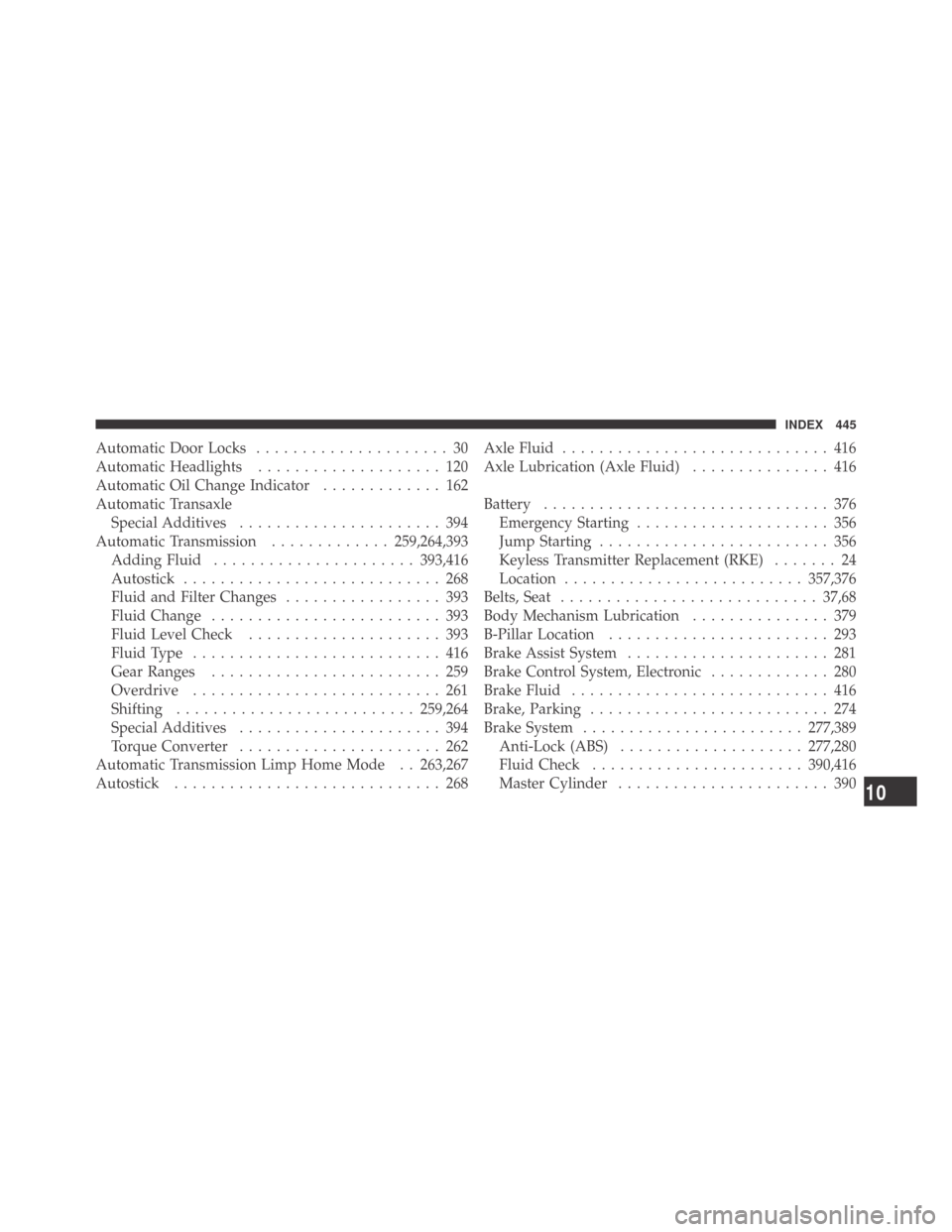
Automatic Door Locks..................... 30
Automatic Headlights.................... 120
Automatic Oil Change Indicator............. 162
Automatic Transaxle
Special Additives...................... 394
Automatic Transmission.............259,264,393
Adding Fluid......................393,416
Autostick............................ 268
Fluid and Filter Changes................. 393
Fluid Change......................... 393
Fluid Level Check..................... 393
FluidType ........................... 416
Gear Ranges......................... 259
Overdrive........................... 261
Shifting ..........................259,264
Special Additives...................... 394
Torque Converter...................... 262
Automatic Transmission Limp Home Mode . . 263,267
Autostick............................. 268AxleFluid ............................. 416
Axle Lubrication (Axle Fluid)............... 416
Battery............................... 376
Emergency Starting..................... 356
Jump Starting......................... 356
Keyless Transmitter Replacement (RKE)....... 24
Location..........................357,376
Belts, Seat............................ 37,68
Body Mechanism Lubrication............... 379
B-Pillar Location........................ 293
Brake Assist System...................... 281
Brake Control System, Electronic............. 280
Brake Fluid............................ 416
Brake, Parking.......................... 274
Brake System........................277,389
Anti-Lock (ABS)....................277,280
Fluid Check.......................390,416
Master Cylinder....................... 390
10
INDEX 445