Page 55 of 469

throat irritation, move to fresh air. If the irritation
continues, see your doctor. If these particles settle on
your clothing, follow the garment manufacturer’s in-
structions for cleaning.
•It is not advisable to drive your vehicle after the
airbags have been deployed. If you are involved in
another collision, the airbags will not be in place to
protect you.
WARNING!
Deployed airbags cannot protect you in another col-
lision. Have the airbags replaced by an authorized
dealer as soon as possible.
Enhanced Accident Response System
In the event of an impact that causes airbag deployment,
with the vehicle stopped, the vehicle communication
network intact, and the power intact, the Enhanced
Accident Response System performs the following func-
tions:
•Cuts off fuel to the engine.
•Flashes hazard lights.
•Turns on the interior lights, which remain on as long as
the battery has power or until the ignition key is
removed.
•Unlocks the doors automatically.
NOTE:The interior lights can only be deactivated if the
key is removed from the ignition switch or the vehicle is
driven.
2
THINGS TO KNOW BEFORE STARTING YOUR VEHICLE 53
Page 71 of 469

Defroster
Check operation by selecting the defrost mode and place
the blower control on high speed. You should be able to
feel the air directed against the windshield. See your
authorized dealer for service if your defroster is
inoperable.
Periodic Safety Checks You Should Make Outside
the Vehicle
Tires
Examine tires for excessive tread wear and uneven wear
patterns. Check for stones, nails, glass, or other objects
lodged in the tread. Inspect the tread and sidewall for
cuts and cracks. Check the wheel nuts for tightness.
Check the tires (including spare) for proper pressure.
Lights
Have someone observe the operation of exterior lights
while you work the controls. Check turn signal and high
beam indicator lights on the instrument panel.
Door Latches
Check for positive closing, latching, and locking.
Fluid Leaks
Check area under vehicle after overnight parking for fuel,
engine coolant, oil, or other fluid leaks. Also, if gasoline
fumes are detected or if fuel, power steering fluid, or
brake fluid leaks are suspected, the cause should be
located and corrected immediately.
2
THINGS TO KNOW BEFORE STARTING YOUR VEHICLE 69
Page 74 of 469
�Voice Recognition (VR) System —
If Equipped.......................... 106
▫Voice Recognition (VR) System Operation . . . 106
▫Commands........................ 108
▫VoiceTraining .......................111
�Seats...............................111
▫Easy Entry Seats......................111
▫Power Seats........................ 112
▫Manual Front Seatback Recline........... 113
▫Lumbar Support..................... 114
▫Head Restraints..................... 114
▫Heated Seats....................... 115
▫Folding Rear Seat.................... 116�To Open And Close The Hood............ 117
�Lights ............................. 119
▫Headlight Switch.................... 119
▫Automatic Headlights — If Equipped...... 120
▫Headlights On With Wipers (Available With
Auto Headlights Only)................ 120
▫Headlight Time Delay................. 120
▫Daytime Running Lights — If Equipped.... 121
▫Lights-On Reminder.................. 121
▫Fog Lights — If Equipped.............. 121
▫Multifunction Lever.................. 122
▫Overhead Console Map/Reading Lights.... 123
▫InteriorLights ...................... 123
72 UNDERSTANDING THE FEATURES OF YOUR VEHICLE
Page 75 of 469
�Windshield Wipers And Washers.......... 125
▫Intermittent Wiper System.............. 125
▫Mist Feature........................ 126
▫Windshield Washers.................. 126
▫Headlights On With Wipers (Available With
Auto Headlights Only)................ 126
�Tilt/Telescoping Steering Column.......... 127
�Electronic Speed Control................ 128
▫To Activate......................... 129
▫To Set A Desired Speed................ 129
▫To Deactivate....................... 130
▫To Resume Speed.................... 130
▫To Vary The Speed Setting.............. 130▫To Accelerate For Passing.............. 131
�Overhead Console..................... 132
▫Courtesy/Reading Lights.............. 132
▫Sunglasses Storage................... 132
�Garage Door Opener — If Equipped........ 133
▫Programming HomeLink�.............. 134
▫Gate Operator/Canadian Programming.... 137
▫Using HomeLink�................... 137
▫Reprogramming A Single
HomeLink�Button................... 138
▫Security........................... 138
▫Troubleshooting Tips.................. 138
▫General Information.................. 139
3
UNDERSTANDING THE FEATURES OF YOUR VEHICLE 73
Page 117 of 469
Heated Seats
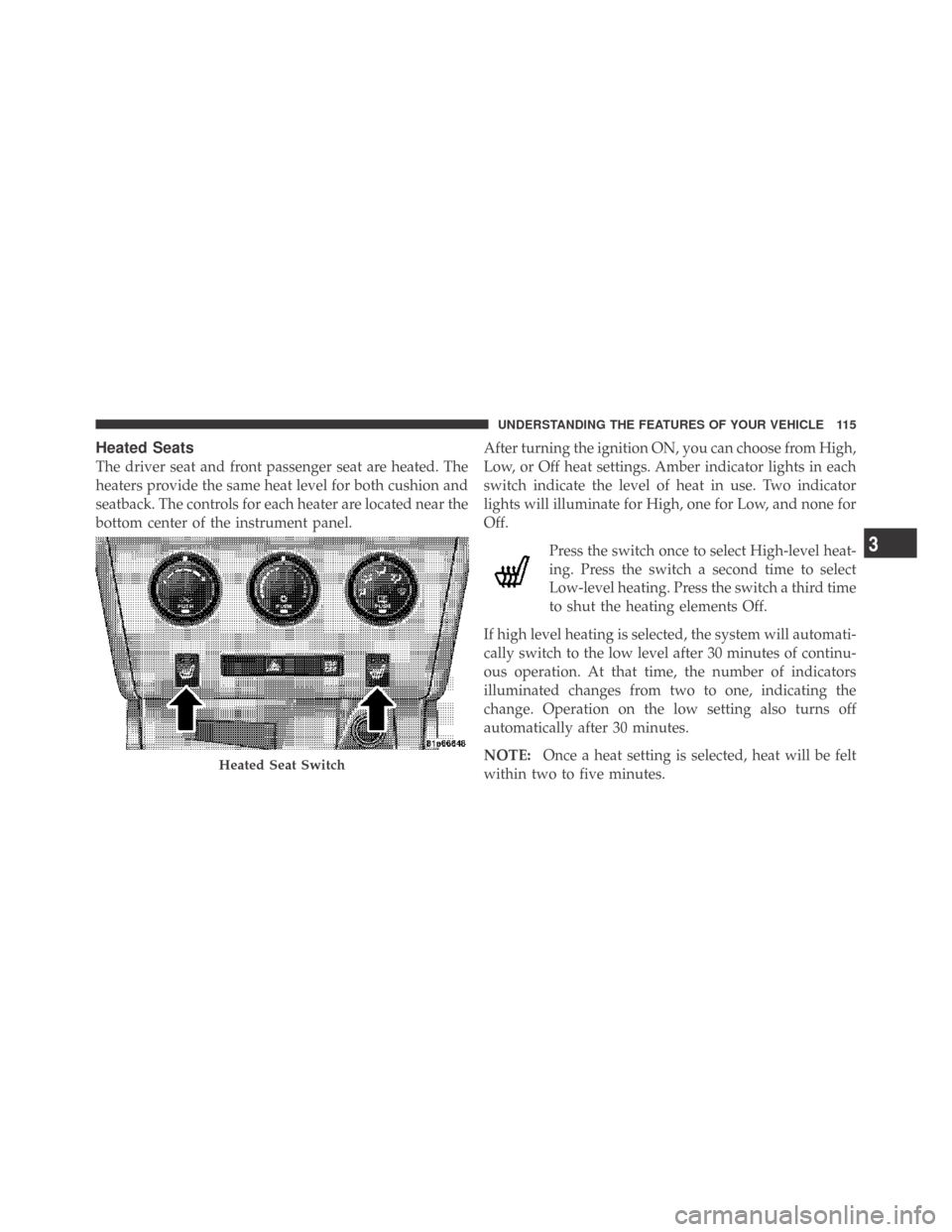
The driver seat and front passenger seat are heated. The
heaters provide the same heat level for both cushion and
seatback. The controls for each heater are located near the
bottom center of the instrument panel.After turning the ignition ON, you can choose from High,
Low, or Off heat settings. Amber indicator lights in each
switch indicate the level of heat in use. Two indicator
lights will illuminate for High, one for Low, and none for
Off.
Press the switch once to select High-level heat-
ing. Press the switch a second time to select
Low-level heating. Press the switch a third time
to shut the heating elements Off.
If high level heating is selected, the system will automati-
cally switch to the low level after 30 minutes of continu-
ous operation. At that time, the number of indicators
illuminated changes from two to one, indicating the
change. Operation on the low setting also turns off
automatically after 30 minutes.
NOTE:Once a heat setting is selected, heat will be felt
within two to five minutes.
Heated Seat Switch
3
UNDERSTANDING THE FEATURES OF YOUR VEHICLE 115
Page 121 of 469
LIGHTS
Headlight Switch
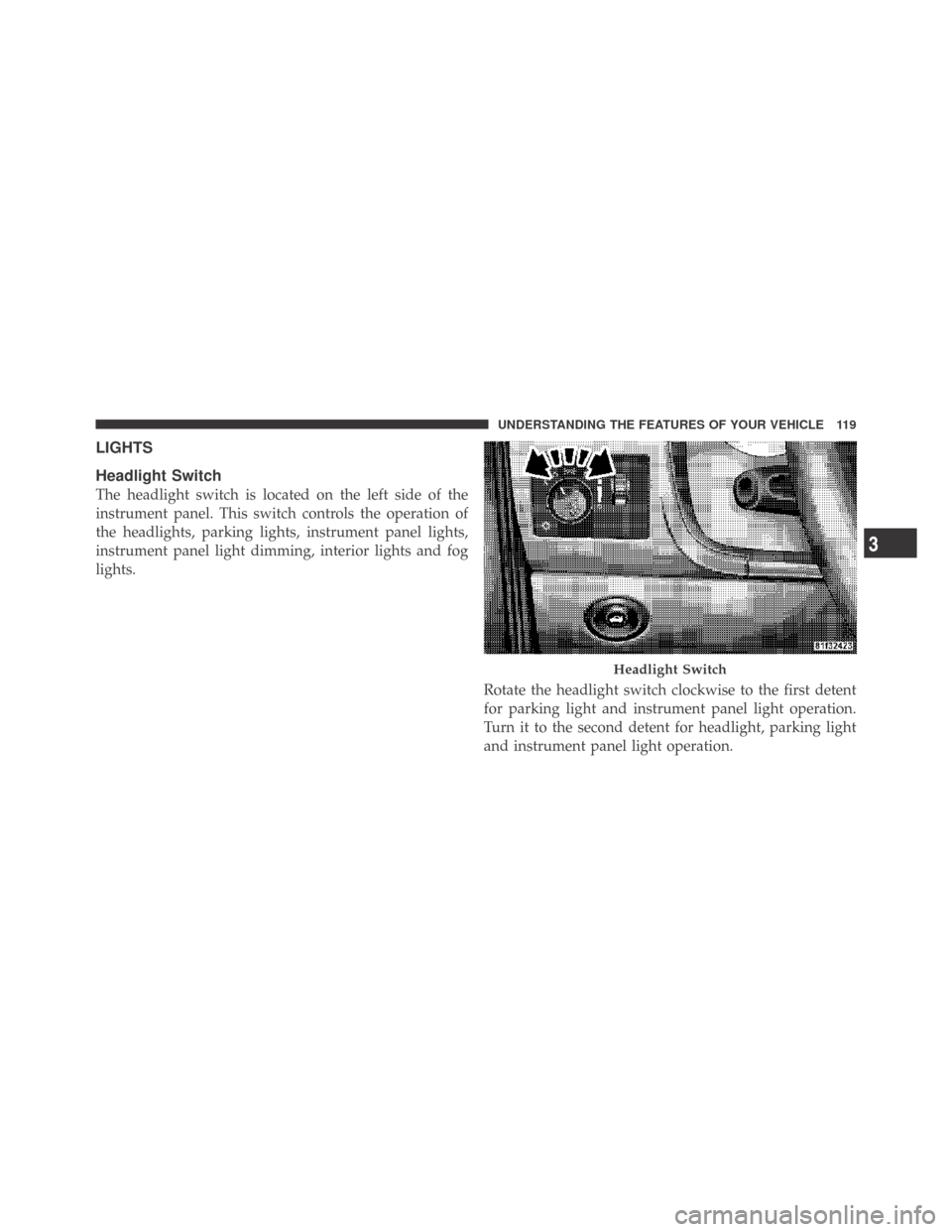
The headlight switch is located on the left side of the
instrument panel. This switch controls the operation of
the headlights, parking lights, instrument panel lights,
instrument panel light dimming, interior lights and fog
lights.
Rotate the headlight switch clockwise to the first detent
for parking light and instrument panel light operation.
Turn it to the second detent for headlight, parking light
and instrument panel light operation.
Headlight Switch
3
UNDERSTANDING THE FEATURES OF YOUR VEHICLE 119
Page 122 of 469
Automatic Headlights — If Equipped
This system automatically turns the headlights on or off
according to ambient light levels. To turn the system on,
rotate the headlight switch counterclockwise to the
AUTO (A) position. When the system is on, the headlight
time delay feature is also on. This means the headlights
will stay on for up to 90 seconds after you turn the
ignition switch OFF. To turn the automatic system off,
move the headlight switch out of the AUTO (A) position.
NOTE:The engine must be running before the head-
lights will come on in the automatic mode.
Headlights On with Wipers (Available with Auto
Headlights Only)
When this feature is active, the headlights will turn on
approximately 10 seconds after the wipers are turned on
if the headlight switch is placed in the AUTO (A)position. In addition, the headlights will turn off when
the wipers are turned off if they were turned on by this
feature.
The Headlights On with Wipers feature can be enabled or
disabled. Refer to ”Headlights On with Wipers,” under
“Personal Settings (Customer-Programmable Features)”
under “Electronic Vehicle Information Center (EVIC)” in
Section 4.
Headlight Time Delay
This feature provides the safety of headlight illumination
for up to 90 seconds (programmable) when leaving your
vehicle in an unlit area.
To activate the delay feature, turn off the ignition switch
while the headlights are still on. Then, turn off the
headlights within 45 seconds. The delay interval begins
when the headlight switch is turned off.
120 UNDERSTANDING THE FEATURES OF YOUR VEHICLE
Page 123 of 469
If you turn the headlights, parking lights, or ignition
switch ON again, the system will cancel the delay.
If you turn the headlights off before the ignition, they will
turn off in the normal manner.
NOTE:The lights must be turned off within 45 seconds
of turning the ignition OFF to activate this feature.
The Headlight delay time is programmable. Refer to
“Delay Turning Headlights Off,” under “Personal Set-
tings (Customer-Programmable Features)” under “Elec-
tronic Vehicle Information Center (EVIC)” in Section 4.
Daytime Running Lights — If Equipped
The high beam headlights will come on as Daytime
Running Lights whenever the ignition switch is ON, the
headlights are off, and the parking brake is off. The
headlight switch must be used for normal nighttime
driving.
Lights-On Reminder
If the headlights or parking lights are on after the ignition
is turned OFF, a chime will sound to alert the driver
when the driver’s door is opened.
Fog Lights — If Equipped
The front fog light switch is built into the head-
light switch. To activate the front fog lights, turn
on the parking lights or the low beam headlights
and press the headlight switch. To turn off the front fog
lights, either press the headlight switch again or turn off
the headlight switch.
An indicator light in the instrument cluster illuminates
when the fog lights are turned on.
NOTE:The fog lights will operate with the low beam
headlights or parking lights on. However, selecting the
high beam headlights will turn off the fog lights.3
UNDERSTANDING THE FEATURES OF YOUR VEHICLE 121