Page 222 of 469

•While a track is playing, press theINFObutton to see
the associated metadata (artist, track title, album, etc.)
for that track. Pressing theINFObutton again jumps
to the next screen of data for that track. Once you have
seen all screens, the lastINFObutton press will take
you back to the play mode screen on the radio.
•Pressing theREPEATbutton will change the iPod�
mode to repeat the current playing track.
•Press theSCANbutton to use iPod�scan mode, which
will play the first five seconds of each track in the
current list and then forward to the next song. To stop
SCAN mode and start playing the desired track, when
it is playing the track, press theSCANbutton again.
During Scan mode, you can also press the <
andSEEK>> buttons to select the previous and next
tracks.
•RNDbutton (available on sales code RES radio only):
Pressing this button toggles between Shuffle ON andShuffle OFF modes for the iPod�.IftheRNDicon is
showing on the radio display, then the shuffle mode is
ON.
List Or Browse Mode
During Play mode, pressing any of the buttons described
below, takes you to List mode. List mode enables you to
scroll through the list of menus and tracks on the iPod�.
•TUNEcontrol knob: TheTUNEcontrol knob functions
in a similar manner as the scroll wheel on the iPod�.
•Turning it clockwise (forward) and counterclock-
wise (backward) scrolls through the lists, displaying
the track detail on the radio display. Once you have
the track to be played highlighted on the radio
display, press theTUNEcontrol knob to select and
start playing the track. Turning theTUNEcontrol
knob fast will scroll through the list faster. During
fast scroll, you may notice a slight delay in updating
the information on the radio display.
220 UNDERSTANDING YOUR INSTRUMENT PANEL
Page 223 of 469
•During all List modes, the iPod�displays all lists in
“wrap-around” mode. So if the track is at the
bottom of the list, just turn the wheel backwards
(counter-clockwise) to get to the track faster.
•In List mode, the radioPRESETButtons are used as
shortcuts to the following lists on the iPod�.
•Preset1–Playlists
•Preset 2 – Artists
•Preset 3 – Albums
•Preset 4 – Genres
•Preset 5 - Audiobooks
•Preset 6 – Podcasts
•Pressing a PRESET button will display the current
list on the top line and the first item in that list on
the second line.
•To Exit List mode without selecting a track, press the
samePRESETbutton again to go back toPlay
mode.
•LISTbutton: TheLISTbutton will display the top
level menu of the iPod�. Turn theTUNEcontrol knob
to list the top-menu item you wish to select and press
theTUNEcontrol knob. This will display the next
sub-menu list item on the iPod�then you can follow
the same steps to go to the desired track in that list.
Not all iPod�sub-menu levels are available on this
system.
•MUSIC TYPEbutton: TheMUSIC TYPEbutton is
another shortcut button to the genre listing on your
iPod�.
4
UNDERSTANDING YOUR INSTRUMENT PANEL 221
Page 230 of 469
When in “Audio Surround” mode, balance is set auto-
matically. Fader control is available to add more sur-
round audio if desired.
REMOTE SOUND SYSTEM CONTROLS — IF
EQUIPPED
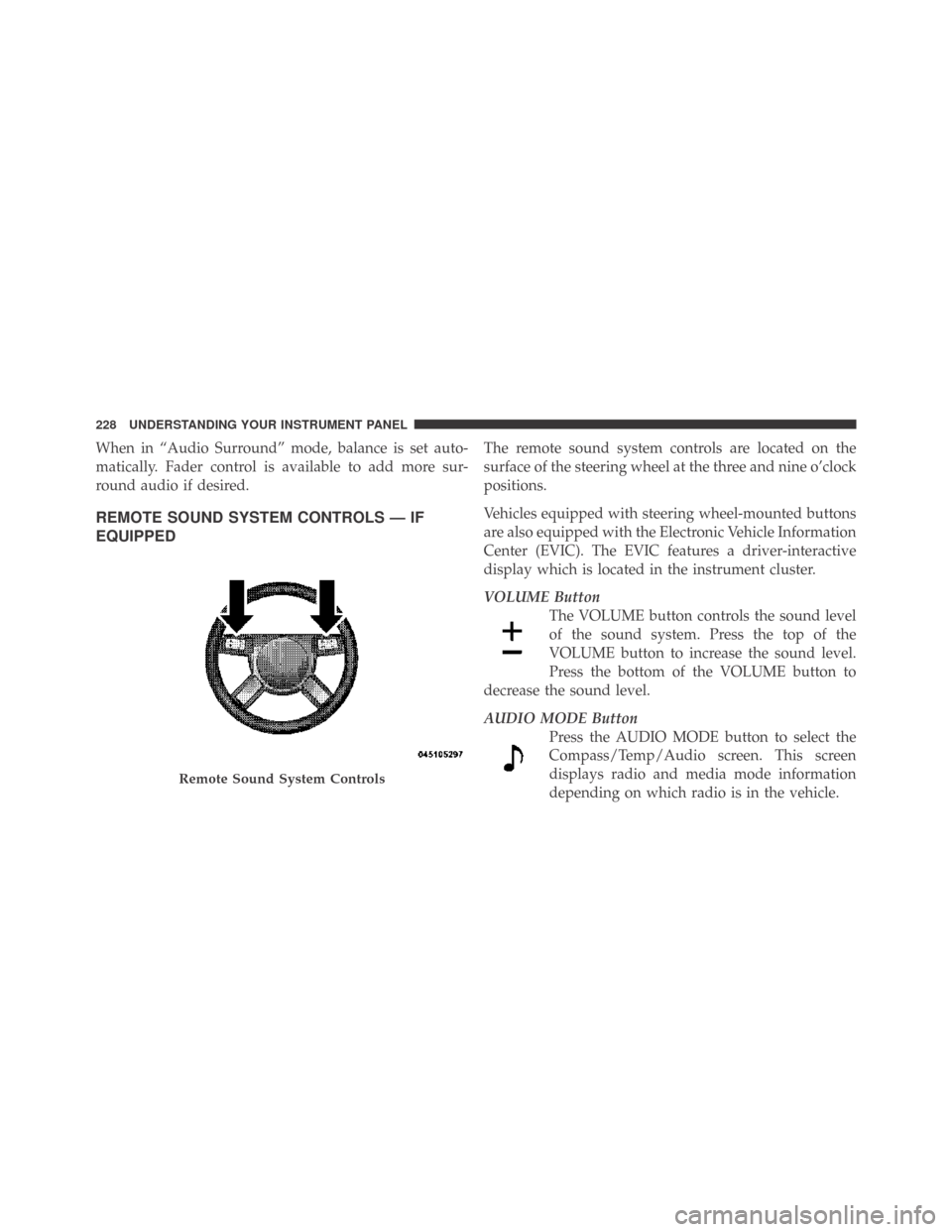
The remote sound system controls are located on the
surface of the steering wheel at the three and nine o’clock
positions.
Vehicles equipped with steering wheel-mounted buttons
are also equipped with the Electronic Vehicle Information
Center (EVIC). The EVIC features a driver-interactive
display which is located in the instrument cluster.
VOLUME Button
The VOLUME button controls the sound level
of the sound system. Press the top of the
VOLUME button to increase the sound level.
Press the bottom of the VOLUME button to
decrease the sound level.
AUDIO MODE Button
Press the AUDIO MODE button to select the
Compass/Temp/Audio screen. This screen
displays radio and media mode information
depending on which radio is in the vehicle.
Remote Sound System Controls
228 UNDERSTANDING YOUR INSTRUMENT PANEL
Page 262 of 469

When parking on a flat surface, place the shift lever in the
PARK position first, and then apply the parking brake.
When parking on a hill, it is important to set the parking
brake before placing the shift lever in PARK, otherwise
the load on the transmission locking mechanism may
make it difficult to move the shift lever out of park. As an
added precaution, turn the front wheels toward the curb
on a downhill grade and away from the curb on an uphill
grade.
WARNING!
Never use the PARK position as a substitute for the
parking brake. Always apply the parking brake fully
when parked to guard against vehicle movement and
possible injury or damage.
The following indicators should be used to ensure that
you have engaged the shift lever in the PARK position:
•When shifting into PARK move the shift lever all the
way forward and left until it stops and is fully seated.
•Look at the shift indicator display on the instrument
panel to ensure it is in the PARK position.
CAUTION!
Damage to the shifter could result if the shift lever is
moved out of PARK before the ignition is turned
from the LOCK to ON position.
REVERSE
This range is used for moving the vehicle rearward.
Always stop before moving the shift lever to REVERSE.
NEUTRAL
This range is used when the vehicle is standing for
prolonged periods with the engine running. The engine
may be started in this range. Set the parking brake if you
must leave the vehicle.
260 STARTING AND OPERATING
Page 267 of 469

When parking on a flat surface, place the shift lever in the
PARK position first, and then apply the parking brake.
When parking on a hill, it is important to set the parking
brake before placing the shift lever in PARK, otherwise
the load on the transmission locking mechanism may
make it difficult to move the shift lever out of PARK. As
an added precaution, turn the front wheels toward the
curb on a downhill grade and away from the curb on an
uphill grade.
WARNING!
Never use the PARK position on an automatic trans-
mission as a substitute for the parking brake. Always
apply the parking brake fully when parked to guard
against vehicle movement and possible injury or
damage.The following indicators should be used to ensure that
you have engaged the shift lever in the PARK position:
•When shifting into PARK, move the shift lever all the
way forward and to the left until it stops and is fully
seated.
•Look at the shift indicator display on the instrument
panel to ensure it is in the PARK position.
CAUTION!
Damage to the shifter could result if the shift lever is
moved out of PARK before the ignition is turned
from the LOCK to ON position.
REVERSE
This range is for moving the vehicle backward. Use only
after the vehicle has come to a complete stop.
5
STARTING AND OPERATING 265
Page 270 of 469

AUTOSTICK�— IF EQUIPPED
Autostick�is a driver-interactive transmission that offers
manual gear shifting to provide you with more control of
the vehicle. Autostick�allows you to maximize engine
braking, eliminate undesirable upshifts and downshifts,
and improve overall vehicle performance. This system
can also provide you with more control during passing,
city driving, cold slippery conditions, mountain driving,
trailer towing, and many other situations.
Autostick�Operation
When the shift lever is in the DRIVE position, the
transmission will operate automatically, shifting between
the five available gears. To engage Autostick�, simply
move the shift lever to the right or left (D+/D-) while in
the DRIVE position. The gear position will display in the
instrument cluster. In Autostick�mode, the transmission
will shift up and down when left or right (D-/D+) is
manually selected by the driver. It will remain in theselected gear until another upshift or downshift is cho-
sen. The transmission will automatically downshift as the
vehicle slows to a stop (to prevent engine lugging) and
will display the current gear. Tapping the shift lever to
the D+ position (at a stop) will allow starting in second
gear. After a stop, the driver should manually upshift
(D+) the transmission as the vehicle is accelerated. To
disengage Autostick�mode, hold the shift lever to the
right (D+) for a few seconds. You can shift in or out of the
Autostick�mode at any time without taking your foot off
the accelerator pedal.
WARNING!
Do not downshift for additional engine braking on a
slippery surface. The drive wheels could lose their
grip and the vehicle could skid, causing an accident
or personal injury.
268 STARTING AND OPERATING
Page 271 of 469

•You can start out in first or second gear. The system
will ignore attempts to upshift at too low of a vehicle
speed.
•The transmission will automatically downshift to first
gear when coming to a stop.
•Starting out in second gear is helpful in snowy or icy
conditions.
•Avoid using speed control when Autostick�is en-
gaged.
•The transmission will automatically shift up when
maximum engine speed is reached while Autostick�is
engaged.
•Transmission shifting will be more crisp/abrupt when
Autostick�is engaged.
DRIVING ON SLIPPERY SURFACES
Acceleration
Rapid acceleration on snow covered, wet, or other slip-
pery surfaces may cause the rear wheels to pull errati-
cally to the right or left. This phenomenon occurs when
there is a difference in the surface traction under the rear
(driving) wheels.
WARNING!
Rapid acceleration on slippery surfaces is dangerous.
Unequal traction can cause sudden pulling of the rear
wheels. You could lose control of the vehicle and
possibly have an accident. Accelerate slowly and
carefully whenever there is likely to be poor traction
(ice, snow, wet mud, loose sand, etc.).
5
STARTING AND OPERATING 269
Page 272 of 469

Traction
When driving on wet or slushy roads, it is possible for a
wedge of water to build up between the tire and road
surface. This is known as hydroplaning and may cause
partial or complete loss of vehicle control and stopping
ability. To reduce this possibility, the following precau-
tions should be observed:
1. Slow down during rainstorms or when the roads are
slushy.
2. Slow down if the road has standing water or puddles.
3. Replace tires when tread wear indicators first become
visible.4. Keep tires properly inflated.
5. Maintain sufficient distance between your vehicle and
the vehicle in front of you to avoid a collision in a sudden
stop.
Your vehicle is equipped with a Limited Slip Differential
(LSD) that reduces, but does not eliminate, the amount of
wheel slip across a given axle for improved handling.
DRIVING THROUGH WATER
Driving through water more than a few inches/
centimeters deep will require extra caution to ensure
safety and prevent damage to your vehicle.
270 STARTING AND OPERATING