Page 202 of 534
•After training a HomeLink�channel, if the garage
door does not operate with HomeLink�and the ga-
rage door opener was manufactured after 1995, the
garage door opener may have a rolling code. If so,
proceed to Step 5 “Programming A Rolling Code
System.”
4. Press and hold the just-trained HomeLink�button
and observe the indicator light.
If the indicator light stays on constantly, programming is
complete and the garage door (or device) should activate
when the HomeLink�button is pressed.
If the indicator light blinks rapidly for two seconds and
then turns to a constant light, proceed to Step 5 “Pro-
gramming A Rolling Code System.”
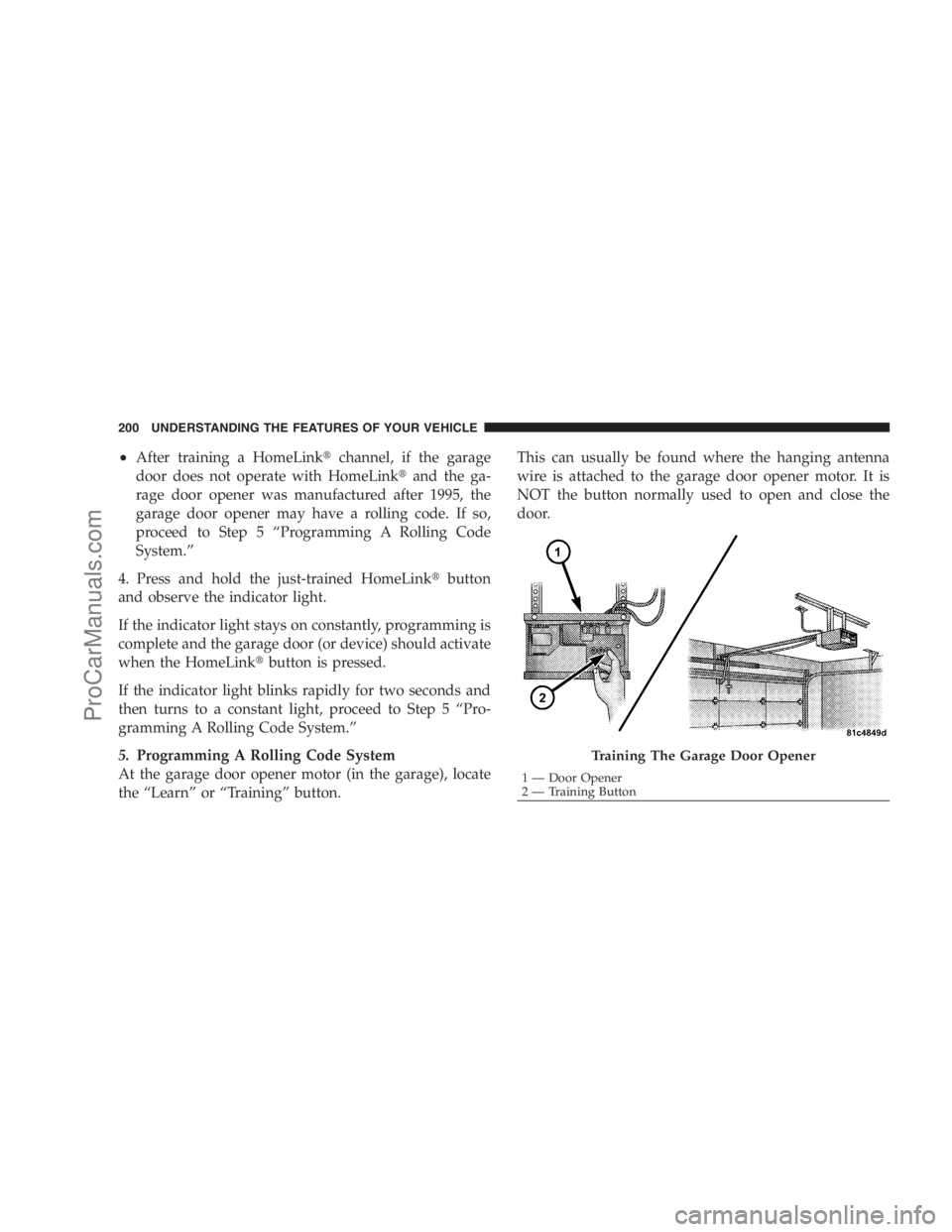
5.Programming A Rolling Code System
At the garage door opener motor (in the garage), locate
the “Learn” or “Training” button.This can usually be found where the hanging antenna
wire is attached to the garage door opener motor. It is
NOT the button normally used to open and close the
door.
Training The Garage Door Opener
1 — Door Opener
2 — Training Button 200 UNDERSTANDING THE FEATURES OF YOUR VEHICLE
ProCarManuals.com
Page 203 of 534
6. Firmly press and release the “Learn” or “Training”
button. The name and color of the button may vary by
manufacturer.
NOTE:There are 30 seconds in which to initiate the next
step after the “Learn” button has been pressed.
7. Return to the vehicle and press the programmed
HomeLink�button twice (holding the button for two
seconds each time). If the device is plugged in and
activates, programming is complete.
If the device does not activate, press the button a third
time (for two seconds) to complete the training.
If you have any problems, or require assistance, please
call toll-free 1–800–355–3515 or, on the Internet at
www.HomeLink.com for information or assistance.
To program the remaining two HomeLink�buttons,
repeat each step for each remaining button. DO NOT
erase the channels.Using HomeLink�
To operate, simply press and release the programmed
HomeLink�button. Activation will now occur for the
trained device (i.e., garage door opener, gate operator,
security system, entry door lock, home/office lighting,
etc. The handheld transmitter of the device may also be
used at any time.
Reprogramming a Single Homelink�Button
To reprogram a channel that has been previously trained,
follow these steps:
1. Turn the ignition switch to the ON/RUN position.
2. Press and hold the desired HomeLink�button until
the indicator light begins to flash after 20 seconds.Do not
release the button.
3.Without releasing the button,proceed with Program-
ming Homelink�Step 2 and follow all remaining steps.
UNDERSTANDING THE FEATURES OF YOUR VEHICLE 201
3
ProCarManuals.com
Page 204 of 534
Gate Operator/Canadian Programming
Canadian radio frequency laws require transmitter sig-
nals to time-out (or quit) after several seconds of trans-
mission – which may not be long enough for HomeLink�
to pick up the signal during programming. Similar to this
Canadian law, some U.S. gate operators are designed to
time-out in the same manner.
It may be helpful to unplug the device during the cycling
process to prevent possible overheating of the garage
door or gate motor.
If you are having difficulties programming a garage door
opener or a gate operator, replace “Programming
HomeLink�” Step 3, with the following:
3. Continue to press and hold the HomeLink�button
while you press and release - every two seconds
(“cycle”) your handheld transmitter until HomeLink�has successfully accepted the frequency signal. The
indicator light will flash slowly and then rapidly when
fully trained.
If you unplugged the device for training, plug it back in
at this time.
Then proceed with Step 4 under “Programming
HomeLink�,” earlier in this section.
Security
It is advised to erase all channels before you sell or turn
in your vehicle.
To do this, press and hold the two outside buttons for
20 seconds until the red indicator flashes. Note that all
channels will be erased. Individual channels cannot be
erased.
The HomeLink�Universal Transceiver is disabled when
the Vehicle Security Alarm is active.
202 UNDERSTANDING THE FEATURES OF YOUR VEHICLE
ProCarManuals.com
Page 208 of 534
Ignition OFF Operation
The power sunroof switch will remain active for 10 min-
utes after the ignition switch is turned OFF. Opening
either front door will cancel this feature.
Auto-Express with Anti–Pinch Protection
During express closing, anytime an obstacle that restricts
glass movement is detected, the motor will stop and
reverse travel to avoid pinching the object.
Auto Express will stop and reverse travel up to three
times in succession. After the third time, Auto Express
will enter a manual operation mode. This allows the
operator to manually control the power switch, in order
to close or open the sunroof in case of a malfunction.
Wind Buffeting
Wind buffeting can be described as the perception of
pressure on the ears or a helicopter-type sound in the
ears. Your vehicle may exhibit wind buffeting with the
windows down, or the sunroof (if equipped) in certainopen or partially open positions. This is a normal occur-
rence and can be minimized. If the buffeting occurs with
the rear windows open, open the front and rear windows
together to minimize the buffeting. If the buffeting occurs
with the sunroof open, adjust the sunroof opening to
minimize the buffeting or open any window.
Sunroof Maintenance
Use only a nonabrasive cleaner and a soft cloth to clean
the glass panel.
ELECTRICAL POWER OUTLETS — IF EQUIPPED
Two 12-Volt power outlets are located on the lower
instrument panel next to the open storage bin. The upper
outlet is controlled by the ignition switch and the lower
outlet is connected directly to the battery. The upper
outlet will also operate a conventional cigar lighter unit
(if equipped with an optional Smoker’s Package).
206 UNDERSTANDING THE FEATURES OF YOUR VEHICLE
ProCarManuals.com
Page 210 of 534
CAUTION! (Continued)
•Accessories that draw higher power (i.e., coolers,
vacuum cleaners, lights, etc.), will degrade the
battery even more quickly. Only use these inter-
mittently and with greater caution.
•After the use of high power draw accessories, or
long periods of the vehicle not being started (with
accessories still plugged in), the vehicle must be
driven a sufficient length of time to allow the
alternator to recharge the vehicle’s battery.
•Power outlets are designed for accessory plugs
only. Do not hang any type of accessory or acces-
sory bracket from the plug. Improper use of the
power outlet can cause damage.
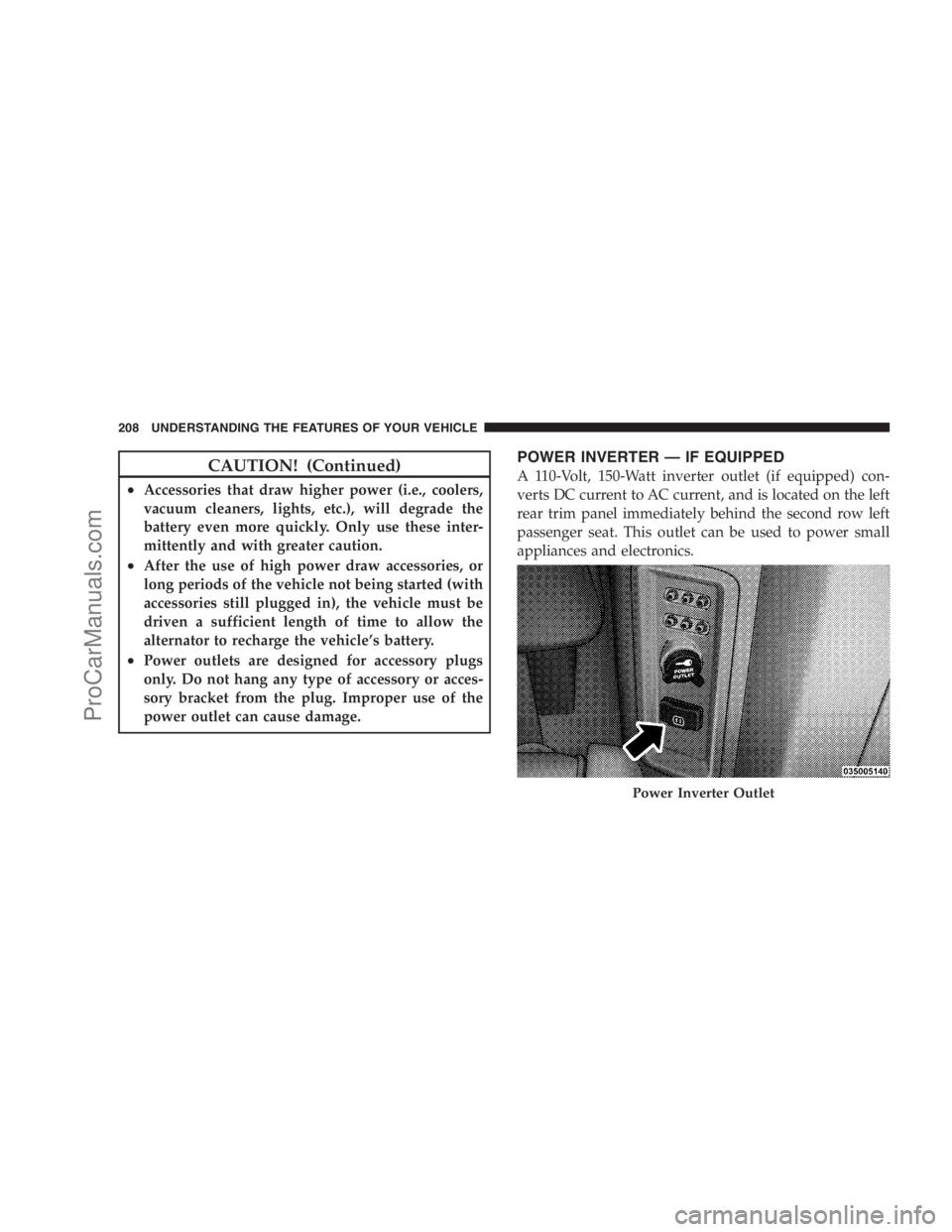
POWER INVERTER — IF EQUIPPED
A 110-Volt, 150-Watt inverter outlet (if equipped) con-
verts DC current to AC current, and is located on the left
rear trim panel immediately behind the second row left
passenger seat. This outlet can be used to power small
appliances and electronics.
Power Inverter Outlet
208 UNDERSTANDING THE FEATURES OF YOUR VEHICLE
ProCarManuals.com
Page 217 of 534
WARNING!
In an accident, serious injury could result if the seat
storage bin covers are not properly latched.
•DO NOT drive the vehicle with the storage bin
covers open.
•Keep the storage bin covers closed and latched
while the vehicle is in motion.
•DO NOT use a storage bin latch as a tie down.
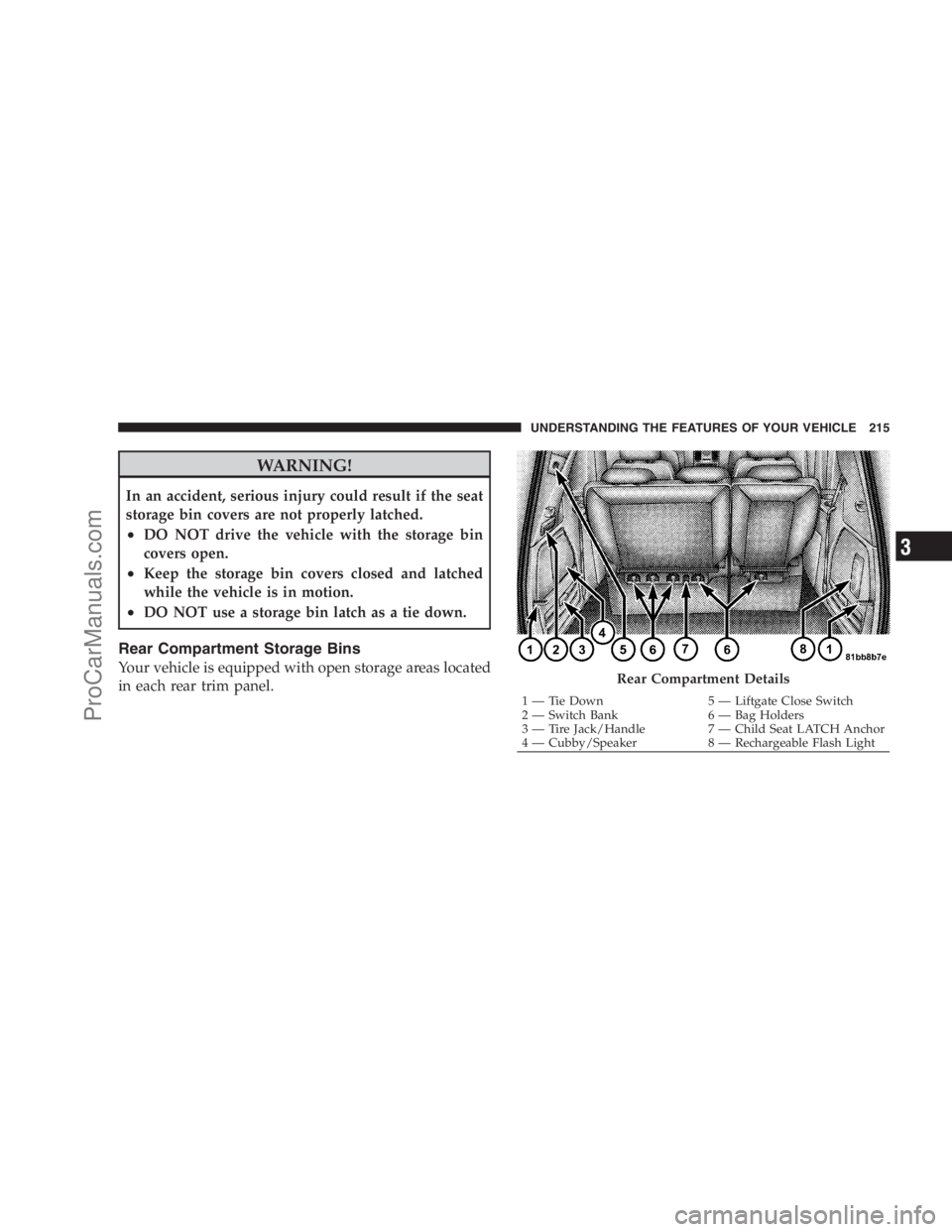
Rear Compartment Storage Bins
Your vehicle is equipped with open storage areas located
in each rear trim panel.Rear Compartment Details
1 — Tie Down 5 — Liftgate Close Switch
2 — Switch Bank 6 — Bag Holders
3 — Tire Jack/Handle 7 — Child Seat LATCH Anchor
4 — Cubby/Speaker 8 — Rechargeable Flash LightUNDERSTANDING THE FEATURES OF YOUR VEHICLE 215
3
ProCarManuals.com
Page 218 of 534
Coat Hooks
Coat hooks are located along the headliner for the second
and third row seating positions. The coat hook load limit
is 10 lbs (4.5 kg). Exceeding the recommended load limit
can cause the coat hooks to break or disengage from the
vehicle.
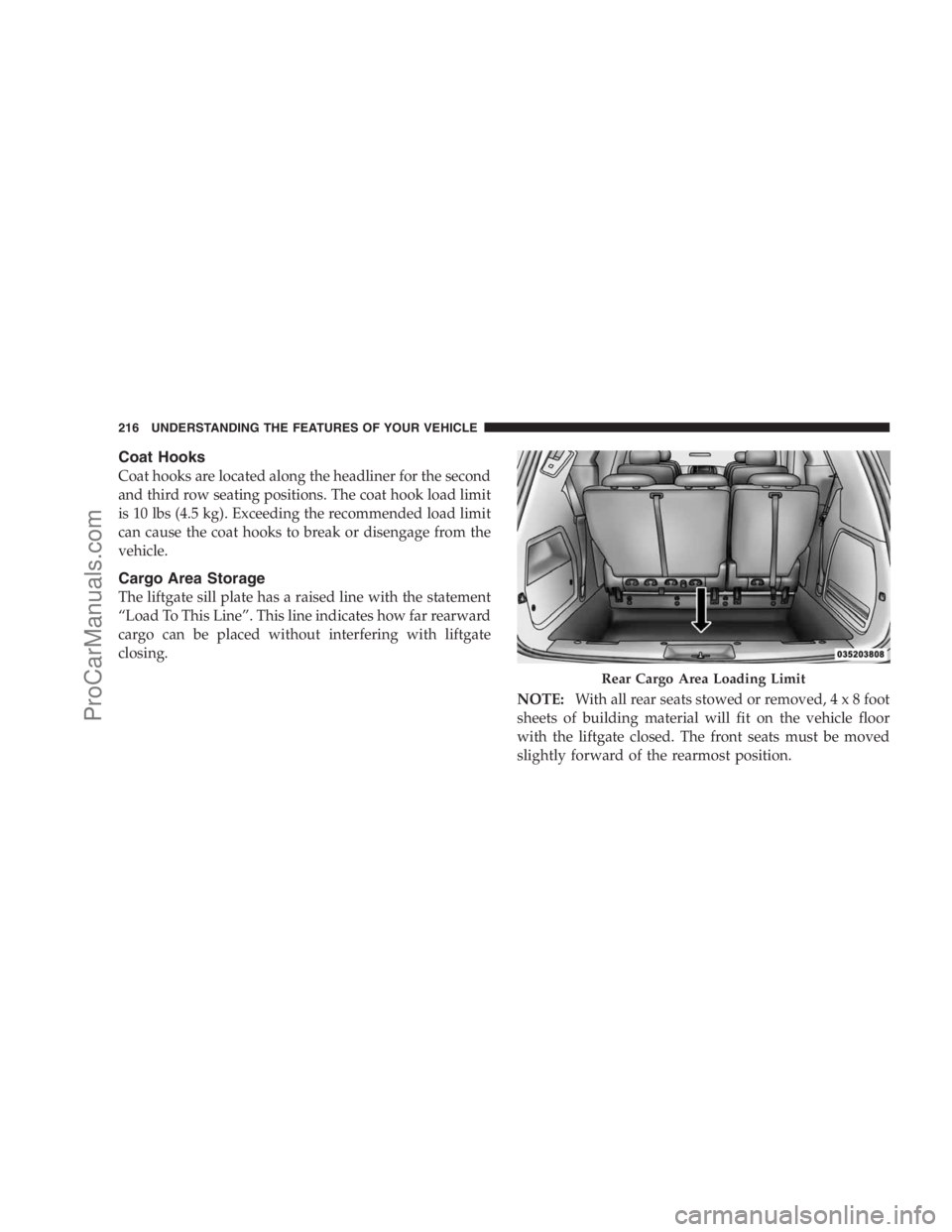
Cargo Area Storage
The liftgate sill plate has a raised line with the statement
“Load To This Line”. This line indicates how far rearward
cargo can be placed without interfering with liftgate
closing.
NOTE:With all rear seats stowed or removed,4x8foot
sheets of building material will fit on the vehicle floor
with the liftgate closed. The front seats must be moved
slightly forward of the rearmost position.
Rear Cargo Area Loading Limit
216 UNDERSTANDING THE FEATURES OF YOUR VEHICLE
ProCarManuals.com
Page 220 of 534
2. Slide the console base forward while lifting slightly to
clear the rear load floor hook.
3. Remove the console.
To Reinstall The Basic Floor Console
1. Position the console at a slight angle (front slightly
higher than the rear).
2. Slide the console rearward into the floor bracket/
hook.
3. Align the console until the front anchor cup plug hole
is centered on the winch hole.
4. Reinstall the clip first and then while pushing down-
ward on the console with slight pressure, reinstall the
cover plug.
5. Pull up on the console to be sure it is firmly latched.
WARNING!
In an accident, serious injury could result if the
removable floor console is not properly installed.
Always be sure the removable floor console is fully
latched.
Premium Console — If Equipped
The three-compartment console with sliding storage bin,
sliding upper tray with storage and large console storage
bin offers multiple configurations.
•Four cupholders with dishwasher safe liners for clean-
ing. The cupholders can accept plastic bottles, large
cups or mugs with handles.
•Top tray storage
•Upper storage bin can hold nine regular or 18 thin CDs
or other items
218 UNDERSTANDING THE FEATURES OF YOUR VEHICLE
ProCarManuals.com