Page 176 of 411
If the ABS light remains on or turns on while driving, it
indicates that the Anti-Lock portion of the brake system
is not functioning and that service is required. However,
the conventional brake system will continue to operate
normally if the BRAKE warning light is not on.
If the ABS light is on, the brake system should be serviced
as soon as possible to restore the benefits of Anti-Lock
brakes. If the ABS light does not turn on when the
Ignition switch is turned to the ON position, have the
light inspected by an authorized dealer.
25. High Beam Indicator
This light shows that the headlights are on high
beam. Push the turn signal lever away from the
steering wheel to switch the headlights from high or low
beam.26. Electronic Vehicle Information Center (EVIC)
Button — If Equipped
Pushing this button will switch between the different
EVIC functions.
27. Electronic Vehicle Information Center (EVIC)
Display — If Equipped
Refer to Electronic vehicle Information Center (EVIC) in
this section for more information.
ELECTRONIC VEHICLE INFORMATION CENTER
(EVIC)
The Electronic Vehicle Information Center (EVIC) fea-
tures a driver-interactive display that is located in the
instrument cluster.
174 UNDERSTANDING YOUR INSTRUMENT PANEL
Page 178 of 411
•RKE Battery Low (with a single chime)
•Personal Settings Not Available
•Left/Right Front Door Ajar (one or more, with a single
chime if speed is above 1 mph (1 km/h)
•Left/Right Rear Door Ajar (one or more, with a single
chime if speed is above 1 mph (1 km/h)
•Door (s) Ajar (with a single chime if vehicle is in
motion)
•Gate Ajar (with a single chime)
•Headlamps On
•Key In Ignition
•Check TPM System
•Oil Change Required (with a single chime)
EVIC Functions
Press the EVIC button until one of the following func-
tions are displayed on the EVIC:
•Performance Pages (if equipped)
•Compass/Temperature/Audio
EVIC Step Button
176 UNDERSTANDING YOUR INSTRUMENT PANEL
Page 183 of 411

continue until the vehicle runs out of fuel. Adding a
significant amount of fuel to the vehicle will turn off the
�LOW FUEL�text and a new DTE value will be dis-
played, based on the current values in the DTE calcula-
tion and the current fuel tank level.
Elapsed Time
Shows the total elapsed time of travel since the last reset
when the ignition switch is in the ACC position. Elapsed
time will increment when the ignition switch is in the ON
or START position.
Tire Pressure Monitor (TPM) — If Equipped
Refer to Section 5, “Tire Pressure Monitoring System
(TPMS)” for system operation.
Personal Settings (Customer-Programmable
Features)
This allows the driver to set and recall features when the
vehicle is stopped.Press and release the EVIC button until Personal Settings
is displayed in the EVIC.
Use the EVIC button to display one of the following
choices.
Language
When in this display you may select different languages
for all display nomenclature, including the trip functions.
Pressing the EVIC button while in this display selects
English, Espanol, or Francais depending on availability.
As you continue, the displayed information will be
shown in the selected language.
NOTE:UConnect�language will not change using the
EVIC. Please refer to “Language Selection” in the Hands–
Free Communication (UConnect�) — If Equipped section
of this manual for details.
UNDERSTANDING YOUR INSTRUMENT PANEL 181
4
Page 185 of 411

Delay Turning Headlights Off
When this feature is selected you can choose to have the
headlights remain on for 0, 30, 60, or 90 seconds when
exiting the vehicle. Press and hold the EVIC button when
in this display until 0, 30, 60, or 90 appears to make your
selection.
Headlights On With Wipers (Available With Auto
Headlights Only)
When ON is selected and the headlight switch is in the
AUTO position, the headlights will turn on approxi-
mately 10 seconds after the wipers are turned on. The
headlights will also turn off when the wipers are turned
off if they were turned on by this feature. Press and hold
the EVIC button when in this display until “ON” or
“OFF” appears to make your selection.
NOTE:Turning the headlights on during the daytime
causes the instrument panel lights to dim. To increase the
brightness, refer to “Lights” in this section.
Delay Power Off to Accessories Until Exit
When this feature is selected, the power window
switches, radio, hands–free system, power sunroof, and
power outlets will remain active for up to 60 minutes
after the ignition switch has been turned OFF. Opening a
vehicle door will cancel this feature. Press and hold the
EVIC button when in this display until “Off”, “45 sec.”,
“5 min.”, or “10 min.” appears to make your selection.
Turn Headlights on with Remote Key Unlock
When this feature is selected the headlights will activate
and remain on for up to 90 seconds when the doors are
unlocked using the RKE transmitter. Press and hold the
EVIC button when in this display until “OFF”, “30 sec.”,
“60 sec.”, or “90 sec.” appears to make your selection.
UNDERSTANDING YOUR INSTRUMENT PANEL 183
4
Page 186 of 411

Confirmation of Voice Commands — If Equipped
When ON is selected, all voice commands from the
UConnect�system are confirmed. Press and hold the
EVIC button when in this display until “ON” or “OFF”
appears to make your selection.
Display English or Metric
The EVIC, odometer, and navigation system units can be
changed between English and Metric.
Press and hold the EVIC button when in this display until
“US” or “METRIC” appears to make your selection.
Oil Change Required
Your vehicle is equipped with an engine oil change
indicator system. The “Oil Change Required” message
will flash in the EVIC display for approximately 5 sec-
onds after a single chime has sounded to indicate the next
scheduled oil change interval. The engine oil changeindicator system is duty cycle based, which means the
engine oil change interval may fluctuate dependent upon
your personal driving style.
Unless reset, this message will continue to display each
time you turn the ignition switch to the ON/RUN
position. To turn off the message temporarily, press and
release the MENU button. To reset the oil change indica-
tor system (after performing the scheduled maintenance)
refer to the following procedure.
1. Turn the ignition switch to the ON position.Do not
start the engine.
2. Fully depress the accelerator pedal slowly three times
within 10 seconds.
3. Turn the ignition switch to the OFF/LOCK position.
NOTE:If the indicator message illuminates when you
start the vehicle, the oil change indicator system did not
reset. If necessary repeat this procedure.
184 UNDERSTANDING YOUR INSTRUMENT PANEL
Page 187 of 411
Setting The Compass Variance And Compass
Calibration
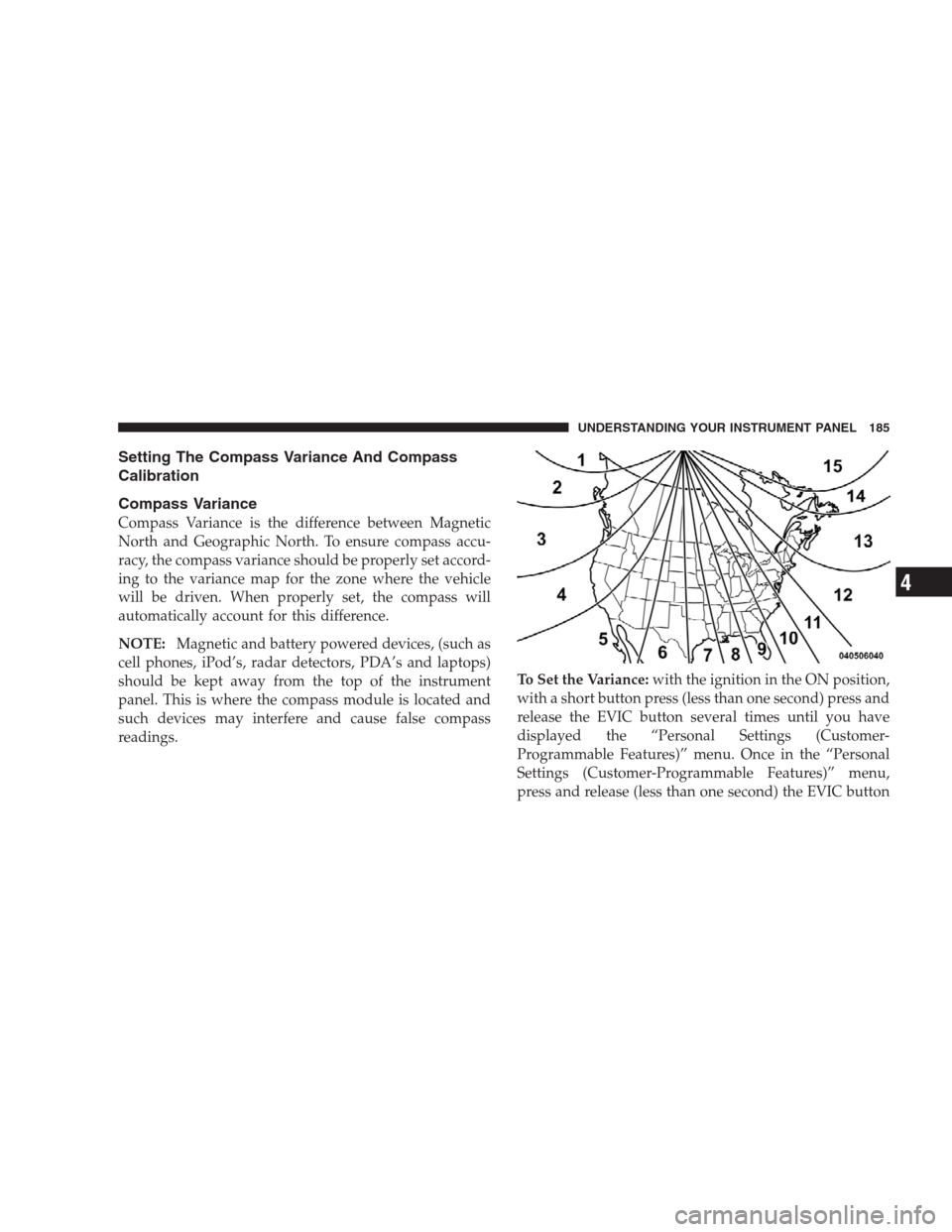
Compass Variance
Compass Variance is the difference between Magnetic
North and Geographic North. To ensure compass accu-
racy, the compass variance should be properly set accord-
ing to the variance map for the zone where the vehicle
will be driven. When properly set, the compass will
automatically account for this difference.
NOTE:Magnetic and battery powered devices, (such as
cell phones, iPod’s, radar detectors, PDA’s and laptops)
should be kept away from the top of the instrument
panel. This is where the compass module is located and
such devices may interfere and cause false compass
readings.To Set the Variance:with the ignition in the ON position,
with a short button press (less than one second) press and
release the EVIC button several times until you have
displayed the “Personal Settings (Customer-
Programmable Features)” menu. Once in the “Personal
Settings (Customer-Programmable Features)” menu,
press and release (less than one second) the EVIC button
UNDERSTANDING YOUR INSTRUMENT PANEL 185
4
Page 189 of 411

5. A short EVIC button press from the�Calibrate Com-
pass (Yes)�screen will exit the EVIC Customer-
Programmable Features, and return it to its normal
operating mode.
6. To complete the compass calibration, drive the vehicle
in one or more complete 360–degree circle under 5 mph
(8 km/h) in an area free from power lines and large
metallic objects, until the “CAL” indicator turns off. The
compass will now function normally.
ELECTRONIC DIGITAL CLOCK
The clock and radio each use the display panel built into
the radio. A digital readout shows the frequency and/or
time in hours and minutes (depending on your radio
model), whenever the ignition switch is in the ON or
ACC position.
When the ignition switch is in the OFF position, or when
the radio frequency is being displayed, timekeeping is
accurately maintained.On the AM/FM/CD (6-disc) radio, the time button
alternates the location of the time and frequency on the
display. On the AM/FM/CD (single-disc) radio, only one
of the two, time or frequency, is displayed.
Clock Setting Procedure
1. Press and hold the TIME button until the hours blink.
2. Adjust the hours by turning the TUNE/AUDIO con-
trol knob.
3. After the hours are adjusted, push the TUNE/AUDIO
control knob to set the minutes.
4. Adjust the minutes by turning the TUNE/AUDIO
control knob.
5. To exit, press any button/knob, or wait approximately
five seconds.
UNDERSTANDING YOUR INSTRUMENT PANEL 187
4
Page 190 of 411
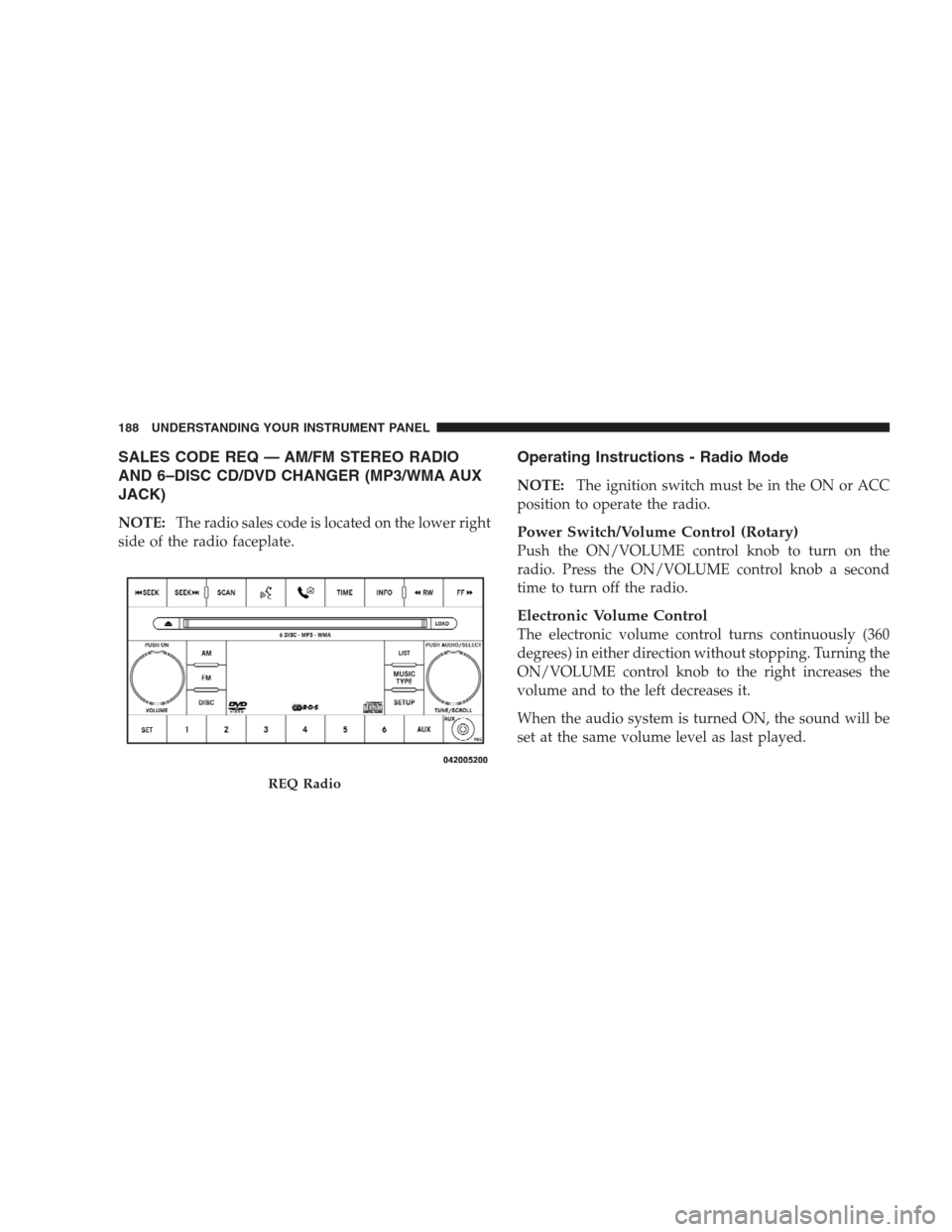
SALES CODE REQ — AM/FM STEREO RADIO
AND 6–DISC CD/DVD CHANGER (MP3/WMA AUX
JACK)
NOTE:The radio sales code is located on the lower right
side of the radio faceplate.
Operating Instructions - Radio Mode
NOTE:The ignition switch must be in the ON or ACC
position to operate the radio.
Power Switch/Volume Control (Rotary)
Push the ON/VOLUME control knob to turn on the
radio. Press the ON/VOLUME control knob a second
time to turn off the radio.
Electronic Volume Control
The electronic volume control turns continuously (360
degrees) in either direction without stopping. Turning the
ON/VOLUME control knob to the right increases the
volume and to the left decreases it.
When the audio system is turned ON, the sound will be
set at the same volume level as last played.
REQ Radio
188 UNDERSTANDING YOUR INSTRUMENT PANEL