Page 135 of 410

WARNING!
Tilting the steering column while the vehicle is
moving is dangerous. Without a stable steering col-
umn, you could lose control of the vehicle and have
an accident. Adjust the column only while the ve-
hicle is stopped. Be sure it is locked before driving.
ELECTRONIC SPEED CONTROL — IF EQUIPPED
When engaged, Electronic Speed Control takes over the
accelerator operation at approximately either 30 mph
(40 km/h ) or 35 mph (56 km/h) depending on the model
or engine size. The Electronic Speed Control lever is
located on the right side of the steering wheel.NOTE:
In order to ensure proper operation, the Elec-
tronic Speed Control System has been designed to shut
down if multiple Speed Control functions are operated
simultaneously. If this occurs, the Electronic Speed Con-
trol System can be reactivated by pushing the Electronic
Speed Control ON/OFF button and resetting the desired
vehicle set speed.
Electronic Speed Control Lever
3
UNDERSTANDING THE FEATURES OF YOUR VEHICLE 133
Page 142 of 410
6. Firmly press and release the “Learn” or “Training”
button. The name and color of the button may vary by
manufacturer.
NOTE:There are 30 seconds in which to initiate the next
step after the “Learn” button has been pressed.
7. Return to the vehicle and press the programmed
HomeLink� button twice (holding the button for two
seconds each time). If the device is plugged in and
activates, programming is complete.
If the device does not activate, press the button a third
time (for two seconds) to complete the training.
If you have any problems, or require assistance, please
call toll-free 1–800–355–3515 or, on the Internet at
www.HomeLink.com for information or assistance.
To program the remaining two HomeLink� buttons,
repeat each step for each remaining button. DO NOT
erase the channels.Using HomeLink�
To operate, simply press and release the programmed
HomeLink� button. Activation will now occur for the
trained device (i.e., garage door opener, gate operator,
security system, entry door lock, home/office lighting,
etc. The hand-held transmitter of the device may also be
used at any time.
Reprogramming a Single Homelink �Button
To reprogram a channel that has been previously trained,
follow these steps:
1. Turn the ignition switch to the ON/RUN position.
2. Press and hold the desired HomeLink� button until
the indicator light begins to flash after 20 seconds. Do not
release the button.
3. Without releasing the button, proceed with Program-
ming Homelink� Step 2 and follow all remaining steps.
140 UNDERSTANDING THE FEATURES OF YOUR VEHICLE
Page 151 of 410

CAUTION!
•Many accessories that can be plugged in draw
power from the vehicle’s battery, even when not in
use (i.e., cellular phones, etc.). Eventually, if
plugged in long enough, the vehicle’s battery will
discharge sufficiently to degrade battery life
and/or prevent engine starting.
•Accessories that draw higher power (i.e., coolers,
vacuum cleaners, lights, etc.), will discharge the
battery even more quickly. Only use these inter-
mittently and with greater caution.
•After the use of high-power draw accessories, or
long periods of the vehicle not being started (with
accessories still plugged in), the vehicle must be
driven a sufficient length of time to allow the
generator to recharge the vehicle’s battery.
REAR SHELF PANEL — IF EQUIPPED
The Rear Shelf Panel attaches to guides in the rear cargo
area. The rear shelf panel may be installed in one of five
different positions.
NOTE:The liftgate may be opened or closed with the
rear cargo shelf panel in position 1, position 2, position 3
or position 4.
WARNING!
•To avoid tipping, lock the shelf securely in all
positions.
•Do not drive this vehicle with the liftgate open, or
use the shelf as a seat.
•Failure to follow these warnings could result in
serious or fatal injury.
3
UNDERSTANDING THE FEATURES OF YOUR VEHICLE 149
Page 152 of 410
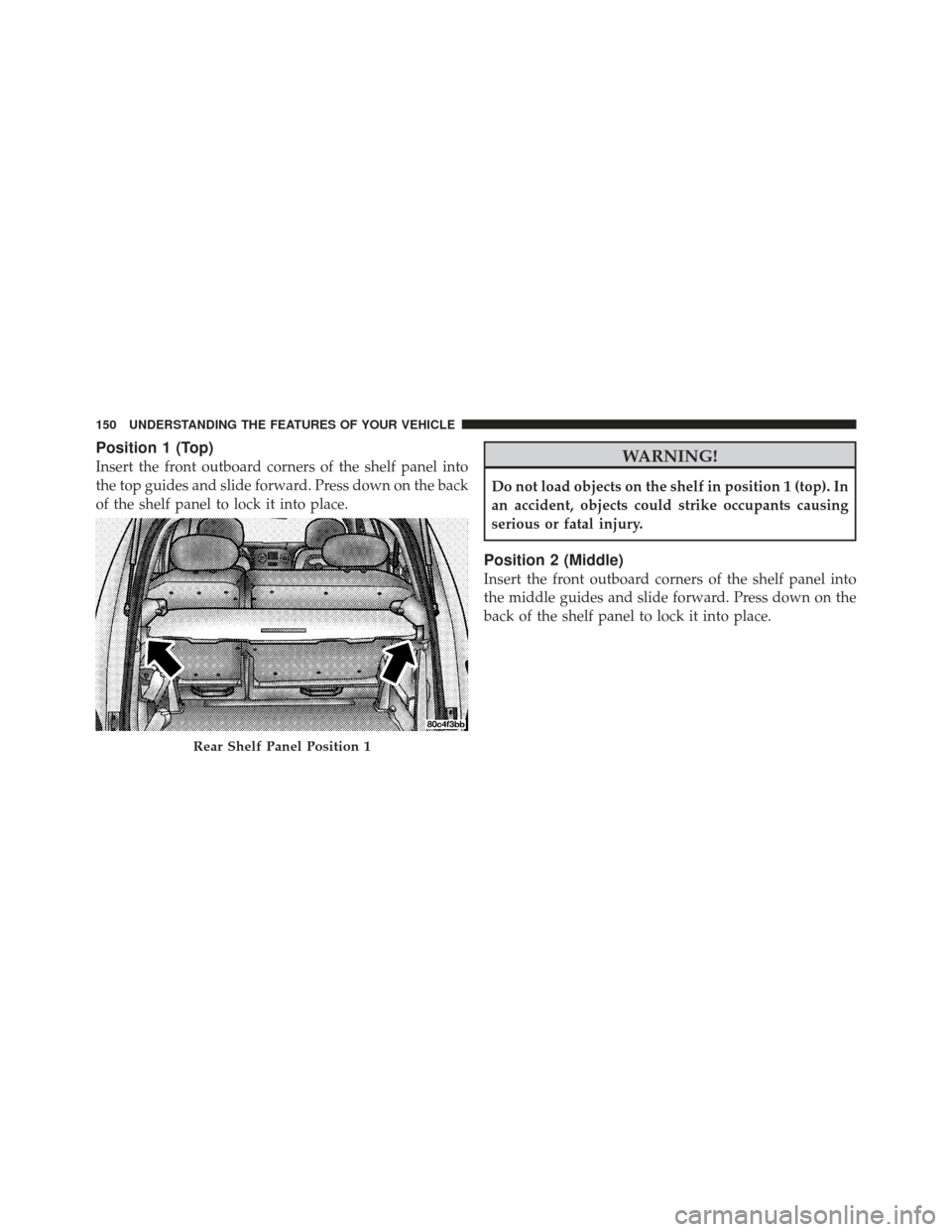
Position 1 (Top)
Insert the front outboard corners of the shelf panel into
the top guides and slide forward. Press down on the back
of the shelf panel to lock it into place.WARNING!
Do not load objects on the shelf in position 1 (top). In
an accident, objects could strike occupants causing
serious or fatal injury.
Position 2 (Middle)
Insert the front outboard corners of the shelf panel into
the middle guides and slide forward. Press down on the
back of the shelf panel to lock it into place.
Rear Shelf Panel Position 1
150 UNDERSTANDING THE FEATURES OF YOUR VEHICLE
Page 154 of 410
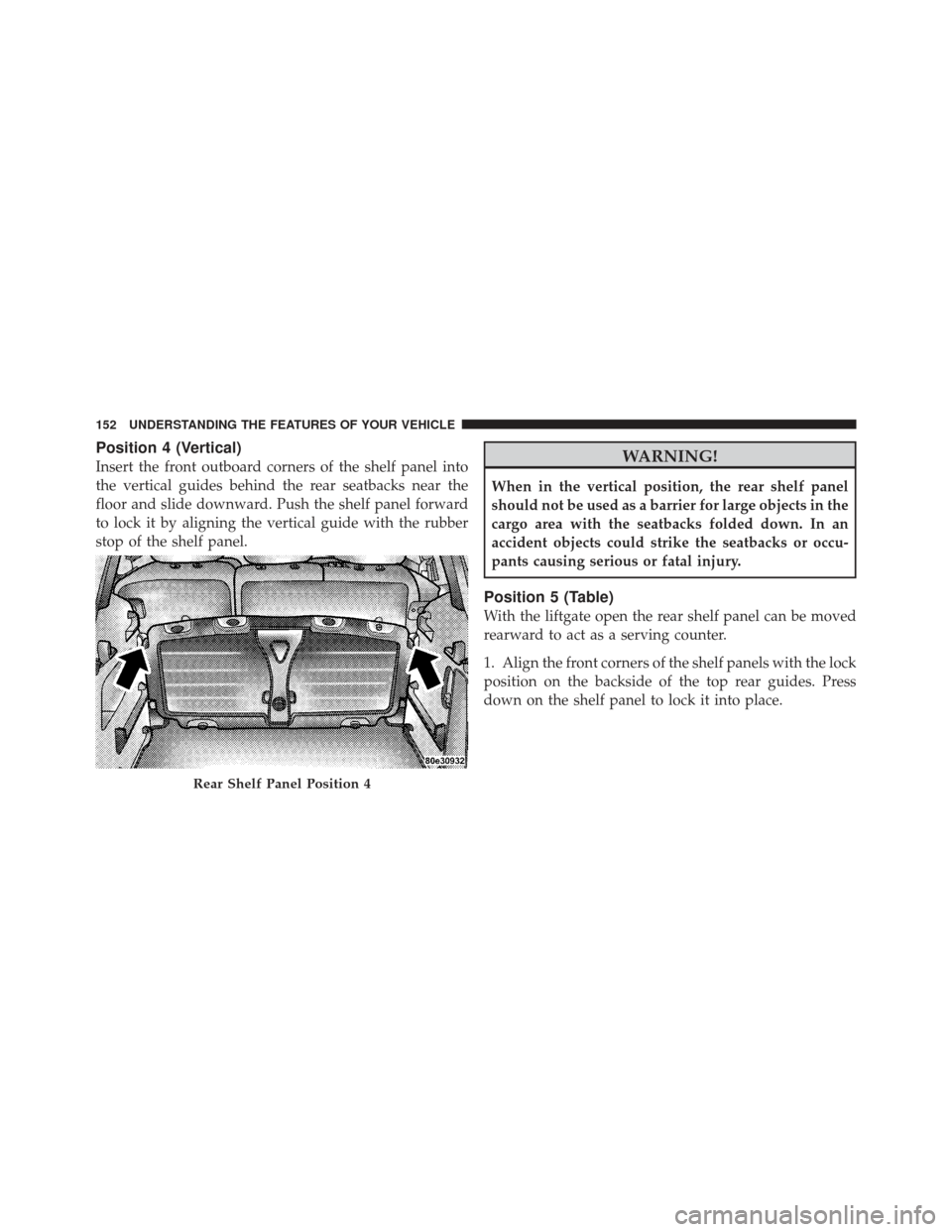
Position 4 (Vertical)
Insert the front outboard corners of the shelf panel into
the vertical guides behind the rear seatbacks near the
floor and slide downward. Push the shelf panel forward
to lock it by aligning the vertical guide with the rubber
stop of the shelf panel.WARNING!
When in the vertical position, the rear shelf panel
should not be used as a barrier for large objects in the
cargo area with the seatbacks folded down. In an
accident objects could strike the seatbacks or occu-
pants causing serious or fatal injury.
Position 5 (Table)
With the liftgate open the rear shelf panel can be moved
rearward to act as a serving counter.
1. Align the front corners of the shelf panels with the lock
position on the backside of the top rear guides. Press
down on the shelf panel to lock it into place.
Rear Shelf Panel Position 4
152 UNDERSTANDING THE FEATURES OF YOUR VEHICLE
Page 159 of 410
UNDERSTANDING YOUR INSTRUMENT PANEL
CONTENTS
�Instrument Panel Features ............... 160
� Instrument Cluster — Base ............... 161
� Instrument Cluster — Premium ........... 162
� Instrument Cluster — Turbo .............. 163
� Instrument Cluster Descriptions ........... 164
� Compass Mini-Trip Computer (CMTC) —
If Equipped .......................... 174
▫ Compass Mini-Trip Computer Reset Button . . 174 ▫
Compass/Temperature Display .......... 175
▫ Odometer Display .................... 177
▫ Trip Odometer (ODO) ................. 177
� Electronic Vehicle Information Center (EVIC) –
If Equipped .......................... 178
▫ EVIC Operation ..................... 178
� Setting The Analog Clock ................ 187
4
Page 162 of 410
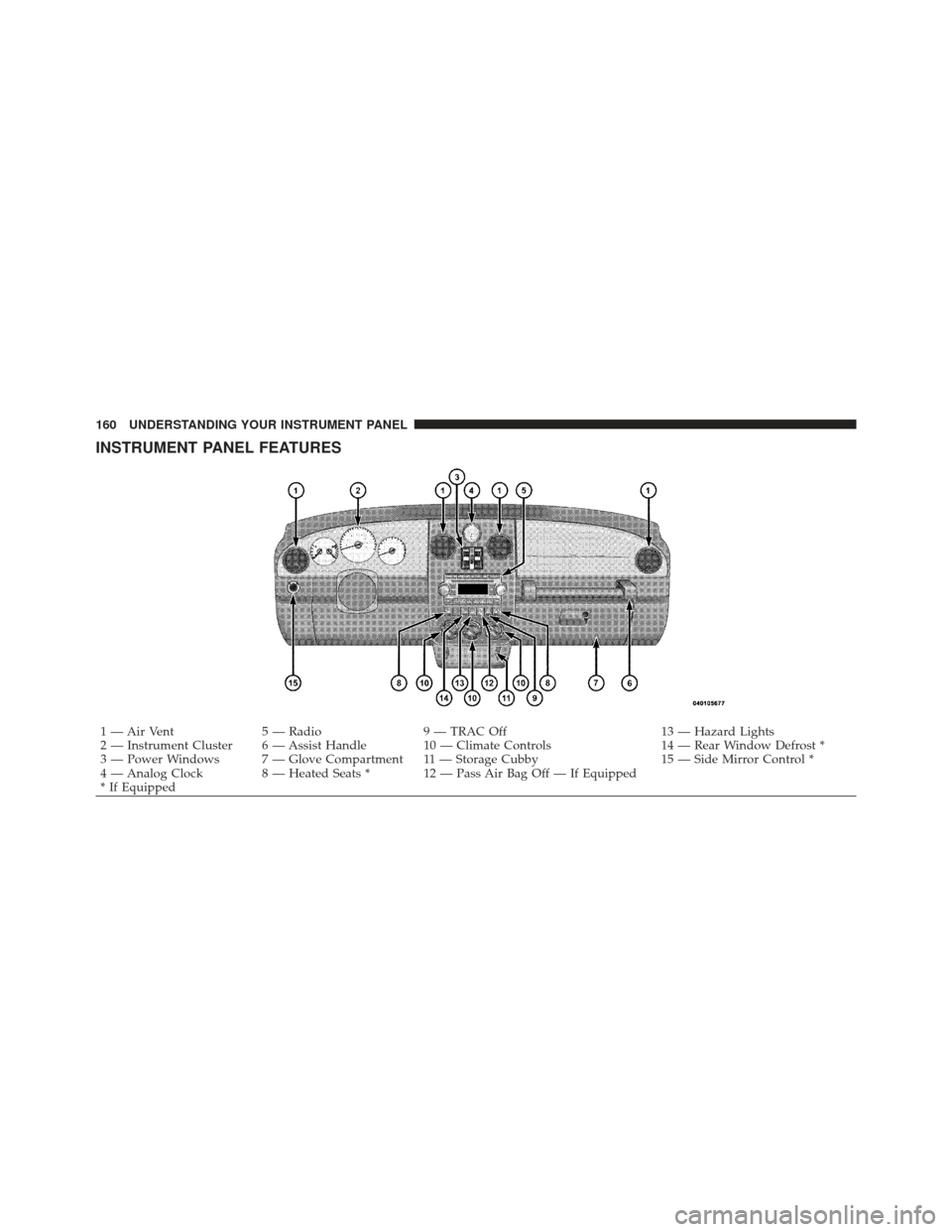
INSTRUMENT PANEL FEATURES
1 — Air Vent5 — Radio9 — TRAC Off 13 — Hazard Lights
2 — Instrument Cluster 6 — Assist Handle 10 — Climate Controls 14 — Rear Window Defrost *
3 — Power Windows 7 — Glove Compartment 11 — Storage Cubby 15 — Side Mirror Control *
4 — Analog Clock 8 — Heated Seats * 12 — Pass Air Bag Off — If Equipped
* If Equipped
160 UNDERSTANDING YOUR INSTRUMENT PANEL
Page 171 of 410

11. Odometer/Trip Odometer Reset Button
Press this button to change the display from odometer to
either of the two trip odometer settings. Trip A or Trip B
will appear when in the trip odometer mode. Push in and
hold the button for two seconds to reset the trip odometer
to 0 miles or kilometers. The odometer must be in trip
mode to reset.
12. Charging System LightThis light shows the status of the electrical charg-
ing system. The light should come on when the
ignition switch is first turned ON and remain on briefly
as a bulb check. If the light stays on or comes on while
driving, turn off some of the vehicle’s non-essential
electrical devices or increase engine speed (if at idle). If
the charging system light remains on, it means that the
vehicle is experiencing a problem with the charging
system. Obtain SERVICE IMMEDIATELY. See an autho-
rized dealer. 13. Turn Signal Indicators
The arrow will flash with the exterior turn signal
when the turn signal lever is operated.
14. Electronic Stability Program (ESP) Indicator Light
/ Traction Control System (TCS) Indicator Light If this indicator light flashes during accelera-
tion, apply as little throttle as possible. While
driving, ease up on the accelerator. Adapt your
speed and driving to the prevailing road con-
ditions, and do not switch off the Electronic Stability
Program (ESP), or Traction Control System (TCS).
15. Brake Warning Light This light monitors various brake functions,
including brake fluid level and parking brake
application. If the brake light turns on, it may
indicate that the parking brake is applied, that
the brake fluid level is low, or that there is a problem with
the anti-lock brake system reservoir.
4
UNDERSTANDING YOUR INSTRUMENT PANEL 169