Page 187 of 410

•Keep all magnetic objects, such as laptop computers,
iPod’s, cell phones and PDA’s (anything with a bat-
tery) away from the compass sensor which is located
in the top of the instrument panel. These devices can
interfere with compass accuracy and performance.
Manual Compass Calibration
If the compass appears to be inaccurate, you may wish to
manually calibrate the compass. Prior to calibrating the
compass, make sure the proper Compass Variance Value
is selected. (Refer to “Compass Variance” for additional
information). Then, continue to calibrate the compass as
follows:
1. Start the engine and leave the shift lever in the PARK
position.
2. Press and release the EVIC button several times until
the EVIC displays the Personal Settings (Customer-
Programmable Features) menu.3. Press and release the EVIC button several times until
“Calibrate Compass (Yes)” is displayed. A EVIC button
press (longer than two seconds) will place the compass in
calibration mode.
4. The CAL indicator will come on continuously in the
EVIC display, to indicate that the compass is now in the
calibration mode and that the vehicle can now be driven
to calibrate. Press the EVIC button from the
�Calibrate
Compass (Yes)� screen to exit the EVIC Customer-
Programmable features, and return it to its normal oper-
ating mode.)
5. Drive the vehicle slowly, under 5 mph (8 km/h),
completing one or more circles (in an area free from large
metal or metallic objects) until the “CAL” indicator turns
off. The compass will now function normally.
Compass Variance
Compass Variance is the difference between Magnetic
North and Geographic North. To compensate for the
4
UNDERSTANDING YOUR INSTRUMENT PANEL 185
Page 189 of 410
5. Press and release the EVIC button to exit.
SETTING THE ANALOG CLOCK
To set the analog clock at the top center of the instrument
panel, press and hold the button until the setting is
correct. The clock will adjust slowly at first, and then
more quickly the longer the button is held.
SALES CODE RAQ – AM/FM/CD (6-DISC) RADIO
WITH OPTIONAL uconnect�studios (SATELLITE
RADIO), uconnect� phone, AND VIDEO
ENTERTAINMENT SYSTEMS (VES)™
CAPABILITIES
NOTE: The radio sales code is located on the lower right
side of your radio faceplate.
Setting The Analog ClockRAQ Radio
4
UNDERSTANDING YOUR INSTRUMENT PANEL 187
Page 191 of 410

will return. Rotating the volume control, turning the
radio ON/OFF, or turning OFF the ignition will also
return the sound from the speakers
NOTE:In Hands Free Phone (if equipped) mode, the
MUTE button mutes the microphone.
SCAN Button (Radio Mode)
Pressing the SCAN button causes the tuner to search for
the next listenable station, in either AM, FM or Satellite (if
equipped) frequencies, pausing for 5 seconds at each
listenable station before continuing to the next. To stop
the search, press SCAN a second time.
MSG or INFO Button (Radio Mode)
Press the MSG or INFO button for an RBDS station (one
with call letters displayed). The radio will return a radio
text message broadcast from an FM station (FM mode
only).
TIME Button
Press the TIME button and the time of day will be
displayed for 5 seconds.
Clock Setting Procedure
1. Press and hold the TIME button until the hours blink.
2. Adjust the hours by turning the right side Tune /
Audio control.
3. After the hours are adjusted, press the right side Tune
/ Audio control to set the minutes. The minutes will
begin to blink.
4. Adjust the minutes using the right side Tune / Audio
control.
5. To exit, press any button/knob or wait 5 seconds.
4
UNDERSTANDING YOUR INSTRUMENT PANEL 189
Page 202 of 410

MSG or INFO Button (CD Mode for MP3 Play)
Press and MSG or INFO button while playing MP3 disc.
The radio scrolls through the following TAG information:
Song Title, Artist, File Name, and Folder Name (if avail-
able).
Press the MSG or INFO button once more to return to
�elapsed time�priority mode.
Press and hold the MSG or INFO button while in the
message display priority mode or elapsed time display
priority mode will display the song title for each file.
RW/FF (CD Mode for MP3 Play)
Press the FF side of the button to move forward through
the MP3 selection.
TUNE Control (CD Mode for MP3 Play)
Pressing the TUNE Control allows the adjustment of
Tone, Balance, and Fade.
AM/FM Button (CD Mode for MP3 Play)
Switches back to radio mode.
RND/ PTY Button (CD Mode for MP3 Play)
Pressing this button plays files randomly.
SET/DIR Button (CD Mode for MP3 Play)
Press the SET/DIR button to display folders, when
playing an MP3 discs that have a file/folder structure.
Turn the TUNE control to display available folders or
move through available folders. Press the TUNE control
to select a folder.
Buttons1-6(CDModeforMP3Play)
Selects disc positions 1 - 6 for Play/Load/Eject.
Operating Instructions - uconnect �phone (If
Equipped)
Refer to uconnect� phone in Section 3 of the Owner’s
Manual.
200 UNDERSTANDING YOUR INSTRUMENT PANEL
Page 203 of 410
Operating Instructions - uconnect�studios
(Satellite Radio) (If Equipped)
Refer to the uconnect� studios (Satellite Radio) section of
the Owner’s Manual.
Operating Instructions - Video Entertainment
System (VES)™ (If Equipped)
Refer to separate Video Entertainment System (VES)™
Guide.
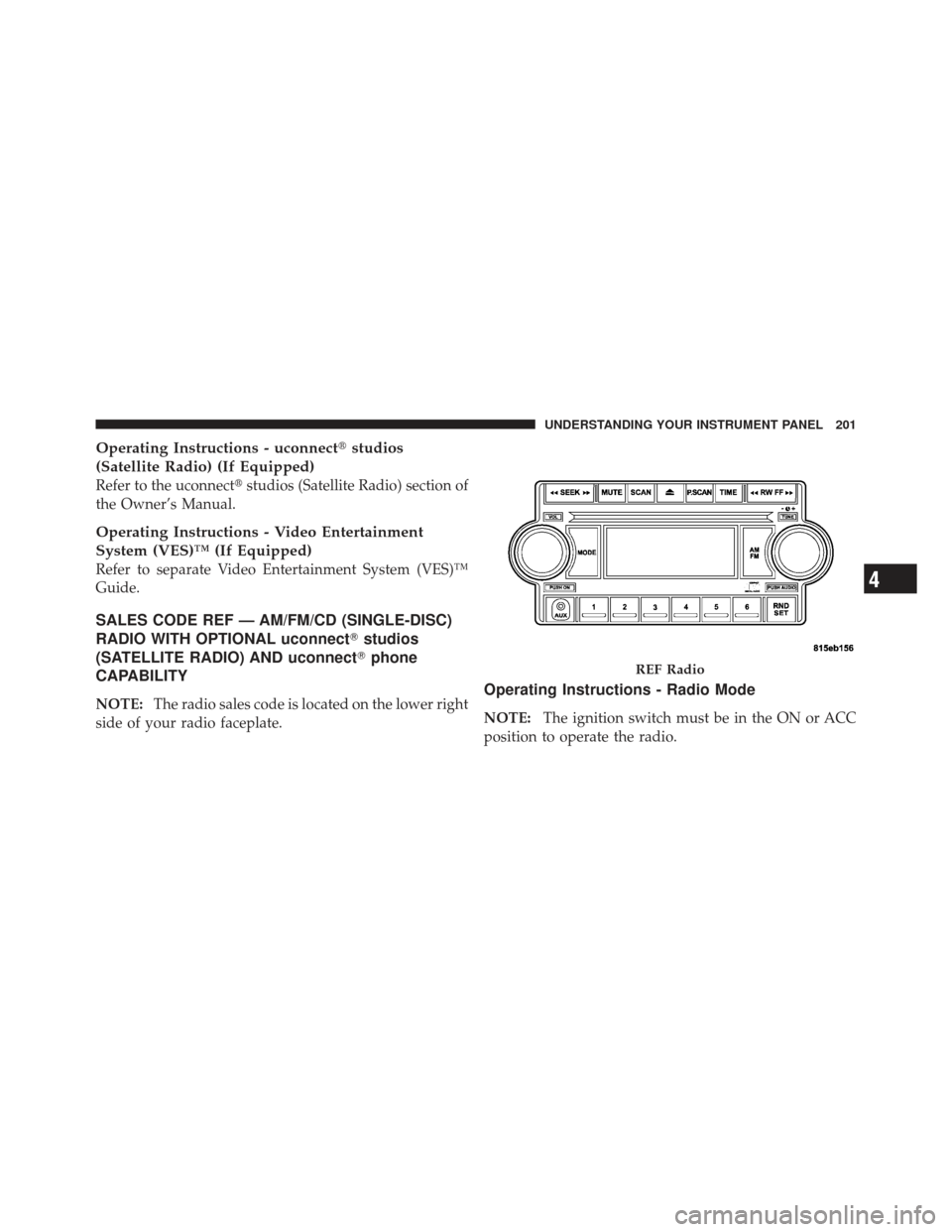
SALES CODE REF — AM/FM/CD (SINGLE-DISC)
RADIO WITH OPTIONAL uconnect �studios
(SATELLITE RADIO) AND uconnect �phone
CAPABILITY
NOTE: The radio sales code is located on the lower right
side of your radio faceplate.Operating Instructions - Radio Mode
NOTE: The ignition switch must be in the ON or ACC
position to operate the radio.
REF Radio
4
UNDERSTANDING YOUR INSTRUMENT PANEL 201
Page 204 of 410

Power Switch/Volume Control (Rotary)
Push the ON/VOL control to turn the radio ON. Push the
ON/VOL a second time to turn OFF the radio.
Electronic Volume Control
The electronic volume control turns continuously (360–
degrees) in either direction without stopping. Turning the
volume control to the right increases the volume and to
the left decreases it.
When the audio system is turned on, the sound will be
set at the same volume level as last played.
For your convenience, the volume can be turned down,
but not up, when the audio system is OFF and the
ignition is ON.
MODE Button (Radio Mode)
Press the MODE button repeatedly to select between the
CD player and Satellite Radio (if equipped).
SEEK Button (Radio Mode)
Press and release the SEEK button to search for the next
listenable station in either AM/FM or Satellite (if
equipped) mode. Press the right side of the button to seek
up and the left side to seek down. The radio will remain
tuned to the new station until you make another selec-
tion. Holding the button will bypass stations without
stopping until you release it.
MUTE Button (Radio Mode)
Press the MUTE button to cancel the sound from the
speakers. “MUTE” will display. Press the MUTE button a
second time and the sound from the speakers will return.
Rotating the volume control, turning the radio ON/OFF,
or turning the ignition ON/OFF, will cancel the MUTE
feature.
NOTE:In Hands-Free Phone (if equipped) mode, the
MUTE button mutes the microphone.
202 UNDERSTANDING YOUR INSTRUMENT PANEL
Page 209 of 410

Press and hold the FF button to fast forward through the
tracks. Release the FF button to stop the fast forward
feature. If the RW button is pressed, the current track will
reverse to the beginning of the track and begin playing.
RND/SET Button (Random Play Button) (CD
Mode)
Press this button while the CD is playing to activate
Random play. This feature plays the selections on the
compact disc in random order to provide an interesting
change of pace.
Press the SEEK button to move to the next randomly
selected track.
Press the RND button a second time to stop Random
play.
Operating Instructions - Auxiliary Mode
The auxiliary (AUX) jack is an audio input jack, which
allows the user to plug in a portable device such as anMP3 player, cassette player, or microphone and utilize
the vehicle’s audio system to amplify the source and play
through the vehicle speakers.
The auxiliary mode becomes active when an electrical
device is plugged into the AUX jack using a standard
3.5 mm stereo audio cable and the user presses and
releases the MODE button until “AUX” appears on the
display.
NOTE:
The radio will return to the last stored mode if
the ignition switch is turned from the OFF/LOCK posi-
tion to the ACC position, the radio is turned on, and the
radio was previously in the AUX mode.
SEEK Button (Auxiliary Mode)
No function.
MUTE Button (Auxiliary Mode)
Press the MUTE button to cancel the sound from the
speakers. �MUTE�will display. Press the MUTE button a
4
UNDERSTANDING YOUR INSTRUMENT PANEL 207
Page 210 of 410
second time and the sound from the speakers will return.
Rotating the volume control or turning the ignition
OFF/ON will also return the sound from the speakers.
SCAN Button (Auxiliary Mode)
No function.
EJECT Button (Auxiliary Mode)
No function.
PSCAN Button (Auxiliary Mode)
No function.
TIME Button (Auxiliary Mode)
Press this button to change the display from elapsed
playing time to time of day. The time of day will display
for five seconds.
RW/FF (Auxiliary Mode)
No function.
RND/SET Button (Auxiliary Mode)
No function.
MODE Button (Auxiliary Mode)
Press the MODE button repeatedly to select between the
CD player and Satellite Radio (if equipped).
Operating Instructions - uconnect�phone — If
Equipped
Refer to the “uconnect� phone” section of this Owner’s
Manual.
Operating Instructions - uconnect �studios
(Satellite Radio) — If Equipped
Refer to the “uconnect� studios (Satellite Radio)” section
of this Owner’s Manual.
208 UNDERSTANDING YOUR INSTRUMENT PANEL