Page 242 of 493
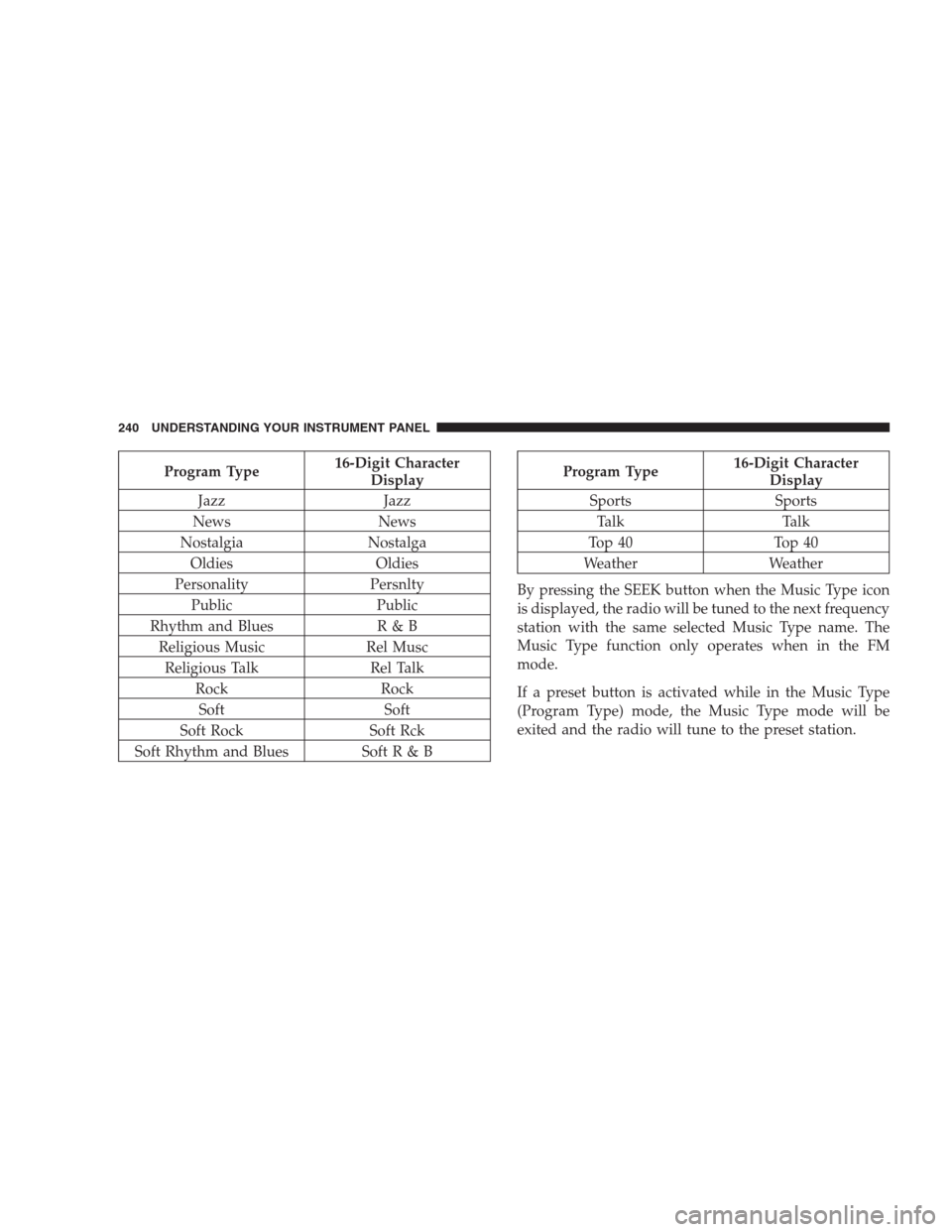
Program Type16-Digit Character
Display
Jazz Jazz
News News
Nostalgia Nostalga
Oldies Oldies
Personality Persnlty
Public Public
Rhythm and Blues R & B
Religious Music Rel Musc
Religious Talk Rel Talk
Rock Rock
Soft Soft
Soft Rock Soft Rck
Soft Rhythm and Blues Soft R & BProgram Type16-Digit Character
Display
Sports Sports
Talk Talk
Top 40 Top 40
Weather Weather
By pressing the SEEK button when the Music Type icon
is displayed, the radio will be tuned to the next frequency
station with the same selected Music Type name. The
Music Type function only operates when in the FM
mode.
If a preset button is activated while in the Music Type
(Program Type) mode, the Music Type mode will be
exited and the radio will tune to the preset station.
240 UNDERSTANDING YOUR INSTRUMENT PANEL
Page 269 of 493
MUSIC TYPE Button
Pressing this button once will turn on the Music Type
mode for five seconds. Pressing the MUSIC TYPE button
or turning the Tune/Scroll control knob within five
seconds will allow the program format type to be se-
lected. Many radio stations do not currently broadcast
Music Type information.
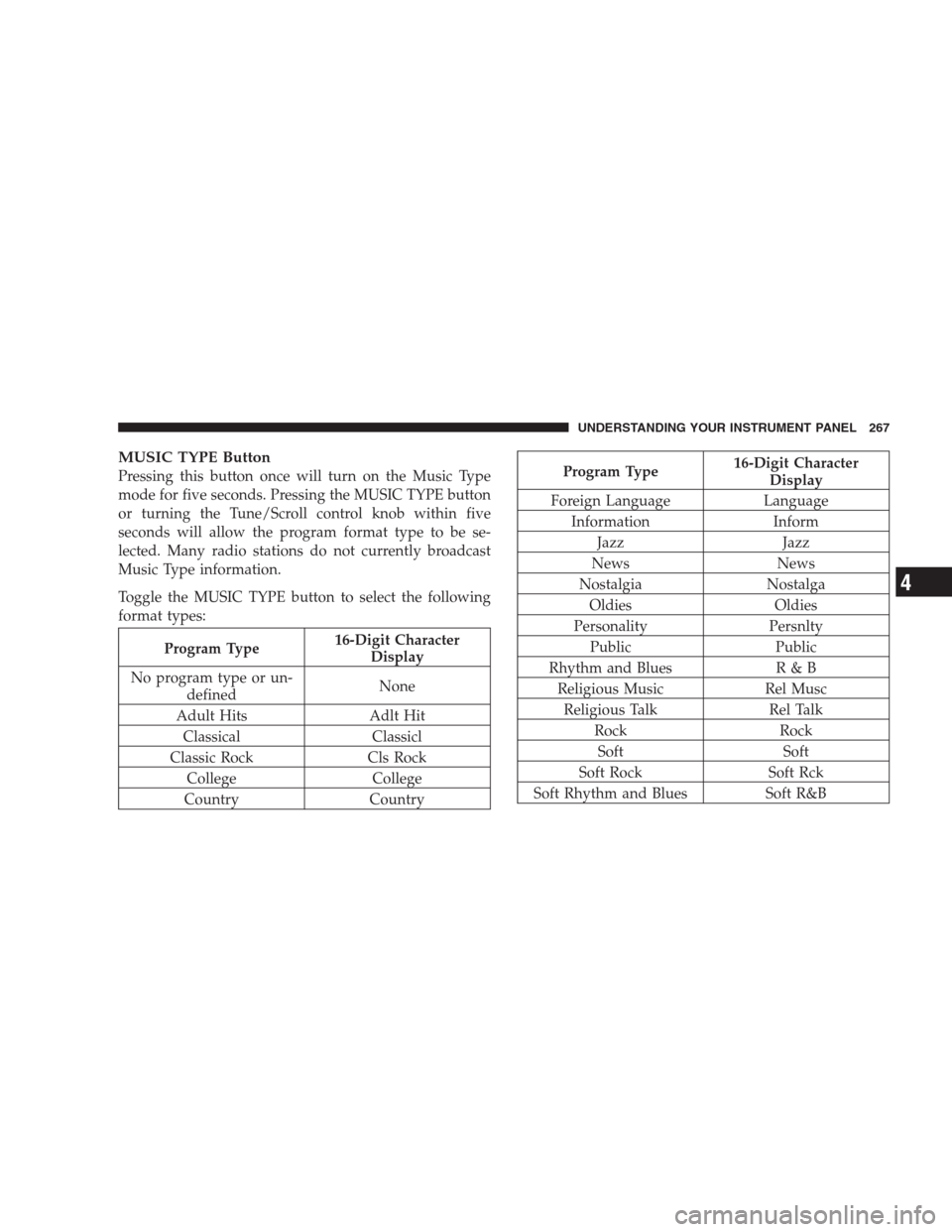
Toggle the MUSIC TYPE button to select the following
format types:
Program Type16-Digit Character
Display
No program type or un-
definedNone
Adult Hits Adlt Hit
Classical Classicl
Classic Rock Cls Rock
College College
Country Country
Program Type16-Digit Character
Display
Foreign Language Language
Information Inform
Jazz Jazz
News News
Nostalgia Nostalga
Oldies Oldies
Personality Persnlty
Public Public
Rhythm and Blues R & B
Religious Music Rel Musc
Religious Talk Rel Talk
Rock Rock
Soft Soft
Soft Rock Soft Rck
Soft Rhythm and Blues Soft R&B
UNDERSTANDING YOUR INSTRUMENT PANEL 267
4
Page 427 of 493
CAUTION!
•When installing the integrated power module
cover, it is important to ensure the cover is prop-
erly positioned and fully latched. Failure to do so
may allow water to get into the integrated power
module and possibly result in an electrical system
failure.
•When replacing a blown fuse, it is important to
use only a fuse having the correct amperage rating.
The use of a fuse with a rating other than indicated
may result in a dangerous electrical system over-
load. If a properly rated fuse continues to blow, it
indicates a problem in the circuit that must be
corrected.
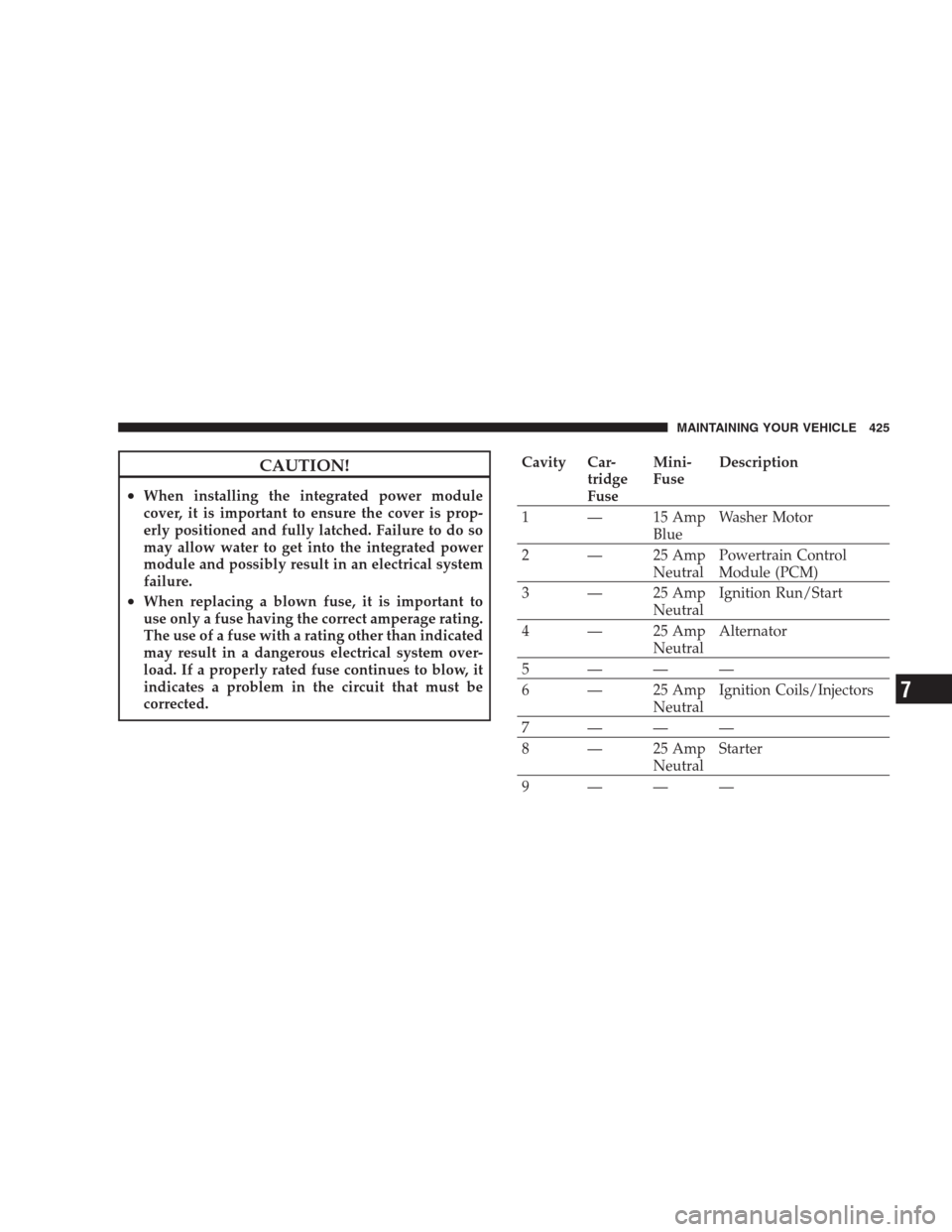
Cavity Car-
tridge
FuseMini-
FuseDescription
1 — 15 Amp
BlueWasher Motor
2 — 25 Amp
NeutralPowertrain Control
Module (PCM)
3 — 25 Amp
NeutralIgnition Run/Start
4 — 25 Amp
NeutralAlternator
5———
6 — 25 Amp
NeutralIgnition Coils/Injectors
7———
8 — 25 Amp
NeutralStarter
9———
MAINTAINING YOUR VEHICLE 425
7
Page 431 of 493
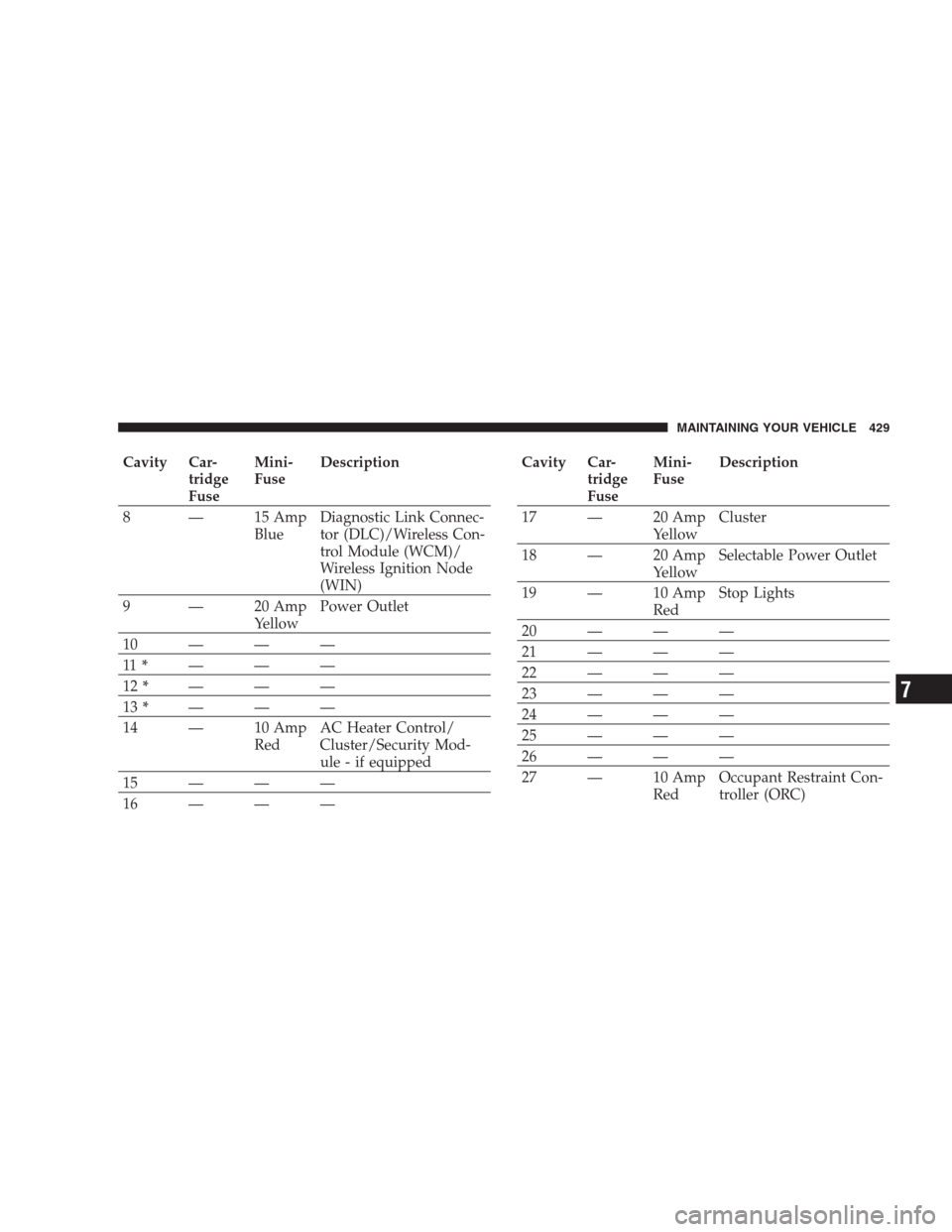
Cavity Car-
tridge
FuseMini-
FuseDescription
8 — 15 Amp
BlueDiagnostic Link Connec-
tor (DLC)/Wireless Con-
trol Module (WCM)/
Wireless Ignition Node
(WIN)
9 — 20 Amp
YellowPower Outlet
10———
11*———
12*———
13*———
14 — 10 Amp
RedAC Heater Control/
Cluster/Security Mod-
ule - if equipped
15———
16———Cavity Car-
tridge
FuseMini-
FuseDescription
17 — 20 Amp
YellowCluster
18 — 20 Amp
YellowSelectable Power Outlet
19 — 10 Amp
RedStop Lights
20———
21———
22———
23———
24———
25———
26———
27 — 10 Amp
RedOccupant Restraint Con-
troller (ORC)
MAINTAINING YOUR VEHICLE 429
7
Page 432 of 493
Cavity Car-
tridge
FuseMini-
FuseDescription
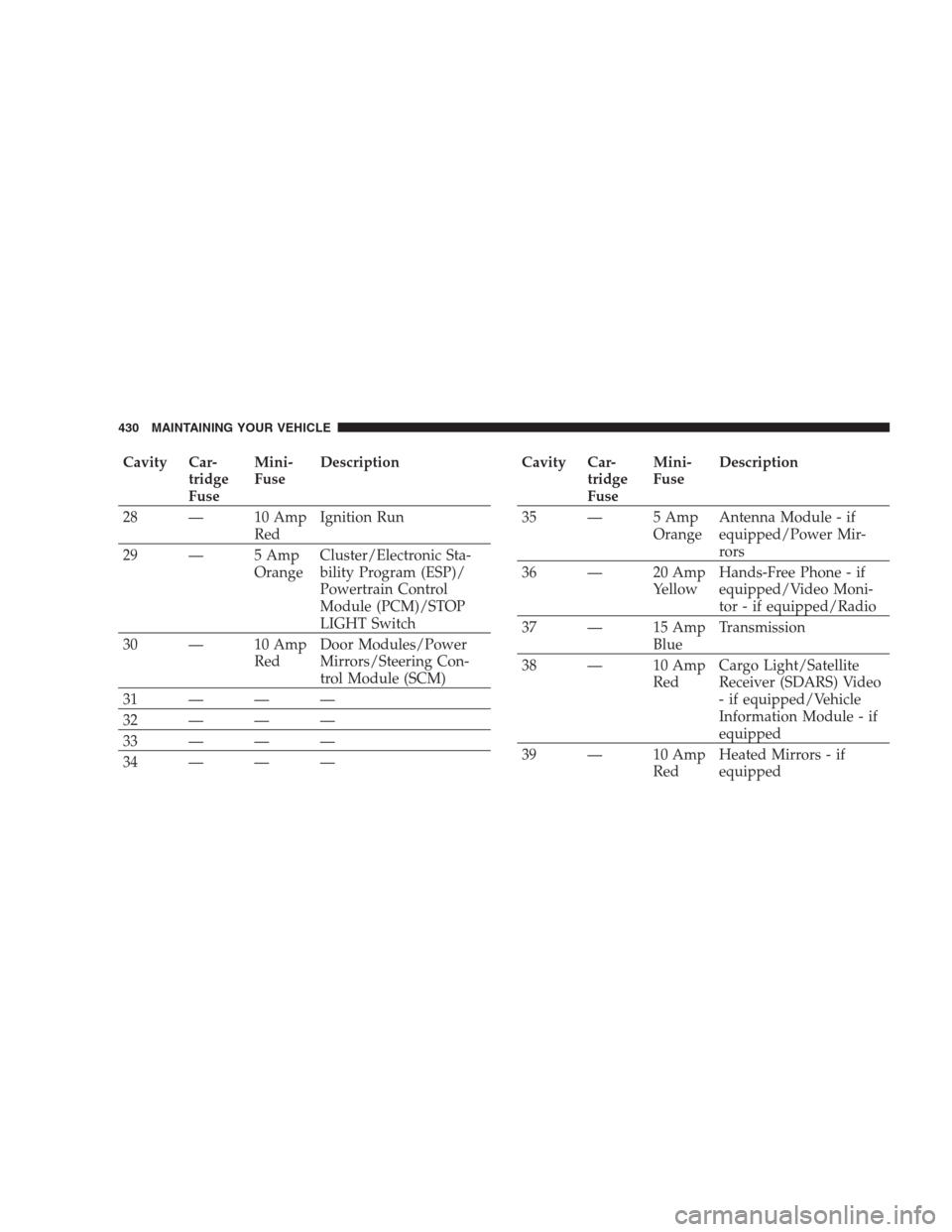
28 — 10 Amp
RedIgnition Run
29 — 5 Amp
OrangeCluster/Electronic Sta-
bility Program (ESP)/
Powertrain Control
Module (PCM)/STOP
LIGHT Switch
30 — 10 Amp
RedDoor Modules/Power
Mirrors/Steering Con-
trol Module (SCM)
31———
32———
33———
34———Cavity Car-
tridge
FuseMini-
FuseDescription
35 — 5 Amp
OrangeAntenna Module - if
equipped/Power Mir-
rors
36 — 20 Amp
YellowHands-Free Phone - if
equipped/Video Moni-
tor - if equipped/Radio
37 — 15 Amp
BlueTransmission
38 — 10 Amp
RedCargo Light/Satellite
Receiver (SDARS) Video
- if equipped/Vehicle
Information Module - if
equipped
39 — 10 Amp
RedHeated Mirrors - if
equipped
430 MAINTAINING YOUR VEHICLE
Page 433 of 493
Cavity Car-
tridge
FuseMini-
FuseDescription
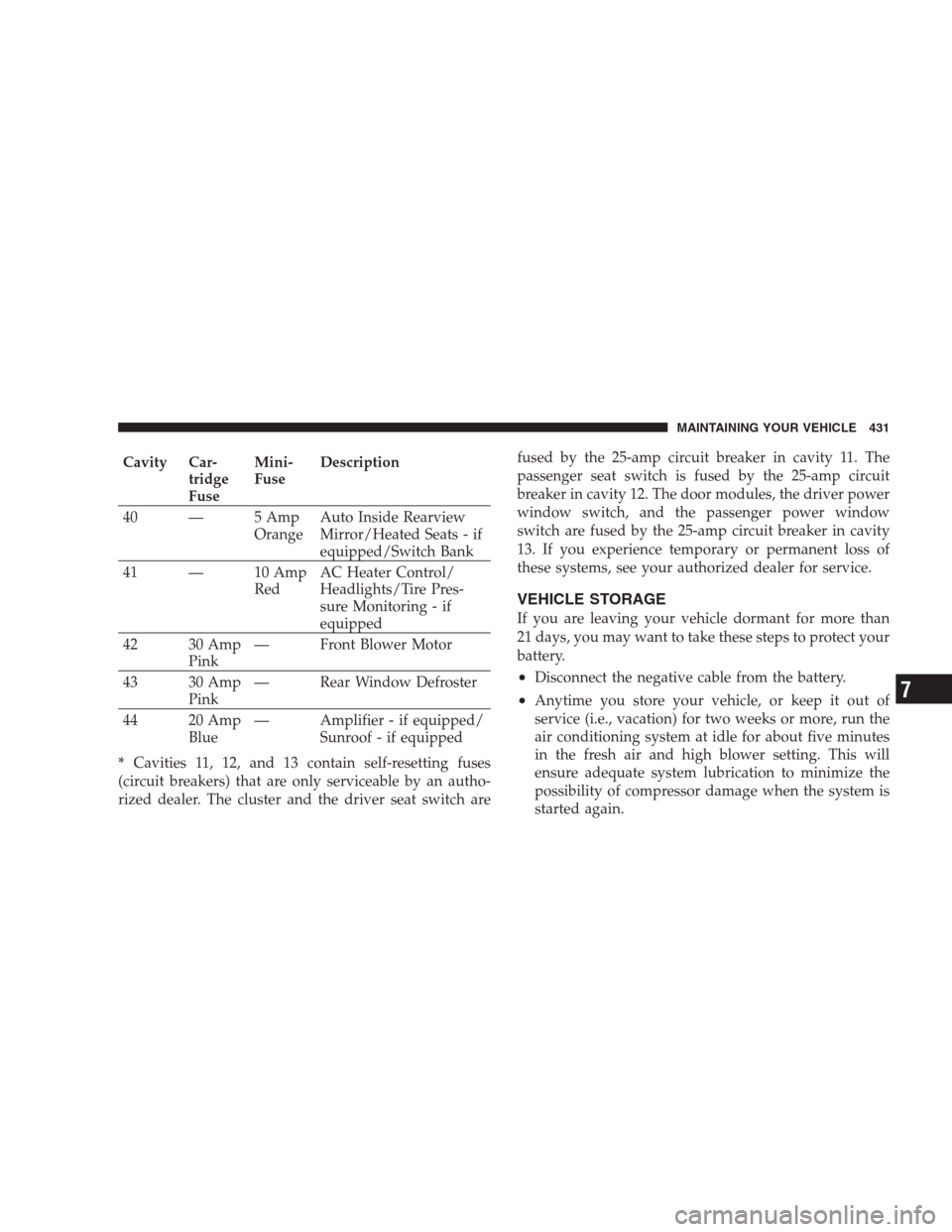
40 — 5 Amp
OrangeAuto Inside Rearview
Mirror/Heated Seats - if
equipped/Switch Bank
41 — 10 Amp
RedAC Heater Control/
Headlights/Tire Pres-
sure Monitoring - if
equipped
42 30 Amp
Pink— Front Blower Motor
43 30 Amp
Pink— Rear Window Defroster
44 20 Amp
Blue— Amplifier - if equipped/
Sunroof - if equipped
*Cavities 11, 12, and 13 contain self-resetting fuses
(circuit breakers) that are only serviceable by an autho-
rized dealer. The cluster and the driver seat switch arefused by the 25-amp circuit breaker in cavity 11. The
passenger seat switch is fused by the 25-amp circuit
breaker in cavity 12. The door modules, the driver power
window switch, and the passenger power window
switch are fused by the 25-amp circuit breaker in cavity
13. If you experience temporary or permanent loss of
these systems, see your authorized dealer for service.
VEHICLE STORAGE
If you are leaving your vehicle dormant for more than
21 days, you may want to take these steps to protect your
battery.
•Disconnect the negative cable from the battery.
•Anytime you store your vehicle, or keep it out of
service (i.e., vacation) for two weeks or more, run the
air conditioning system at idle for about five minutes
in the fresh air and high blower setting. This will
ensure adequate system lubrication to minimize the
possibility of compressor damage when the system is
started again.
MAINTAINING YOUR VEHICLE 431
7
Page 435 of 493
BULB REPLACEMENT
Low Beam Headlight, High Beam Headlight, and
Park/Turn Light
High Intensity Discharge Headlights (HID)
The headlights are a type of high voltage discharge tube.
High voltage can remain in the circuit even with the
HEADLIGHT switch off and the key removed.Because
of this, you should not attempt to service a headlight
bulb yourself. If a headlight bulb fails, take your
vehicle to an authorized dealer for service.
NOTE:When HID headlights are turned on, there is a
blue hue to the lights. This diminishes and becomes more
white after approximately 10 seconds, as the system
charges.
Tail/Stop, Tail, Turn Signal Light, and Backup
Light
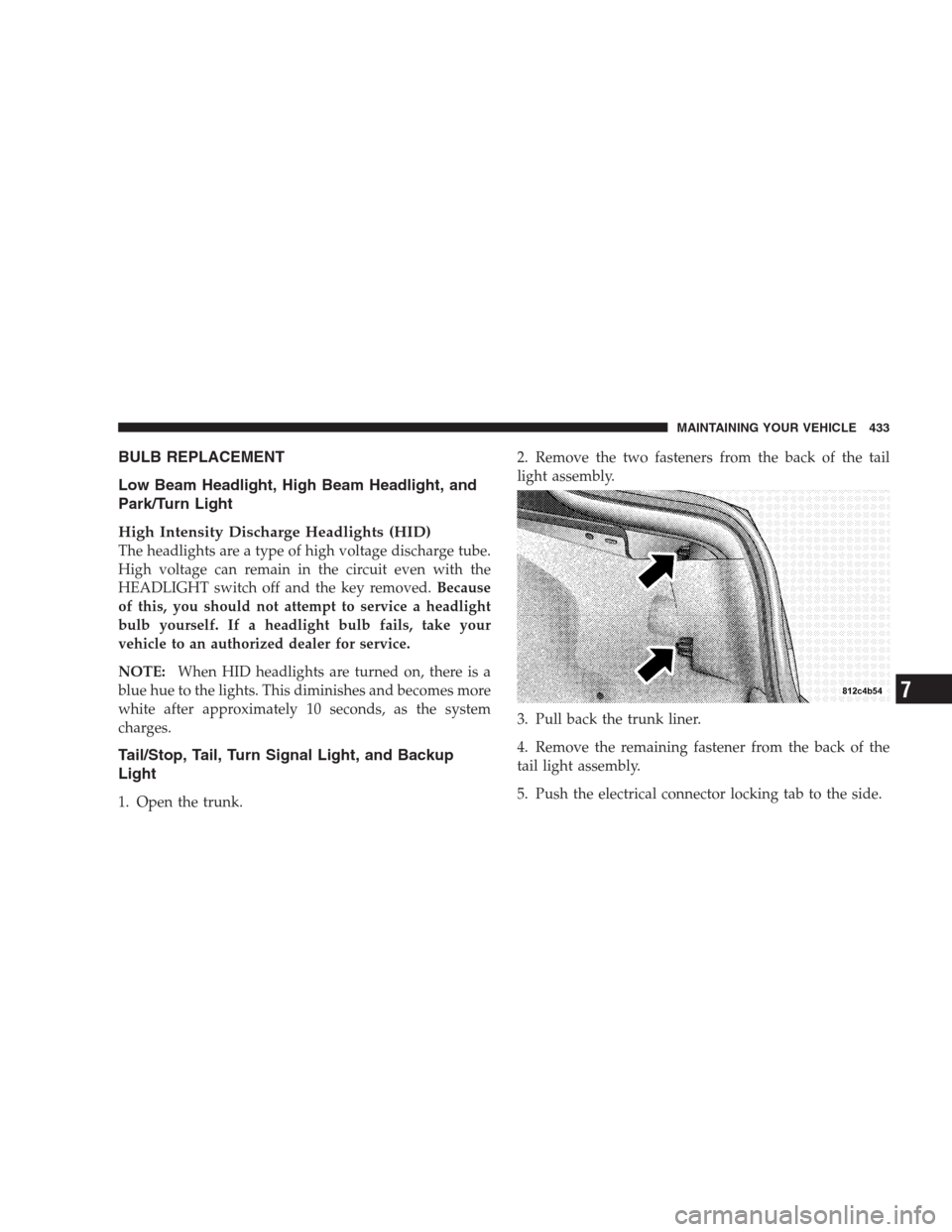
1. Open the trunk.2. Remove the two fasteners from the back of the tail
light assembly.
3. Pull back the trunk liner.
4. Remove the remaining fastener from the back of the
tail light assembly.
5. Push the electrical connector locking tab to the side.
MAINTAINING YOUR VEHICLE 433
7