Page 29 of 526
•Doors closed
•Hood closed
•Trunk closed
•Hazard switch off
•Brake switch inactive (brake pedal not pressed)
•Ignition key removed from ignition switch
•Battery at an acceptable charge level
•RKE PANIC button not pressed
To Enter Remote Start Mode
Press and release the REMOTE START button
on the RKE transmitter twice, within five sec-
onds. The parking lights will flash and the horn
will chirp twice (if programmed). Then, the
engine will start and the vehicle will remain in the
Remote Start mode for a 15-minute cycle.NOTE:
•The park lamps will turn on and remain on during
Remote Start mode.
•For security, power window and power sunroof op-
eration (if equipped) are disabled when the vehicle is
in the Remote Start mode.
•The engine can be started two consecutive times (two
15-minute cycles) with the RKE transmitter. However,
the ignition switch must be cycled to the ON position
before you can repeat the start sequence for a third
cycle.
To Exit Remote Start Mode without Driving the
Vehicle
Press and release the REMOTE START button one time,
or allow the engine to run for the entire 15-minute cycle.
THINGS TO KNOW BEFORE STARTING YOUR VEHICLE 27
2
Page 67 of 526

1. Used for research purposes, such as to match data
with a particular crash record in an aggregate database,
provided confidentiality of personal data is thereafter
preserved.
2. Used in defense of litigation involving a Chrysler LLC
product.
3. Requested by police under a legal warrant.
4. Otherwise required by law.
Data parameters that may be recorded:
•Diagnostic trouble code(s) and warning light status for
electronically-controlled safety systems, including the
airbag system
•Airbag disable light status (if equipped)
•�Time�of airbag deployment (in terms of ignition
cycles and vehicle mileage)
•Airbag deployment level (if applicable)
•Impact acceleration and angle
•Seat belt status
•Brake status (service and parking brakes)
•Accelerator status (including vehicle speed)
•Engine control status (including engine speed)
•Transmission gear selection
•Cruise control status
•Traction/stability control status
•Tire Pressure Monitoring System status
Child Restraints
Everyone in your vehicle needs to be buckled up all the
time, including babies and children. Every state in the
United States and all Canadian provinces require that
THINGS TO KNOW BEFORE STARTING YOUR VEHICLE 65
2
Page 80 of 526

Defroster
Check operation by selecting the defrost mode and place
the blower control on high speed. You should be able to
feel the air directed against the windshield. See your
authorized dealer for service if your defroster is
inoperable.
Periodic Safety Checks You Should Make Outside
The Vehicle
Tires
Examine tires for excessive tread wear and uneven wear
patterns. Check for stones, nails, glass, or other objects
lodged in the tread. Inspect the tread and sidewall for
cuts and cracks. Check the wheel nuts for tightness.
Check the tires (including spare) for proper pressure.
Lights
Have someone observe the operation of exterior lights
while you work the controls. Check turn signal and high
beam indicator lights on the instrument panel.
Door Latches
Check for positive closing, latching, and locking.
Fluid Leaks
Check area under vehicle after overnight parking for fuel,
engine coolant, oil, or other fluid leaks. Also, if gasoline
fumes are detected or if fuel, power steering fluid, or
brake fluid leaks are suspected, the cause should be
located and corrected immediately.
78 THINGS TO KNOW BEFORE STARTING YOUR VEHICLE
Page 142 of 526
Daytime Running Lights — If Equipped
The high beam headlights will come on as Daytime
Running Lights whenever the ignition switch is ON, the
headlights are off and the parking brake is off. The
headlight switch must be used for normal nighttime
driving.
Lights-On Reminder
If the headlights or parking lights are on after the ignition
is turned OFF, a chime will sound to alert the driver
when the driver’s door is opened.
Fog Lights — If Equipped
The front fog light switch is built into the head-
light switch. To activate the front fog lights, turn
on the parking lights or the low beam headlights
and press the headlight switch. To turn off the front fog
lights, either press the headlight switch a second time or
turn off the headlight switch.An indicator light in the instrument cluster illuminates
when the fog lights are turned on.
NOTE:The fog lights will operate with the low beam
headlights or parking lights on. However, selecting the
high beam headlights will turn off the fog lights.
Multifunction Lever
The multifunction lever controls the operation of the turn
signals, headlight beam selection and passing lights. The
multifunction lever is located on the left side of the
steering column.
140 UNDERSTANDING THE FEATURES OF YOUR VEHICLE
Page 151 of 526
transmitter or the memory switch on the driver’s door
trim panel to return the tilt/telescopic steering column to
pre-programmed positions. Refer to “Driver Memory
Seat” in this section.
WARNING!
Moving the steering column while the vehicle is
moving is dangerous. Without a stable steering col-
umn, you could lose control of the vehicle and have
an accident. Adjust the column only while the ve-
hicle is stopped.
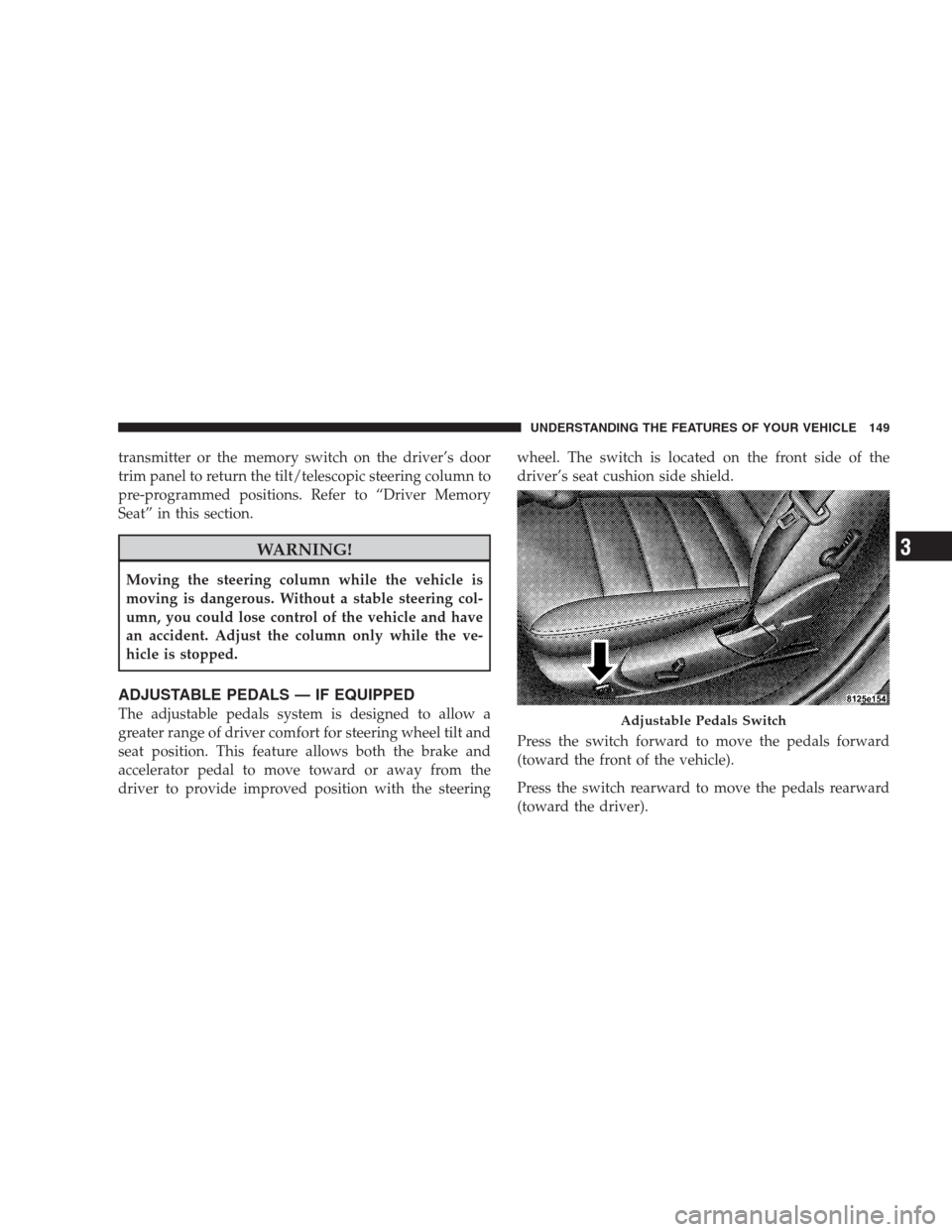
ADJUSTABLE PEDALS — IF EQUIPPED
The adjustable pedals system is designed to allow a
greater range of driver comfort for steering wheel tilt and
seat position. This feature allows both the brake and
accelerator pedal to move toward or away from the
driver to provide improved position with the steeringwheel. The switch is located on the front side of the
driver’s seat cushion side shield.
Press the switch forward to move the pedals forward
(toward the front of the vehicle).
Press the switch rearward to move the pedals rearward
(toward the driver).Adjustable Pedals Switch
UNDERSTANDING THE FEATURES OF YOUR VEHICLE 149
3
Page 154 of 526
To Set At A Desired Speed
When the vehicle reaches the speed desired, push the
lever downward to SET DECEL and release. Remove
your foot from the accelerator pedal and the vehicle will
operate at the selected speed.
NOTE:
•Electronic Speed Control will only function in 3rd, 4th,
or 5th gear when in the Autostick�mode (if
equipped).
•The Electronic Speed Control may not engage if a
different size tire is installed on one wheel, such as the
compact spare tire.
To Deactivate
The system will disable Electronic Speed Control without
erasing the memory if you:
•Softly tap the brake pedal,
•Depress the brake pedal, or
•Pull the Electronic Speed Control lever toward you to
CANCEL.
Pushing and releasing the ON/OFF button or turning off
the ignition erases the set speed from memory.
To Resume Speed
If you deactivated the Electronic Speed Control without
erasing the set speed from memory and your vehicle
speed is above 20 mph (32 km/h) you can resume the
previous set speed. To do so, push the lever upward to
RESUME ACCEL and release. Then remove your foot
from the accelerator pedal.
To Vary the Speed Setting
When the Electronic Speed Control is set, you can in-
crease speed by pushing up and holding the Electronic
Speed Control lever in RESUME ACCEL. When the
Electronic Speed Control lever is released, a new set
speed will be established.
152 UNDERSTANDING THE FEATURES OF YOUR VEHICLE
Page 157 of 526
WARNING!
•Adaptive Cruise Control (ACC) is a convenience
system. It is not a substitute for active driving
involvement. It is always the driver ’s responsibil-
ity to be attentive of road, traffic, and weather
conditions, vehicle speed, distance to the vehicle
ahead; and, most importantly, brake operation to
ensure safe operation of the vehicle under all road
conditions. Your complete attention is always re-
quired while driving to maintain safe control of
your vehicle. Failure to follow these warnings can
result in an accident or serious personal injury.The
ACC system:
•Does not react to pedestrians, oncoming vehicles,
and stationary objects (i.e., a stopped vehicle in a
traffic jam or a disabled vehicle).
(Continued)
WARNING! (Continued)
•Cannot take street, traffic, and weather conditions
into account, and may be limited upon adverse
sight distance conditions.
•Does not predict the lane curvature or the move-
ment of preceding vehicles and will not compen-
sate for such changes.
•Does not always fully recognize complex driving
conditions, which can result in wrong or missing
distance warnings.
•May not detect a vehicle ahead when strong light
(for example, sunrise or sunset) is directly shining
on the front of the vehicle.
•Can only apply a maximum of 25% of the vehicle’s
braking capability, and will not bring the vehicle
to a complete stop.
UNDERSTANDING THE FEATURES OF YOUR VEHICLE 155
3
Page 159 of 526
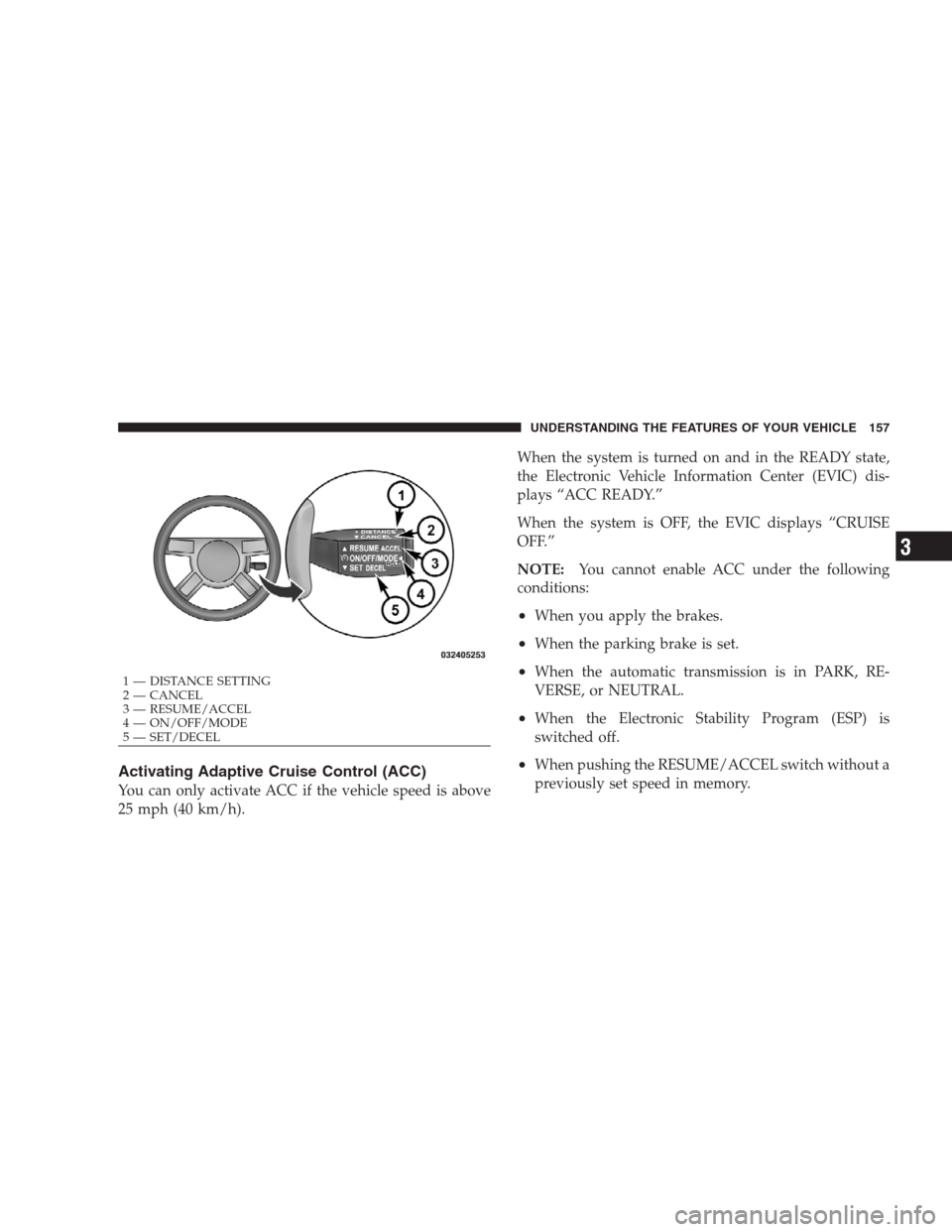
Activating Adaptive Cruise Control (ACC)
You can only activate ACC if the vehicle speed is above
25 mph (40 km/h).When the system is turned on and in the READY state,
the Electronic Vehicle Information Center (EVIC) dis-
plays “ACC READY.”
When the system is OFF, the EVIC displays “CRUISE
OFF.”
NOTE:You cannot enable ACC under the following
conditions:
•When you apply the brakes.
•When the parking brake is set.
•When the automatic transmission is in PARK, RE-
VERSE, or NEUTRAL.
•When the Electronic Stability Program (ESP) is
switched off.
•When pushing the RESUME/ACCEL switch without a
previously set speed in memory.
1 — DISTANCE SETTING
2 — CANCEL
3 — RESUME/ACCEL
4 — ON/OFF/MODE
5 — SET/DECELUNDERSTANDING THE FEATURES OF YOUR VEHICLE 157
3