Page 64 of 526
WARNING!
Deployed airbags can’t protect you in another colli-
sion. Have the airbags replaced by an authorized
dealer as soon as possible.
Enhanced Accident Response System
In the event of an impact that causes airbag deployment,
with the vehicle stopped, and the vehicle communication
network intact, and the power intact, the Enhanced
Accident Response System performs the following func-
tions:
•Cuts off fuel to the engine.
•Flashes hazard lights.
•Turns on the interior lights, which remain on as long as
the battery has power or until the ignition key is
removed.
•Unlocks the doors automatically.
NOTE:The interior lights can only be deactivated if the
key is removed from the ignition switch or the vehicle is
driven.
Maintaining Your Airbag System
WARNING!
•Modifications to any part of the airbag system
could cause it to fail when you need it. You could
be injured because the airbags are not there to
protect you. Do not modify the components or
wiring, including adding any kind of badges or
stickers to the steering wheel hub trim cover or the
upper passenger side of the instrument panel. Do
not modify the front bumper, vehicle body struc-
ture, or frame.
(Continued)
62 THINGS TO KNOW BEFORE STARTING YOUR VEHICLE
Page 80 of 526

Defroster
Check operation by selecting the defrost mode and place
the blower control on high speed. You should be able to
feel the air directed against the windshield. See your
authorized dealer for service if your defroster is
inoperable.
Periodic Safety Checks You Should Make Outside
The Vehicle
Tires
Examine tires for excessive tread wear and uneven wear
patterns. Check for stones, nails, glass, or other objects
lodged in the tread. Inspect the tread and sidewall for
cuts and cracks. Check the wheel nuts for tightness.
Check the tires (including spare) for proper pressure.
Lights
Have someone observe the operation of exterior lights
while you work the controls. Check turn signal and high
beam indicator lights on the instrument panel.
Door Latches
Check for positive closing, latching, and locking.
Fluid Leaks
Check area under vehicle after overnight parking for fuel,
engine coolant, oil, or other fluid leaks. Also, if gasoline
fumes are detected or if fuel, power steering fluid, or
brake fluid leaks are suspected, the cause should be
located and corrected immediately.
78 THINGS TO KNOW BEFORE STARTING YOUR VEHICLE
Page 83 of 526
▫Automatic Headlights — If Equipped...... 137
▫Headlights On With Wipers (Available With
Auto Headlights Only)................ 137
▫SmartBeams — If Equipped............. 138
▫Headlight Time Delay................. 139
▫Daytime Running Lights — If Equipped.... 140
▫Lights-On Reminder.................. 140
▫Fog Lights — If Equipped.............. 140
▫Multifunction Lever.................. 140
▫Overhead Console Map/Reading Lights.... 142
▫Interior Lights...................... 142
�Windshield Wipers And Washers.......... 143
▫Intermittent Wiper System.............. 144▫Mist Feature........................ 145
▫Windshield Washers.................. 145
▫Headlights On With Wipers (Available With
Auto Headlights Only)................ 145
▫Rain Sensing Wipers — If Equipped....... 146
�Tilt/Telescoping Steering Column.......... 147
�Power Tilt/Telescoping Steering Column
— If Equipped........................ 148
�Adjustable Pedals — If Equipped.......... 149
�Electronic Speed Control................ 150
▫To Activate......................... 151
▫To Set At A Desired Speed.............. 152
▫To Deactivate....................... 152
UNDERSTANDING THE FEATURES OF YOUR VEHICLE 81
3
Page 133 of 526
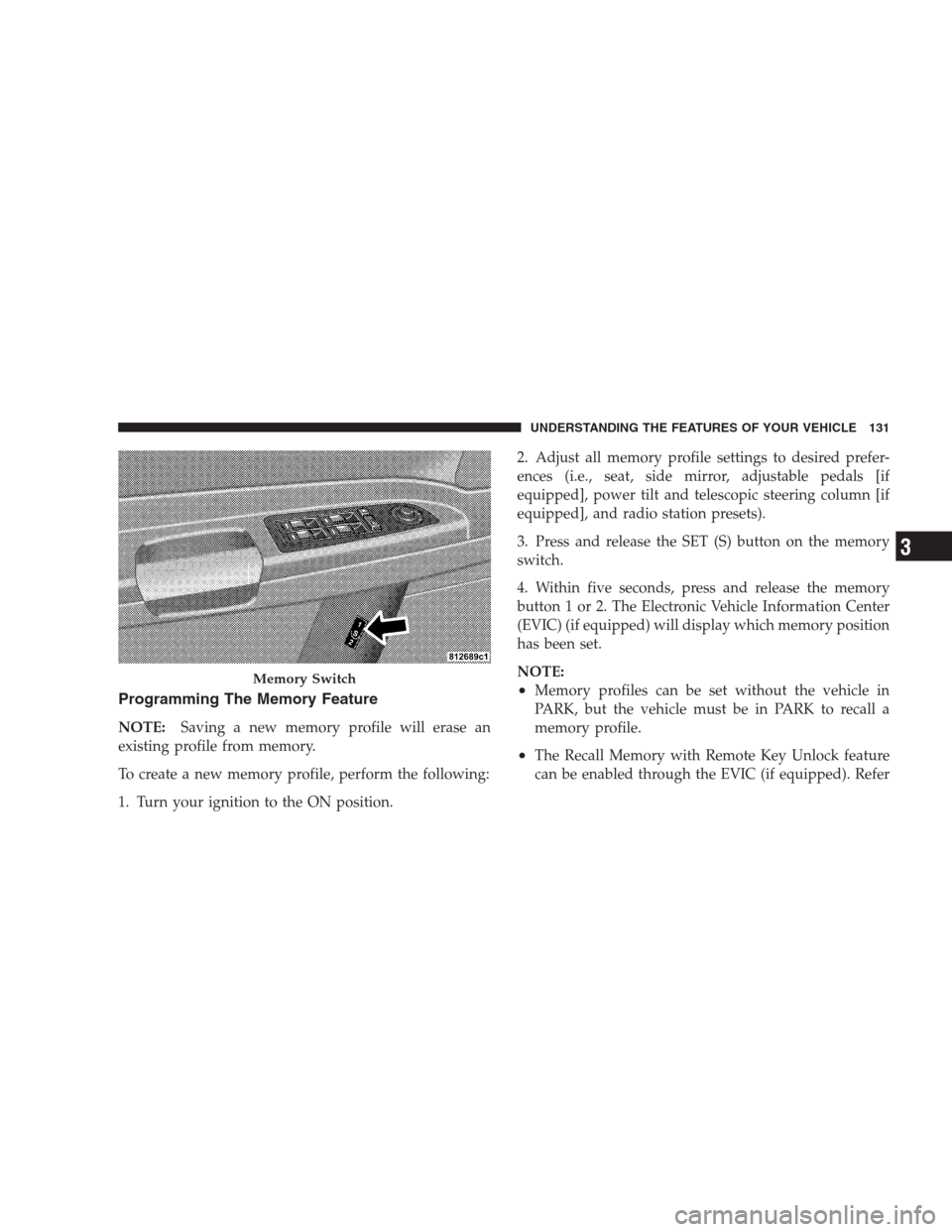
Programming The Memory Feature
NOTE:Saving a new memory profile will erase an
existing profile from memory.
To create a new memory profile, perform the following:
1. Turn your ignition to the ON position.2. Adjust all memory profile settings to desired prefer-
ences (i.e., seat, side mirror, adjustable pedals [if
equipped], power tilt and telescopic steering column [if
equipped], and radio station presets).
3. Press and release the SET (S) button on the memory
switch.
4. Within five seconds, press and release the memory
button 1 or 2. The Electronic Vehicle Information Center
(EVIC) (if equipped) will display which memory position
has been set.
NOTE:
•Memory profiles can be set without the vehicle in
PARK, but the vehicle must be in PARK to recall a
memory profile.
•The Recall Memory with Remote Key Unlock feature
can be enabled through the EVIC (if equipped). Refer
Memory Switch
UNDERSTANDING THE FEATURES OF YOUR VEHICLE 131
3
Page 135 of 526
To recall the memory settings for driver one, press
MEMORY button number 1 on the driver’s door or the
UNLOCK button on the RKE transmitter linked to
memory position 1.
To recall the memory setting for driver two, press
MEMORY button number 2 on the driver’s door or the
UNLOCK button on the RKE transmitter linked to
memory position 2.
A recall can be cancelled by pressing any of the
MEMORY buttons (S, 1, or 2) on the driver’s door during
a recall. When a recall is cancelled, the driver seat, side
mirror, adjustable pedals (if equipped), and power tilt
and telescopic steering column (if equipped) stop mov-
ing. A delay of one second will occur before another recall
can be selected.Easy Entry/Exit Seat (Available with Memory Seat
Only)
This feature provides automatic driver seat positioning to
enhance driver mobility when entering and exiting the
vehicle.
The distance the driver seat moves depends on where
you have the driver seat positioned when you remove the
key from the ignition switch.
UNDERSTANDING THE FEATURES OF YOUR VEHICLE 133
3
Page 150 of 526
outward or push it inward as desired. To lock the steering
column in position, push the control handle inward until
fully engaged.
WARNING!
Do not adjust the steering wheel while driving. The
telescoping adjustment must be locked while driv-
ing. Adjusting the steering wheel while driving or
driving without the telescoping adjustment locked
could cause the driver to lose control of the vehicle.
POWER TILT/TELESCOPING STEERING COLUMN
— IF EQUIPPED
This feature allows you to tilt the steering column
upward or downward. It also allows you to lengthen or
shorten the steering column. The power tilt/telescoping
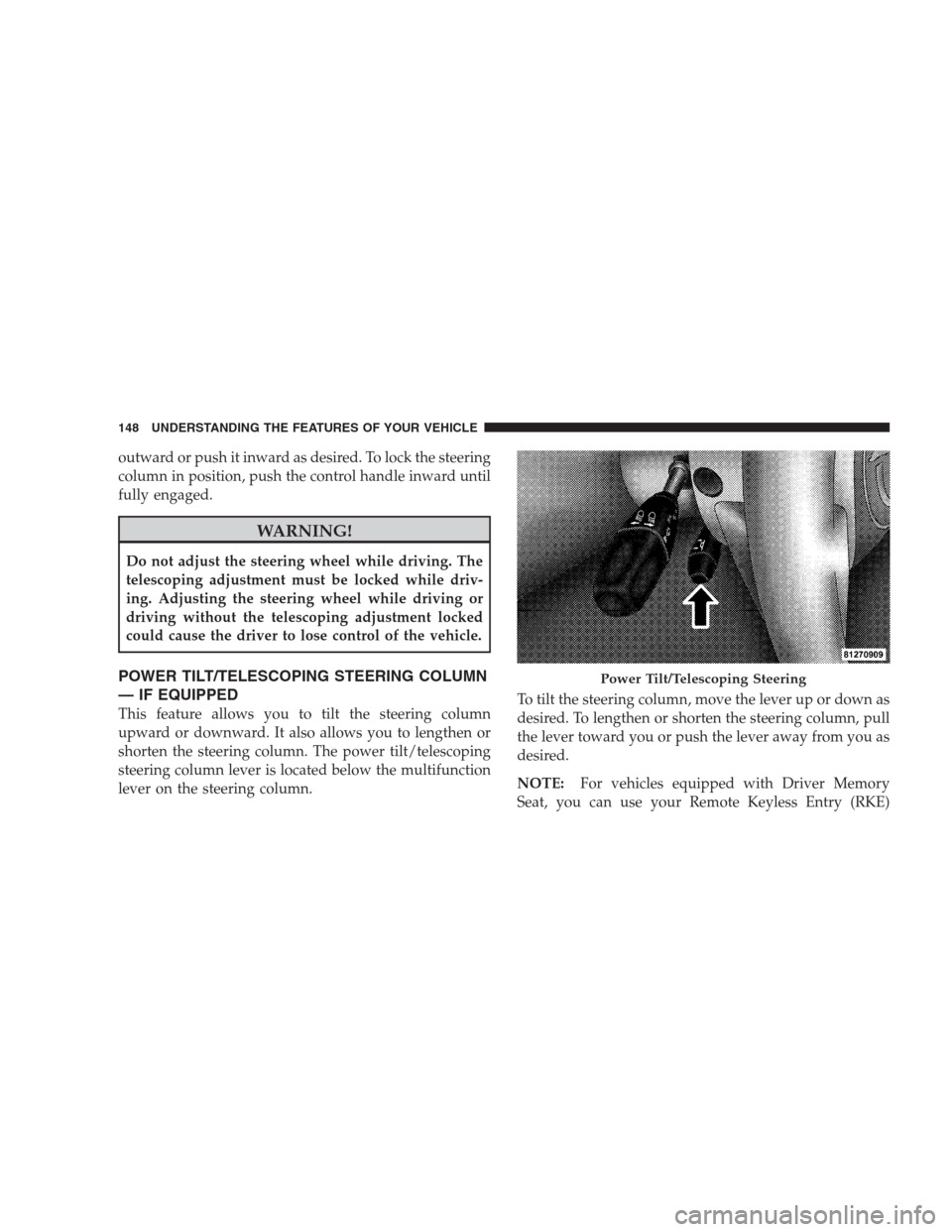
steering column lever is located below the multifunction
lever on the steering column.To tilt the steering column, move the lever up or down as
desired. To lengthen or shorten the steering column, pull
the lever toward you or push the lever away from you as
desired.
NOTE:For vehicles equipped with Driver Memory
Seat, you can use your Remote Keyless Entry (RKE)
Power Tilt/Telescoping Steering
148 UNDERSTANDING THE FEATURES OF YOUR VEHICLE
Page 235 of 526
the FUNCTION SELECT button while in this display to
select English, Espanol, Deutsch, Italiano, or Francais.
Then, as you continue, the information will display in the
selected language.
NOTE:The EVIC will not change the uconnect�lan-
guage selection. Refer to “Language Selection” under
“uconnect�phone” in Section 3.
“Lock Doors Automatically at 15 mph (24 km/h)”
When ON is selected, all doors will lock automatically
when the vehicle reaches a speed of 15 mph (24 km/h).
To make your selection, press and release the FUNC-
TION SELECT button until “ON” or “OFF” appears.
“Unlock Doors Automatically on Exit”
When ON is selected, all doors will unlock when the
vehicle is stopped and the transmission is in the PARK or
NEUTRAL position and the driver’s door is opened. To
make your selection, press and release the FUNCTION
SELECT button until “ON” or “OFF” appears.
“Remote Key Unlock”
WhenDriver Door 1st Pressis selected, only the driver’s
door will unlock on the first press of the Remote Keyless
Entry (RKE) transmitter UNLOCK button. When Driver
Door 1st Press is selected, you must press the RKE
transmitter UNLOCK button twice to unlock the passen-
ger’s doors. WhenAll Doors 1st Pressis selected, all of
the doors will unlock on the first press of the RKE
transmitter UNLOCK button. To make your selection,
press and release the FUNCTION SELECT button until
“Driver Door 1st Press” or “All Doors 1st Press” appears.
“Recall Memory with Remote Key Unlock” — If
Equipped
When ON is selected, you can use your RKE transmitter
to recall one of two pre-programmed memory profiles.
Each memory profile contains desired position settings
for the driver seat, side mirror, adjustable pedals (if
equipped), power tilt and telescopic steering column (if
equipped), and a set of desired radio station presets.
UNDERSTANDING YOUR INSTRUMENT PANEL 233
4
Page 308 of 526
�Driving On Slippery Surfaces............. 327
▫Acceleration........................ 327
▫Traction........................... 328
�Driving Through Water................. 328
▫Flowing/Rising Water................. 329
▫Shallow Standing Water............... 329
�Power Steering....................... 331
▫Power Steering Fluid Check............. 332
�Parking Brake........................ 332
�Anti-Lock Brake System................. 334
�Electronic Brake Control System........... 336
▫Anti-Lock Brake System (ABS)........... 336
▫Traction Control System (TCS)........... 337▫Brake Assist System (BAS).............. 337
▫Electronic Stability Program (ESP)........ 338
▫Synchronizing ESP................... 340
▫ESP/BAS Malfunction Indicator Light And
ESP/TCS Indicator Light............... 341
�Tire Safety Information................. 342
▫Tire Markings....................... 342
▫Tire Identification Number (TIN)......... 345
▫Tire Loading And Tire Pressure.......... 346
�Tires — General Information............. 350
▫Tire Pressure....................... 350
▫Tire Inflation Pressures................ 351
▫Tire Pressures For High Speed Operation . . . 353
306 STARTING AND OPERATING