2009 CHEVROLET UPLANDER remote control
[x] Cancel search: remote controlPage 1 of 464

Seats and Restraint System............................. 1-1
Front Seats
............................................... 1-2
Rear Seats
............................................... 1-6
Safety Belts
.............................................1-23
Child Restraints
.......................................1-43
Airbag System
.........................................1-77
Restraint System Check
............................1-92
Features and Controls..................................... 2-1
Keys
........................................................ 2-3
Doors and Locks
......................................2-10
Windows
.................................................2-24
Theft-Deterrent Systems
............................2-27
Starting and Operating Your Vehicle
...........2-31
Mirrors
....................................................2-43
Object Detection Systems
..........................2-44
OnStar
®System
......................................2-47
Universal Home Remote System
................2-50
Storage Areas
.........................................2-55
Instrument Panel............................................. 3-1
Instrument Panel Overview
.......................... 3-4
Climate Controls
......................................3-22
Warning Lights, Gages, and Indicators
........3-30
Driver Information Center (DIC)
..................3-43
Audio System(s)
.......................................3-76Driving Your Vehicle....................................... 4-1
Your Driving, the Road, and the Vehicle
....... 4-2
Towing
...................................................4-24
Service and Appearance Care.......................... 5-1
Service
..................................................... 5-3
Fuel
......................................................... 5-5
Checking Things Under the Hood
...............5-12
Headlamp Aiming
.....................................5-41
Bulb Replacement
....................................5-41
Windshield Wiper Blade Replacement
.........5-46
Tires
......................................................5-47
Appearance Care
.....................................5-89
Vehicle Identication
.................................5-97
Electrical System
......................................5-97
Capacities and Specications
...................5-104
Maintenance Schedule..................................... 6-1
Maintenance Schedule
................................ 6-2
Customer Assistance Information.................... 7-1
Customer Assistance and Information
........... 7-2
Reporting Safety Defects
...........................7-14
Vehicle Data Recording and Privacy
...........7-16
Index................................................................ 1
2009 Chevrolet Uplander Owner ManualM
Page 99 of 464

Keys...............................................................2-3
Remote Keyless Entry (RKE) System................2-4
Remote Keyless Entry (RKE) System
Operation...................................................2-5
Remote Vehicle Start......................................2-7
Doors and Locks............................................2-10
Door Locks..................................................2-10
Power Door Locks........................................2-11
Delayed Locking...........................................2-12
Automatic Door Lock.....................................2-12
Programmable Automatic Door Unlock.............2-13
Lockout Protection........................................2-13
Dual Sliding Doors........................................2-13
Power Sliding Door (PSD)..............................2-16
Liftgate........................................................2-22
Windows........................................................2-24
Power Windows............................................2-25
Manual Rear Quarter Windows.......................2-26
Power Rear Quarter Windows........................2-26
Sun Visors...................................................2-27Theft-Deterrent Systems..................................2-27
Content Theft-Deterrent.................................2-27
PASS-Key
®III Electronic Immobilizer...............2-29
PASS-Key®III Electronic Immobilizer
Operation.................................................2-29
Starting and Operating Your Vehicle................2-31
New Vehicle Break-In....................................2-31
Ignition Positions..........................................2-31
Retained Accessory Power (RAP)...................2-32
Starting the Engine.......................................2-32
Engine Coolant Heater..................................2-34
Automatic Transmission Operation...................2-35
Parking Brake..............................................2-38
Shifting Into Park..........................................2-38
Shifting Out of Park......................................2-40
Parking Over Things That Burn.......................2-40
Engine Exhaust............................................2-41
Running the Vehicle While Parked..................2-42
Section 2 Features and Controls
2-1
Page 100 of 464

Mirrors...........................................................2-43
Manual Rearview Mirror.................................2-43
Outside Power Mirrors...................................2-43
Outside Convex Mirror...................................2-43
Outside Heated Mirrors..................................2-44
Object Detection Systems...............................2-44
Ultrasonic Rear Parking Assist (URPA)............2-44
OnStar
®System.............................................2-47
Universal Home Remote System......................2-50
Universal Home Remote System Operation
(With One Triangular LED)...........................2-51Storage Areas................................................2-55
Glove Box...................................................2-55
Cupholders..................................................2-55
Overhead Console (Without Rail)....................2-55
Overhead Console (With Rail)........................2-56
Floor Console Storage Area...........................2-58
Folding Tray................................................2-58
Second Row Center Console..........................2-58
Luggage Carrier...........................................2-59
Convenience Net (With Rear
Convenience Center).................................2-60
Convenience Net (Without Rear
Convenience Center).................................2-60
Convenience Center......................................2-61
Section 2 Features and Controls
2-2
Page 107 of 464

The remote vehicle start feature will not operate if:
The remote start system is disabled. See “REMOTE
START” underDIC Vehicle Personalization (Uplevel
Only) on page 3-68.
The vehicle’s key is in the ignition.
The vehicle’s hood, liftgate or doors are not closed.
The hazard warning ashers are on.
There is an emission control system malfunction.
The engine coolant temperature is too high.
The oil pressure is low.
Two remote vehicle starts have already been
provided. The maximum number of remote starts or
remote start attempts between ignition cycles
with the key is two.
Remote Start Ready
If your vehicle does not have the remote vehicle start
feature, it may have the remote start ready feature. This
feature allows your dealer/retailer to add the
manufacturer’s remote vehicle start feature.
See your dealer/retailer if you would like to add the
manufacturer’s remote vehicle start feature to your
vehicle.
2-9
Page 147 of 464
OnStar Virtual Advisor
OnStar Virtual Advisor is a feature of OnStar
Hands-Free Calling that uses minutes to access
location-based weather, local traffic reports, and
stock quotes. Press the phone button and give a
few simple voice commands to browse through the
various topics. See the OnStar Owner’s Guide for
more information. This feature is only available in the
continental U.S.
OnStar Steering Wheel Controls
This vehicle may have a Talk/Mute button that can
be used to interact with OnStar Hands-Free Calling. See
Audio Steering Wheel Controls on page 3-111for
more information.
On some vehicles, the mute button can be used to dial
numbers into voice mail systems, or to dial phone
extensions. See the OnStar Owner’s Guide for more
information.
How OnStar Service Works
The OnStar system can record and transmit vehicle
information. This information is automatically sent to an
OnStar Call Center when the OnStar button is
pressed, the emergency button is pressed, or if the
airbags or AACN system deploy. This information
usually includes the vehicle’s GPS location and, in the
event of a crash, additional information regarding
the crash that the vehicle was involved in (e.g. the
direction from which the vehicle was hit). When
the Virtual Advisor feature of OnStar Hands-Free Calling
is used, the vehicle also sends OnStar the vehicle’s
GPS location so they can provide services where it is
located.
OnStar service cannot work unless the vehicle is in a
place where OnStar has an agreement with a wireless
service provider for service in that area. OnStar service
also cannot work unless the vehicle is in a place where
the wireless service provider OnStar has hired for that
area has coverage, network capacity and reception when
the service is needed, and technology that is compatible
with the OnStar service. Not all services are available
everywhere, particularly in remote or enclosed areas, or
at all times.
2-49
Page 148 of 464

Location information about the vehicle is only available
if the GPS satellite signals are unobstructed and
available.
The vehicle must have a working electrical system,
including adequate battery power, for the OnStar
equipment to operate. There are other problems OnStar
cannot control that may prevent OnStar from providing
OnStar service at any particular time or place. Some
examples are damage to important parts of the vehicle
in a crash, hills, tall buildings, tunnels, weather or
wireless phone network congestion.
Your Responsibility
Increase the volume of the radio if the OnStar advisor
cannot be heard. If the light next to the OnStar buttons
is red, the system may not be functioning properly.
Press the OnStar button and request a vehicle
diagnostic. If the light appears clear (no light is
appearing), your OnStar subscription has expired and
all services have been deactivated. Press the OnStar
button to conrm that the OnStar equipment is active.
Universal Home Remote
System
The Universal Home Remote System provides a way to
replace up to three hand-held Radio-Frequency (RF)
transmitters used to activate devices such as garage
door openers, security systems, and home lighting.
This device complies with Part 15 of the FCC Rules.
Operation is subject to the following two conditions:
1. This device may not cause harmful interference.
2. This device must accept any interference received,
including interference that may cause undesired
operation.
This device complies with RSS-210 of Industry Canada.
Operation is subject to the following two conditions:
1. This device may not cause interference.
2. This device must accept any interference received,
including interference that may cause undesired
operation of the device.
Changes or modications to this system by other than
an authorized service facility could void authorization to
use this equipment.
2-50
Page 149 of 464
Universal Home Remote System
Operation (With One Triangular LED)
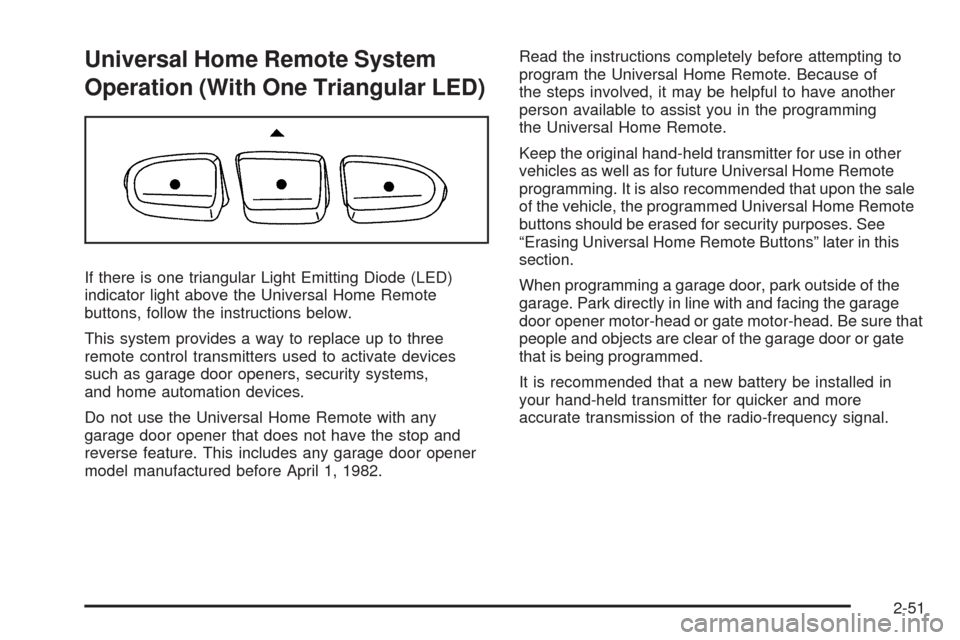
If there is one triangular Light Emitting Diode (LED)
indicator light above the Universal Home Remote
buttons, follow the instructions below.
This system provides a way to replace up to three
remote control transmitters used to activate devices
such as garage door openers, security systems,
and home automation devices.
Do not use the Universal Home Remote with any
garage door opener that does not have the stop and
reverse feature. This includes any garage door opener
model manufactured before April 1, 1982.Read the instructions completely before attempting to
program the Universal Home Remote. Because of
the steps involved, it may be helpful to have another
person available to assist you in the programming
the Universal Home Remote.
Keep the original hand-held transmitter for use in other
vehicles as well as for future Universal Home Remote
programming. It is also recommended that upon the sale
of the vehicle, the programmed Universal Home Remote
buttons should be erased for security purposes. See
“Erasing Universal Home Remote Buttons” later in this
section.
When programming a garage door, park outside of the
garage. Park directly in line with and facing the garage
door opener motor-head or gate motor-head. Be sure that
people and objects are clear of the garage door or gate
that is being programmed.
It is recommended that a new battery be installed in
your hand-held transmitter for quicker and more
accurate transmission of the radio-frequency signal.
2-51
Page 150 of 464
Programming the Universal Home
Remote System
For questions or help programming the Universal Home
Remote System, call 1-800-355-3515 or go to
www.homelink.com.
Programming a garage door opener involves
time-sensitive actions, so read the entire procedure
before starting. Otherwise, the device will time out and
the procedure will have to be repeated.
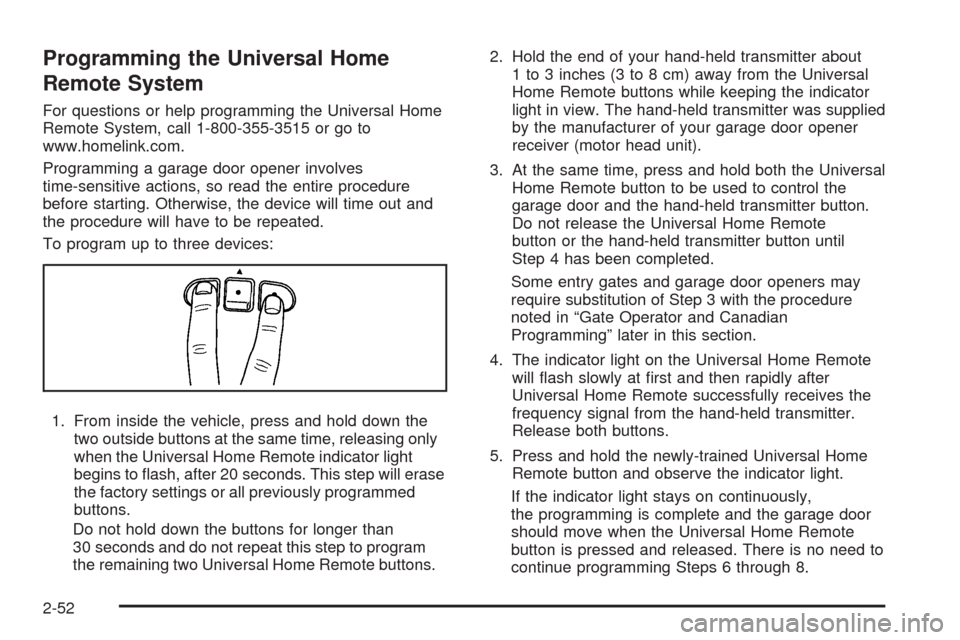
To program up to three devices:
1. From inside the vehicle, press and hold down the
two outside buttons at the same time, releasing only
when the Universal Home Remote indicator light
begins to ash, after 20 seconds. This step will erase
the factory settings or all previously programmed
buttons.
Do not hold down the buttons for longer than
30 seconds and do not repeat this step to program
the remaining two Universal Home Remote buttons.2. Hold the end of your hand-held transmitter about
1 to 3 inches (3 to 8 cm) away from the Universal
Home Remote buttons while keeping the indicator
light in view. The hand-held transmitter was supplied
by the manufacturer of your garage door opener
receiver (motor head unit).
3. At the same time, press and hold both the Universal
Home Remote button to be used to control the
garage door and the hand-held transmitter button.
Do not release the Universal Home Remote
button or the hand-held transmitter button until
Step 4 has been completed.
Some entry gates and garage door openers may
require substitution of Step 3 with the procedure
noted in “Gate Operator and Canadian
Programming” later in this section.
4. The indicator light on the Universal Home Remote
will ash slowly at rst and then rapidly after
Universal Home Remote successfully receives the
frequency signal from the hand-held transmitter.
Release both buttons.
5. Press and hold the newly-trained Universal Home
Remote button and observe the indicator light.
If the indicator light stays on continuously,
the programming is complete and the garage door
should move when the Universal Home Remote
button is pressed and released. There is no need to
continue programming Steps 6 through 8.
2-52