2009 CHEVROLET UPLANDER door lock
[x] Cancel search: door lockPage 228 of 464

DIC Vehicle Personalization
(Uplevel Only)
Your vehicle may have customization capabilities that
allow you to program certain features to one preferred
setting. Customization features can only be programmed
to one setting on the vehicle and cannot be programmed
to a preferred setting for two different drivers. The
customization features include the following:
Exterior lighting delay
Interior lighting delay
Delayed locking
Content theft
Remote keyless entry feedback
Remote start
Rear park chime
Your vehicle may also have personalization capabilities
that allow you to program certain features to a
preferred setting for up to two drivers. The rst
personalized key corresponds to driver 1 and the second
personalized key corresponds to driver 2. The driver
number also corresponds to the numbers, 1 or 2, on the
back of the Remote Keyless Entry (RKE) transmitters.The personalization features include the following:
Radio station presets
Auto door unlock preferences
Remote keyless entry unlock preferences
All of the customization and personalization options may
not be available on your vehicle. Only the options
available will be displayed on your DIC.
The default settings for the customization and
personalization features were set when your vehicle left
the factory, but may have been changed from their
default setting since then.
The customization preferences are automatically
recalled.
The driver’s personalization preferences are recalled
by using the key programmed for driver 1 or 2. The
driver number also corresponds to the numbers, 1 or 2,
on the back of the RKE transmitters.
To change customization and personalization
preferences, use the following procedure.
3-68
Page 231 of 464

DELAYED LOCKING
This feature allows the locking of the vehicle to be
delayed until all of the doors have been closed for about
ve seconds.
When the delayed locking feature is enabled, it may be
activated when the key is out of the ignition by doing
one of the following:
Pressing the driver’s door power lock switch one
time while the driver’s door is open.
Pressing the passenger’s door power lock switch
one time while the passenger’s door is open.
Pressing the lock button on the RKE transmitter
one time while any door is open.
Two chimes will sound to signal that delayed locking is
active.
The doors may be locked immediately by repeating one
of the above actions more than one time.
If a door remains open, without any other door being
opened or closed, the vehicle will lock after about
45 seconds.
If a key is in the ignition, this feature will not lock the
doors. SeeDelayed Locking on page 2-12for more
information.Press the menu button until DELAYED LOCKING
appears on the DIC display. Press the set/reset button
to scroll through the following choices:
OFF:There will be no delayed locking of the vehicle’s
doors.
ON (default):The locking of the vehicle’s doors will be
delayed by ve seconds while a door is open after a
power door lock switch is pressed, or the lock button on
the RKE transmitter is pressed while a door is open.
To select a setting and move on to the next feature,
press the menu button while the desired setting
is displayed on the DIC.
CONTENT THEFT
If your vehicle has the content theft-deterrent system,
once this feature is turned on, the system will activate if
someone tries to enter the vehicle without using the
RKE transmitter or the correct key. It will also activate
when an incorrect key is used in the ignition.
Press the menu button until CONTENT THEFT appears
on the DIC display. Press the set/reset button to
scroll through the following choices:
OFF:The content theft-deterrent system will be
turned off.
ON (default):The content theft-deterrent system will be
turned on.
3-71
Page 232 of 464

When ON is selected, the content theft-deterrent system
will be armed when the vehicle is locked by pressing
the lock button on the RKE transmitter or by pressing the
power door lock switch. SeeContent Theft-Deterrent
on page 2-27andPower Door Locks on page 2-11for
more information.
To select a setting and move on to the next feature,
press the menu button while the desired setting is
displayed on the DIC.
FOB LOCK FEEDBACK
This feature allows you to select the type of feedback
you will receive when locking the vehicle with the
RKE transmitter.
Press the menu button until FOB LOCK FEEDBACK
appears on the DIC display. Press the set/reset button to
scroll through the following choices:
OFF:There will be no feedback when locking the
vehicle.
LIGHTS:The exterior lamps will ash when you press
the lock button on the RKE transmitter.LIGHTS and HORN (default):The exterior lamps will
ash when you press the lock button on the RKE
transmitter, and the horn will sound when the lock button
is pressed again within ve seconds of the previous
command.
To select a setting and move on to the next feature,
press the menu button while the desired setting is
displayed on the DIC.
REMOTE START
If your vehicle has remote start, this feature allows the
remote start to be turned OFF or ON. The remote
start feature allows you to start the engine from outside
of the vehicle using the RKE transmitter. SeeRemote
Vehicle Start on page 2-7for more information.
Press the menu button until REMOTE START appears
on the DIC display. Press the set/reset button to
scroll through the following choices:
OFF:The remote start feature will be disabled.
ON (default):The remote start feature will be enabled.
To select a setting and move on to the next feature,
press the menu button while the desired setting is
displayed on the DIC.
3-72
Page 234 of 464

REPLACE KEY
This screen displays only if YES was selected for the
PERSONALIZE KEY feature, keys 1 and 2 have already
been personalized, and the current key being used is
not key 1 or 2. This feature allows you to program a key
to be recognized as key 1 or 2 in the event that the
previously programmed key needs to be replaced.
1:The key will be programmed to be recognized
as key 1.
2:The key will be programmed to be recognized
as key 2.
CANCEL (default):The key will not be programmed.
RADIO STATIONS PERSONALIZED
This screen displays only if YES was selected for the
PERSONALIZE KEY feature. This feature allows you to
set the radio station presets to be recognized for the
key, 1 or 2, that is being used. Once this message
displays, set the radio station presets. If the presets are
not set at this time, the presets will not be recognized
for key 1 or 2, however, the vehicle radio station presets
will be maintained.
AUTO DOOR UNLOCK
This feature allows automatic door unlocking to be
turned off, used for the driver’s door only, or for all of
the doors.
Press the menu button until AUTO DOOR UNLOCK
appears on the DIC display. Press the set/reset button
to scroll through the following choices:
OFF:None of the doors will unlock when the vehicle is
shifted into P (Park) or the key is taken out of the ignition.
DRIVER:Only the driver’s door will unlock when the
vehicle is shifted into P (Park) or the key is taken out of
the ignition.
ALL (default):All of the doors will unlock when the
vehicle is shifted into P (Park) or the key is taken out of
the ignition.
To select a setting and move on to the next feature,
press the menu button while the desired setting is
displayed on the DIC.
AUTO UNLOCK ON
This feature displays only if DRIVER or ALL was
selected for the AUTO DOOR UNLOCK feature. This
feature allows the selection of when the vehicle’s doors
will unlock.
3-74
Page 235 of 464

Press the menu button until AUTO UNLOCK ON
appears on the DIC display. Press the set/reset button
to scroll through the following choices:
KEY-OUT:The door(s) will unlock when the key is
taken out of the ignition.
PARK (default):The door(s) will unlock when the
vehicle is shifted into P (Park).
To select a setting and move on to the next feature,
press the menu button while the desired setting is
displayed on the DIC.
FOB UNLOCK ON 1ST PRESS
This feature allows the selection of which doors will
unlock on the rst press of the unlock button on the RKE
transmitter. SeeRemote Keyless Entry (RKE) System
Operation on page 2-5for more information.
Press the menu button until FOB UNLOCK ON 1ST
PRESS appears on the DIC display. Press the set/reset
button to scroll through the following choices:
DRIVER (default):The driver’s door will unlock on the
rst press of the unlock button on the RKE transmitter.
ALL:All of the doors will unlock on the rst press of the
unlock button on the RKE transmitter.To select a setting, press the menu button while the
desired setting is displayed on the DIC. The DIC
will then display PRESS UNLOCK SWITCH ON KEY
FOB. Press the unlock button on the RKE transmitter
and your setting will be saved for that RKE transmitter.
After programming the last option, the message KEY
FOB NOW PERSONALIZED will appear on the
DIC display for a few seconds if you personalized the
key. Next, the message PERSONAL OPTIONS SAVED
will appear briey on the DIC display, then the display
will return to the PERSONAL PROGRAM main screen.
Exiting the Personal Program Menu
The personal program menu will be exited when any of
the following occurs:
The vehicle is shifted out of P (Park).
The vehicle is no longer in ON/RUN.
The end of the personal program menu is reached.
3-75
Page 293 of 464
Loading the Vehicle
It is very important to know how much weight your
vehicle can carry. This weight is called the vehicle
capacity weight and includes the weight of all
occupants, cargo, and all nonfactory-installed
options. Two labels on your vehicle show how much
weight it may properly carry, the Tire and Loading
Information label and the Certication/Tire label.
{CAUTION:
Do not load the vehicle any heavier than the
Gross Vehicle Weight Rating (GVWR), or
either the maximum front or rear Gross Axle
Weight Rating (GAWR). If you do, parts on the
vehicle can break, and it can change the way
your vehicle handles. These could cause you
to lose control and crash. Also, overloading
can shorten the life of the vehicle.
Tire and Loading Information Label
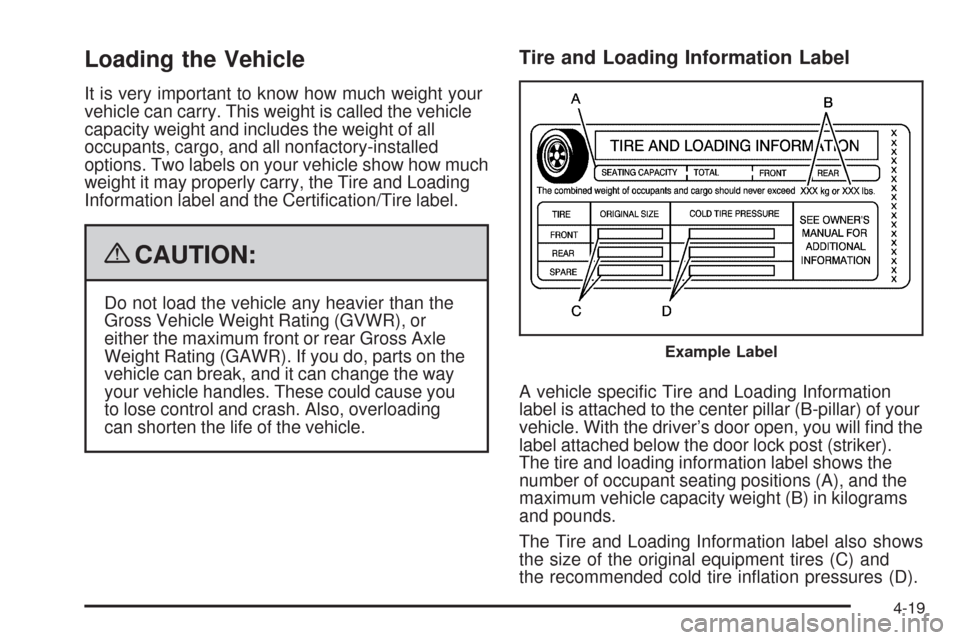
A vehicle specic Tire and Loading Information
label is attached to the center pillar (B-pillar) of your
vehicle. With the driver’s door open, you will nd the
label attached below the door lock post (striker).
The tire and loading information label shows the
number of occupant seating positions (A), and the
maximum vehicle capacity weight (B) in kilograms
and pounds.
The Tire and Loading Information label also shows
the size of the original equipment tires (C) and
the recommended cold tire ination pressures (D).
Example Label
4-19
Page 371 of 464

You will have two minutes to match the rst tire/wheel
position, and ve minutes overall to match all four
tire/wheel positions. If it takes longer than two minutes, to
match the rst tire and wheel, or more than ve minutes
to match all four tire and wheel positions the matching
process stops and you will need to start over.
The TPMS sensor matching process is outlined below:
1. Set the parking brake.
2. Turn the ignition switch to RUN with the engine off.
3. Using the Remote Keyless Entry (RKE) transmitter,
lock and unlock the vehicle’s doors.
4. Press and hold the RKE transmitter’s LOCK and
UNLOCK buttons at the same time, for about
three seconds. The horn chirps two times indicating
the receiver is ready for the sensor matching
process to begin.
5. Start with the driver side front tire. The driver side
turn signal lamp comes on.6. Remove the valve cap from the valve cap stem.
Activate the TPMS sensor by increasing or
decreasing the tire’s air pressure for ve seconds,
or until a horn chirp sounds. The horn chirp,
which may take up to 30 seconds to sound,
conrms that the sensor identication code has
been matched to this tire and wheel position.
7. Proceed to the passenger side front tire, and repeat
the procedure in Step 6.
8. Proceed to the passenger side rear tire, and repeat
the procedure in Step 6.
9. Proceed to the driver side rear tire, and repeat the
procedure in Step 6.
10. After hearing the conrming horn chirp for the driver
side rear tire, the tire sensor matching process
ends. Turn the ignition switch to LOCK.
11. Set all four tires to the recommended air pressure
level as indicated on the Tire and Loading
Information label.
12. Put the valve caps back on the valve stems.
5-61
Page 408 of 464

Headlamp Wiring
The headlamp wiring is protected by four internal fuses
in the underhood fuse block. An electrical overload
will cause the lamps to go on and off, or in some cases
to remain off. If this happens, have your headlamp
wiring checked right away.
Windshield Wiper Fuses
The windshield wiper motor is protected by an internal
fuse in the underhood fuse block. If the motor overheats
due to heavy snow, etc., the wiper will stop until the
motor cools. If the overload is caused by some electrical
problem, be sure to get it xed.
The rear washer pump is controlled by a relay located
in the engine compartment, behind the windshield
washer uid reservoir. The rear wiper motor is protected
by a fuse located in the instrument panel fuse block.
Power Windows and Other
Power Options
Circuit breakers in the instrument panel fuse panel
protect the power windows and other power accessories.
When the current load is too heavy, the circuit breaker
opens and closes, protecting the circuit until the
problem is xed.
Fuses and Circuit Breakers
The wiring circuits in the vehicle are protected from
short circuits by a combination of fuses, circuit breakers
and fusible thermal links. This greatly reduces the
chance of res caused by electrical problems.
Look at the silver-colored band inside the fuse. If the
band is broken or melted, replace the fuse. Be sure you
replace a bad fuse with a new one of the identical
size and rating.
Fuses of the same amperage can be temporarily
borrowed from another fuse location, if a fuse goes out.
Replace the fuse as soon as you can.
Instrument Panel Fuse Block
The instrument panel fuse block is located at the right
end of the instrument panel, on the passenger side
of the vehicle. Open the front passenger door,
and remove the cover, to access the fuse block.
Your vehicle may not have all of the fuses listed.
5-98