2009 CHEVROLET UPLANDER climate control
[x] Cancel search: climate controlPage 180 of 464
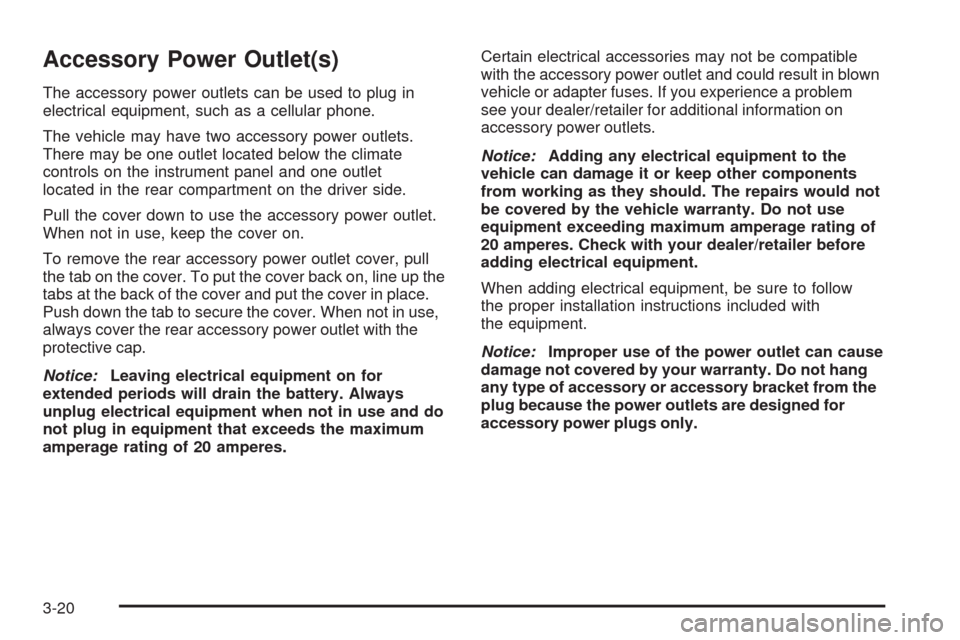
Accessory Power Outlet(s)
The accessory power outlets can be used to plug in
electrical equipment, such as a cellular phone.
The vehicle may have two accessory power outlets.
There may be one outlet located below the climate
controls on the instrument panel and one outlet
located in the rear compartment on the driver side.
Pull the cover down to use the accessory power outlet.
When not in use, keep the cover on.
To remove the rear accessory power outlet cover, pull
the tab on the cover. To put the cover back on, line up the
tabs at the back of the cover and put the cover in place.
Push down the tab to secure the cover. When not in use,
always cover the rear accessory power outlet with the
protective cap.
Notice:Leaving electrical equipment on for
extended periods will drain the battery. Always
unplug electrical equipment when not in use and do
not plug in equipment that exceeds the maximum
amperage rating of 20 amperes.Certain electrical accessories may not be compatible
with the accessory power outlet and could result in blown
vehicle or adapter fuses. If you experience a problem
see your dealer/retailer for additional information on
accessory power outlets.
Notice:Adding any electrical equipment to the
vehicle can damage it or keep other components
from working as they should. The repairs would not
be covered by the vehicle warranty. Do not use
equipment exceeding maximum amperage rating of
20 amperes. Check with your dealer/retailer before
adding electrical equipment.
When adding electrical equipment, be sure to follow
the proper installation instructions included with
the equipment.
Notice:Improper use of the power outlet can cause
damage not covered by your warranty. Do not hang
any type of accessory or accessory bracket from the
plug because the power outlets are designed for
accessory power plugs only.
3-20
Page 182 of 464
Cigarette Lighter
For vehicles with a cigarette lighter, it is located on the
instrument panel below the climate controls. Push
the lighter in all the way and let go. It pops back out
when it is ready to be used.
Notice:Holding a cigarette lighter in while it is
heating does not let the lighter back away from the
heating element when it is hot. Damage from
overheating can occur to the lighter or heating
element, or a fuse could be blown. Do not hold a
cigarette lighter in while it is heating.
Notice:If papers, pins, or other ammable items
are put in the ashtray, hot cigarettes or other
smoking materials could ignite them and possibly
damage your vehicle. Never put ammable items in
the ashtray.
Climate Controls
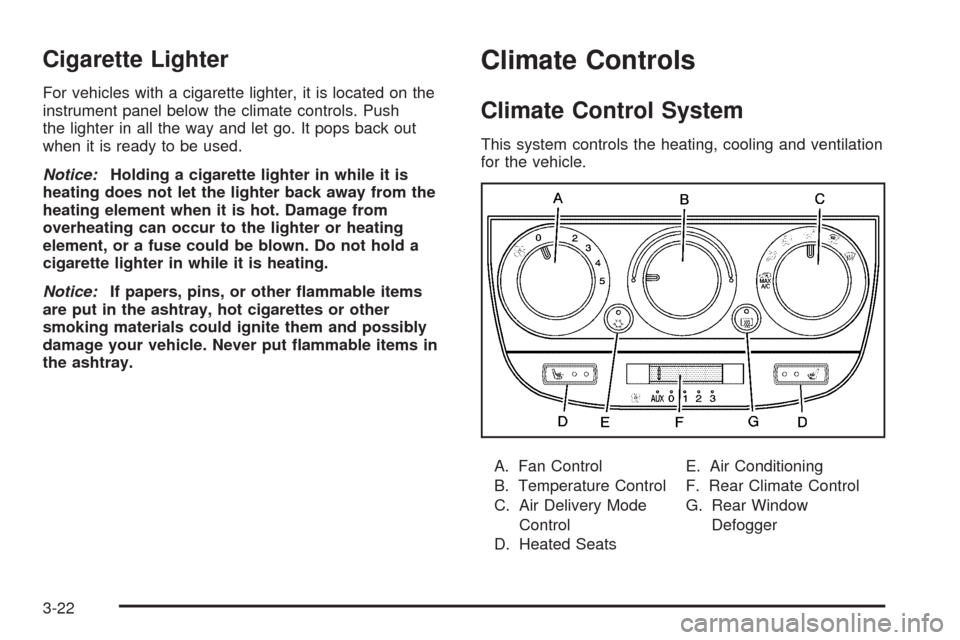
Climate Control System
This system controls the heating, cooling and ventilation
for the vehicle.
A. Fan Control
B. Temperature Control
C. Air Delivery Mode
Control
D. Heated SeatsE. Air Conditioning
F. Rear Climate Control
G. Rear Window
Defogger
3-22
Page 185 of 464
Dual Climate Control System
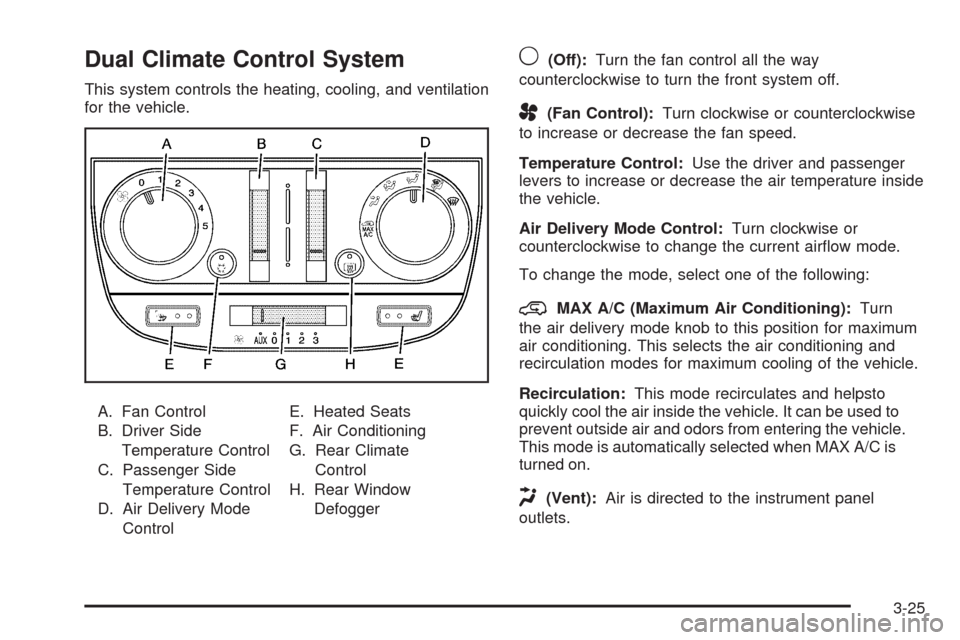
This system controls the heating, cooling, and ventilation
for the vehicle.
A. Fan Control
B. Driver Side
Temperature Control
C. Passenger Side
Temperature Control
D. Air Delivery Mode
ControlE. Heated Seats
F. Air Conditioning
G. Rear Climate
Control
H. Rear Window
Defogger
9(Off):Turn the fan control all the way
counterclockwise to turn the front system off.
A(Fan Control):Turn clockwise or counterclockwise
to increase or decrease the fan speed.
Temperature Control:Use the driver and passenger
levers to increase or decrease the air temperature inside
the vehicle.
Air Delivery Mode Control:Turn clockwise or
counterclockwise to change the current airow mode.
To change the mode, select one of the following:
@MAX A/C (Maximum Air Conditioning):Turn
the air delivery mode knob to this position for maximum
air conditioning. This selects the air conditioning and
recirculation modes for maximum cooling of the vehicle.
Recirculation:This mode recirculates and helpsto
quickly cool the air inside the vehicle. It can be used to
prevent outside air and odors from entering the vehicle.
This mode is automatically selected when MAX A/C is
turned on.
H(Vent):Air is directed to the instrument panel
outlets.
3-25
Page 188 of 464

Rear Climate Control System
For vehicles with a rear climate control system, the
driver or rear seat passengers may be able to adjust the
fan speed for the rear seating area. This system works
with the main climate control system.
This lever is located below the main climate control
system and it is used to adjust the fan speed for the rear
seat passengers.
9(Off):Turns the fan off.
A(Fan):Slide the lever to 1, 2, or 3 to increase or
decrease airow to the rear seating area.
AUX (Auxiliary):Slide the lever to AUX to let the rear
passengers adjust the temperature and airow to the rear
seating area.When the front climate control is in AUX and the rear
climate control fan or temperature button is pressed, the
display shows the same airow modes as the front
climate control system. SeeDual Climate Control
System on page 3-25Dual Climate Control System.
The front control must be in the AUX position to enable
adjustment of the temperature and fan speed on the
rear control system. If it is not in AUX, pressing the fan
or temperature button on the rear climate control will
show a DISABLED message on the Rear Seat
Entertainment (RSE) system display.
qg(Decrease Setting):Press to decrease the fan
or temperature setting while arrows are displayed.
rl(Increase Setting):Press to increase the fan or
temperature setting while arrows are displayed.
9(Fan)b(Temperature):Press once to enable
adjustment of the fan speed. The current fan speed
setting and arrows are highlighted on the display screen.
3-28
Page 189 of 464

Press eitherqgorrlto increase or decrease
fan speed. The on screen display disappears after
a few seconds.
Press
9btwice to enable temperature adjustment.
After pressing
9b, the current temperature settings
are highlighted and appear in the on screen display. The
arrows indicate that to increase or decrease
temperature, press either the
qgorrlbutton.
The on screen display disappears after a few seconds.
Press
9ba third time to turn off the on screen
display.
QR:Press to toggle between the fan and
temperature settings.
Rear Air Outlets
The outlet behind the driver side rear seat is for the cold
air return. Be sure to keep it free from obstructions.
Also, keep the area around the base of the center
instrument panel console, between and under the front
seats, free of objects that could also obstruct airow
to the rear seating area.
SeeClimate Control System on page 3-22orDual
Climate Control System on page 3-25for more
information on the main climate control system.
SeeOutlet Adjustment on page 3-27for information on
ventilation.
Passenger Compartment Air Filter
Both outside and recirculated air are routed through a
passenger compartment lter. Pollen, dust particles and
other contaminants are removed by the lter. Air
reductions indicate that the lter needs to be replaced.
SeeScheduled Maintenance on page 6-4for
replacement intervals.
The access panel for the passenger compartment air
lter is located in the back of the glove box. To replace
the lter:
1. Pull the tab located on the outer access panel
up and out.
3-29
Page 210 of 464

Compass Calibration
The compass can be manually calibrated. Only calibrate
the compass in a magnetically clean and safe location,
such as an open parking lot, where driving the vehicle in
circles is not a danger. It is suggested to calibrate away
from tall buildings, utility wires, manhole covers, or other
industrial structures, if possible.
If CAL should ever appear in the DIC display, the
compass should be calibrated.
If the DIC display does not show a heading, for
example, N for North, or the heading does not change
after making turns, there may be a strong magnetic eld
interfering with the compass. Such interference may be
caused by a magnetic CB or cell phone antenna mount, a
magnetic emergency light, magnetic note pad holder, or
any other magnetic item. Turn off the vehicle, move the
magnetic item, then turn on the vehicle and calibrate the
compass.To calibrate the compass, use the following procedure:Compass Calibration Procedure
1. Before calibrating the compass, make sure the
compass zone is set to the variance zone in
which the vehicle is located. See “Compass
Variance (Zone) Procedure” earlier in this section.
Do not operate any switches such as window,
sunroof, climate controls, seats, etc. during
the calibration procedure.
2. Press the menu button until COMPASS
CALIBRATION displays.
3. Press the set/reset button to start the compass
calibration.
4. The DIC will display CALIBRATION BEGUN DRIVE
UNTIL DONE. Drive the vehicle in tight circles at
less than 5 mph (8 km/h) to complete the calibration.
The DIC will display CALIBRATION FINISHED
for a few seconds when the calibration is complete.
3-50
Page 258 of 464

An error message could display if any other type of
media is inserted into the DVD player.
If an error message displays on the video screen, see
“DVD Messages” later in this section.
DVD Player Buttons
cY(Stop/Eject):Press and release to stop playing,
rewinding, or fast forwarding.
Press
cYtwice to eject a disc. If the player is
already stopped, then only press
cYonce.
DVD AUX (Disc Auxiliary):Press to switch the system
between the DVD player and an auxiliary device.
rj(Play/Pause):Press to start play of a disc. If the
disc is playing, press
rjto pause it. Pressrj
again to continue playing the disc.
43(Wired Headphone Volume):Press to select
the correct headphone, then press
rorqto increase
or decrease the headphone volume.
When a DVD is playing in the DVD player and the RSA
system is on,
cYandrjare the only buttons
that will work.
RSA SRC (Rear Seat Audio Source):Press and
release to turn on the RSA system and to switch
between AM, FM1, FM2, XM1, XM2, or the front CD
player. If one of the sources is not available, the system
skips over the source when this button is pressed.
Press and hold to turn off RSA.
q,Q,r,R(Directional Arrows):Press to navigate
through DVD menus.
QandRmove through MP3 folders.
g(Fast Reverse):Press to fast reverse the DVD and
CD. To stop reversing, press
rjorcY. While
the DVD is playing the copyright information or previews,
gmay not work. RSE Faceplate with Rear Seat Climate Controls
shown, RSE Faceplate without Rear Seat Climate
Controls similar
3-98
Page 259 of 464

l(Fast Forward):Press to fast forward the DVD and
CD. To stop forwarding, press
rjorcY. While
the DVD is playing the copyright information or previews,
lmay not work.
MENU (Disc):Press to view the main DVD menu. The
menu is different on every disc. Use
q,Q,r,or
Rto move the cursor around the menu. After making a
selection, press
r.
r(Enter/Select):Press to select the choice that is
highlighted in any menu.
z(Display Control Button):Press to open the RSE
On-Screen Display (OSD) menus to adjust the color,
tint, brightness, contrast, and display modes.
For vehicles without rear seat climate control,z
can take the place of9C.
For vehicles with rear seat climate control,zis
also found on the remote control.
Playing a Disc
To play a disc, insert the disc with the label side up into
the loading slot. The DVD player continues loading
the disc and the player automatically starts if the vehicle
is in ACC/ACCESSORY, ON/RUN, or RAP.
If a disc is already in the player make sure that the DVD
player is on, then press
rjon the player faceplate or
on the remote control. Press DVD AUX on the player
faceplate, or CD AUX on the radio faceplate until RSE
displays, to start playing a disc.
Some DVDs do not allow fast forwarding or skipping of
the copyright information or previews. Some DVDs
begins playing after the previews have nished. If the
DVD does not begin playing at the main title, refer to the
on-screen instructions.
To stop playing a disc, press
cYon the DVD player
faceplate or the remote control.
To resume playback, press
rjon the DVD player
faceplate or the remote control. The movie should
resume play from where it was last stopped if the disc
has not been ejected.
If the disc has been ejected, the disc resumes play at
the beginning of the disc.
3-99