2009 CHEVROLET TRAVERSE lock
[x] Cancel search: lockPage 1 of 422

Seats and Restraint
System............................... 1-1
Head Restraints
.............. 1-2
Front Seats
.................... 1-3
Rear Seats
.................... 1-9
Safety Belts
..................1-14
Child Restraints
.............1-27
Airbag System
..............1-46
Restraint System
Check
......................1-59
Features and Controls...... 2-1
Keys
............................. 2-2
Doors and Locks
............ 2-8
Windows
......................2-14
Theft-Deterrent
Systems
...................2-16
Starting and Operating
Your Vehicle
.............2-20
Mirrors
.........................2-31
Object Detection
Systems
...................2-36
OnStar
®System
............2-43Universal Home Remote
System
.....................2-47
Storage Areas
...............2-52
Sunroof
........................2-56
Instrument Panel............... 3-1
Instrument Panel
Overview
.................... 3-4
Climate Controls
............3-19
Warning Lights, Gages,
and Indicators
............3-30
Driver Information
Center (DIC)
.............3-44
Audio System(s)
............3-73
Driving Your Vehicle......... 4-1
Your Driving, the Road,
and the Vehicle
........... 4-1
Towing
........................4-21
Service and
Appearance Care............... 5-1
Service
.......................... 5-3
Fuel
.............................. 5-5
Checking Things Under
the Hood
.................... 5-9Headlamp Aiming
..........5-33
Bulb Replacement
.........5-33
Windshield Wiper Blade
Replacement
.............5-35
Tires
...........................5-36
Appearance Care
..........5-78
Vehicle Identication
......5-85
Electrical System
...........5-85
Capacities and
Specications
............5-92
Maintenance Schedule...... 6-1
Maintenance Schedule
..... 6-1
Customer Assistance
Information........................ 7-1
Customer Assistance and
Information
................. 7-1
Reporting Safety
Defects
.....................7-14
Vehicle Data Recording
and Privacy
...............7-16
Index....................................i-1
2009 Chevrolet Traverse Owner ManualM
Page 4 of 422

Vehicle Symbol Chart
Here are some additional symbols
that may be found on the vehicle
and what they mean. For more
information on the symbol, refer to
the index.
9:Airbag Readiness Light
#:Air Conditioning
!:Antilock Brake System (ABS)
g:Audio Steering Wheel
Controls or OnStar®
$:Brake System Warning Light
":Charging System
I:Cruise Control
B:Engine Coolant Temperature
O:Exterior Lamps
#:Fog Lamps
.:Fuel Gage
+:Fuses
i:Headlamp High/Low-Beam
Changer
j:LATCH System Child Restraints
*:Malfunction Indicator Lamp
::Oil Pressure
g:Outside Power Foldaway
Mirrors
}:Power
/:Remote Vehicle Start
>:Safety Belt Reminders
7:Tire Pressure Monitor
_:Tow/Haul Mode
F:Traction Control
M:Windshield Washer Fluid
iv Preface
Page 6 of 422
Head Restraints
The vehicle’s front seats have
adjustable head restraints in all
outboard seating positions.
{CAUTION
With head restraints that are not
installed and adjusted properly,
there is a greater chance that
occupants will suffer a neck/spinal
injury in a crash. Do not drive until
the head restraints for all
occupants are installed and
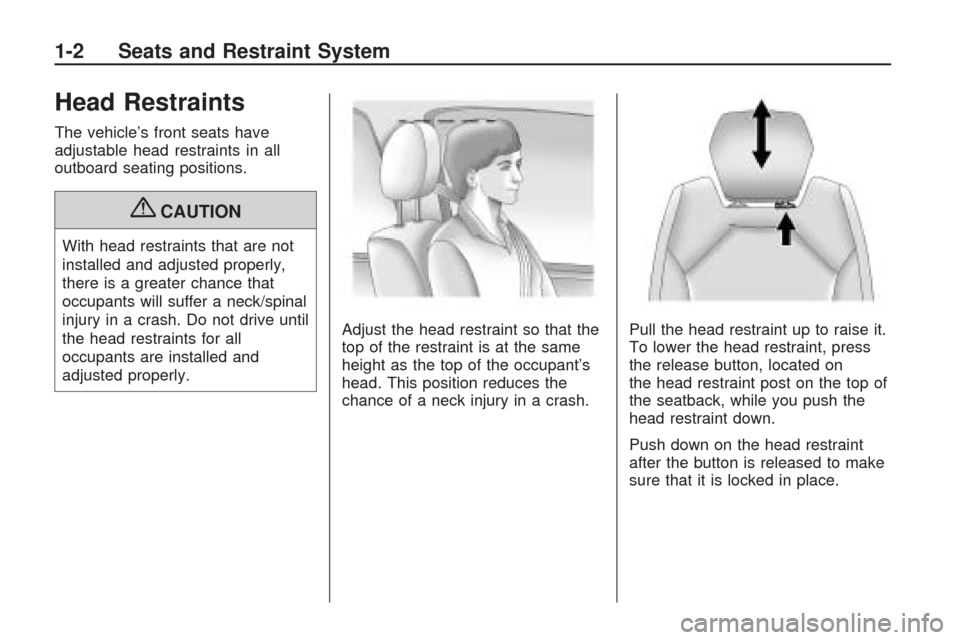
adjusted properly.Adjust the head restraint so that the
top of the restraint is at the same
height as the top of the occupant’s
head. This position reduces the
chance of a neck injury in a crash.Pull the head restraint up to raise it.
To lower the head restraint, press
the release button, located on
the head restraint post on the top of
the seatback, while you push the
head restraint down.
Push down on the head restraint
after the button is released to make
sure that it is locked in place.
1-2 Seats and Restraint System
Page 7 of 422
Front Seats
Manual Seats
{CAUTION
You can lose control of the
vehicle if you try to adjust a
manual driver’s seat while the
vehicle is moving. The sudden
movement could startle and
confuse you, or make you push a
pedal when you do not want to.
Adjust the driver’s seat only when
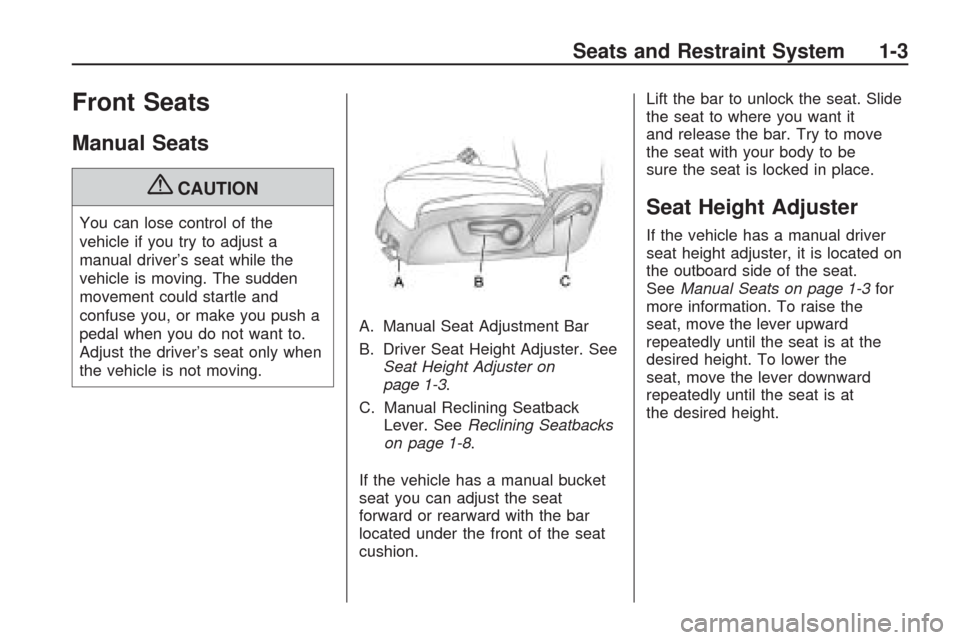
the vehicle is not moving.A. Manual Seat Adjustment Bar
B. Driver Seat Height Adjuster. See
Seat Height Adjuster on
page 1-3.
C. Manual Reclining Seatback
Lever. SeeReclining Seatbacks
on page 1-8.
If the vehicle has a manual bucket
seat you can adjust the seat
forward or rearward with the bar
located under the front of the seat
cushion.Lift the bar to unlock the seat. Slide
the seat to where you want it
and release the bar. Try to move
the seat with your body to be
sure the seat is locked in place.Seat Height Adjuster
If the vehicle has a manual driver
seat height adjuster, it is located on
the outboard side of the seat.
SeeManual Seats on page 1-3for
more information. To raise the
seat, move the lever upward
repeatedly until the seat is at the
desired height. To lower the
seat, move the lever downward
repeatedly until the seat is at
the desired height.
Seats and Restraint System 1-3
Page 11 of 422

See “MEMORY SEAT RECALL”
underDIC Vehicle Customization
(With DIC Buttons) on page 3-65for
more information.
To stop recall movement of the
memory feature at any time, press
one of the power seat controls,
memory buttons, or power mirror
buttons.
If something has blocked the driver
seat while recalling a memory
position, the driver seat recall
may stop working. If this happens,
press the appropriate control for
the area that is not recalling
for two seconds, after the
obstruction is removed. Then try
recalling the memory position again
by pressing the appropriate
memory button. If the memory
position is still not being recalled,
see your dealer/retailer for service.Easy Exit Seat
The control for this feature is
located on the driver door panel
between buttons 1 and 2.
With the vehicle in P (Park), the
exit position can be recalled
by pressing the exit button. You will
hear a single beep. The driver
seat will move back.
If the easy exit seat feature is on in
the Driver Information Center (DIC),
automatic seat movement will occur
when the key is removed from the
ignition. See “EASY EXIT SEAT”
underDIC Vehicle Customization
(With DIC Buttons) on page 3-65for
more information.Further programming for the
memory seat feature can be done
using the DIC. You can select
or cancel the following:
The automatic easy exit seat
feature.
The remote memory seat recall
feature.
For programming information, see
DIC Vehicle Customization (With
DIC Buttons) on page 3-65.
Seats and Restraint System 1-7
Page 12 of 422

Reclining Seatbacks
Manual Reclining Seatbacks
{CAUTION
You can lose control of the
vehicle if you try to adjust a
manual driver’s seat while the
vehicle is moving. The sudden
movement could startle and
confuse you, or make you push a
pedal when you do not want to.
Adjust the driver’s seat only when
the vehicle is not moving.
{CAUTION
If either seatback is not locked, it
could move forward in a sudden
stop or crash. That could cause
injury to the person sitting there.
Always push and pull on the
seatbacks to be sure they are
locked.In vehicles with seats that have
manual reclining seatbacks, the lever
used to operate them is located on
the outboard side of the seat.
To recline the seatback, do the
following:
1. Lift the recline lever.
2. Move the seatback to the desired
position, then release the lever to
lock the seatback in place.
3. Push and pull on the seatback to
make sure it is locked.
To return the seatback to an upright
position, do the following:
1. Lift the lever fully without
applying pressure to the
seatback and the seatback will
return to the upright position.
2. Push and pull on the seatback to
make sure it is locked.
Power Reclining Seatbacks
In vehicles with seats that have
power reclining seatbacks,
the control used to recline them is
located on the outboard side of
the seat behind the power
seat control. SeePower Seats on
page 1-4for more information.
To recline the seatback, tilt the
top of the control rearward.
To bring the seatback forward, tilt
the top of the control forward.
1-8 Seats and Restraint System
Page 14 of 422

Entering and Exiting the
Third Row
{CAUTION
Using the third row seating
position while the second row is
folded, or folded and tumbled,
could cause injury in a sudden stop
or crash. Be sure to return the seat
to the passenger seating position.
Push and pull on the seat to make
sure it is locked into place.
Notice:Folding a rear seat with
the safety belts still fastened may
cause damage to the seat or the
safety belts. Always unbuckle the
safety belts and return them to
their normal stowed position
before folding a rear seat.To access the third row:
1. Remove objects on the oor in
front of or on the second row
seat, or in the seat tracks on
the oor.
2. Move the front center console
armrest completely forward.
SeeCenter Console Storage on
page 2-52.3. Place folding armrests in the
upright position.
4. Ensure that the safety belt is
unfastened and in the stowed
position.
5. Pull the sliding seat lever (C)
forward and move the seatback
forward. The seat cushion
will fold, and the entire seat will
slide forward.
1-10 Seats and Restraint System
Page 15 of 422

Returning the Seat to the
Seating Position
To return the second row seat to its
normal seating position:
1. Remove objects on the oor
behind the second row seat
or in the seat tracks on the oor.
2. Pull the seatback rearward until it
is locked in place.
3. Slide the seat rearward by
pushing on the seatback until it is
locked into place.
4. Push down on the rear of the
seat cushion until it is locked
in place.
5. Push and pull on the seatback
and seat cushion to make sure
they are locked in place.
6. Check that the safety belt is not
under the seat cushion.
Reclining the Seatbacks
To recline the seatback:
1. Leaning forward in the seat, pull
the reclining seatback strap (B).
2. Move the seatback to the desired
position, then release the strap
to lock the seatback in place.
3. Push and pull on the seatback to
make sure it is locked.
Folding the Rear Seat
To fold the second row seats:
1. Remove anything on or under
the seat.
2. Place the armrest in the upright
position, and unfasten the
safety belt.
3. Pull forward on the reclining
seatback strap (B) and push
down on the seatback.
If the headrest touches the front
seat, slide the second row
seat rearward.To return the seatback to the
seating position, lift the upper corner
of the seatback and push it
rearward until it locks into place.
Push and pull on the seatback
to make sure it is locked.
Adjusting the Seats
To adjust the second row seats, pull
outward on the seat adjustment
handle (A). Slide the seat forward or
rearward to the desired position.
Release the handle and push and
pull on the seat to make sure it is
locked.
Seats and Restraint System 1-11