Page 303 of 484
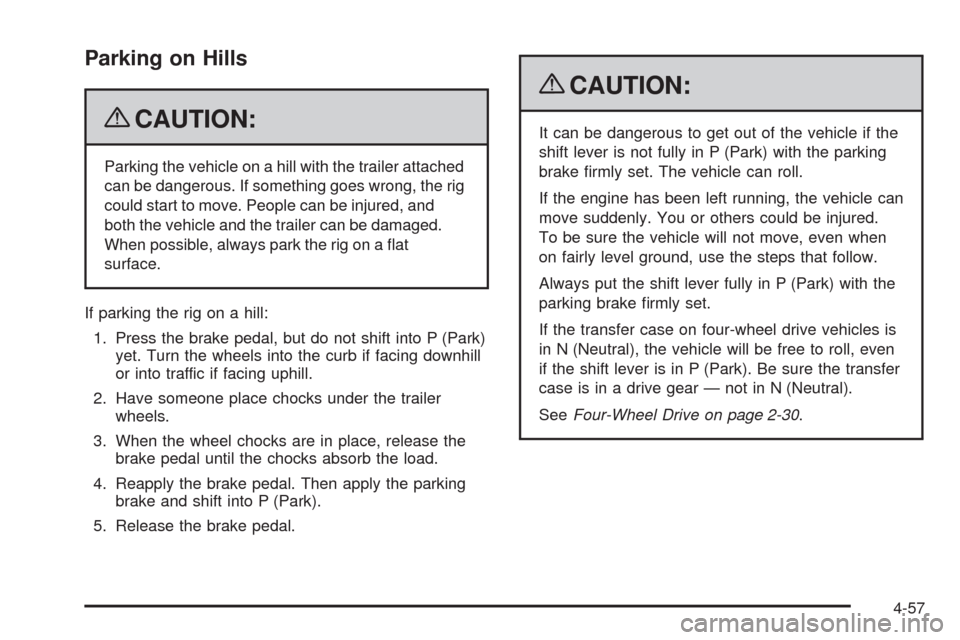
Parking on Hills
{CAUTION:
Parking the vehicle on a hill with the trailer attached
can be dangerous. If something goes wrong, the rig
could start to move. People can be injured, and
both the vehicle and the trailer can be damaged.
When possible, always park the rig on a at
surface.
If parking the rig on a hill:
1. Press the brake pedal, but do not shift into P (Park)
yet. Turn the wheels into the curb if facing downhill
or into traffic if facing uphill.
2. Have someone place chocks under the trailer
wheels.
3. When the wheel chocks are in place, release the
brake pedal until the chocks absorb the load.
4. Reapply the brake pedal. Then apply the parking
brake and shift into P (Park).
5. Release the brake pedal.
{CAUTION:
It can be dangerous to get out of the vehicle if the
shift lever is not fully in P (Park) with the parking
brake rmly set. The vehicle can roll.
If the engine has been left running, the vehicle can
move suddenly. You or others could be injured.
To be sure the vehicle will not move, even when
on fairly level ground, use the steps that follow.
Always put the shift lever fully in P (Park) with the
parking brake rmly set.
If the transfer case on four-wheel drive vehicles is
in N (Neutral), the vehicle will be free to roll, even
if the shift lever is in P (Park). Be sure the transfer
case is in a drive gear — not in N (Neutral).
SeeFour-Wheel Drive on page 2-30.
4-57
Page 304 of 484

Leaving After Parking on a Hill
1. Apply and hold the brake pedal while you:
start the engine,
shift into a gear, and
release the parking brake.
2. Let up on the brake pedal.
3. Drive slowly until the trailer is clear of the chocks.
4. Stop and have someone pick up and store the
chocks.
Maintenance When Trailer Towing
The vehicle needs service more often when pulling a
trailer. See this manual’s Maintenance Schedule or Index
for more information. Things that are especially important
in trailer operation are automatic transmission uid,
engine oil, axle lubricant, belts, cooling system and brake
system. It is a good idea to inspect these before and
during the trip.
Check periodically to see that all hitch nuts and bolts
are tight.
Trailer Wiring Harness
The vehicle may have a seven-wire trailer towing
harness. This harness may have a seven-pin
universal heavy-duty trailer connector (if equipped
with the trailering package) that is attached to a
bracket on the hitch platform or included with the
four-pin trailer towing harness. If the vehicle is not
equipped with the heavy-duty trailer connector, one
may be purchased from your dealer/retailer.
4-58
Page 305 of 484

The seven-wire harness contains the following trailer
circuits:
Yellow: Left Stop/Turn Signal
Dark Green: Right Stop/Turn Signal
Brown: Running Lamps
White: Ground
Light Green: Back-up Lamps
Dark Blue: Electric Brakes
Red: Battery Feed (The chassis wiring ring terminal
must be fastened to a stud on the underhood
electrical center before the trailer feed will become
active.)
If towing a light-duty trailer with a standard four-way
round pin connector, an adapter connector is available
from your dealer/retailer.
If charging a remote (non-vehicle) battery, turn on the
headlamps to boost the vehicle system voltage and
properly charge the battery.
The vehicle is also equipped with wiring for an electric
trailer brake controller. These wires are located inside the
vehicle on the driver side under the instrument panel.
These wires should be connected to an electric trailer
brake controller by your dealer/retailer or a qualied
service center.The vehicle may be equipped with a four-pin trailer
towing harness. This harness has a four-pin trailer
connector that contains the following trailer circuits:
Yellow: Left Stop/Turn Signal
Dark Green: Right Stop/Turn Signal
Brown: Running Lamps
White: Ground
This harness also contains the following trailer circuits
that are not connected to the four-pin trailer connector:
Light Green: Back-Up Lamps
Dark Blue: Electric Brakes
Red: Battery Feed
If the vehicle is a TrailBlazer SS, a trailer wiring harness
extension, and instructions for installing this extension,
were provided when the vehicle was delivered. This
extension will allow the vehicle’s trailer wiring harness to
be more easily accessible. There is a four-way connector
on the harness. A seven-way adapter plug is also
included if the trailer requires it.
4-59
Page 332 of 484

How to Check Automatic Transmission
Fluid
Because this operation can be a little difficult, you may
choose to have this done at the dealer/retailer service
department.
If you do it yourself, be sure to follow all the instructions
here, or you could get a false reading on the dipstick.
Notice:Too much or too little uid can damage
your transmission. Too much can mean that some
of the uid could come out and fall on hot engine
parts or exhaust system parts, starting a re.
Too little uid could cause the transmission to
overheat. Be sure to get an accurate reading if
you check your transmission uid.
Wait at least 30 minutes before checking the
transmission uid level if you have been driving:
When outside temperatures are above 90°F (32°C).
At high speed for quite a while.
In heavy traffic — especially in hot weather.
While pulling a trailer.To get the right reading, the uid should be at normal
operating temperature, which is 180°F to 200°F
(82°C to 93°C).
Get the vehicle warmed up by driving about
15 miles (24 km) when outside temperatures are
above 50°F (10°C). If it is colder than 50°F (10°C),
drive the vehicle in 3 (Third) until the engine temperature
gage moves and then remains steady for 10 minutes.
A cold uid check can be made after the vehicle has
been sitting for eight hours or more with the engine off,
but this is used only as a reference. Let the engine run
at idle for ve minutes if outside temperatures are 50°F
(10°C) or more. If it is colder than 50°F (10°C), you may
have to idle the engine longer. Should the uid level be
low during this cold check, you must check the uid hot
before adding uid. Checking the uid hot will give a
more accurate reading of the uid level.
5-26
Page 342 of 484

If No Steam Is Coming From The
Engine Compartment
If an engine overheat warning is displayed but no
steam can be seen or heard, the problem may not be
too serious. Sometimes the engine can get a little too
hot when the vehicle:
Climbs a long hill on a hot day.
Stops after high-speed driving.
Idles for long periods in traffic.
Tows a trailer.
If the overheat warning is displayed with no sign of
steam:
1. Turn the air conditioning off.
2. Turn the heater on to the highest temperature and
to the highest fan speed. Open the windows as
necessary.
3. In heavy traffic, let the engine idle in N (Neutral)
while stopped. If it is safe to do so, pull off the
road, shift to P (Park) or N (Neutral) and let
the engine idle.
If the temperature overheat gage is no longer in the
overheat zone or an overheat warning no longer
displays, the vehicle can be driven. Continue to drive
the vehicle slow for about 10 minutes. Keep a safevehicle distance from the car in front of you. If the
warning does not come back on, continue to drive
normally.
If the warning continues, pull over, stop, and park the
vehicle right away.
If there is no sign of steam, idle the engine for three
minutes while parked. If the warning is still displayed,
turn off the engine until it cools down.
Engine Fan Noise
The vehicle has a clutched engine cooling fan. When
the clutch is engaged, the fan spins faster to provide
more air to cool the engine. In most everyday driving
conditions the clutch is not engaged. This improves fuel
economy and reduces fan noise. Under heavy vehicle
loading, trailer towing, and/or high outside temperatures,
the fan speed increases when the clutch engages so
you may hear an increase in fan noise. This is normal
and should not be mistaken as the transmission slipping
or making extra shifts. It is merely the cooling system
functioning properly. The fan will slow down when
additional cooling is not required and the clutch
disengages.
You may also hear this fan noise when the engine is
started. The sound will go away as the fan clutch
disengages.
5-36
Page 426 of 484
Fuses Usage
1Electrically-Controlled Air
Suspension
2Passenger Side High-Beam
HeadlampFuses Usage
3Passenger Side Low-Beam
Headlamp
4 Back-Up Trailer Lamps
5 Driver Side High-Beam Headlamp
5-120
Page 427 of 484
Fuses Usage
6 Driver Side Low-Beam Headlamp
7 Windshield Wiper
8 Active Transfer Case
9 Windshield Washer
10 Powertrain Control Module B
11 Fog Lamps
12 Stoplamp
13 Cigarette Lighter
14 Ignition Coils
15Transmission Control Module
Canister
16 Truck Body Controller, Ignition 1
17 Crank
18 Airbag
19 Trailer Electric Brake
21 Horn
22 Ignition E
23 Electronic Throttle Control
24Instrument Panel Cluster,
Driver Information Center
25Brake Transmission Shift
Interlock
26 Engine 1
27 BackupFuses Usage
28 Engine Control Module 1
29 Engine Control Module
30 Air Conditioning
31 Injector A
32 Trailer
33 Antilock Brakes (ABS)
34 Ignition A
35 Blower
36 Ignition B
50 Passenger Side Trailer Turn
51 Driver Side Trailer Turn
52 Hazard Flashers
53 Transmission
54 Oxygen Sensor B
55 Oxygen Sensor A
56 Injector B
57 Headlamp Driver Module
58 Body Controller 1
59 Electric Adjustable Pedals
61Vehicle Stability Enhancement
System
62 Regulated Voltage Control
63 Air Solenoid
64 Air Pump
5-121
Page 430 of 484
Fuses Usage
23 Blank
24 Unlock
25 Blank
26 Blank
27OnStar
®Overhead Battery,
OnStar®System
28 Sunroof
29 Not Used
30 Parking Lamps
31 Truck Body Controller Accessory
32 Truck Body Controller 5
33 Front Wipers
34 Vehicle Stop
35 Transmission Control Module
36Heat Ventilation Air
Conditioning B
37 Front Parking Lamps
Fuses Usage
38 Driver Side Turn Signal
39Heat Ventilation Air
Conditioning 1
40 Truck Body Controller 4
41 Radio
42 Trailer Park
43 Passenger Side Turn Signal
44 Heat Ventilation Air Conditioning
45 Rear Fog Lamps
46 Auxiliary Power 1
47 Ignition 0
48 Four-Wheel Drive
49 Blank
50 Truck Body Controller Ignition
51 Brakes
52 Truck Body Controller Run
5-124


