2009 CHEVROLET SUBURBAN ECU
[x] Cancel search: ECUPage 187 of 578
To put the cover in the vehicle:
1. Make sure the cover slot in the holder faces
rearward with the round surface facing down.
2. Then, hold the cover at an angle and place the
cover end cap into the slot in the passenger side
trim panel.
3. Move the other end of the cover forward and hold it
next to the driver’s side trim panel slot.
4. Press the end caps in, to allow the cover to t into
the trim slot.
5. Pull lightly on the cover holder to make sure it is
secure.
On extended wheelbase models there are two
cover positions. The slots furthest forward allow the
cover to be used if the third seat is removed or
folded down. The cover can be installed and
removed from either side.Sunroof
Your vehicle may be equipped with a power sliding
sunroof. To open or close the sunroof, the ignition needs
to be turned to ON/RUN, or Retained Accessory Power
(RAP) must be active. When RAP is active, the sunroof
will work for 10 minutes after the ignition is turned off, or
until a front door is opened. SeeRetained Accessory
Power (RAP) on page 2-28for more information.
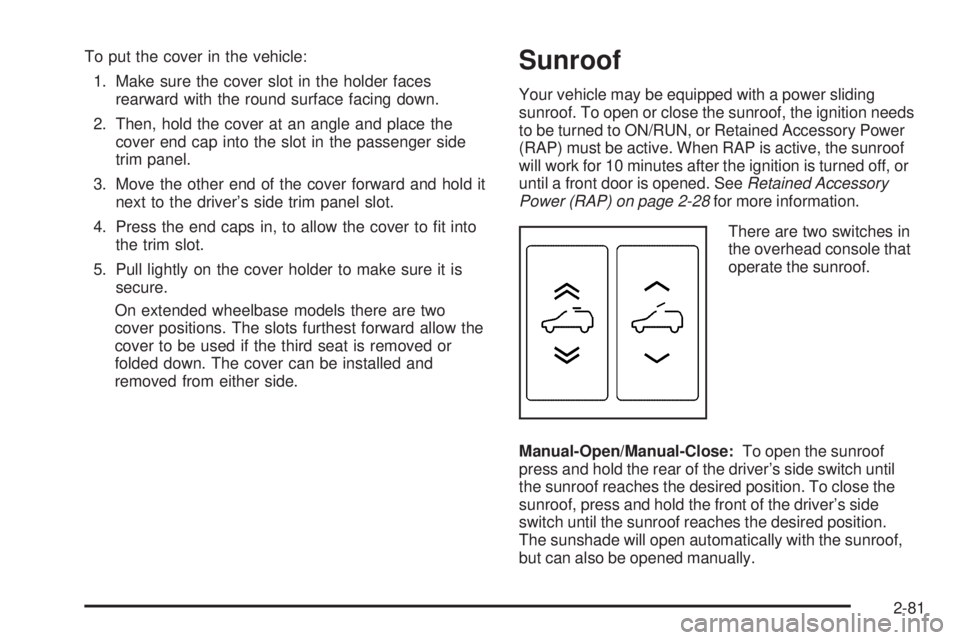
There are two switches in
the overhead console that
operate the sunroof.
Manual-Open/Manual-Close:To open the sunroof
press and hold the rear of the driver’s side switch until
the sunroof reaches the desired position. To close the
sunroof, press and hold the front of the driver’s side
switch until the sunroof reaches the desired position.
The sunshade will open automatically with the sunroof,
but can also be opened manually.
2-81
Page 190 of 578

Oil Pressure Light.........................................3-48
Security Light...............................................3-48
Fog Lamp Light............................................3-49
Cruise Control Light......................................3-49
Highbeam On Light.......................................3-49
Tow/Haul Mode Light....................................3-49
Fuel Gage...................................................3-50
Low Fuel Warning Light.................................3-51
Driver Information Center (DIC).......................3-51
DIC Operation and Displays
(With DIC Buttons)....................................3-52
DIC Operation and Displays
(Without DIC Buttons)................................3-58
DIC Compass..............................................3-61
DIC Warnings and Messages.........................3-64
DIC Vehicle Customization
(With DIC Buttons)....................................3-74Audio System(s).............................................3-83
Setting the Clock..........................................3-84
Radio(s)......................................................3-86
Using an MP3 (Radio with CD or
Six-Disc CD Player).................................3-105
Using an MP3 (Radio with CD and DVD
Player)...................................................3-109
XM Radio Messages...................................3-114
Navigation/Radio System..............................3-115
Bluetooth
®.................................................3-115
Rear Seat Entertainment (RSE) System.........3-127
Rear Seat Audio (RSA)................................3-136
Theft-Deterrent Feature................................3-138
Audio Steering Wheel Controls......................3-138
Radio Reception.........................................3-139
Rear Side Window Antenna..........................3-140
XM™ Satellite Radio Antenna System............3-140
Section 3 Instrument Panel
3-2
Page 236 of 578

Oil Pressure Light
{CAUTION:
Do not keep driving if the oil pressure is low. The
engine can become so hot that it catches re.
Someone could be burned. Check the oil as soon
as possible and have the vehicle serviced.
Notice:Lack of proper engine oil maintenance can
damage the engine. The repairs would not be
covered by the vehicle warranty. Always follow the
maintenance schedule in this manual for changing
engine oil.This light comes on briey while starting the engine. If it
does not, have the vehicle serviced by your dealer/
retailer. If the system is working normally the indicator
light then goes off.
If the light comes on and stays on, it means that oil is
not owing through the engine properly. The vehicle
could be low on oil and it might have some other system
problem.
Security Light
For information regarding
this light and the vehicle’s
security system, see
Content Theft-Deterrent on
page 2-22.
3-48
Page 303 of 578
No Artist Info:No artist information is available at this
time on this channel. The system is working properly.
No Title Info:No song title information is available
at this time on this channel. The system is working
properly.
No CAT Info:No category information is available at
this time on this channel. The system is working
properly.
No Information:No text or informational messages are
available at this time on this channel. The system is
working properly.
CAT Not Found:There are no channels available for
the selected category. The system is working properly.
XM Theftlocked:The XM receiver in the vehicle
could have previously been in another vehicle. For
security purposes, XM receivers cannot be swapped
between vehicles. If this message is received after
having the vehicle serviced, check with your
dealer/retailer.
XM Radio ID:If tuned to channel 0, this message
alternates with the XM™ Radio 8 digit radio ID label.
This label is needed to activate the service.Unknown:If this message is received when tuned to
channel 0, there could be a receiver fault. Consult
with your dealer/retailer.
Check XM Receivr:If this message does not clear
within a short period of time, the receiver could have a
fault. Consult with your dealer/retailer.
XM Not Available:If this message does not clear
within a short period of time, the receiver could have a
fault. Consult with your dealer/retailer.
Navigation/Radio System
For vehicles with a navigation radio system, see the
separate Navigation System manual.
Bluetooth®
Vehicles with a Bluetooth system can use a Bluetooth
capable cell phone with a Hands Free Prole to
make and receive phone calls. The system can be used
while the key is in ON/RUN or ACC/ACCESSORY
position. The range of the Bluetooth system can be up
to 30 ft. (9.1 m). Not all phones support all functions,
and not all phones are guaranteed to work with
the in-vehicle Bluetooth system. See gm.com/bluetooth
for more information on compatible phones.
3-115
Page 342 of 578
To remove the air dam:
1. Remove the two outboard air dam bolts.
2. With a at-blade tool, disengage the snaps.
3. After the bolts are removed and the snaps are
disengaged, push forward on the air dam until it
is free.
Notice:Operating your vehicle for extended
periods without the front fascia lower air dam
installed can cause improper air ow to the engine.
Always be sure to replace the front fascia air
dam when you are nished off-road driving.
After off-roading, be sure to reinstall the air dam:
1. Line up the snaps and push the air dam rearward
to engage the snaps.
2. Install the two outboard bolts.Loading Your Vehicle for Off-Road
Driving
{CAUTION:
Cargo on the load oor piled higher than the
seatbacks can be thrown forward during a
sudden stop. You or your passengers could
be injured. Keep cargo below the top of the
seatbacks.
Unsecured cargo on the load oor can be
tossed about when driving over rough terrain.
You or your passengers can be struck by
ying objects. Secure the cargo properly.
Heavy loads on the roof raise the vehicle’s
center of gravity, making it more likely to roll
over. You can be seriously or fatally injured if
the vehicle rolls over. Put heavy loads inside
the cargo area, not on the roof. Keep cargo
in the cargo area as far forward and low as
possible.
4-14
Page 343 of 578
There are some important things to remember about
how to load your vehicle.
The heaviest things should be on the oor, forward
of the rear axle. Put heavier items as far forward
as you can.
Be sure the load is properly secured, so things are
not tossed around.
You will nd other important information underLoading
the Vehicle on page 4-33andTires on page 5-61.
Environmental Concerns
Off-road driving can provide wholesome and satisfying
recreation. However, it also raises environmental
concerns. We recognize these concerns and urge every
off-roader to follow these basic rules for protecting the
environment:
Always use established trails, roads, and areas that
have been specially set aside for public off-road
recreational driving and obey all posted regulations.
Avoid any driving practice that could damage
shrubs, owers, trees, or grasses or disturb wildlife.
This includes wheel-spinning, breaking down trees,
or unnecessary driving through streams or over soft
ground.
Always carry a litter bag and make sure all refuse is
removed from any campsite before leaving.
Take extreme care with open res (where permitted),
camp stoves, and lanterns.
Never park your vehicle over dry grass or other
combustible materials that could catch re from
the heat of the vehicle’s exhaust system.
Traveling to Remote Areas
It makes sense to plan your trip, especially when going
to a remote area. Know the terrain and plan your route.
Get accurate maps of trails and terrain. Check to see if
there are any blocked or closed roads.
It is also a good idea to travel with at least one other
vehicle in case something happens to one of them.
For vehicles with a winch, be sure to read the winch
instructions. In a remote area, a winch can be handy
if you get stuck but you will want to know how to use it
properly.
4-15
Page 366 of 578
The Certication/Tire label also contains
information about your Front Axle Reserve
Capacity.
And, if you do have a heavy load, you should
spread it out.
{CAUTION:
Do not load the vehicle any heavier than
the Gross Vehicle Weight Rating (GVWR), or
either the maximum front or rear Gross Axle
Weight Rating (GAWR). If you do, parts on the
vehicle can break, and it can change the way
your vehicle handles. These could cause you
to lose control and crash. Also, overloading
can shorten the life of the vehicle.
Notice
:Overloading your vehicle may cause
damage. Repairs would not be covered by your
warranty. Do not overload your vehicle.
The label will help you decide how much cargo
and installed equipment your truck can carry.
Using heavier suspension components to
get added durability might not change your weight
ratings. Ask your dealer to help you load your
vehicle the right way.If you put things inside your vehicle — like
suitcases, tools, packages, or anything else — they
go as fast as the vehicle goes. If you have to stop
or turn quickly, or if there is a crash, they will keep
going.
{CAUTION:
Things you put inside your vehicle can strike
and injure people in a sudden stop or turn,
or in a crash.
Put things in the cargo area of your
vehicle. Try to spread the weight evenly.
Never stack heavier things, like
suitcases, inside the vehicle so that some
of them are above the tops of the seats.
Do not leave an unsecured child restraint
in your vehicle.
When you carry something inside the
vehicle, secure it whenever you can.
Do not leave a seat folded down unless
you need to.
There is also important loading information for
off-road driving in this manual. See “Loading Your
Vehicle for Off-Road Driving” underOff-Road
Driving on page 4-13.
4-38
Page 368 of 578
Here are some guidelines for safely carrying a snow
plow on your vehicle:
Make sure the weight on the front and rear axles
does not exceed the axle rating for each.
For the front axle, if more cargo or passengers
must be carried, appropriate counter ballast must
be installed rear of the rear axle. Counter ballast
must be properly secured so it will not move
during driving.
Follow the snow plow manufacturer’s
recommendations regarding rear ballast.
Rear ballast may be required to ensure a
proper front and rear weight distribution ratio,
even though the actual weight at the front axle
may be less than the front axle rating.
The snow plow manufacturer or installer can
assist you in determining the amount of rear ballast
required, to help make sure your snowplow/vehicle
combination does not exceed the GVW rating, the
front and rear axle ratings, and the front and rear
weight distribution ratio.
The total vehicle must not exceed the GVW rating.Front axle reserve capacity is the difference between
your front Gross Axle Weight Rating (GAWR) and
the front axle weight of your vehicle with full fuel and
passengers. Basically, it is the amount of weight you can
add to your front axle before reaching your front GAWR.
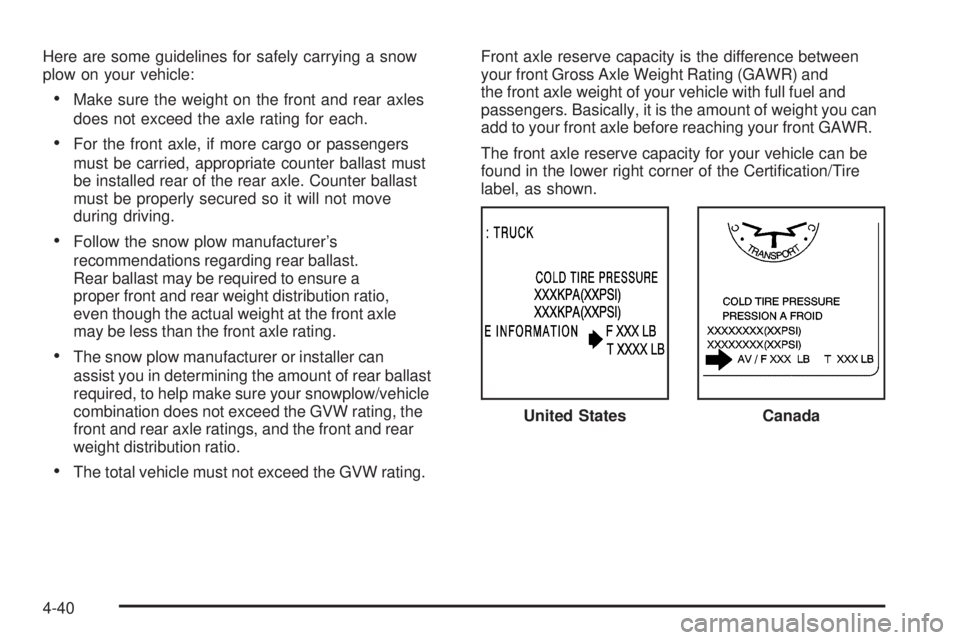
The front axle reserve capacity for your vehicle can be
found in the lower right corner of the Certication/Tire
label, as shown.
United States
Canada
4-40