2009 CHEVROLET MALIBU display
[x] Cancel search: displayPage 84 of 420
The high-beam headlamps, parking lamps, and
back-up lamps may come on each time
Kis pressed.
See “EXT (Exterior) LIGHTS” underDIC Vehicle
Personalization on page 3-50for additional information.
Pressing
Kon the RKE transmitter disarms the content
theft-deterrent system. SeeContent Theft-Deterrent on
page 2-18.
V(Remote Trunk Release):Press and hold for
about one second to unlock the trunk. The trunk can be
opened with the transmitter when the vehicle speed
is less than 2 mph (3 km/h) or when the ignition is off.
L(Vehicle Locator/Panic Alarm):Press and release
to locate the vehicle. The horn sounds three times
and the headlamps and turn signals ash three times.
Press and hold
Lfor about three seconds to initiate
the panic alarm. The horn sounds and the headlamps
and turn signals ash for 30 seconds. Press
Lagain
to cancel the panic alarm.
Programming Transmitters to the
Vehicle
Only RKE transmitters programmed to the vehicle
will work. If a transmitter is lost or stolen, a replacement
can be purchased and programmed through your
dealer/retailer. When the replacement transmitter is
programmed to the vehicle, all remaining transmitters
must also be programmed. Any lost or stolen transmitters
no longer work once the new transmitter is programmed.
Each vehicle can have up to four transmitters
programmed to it.
Battery Replacement
Replace the battery if the KEY FOB BATT (Battery)
LOW message displays in the DIC. See “KEY FOB BATT
(Battery) LOW” underDIC Warnings and Messages
on page 3-46for additional information.
Notice:When replacing the battery, do not touch
any of the circuitry on the transmitter. Static
from your body could damage the transmitter.
2-6
Page 89 of 420
Door Ajar Reminder
A chime will sound and the DOOR AJAR message
will display if one of the doors is not fully closed.
This happens when the ignition is on and the shift
lever is moved out of P (Park) or N (Neutral).
SeeDIC Warnings and Messages on page 3-46.
Delayed Locking
This feature will delay the actual locking of the doors
and arming of the theft-deterrent system for ve seconds
when the power door lock switch or remote keyless
entry transmitter is used to lock the vehicle.
If any door is open when locking the vehicle, three
chimes will sound signaling that the delayed locking
feature is active. Five seconds after the last door
is closed, all of the doors will lock. To cancel the delay
and lock the doors immediately, press the lock button
on the remote keyless entry transmitter or the power
door lock switch a second time. The theft deterrent
system will arm after 30 seconds.
Programmable Automatic Door
Locks
The vehicle is programmed to lock all doors
automatically when the following are met:
All doors are closed.
The ignition is on.
The vehicle is shifted out of (P) Park.
This feature cannot be disabled.
All doors will unlock when the vehicle is shifted into
(P) Park.
The power door unlock function can be programmed
through prompts displayed on the Driver Information
Center (DIC). SeeDIC Vehicle Personalization on
page 3-50.
2-11
Page 101 of 420
R(ON/RUN):This position can be used to operate the
electrical accessories and to display some instrument
panel warning lights. The switch will stay in this position
while the engine is running.
If you leave the key in the ACC/ACCESSORY or
ON/RUN position with the engine off, the battery could
be drained. You may not be able to start the vehicle
if the battery is allowed to drain for an extended period
of time.
/(START):This position starts the engine. When the
engine starts, release the key. The ignition switch will
return to the ON/RUN position for driving.
A warning tone will sound when the driver door is opened,
the ignition is in ACC/ACCESSORY or LOCK/OFF and
the key is in the ignition.
Retained Accessory Power (RAP)
These vehicle accessories can be used for up to
10 minutes after the engine is turned off:
Audio System
Power Windows
Heated Seats (if equipped)
Sunroof (if equipped)
These features continue to work up to 10 minutes after
the ignition is turned to LOCK/OFF.
The power windows, heated seats, and sunroof will
work until any door is opened.
The radio continues to work until the driver door is
opened.
All these features operate when the key is in the
ON/RUN or ACC/ACCESSORY.
2-23
Page 109 of 420
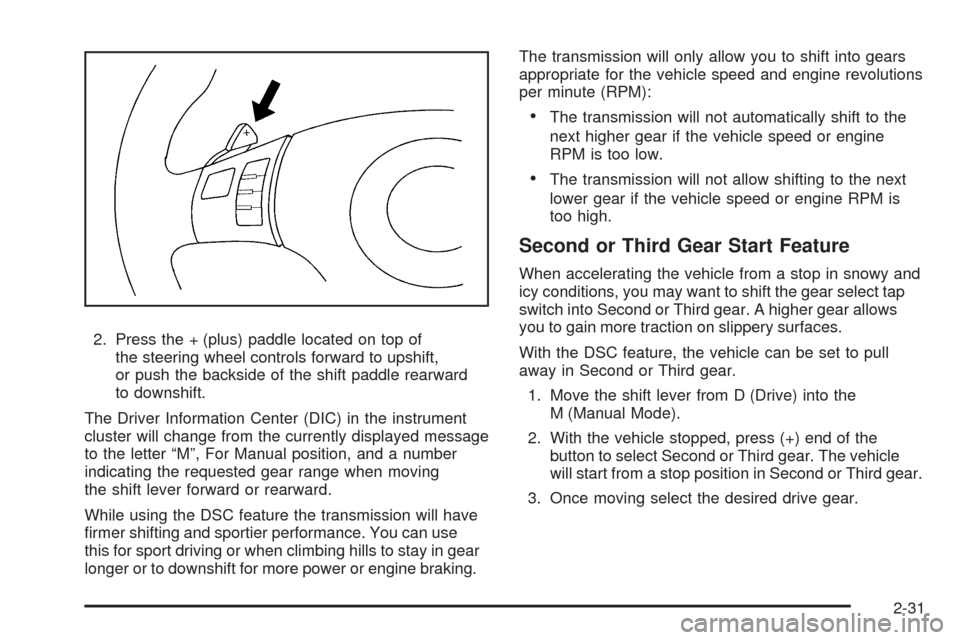
2. Press the + (plus) paddle located on top of
the steering wheel controls forward to upshift,
or push the backside of the shift paddle rearward
to downshift.
The Driver Information Center (DIC) in the instrument
cluster will change from the currently displayed message
to the letter “M”, For Manual position, and a number
indicating the requested gear range when moving
the shift lever forward or rearward.
While using the DSC feature the transmission will have
rmer shifting and sportier performance. You can use
this for sport driving or when climbing hills to stay in gear
longer or to downshift for more power or engine braking.The transmission will only allow you to shift into gears
appropriate for the vehicle speed and engine revolutions
per minute (RPM):
The transmission will not automatically shift to the
next higher gear if the vehicle speed or engine
RPM is too low.
The transmission will not allow shifting to the next
lower gear if the vehicle speed or engine RPM is
too high.
Second or Third Gear Start Feature
When accelerating the vehicle from a stop in snowy and
icy conditions, you may want to shift the gear select tap
switch into Second or Third gear. A higher gear allows
you to gain more traction on slippery surfaces.
With the DSC feature, the vehicle can be set to pull
away in Second or Third gear.
1. Move the shift lever from D (Drive) into the
M (Manual Mode).
2. With the vehicle stopped, press (+) end of the
button to select Second or Third gear. The vehicle
will start from a stop position in Second or Third gear.
3. Once moving select the desired drive gear.
2-31
Page 110 of 420
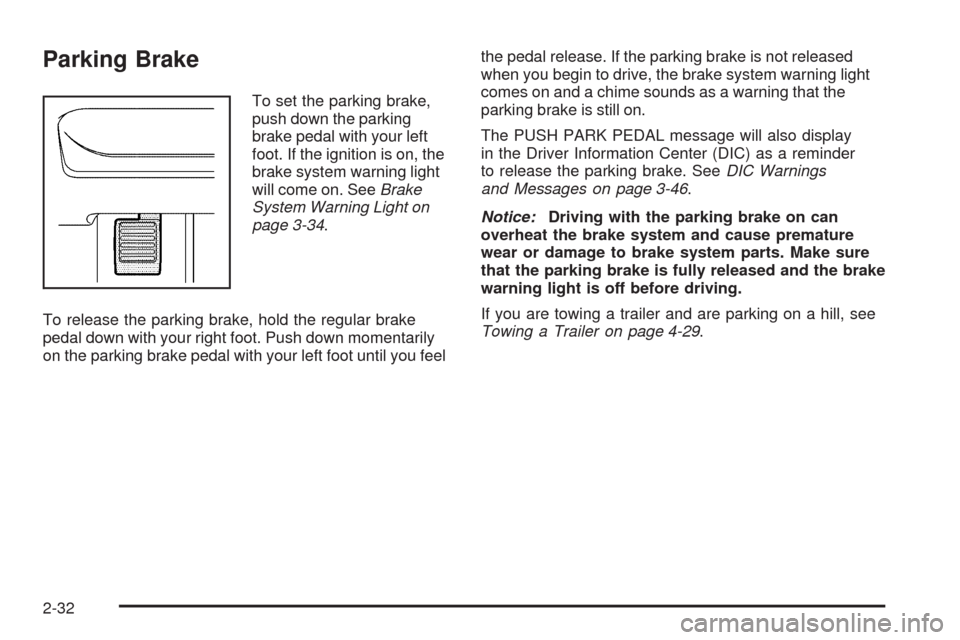
Parking Brake
To set the parking brake,
push down the parking
brake pedal with your left
foot. If the ignition is on, the
brake system warning light
will come on. SeeBrake
System Warning Light on
page 3-34.
To release the parking brake, hold the regular brake
pedal down with your right foot. Push down momentarily
on the parking brake pedal with your left foot until you feelthe pedal release. If the parking brake is not released
when you begin to drive, the brake system warning light
comes on and a chime sounds as a warning that the
parking brake is still on.
The PUSH PARK PEDAL message will also display
in the Driver Information Center (DIC) as a reminder
to release the parking brake. SeeDIC Warnings
and Messages on page 3-46.
Notice:Driving with the parking brake on can
overheat the brake system and cause premature
wear or damage to brake system parts. Make sure
that the parking brake is fully released and the brake
warning light is off before driving.
If you are towing a trailer and are parking on a hill, see
Towing a Trailer on page 4-29.
2-32
Page 115 of 420
Mirrors
Manual Rearview Mirror
Hold the inside rearview mirror in the center to move it
for a clearer view of behind your vehicle. Adjust the mirror
to avoid glare from the headlamps behind. Push the tab
forward for daytime use and pull it for nighttime use.
Vehicles with OnStar
®have three additional control
buttons located at the bottom of the mirror. See your
dealer/retailer for more information on the system
and how to subscribe to OnStar
®. SeeOnStar®System
on page 2-40for more information about the services
OnStar
®provides.
Automatic Dimming Rearview Mirror
The vehicle may have an automatic dimming inside
rearview mirror with a compass display and OnStar®
controls. See your dealer/retailer for more information
on the system and how to subscribe to OnStar®.
SeeOnStar®System on page 2-40for more information
about the services OnStar®provides.
O(On/Off):Press to turn the dimming feature on
or off.
Automatic Dimming Mirror Operation
Automatic dimming reduces the glare of lights from
behind the vehicle. The dimming feature comes on and
the indicator light illuminates each time the vehicle is
started.
Cleaning the Mirror
Do not spray glass cleaner directly on the mirror.
Use a soft towel dampened with water.
2-37
Page 116 of 420
Compass
Compass Operation
PressOto turn the compass display on or off.
When the ignition and the compass feature are on,
the compass displays the current compass direction
after a few seconds.
Compass Calibration
If after a few seconds the display does not show a
compass direction, (N for North for example), there may
be a strong magnetic eld interfering with the compass.
Interference can be caused by a magnetic antenna
mount, note pad holder, or similar object. If the letter C
appears in the compass window, the compass may need
to be reset or calibrated.
The mirror can be calibrated by driving the vehicle very
slowly, in circles, until the display reads a direction.
Compass Variance
The mirror is set in zone eight. It is necessary to adjust
the compass to compensate for compass variance if
the vehicle is driven outside zone eight. Under certain
circumstances, such as a long distance, cross-country
trip, it is necessary to adjust the compass variance.To adjust for compass variance:
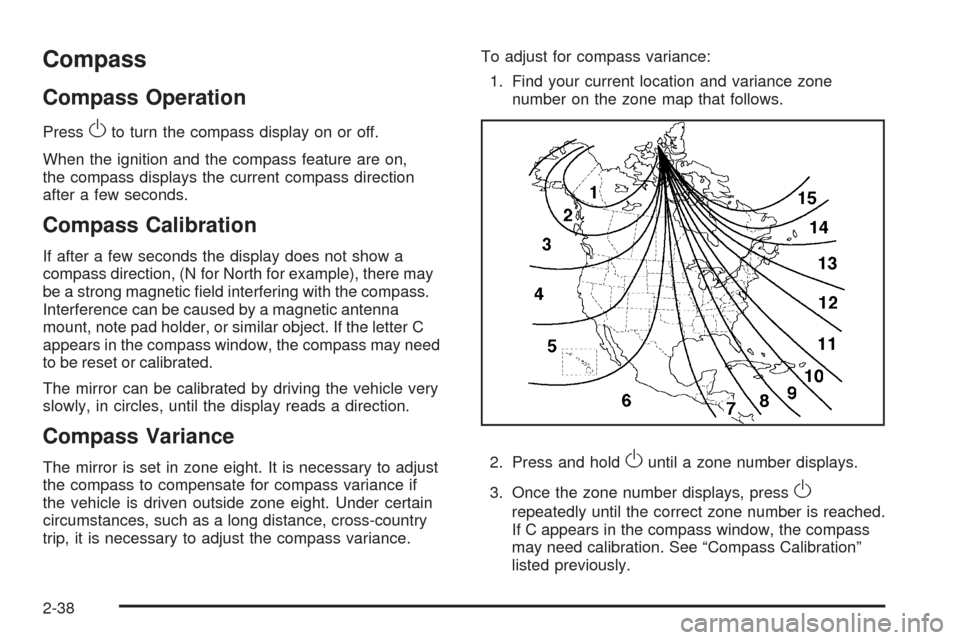
1. Find your current location and variance zone
number on the zone map that follows.
2. Press and holdOuntil a zone number displays.
3. Once the zone number displays, press
O
repeatedly until the correct zone number is reached.
If C appears in the compass window, the compass
may need calibration. See “Compass Calibration”
listed previously.
2-38
Page 132 of 420
Engine Coolant Temperature Warning Light......3-36
Engine Coolant Temperature Gage..................3-37
Tire Pressure Light.......................................3-37
Malfunction Indicator Lamp.............................3-38
Oil Pressure Light.........................................3-41
Security Light...............................................3-41
Cruise Control Light......................................3-42
Highbeam On Light.......................................3-42
Fuel Gage...................................................3-42
Driver Information Center (DIC).......................3-43
DIC Operation and Displays...........................3-44
DIC Warnings and Messages.........................3-46
DIC Vehicle Personalization............................3-50Audio System(s).............................................3-56
Setting the Clock..........................................3-57
Radio(s)......................................................3-59
Using an MP3..............................................3-71
XM Radio Messages.....................................3-77
Bluetooth
®...................................................3-78
Theft-Deterrent Feature..................................3-89
Audio Steering Wheel Controls.......................3-89
Radio Reception...........................................3-91
Backglass Antenna.......................................3-92
XM™ Satellite Radio Antenna System.............3-92
Chime Level Adjustment................................3-92
Section 3 Instrument Panel
3-2