2009 CHEVROLET KODIAK door lock
[x] Cancel search: door lockPage 1 of 376

Seats and Restraint System............................. 1-1
Front Seats
............................................... 1-2
Rear Seats
..............................................1-10
Safety Belts
.............................................1-11
Child Restraints
.......................................1-28
Airbag System
.........................................1-48
Restraint System Check
............................1-59
Features and Controls..................................... 2-1
Keys
........................................................ 2-2
Doors and Locks
....................................... 2-6
Windows
.................................................. 2-8
Starting and Operating Your Vehicle
...........2-10
Mirrors
....................................................2-51
Storage Areas
.........................................2-53
Instrument Panel............................................. 3-1
Instrument Panel Overview
.......................... 3-4
Climate Controls
......................................3-20
Warning Lights, Gages, and Indicators
........3-23
Audio System(s)
.......................................3-48
Driving Your Vehicle....................................... 4-1
Your Driving, the Road, and the Vehicle
....... 4-2
Towing
...................................................4-23Service and Appearance Care.......................... 5-1
Service
..................................................... 5-3
Fuel
......................................................... 5-6
Checking Things Under the Hood
...............5-22
Rear Axle
...............................................5-67
Four-Wheel Drive
.....................................5-68
Front Axle
...............................................5-69
Noise Control System
...............................5-70
Bulb Replacement
....................................5-71
Windshield Wiper Blade Replacement
.........5-71
Other Service Items
..................................5-72
Tires
......................................................5-76
Appearance Care
.....................................5-87
Vehicle Identification
.................................5-94
Electrical System
......................................5-95
Capacities and Specifications
...................5-102
Normal Maintenance Replacement Parts
....5-108
Maintenance Schedule..................................... 6-1
Maintenance Schedule
................................ 6-2
Customer Assistance Information.................... 7-1
Customer Assistance and Information
........... 7-2
Reporting Safety Defects
............................ 7-9
Vehicle Data Recording and Privacy
...........7-11
Index................................................................ 1
2009 Chevrolet Kodiak Owner ManualM
Page 65 of 376

Keys...............................................................2-2
Remote Keyless Entry (RKE) System................2-3
Remote Keyless Entry (RKE) System
Operation...................................................2-4
Doors and Locks.............................................2-6
Door Locks....................................................2-6
Power Door Locks..........................................2-7
Windows.........................................................2-8
Manual Windows............................................2-9
Power Windows.............................................2-9
Sliding Rear Window.......................................2-9
Sun Visors....................................................2-9
Starting and Operating Your Vehicle................2-10
New Vehicle Break-In....................................2-10
Ignition Positions..........................................2-11
Engine Starter Over-Crank Protection..............2-12
Starting the Gasoline Engine..........................2-12
Starting the Diesel Engine..............................2-14
Engine Alarm and Automatic Shutdown............2-18
Idle Shutdown..............................................2-19
High Idle System..........................................2-20
Exhaust Restrictor (Engine Warm-Up)..............2-22
Engine Checks Before Operating....................2-23
Engine Coolant Heater..................................2-25Diesel Engine Exhaust Brake.........................2-26
Automatic Transmission Operation...................2-27
Manual Transmission Operation......................2-28
Power Take-Off (PTO)...................................2-30
Four-Wheel Drive..........................................2-30
Parking.......................................................2-35
Two-Speed Rear Axle...................................2-36
Parking Brake (With Hydraulic Brakes).............2-38
Parking Brake (With Air Brakes)......................2-41
Parking Brake Burnish Procedure....................2-43
Air Suspension
.............................................2-44
Parking Over Things That Burn.......................2-44
Engine Exhaust............................................2-45
Diesel Particulate Filter..................................2-46
Running the Vehicle While Parked..................2-50
Mirrors...........................................................2-51
Manual Rearview Mirror.................................2-51
Outside Manual Mirrors..................................2-51
Outside Power Mirrors...................................2-51
Outside Convex Mirrors.................................2-52
Outside Heated Mirrors..................................2-52
Storage Areas................................................2-53
Center Console Storage.................................2-53
Section 2 Features and Controls
2-1
Page 66 of 376

Keys
{CAUTION:
Leaving children in a vehicle with the ignition key
is dangerous for many reasons, children or others
could be badly injured or even killed. They could
operate the power windows or other controls or
even make the vehicle move. The windows will
function with the keys in the ignition and children
could be seriously injured or killed if caught in the
path of a closing window. Do not leave the keys in
a vehicle with children.
Your vehicle has one double-sided key for the ignition
and all door locks.
If you ever lose your key, your dealer/retailer will be
able to assist you with obtaining a new one.
Notice:If you ever lock your keys in the vehicle,
you may have to damage the vehicle to get in.
Be sure you have spare keys.
If you ever do get locked out of your vehicle, call
Roadside Assistance Center. SeeRoadside Assistance
Program on page 7-5.
2-2
Page 68 of 376
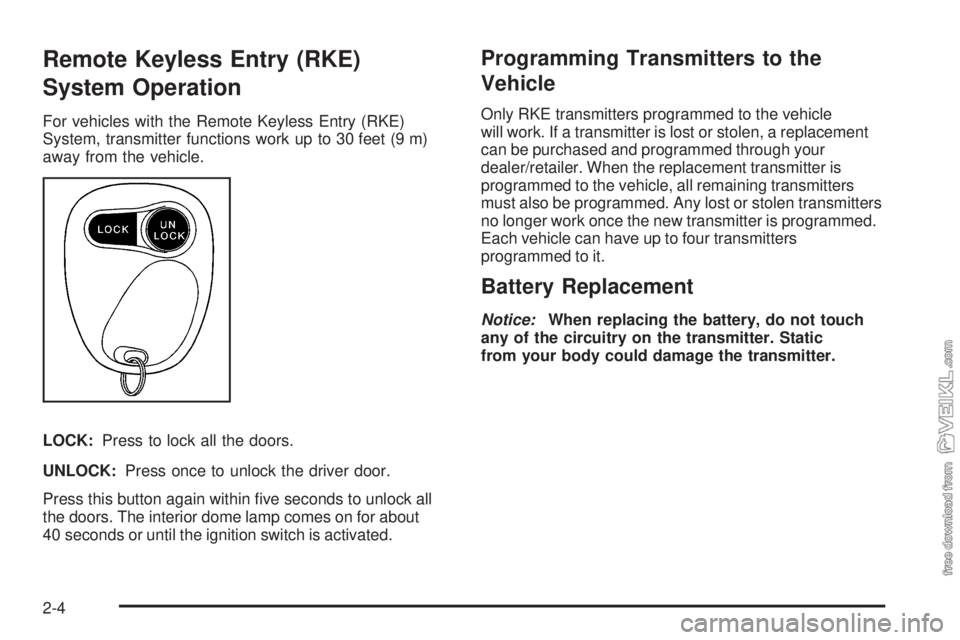
Remote Keyless Entry (RKE)
System Operation
For vehicles with the Remote Keyless Entry (RKE)
System, transmitter functions work up to 30 feet (9 m)
away from the vehicle.
LOCK:Press to lock all the doors.
UNLOCK:Press once to unlock the driver door.
Press this button again within five seconds to unlock all
the doors. The interior dome lamp comes on for about
40 seconds or until the ignition switch is activated.
Programming Transmitters to the
Vehicle
Only RKE transmitters programmed to the vehicle
will work. If a transmitter is lost or stolen, a replacement
can be purchased and programmed through your
dealer/retailer. When the replacement transmitter is
programmed to the vehicle, all remaining transmitters
must also be programmed. Any lost or stolen transmitters
no longer work once the new transmitter is programmed.
Each vehicle can have up to four transmitters
programmed to it.
Battery Replacement
Notice:When replacing the battery, do not touch
any of the circuitry on the transmitter. Static
from your body could damage the transmitter.
2-4
Page 69 of 376

1. Separate the transmitter with a flat, thin object
inserted into the slot near the key ring hole.
2. Remove the battery.
3. Insert the new battery, positive (+) side down.
Replace with a CR2032 or equivalent battery.4. Align the transmitter back together.
5. Check the operation of the transmitter. If the
transmitter does not work after battery replacement,
it may need to be resynchronized to the vehicle.
SeeResynchronizationfollowing.
Resynchronization
Resynchronization may be necessary due to the
security method used by this system. The transmitter
does not send the same signal twice to the receiver. The
receiver will not respond to a signal it has been sent
previously. This prevents anyone from recording
and playing back the signal from the transmitter.
To resynchronize the transmitter, stand close to the
vehicle and simultaneously press and hold the LOCK
and UNLOCK buttons on the transmitter for at least
five seconds. The door locks should cycle to confirm
resynchronization. If the locks do not cycle, see
your dealer/retailer for service.
2-5
Page 70 of 376

Doors and Locks
Door Locks
{CAUTION:
Unlocked doors can be dangerous.
•Passengers, especially children, can easily
open the doors and fall out of a moving
vehicle. When a door is locked, the handle
will not open it. You increase the chance of
being thrown out of the vehicle in a crash if
the doors are not locked. So, wear safety
belts properly and lock the doors whenever
you drive.
CAUTION: (Continued)
CAUTION: (Continued)
•
Young children who get into unlocked vehicles
may be unable to get out. A child can be
overcome by extreme heat and can suffer
permanent injuries or even death from heat
stroke. Always lock your vehicle whenever
you leave it.
•Outsiders can easily enter through an
unlocked door when you slow down or stop
your vehicle. Locking your doors can help
prevent this from happening.
There are several ways to lock and unlock your vehicle.
On a vehicle equipped with keyless entry, you can
use your transmitter to lock or unlock your vehicle. See
Remote Keyless Entry (RKE) System Operation on
page 2-4.
To lock or unlock the door from the outside, use the key.
2-6
Page 71 of 376

To lock the door from the
inside, slide the manual
lever on the door down.
To unlock the door,
slide the manual lever up.Power Door Locks
If your vehicle has power
door locks, press the
bottom of the power door
lock switch to lock all the
doors at once. To unlock all
the doors at once, press
the top of the power door
lock switch.
When a door is locked, the inside door handle will
not work.
2-7
Page 73 of 376

Manual Windows
Turn the hand crank on each door to raise or lower the
window.
Power Windows
If your vehicle has power windows, the switches for all
windows are located on the driver’s door. In addition,
each passenger door has a switch for their own window.
Press the rearward part of the switch to lower the window.
Press the forward part of the switch to raise the window.
The power windows will operate when the ignition is in
ACC/ACCESSORY or ON/RUN.
Express-Down
The driver’s window has an express-down feature.
This allows the window to be lowered fully without
continuously holding the switch. Press the switch down
fully to initiate the express-down feature. Press the
top of the switch to stop the window from lowering.
Window Lockout (Crew Cab)
o
(Window Lockout):The driver’s window switches
include a lockout feature. This prevents the passenger’s
from operating their windows. The driver can still
operate all windows with the lockout on. Press the
button to turn the lockout feature on and off.
Sliding Rear Window
To open the sliding rear window, pull the latch toward
the driver’s side of the vehicle.
To close the window, slide the window toward the
passenger’s side of the vehicle. The latch will
automatically lock into place. Try to open the window
without releasing the latch to be sure the window
is in the locked position.
Sun Visors
To block out glare, you can swing down the visors. You
can also swing them out to block glare from the side. Regular Cab Switches
Crew Cab Switches
2-9