2009 CHEVROLET HHR ignition
[x] Cancel search: ignitionPage 153 of 450
Reducing Speed While Using Cruise
Control
If the cruise control system is already engaged,
Push and hold the SET−button until the lower
speed desired is reached, then release it.
To slow down in small amounts, push the SET−
button briey. Each time this is done, the vehicle
goes about 1 mph (1.6 km/h) slower.
Passing Another Vehicle While Using
Cruise Control
Use the accelerator pedal to increase the vehicle speed.
When you take your foot off the pedal, the vehicle slows
down to the cruise control speed you set earlier.
Using Cruise Control on Hills
How well the cruise control will work on hills depends
upon the vehicle speed, load and the steepness of the
hills. When going up steep hills, you might have to step
on the accelerator pedal to maintain the vehicle speed.When going downhill, you might have to brake or shift to
a lower gear to keep the vehicle speed down. When the
brakes are applied the cruise control turns off.
Ending Cruise Control
To end cruise control, step lightly on the brake
pedal or the clutch pedal if the vehicle has a manual
transmission.
Stepping on the brake pedal or clutch pedal will only
end the current cruise control session.
Press
Ito turn the system completely off.
Erasing Speed Memory
The cruise control set speed memory is erased when
the cruise control or the ignition is turned off.
3-13
Page 154 of 450
Headlamps
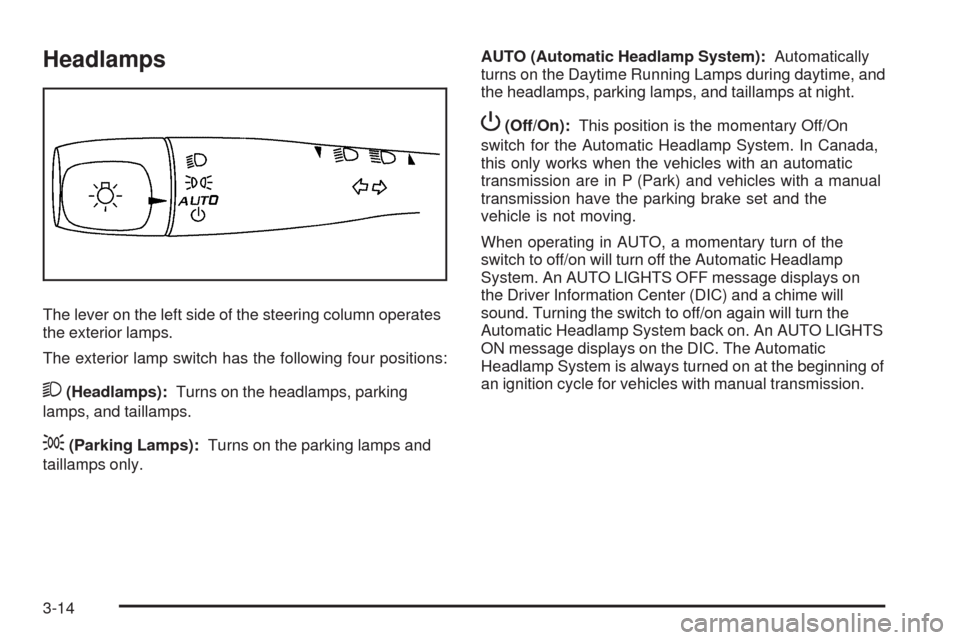
The lever on the left side of the steering column operates
the exterior lamps.
The exterior lamp switch has the following four positions:
2(Headlamps):Turns on the headlamps, parking
lamps, and taillamps.
;(Parking Lamps):Turns on the parking lamps and
taillamps only.AUTO (Automatic Headlamp System):Automatically
turns on the Daytime Running Lamps during daytime, and
the headlamps, parking lamps, and taillamps at night.
P(Off/On):This position is the momentary Off/On
switch for the Automatic Headlamp System. In Canada,
this only works when the vehicles with an automatic
transmission are in P (Park) and vehicles with a manual
transmission have the parking brake set and the
vehicle is not moving.
When operating in AUTO, a momentary turn of the
switch to off/on will turn off the Automatic Headlamp
System. An AUTO LIGHTS OFF message displays on
the Driver Information Center (DIC) and a chime will
sound. Turning the switch to off/on again will turn the
Automatic Headlamp System back on. An AUTO LIGHTS
ON message displays on the DIC. The Automatic
Headlamp System is always turned on at the beginning of
an ignition cycle for vehicles with manual transmission.
3-14
Page 155 of 450
Wiper Activated Headlamps
The headlamps and parking lamps are activated
15 seconds after the windshield wipers are turned on.
For this feature to work, automatic lighting must be
enabled. SeeHeadlamps on page 3-14for additional
information.
When the ignition is turned off, the wiper-activated
headlamps will immediately turn off. They also turn off
15 seconds after the windshield wiper control is
turned off.
Headlamps on Reminder
If the drivers door is opened with the ignition off and the
lamps on, a warning chime will sound. This indicates
that the headlamps are still on.
Daytime Running Lamps (DRL)
Daytime Running Lamps (DRL) can make it easier for
others to see the front of your vehicle during the day.
Fully functional daytime running lamps are required on
all vehicles rst sold in Canada.The vehicle has a light sensor on top of the instrument
panel. Do not cover this sensor or the headlamps
will come on when they are not needed.
The DRL system will make the headlamps come on
at reduced brightness when the following conditions
are met:
The ignition is on.
The exterior lamp control is turned to AUTO.
The light sensor detects daytime light.
The shift lever is not in P (Park).
While the DRL system is on, the taillamps, sidemarker
lamps, and instrument panel lights will not be on.
For vehicles with an Automatic Transmission, the
DRL system is off any time the vehicle is in P (Park).
For vehicles with a Manual Transmission, the DRL
system will be off when the vehicle is rst started, the
park brake is applied, and the vehicle has not moved.
The DRL system on U.S. vehicles can also be turned
off by using the off/on switch for one ignition cycle.
The regular headlamp system should be turned on when
needed.
3-15
Page 156 of 450
Automatic Headlamp System
When it is dark enough outside, the automatic system
turns on the headlamps at the normal brightness along
with other lamps such as the taillamps, sidemarker,
parking lamps, instrument panel lights, and interior switch
backlighting.
Do not cover the light sensor, located on top of the
instrument panel. If the sensor is covered the headlamps
may remain on when they are not needed.
If the vehicle is driven through a parking garage, overcast
weather or a tunnel, the automatic headlamp system may
turn on.
There is a delay in the transition between the daytime
and nighttime operation of the automatic lamp control
system so that driving under bridges or bright overhead
street lights does not affect the system. The automatic
lamp control system will only be affected when the light
sensor sees a change in lighting lasting longer than this
delay.
If the vehicle is started in a dark garage, the automatic
lamp system turns on immediately. Once the vehicle
exits the garage, it will take about 20 seconds for the
automatic lamp system to change to DRL if it is light
outside. During that delay, the instrument panel cluster
may not be as bright as usual. Make sure the instrument
panel brightness control is in the full bright position.
SeeInstrument Panel Brightness on page 3-17.To idle the vehicle with the system off, turn the ignition
on and turn the exterior light switch to the off/on position.
For vehicles rst sold in Canada, the transmission must
stay in P (Park) for this function or the parking brake must
be set for vehicles with manual transmissions.
Turn on the regular headlamps when they are needed.
Fog Lamps
For vehicles with fog lamps, the button is located on the
instrument panel, to the right of the steering wheel.
The ignition must be on to use the fog lamps.
#:Press to turn the fog lamps on and off. An indicator
light on the button comes on when the fog lamps are on.
The parking lamps automatically turn on and off when the
fog lamps are turned on and off.
The fog lamps will turn off while the high-beam
headlamps are turned on.
Some localities have laws that require the headlamps to
be on along with the fog lamps.
3-16
Page 157 of 450
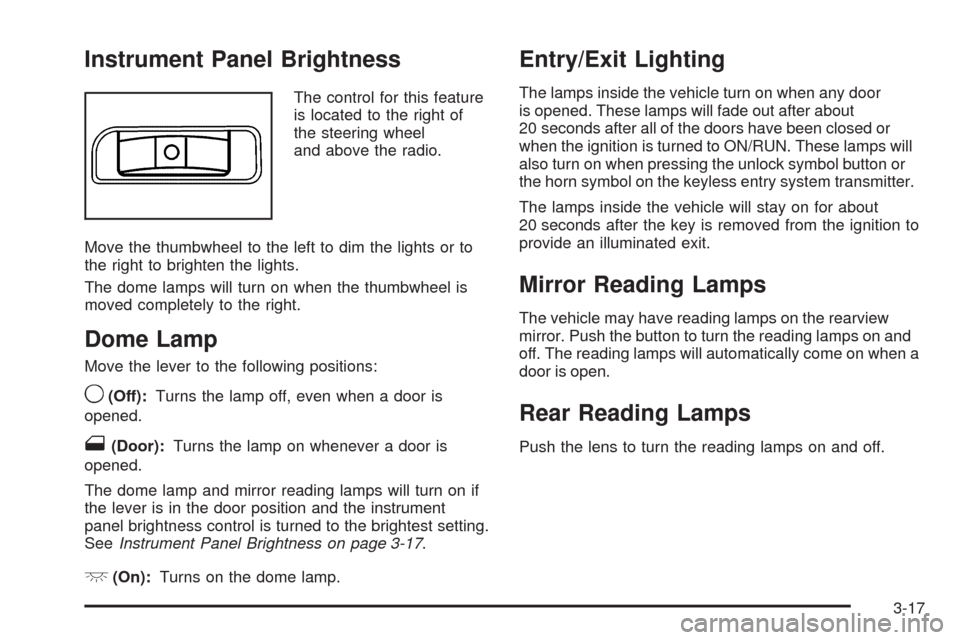
Instrument Panel Brightness
The control for this feature
is located to the right of
the steering wheel
and above the radio.
Move the thumbwheel to the left to dim the lights or to
the right to brighten the lights.
The dome lamps will turn on when the thumbwheel is
moved completely to the right.
Dome Lamp
Move the lever to the following positions:
9(Off):Turns the lamp off, even when a door is
opened.
1(Door):Turns the lamp on whenever a door is
opened.
The dome lamp and mirror reading lamps will turn on if
the lever is in the door position and the instrument
panel brightness control is turned to the brightest setting.
SeeInstrument Panel Brightness on page 3-17.
+(On):Turns on the dome lamp.
Entry/Exit Lighting
The lamps inside the vehicle turn on when any door
is opened. These lamps will fade out after about
20 seconds after all of the doors have been closed or
when the ignition is turned to ON/RUN. These lamps will
also turn on when pressing the unlock symbol button or
the horn symbol on the keyless entry system transmitter.
The lamps inside the vehicle will stay on for about
20 seconds after the key is removed from the ignition to
provide an illuminated exit.
Mirror Reading Lamps
The vehicle may have reading lamps on the rearview
mirror. Push the button to turn the reading lamps on and
off. The reading lamps will automatically come on when a
door is open.
Rear Reading Lamps
Push the lens to turn the reading lamps on and off.
3-17
Page 158 of 450
Electric Power Management
This vehicle has Electric Power Management (EPM),
an advanced control system. It estimates the battery’s
temperature and state of charge and then adjusts the
voltage for best performance and extended life of the
battery.
When the battery’s state of charge is low, the voltage is
raised slightly to quickly put the charge back in. When the
state of charge is high, the voltage is lowered slightly to
prevent overcharging. If the vehicle has a voltmeter gage
or voltage display on the Driver Information Center (DIC),
you may see the voltage move up or down. This is
normal. If there is a problem, an alert will be displayed.
The battery can be discharged at idle if the electrical
loads are very high. This is true for all vehicles. This is
because the generator (alternator) may not be spinning
fast enough at idle to produce all the power that is
needed for very high electrical loads.
A high electrical load occurs when several of the
following loads are on: headlamps, high beams, fog
lamps, rear window defogger, climate control fan at high
speed, heated seats, engine cooling fans, trailer loads,
and loads plugged into accessory power outlets.EPM works to prevent excessive discharge of the
battery. It does this by balancing the generator’s output
and the vehicle’s electrical needs. It can increase
engine idle speed to generate more power, whenever
needed. It can temporarily reduce the power demands of
some accessories.
Normally, these actions occur in steps or levels, without
being noticeable. In rare cases at the highest levels
of corrective action, this action may be noticeable to
the driver.
Battery Run-Down Protection
The vehicle has a battery saver feature designed to
protect the vehicle’s battery.
When any interior lamp is left on and the ignition is
turned off, the battery rundown protection system
automatically turns the lamp off after 20 minutes.
This prevents draining of the battery.
3-18
Page 162 of 450
9(Off):Turn the fan control to this position to turn the
fan off.
Temperature Control:Turn clockwise or
counterclockwise to increase or decrease the
temperature.
9(Fan):Turn clockwise or counterclockwise to
increase or decrease the fan speed. In any setting other
than off, the fan runs continuously with the ignition on.
The fan must be turned on to run the air conditioning (AC)
compressor.
Air Delivery Mode Control:Turn clockwise or
counterclockwise to change the direction of the airow
inside the vehicle.
To change the current mode, select one of the following:
H(Vent):Air is directed to the instrument panel
outlets.
)(Bi-Level):Air is divided between the instrument
panel outlets and the oor outlets.
6(Floor):Air is directed to the oor outlets, with
some air directed to the windshield and side windows.
-(Defog):This mode clears the windows of fog or
moisture. Air is directed to the windshield, side window,
and oor outlets. In this mode, the system runs the air
conditioning compressor. To defog the windows faster,
turn the temperature control knob clockwise to the
warmest setting.
0(Defrost):This mode removes fog or frost from
the windshield more quickly. Air is directed to the
windshield, with some air directed to the side window
and oor outlets. In this mode, the system runs the
air conditioning compressor. To defrost the windows
faster, turn the temperature control knob clockwise
to the warmest setting.
#(Air Conditioning):Press to turn the air conditioning
system on or off. An indicator light comes on to show
that the air conditioning is on.
On hot days, open the windows to let hot inside air
escape; then close them. This helps to reduce the time
it takes for your vehicle to cool down. It also helps
the system to operate more efficiently.
3-22
Page 163 of 450
For quick cool down on hot days:
1. Select
H.
2. Select
@.
3. Select
#.
4. Select the coolest temperature.
5. Select the highest fan speed.
Using these settings together for long periods of time
may cause the air inside of the vehicle to become
too dry. To prevent this from happening, after the air in
the vehicle has cooled, turn off the recirculation by
pressing the outside air button.
The air conditioning system removes moisture from
the air, so a small amount of water might drip under
the vehicle while idling or after turning off the engine.
This is normal.
The air conditioning compressor cannot be turned on
when the fan is off.
@(Recirculation):Press to turn the recirculation
mode on. An indicator light comes on to show that
recirculation is on.
This mode recirculates and helps to quickly cool the air
inside the vehicle. It can be used to help prevent outside
air and odors from entering the vehicle.The air conditioning compressor also comes on.
Recirculation is not available in oor, defog and defrost
modes. If the recirculation button is pressed, the indicator
light ashes ve times and outside air will be delivered.
Operation in this mode during periods of high humidity
and cool outside temperatures may result in increased
window fogging. If window fogging is experienced, select
the defrost mode.
;(Outside Air):Press to allow outside air to circulate
through the vehicle. An indicator light comes on to show
that outside air is on.
Rear Window Defogger
The rear window defogger uses a warming grid to
remove fog from the rear window.
The rear window defogger only works when the ignition
is in ON/RUN.
<(Rear):Press to turn the rear window defogger on or
off. Be sure to clear as much snow from the rear window
as possible. An indicator light comes on to show that the
rear window defogger is on.
The rear window defogger turns off approximately
15 minutes after the button is pressed. If turned
on again, the defogger only runs for approximately
seven minutes before turning off.
3-23