2009 CHEVROLET HHR roof
[x] Cancel search: roofPage 76 of 450
Passenger Sensing System
(With Turbo and RPO AR9 or AE4)
This information is for vehicles with a turbo engine and
Regular Production Option (RPO) code AR9 or AE4.
RPO codes are listed on the Service Parts Identication
label. SeeService Parts Identification Label on
page 5-107.
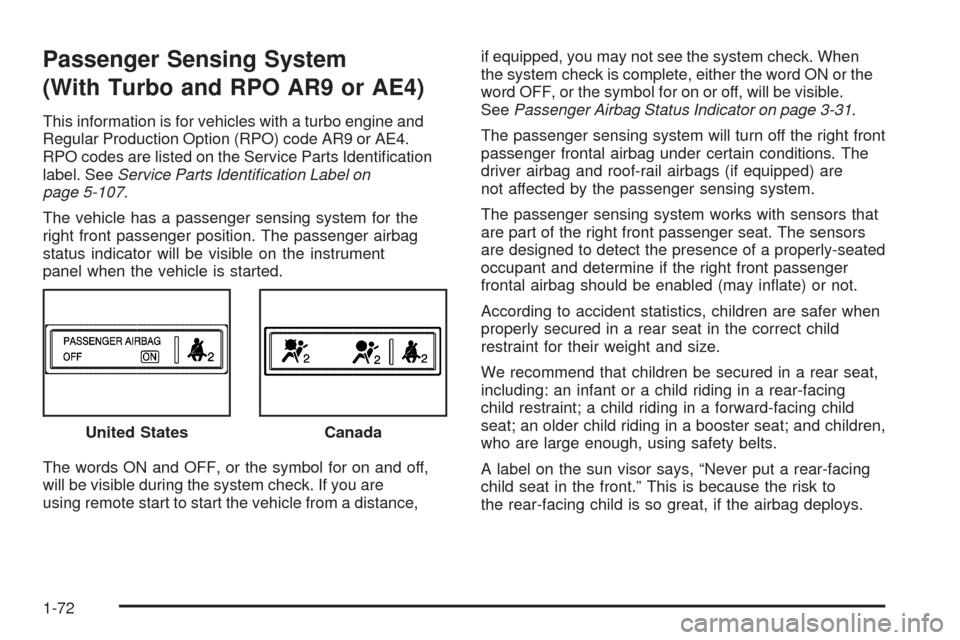
The vehicle has a passenger sensing system for the
right front passenger position. The passenger airbag
status indicator will be visible on the instrument
panel when the vehicle is started.
The words ON and OFF, or the symbol for on and off,
will be visible during the system check. If you are
using remote start to start the vehicle from a distance,if equipped, you may not see the system check. When
the system check is complete, either the word ON or the
word OFF, or the symbol for on or off, will be visible.
SeePassenger Airbag Status Indicator on page 3-31.
The passenger sensing system will turn off the right front
passenger frontal airbag under certain conditions. The
driver airbag and roof-rail airbags (if equipped) are
not affected by the passenger sensing system.
The passenger sensing system works with sensors that
are part of the right front passenger seat. The sensors
are designed to detect the presence of a properly-seated
occupant and determine if the right front passenger
frontal airbag should be enabled (may inate) or not.
According to accident statistics, children are safer when
properly secured in a rear seat in the correct child
restraint for their weight and size.
We recommend that children be secured in a rear seat,
including: an infant or a child riding in a rear-facing
child restraint; a child riding in a forward-facing child
seat; an older child riding in a booster seat; and children,
who are large enough, using safety belts.
A label on the sun visor says, “Never put a rear-facing
child seat in the front.” This is because the risk to
the rear-facing child is so great, if the airbag deploys. United States
Canada
1-72
Page 82 of 450
Adding Equipment to Your
Airbag-Equipped Vehicle
Q:Is there anything I might add to or change
about the vehicle that could keep the airbags
from working properly?
A:Yes. If you add things that change the vehicle’s
frame, bumper system, height, front end or side
sheet metal, they may keep the airbag system from
working properly. Changing or moving any parts
of the front seats, safety belts, the airbag sensing
and diagnostic module, steering wheel, instrument
panel, roof-rail airbag modules, ceiling headliner
or pillar garnish trim, front sensors, side impact
sensors, rollover sensor module, or airbag wiring
can affect the operation of the airbag system.
In addition, the vehicle has a passenger sensing
system for the right front passenger position, which
includes sensors that are part of the passenger seat.The passenger sensing system may not operate
properly if the original seat trim is replaced with
non-GM covers, upholstery or trim, or with GM
covers, upholstery or trim designed for a different
vehicle. Any object, such as an aftermarket seat
heater or a comfort enhancing pad or device,
installed under or on top of the seat fabric, could
also interfere with the operation of the passenger
sensing system. This could either prevent proper
deployment of the passenger airbag(s) or prevent
the passenger sensing system from properly turning
off the passenger airbag(s). SeePassenger Sensing
System (Without Turbo/With Turbo and RPO AS5)
on page 1-66orPassenger Sensing System (With
Turbo and RPO AR9 or AE4) on page 1-72.
If you have questions, call Customer Assistance.
The phone numbers and addresses for Customer
Assistance are in Step Two of the Customer
Satisfaction Procedure in this manual. See
Customer Satisfaction Procedure on page 7-2.
If the vehicle has rollover roof-rail airbags,
seeDifferent Size Tires and Wheels on page 5-71
for additional important information.
1-78
Page 86 of 450
Mirrors...........................................................2-39
Manual Rearview Mirror.................................2-39
Automatic Dimming Rearview Mirror................2-39
Compass.....................................................2-39
Outside Power Mirrors...................................2-41
Blind Spot Mirrors.........................................2-41
Outside Convex Mirror...................................2-43
Object Detection Systems...............................2-44
Rear Vision Camera (RVC)............................2-44
OnStar
®System.............................................2-47Storage Areas................................................2-51
Glove Box...................................................2-51
Cupholders..................................................2-51
Instrument Panel Storage...............................2-51
Floor Console Storage Area...........................2-51
Rear Storage Area........................................2-51
Rear Compartment Storage Panel/Cover..........2-52
Roof Rack System........................................2-54
Convenience Net..........................................2-54
Hideaway Rear Storage Bins..........................2-55
Sunroof.........................................................2-56
Section 2 Features and Controls
2-2
Page 109 of 450
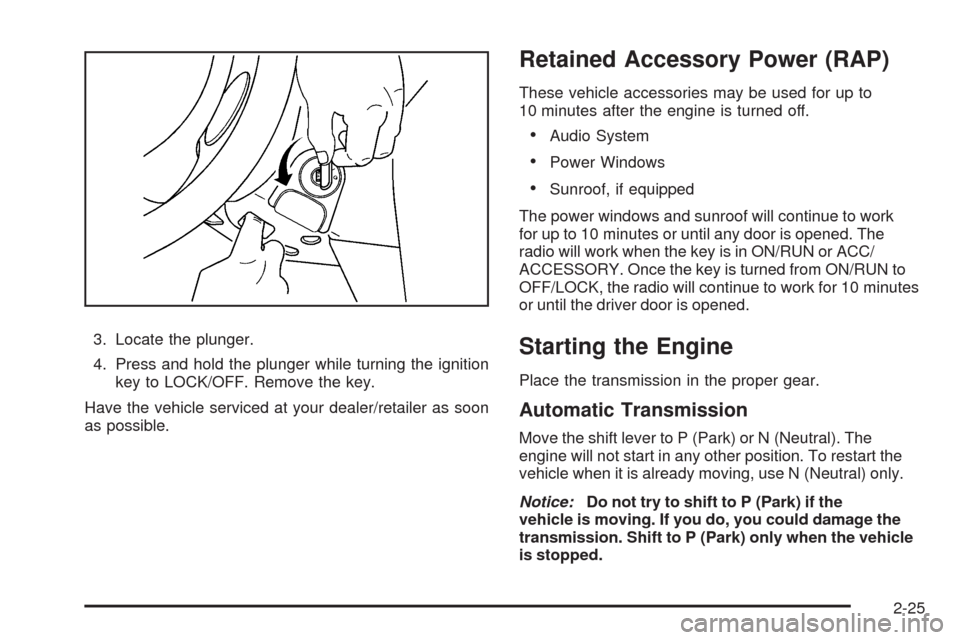
3. Locate the plunger.
4. Press and hold the plunger while turning the ignition
key to LOCK/OFF. Remove the key.
Have the vehicle serviced at your dealer/retailer as soon
as possible.
Retained Accessory Power (RAP)
These vehicle accessories may be used for up to
10 minutes after the engine is turned off.
Audio System
Power Windows
Sunroof, if equipped
The power windows and sunroof will continue to work
for up to 10 minutes or until any door is opened. The
radio will work when the key is in ON/RUN or ACC/
ACCESSORY. Once the key is turned from ON/RUN to
OFF/LOCK, the radio will continue to work for 10 minutes
or until the driver door is opened.
Starting the Engine
Place the transmission in the proper gear.
Automatic Transmission
Move the shift lever to P (Park) or N (Neutral). The
engine will not start in any other position. To restart the
vehicle when it is already moving, use N (Neutral) only.
Notice:Do not try to shift to P (Park) if the
vehicle is moving. If you do, you could damage the
transmission. Shift to P (Park) only when the vehicle
is stopped.
2-25
Page 138 of 450
Roof Rack System
Your vehicle may be equipped with a roof rack system.
{CAUTION:
If something is carried on top of the vehicle that is
longer or wider than the luggage carrier — like
paneling, plywood, or a mattress — the wind can
catch it while the vehicle is being driven. This can
cause a driver to lose control. The item being
carried could be violently torn off, and this could
cause a collision, and damage the vehicle. Items
may be carried inside. Never carry something
longer or wider than the luggage carrier on top of
the vehicle.
Notice:Loading cargo on the luggage carrier that
weighs more than 150 lbs (68 kg) or hangs over
the rear sides of the vehicle may damage your
vehicle. Load cargo so that it rests on the slats
as far forward as possible and against the side
rails making sure to fasten it securely.Notice:Loading cargo directly on the roof of the
vehicle may cause damage to the vehicle and would
not be covered under warranty. Do not place
cargo on the roof the vehicle.
Do not exceed the maximum vehicle capacity when
loading your vehicle. For more information on vehicle
capacity and loading, seeLoading the Vehicle on
page 4-25.
To prevent damage or loss of cargo as you are driving,
check frequently to ensure your cargo is securely
fastened.
The roof rack system has siderails that are attached to
the roof. All cargo must be loaded on the luggage
carrier crossrails only.
Use GM accessory racks that are compatible with your
roof rack system, these are available at your GM dealer.
Convenience Net
Your vehicle may have a convenience net. The metal
rings in the cargo area can be used to attach the
convenience net for several uses. The net can be used
to attach items secured to the oor, to the rear liftgate
or liftgate glass. The net is not for larger, heavier loads.
2-54
Page 140 of 450
Sunroof
The vehicle may have a power sunroof.
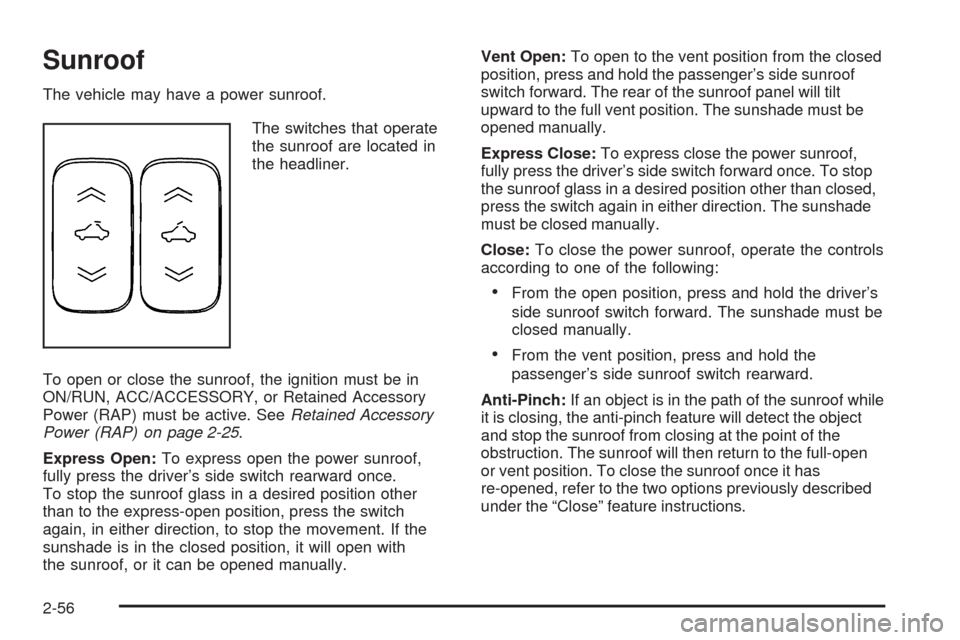
The switches that operate
the sunroof are located in
the headliner.
To open or close the sunroof, the ignition must be in
ON/RUN, ACC/ACCESSORY, or Retained Accessory
Power (RAP) must be active. SeeRetained Accessory
Power (RAP) on page 2-25.
Express Open:To express open the power sunroof,
fully press the driver’s side switch rearward once.
To stop the sunroof glass in a desired position other
than to the express-open position, press the switch
again, in either direction, to stop the movement. If the
sunshade is in the closed position, it will open with
the sunroof, or it can be opened manually.Vent Open:To open to the vent position from the closed
position, press and hold the passenger’s side sunroof
switch forward. The rear of the sunroof panel will tilt
upward to the full vent position. The sunshade must be
opened manually.
Express Close:To express close the power sunroof,
fully press the driver’s side switch forward once. To stop
the sunroof glass in a desired position other than closed,
press the switch again in either direction. The sunshade
must be closed manually.
Close:To close the power sunroof, operate the controls
according to one of the following:
From the open position, press and hold the driver’s
side sunroof switch forward. The sunshade must be
closed manually.
From the vent position, press and hold the
passenger’s side sunroof switch rearward.
Anti-Pinch:If an object is in the path of the sunroof while
it is closing, the anti-pinch feature will detect the object
and stop the sunroof from closing at the point of the
obstruction. The sunroof will then return to the full-open
or vent position. To close the sunroof once it has
re-opened, refer to the two options previously described
under the “Close” feature instructions.
2-56
Page 236 of 450
XM™ Satellite Radio Service
XM Satellite Radio Service gives digital radio reception
from coast-to-coast in the 48 contiguous United States,
and in Canada. Just as with FM, tall buildings or hills can
interfere with satellite radio signals, causing the sound to
fade in and out. In addition, traveling or standing under
heavy foliage, bridges, garages, or tunnels may cause
loss of the XM signal for a period of time.
Cellular Phone Usage
Cellular phone usage may cause interference with the
vehicle’s radio. This interference may occur when making
or receiving phone calls, charging the phone’s battery,
or simply having the phone on. This interference causes
an increased level of static while listening to the radio.
If static is received while listening to the radio, unplug
the cellular phone and turn it off.
Fixed Mast Antenna
The xed mast antenna can withstand most car washes
without being damaged as long as it is securely attached
to the base. If the mast becomes slightly bent, straighten
it out by hand. If the mast is badly bent, replace it.Occasionally check to make sure the antenna is
tightened to its base. If tightening is required, tighten by
hand until fully seated plus one quarter turn.
XM™ Satellite Radio Antenna
System
The XM Satellite Radio antenna is located on the roof of
the vehicle. Keep the antenna clear of obstructions for
clear radio reception.
If the vehicle has a sunroof, the performance of the XM
system may be affected if the sunroof is open.
Chime Level Adjustment
The radio may be used to adjust the vehicle’s chime
level. If the radio can be used to change the volume
level of the chime, press and hold the sixth numbered
pushbutton or the sixth FAV pushbutton with the ignition
on and the radio power off. The volume level changes
between Normal and Loud. The selected volume
level appears on the radio display.
Removing the radio and not replacing it with a factory
radio or chime module will disable vehicle chimes.
3-96
Page 388 of 450
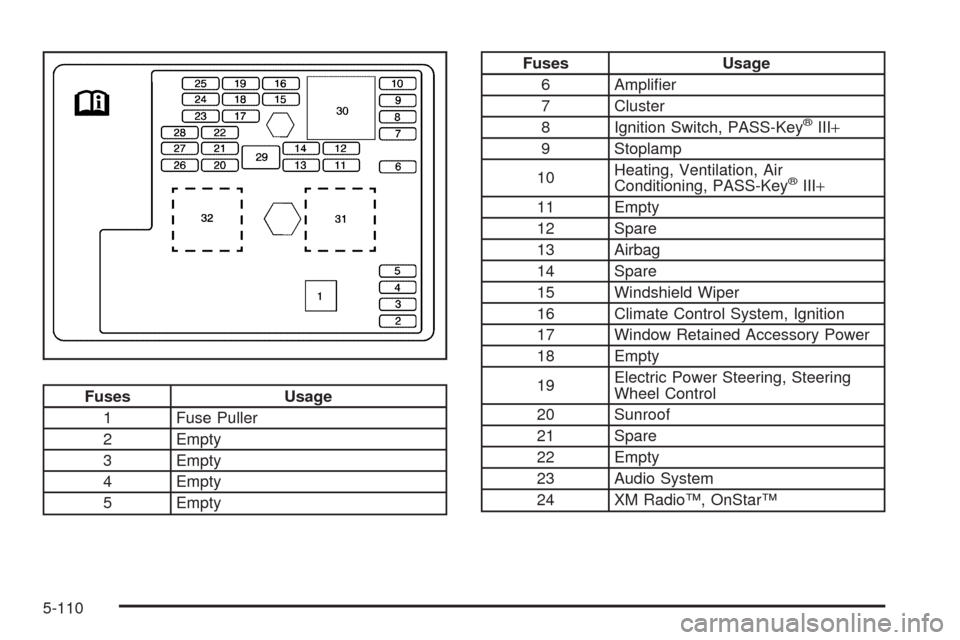
Fuses Usage
1 Fuse Puller
2 Empty
3 Empty
4 Empty
5 Empty
Fuses Usage
6 Amplier
7 Cluster
8 Ignition Switch, PASS-Key
®III+
9 Stoplamp
10Heating, Ventilation, Air
Conditioning, PASS-Key
®III+
11 Empty
12 Spare
13 Airbag
14 Spare
15 Windshield Wiper
16 Climate Control System, Ignition
17 Window Retained Accessory Power
18 Empty
19Electric Power Steering, Steering
Wheel Control
20 Sunroof
21 Spare
22 Empty
23 Audio System
24 XM Radio™, OnStar™
5-110