2009 CHEVROLET CORVETTE seats
[x] Cancel search: seatsPage 29 of 434
Safety Belt Extender
If the safety belt will fasten around you, you should
use it.
But if a safety belt is not long enough, your
dealer/retailer will order you an extender. When you go
in to order it, take the heaviest coat you will wear,
so the extender will be long enough for you. To help
avoid personal injury, do not let someone else use
it, and use it only for the seat it is made to t. The
extender has been designed for adults. Never use it for
securing child seats. To wear it, attach it to the
regular safety belt. For more information, see the
instruction sheet that comes with the extender.
Child Restraints
Older Children
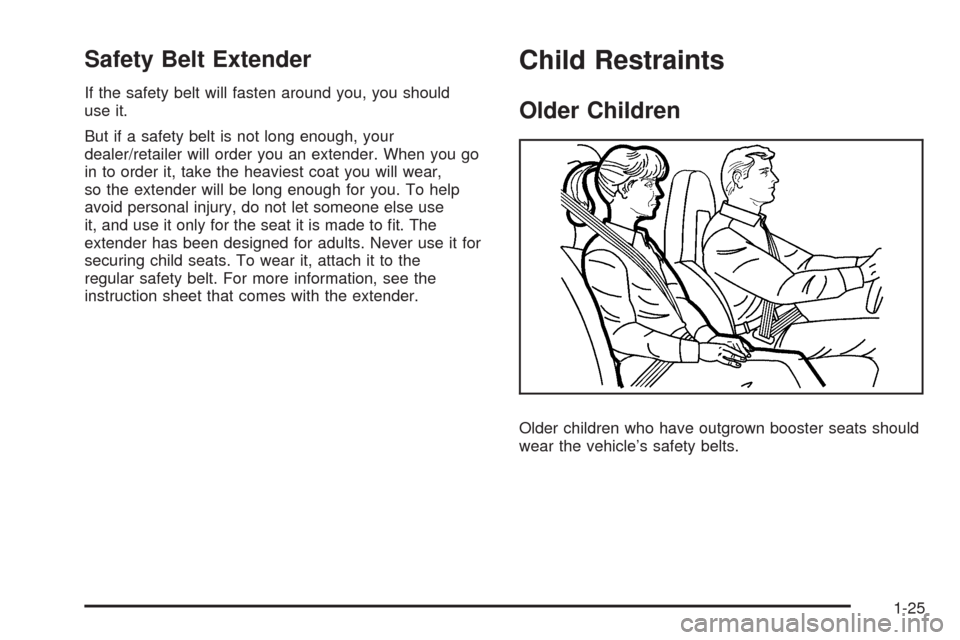
Older children who have outgrown booster seats should
wear the vehicle’s safety belts.
1-25
Page 39 of 434
To help reduce the chance of injury, the child restraint
must be secured in the vehicle. Child restraint systems
must be secured in vehicle seats by lap belts or the lap
belt portion of a lap-shoulder belt, or by the LATCH
system. SeeLower Anchors and Tethers for Children
(LATCH) (Coupe and Convertible Models Only) on
page 1-36orLower Anchors and Tethers for Children
(LATCH) (Z06 and ZR1 Models Only) on page 1-36for
more information. A child can be endangered in a crash if
the child restraint is not properly secured in the vehicle.
When securing an add-on child restraint, refer to the
instructions that come with the restraint which may be on
the restraint itself or in a booklet, or both, and to this
manual. The child restraint instructions are important, so
if they are not available, obtain a replacement copy
from the manufacturer.
Keep in mind that an unsecured child restraint can move
around in a collision or sudden stop and injure people in
the vehicle. Be sure to properly secure any child restraint
in the vehicle — even when no child is in it.Securing the Child Within the Child
Restraint
{CAUTION:
A child can be seriously injured or killed in a crash
if the child is not properly secured in the child
restraint. Secure the child properly following the
instructions that came with that child restraint.
1-35
Page 62 of 434

Servicing Your Airbag-Equipped
Vehicle
Airbags affect how the vehicle should be serviced.
There are parts of the airbag system in several places
around the vehicle. Your dealer/retailer and the
service manual have information about servicing the
vehicle and the airbag system. To purchase a service
manual, seeService Publications Ordering Information
on page 7-15.
{CAUTION:
For up to 10 seconds after the ignition is turned off
and the battery is disconnected, an airbag can still
inate during improper service. You can be injured
if you are close to an airbag when it inates. Avoid
yellow connectors. They are probably part of the
airbag system. Be sure to follow proper service
procedures, and make sure the person performing
work for you is qualied to do so.
Adding Equipment to Your
Airbag-Equipped Vehicle
Q:Is there anything I might add to or change
about the vehicle that could keep the airbags
from working properly?
A:Yes. If you add things that change your vehicle’s
frame, bumper system, height, front end or side
sheet metal, they may keep the airbag system from
working properly. Changing or moving any parts of
the front seats, safety belts, the airbag sensing and
diagnostic module, steering wheel, instrument panel,
the inside review mirror, front sensors, or airbag
wiring can affect the operation of the airbag system.
1-58
Page 141 of 434
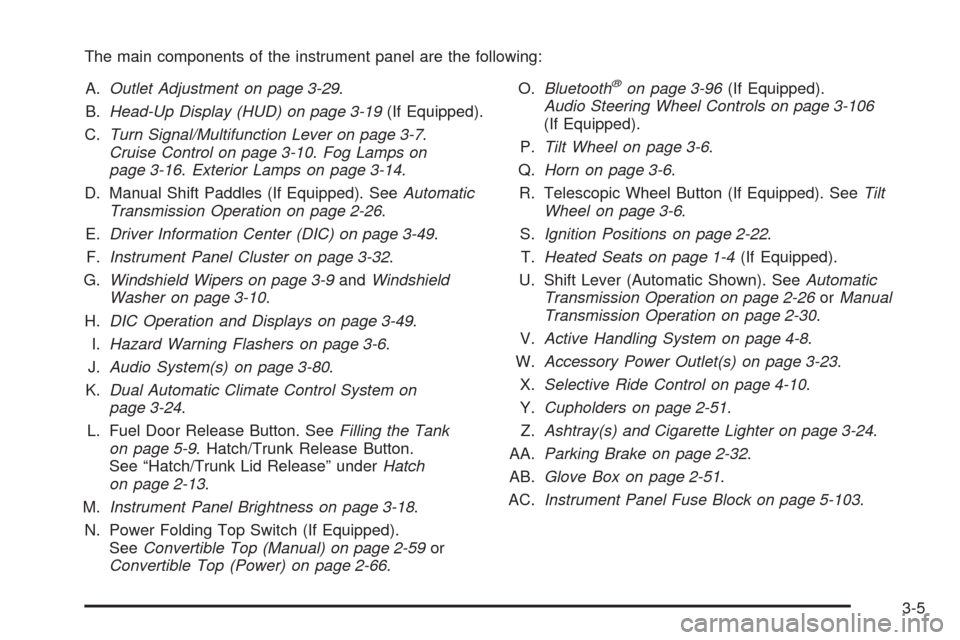
The main components of the instrument panel are the following:
A.Outlet Adjustment on page 3-29.
B.Head-Up Display (HUD) on page 3-19(If Equipped).
C.Turn Signal/Multifunction Lever on page 3-7.
Cruise Control on page 3-10.Fog Lamps on
page 3-16.Exterior Lamps on page 3-14.
D. Manual Shift Paddles (If Equipped). SeeAutomatic
Transmission Operation on page 2-26.
E.Driver Information Center (DIC) on page 3-49.
F.Instrument Panel Cluster on page 3-32.
G.Windshield Wipers on page 3-9andWindshield
Washer on page 3-10.
H.DIC Operation and Displays on page 3-49.
I.Hazard Warning Flashers on page 3-6.
J.Audio System(s) on page 3-80.
K.Dual Automatic Climate Control System on
page 3-24.
L. Fuel Door Release Button. SeeFilling the Tank
on page 5-9. Hatch/Trunk Release Button.
See “Hatch/Trunk Lid Release” underHatch
on page 2-13.
M.Instrument Panel Brightness on page 3-18.
N. Power Folding Top Switch (If Equipped).
SeeConvertible Top (Manual) on page 2-59or
Convertible Top (Power) on page 2-66.O.Bluetooth
®on page 3-96(If Equipped).
Audio Steering Wheel Controls on page 3-106
(If Equipped).
P.Tilt Wheel on page 3-6.
Q.Horn on page 3-6.
R. Telescopic Wheel Button (If Equipped). SeeTilt
Wheel on page 3-6.
S.Ignition Positions on page 2-22.
T.Heated Seats on page 1-4(If Equipped).
U. Shift Lever (Automatic Shown). SeeAutomatic
Transmission Operation on page 2-26orManual
Transmission Operation on page 2-30.
V.Active Handling System on page 4-8.
W.Accessory Power Outlet(s) on page 3-23.
X.Selective Ride Control on page 4-10.
Y.Cupholders on page 2-51.
Z.Ashtray(s) and Cigarette Lighter on page 3-24.
AA.Parking Brake on page 2-32.
AB.Glove Box on page 2-51.
AC.Instrument Panel Fuse Block on page 5-103.
3-5
Page 165 of 434
Rear Window Defogger
The rear window defogger uses a warming grid to
remove fog or frost from the rear window.
The rear window defogger only works when the
engine is running.
=(Rear Window Defogger):Press to turn the
rear window defogger on or off. Be sure to clear as
much snow from the rear window as possible.
An indicator light comes on to show that the rear
window defogger is on.
The rear window defogger turns off about 10 minutes
after the button is pressed when traveling less than
30 mph (48 km/h). If turned on again, the defogger only
runs for about ve minutes before turning off. The
defogger can also be turned off by turning off the engine.
The vehicle has heated outside rearview mirrors.
The mirrors will heat to help clear fog or frost from the
surface of the mirrors when the rear window defogger
button is pressed.
For vehicles with a power convertible top, the rear
window defogger and heated mirrors are automatically
disabled when the power convertible top is moving
or down.Notice:Do not use anything sharp on the inside of
the rear window. If you do, you could cut or
damage the warming grid, and the repairs would not
be covered by the vehicle warranty. Do not attach
a temporary vehicle license, tape, a decal or
anything similar to the defogger grid.Outlet Adjustment
Use the tab located on the air outlets to change the
direction of the airow.
Operation Tips
Clear away any ice, snow or leaves from the air
inlets at the base of the windshield that may
block the ow of air into your vehicle.
Use of non-GM approved hood deectors may
adversely affect the performance of the system.
Keep the area around the base of the instrument
panel console and air path under the seats clear
of objects to help circulate the air inside of
your vehicle more effectively.
3-29
Page 186 of 434
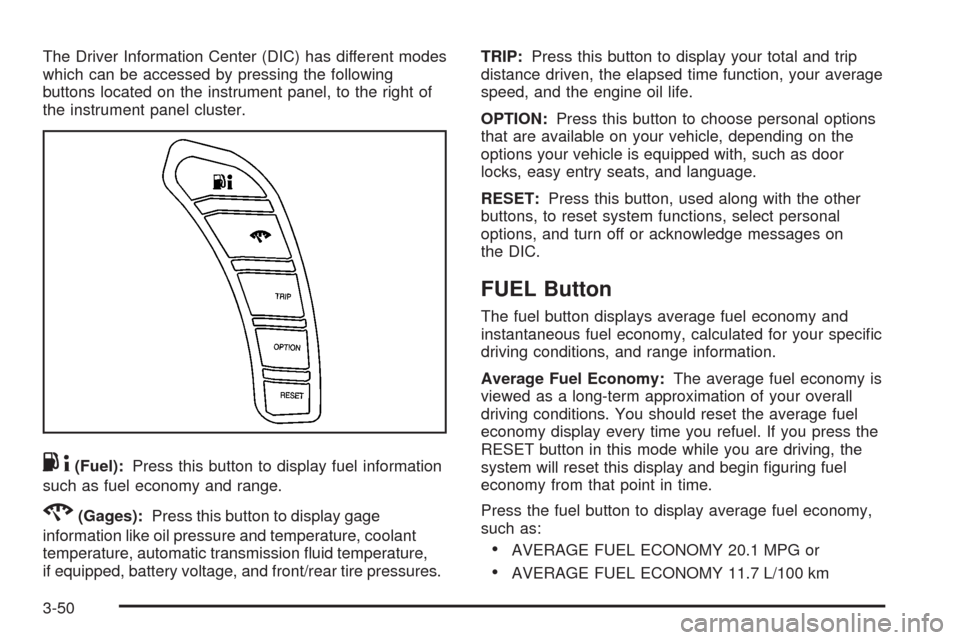
The Driver Information Center (DIC) has different modes
which can be accessed by pressing the following
buttons located on the instrument panel, to the right of
the instrument panel cluster.
.4(Fuel):Press this button to display fuel information
such as fuel economy and range.
2(Gages):Press this button to display gage
information like oil pressure and temperature, coolant
temperature, automatic transmission uid temperature,
if equipped, battery voltage, and front/rear tire pressures.TRIP:Press this button to display your total and trip
distance driven, the elapsed time function, your average
speed, and the engine oil life.
OPTION:Press this button to choose personal options
that are available on your vehicle, depending on the
options your vehicle is equipped with, such as door
locks, easy entry seats, and language.
RESET:Press this button, used along with the other
buttons, to reset system functions, select personal
options, and turn off or acknowledge messages on
the DIC.
FUEL Button
The fuel button displays average fuel economy and
instantaneous fuel economy, calculated for your specic
driving conditions, and range information.
Average Fuel Economy:The average fuel economy is
viewed as a long-term approximation of your overall
driving conditions. You should reset the average fuel
economy display every time you refuel. If you press the
RESET button in this mode while you are driving, the
system will reset this display and begin guring fuel
economy from that point in time.
Press the fuel button to display average fuel economy,
such as:
AVERAGE FUEL ECONOMY 20.1 MPG or
AVERAGE FUEL ECONOMY 11.7 L/100 km
3-50
Page 271 of 434
The GVWR includes the weight of the vehicle,
all occupants, fuel and cargo. Never exceed
the GVWR for your vehicle, or the Gross Axle
Weight Rating (GAWR) for either the front or
rear axle.
Do not load your vehicle with more weight than it
was designed to carry. See “Steps for Determining
Correct Load Limit” earlier in this section.
{CAUTION:
Do not load the vehicle any heavier than the
Gross Vehicle Weight Rating (GVWR), or
either the maximum front or rear Gross Axle
Weight Rating (GAWR). If you do, parts on the
vehicle can break, and it can change the way
your vehicle handles. These could cause you
to lose control and crash. Also, overloading
can shorten the life of the vehicle.
Notice
:Overloading your vehicle may cause
damage. Repairs would not be covered by your
warranty. Do not overload your vehicle.If you put things inside your vehicle — like
suitcases, tools, packages or anything else — they
will go as fast as the vehicle goes. If you have
to stop or turn quickly, or if there is a crash, they
will keep going.
{CAUTION:
Things you put inside your vehicle can strike
and injure people in a sudden stop or turn, or
in a crash.
Put things in the rear area of your
vehicle. Try to spread the weight evenly.
Never stack heavier things, like
suitcases, inside the vehicle so that some
of them are above the tops of the seats.
Do not leave an unsecured child restraint
in your vehicle.
When you carry something inside the
vehicle, secure it whenever you can.
4-27
Page 338 of 434
Tire Terminology and Denitions
Air Pressure:The amount of air inside the
tire pressing outward on each square inch of
the tire. Air pressure is expressed in pounds
per square inch (psi) or kilopascal (kPa).
Accessory Weight
:This means the combined
weight of optional accessories. Some examples of
optional accessories are, automatic transmission,
power steering, power brakes, power windows,
power seats, and air conditioning.
Aspect Ratio
:The relationship of a tire’s height
to its width.
Belt
:A rubber coated layer of cords that is
located between the plies and the tread. Cords
may be made from steel or other reinforcing
materials.
Bead
:The tire bead contains steel wires wrapped
by steel cords that hold the tire onto the rim.
Bias Ply Tire
:A pneumatic tire in which the plies
are laid at alternate angles less than 90 degrees
to the centerline of the tread.Cold Tire Pressure
:The amount of air pressure
in a tire, measured in pounds per square inch (psi)
or kilopascals (kPa) before a tire has built up heat
from driving. SeeInflation - Tire Pressure on
page 5-70.
Curb Weight
:The weight of a motor vehicle
with standard and optional equipment including
the maximum capacity of fuel, oil, and coolant,
but without passengers and cargo.
DOT Markings
:A code molded into the sidewall
of a tire signifying that the tire is in compliance
with the U.S. Department of Transportation (DOT)
motor vehicle safety standards. The DOT code
includes the Tire Identication Number (TIN), an
alphanumeric designator which can also identify
the tire manufacturer, production plant, brand,
and date of production.
GVWR
:Gross Vehicle Weight Rating.
SeeLoading the Vehicle on page 4-22.
GAWR FRT
:Gross Axle Weight Rating for the
front axle. SeeLoading the Vehicle on page 4-22.
GAWR RR
:Gross Axle Weight Rating for the
rear axle. SeeLoading the Vehicle on page 4-22.
5-66