2009 CHEVROLET CORVETTE audio
[x] Cancel search: audioPage 155 of 434

Head-Up Display (HUD)
{CAUTION:
If the HUD image is too bright, or too high in your
eld of view, it may take you more time to see
things you need to see when it is dark outside.
Be sure to keep the HUD image dim and placed
low in your eld of view.
For vehicles with the Head-Up Display (HUD), you can
see some of the driver information that appears on
the instrument panel cluster.
The information may be displayed in English or metric
units and appears as an image focused out toward
the front of the vehicle. The HUD consists of the
following information:
Speedometer
Turn Signal Indicators
High-Beam Indicator Symbol
Tachometer
Manual Paddle Shift Gear Indicator (If Equipped)
These displays on the HUD are for use when
using the manual paddle shift controls to shift the
transmission. See “Manual Paddle Shift” in
Automatic Transmission Operation on page 2-26.
Shift Light
This light is used for performance driving to indicate
that the vehicle’s best performance level has been
reached to shift the transmission into the next
higher gear. An arrow pointing up will light up on
the display just prior to reaching the engine fuel
cut-off mode. This cut-off is about 6,500 RPM for
the LS3 engine, 6,600 RPM for the LS9 & ZR1
engines and 7,000 RPM for the LS7 engine.
Check Gages Warning
Engine Coolant Temperature Gage
Transmission Fluid Temperature Gage,
(Automatic Transmission Vehicles Only)
Engine Oil Temperature Gage
Engine Oil Pressure Gage
G-Force Gage
Boost Gage (If Equipped)
Audio Functions, Street Mode Only
Navigation, Only with Navigation Radio,
Turn-by-Turn Guidance
3-19
Page 156 of 434

There are three HUD modes that can be viewed in the
HUD display. Press the MODE button to scroll
through these modes in the following order:
Street Mode supports
audio and navigation
functions with your choice
of tachometer settings.
Track Mode 1 supports the
G-Force gage and minor
gages with a circular
tachometer.
Track Mode 2 supports
G-Force gages, boost
gage w/SS, and minor
gages with a linear
tachometer.When the desired HUD display has been selected,
release the MODE button.
Within each mode, the display, can be further
customized by pressing the PAGE button. Pressing this
button in each mode will turn off and on the following:
Street Mode — No tachometer, circular tachometer,
and linear tachometer.
Track Modes 1 and2—Nominor gage, coolant
temperature, transmission oil temperature, engine oil
temperature, engine oil pressure, and boost gage.
While in Track Mode 1 or 2, the maximum G value
achieved during the current ignition cycle can be
displayed by pressing and holding the PAGE button.
The maximum G display will be shown until the PAGE
button is released. The maximum G value display will
be identical to the normal G value display, except the
maximum G gage digits (X.XX G) and corresponding
G gage bar will overwrite the current G value.
3-20
Page 216 of 434

Audio System(s)
Determine which radio the vehicle has and read the
following pages to become familiar with its features.
{CAUTION:
Taking your eyes off the road for extended periods
could cause a crash resulting in injury or death to
you or others. Do not give extended attention to
entertainment tasks while driving.
This system provides access to many audio and non
audio listings.
To minimize taking your eyes off the road while driving,
do the following while the vehicle is parked:
Become familiar with the operation and controls of
the audio system.
Set up the tone, speaker adjustments, and preset
radio stations.
For more information, seeDefensive Driving on
page 4-2.Notice:Contact your dealer/retailer before adding
any equipment.
Adding audio or communication equipment could
interfere with the operation of the vehicle’s engine,
radio, or other systems, and could damage them.
Follow federal rules covering mobile radio and
telephone equipment.
The vehicle has Retained Accessory Power (RAP).
With RAP, the audio system can be played even after
the ignition is turned off. SeeRetained Accessory Power
(RAP) on page 2-23for more information.
Setting the Clock
To set the clock:
1. Press and hold H until the correct hour displays.
2. Press and hold M until the correct minute displays.
3. Press the tune knob to select between the 12 or
24 hour display format.
The clock mode automatically times out with the
changed display format set as the current default setting.
3-80
Page 217 of 434
Radio(s)
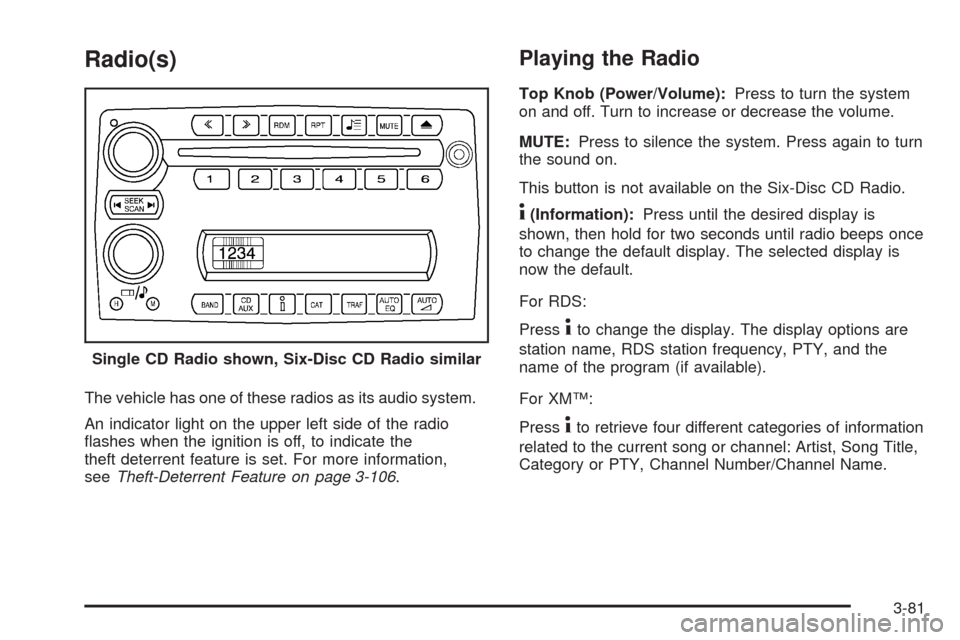
The vehicle has one of these radios as its audio system.
An indicator light on the upper left side of the radio
ashes when the ignition is off, to indicate the
theft deterrent feature is set. For more information,
seeTheft-Deterrent Feature on page 3-106.
Playing the Radio
Top Knob (Power/Volume):Press to turn the system
on and off. Turn to increase or decrease the volume.
MUTE:Press to silence the system. Press again to turn
the sound on.
This button is not available on the Six-Disc CD Radio.
4(Information):Press until the desired display is
shown, then hold for two seconds until radio beeps once
to change the default display. The selected display is
now the default.
For RDS:
Press
4to change the display. The display options are
station name, RDS station frequency, PTY, and the
name of the program (if available).
For XM™:
Press
4to retrieve four different categories of information
related to the current song or channel: Artist, Song Title,
Category or PTY, Channel Number/Channel Name. Single CD Radio shown, Six-Disc CD Radio similar
3-81
Page 218 of 434
Audio Settings
Press and holdOewhen no tone or speaker control
is displayed to adjust all tone and speaker controls
to the middle position. AUDIO SETTINGS CENTERED
displays.
Adjusting the Tone (Bass/Treble)
Oe(Bass/Treble):To adjust the Bass or Treble:
Press and release
Oeuntil BASS or TREBLE
displays.
Turn theOeknob to increase or to decrease
the level.
Press and hold theOeknob until the level
changes to the middle position.
Adjusting the Speakers (Balance/Fade)
Oe(Balance/Fade):To adjust the Balance:
Press and release
Oeuntil BALANCE displays.
Turn theOeknob to move the sound toward the
right or the left speakers.
Press and hold theOeknob until the level
changes to the middle position.To adjust the Fade:
Press and release
Oeuntil FADE displays
Turn theOeknob to move the sound toward the
front or the rear speakers.
Press and hold theOeknob until the level
changes to the middle position.
AUTO EQ (Automatic Equalization):The radio saves
separate AUTO EQ settings for each preset and source.
For vehicles without the Bose
®sound system:
Press AUTO EQ to select equalization settings
designed for CLASSICAL, POP, ROCK, JAZZ,
TALK, and COUNTRY.
Selecting CUSTOM or changing bass or treble,
returns the EQ to the manual bass and treble
settings.
For vehicles with the Bose
®sound system:
Press AUTO EQ to select equalization settings from
EQ1 through EQ6.
Selecting CUSTOM or changing bass or treble,
returns the EQ to the manual bass and treble
settings.
3-82
Page 219 of 434
AUTOn(Automatic Volume):Automatic volume
automatically adjusts the audio system to make up
for road and wind noise, by increasing the volume as
vehicle speed increases.
For vehicles without the Bose
®sound system:
1. Set the volume at the desired level.
2. Press AUTO
nto select AUTO VOLUME MIN
(minimum), AUTO VOLUME MED (medium), or
AUTO VOLUME MAX (maximum). Each higher
setting provides more volume compensation
at faster vehicle speeds.
3. Press AUTO
nuntil AUTO VOLUME OFF
displays to turn automatic volume off.
For vehicles with the Bose
®sound system:
Vehicles with the Bose
®sound system include
Bose®AudioPilot®noise compensation technology.
AudioPilot®continuously adjusts the audio system
equalization to compensate for background noise.This feature is most effective at lower radio volume
settings where background noise can affect how well the
audio is heard. At higher volume settings, there may
be little or no adjustments by AudioPilot
®. For additional
information on AudioPilot®, visit bose.com/audiopilot.
To use AudioPilot
®:
1. Set the volume at the desired level.
2. Press AUTO
nuntil AUTO VOLUME ON
displays.
3. Press AUTO
nuntil AUTO VOLUME OFF
displays to turn off AudioPilot®.
3-83
Page 223 of 434
Press TRAF to turn off the traffic announcements
if TA is on the display.
The radio plays the traffic announcement even if the
volume is low. The radio interrupts the play of a CD if
the last tuned station broadcasts traffic announcements.
This function does not apply to XM Satellite Radio
Service.
Radio Messages for XM Only
SeeXM Radio Messages on page 3-95XM Radio
Messages later in this section for further detail.
Using the CD Player
The CD player can play smaller 3 inch (8 cm) single
CDs with an adapter ring.
A CD in the player it stays in the player when the
ignition is turned off. When the ignition or radio is turned
on, the CD starts to play where it stopped, if it was
the last selected audio source.
Loading a CD
Single CD Radio:
Insert the CD partway into the slot, label side up, until
the player pulls the CD in. The CD begins playing
automatically.
The CD symbol displays when a CD is inserted, and
the track number displays when each new track starts
to play.
Six-Disc CD Radio:
If more than one CD has been loaded, a number for
each CD displays.
M(Load):Press to load CDs into the CD player.
To insert one CD:
1. Press
M.
2. Load a CD and insert the CD partway into the slot,
label side up when INSERT CD # displays.
The player pulls the CD in.
3-87
Page 228 of 434
Using the Auxiliary Input Jack
The radio system has an auxiliary input jack located on
the right side of the faceplate. This is not an audio
output; do not plug the headphone set into the front
auxiliary input jack. An external audio device can
be connected to the auxiliary input jack for use as
another source for audio listening.
Drivers are encouraged to set up any auxiliary device
while the vehicle is in P (Park). SeeDefensive
Driving on page 4-2.
Connect a 3.5 mm (1/8 inch) cable to the radio’s front
auxiliary input jack to use a portable audio player.
The radio displays AUX INPUT DEVICE when a device
is connected and begins playing audio from that
device.
Top Knob (Power/Volume):Turn to increase or
decrease the volume of the portable player. Additional
volume adjustments can be made from the portable
device.
BAND:Press to listen to the radio while a portable
audio device is playing. The portable audio device
continues playing.CD/AUX (CD/Auxiliary):Press to play a CD while a
portable audio device is playing. Press again and
the system begins playing audio from the connected
portable audio player. If a portable audio player is
connected, AUX INPUT DEVICE displays. If a portable
audio player is not connected, AUX INPUT DEVICE
does not display.
Using an MP3
MP3 Format
Radios with the MP3 feature can only play CD-R discs.
Do not mix standard audio and MP3 les on the
same disc.
Supported File Structure
Radios with the MP3 feature support up to:
50 folders.
11 folders in depth.
50 playlists.
255 les.
10 sessions.
3-92