2009 CHERY TIGGO brake rotor
[x] Cancel search: brake rotorPage 1400 of 1903
Downloaded from www.Manualslib.com manuals search engine Rear Brake
APPLICATIONSPECIFICATION (mm)
Brake Rotor Diameter 303
Brake Rotor Thickness (New) 9
Min. Thickness Of Brake Rotor 7
Rear Brake Pad Thickness (New) 15
Min. Thickness Of Rear Brake Pad 7
Thickness Of Parking Brake Lining 2.5
Min. Thickness Of Parking Brake Lining 1.5
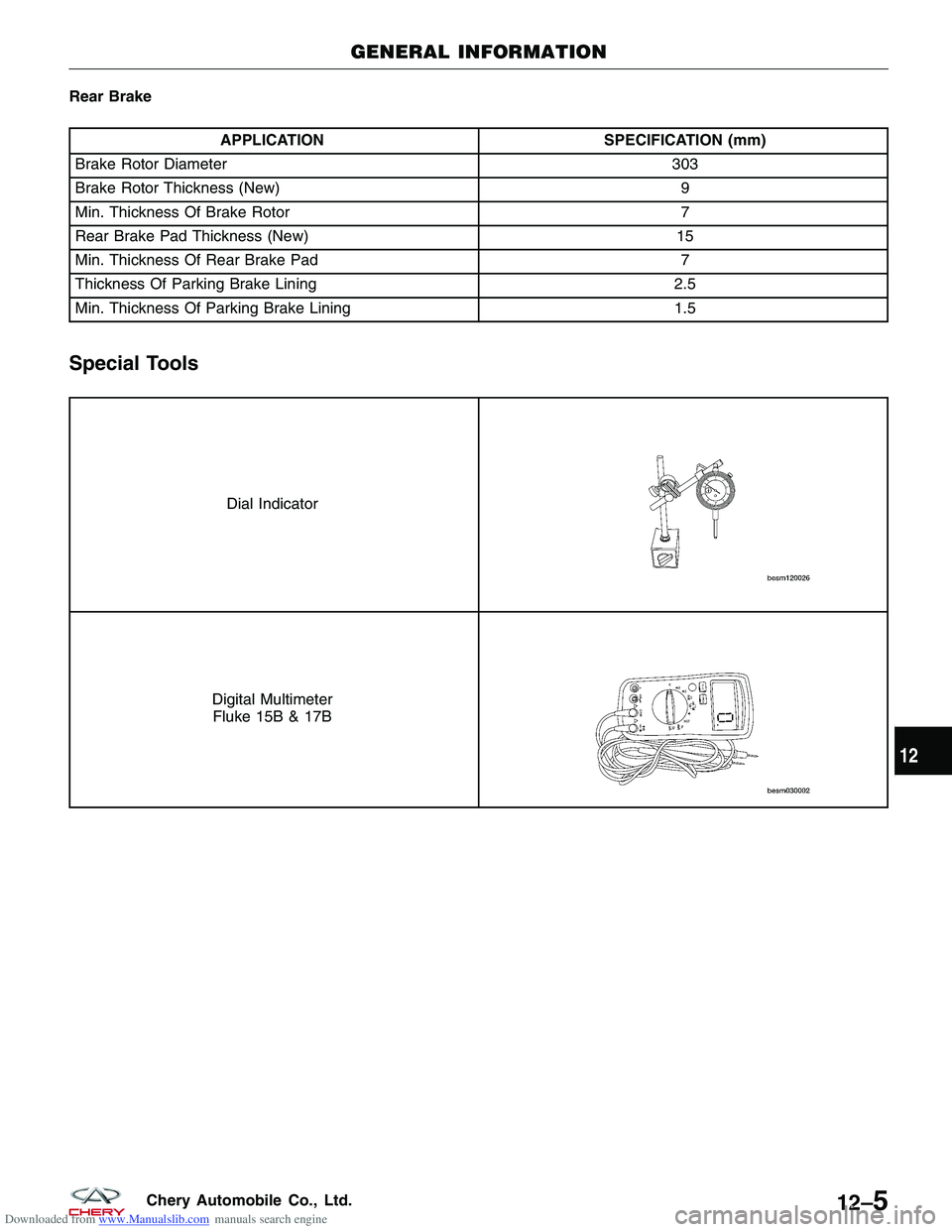
Special Tools
Dial Indicator
Digital Multimeter
Fluke 15B & 17B
GENERAL INFORMATION
12
12–5Chery Automobile Co., Ltd.
Page 1402 of 1903
Downloaded from www.Manualslib.com manuals search engine DIAGNOSIS & TESTING
Diagnostic Help
Brake diagnosis involves determining if the concern is related to a mechanical, hydraulic, electrical or vacuum oper-
ated component.
NOTE :
The brake reservoir fluid level will decrease in proportion to normal lining wear.
NOTE :
Brake fluid tends to darken over time. This is normal and should not be mistaken for contamination.
Preliminary Brake Check:
•Check the condition of the tires and wheels. Damaged wheels and worn, damaged or under inflated tires can
cause a pull, shudder, vibration and a condition similar to brake grab.
• If a complaint was based on noise while braking, check the suspension components. Jounce the front and the
rear of vehicle and listen for anything that might be caused by a loose, worn or damaged suspension or steer-
ing component.
• Inspect the brake fluid level and condition.
1. If the fluid level is abnormally low, look for any evidence of leaks at the calipers, brake lines, master cyl-
inder and at the Antilock Brake System (ABS) Hydraulic Control Unit (HCU).
2. If the fluid appears to be contaminated, drain a sample to examine.
• The system will have to be flushed if the fluid is separated into layers, or contains a substance other than
brake fluid. The system seals, cups, hoses, master cylinder and HCU will also have to be replaced after flush-
ing. Use clean brake fluid to flush the system.
• Check the parking brake operation. Verify free movement and full release of the cables and the lever. Also note
if the vehicle was being operated with the parking brake partially applied.
• Check the brake pedal operation. Verify that the pedal does not bind and has adequate free play. If the pedal
lacks free play, check the pedal and the power booster for looseness or for a binding condition. DO NOT road
test the vehicle until the condition is located and corrected.
• Check the vacuum booster check valve and vacuum supply hose.
• If the preliminary checks appear to be OK, road test the vehicle.
Brake Noise
CONDITION POSSIBLE CAUSES CORRECTION
Disc Brake Chirp · Excessive brake rotor runout.
· Small particles· Diagnose and correct as
necessary.
Disc Brake Rattle Or Clunk · Broken or missing spring clips.
· Caliper guide pin bolts loose.
· Missing abutment shims.
· Small metal particles· Replace brake pads.
· Tighten guide pin bolts.
· Replace missing abutment shims.
Disc Brake Squeak At Low Speed
(While Applying Light Brake Pedal
Effort) · Brake shoe linings.
· Replace brake pads.
Scraping Or Whirring · ABS wheel speed sensor hitting
tone wheel.· Inspect, correct or replace faulty
component(s).
12
12–7Chery Automobile Co., Ltd.
Page 1403 of 1903
Downloaded from www.Manualslib.com manuals search engine Braking Concerns
CONDITIONPOSSIBLE CAUSES CORRECTION
Excessive Pedal Effort · Obstruction of brake pedal.
· Low power brake booster assist.
· Glazed brake pads.
· Brake pad lining transfer to brake
rotor.· Inspect, remove or move
obstruction.
· Refer to Power Brake Booster in
this section.
· Resurface or replace brake rotors
as necessary. Replace brake pads.
· Resurface or replace brake rotors
as necessary. Replace brake pads.
Excessive Pedal Effort (Hard Pedal
Unable To Lock-Up Wheels) · Power brake booster runout
(vacuum assist).· Check booster vacuum hose and
engine tune for adequate vacuum
supply.
Excessive Pedal Travel (Vehicle
Stops OK) · Air in brake lines.
· Bleed brakes.
Pedal Pulsates/Surges During
Braking · Disc brake rotor has excessive
thickness variation.· Isolate condition as rear or front.
Resurface or replace brake rotors as
necessary.
Pedal Is Spongy · Air in brake lines.· Bleed brakes.
Vehicle Pulls To Right Or Left On
Braking · Frozen brake caliper piston.
· Contaminated brake pad/shoe
lining (most likely front lining).
· Pinched brake lines.
· Leaking piston seal.
· Suspension problem.· Replace frozen piston or caliper.
Bleed brakes.
· Inspect and clean, or replace
pads/shoes. Repair source of
contamination.
· Replace pinched line.
· Replace piston seal or brake
caliper.
· See the Suspension section.
Parking Brake - Excessive Handle
Travel · Rear brakes out of adjustment.· Adjust rear parking brake shoes on
vehicles with rear disc brakes.
DIAGNOSIS & TESTING
12–8Chery Automobile Co., Ltd.
Page 1413 of 1903
Downloaded from www.Manualslib.com manuals search engine Front Brake Caliper
Description
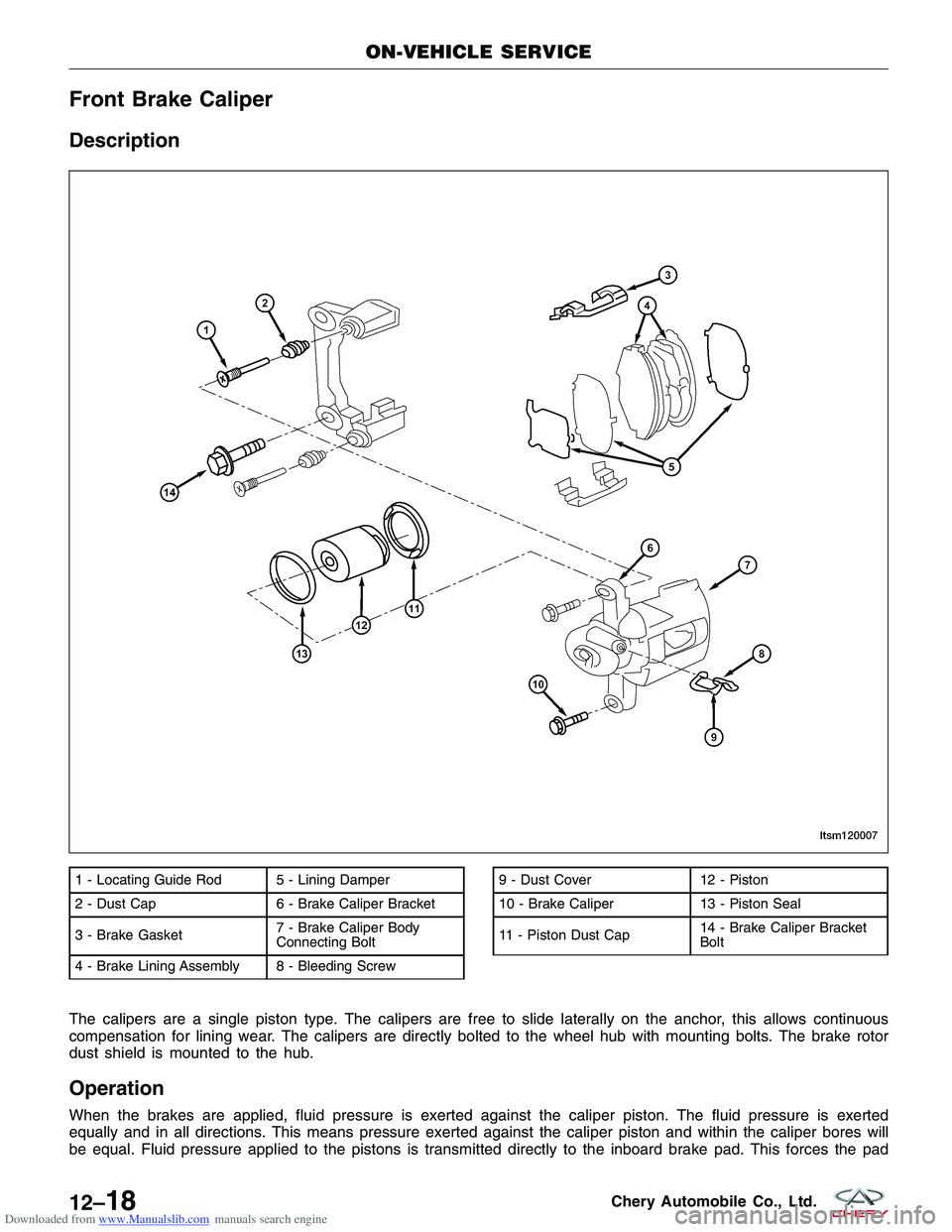
The calipers are a single piston type. The calipers are free to slide laterally on the anchor, this allows continuous
compensation for lining wear. The calipers are directly bolted to the wheel hub with mounting bolts. The brake rotor
dust shield is mounted to the hub.
Operation
When the brakes are applied, fluid pressure is exerted against the caliper piston. The fluid pressure is exerted
equally and in all directions. This means pressure exerted against the caliper piston and within the caliper bores will
be equal. Fluid pressure applied to the pistons is transmitted directly to the inboard brake pad. This forces the pad
1 - Locating Guide Rod 5 - Lining Damper
2 - Dust Cap 6 - Brake Caliper Bracket
3 - Brake Gasket7 - Brake Caliper Body
Connecting Bolt
4 - Brake Lining Assembly 8 - Bleeding Screw9 - Dust Cover 12 - Piston
10 - Brake Caliper 13 - Piston Seal
11 - Piston Dust Cap 14 - Brake Caliper Bracket
Bolt
ON-VEHICLE SERVICE
LTSM120007
12–18Chery Automobile Co., Ltd.
Page 1414 of 1903
Downloaded from www.Manualslib.com manuals search engine lining against the inner surface of the disc brake rotor. At the same time, fluid pressure within the piston bore forces
the caliper to slide inward on the slide pins. This action brings the outboard brake pad lining into contact with the
outer surface of the disc brake rotor.
Removal & Installation
1. Using a brake pedal holding tool, depress the brake pedal past its first 25 mm of travel and hold it in this posi-tion. This will isolate the master cylinder from the brake hydraulic system and will not allow the brake fluid to
drain out of the master cylinder reservoir when the lines are opened.
2. Raise and support the vehicle.
3. Remove the wheel mounting nuts and the tire and wheel assembly. (Tighten: Wheel mounting nuts to 110 N·m)
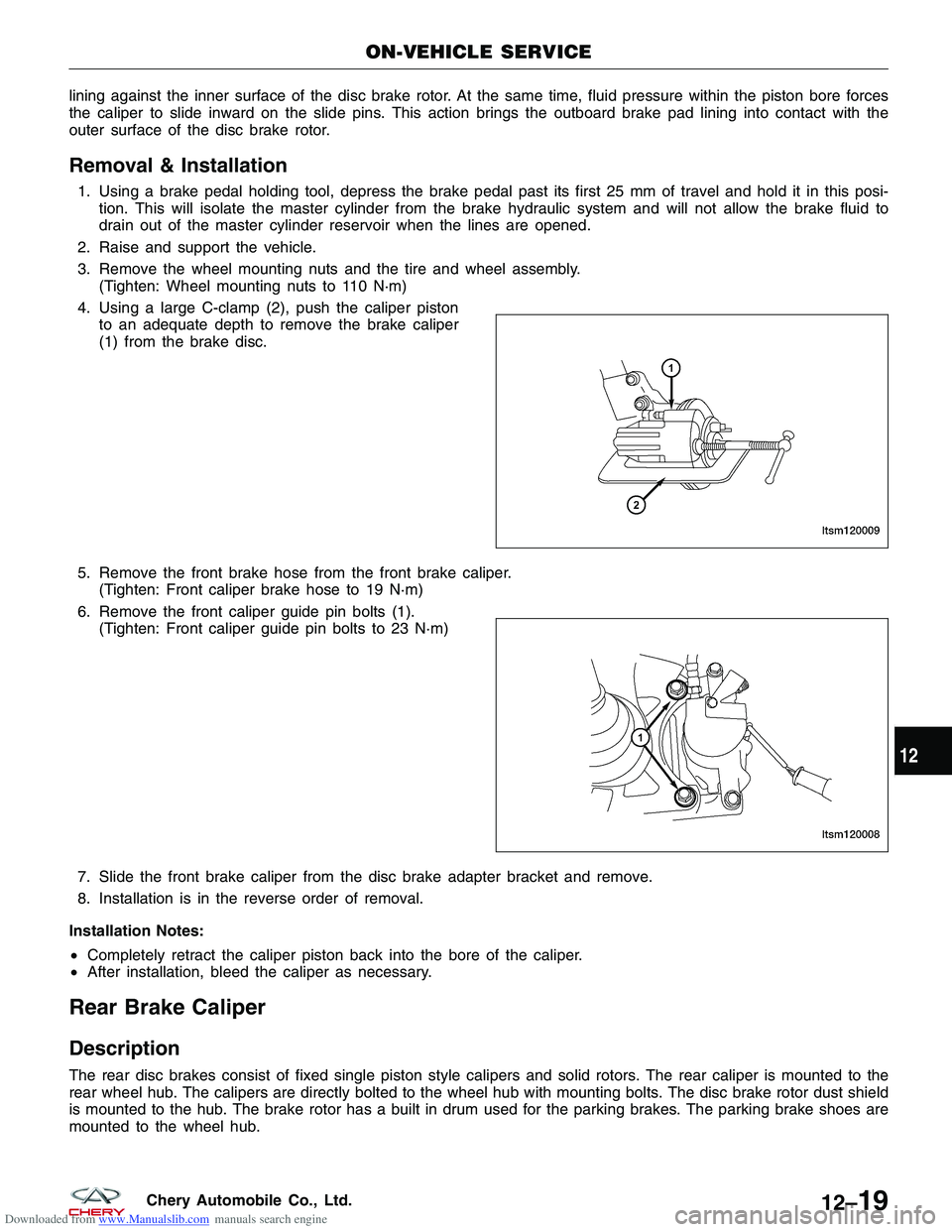
4. Using a large C-clamp (2), push the caliper piston to an adequate depth to remove the brake caliper
(1) from the brake disc.
5. Remove the front brake hose from the front brake caliper. (Tighten: Front caliper brake hose to 19 N·m)
6. Remove the front caliper guide pin bolts (1). (Tighten: Front caliper guide pin bolts to 23 N·m)
7. Slide the front brake caliper from the disc brake adapter bracket and remove.
8. Installation is in the reverse order of removal.
Installation Notes:
• Completely retract the caliper piston back into the bore of the caliper.
• After installation, bleed the caliper as necessary.
Rear Brake Caliper
Description
The rear disc brakes consist of fixed single piston style calipers and solid rotors. The rear caliper is mounted to the
rear wheel hub. The calipers are directly bolted to the wheel hub with mounting bolts. The disc brake rotor dust shield
is mounted to the hub. The brake rotor has a built in drum used for the parking brakes. The parking brake shoes are
mounted to the wheel hub.
ON-VEHICLE SERVICE
LTSM120009
LTSM120008
12
12–19Chery Automobile Co., Ltd.
Page 1415 of 1903
Downloaded from www.Manualslib.com manuals search engine Operation
When the brakes are applied, fluid pressure is exerted against the caliper piston. The fluid pressure is exerted
equally and in all directions. This means pressure exerted against the caliper piston and within the caliper bores will
be equal. Fluid pressure applied to the pistons is transmitted directly to the inboard brake pad. This forces the pad
lining against the inner surface of the brake rotor. At the same time, fluid pressure within the piston bore forces the
caliper to slide inward on the slide pins. This action brings the outboard brake pad lining into contact with the outer
surface of the disc brake rotor.
Removal & Installation
1. Using a brake pedal holding tool, depress the brake pedal past its first 25 mm of travel and hold it in this posi-tion. This will isolate the master cylinder from the brake hydraulic system and will not allow the brake fluid to
drain out of the master cylinder reservoir when the lines are opened.
2. Raise and support the vehicle.
3. Remove the wheel mounting nuts and the tire and wheel assembly. (Tighten: Wheel mounting nuts to 110 N·m)
4. Remove the banjo bolt connecting the brake hose to the rear brake caliper. (Tighten: Rear caliper banjo bolt to 20 N·m)
5. Remove the rear caliper guide pin bolts. (Tighten: Rear caliper guide pin bolts to 23 N·m)
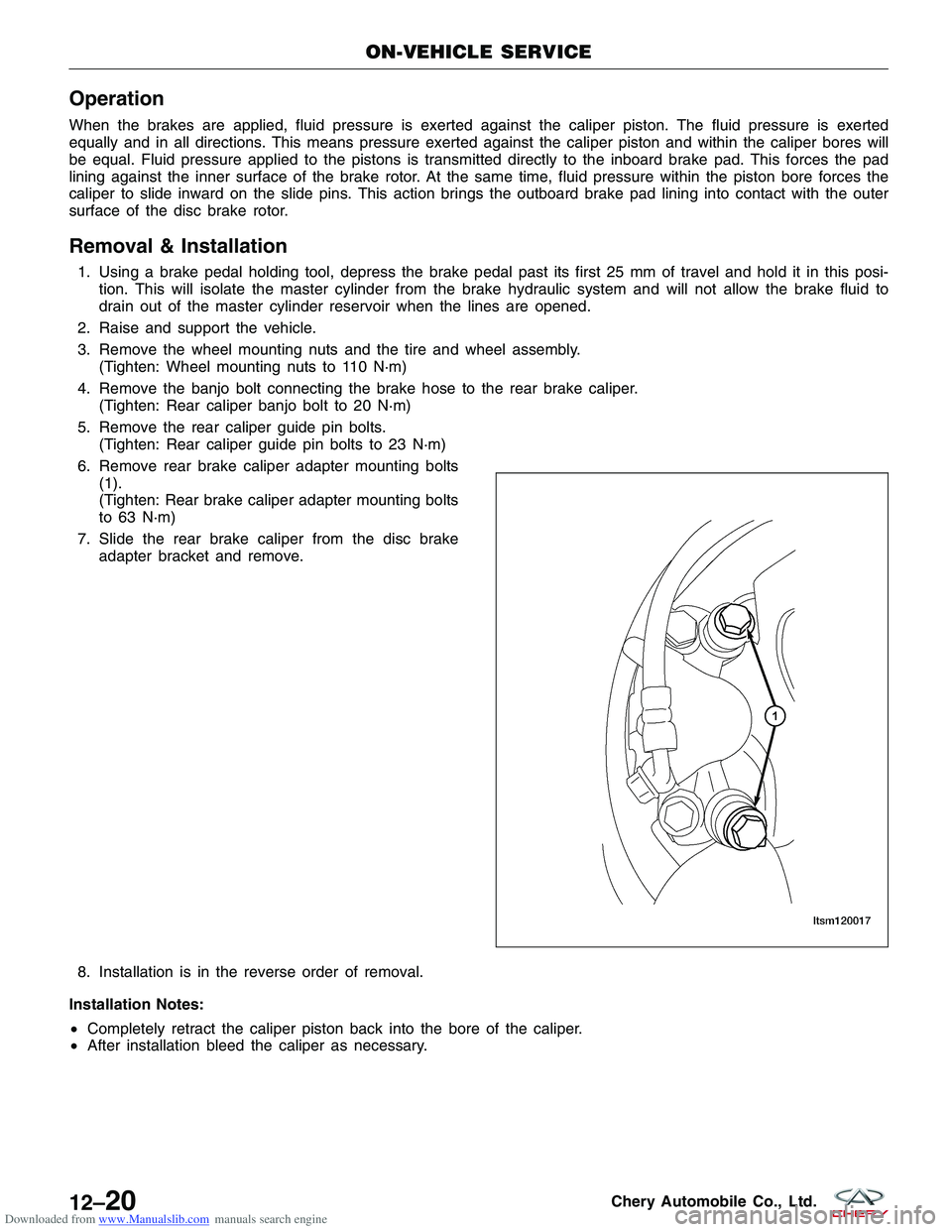
6. Remove rear brake caliper adapter mounting bolts (1).
(Tighten: Rear brake caliper adapter mounting bolts
to 63 N·m)
7. Slide the rear brake caliper from the disc brake adapter bracket and remove.
8. Installation is in the reverse order of removal.
Installation Notes:
• Completely retract the caliper piston back into the bore of the caliper.
• After installation bleed the caliper as necessary.
ON-VEHICLE SERVICE
LTSM120017
12–20Chery Automobile Co., Ltd.
Page 1416 of 1903
Downloaded from www.Manualslib.com manuals search engine Front Brake Rotor
Removal & Installation
1. Raise and support the vehicle.
2. Remove the wheel mounting nuts and the tire and wheel assembly.(Tighten: Wheel mounting nuts to 110 N·m)
3. Remove the front caliper (See Front Caliper Removal & Installation in Section 12 Brakes).
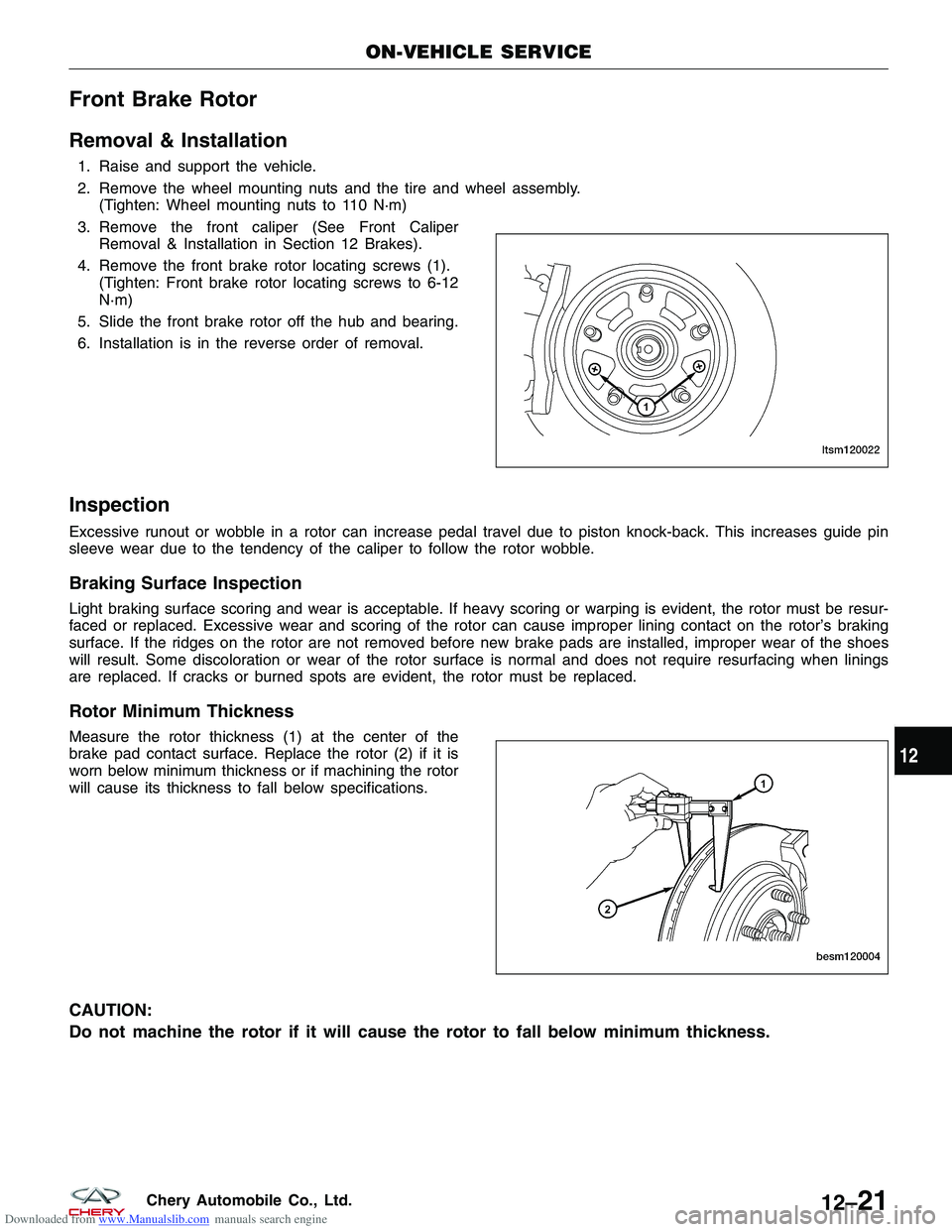
4. Remove the front brake rotor locating screws (1). (Tighten: Front brake rotor locating screws to 6-12
N·m)
5. Slide the front brake rotor off the hub and bearing.
6. Installation is in the reverse order of removal.
Inspection
Excessive runout or wobble in a rotor can increase pedal travel due to piston knock-back. This increases guide pin
sleeve wear due to the tendency of the caliper to follow the rotor wobble.
Braking Surface Inspection
Light braking surface scoring and wear is acceptable. If heavy scoring or warping is evident, the rotor must be resur-
faced or replaced. Excessive wear and scoring of the rotor can cause improper lining contact on the rotor’s braking
surface. If the ridges on the rotor are not removed before new brake pads are installed, improper wear of the shoes
will result. Some discoloration or wear of the rotor surface is normal and does not require resurfacing when linings
are replaced. If cracks or burned spots are evident, the rotor must be replaced.
Rotor Minimum Thickness
Measure the rotor thickness (1) at the center of the
brake pad contact surface. Replace the rotor (2) if it is
worn below minimum thickness or if machining the rotor
will cause its thickness to fall below specifications.
CAUTION:
Do not machine the rotor if it will cause the rotor to fall below minimum thickness.
ON-VEHICLE SERVICE
LTSM120022
BESM120004
12
12–21Chery Automobile Co., Ltd.
Page 1417 of 1903
Downloaded from www.Manualslib.com manuals search engine Rotor Runout
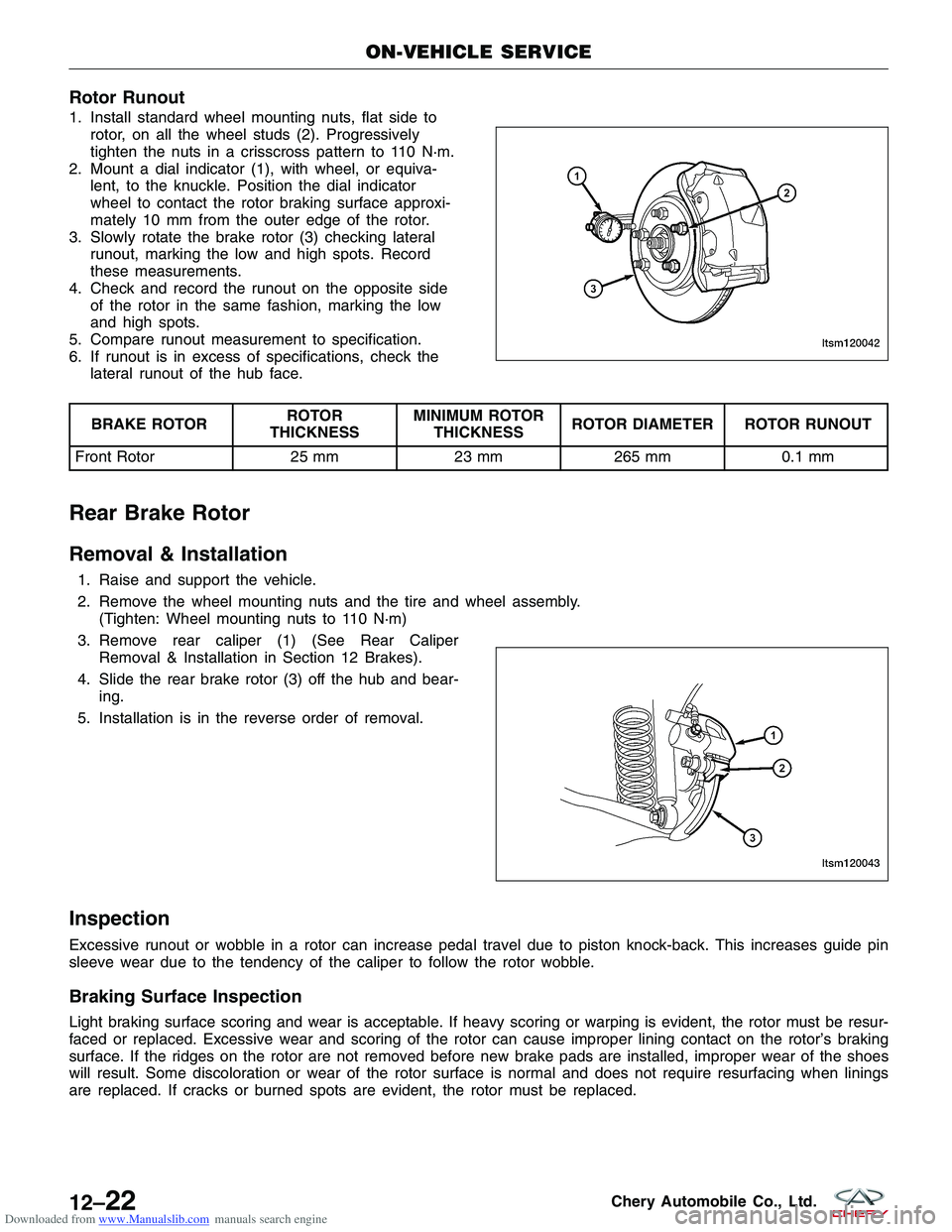
1. Install standard wheel mounting nuts, flat side torotor, on all the wheel studs (2). Progressively
tighten the nuts in a crisscross pattern to 110 N·m.
2. Mount a dial indicator (1), with wheel, or equiva- lent, to the knuckle. Position the dial indicator
wheel to contact the rotor braking surface approxi-
mately 10 mm from the outer edge of the rotor.
3. Slowly rotate the brake rotor (3) checking lateral runout, marking the low and high spots. Record
these measurements.
4. Check and record the runout on the opposite side of the rotor in the same fashion, marking the low
and high spots.
5. Compare runout measurement to specification.
6. If runout is in excess of specifications, check the lateral runout of the hub face.
BRAKE ROTOR ROTOR
THICKNESS MINIMUM ROTOR
THICKNESS ROTOR DIAMETER ROTOR RUNOUT
Front Rotor 25 mm23 mm265 mm 0.1 mm
Rear Brake Rotor
Removal & Installation
1. Raise and support the vehicle.
2. Remove the wheel mounting nuts and the tire and wheel assembly.
(Tighten: Wheel mounting nuts to 110 N·m)
3. Remove rear caliper (1) (See Rear Caliper Removal & Installation in Section 12 Brakes).
4. Slide the rear brake rotor (3) off the hub and bear- ing.
5. Installation is in the reverse order of removal.
Inspection
Excessive runout or wobble in a rotor can increase pedal travel due to piston knock-back. This increases guide pin
sleeve wear due to the tendency of the caliper to follow the rotor wobble.
Braking Surface Inspection
Light braking surface scoring and wear is acceptable. If heavy scoring or warping is evident, the rotor must be resur-
faced or replaced. Excessive wear and scoring of the rotor can cause improper lining contact on the rotor’s braking
surface. If the ridges on the rotor are not removed before new brake pads are installed, improper wear of the shoes
will result. Some discoloration or wear of the rotor surface is normal and does not require resurfacing when linings
are replaced. If cracks or burned spots are evident, the rotor must be replaced.
ON-VEHICLE SERVICE
LTSM120042
LTSM120043
12–22Chery Automobile Co., Ltd.