Page 143 of 490

Keep the original hand-held transmitter for use in other
vehicles as well as for future Universal Home Remote
programming. It is also recommended that upon the
sale of the vehicle, the programmed Universal Home
Remote buttons should be erased for security purposes.
See “Erasing Universal Home Remote Buttons” later in
this section.
When programming a garage door, park outside of the
garage. Park directly in line with and facing the garage
door opener motor-head or gate motor-head. Be sure that
people and objects are clear of the garage door or gate
that is being programmed.
It is recommended that a new battery be installed in
your hand-held transmitter for quicker and more
accurate transmission of the radio-frequency signal.
Programming the Universal Home
Remote System
For questions or help programming the Universal
Home Remote System, call 1-800-355-3515 or
go to www.homelink.com.
Programming a garage door opener involves
time-sensitive actions, so read the entire procedure
before starting. Otherwise, the device will time out
and the procedure will have to be repeated.To program up to three devices:
1. From inside the vehicle, press and hold down the
two outside buttons at the same time, releasing
only when the Universal Home Remote indicator
light begins to ash, after 20 seconds. This step
will erase the factory settings or all previously
programmed buttons.
Do not hold down the buttons for longer than
30 seconds and do not repeat this step to program
the remaining two Universal Home Remote buttons.
2. Hold the end of your hand-held transmitter about
1 to 3 inches (3 to 8 cm) away from the Universal
Home Remote buttons while keeping the indicator
light in view. The hand-held transmitter was supplied
by the manufacturer of your garage door opener
receiver (motor head unit).
2-61
Page 145 of 490
7. Firmly press and release the “Learn” or “Smart”
button. After you press this button, you will have
30 seconds to complete Step 8.
8. Immediately return to the vehicle. Firmly press and
hold the Universal Home Remote button, chosen in
Step 3 to control the garage door, for two seconds,
and then release it. If the garage door does not
move, press and hold the same button a second time
for two seconds, and then release it. Again, if the
door does not move, press and hold the same button
a third time for two seconds, and then release.
The Universal Home Remote should now activate
the garage door.
To program the remaining two Universal Home Remote
buttons, begin with Step 2 of “Programming the Universal
Home Remote System.” Do not repeat Step 1, as this will
erase all previous programming from the Universal Home
Remote buttons.Gate Operator and Canadian
Programming
If you have questions or need help programming the
Universal Home Remote System, call 1-800-355-3515
or go to www.homelink.com.
Canadian radio-frequency laws require transmitter
signals to time out or quit after several seconds of
transmission. This may not be long enough for Universal
Home Remote to pick up the signal during programming.
Similarly, some U.S. gate operators are manufactured
to time out in the same manner.
If you live in Canada, or you are having difficulty
programming a gate operator or garage door opener by
using the “Programming Universal Home Remote”
procedures, regardless of where you live, replace
Step 3 under “Programming Universal Home Remote”
with the following:
Continue to press and hold the Universal Home Remote
button while you press and release every two seconds
(cycle) the hand-held transmitter button until the
frequency signal has been successfully accepted by the
Universal Home Remote. The Universal Home Remote
indicator light will ash slowly at rst and then rapidly.
Proceed with Step 4 under “Programming Universal
Home Remote” to complete.
2-63
Page 153 of 490
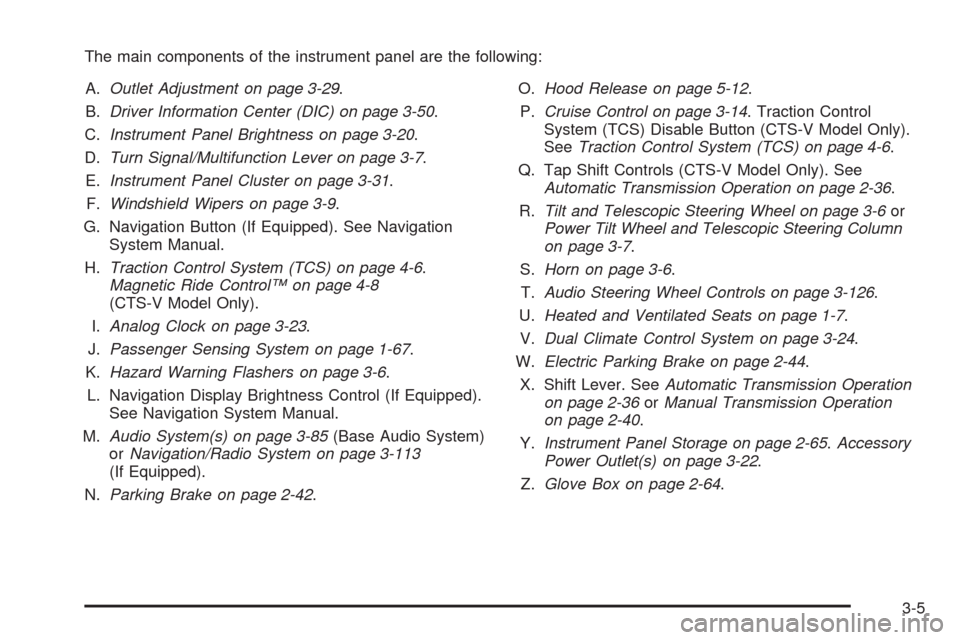
The main components of the instrument panel are the following:
A.Outlet Adjustment on page 3-29.
B.Driver Information Center (DIC) on page 3-50.
C.Instrument Panel Brightness on page 3-20.
D.Turn Signal/Multifunction Lever on page 3-7.
E.Instrument Panel Cluster on page 3-31.
F.Windshield Wipers on page 3-9.
G. Navigation Button (If Equipped). See Navigation
System Manual.
H.Traction Control System (TCS) on page 4-6.
Magnetic Ride Control™ on page 4-8
(CTS-V Model Only).
I.Analog Clock on page 3-23.
J.Passenger Sensing System on page 1-67.
K.Hazard Warning Flashers on page 3-6.
L. Navigation Display Brightness Control (If Equipped).
See Navigation System Manual.
M.Audio System(s) on page 3-85(Base Audio System)
orNavigation/Radio System on page 3-113
(If Equipped).
N.Parking Brake on page 2-42.O.Hood Release on page 5-12.
P.Cruise Control on page 3-14. Traction Control
System (TCS) Disable Button (CTS-V Model Only).
SeeTraction Control System (TCS) on page 4-6.
Q. Tap Shift Controls (CTS-V Model Only). See
Automatic Transmission Operation on page 2-36.
R.Tilt and Telescopic Steering Wheel on page 3-6or
Power Tilt Wheel and Telescopic Steering Column
on page 3-7.
S.Horn on page 3-6.
T.Audio Steering Wheel Controls on page 3-126.
U.Heated and Ventilated Seats on page 1-7.
V.Dual Climate Control System on page 3-24.
W.Electric Parking Brake on page 2-44.
X. Shift Lever. SeeAutomatic Transmission Operation
on page 2-36orManual Transmission Operation
on page 2-40.
Y.Instrument Panel Storage on page 2-65.Accessory
Power Outlet(s) on page 3-22.
Z.Glove Box on page 2-64.
3-5
Page 164 of 490

Reducing Speed While Using Cruise
Control
To reduce the vehicle’s speed while using cruise
control:
Press and hold the SET– button on the steering
wheel until the desired speed is reached, then
release it.
To slow down in very small amounts, press the
SET– button on the steering wheel briey.
Each time this is done, the vehicle goes about
1 mph (1.6 km/h) slower.
Passing Another Vehicle While Using
Cruise Control
Use the accelerator pedal to increase the vehicle’s
speed. When you take your foot off the pedal, the
vehicle slows down to the previously set cruise speed.
Using Cruise Control on Hills
How well the cruise control works on hills depends upon
the vehicle’s speed, load, and the steepness of the
hills. When going up steep hills, you might have to step
on the accelerator pedal to maintain the vehicle’s speed.
When going downhill, you might have to brake or shift
to a lower gear to keep the vehicle’s speed down.
When the brakes are applied the cruise control turns off.
Ending Cruise Control
There are four ways to end cruise control:
Step lightly on the brake pedal
(manual and automatic transmissions).
Press the clutch pedal to the oor
(manual transmissions).
Press[on the steering wheel.
PressIon the steering wheel.
Erasing Speed Memory
The cruise control set speed memory is erased when
the cruise control or the ignition is turned off.
3-16
Page 166 of 490

Daytime Running Lamps (DRL)
Daytime Running Lamps (DRL) can make it easier for
others to see the front of your vehicle during the day.
Fully functional daytime running lamps are required on
all vehicles rst sold in Canada.
The DRL system will make either the reduced intensity
low-beam headlamps or dedicated DRL’s come on
when the following conditions are met:
It is still daylight and the ignition is in ON/RUN
or START.
The exterior lamp control is in off or AUTO and the
headlamps are off.
The automatic transmission is not in P (Park).
When DRL’s are on, only the reduced intensity
low-beam headlamps or dedicated DRL’s will be on.
The other exterior lamps and the instrument panel
cluster will not be on.When the exterior lamp control is in AUTO and it is dark
enough outside, the DRL turns off and the low-beam
headlamps will turn on. When it is bright enough outside,
the low-beam headlamps will go off, and the DRL will
turn back on. If the vehicle is started in a dark garage,
the automatic headlamp system comes on immediately.
Once the vehicle leaves the garage, it takes about
one minute for the automatic headlamp system to
change to DRL if it is light outside. During that delay,
the instrument panel cluster may not be as bright
as usual. Make sure the instrument panel brightness
lever is in the full bright position. SeeInstrument Panel
Brightness on page 3-20.
Turning the exterior lamp control to off or to the
low-beam headlamp position will turn off the DRL.
If the parking lamps or the fog lamps were turned on
instead, the DRL will still turn off.
This will work regardless of gear position and whether
or not the parking brake is set.
3-18
Page 167 of 490

Light Sensor
The light sensor for the
DRL and AUTO headlamp
feature is located on
top of the instrument panel.
If the sensor is covered, it will prevent it from sensing
light, and the exterior lamps or the Headlamps Suggested
message will appear on the DIC whenever the ignition
is on.
Adaptive Forward Lighting System
The Adaptive Forward Lighting System (AFL) pivots
the headlamps horizontally to provide greater road
illumination while turning. To enable AFL, set the
exterior lamp switch on the multifunction lever to the
AUTO position. Moving the switch out of the AUTOposition will deactivate the system. AFL will operate
when the vehicle speed is greater than 2 mph (3 km/h).
AFL will not operate when the transmission is in
R (Reverse). AFL is not immediately operable after
starting the vehicle; driving a short distance is required
to calibrate the AFL. SeeHeadlamps on page 3-17.
Fog Lamps
Use the fog lamps for better vision in foggy or misty
conditions. The fog lamp control is located on the turn
signal/multifunction lever.
#(Fog Lamps):Turn the fog lamp band on the
lever up to
#and release it, to turn the fog lamps on
or off. The band will return to its original position.
The parking lamps must be on for the fog lamps to work.
If the high-beam headlamps are turned on, the fog
lamps will also turn off. They will turn back on again
when you change back to low-beam headlamps.
Some localities have laws that require the headlamps to
be on along with the fog lamps.
3-19
Page 179 of 490
Instrument Panel Cluster
The instrument panel cluster is designed to indicate how the vehicle is running. It shows how fast the vehicle is
going, how much fuel the vehicle has used and many of the other things needed to drive safely and economically.
United States Automatic Transmission Cluster shown, Manual and Canada similar
3-31
Page 180 of 490
United States V–Series Automatic Transmission Cluster shown, Manual and Canada similar
3-32

