2009 BUICK ENCLAVE turn signal
[x] Cancel search: turn signalPage 232 of 412

+e−e(Volume):Press to
increase or to decrease the radio
volume.
¨(Seek):Press to go to the next
radio station while in AM, FM, or
XM™. Press
¨to go to the
next track or chapter while sourced
to the CD or DVD slot. Press the
¨if multiple discs are loaded to go
to the next disc while sourced to
a CD player.
Radio Reception
Frequency interference and static
can occur during normal radio
reception if items such as cell phone
chargers, vehicle convenience
accessories, and external electronic
devices are plugged into the
accessory power outlet. If there is
interference or static, unplug the item
from the accessory power outlet.
AM
The range for most AM stations is
greater than for FM, especially at
night. The longer range can cause
station frequencies to interfere with
each other. For better radio
reception, most AM radio stations
boost the power levels during the
day, and then reduce these levels
during the night. Static can also
occur when things like storms and
power lines interfere with radio
reception. When this happens, try
reducing the treble on the radio.
FM Stereo
FM signals only reach about
10 to 40 miles (16 to 65 km).
Although the radio has a built-in
electronic circuit that automatically
works to reduce interference,
some static can occur, especially
around tall buildings or hills, causing
the sound to fade in and out.
XM Satellite Radio Service
XM Satellite Radio Service gives
digital radio reception from
coast-to-coast in the 48 contiguous
United States, and in Canada.
Just as with FM, tall buildings or hills
can interfere with satellite radio
signals, causing the sound to fade
in and out. In addition, traveling
or standing under heavy foliage,
bridges, garages, or tunnels
may cause loss of the XM signal for
a period of time.
Cellular Phone Usage
Cellular phone usage may cause
interference with the vehicle’s radio.
This interference may occur when
making or receiving phone calls,
charging the phone’s battery,
or simply having the phone on. This
interference causes an increased
level of static while listening to
the radio. If static is received while
listening to the radio, unplug the
cellular phone and turn it off.
3-114 Instrument Panel
Page 249 of 412

CAUTION (Continued)
Adjust the Climate Control
system to a setting that
circulates the air inside the
vehicle and set the fan speed
to the highest setting. See
Climate Control System in
the Index.
For more information about
carbon monoxide, seeEngine
Exhaust on page 2-30.
Snow can trap exhaust gases
under your vehicle. This can
cause deadly CO (carbon
monoxide) gas to get inside. CO
could overcome you and kill you.
You cannot see it or smell it, so
you might not know it is in your
vehicle. Clear away snow from
around the base of your vehicle,
especially any that is blocking the
exhaust.
Run the engine for short periods
only as needed to keep warm,
but be careful.To save fuel, run the engine for only
short periods as needed to warm
the vehicle and then shut the engine
off and close the window most of
the way to save heat. Repeat
this until help arrives but only when
you feel really uncomfortable
from the cold. Moving about to keep
warm also helps.
If it takes some time for help to
arrive, now and then when you run
the engine, push the accelerator
pedal slightly so the engine
runs faster than the idle speed. This
keeps the battery charged to
restart the vehicle and to signal for
help with the headlamps. Do
this as little as possible to save fuel.
If Your Vehicle is Stuck
in Sand, Mud, Ice,
or Snow
Slowly and cautiously spin the
wheels to free the vehicle when
stuck in sand, mud, ice, or snow.
SeeRocking Your Vehicle to Get It
Out on page 4-16.If the vehicle has a traction system,
it can often help to free a stuck
vehicle. Refer to the vehicle’s
traction system in the Index. If stuck
too severely for the traction
system to free the vehicle, turn the
traction system off and use the
rocking method.
{CAUTION
If you let your vehicle’s tires spin
at high speed, they can explode,
and you or others could be
injured. The vehicle can overheat,
causing an engine compartment
re or other damage. Spin the
wheels as little as possible and
avoid going above 35 mph
(55 km/h) as shown on the
speedometer.
For information about using tire
chains on the vehicle, seeTire
Chains on page 5-56.
Driving Your Vehicle 4-15
Page 265 of 412

Making Turns
Notice:Making very sharp turns
while trailering could cause
the trailer to come in contact with
the vehicle. The vehicle could
be damaged. Avoid making very
sharp turns while trailering.
When turning with a trailer, make
wider turns than normal. Do this so
the trailer won’t strike soft shoulders,
curbs, road signs, trees or other
objects. Avoid jerky or sudden
maneuvers. Signal well in advance.
Turn Signals When Towing a
Trailer
The arrows on the instrument panel
ash whenever signaling a turn
or lane change. Properly hooked up,
the trailer lamps also ash, telling
other drivers the vehicle is turning,
changing lanes or stopping.When towing a trailer, the arrows on
the instrument panel ash for
turns even if the bulbs on the trailer
are burned out. For this reason
you may think other drivers
are seeing the signal when they are
not. It is important to check
occasionally to be sure the trailer
bulbs are still working.
Driving on Grades
Because of the added load of the
trailer, the vehicle’s engine may
overheat on hot days, when going up
a long or steep grade with a trailer. If
the engine coolant temperature gage
indicates overheating, turn off the air
conditioning to reduce engine load,
pull off the road and stop in a safe
spot. Let the engine run while
parked, preferably on level ground,
with the transmission in P (Park) for
a few minutes before turning the
engine off.Reduce speed and shift to a lower
gearbeforestarting down a long
or steep downgrade. If the
transmission is not shifted down, the
brakes might have to be used so
much that they would get hot and no
longer work well.
On a long uphill grade, shift down
and reduce the vehicle speed
to around 55 mph (88 km/h) to
reduce the possibility of the engine
and the transmission overheating.
Driving Your Vehicle 4-31
Page 268 of 412

Trailer Wiring Harness
The vehicle is equipped with the
following wiring harness for towing
a trailer.
Basic Trailer Wiring
The trailer wiring harness, with a
seven-pin connector, is located at
the rear of the vehicle and is tied to
the vehicle’s frame. The harness
connector can be plugged into a
seven-pin universal heavy-duty
trailer connector available through
your dealer/retailer.The seven-wire harness contains
the following trailer circuits:Yellow: Left Stop/Turn Signal
Dark Green: Right Stop/Turn
Signal
Brown: Taillamps
Black: Ground
Light Green: Back-up Lamps
Red/Black: Battery Feed
Dark Blue: Trailer Brake*
*The fuse for this circuit is installed
in the underhood electrical center,
but the wires are not connected.
They should be connected by your
dealer/retailer or a qualied
service center.If the back-up lamp circuit is
not functional, contact your
dealer/retailer.
If a remote (non-vehicle) battery is
being charged, press the Tow/Haul
mode switch located on the center
console near the climate controls.
This will boost the vehicle system
voltage and properly charge the
battery. If the trailer is too light for
Tow/Haul mode, turn on the
headlamps (Non-HID only) as a
second way to boost the vehicle
system and charge the battery.
Engine Cooling When Trailer
Towing
The cooling system may temporarily
overheat during severe operating
conditions. SeeEngine Overheating
on page 5-20.
4-34 Driving Your Vehicle
Page 269 of 412

Service and
Appearance Care
Service
Service...............................5-3
Accessories and
Modications.....................5-3
California Proposition 65
Warning............................5-3
California Perchlorate
Materials Requirements.....5-4
Doing Your Own
Service Work....................5-4
Adding Equipment to the
Outside of the Vehicle......5-4
Fuel
Fuel....................................5-5
Gasoline Octane.................5-5
Gasoline Specications.......5-5
California Fuel....................5-5
Additives.............................5-5
Fuels in Foreign
Countries..........................5-6
Filling the Tank...................5-7
Filling a Portable Fuel
Container..........................5-8
Checking Things Under
the Hood
Checking Things Under
the Hood..........................5-9
Hood Release.....................5-9
Engine Compartment
Overview.........................5-10
Engine Oil.........................5-11
Engine Oil Life System.....5-13
Engine Air Cleaner/Filter. . . .5-14
Automatic Transmission
Fluid................................5-15
Cooling System.................5-16
Engine Coolant.................5-17
Engine Overheating...........5-20
Overheated Engine
Protection
Operating Mode
..............5-22
Power Steering Fluid.........5-22
Windshield Washer
Fluid................................5-23
Brakes..............................5-24
Battery..............................5-27
Jump Starting...................5-28
All-Wheel Drive
All-Wheel Drive.................5-32
Headlamp Aiming
Headlamp Aiming..............5-33
Bulb Replacement
Bulb Replacement.............5-33
High Intensity Discharge
(HID) Lighting..................5-33
Halogen Bulbs..................5-34
Taillamps, Turn Signal,
Stoplamps and
Sidemarker Lamps
..........5-34
License Plate Lamp..........5-35
Replacement Bulbs...........5-35
Windshield Replacement
Windshield
Replacement...................5-35
Windshield Wiper Blade
Replacement
Windshield Wiper Blade
Replacement...................5-36
Tires
Tires.................................5-36
Tire Sidewall Labeling.......5-37
Service and Appearance Care 5-1
Page 302 of 412
Halogen Bulbs
{CAUTION
Halogen bulbs have pressurized
gas inside and can burst if you
drop or scratch the bulb. You or
others could be injured. Be sure
to read and follow the instructions
on the bulb package.
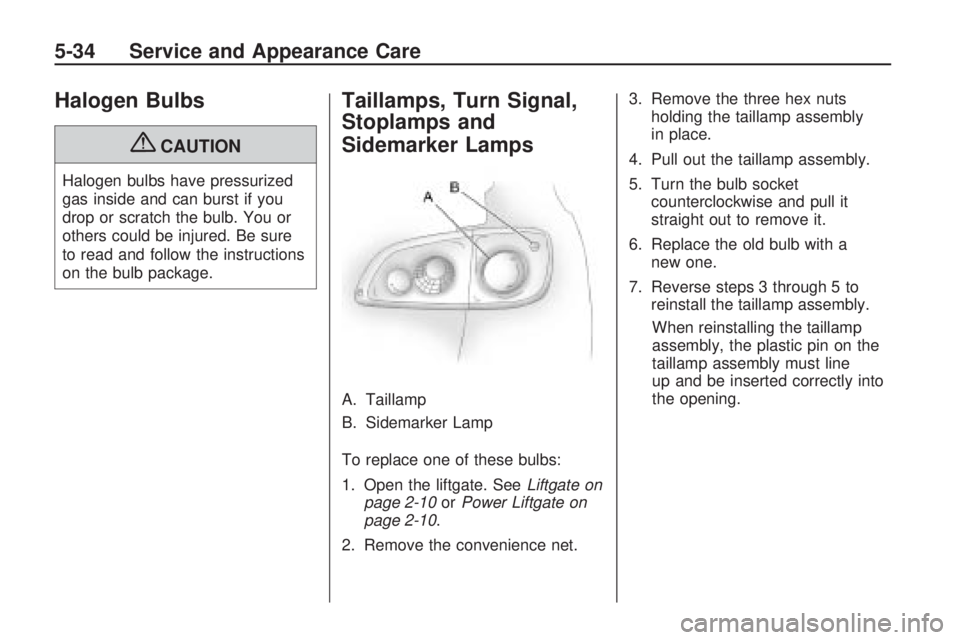
Taillamps, Turn Signal,
Stoplamps and
Sidemarker Lamps
A. Taillamp
B. Sidemarker Lamp
To replace one of these bulbs:
1. Open the liftgate. SeeLiftgate on
page 2-10orPower Liftgate on
page 2-10.
2. Remove the convenience net.3. Remove the three hex nuts
holding the taillamp assembly
in place.
4. Pull out the taillamp assembly.
5. Turn the bulb socket
counterclockwise and pull it
straight out to remove it.
6. Replace the old bulb with a
new one.
7. Reverse steps 3 through 5 to
reinstall the taillamp assembly.
When reinstalling the taillamp
assembly, the plastic pin on the
taillamp assembly must line
up and be inserted correctly into
the opening.
5-34 Service and Appearance Care
Page 303 of 412
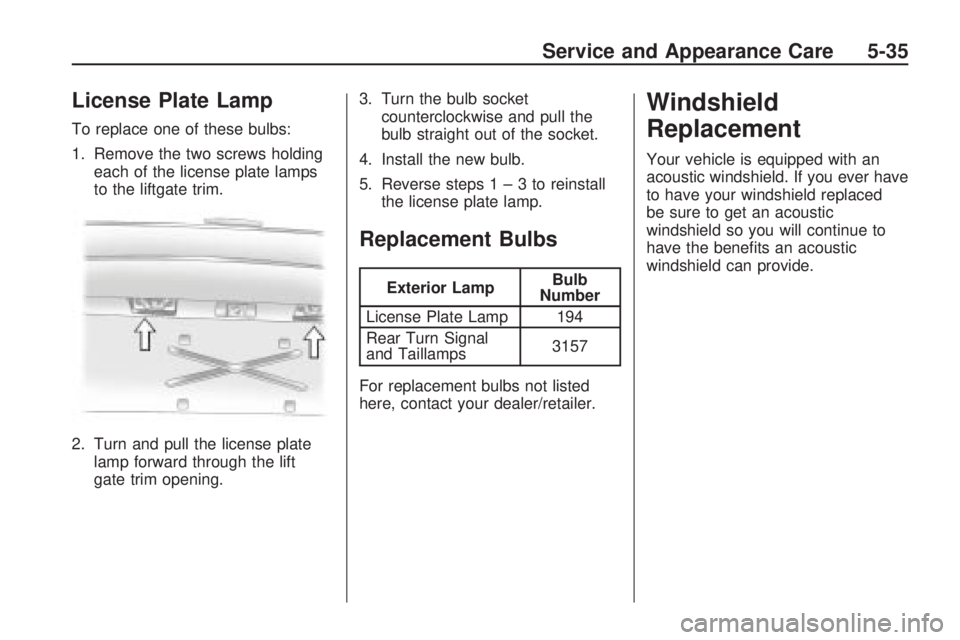
License Plate Lamp
To replace one of these bulbs:
1. Remove the two screws holding
each of the license plate lamps
to the liftgate trim.
2. Turn and pull the license plate
lamp forward through the lift
gate trim opening.3. Turn the bulb socket
counterclockwise and pull the
bulb straight out of the socket.
4. Install the new bulb.
5. Reverse steps1–3toreinstall
the license plate lamp.
Replacement Bulbs
Exterior LampBulb
Number
License Plate Lamp 194
Rear Turn Signal
and Taillamps3157
For replacement bulbs not listed
here, contact your dealer/retailer.
Windshield
Replacement
Your vehicle is equipped with an
acoustic windshield. If you ever have
to have your windshield replaced
be sure to get an acoustic
windshield so you will continue to
have the benets an acoustic
windshield can provide.
Service and Appearance Care 5-35
Page 315 of 412

One or more TPMS sensors
are missing or damaged.
The DIC message and the
TPMS malfunction light should
go off when the TPMS sensors
are installed and the sensor
matching process is performed
successfully. See your dealer/
retailer for service.
Replacement tires or wheels do
not match your vehicle’s original
equipment tires or wheels. Tires
and wheels other than those
recommended for your vehicle
could prevent the TPMS from
functioning properly. SeeBuying
New Tires on page 5-50.
Operating electronic devices or
being near facilities using radio
wave frequencies similar to the
TPMS could cause the TPMS
sensors to malfunction.
If the TPMS is not functioning it
cannot detect or signal a low tire
condition. See your dealer/ retailerfor service if the TPMS malfunction
light and DIC message comes
on and stays on.
TPMS Sensor Matching
Process
Each TPMS sensor has a unique
identication code. Any time you
rotate your vehicle’s tires or replace
one or more of the TPMS sensors,
the identication codes will need to
be matched to the new tire/wheel
position. The sensors are matched to
the tire/wheel positions in the
following order: driver side front tire,
passenger side front tire, passenger
side rear tire, and driver side rear tire
using a TPMS diagnostic tool. See
your dealer/ retailer for service.
The TPMS sensors can also be
matched to each tire/wheel position
by increasing or decreasing the
tire’s air pressure. If increasing the
tire’s air pressure, do not exceed
the maximum ination pressure
indicated on the tire’s sidewall.To decrease air-pressure out of a
tire you can use the pointed
end of the valve cap, a pencil-style
air pressure gage, or a key.
You have two minutes to match
the rst tire/wheel position, and
ve minutes overall to match all
four tire/wheel positions. If it takes
longer than two minutes, to match
the rst tire and wheel, or more than
ve minutes to match all four tire
and wheel positions the matching
process stops and you need to
start over.
The TPMS sensor matching process
is outlined below:
1. Set the parking brake.
2. Turn the ignition switch to
ON/RUN with the engine off.
Service and Appearance Care 5-47