2009 AUDI S6 steering
[x] Cancel search: steeringPage 120 of 398

• ..__O_ n_ t_h _e _ r_o _a _ d __________________________________________________ _
& WARNING
Never start or let the engine run in a confined or enc losed area .
Exhaust fumes from the engine contain carbon monoxide , a color
le ss and odorless gas . Carbon monoxide can be fatal if inhaled .
• Never leave the engine idling unattended . An unattended
vehi cle with a runn ing engine poses a danger of personal injury or
theft.
0 Note
• Avoi d high engine speed s, fa st a ccele rati on or heavy eng ine
loads while the engi ne is sti ll cold. This cou ld damage the engine.
• The e ngi ne canno t be sta rt e d by pushing o r to w ing the vehicle.
~ For the sake of the environment
To avoid unnecessary engine wear and to re duce ex hau st emis
sions, do not let your vehicle stand and warm up. Be ready to drive
off immed iate ly afte r start ing y our veh icle. Maintain modera te
sp eed unt il the engine is completely warm. Remembe r, th e engine
performs best a t operati ng tempe ra ture .•
Stopping the engine
- Turn t he ignit ion key to position © ~ page 117 , fig. 117 .
& WARNING
• Never turn off the engine until the vehicle has come to a
complete stop.
• The brake booster and servotroni c only work when the engine
is running . With the ignition turned off , you have to apply more
force when steering or braking . Since you cannot steer and stop
normally, this can lead to accidents and serious injuries .
& WARNING (continued )
• The radiator fan can continue to run for up to 10 minutes even
after you have turned off the engine and removed the ignition key .
The radiator fan can also turn on again if the engine coolant heats
up because of inten se sunlight or heat build -up in the engine
compartment .
0 Note
Do not stop the engine immediatel y after hard or extended driving.
Keep the eng ine runn ing f or ap proximate ly t wo minu tes to preven t
excessive heat build -up. •
Starting and stopping the engine
with Convenience key
Ap plies to vehicles: wit h C onvenien ce key
Starting the engine with the [ START) button
This button switches on the i gnition and starts the en gine.
Fig. 118 Convenienc e
key ; EN GINE START
button
T he [ S TA RT ] b utto n is prov ided with two-stage operation
~ fig .118. .,,_
Page 121 of 398
![AUDI S6 2009 Owners Manual On th e road 111111 _________________________________ __::..:....:.......;,;_;_;_ _ __;____,J
Switching the ignition on
- Press t he [ S TART] button once to the first stage to switch
on](/manual-img/6/57595/w960_57595-120.png "AUDI S6 2009 Owners Manual On th e road 111111 _________________________________ __::..:....:.......;,;_;_;_ _ __;____,J
Switching the ignition on
- Press t he [ S TART] button once to the first stage to switch
on")
On th e road 111111 _________________________________ __::..:....:.......;,;_;_;_ _ __;____,J
Switching the ignition on
- Press t he [ S TART] button once to the first stage to switch
on on ly the ignition.
Starting the engine
- Step on t he brake.
- Move the se lector leve r to t he P or N posit ion
~ & .
- Press the [ STA RT ] button to t he second s tage to star t the
engine.
After a cold engine is started, there may be a brief period of
increased noise because oil pressure must first bui ld up in the
hydraulic valve adjusters . This is norma l and not a cause for
concern.
If the engine does not start immed iately, stop trying after 10
seconds and then try to restart the engine about 30 seconds later.
& WARNING
Ne ver all ow the e ngine to run in confined spa ce s -danger of
asphyxi atio n.
0 Note
• Avo id high engi ne rp m, full throttle and heavy engine loads unti l
the engine has reached operating temperature -otherwise you risk
engine damage .
• T he engine cannot be started by pushing or towing the vehic le.
c£> For the sake of the environment
Do not allow the engine to warm up with the vehicle stationary . Start
driving right away . In this way you avo id unnecessary emissions .
Contro ls and eq uip
ment
[ i ] Tip s
If you open the driver's door when t he ign itio n is switched on, a
buzzer sounds and the message
Ign ition i s on appears in the instru
ment cluster display. P lease switch the ignition off. •
Applies to vehic les : w ith C onven ien ce key
Switching engine off with the [STOP] button
Bring yo ur vehicle to a comp le te sto p.
Fig. 11 9 Con veni ence
k ey: E NGIN E STO P
button
Move the se lector lever to the P o r N position .
Press the [
STOP I button ~ fig. 119.
Pressing the ( STO P] button once switches off the engine and the
ignition . If you press the ( S T O P! button again for more than 1
second, the steering is locked, provided that the selector leve r is in
the P position
~ & .
Emergency OFF function
If necessary , the engine can be switched off with the selector leve r
in the R, Dor S positions. To do so, step on the brake peda l and
press and hold the ( STOP] button (vehicle speed must be less than
6 mph/ 10 km /h. .,,_
Vehicle care I I irechnical data
Page 122 of 398

• .___O_ n_ t_ h_ e_ r_ o_ a_d ____________________________________________________ _
& WARNING
• Never turn off the engine until the vehicle has come to a
complete stop.
• The brake booster and servotronic only work when the engine
is running. With the ignition turned off, you have to apply more
force when steering or braking. Since you cannot steer and stop
normally, this can lead to accidents and serious injuries.
• For safety reasons, you should always park your vehicle with
the selector lever in P. Otherwise, the vehicle could inadvertently roll away.
• After the engine has been switched off, the radiator fan can
continue to run for up to 10 minutes -even with the ignition
switched off. It can also switch on again after some time if the
coolant temperature rises as the result of a heat buildup or if the
engine is hot and the engine compartment is additionally heated
by the sun's rays.
0 Note
If the engine has been under heavy load for an extended period,
heat builds up in the engine compartment after the engine is
switched off -there is a risk of damaging the engine. Allow the
engine to run at idle for about 2 minutes before switching it off. •
Applies to vehicles: w ith Conven ience key
Driver messages in the instrument cluster
display
If a function is not present, a driver message appears.
No key identified
This message appears when the [STAR T) button is pressed if there
is no master key inside the vehicle or if the system does not recog
nize it . For example, the master key cannot be recognized if it is
covered by an object (e.g. aluminum brief case) which
screens the radio signal.
.Electronic devices such as cell phones can also inter
fere with the radio signal.
Press brake pedal to start engine
This message appears if you press the [ START) button to start the
engine and do not depress the brake pedal. The engine can only be
started if the brake pedal is depressed.
Engage N or P to start engine
This message appears when the engine is started if the selector
lever for the automatic transmission is not in the P or N position.
The engine can only be started with the selector in these positions.
? Key not in vehicle
This message appears along with the symbol if the master key is
removed from the vehicle with the engine running. It is intended to
remind you (e.g. when changing drivers) not to continue the journey
without the master key.
If the master key is no longer in the vehicle, you cannot switch off
the ignition after stopping the engine and you also cannot start the engine again. Moreover, you cannot lock the vehicle from the
outside with the key.
Shift to P, otherwise vehicle can roll away. Doors do not lock if lever
is not in
P.
This message appears for safety reasons along with a warning
buzzer if the selector lever for the automatic transmission is not in
the P position when the ignition is switched off with the
[STOP)
button and the driver's door is opened. Move the selector lever to
the P position, otherwise the vehicle is not secured against rolling
away. You also cannot lock the vehicle using the locking button on
the door handle or using the remote key.
To engage steering lock, press and hold STOP button
This message appears for safety reasons if the engine and the igni
tion have been switched off by pressing the [
STOP) button once, .,,_
Page 123 of 398
![AUDI S6 2009 Owners Manual On th e road -
-------------------
and then the drivers door is opened. In this instance, the steering is
not locked . The steering is locked :
• If you press the
I STOP ] b](/manual-img/6/57595/w960_57595-122.png "AUDI S6 2009 Owners Manual On th e road -
-------------------
and then the drivers door is opened. In this instance, the steering is
not locked . The steering is locked :
• If you press the
I STOP ] b")
On th e road -
-------------------'
and then the driver's door is opened. In this instance, the steering is
not locked . The steering is locked :
• If you press the
I STOP ] button aga in for more than 1 second.
• If you c lose the driver's door and lock your vehicle from the
outside .•
Electromechanical parking brake
Operation
The electromechanical parking brake replaces the hand
brake.
Fi g. 120 Center
co nso le: Parki ng bra ke
- Pull the switch to app ly the park ing brake => fig. 12 0. The
indicator light in the switch will come on .
- Step on the brake pedal or the accelerator pedal and
press the switch at the same time to rel ease the parking
brake. The indicator lig ht in the switch wi ll go out.
Your vehicle is equipped with an elect romechanical parking brake
which replaces the handbrake . T he parking brake is designed to
prevent the vehicle from rol ling unintentional ly.
Con tro ls and eq uip
ment
I n add ition to the normal functions of a traditional hand brake, the
e lectromechanica l parking brake provides various convenience and
safety functions.
Emergen cy brake
An emergency brake ensur es that the vehicle can be slowed even if
t he
normal brakes fail=> page 123, "Emergency braking".
Ind icator lights
• If the parking brake is applied with the ignition tu rned on , the
indicator light in the instrument cluster (U.S models :
::i.:,, Canadian
models: ®)) and in the switch <®) will com e on .
• I f the parking brake is app lie d with the ignition
turn ed off , the
indicator light in the instrument cluster (U.S. models: ::.:\,, Canadian
models :(®) ) and in the switch(®) will come on for about 30 seconds
and then go out .
& WARNING
If the vehicle i s stationary and the tr ansmi ssion is engag ed with
the engine ru nning , the engine should not be speeded up (e .g .
manu ally from under the hood ). Otherwi se the vehicle will sta rt to
move -you run the risk of a n accident .
0 Note
If the warning/indica tor light (U.S . mode ls: BRAKE , Canadian mode ls :
(Ci)) ) flashes in the instrument clus ter, there is a brake system
malfunction . By pressing the
I CHECK] button, you can bring up a
driver message which explai ns the ma lfunc tion in more detail. If the
message
P a rki ng brake ! Please conta ct w ork shop appears, there is
a par king brake malfunction which you should have repaired imme -
d iate ly by an authorized dealership=>
page 30. ..
Vehicle care
I I irechnical data
Page 129 of 398

_____________________________________________ A_ d_a ...: p_ t_ i_ v _e_ C_ ru_ is_ e_ C_ o_n _ t_ r_o _ l _ __._
Adaptive Cruise Control
Speed and distance control system
Applies to vehic les : with Adaptive C ruise Cont rol
Description
The Adaptive Cruise Control driver assistance pr ogram is
a combined speed and distance control system .
Fig. 123 Fro nt
bu mper: Pos it io n of
r adar senso r
Adaptive Cruise Control can help make driving more re laxed and
less t iring, particula rly during long trips on interstates or other
highways that are generally straight .
Set ACC to maintain a constant, legal travel speed between 20 and
95 mph (30 -150 km/h) that is appropriate for prevailing traffic
conditions. Select a following distance to the vehicle ahead and ACC
w ill adjust your speed to maintain that distance .
Adaptive Cruise Contro l has technical limitations that you must
know, so please read this section carefully, understand how the
system works and use it proper ly at all times .
How does it work ?
You can operate the Adaptive Cruise Control using the lever on the
steering wheel column=> page 130, "How is the speed stored?" a nd
=> page 133, "How is the distance (time interval) set? ".
Con tro ls and eq uip
ment
Driver inf ormation
Important information is brought up in the speedometer and in the
instrument cluster display as the ve hicle is being driven
=> page 135, "Driver information" .
What is important for y ou to kn ow
The Adaptive Cruise Control is set with system -specified limits; that
is, as a driver, you will have to adj ust the speed and distance to the
vehic le ahead in some instances=> page 138 , "Driver intervention
prompt" and=> page 140, "System limita tions" .
& WARNING
Improper u se of the Adapti ve Crui se Control can c ause colli sion s,
oth er ac cident s and s eriou s per sonal injur y.
• Alway s reme mber that the Adapt ive Cruise Control ha s limit s -
it will not slow the veh icle do wn or maintain the set dis tance
w hen you drive to w ard s an obst acle or something o n or ne ar the
road th at is not moving, such as vehicle s stopped in a traffi c jam ,
a stalled or disabled vehicle .
• Alwa ys remember th at the Adaptive Cru ise Control can not
dete ct a vehicle th at is driving to ward s you in your tr affi c lane and
th at it can not dete ct n arr ow vehi cles su ch as motorcycl es and
bicycle s.
• Never dr ive at speed s th at ar e too fa st for traff ic, road and
we ather co nd ition s.
• The Adaptive Cru ise Control cannot slow or brake th e vehi cle
sa fely wh en yo u follo w anothe r vehi cle too closely . Al wa ys
remember th at the Adaptive Crui se C ontrol ha s a braki ng power
t hat i s onl y ab out 30% of the veh icle 's maximum braking abilit y.
Alway s be p rep ared to br ake and take eva sive a ctio n to avoid colli-
s ion s and other a ccident situa tio ns. ._
Vehicle care
I I irechnical data
Page 145 of 398
Audi lane ass is t 11111 -----------------------------------
Audi lane assist
Lane assist
A pplies to veh icles : with lane assist
Description
Lane a ssist helps you keep y our vehicle in your lane .
Lane assist uses a camera to detect lane boundary lines. If the
system detects that your vehicle is about to leave a lane boundary
line, the steering wheel
vibrates to alert the driver. If lane assist
detects boundary lines on both sides of the vehicle's lane, the
system enters active standby mode, which is indicated by the green
indica tor light /: on the instrument cluster .
I f the system is in active standby mode and the turn signal is acti
vated before driving ov er the boundary line, the warning does not
occur since the sys tem allows for intenti onal lane changes.
The system is designed for driving on freeways and expanded high
ways and t hus works on ly at speeds of 40 mph (65 km/h) or mo re .
& WARNING
• Lane ass ist will not k eep your vehicle in your lane. The sy stem
only warns the d riv er w hen t he vehicle i s le av ing the lan e. The
driv er is alway s re spon sible for keeping the vehicle in the lane.
• The camera is not able to d ete ct all lane boundary lines and in
s o me cases might al so dete ct lane str ucture s or objects as
boundary lines . This c an le ad to in corre ct wa rning s or warnings
that fa il to go off at all .
• The camer a's visibili ty ca n be i mpaired by vehi cle s ahe ad of
you , for instan ce, or by rain , snow , h eavy spray or li ght shining into
th e cam era lens . Thi s can ca use lane as sis t to f ail to d ete ct
boundary line s. •
Con tro ls and eq uip
ment
Ap plies to vehi cles : wi th la ne assi st
Activating and deactivating
Fig . 14 3 Turn signal
l ev er: La ne assis t
butt on
F ig . 144 Win dshie ld:
L ane assist ca mera
v iewing win dow
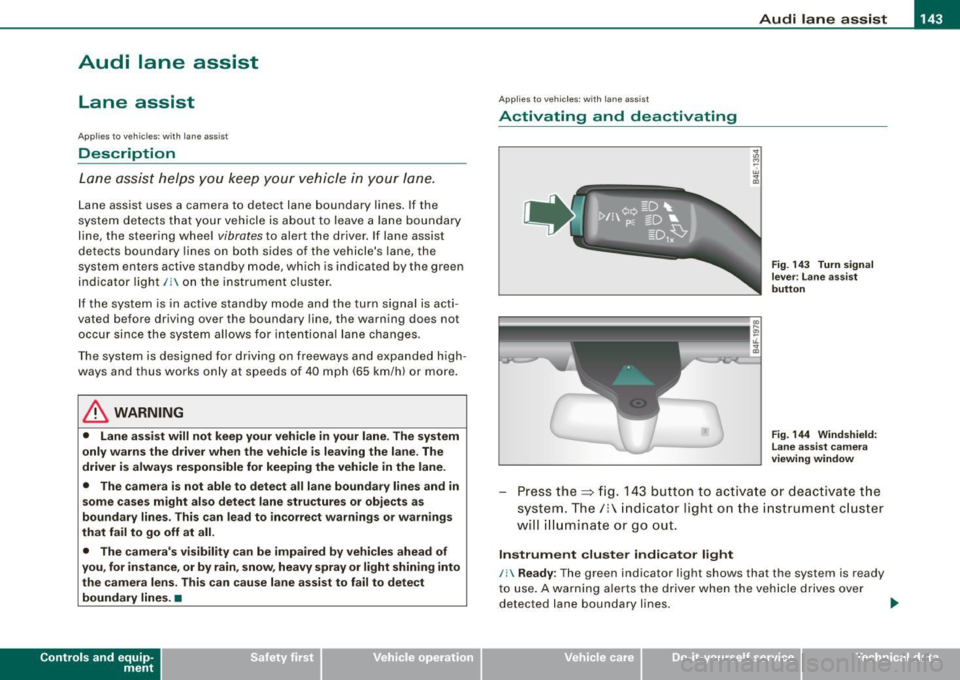
Press the :::> fig. 143 button to activa te or deactivate the
syst em . T he/ : in dica tor ligh t on t he i nstrument c luster
will illuminate or go out.
Instrument c lu ster indi ca tor light
/: Ready:
The green indicator light shows that the system is ready
to use . A warning a lerts the drive r when the veh icle drives over
dete cted lane boundary l ines. .,.
Vehicle care I I irechnical data
Page 146 of 398

• .___A_ u_ d _ i_l_a _n _ e_ a_ s_s _is _ t _________________________________________________ _
I Not ready: The yellow indicator light shows that the system is
turned on but unable to send a warn ing. This can be due to the
following:
• There are no boundary lines, or there is on ly one boundary line
present .
• The boundary lines are not detected (e.g. due to snow, dirt, wet
conditions or light shining into the camera lens).
• More than two boundary lines (such as at construction sites) are
located in the vehicle's lane.
• The vehicle's speed is below the speed needed to activate it,
which is about 40 mph (65 km/h).
• The lane is narrower than about 8 ft . (2.5 ml, or wider than about
16 ft. (5 ml.
• The curve is too sharp.
Notes on the instrument cluster display
When the lane assist turns off automatically, the instrument cluster
indicator goes out and one of the following messages appears on
the display:
Audi lane assist not available: Currently no sensor vision
This message appears when the camera can no longer function
because it cannot detect the boundary lines. This may be due to the
following :
• The exterior s ide of the camera viewing window=>
page 143,
fig. 144 is covered with dirt or ice. Clean this part of the windshield.
• The camera v iewing window is fogged up on the inside. In this
case, wait until the fog disappears before turning lane assist on
again.
• The system was unable to detect boundary lines over an
extended period of time due to road conditions (such as snow
covered lanes). Do not turn lane assist on again until the lines can
be more easily detected.
Audi lane assist not available
A temporary malfunction is preventing lane assist from operating .
Try turning on lane assist again a t a later time.
Audi lane assist: system fault
The system should be checked by an authorized Audi dealer or other
qualified workshop .
[ i ] Tips
• Make sure that the camera viewing window=> page 143, fig. 144
is not covered by stickers or similar objects .
• Always keep the camera viewing window clean. This can usually
be done by operating the windshield wipers. •
Applies to vehicles: with lane assist
MMI settings
You can use the MM/ to adjust the warning time and
steering wheel vibration.
Setting the warning time
Press the I CAR] function button.
- Select
Systems * in the CAR menu .
- Select
Audi lane assist.
Fig. 145 MMI Display:
Setting the warning
time and stee ring
wheel vibration
Page 147 of 398
___________________________________________________ A_u_ d_i_ l_ a _ n_ e_ a _ s_s _ i_s _t __ lffll
- Sele ct Warning early , adaptive or late ~ page 144,
fig. 145.
Setting th e st eering wheel vibration
- Press the
I CAR I function button.
- Selec t Sy stems ·* in t he CAR me nu.
- Selec t Audi lane a ssis t.
- Selec t Steering vibrat ion weak , medium or strong.
Setting th e warning tim e
Earl y:
This setting warns the driver before a wheel touches the
detected lane boundary line. The warning depends on the vehicle's
angle as it approaches the boundary line . If you approach a
boundary l ine gradua lly, the warning will occur ear lier. If you
approach the boundary line at a very sharp angle, the warning wi ll
occur just before a whee l touches the line.
Adapti ve : In this setting, the warning time adjusts to the character
istics of the road and the vehicle speed. The warning occurs later for
curves and occurs earlier for straight stretches of road . The warning
occurs later on narrow roads than on wide roads.
Late: This setting warns the driver when a whee l drives over the
detected lane boundary line.
Se ttin g th e steering wheel vibrat ion
When adjusting the steering wheel vibration, the steering wheel
v ibrates so that you can check the intensity you have set.
[ i ] Tips
• When making the adjustment, lane assist is not activated . The
steering whee l vibrates briefly only to assist you in changing the
setting .
• Your settings are automatically stored and assigned to the
remote contro l key being used. •
Controls and equip
ment I • •